

im using wireless but my netbook downloads that for 5 mins..
MSI Gaming Notebook, Check out Post #3! Gathering time!
MSI Gaming Notebook, Check out Post #3! Gathering time!
|
|
 Mar 16 2011, 09:30 PM Mar 16 2011, 09:30 PM
|
 
Junior Member
61 posts Joined: Sep 2010 
|
im using wireless but my netbook downloads that for 5 mins..
|
|
|
|
|
|
Mar 16 2011, 10:55 PM
|

Senior Member
1,518 posts Joined: Mar 2008 From: Here'n'There 
|
i highly doubt it's wireless problem.
else you can have it check..or try speedtest.net or both files are dl-ed at the same time? distance of laptop to wireless does affect too. Even slight position of the laptop to the wifi does matter. example. my table can hold 2 laptop, but on my side when i use my wireless it's pretty fast but my friend who is beside me tends to be slower. Or maybe just my wireless sucks  |
|
|
Mar 17 2011, 01:36 PM
|
|
Junior Member
61 posts Joined: Sep 2010
|
QUOTE(lee_what2004 @ Mar 16 2011, 01:11 AM) Type Services.msc on start menu. so what's the file for?or if want other method, Install this, for Win 7 64-bit, http://www.mediafire.com/?qd51gnamitd Then do defrag using the built-in from Windows Then open command prompt as Admin, use this command xbootmgr -trace boot -prepSystem -verboseReadyBoot Your notebook will be reboot for 6 times, just leave it idle while restarting, then check again the boot time...  |
|
|
Mar 17 2011, 01:41 PM
|
 
Elite
14,813 posts Joined: Nov 2006
|
You need that file to use the xbootmgr command...
This post has been edited by lee_what2004: Mar 17 2011, 01:41 PM |
|
|
Mar 17 2011, 04:29 PM
|
|
Junior Member
61 posts Joined: Sep 2010
|
boot takes 55 seconds.
|
|
|
Mar 17 2011, 04:38 PM
|
|
Elite
14,813 posts Joined: Nov 2006
|
After done those steps ?
Using what to measure ? This post has been edited by lee_what2004: Mar 17 2011, 04:38 PM |
|
|
|
|
|
Mar 17 2011, 04:38 PM
|
|
Junior Member
61 posts Joined: Sep 2010
|
yeah. i tried f3 for recovery, it says my recovery environment is not normal. i changed my hard disk drive name back to what it was, still does not work.
Added on March 17, 2011, 4:39 pmit still took a long time. soluto. This post has been edited by angelchong: Mar 17 2011, 04:39 PM |
|
|
Mar 17 2011, 04:42 PM
|
|
Elite
14,813 posts Joined: Nov 2006
|
Can give screenshot on the Soluto? With the detail process..
|
|
|
Mar 17 2011, 04:48 PM
|
|
Junior Member
61 posts Joined: Sep 2010
|
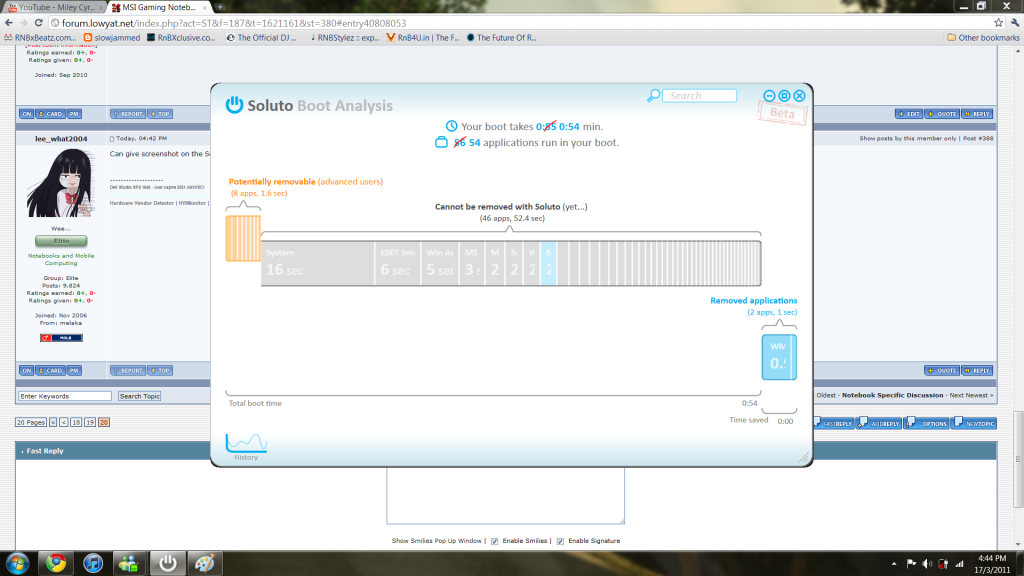 last time it booted really fast, less than 15 seconds.. until i uninstalled kaspersky and downloaded eset cause my license expired. dont know if it has anything to do with it. This post has been edited by angelchong: Mar 17 2011, 04:49 PM |
|
|
Mar 17 2011, 04:49 PM
|

Senior Member
2,634 posts Joined: Dec 2008
|
I realize something. even after i installed my mamba drivers, and set the touchpad to be disabled after plugging in my mouse, it is still on. I checked the settings already. The mousepad just isn't disabling. Anyone had this issue?
|
|
|
Mar 17 2011, 04:53 PM
|
|
Junior Member
61 posts Joined: Sep 2010
|
QUOTE(razorboy @ Mar 17 2011, 04:49 PM) I realize something. even after i installed my mamba drivers, and set the touchpad to be disabled after plugging in my mouse, it is still on. I checked the settings already. The mousepad just isn't disabling. Anyone had this issue? i use a gaming mouse too. mines working fine. |
|
|
Mar 17 2011, 11:11 PM
|
|
Senior Member
1,518 posts Joined: Mar 2008 From: Here'n'There
|
anyway, soluto doesnt work on 64 bit? O_O
|
|
|
Mar 17 2011, 11:12 PM
|
|
Elite
14,813 posts Joined: Nov 2006
|
Works on my 64-bit...
|
|
|
|
|
|
Mar 18 2011, 01:28 AM
|
|
Junior Member
61 posts Joined: Sep 2010
|
so.. what do you think i should do now?
for f3 recovery, i still get "the recovery environment is not normal". |
|
|
Mar 18 2011, 01:37 AM
|
|
Senior Member
1,518 posts Joined: Mar 2008 From: Here'n'There
|
hmm..i never try the f3 recovery yet so i cant say much..sorry mate
|
|
|
Mar 18 2011, 01:41 AM
|
|
Elite
14,813 posts Joined: Nov 2006
|
QUOTE(angelchong @ Mar 18 2011, 01:28 AM) so.. what do you think i should do now? The C: partition is named OS_INSTALL and the D: partition is called DATA ?for f3 recovery, i still get "the recovery environment is not normal". |
|
|
Mar 18 2011, 02:13 AM
|

Junior Member
14 posts Joined: May 2006
|
i am using MSI FR620 model, this model came with build in webcam.. but is just can't function and can't detect this webcam.. anyone how to solve this?
my model spec as below:- CPU: 2nd generation Intel Core i7 GPU: Next generation Intel HD Graphic LCD: 15.6 Full HD + LED Backlight Memory: DD3 4GB HDD: 500GB USB 3.0 HD Webcam please help!! |
|
|
Mar 18 2011, 02:17 AM
|
|
Elite
14,813 posts Joined: Nov 2006
|
Is it detected on device manager ?
also check Turbo Battery+ if its an apps, might have disabled the webcam.. This post has been edited by lee_what2004: Mar 18 2011, 02:19 AM |
|
|
Mar 18 2011, 02:33 AM
|
|
Junior Member
14 posts Joined: May 2006
|
QUOTE(lee_what2004 @ Mar 18 2011, 02:17 AM) Is it detected on device manager ? is not detected on device manager.. also check Turbo Battery+ if its an apps, might have disabled the webcam..  btw, what is turbo battery? i don't understand.. |
|
|
Mar 18 2011, 02:37 AM
|
|
Elite
14,813 posts Joined: Nov 2006
|
Latest power-saving technologies
Turbo Battery+: The FX620, FR620, FX720, and FR720 come with Turbo Battery+ technology that lets you control power to an array of hardware, including Bluetooth, wireless devices, and the webcam, with a single click of the mouse. Now, you can extend battery time by shutting off devices not in use. Shortcuts shut off power to idle hardware: Located above the keyboards of the new F Series laptops are five shortcuts. With one click of the mouse, you can eject a DVD, turn off the screen, or turn on the S-Bar, Turbo Battery+, or Cinema Pro, so when you're away from your computer for a few minutes, you can instantly shut off the display, so as to not waste battery power. |
|
Topic ClosedOptions
|
| Change to: |  0.0249sec 0.0249sec
 0.21 0.21
 6 queries 6 queries
 GZIP Disabled GZIP Disabled
Time is now: 3rd December 2025 - 03:22 PM |
 Quote
Quote