

Any fix for it ?

Graphic card Powerplay not working, ATI GC user Help !
|
|
 Sep 28 2010, 10:25 PM, updated 16y ago Sep 28 2010, 10:25 PM, updated 16y ago
Show posts by this member only | Post
#1
|
 
Senior Member
3,758 posts Joined: May 2008 
|
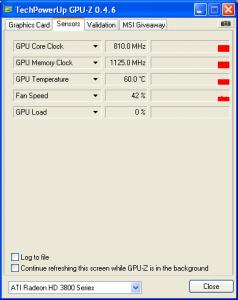
Graphic Card is HD 3870 x-turbo III, having very less information on google , the card powerplay doesn't work on 2d mode.It constantly running at 810mhz even on bootup and on desktop mode , the gpuz still show 810mhz on default clock and gpu clock.
Any fix for it ? |
|
|
|
|
|
Sep 29 2010, 01:16 AM
Show posts by this member only | Post
#2
|

Junior Member
297 posts Joined: Nov 2006 
|
try upgrade/downgrade driver
|
|
|
Sep 29 2010, 01:43 AM
Show posts by this member only | Post
#3
|

Senior Member
1,343 posts Joined: Jun 2006 From: Wangsa Maju/TTDI/Ampang
|
what does the core/memory clock at Sensors tab on gpu-z says?
|
|
|
Sep 29 2010, 02:22 PM
Show posts by this member only | Post
#4
|
|
Senior Member
3,758 posts Joined: May 2008
|
It's not the graphic card driver problem , it's the gpu bios thing which doesn't have powerplay at all.
My current idle. This post has been edited by Maxieos: Sep 29 2010, 02:23 PM Attached thumbnail(s) 
|
|
|
Sep 29 2010, 03:12 PM
Show posts by this member only | Post
#5
|
 
Elite
10,015 posts Joined: Mar 2009 From: the future
|
Try using RivaTuner, and setting different clocks for the 2D mode and 3D performance mode.
|
|
|
Sep 29 2010, 06:32 PM
Show posts by this member only | Post
#6
|
|
Senior Member
3,758 posts Joined: May 2008
|
QUOTE(TDUEnthusiast @ Sep 29 2010, 03:12 PM) Try using RivaTuner, and setting different clocks for the 2D mode and 3D performance mode. Downloaded and installed , so , I am not good on this program , which option to set and check the clock for 2d and 3d mode ? very complicated application   |
|
|
|
|
|
Sep 29 2010, 07:33 PM
Show posts by this member only | Post
#7
|
|
Elite
10,015 posts Joined: Mar 2009 From: the future
|
 . Open RivaTuner, ignore any warnings about incompatible graphics driver, then, the main screen should appear. . Open RivaTuner, ignore any warnings about incompatible graphics driver, then, the main screen should appear. At "Driver Settings", click the button on the right, then press a picture of a graphics card. An option to set the clocks of your GPU should appear. Enable "Hardware level overclocking". It will ask you to either reboot / detect now. Select detect now, or if you'd like, you could reboot your PC. There should be something called " Standard 2D" below the 4 tabs, which are Overclocking, Fan, Compatibility and Overlay. Set a clock you'd like for Standard 2D, save it, and tick apply overclocking settings at Windows start up. Then, click on the Standard 2D thing, then press 3D performance, set a clock rate for that, tick apply overclocking settings at Windows start up, then apply, if it says anything related to conflict or something, just ignore it, save, and it should work  . . |
|
|
Sep 29 2010, 07:59 PM
Show posts by this member only | Post
#8
|

Senior Member
1,304 posts Joined: Jan 2009 From: Kuala Lumpur
|
did u enable ati powerplay in catalyst control centre? which version of ccc u using?
|
|
|
Sep 29 2010, 08:00 PM
Show posts by this member only | Post
#9
|
|
Senior Member
3,758 posts Joined: May 2008
|
What mhz should I set ? very unclear here , and voltage if there is ?
Will it crash my pc ? Added on September 29, 2010, 8:07 pm QUOTE(GothFebrio @ Sep 29 2010, 07:59 PM) did u enable ati powerplay in catalyst control centre? which version of ccc u using? There is no option for Powerplay on CCC.My CCC version is at the GPUZ picture there .This post has been edited by Maxieos: Sep 29 2010, 08:07 PM |
|
|
Sep 29 2010, 08:12 PM
|

Elite
15,694 posts Joined: Mar 2008
|
Set it like around 150MHz is enough. (For 2D mode)
For 3D mode, set it to default clock. Don't touch the voltage, it may damage your card is too much or cause your card to unstable if too low. And you may try to update your driver. But remember, please wipe driver up until it is clean. Methods can be found at here. Then, download the latest CCC, that is 10.9, install it. This post has been edited by kingkingyyk: Sep 29 2010, 08:14 PM |
|
|
Sep 29 2010, 08:15 PM
|
|
Senior Member
3,758 posts Joined: May 2008
|
QUOTE(TDUEnthusiast @ Sep 29 2010, 07:33 PM) . Open RivaTuner, ignore any warnings about incompatible graphics driver, then, the main screen should appear. At "Driver Settings", click the button on the right, then press a picture of a graphics card. An option to set the clocks of your GPU should appear. Enable "Hardware level overclocking". It will ask you to either reboot / detect now. Select detect now, or if you'd like, you could reboot your PC. There should be something called " Standard 2D" below the 4 tabs, which are Overclocking, Fan, Compatibility and Overlay. Set a clock you'd like for Standard 2D, save it, and tick apply overclocking settings at Windows start up. Then, click on the Standard 2D thing, then press 3D performance, set a clock rate for that, tick apply overclocking settings at Windows start up, then apply, if it says anything related to conflict or something, just ignore it, save, and it should work .QUOTE(kingkingyyk @ Sep 29 2010, 08:12 PM) Set it like around 150MHz is enough. (For 2D mode) I have problem here Don't touch the voltage, it may damage your card is too much or cause your card to unstable if too low. Set it to default clock. And you may try to update your driver. But remember, please wipe driver up until it is clean. Methods can be found at here. Then, download the latest CCC, that is 10.9, install it.  , it doesn't have the 2d option at all. , it doesn't have the 2d option at all.Using Riva tuner v2.24 What happen here ?? Attached thumbnail(s) 
|
|
|
Sep 29 2010, 08:45 PM
|
|
Senior Member
1,304 posts Joined: Jan 2009 From: Kuala Lumpur
|
QUOTE(Maxieos @ Sep 29 2010, 08:00 PM) What mhz should I set ? very unclear here , and voltage if there is ? have u try installing the new CCC, its 10.9 now, ur gpu does support ati powerplay, so there must be something wrong with ur current ccc.Will it crash my pc ? Added on September 29, 2010, 8:07 pm There is no option for Powerplay on CCC.My CCC version is at the GPUZ picture there . |
|
|
Sep 29 2010, 08:57 PM
|
|
Senior Member
3,758 posts Joined: May 2008
|
QUOTE(GothFebrio @ Sep 29 2010, 08:45 PM) have u try installing the new CCC, its 10.9 now, ur gpu does support ati powerplay, so there must be something wrong with ur current ccc. How do you confirm my gpu support powerplay ? what proof show it support ? |
|
|
|
|
|
Sep 29 2010, 09:02 PM
|
|
Elite
15,694 posts Joined: Mar 2008
|
QUOTE(Maxieos @ Sep 29 2010, 08:57 PM) How do you confirm my gpu support powerplay ? what proof show it support ? http://www.amd.com/us/products/technologie...power-play.aspxQUOTE Now this power management technology has been built into the ATI Radeon™ HD 3800 Series - the first time such power savings technology has been used on an AMD desktop graphics processor. |
|
|
Sep 29 2010, 09:06 PM
|
|
Senior Member
3,758 posts Joined: May 2008
|
QUOTE(kingkingyyk @ Sep 29 2010, 09:02 PM) but the card I am using is non reference card or somehow is a modified card.It doesn't have power play because it's OC card.I wanted to ask one thing , is one comes with an important point ? card bios or CCC software when comes to overwrite setting ? |
|
|
Sep 29 2010, 09:07 PM
|
|
Elite
15,694 posts Joined: Mar 2008
|
QUOTE but the card I am using is non reference card or somehow is a modified card.It doesn't have power play because it's OC card. I wanted to ask one thing , is one comes with an important point ? card bios or CCC software when comes to overwrite setting ? Card bios is more important, it controls your graphic card directly. |
|
|
Sep 29 2010, 09:17 PM
|
|
Senior Member
3,758 posts Joined: May 2008
|
QUOTE(kingkingyyk @ Sep 29 2010, 09:07 PM) Card bios is more important, it controls your graphic card directly. So I think the powerplay problem is because of my bios .Would you think the same ? |
|
|
Sep 29 2010, 09:21 PM
|
|
Elite
15,694 posts Joined: Mar 2008
|
Update your driver first.
If can't, then flash the bios. |
|
|
Sep 29 2010, 09:26 PM
|
|
Senior Member
1,304 posts Joined: Jan 2009 From: Kuala Lumpur
|
QUOTE(Maxieos @ Sep 29 2010, 08:57 PM) How do you confirm my gpu support powerplay ? what proof show it support ? http://www.amd.com/us/products/desktop/gra...0-overview.aspxAdded on September 29, 2010, 9:26 pm QUOTE(kingkingyyk @ Sep 29 2010, 09:21 PM) Update your driver first. +1If can't, then flash the bios. This post has been edited by GothFebrio: Sep 29 2010, 09:26 PM |
|
|
Sep 29 2010, 09:34 PM
|
|
Senior Member
3,758 posts Joined: May 2008
|
Ok , the latest driver is 10.9 so I need uninstall the current driver first or just click the 10.9 driver that I just finsih downloaded ?
|
| Change to: |  0.0217sec 0.0217sec
 0.35 0.35
 6 queries 6 queries
 GZIP Disabled GZIP Disabled
Time is now: 5th December 2025 - 08:28 PM |
 Quote
Quote