

Maxis is already testing Astro delivery over their FTTH in Mont Kiara, but im not sure whether its data or RF overlay as you mentioned.
Maxis The Official Maxis FTTH Thread, Maxis FTTH launched 1st Sep 2010!
Maxis The Official Maxis FTTH Thread, Maxis FTTH launched 1st Sep 2010!
|
|
 Sep 8 2010, 02:55 PM Sep 8 2010, 02:55 PM
Return to original view | Post
#1
|
 
Junior Member
407 posts Joined: Jan 2003  
|
Maxis is already testing Astro delivery over their FTTH in Mont Kiara, but im not sure whether its data or RF overlay as you mentioned.
|
|
|
|
|
|
Aug 12 2011, 11:31 PM
Return to original view | Post
#2
|
|
Junior Member
407 posts Joined: Jan 2003
|
Maxis seems to be extraordinarily bad from the stuff in this thread. Unifi remains a virtual monopoly.
|
|
|
Aug 15 2011, 11:17 PM
Return to original view | Post
#3
|
|
Junior Member
407 posts Joined: Jan 2003
|
guys check this out.
http://www.maxis.com.my/business/fixedSolu...fibre/index.asp this sounds like a business counterpart to the ftth service. doesn't mention any bandwidth limit anywhere, and the cheapest business package has fixed ip, unlike unifi's cheapest business package. |
|
|
Aug 16 2011, 12:30 AM
Return to original view | Post
#4
|
|
Junior Member
407 posts Joined: Jan 2003
|
It's apparently very new, the business account managers will only be briefed/trained on Thursday. I will share more of what I learn on Thurs/Fri. Apparently wherever there's Unifi Business, Maxis can come in with this.
|
|
|
Aug 16 2011, 12:42 PM
Return to original view | Post
#5
|
|
Junior Member
407 posts Joined: Jan 2003
|
if i get it for my office, i wouldn't really use the voice stuff. we already have our fixed line and we use our mobile phones most of the time.
maxis wireless broadband is 3g dongle with sim maxis wifi is those wifi hotspots found around town which need login, like airzed, streamyxzone, starbucks wifi, etc |
|
|
Aug 19 2011, 02:06 PM
Return to original view | Post
#6
|
|
Junior Member
407 posts Joined: Jan 2003
|
Anyone here using their own custom router etc with their Maxis fiber internet?
|
|
|
|
|
|
Aug 20 2011, 04:57 PM
Return to original view | Post
#7
|
|
Junior Member
407 posts Joined: Jan 2003
|
does anyone know the VLAN settings?
Added on August 21, 2011, 4:12 amChecked with Maxis. NO QUOTA for business packages. But there will be throttling for P2P traffic. Thinking of applying for my office, but still unsure because of the lack of community support - until now I can't find any guides online on how to use your own router, while there's plenty out there for Unifi. Added on August 26, 2011, 6:12 pmJust signed up for Business Fiber 32mbps. Will let you guys know any updates on installation and speed test. This post has been edited by paultantk: Aug 26 2011, 06:12 PM |
|
|
Sep 10 2011, 04:23 AM
Return to original view | Post
#8
|
|
Junior Member
407 posts Joined: Jan 2003
|
it hasn't been installed yet.
yes, torrents and all would probably be dead, unless you got vpn. but i dont torrent and i don't want my staff to either. i am very curious as to how to replace the default equipment with my own, but there's nothing on the net that explains whatever vlan settings maxis uses. not much of a user community. can anyone willing take photo of their equipment so i can get the model names and look it up online? what equipment does maxis use for vdsl2 installations? |
|
|
Sep 11 2011, 03:35 AM
Return to original view | Post
#9
|
|
Junior Member
407 posts Joined: Jan 2003
|
thanks i will try that out
|
|
|
Sep 16 2011, 02:07 AM
Return to original view | Post
#10
|
|
Junior Member
407 posts Joined: Jan 2003
|
So far still no news from maxis on install date. Seriously bad compared to my experience with Unifi at home
Added on September 19, 2011, 6:20 pmI expressed interest to sign up for a Business Fiber internet service from Maxis before the account manager even got training for it. And after ding dong here and there, I finally managed to apply at the end of August. Throughout the month I have been bugging the account manager non stop when they can provide me installation dates so I can plan for it. Now it's the end of September, I just only got confirmation that I have to wait another 2 weeks for installation. What kind of unrealistic turnaround time is this? 6 weeks?! And almost a whole month to even get an indication of installation appointment? When I applied for Unifi for my home, I got my service installed in just 1 week later. For my office I decided to go for Maxis cos I assumed they hv better customer service, which I tot was necessary for critical business usage So what actually justifies Maxis premium price? I should have just stuck to Unifi Business! This post has been edited by paultantk: Sep 19 2011, 06:20 PM |
|
|
Oct 1 2011, 09:43 AM
Return to original view | Post
#11
|
|
Junior Member
407 posts Joined: Jan 2003
|
Guess what. Installation date was yesterday.
They came, hung around poked around my server room for about 10 minutes, and then decided that while the installation address for the Maxis order form is correct, the unit number on the TM HSBB network order form is wrong, so they said they refused to install and just left without any indication of when they would fix their stupid mistake and come back to reinstall. No offer to install first and rectify their own stupid cock up later, they say they "never do before". Now I'm supposed to wait until Monday (after an initial 5 weeks wait) and then see when they can slot me in again. This probably means another few weeks of wait again. Incompetent idiots. Guys, be very careful and take note, if you (like me) decide to go for Maxis with the promise of better customer service because you're a business user and you need a certain response time, you're going to be sorely disappointed since the infrastructure is shared with Unifi's HSBB network, the installers are the same low quality Unifi installers! This post has been edited by paultantk: Oct 1 2011, 09:46 AM |
|
|
Oct 1 2011, 08:40 PM
Return to original view | Post
#12
|
|
Junior Member
407 posts Joined: Jan 2003
|
I took the 32mbps package which costs 988 a month. It has a cheaper ringgit to speed ratio than unifi 20mbps which is 899 a month. Like unifi biz, maxis Business packages have no bandwidth volume caps and I've double and triple checked on this.
The router they giving also looks more competent than the unifi orange router. I've actually previously tried installing unifi at my office in the past but the installer was incompetent, couldn't trace my copper line and offered no solution. Very tidak apa attitude and no one from TM was helping me. I lost faith in unifi at my office block. I personally sort of "manage" unifi home packages at three sites. No issues. Fast performance. But I had issue at my office. There's also some unifi users in jaya one who offer free wifi via their unifi. Doesn't seem so stable, always their logs got repeated lines of something like pppoe server not found. For maxis, I never had to leave my office to apply. An account manager came to my office multiple times for forms, collect cheques, etc. So far service very good, very apologetic about my issues except I have no actual line installed until now wtf! |
|
|
Oct 2 2011, 09:53 AM
Return to original view | Post
#13
|
|
Junior Member
407 posts Joined: Jan 2003
|
I have uses for a static ip.
|
|
|
|
|
|
Oct 2 2011, 04:22 PM
Return to original view | Post
#14
|
|
Junior Member
407 posts Joined: Jan 2003
|
amazing, just seven days! i've been waiting for over 6 weeks already, and i have a bad feeling on Monday they're going to tell me to wait another few weeks since they'll probably have to throw me at the back of the "queue" again.
|
|
|
Oct 2 2011, 04:55 PM
Return to original view | Post
#15
|
|
Junior Member
407 posts Joined: Jan 2003
|
nope. its like this.
installation requires both maxis and tm people as it rides on tm's hsbb network. maxis order form, my office address is correct, which is why they managed to find their way to my office in the first place. but the tm order form, someone keyed in my office address wrongly. so when they realised this, they suddenly decided to refuse to install, saying its not "SOP". my account manager another one, never bother to check if every detail is correct even though i was reminding him on average every 2 days. i am wondering if this is just TM's way of sabotaging the installation of every other provider running on the government subsidised HSBB network, to make it appear like only unifi installations go smoothly. I also don't believe the installer's excuse that every unit in my office building has its own port and they mistakenly opened port for someone else's office. Am I expected to believe that every unit in this block is pre-wired to TM's HSBB network? And my "port" is not "open"? my account manager just told me the wait time is now ONE MONTH, but he will confirm with me on monday. if its really one month, i will be cancelling my application. they banked in my 2 months deposit cheque and various other fees amounting to well over RM2,000 at the very beginning of the install process. so unlike unifi installation, you no need to pay anything, the wait is not so painful, this one we paid alot of money upfront already, still need to wait so unreasonably long. This post has been edited by paultantk: Oct 3 2011, 07:56 AM |
|
|
Oct 13 2011, 05:46 PM
Return to original view | Post
#16
|
|
Junior Member
407 posts Joined: Jan 2003
|
finally my line is in. damn happy, hehehehe.
 |
|
|
Nov 5 2011, 11:24 PM
Return to original view | Post
#17
|
|
Junior Member
407 posts Joined: Jan 2003
|
so far one month on maxis 32mbps business fiber. very happy with the service. never down so far. i like the public IP address they gave me, got repeat numbers and alot of single and double digits in it. no ports are blocked so i can host stuff on my public IP address. peak download speed from DDL hosts about 3.8MByte/s. i don't have any proxy server in front of me, and i can use google and opendns dns servers.
|
|
|
Nov 6 2011, 01:20 AM
Return to original view | Post
#18
|
|
Junior Member
407 posts Joined: Jan 2003
|
during someone else's maxis business fiber installation that i supervised recently, the installer was kinda saying business packages are special, got public ip... i think that kinda implies that the home pages are private ip. but you better check to make sure.
|
|
|
Nov 6 2011, 12:27 PM
Return to original view | Post
#19
|
|
Junior Member
407 posts Joined: Jan 2003
|
Guys see the post by junowong here, try and let us know if it works?
http://forum.lowyat.net/topic/2044550# For people with private ip |
|
|
Nov 7 2011, 04:40 PM
Return to original view | Post
#20
|
|
Junior Member
407 posts Joined: Jan 2003
|
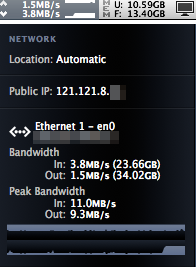 Managed to hit these speeds doing the following activity. 1) Uploading a few GB of files from my office to my file server in my home running on Unifi 20mbps 2) Downloading from fileserve. |
|
Topic ClosedOptions
|
| Change to: |  0.0618sec 0.0618sec
 1.19 1.19
 7 queries 7 queries
 GZIP Disabled GZIP Disabled
Time is now: 3rd December 2025 - 08:35 AM |
 Quote
Quote