Welcome Guest ( Log In | Register )

Bump Topic Topic Closed RSS Feed
125 Pages « < 5 6 7 8 9 > » Bottom

Outline · [ Standard ] · Linear+

 Asus A | U | N series combined thread V2, New model coming in.....

views
     
SUSgogo2
post Aug 26 2010, 04:06 PM

gogo2
********
All Stars
18,672 posts

Joined: Jan 2003
From: Penang


QUOTE(stalkerrox @ Aug 26 2010, 03:57 PM)
cause last time i had a acer 4741g the 310m only showing temp of 40+ degrees on idle..
and i remember last time when i never use the nvidia graphic on my a42jv the frequency will lower by itself...
damn strange now lol anyone have this problem also?

i try my setting on battery saving also same...
*
have you tried underclock using RivaTuner?
stalkerrox
post Aug 26 2010, 04:54 PM

Regular
******
Senior Member
1,587 posts

Joined: Jan 2003
From: Glenmarie, Shah Alam


nope havent tried...
actually its a M GPU how come it doesnt auto reduce voltage by itself?
i remember last time it did and the voltage was lower.. but now dont know why cannot already
SUSgogo2
post Aug 26 2010, 04:58 PM

gogo2
********
All Stars
18,672 posts

Joined: Jan 2003
From: Penang


QUOTE(stalkerrox @ Aug 26 2010, 04:54 PM)
nope havent tried...
actually its a M GPU how come it doesnt auto reduce voltage by itself?
i remember last time it did and the voltage was lower.. but now dont know why cannot already
*
probably driver problem liao...

Change back to old driver and check it out...

I also afraid you change some setting...

But anyway, I hope to hear from you the setting...

Yeah, I think it should reduce voltage.. or totally shutdown with 0 voltage. When I check it, its show 0W usage. I believe
my 335M is using 0 voltage. Probably the software you use to check is wrong.

Please tell us what software you use to check the voltage. And also, what driver you use...
stalkerrox
post Aug 26 2010, 06:18 PM

Regular
******
Senior Member
1,587 posts

Joined: Jan 2003
From: Glenmarie, Shah Alam


Later i check and let u know.. Im using the latest 1 fro
Nvidia website.. The temp i check from gpuz and gpuobserver gadget.. Both showsme the same figures.. Yeah it also shows 0 watt for me.. Just strange when idle my cpu is 40+ and gpu 57-59
SUSgogo2
post Aug 26 2010, 06:46 PM

gogo2
********
All Stars
18,672 posts

Joined: Jan 2003
From: Penang


QUOTE(stalkerrox @ Aug 26 2010, 06:18 PM)
Later i check and let u know.. Im using the latest 1 fro
Nvidia website.. The temp i check from gpuz and gpuobserver gadget.. Both showsme the same figures.. Yeah it also shows 0 watt for me.. Just strange when idle my cpu is 40+ and gpu 57-59
*
Are you using A42JV? I'm using latest driver. My CPU is 49C while my GPU is 45C. So your laptop a bit strange.
liamx
post Aug 26 2010, 08:48 PM

Getting Started
**
Junior Member
67 posts

Joined: Jul 2010
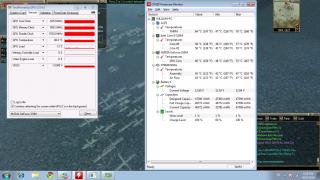
ok i've check already
i monitor my temperature from start until end
from smooth until lag
take a look at the ss
Attached Image
the temperature is same since i start play and until it starts to lag. its not temperature prob
SUSgogo2
post Aug 26 2010, 08:57 PM

gogo2
********
All Stars
18,672 posts

Joined: Jan 2003
From: Penang


QUOTE(liamx @ Aug 26 2010, 08:48 PM)
ok i've check already
i monitor my temperature from start until end
from smooth until lag
take a look at the ss
Attached Image
the temperature is same since i start play and until it starts to lag. its not temperature prob
*
How about the CPU utilization and RAM utilization? Let's nail this fella.

As you see, the load is 12%. So its not the GPU issue. Some how, somewhere in your PC, slow down your
game...

It could be your RAM load high, CPU load too high or the temperature to high etc....

Definitely not your GPU... and I think 1GB GPU memory is enough... for 1366x768..

By the way, is it possible that some software like antivirus start to scan your system?

This post has been edited by gogo2: Aug 26 2010, 08:59 PM
stalkerrox
post Aug 26 2010, 10:29 PM

Regular
******
Senior Member
1,587 posts

Joined: Jan 2003
From: Glenmarie, Shah Alam


QUOTE(gogo2 @ Aug 26 2010, 06:46 PM)
Are you using A42JV? I'm using latest driver. My CPU is 49C while my GPU is 45C. So your laptop a bit strange.
*
yah im using A42JV

still dont understand why my GC running at full speed lol..
eugenechiuu
post Aug 26 2010, 10:30 PM

Gadget/Food Enthusiast
*******
Senior Member
2,909 posts

Joined: Jul 2009
From: London, United Kingdom or Kota Kinabalu, Sabah


QUOTE(stalkerrox @ Aug 26 2010, 06:18 PM)
Later i check and let u know.. Im using the latest 1 fro
Nvidia website.. The temp i check from gpuz and gpuobserver gadget.. Both showsme the same figures.. Yeah it also shows 0 watt for me.. Just strange when idle my cpu is 40+ and gpu 57-59
*
wah why ur idle so hot?? Are u using any cooler??
how's the temp when u play games then?
lee_what2004
post Aug 26 2010, 10:41 PM

*stare* ji--------
Group Icon
Elite
14,813 posts

Joined: Nov 2006


and I presumed no apps is using the nVidia, nothing shown on the nVidia tool?

This post has been edited by lee_what2004: Aug 26 2010, 10:41 PM
liamx
post Aug 26 2010, 10:43 PM

Getting Started
**
Junior Member
67 posts

Joined: Jul 2010
QUOTE(gogo2 @ Aug 26 2010, 08:57 PM)
How about the CPU utilization and RAM utilization? Let's nail this fella.

As you see, the load is 12%. So its not the GPU issue. Some how, somewhere in your PC, slow down your
game...

It could be your RAM load high, CPU load too high or the temperature to high etc....

Definitely not your GPU... and I think 1GB GPU memory is enough... for 1366x768..

By the way, is it possible that some software like antivirus start to scan your system?
*
i check from task manager.
cpu usage is about 40% and physical memory is 48%
temperature as screenshot.
err.. nope, coz wat i have to do is.. turn off the game after 30~40 min and relogin and it will bcome smooth
SUSgogo2
post Aug 26 2010, 10:49 PM

gogo2
********
All Stars
18,672 posts

Joined: Jan 2003
From: Penang


QUOTE(stalkerrox @ Aug 26 2010, 10:29 PM)
yah im using A42JV

still dont understand why my GC running at full speed lol..
*
Haha, something not right here. The thing is, we using same laptop. But why the difference? I think its due to some software inside your
laptop or highly possible your laptop GPU is not cooled properly....

The other thing we can do is for you to revert back to old configuration that give you lower temperature... can you try that?

QUOTE(liamx @ Aug 26 2010, 10:43 PM)
i check from task manager.
cpu usage is about 40% and physical memory is 48%
temperature as screenshot.
err.. nope, coz wat i have to do is.. turn off the game after 30~40 min and relogin and it will bcome smooth
*
What game is that? Is it on Steam game? Or is it Dota? Did you update the games? I want to reproduce your issue.
I wonder if I have the same game or not. Just let me know what game you have and I hope I have the same game on
Steam as yours....


Added on August 26, 2010, 10:50 pm
QUOTE(liamx @ Aug 26 2010, 10:43 PM)
i check from task manager.
cpu usage is about 40% and physical memory is 48%
temperature as screenshot.
err.. nope, coz wat i have to do is.. turn off the game after 30~40 min and relogin and it will bcome smooth
*
Another thing you can try is to go to Task Manager, kill all the task not used including antivirus etc. And run the game again....

This post has been edited by gogo2: Aug 26 2010, 10:50 PM

Ultima
post Aug 26 2010, 11:00 PM

KiRiSuTe GoMeN
*******
Senior Member
5,197 posts

Joined: Jan 2003
From: Muor....


my prob same like him, the gpu temp still around 59-60c either i use it or not sweat.gif
lee_what2004
post Aug 26 2010, 11:02 PM

*stare* ji--------
Group Icon
Elite
14,813 posts

Joined: Nov 2006


stalkerrox, try run this to turn off powermizer and then turn it on back, see whether your clocks can go idle or not..
http://forums.laptopvideo2go.com/topic/217...zer-switch-v11/

liamx
post Aug 26 2010, 11:03 PM

Getting Started
**
Junior Member
67 posts

Joined: Jul 2010
QUOTE(gogo2 @ Aug 26 2010, 10:49 PM)
Another thing you can try is to go to Task Manager, kill all the task not used including antivirus etc. And run the game again....
*
yaya.. did already.. then login to the game and play for 30~40min
then it start to lag again, then i have to quit, and login again then it will be smooth.
lee_what2004
post Aug 26 2010, 11:07 PM

*stare* ji--------
Group Icon
Elite
14,813 posts

Joined: Nov 2006


liamx, reinstalling the games, I guess no use?
liamx
post Aug 26 2010, 11:29 PM

Getting Started
**
Junior Member
67 posts

Joined: Jul 2010
QUOTE(lee_what2004 @ Aug 26 2010, 11:07 PM)
liamx, reinstalling the games, I guess no use?
*
reinstall few times already.. still same..
SUSgogo2
post Aug 26 2010, 11:42 PM

gogo2
********
All Stars
18,672 posts

Joined: Jan 2003
From: Penang


QUOTE(liamx @ Aug 26 2010, 11:29 PM)
reinstall few times already.. still same..
*
What game is that? Is it updated? Some games got bug and need constant update.
liamx
post Aug 26 2010, 11:51 PM

Getting Started
**
Junior Member
67 posts

Joined: Jul 2010
QUOTE(gogo2 @ Aug 26 2010, 11:42 PM)
What game is that? Is it updated? Some games got bug and need constant update.
*
row a.k.a return of warrior ( online game )
but all my friends has no prob with their lappy..
SUSgogo2
post Aug 27 2010, 12:00 AM

gogo2
********
All Stars
18,672 posts

Joined: Jan 2003
From: Penang


QUOTE(liamx @ Aug 26 2010, 11:51 PM)
row a.k.a return of warrior ( online game )
but all my friends has no prob with their lappy..
*
a) update latest driver
b) your line is bad. Go to your friends house to play
c) reduce the quality of your nvidia setting. Set it to performance instead of quality at the nvidia control panel.

125 Pages « < 5 6 7 8 9 > » Top
Topic ClosedOptions
 

Change to:
| Lo-Fi Version
0.0159sec    0.29    6 queries    GZIP Disabled
Time is now: 3rd December 2025 - 02:32 AM