Welcome Guest ( Log In | Register )

Bump Topic Topic Closed RSS Feed
7 Pages < 1 2 3 4 > » Bottom

Outline · [ Standard ] · Linear+

 The Solid State Storage Thread

views
     
owikh84
post Mar 1 2011, 10:02 PM

i7 Clan
Group Icon
Elite
8,711 posts

Joined: Nov 2007
From: Butterworth, PG / Machang, Kelantan


G.Skill Displays Phoenix II SATA 6 Gbps SSD with Blazing 550 MB/s Speeds

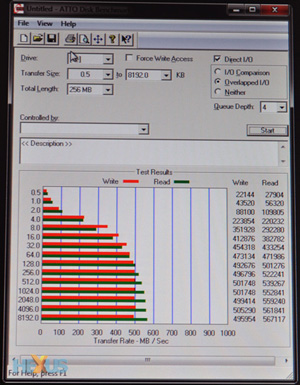
G.Skill showed off its fastest SATA solid state drive (SSD) at CeBIT, the Phoenix II series. Based on the SandForce SF-2000 series controller, Phoenix II pushes the limits of SF-2000 series in terms of throughput, and advertises some of the highest transfer rates for the chipset: 550 MB/s read, and 500 MB/s write. The company even validated these speeds using a session of ATTO disk benchmark. The 120 GB Phoenix II SSD was connected to an AMD SB850 SATA 6 Gb/s controller, on a system headed by Phenom II X6 processor. G.Skill said that the 120 GB model would be priced at €299.

user posted imageuser posted image
owikh84
post Mar 7 2011, 12:10 AM

i7 Clan
Group Icon
Elite
8,711 posts

Joined: Nov 2007
From: Butterworth, PG / Machang, Kelantan


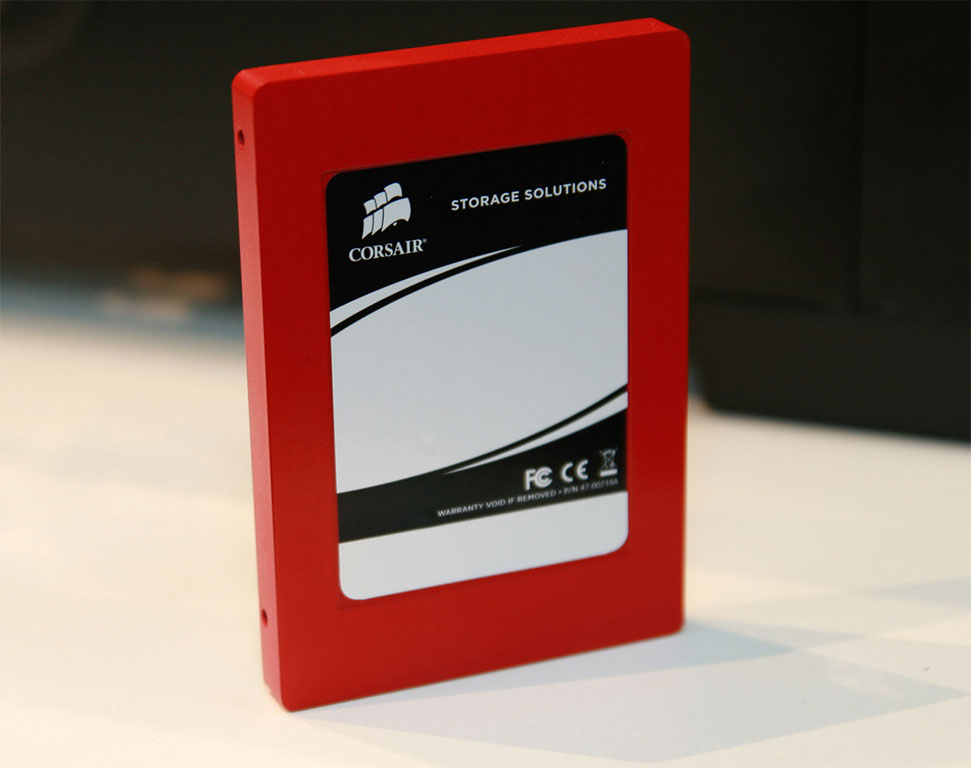
Corsair Unveils Flaming Red Force GT Series SATA 6 Gb/s SSDs

Corsair's best memory modules come under the Dominator line, the best Dominator modules are marked under Dominator GT, with their distinctive flaming red heatsinks. Corsair is looking to extend the "GT" marker even to its SSDs, and is ready with the Force GT line of 2.5-inch SATA 6 Gb/s SSDs. As you can see, the flaming red product scheme is carried over. Driven by the latest SandForce SF-2000 series controllers, Force GT offers read speeds of up to 520 MB/s, and 500 MB/s write speeds. It is available in number of capacities in the higher quadrant. At least the 240 GB model will be launched very soon.

» Click to show Spoiler - click again to hide... «


This post has been edited by owikh84: Mar 10 2011, 09:11 PM
owikh84
post Mar 10 2011, 08:46 PM

i7 Clan
Group Icon
Elite
8,711 posts

Joined: Nov 2007
From: Butterworth, PG / Machang, Kelantan


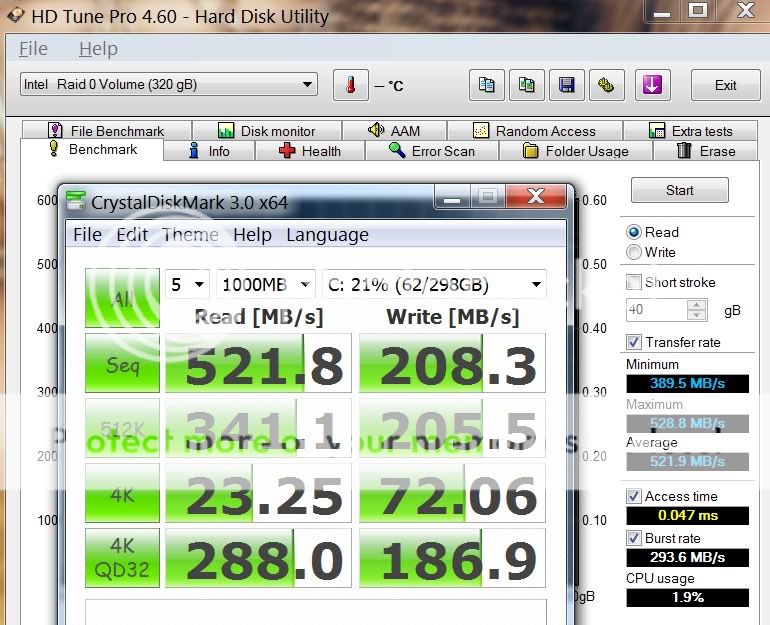
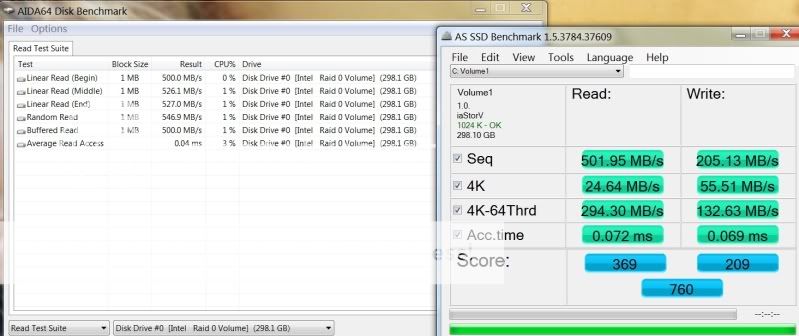
Intel X18-M G2 160GB x2 raid0
user posted image
user posted image

This post has been edited by owikh84: Mar 10 2011, 09:09 PM
owikh84
post Mar 17 2011, 10:59 PM

i7 Clan
Group Icon
Elite
8,711 posts

Joined: Nov 2007
From: Butterworth, PG / Machang, Kelantan


QUOTE(881118 @ Mar 17 2011, 10:52 PM)
shud i plug corsair f60 into sata 3gb or 6gb?
i know it wont fully utilize sata6gbs but it is still better to plug in into faster port?
*
ur SATA2 based SSD will performance similarly on both SATA2 and SATA3 ports.
it wont get anything extra from SATA3 port.
owikh84
post Mar 21 2011, 04:53 PM

i7 Clan
Group Icon
Elite
8,711 posts

Joined: Nov 2007
From: Butterworth, PG / Machang, Kelantan


New tech and cheaper than G2 when it launched.
I would say the prices are reasonable. Most importantly is reliability as compared to other brands. U wont go wrong with Intel.
owikh84
post Apr 2 2011, 04:39 PM

i7 Clan
Group Icon
Elite
8,711 posts

Joined: Nov 2007
From: Butterworth, PG / Machang, Kelantan


QUOTE(Hawaiiii @ Apr 1 2011, 09:35 PM)
i have just bought the intel x18-m ssd, and my system cannot detect this ssd after i have connect it to the mobo at Sata 2 / Sata 3, it is something wrong or perhaps bios setting?? by the way my spec as below:
W7HP 32 bit
GiGabye H67M-D2
*
I suspect this is microSATA to SATA adapter issue. Some types adapters are working fine, although cheap.

This post has been edited by owikh84: Apr 2 2011, 04:40 PM
owikh84
post Apr 2 2011, 04:41 PM

i7 Clan
Group Icon
Elite
8,711 posts

Joined: Nov 2007
From: Butterworth, PG / Machang, Kelantan


QUOTE(atomic @ Apr 2 2011, 04:39 PM)
Anyone know where can i buy microsata to sata converter/adapter?
*
eBay search for "1.8 to 2.5"
But beware u might find it incompatible with this SSD.
owikh84
post Apr 3 2011, 12:39 PM

i7 Clan
Group Icon
Elite
8,711 posts

Joined: Nov 2007
From: Butterworth, PG / Machang, Kelantan


QUOTE(Hawaiiii @ Apr 3 2011, 12:28 PM)
Yes im using 1.8 to 2.5" micro sata adapter, hopefully is the adapter problem but sadly though i can get a better adapter at lowyat but cant find sad.gif
*
I strongly believe it's the adapter issues like what I encountered just recently.
it will work like 2-3 times then kaput. I got one adapter which is very durable and working until now, slightly different from the problematic ones.
Too bad don't have any extra for sale. But i can source for it thru my supplier.
owikh84
post Apr 4 2011, 11:17 PM

i7 Clan
Group Icon
Elite
8,711 posts

Joined: Nov 2007
From: Butterworth, PG / Machang, Kelantan


QUOTE(Hawaiiii @ Apr 4 2011, 11:04 PM)
now my bios finally detected the SSD, but after login windows, it doesnt show up at the disk management, whats wrong???
*
Tried these?
unplug and replug the SSD
Device Manager > scan for new hardware
Disk Mgt > rescan disk

owikh84
post Apr 4 2011, 11:56 PM

i7 Clan
Group Icon
Elite
8,711 posts

Joined: Nov 2007
From: Butterworth, PG / Machang, Kelantan


QUOTE(Hawaiiii @ Apr 4 2011, 11:53 PM)
Still doesnt work T T, think have to send back for checking...
*
then nothing can be done d btw bro which type of adapter r u using?
owikh84
post Apr 5 2011, 06:41 AM

i7 Clan
Group Icon
Elite
8,711 posts

Joined: Nov 2007
From: Butterworth, PG / Machang, Kelantan


QUOTE(Hawaiiii @ Apr 5 2011, 12:27 AM)
microsata adapter, 1 is chap ayam and another is Stableau, both also not really working, seem like the SSD faulty, i will just send back for replacement.
*
sorry to hear that bro, but Stableau hmm i tot it will detect the SSD nicely.
but i'm still thinking that the SSD is still working perfectly if correct adapter is used.
mine is brandless but working excellently, physically it looked exactly like this:
user posted image
but has a white bar code sticker pasted on the adapter. It has been serving me since 4 months+ for main OS.
owikh84
post Apr 6 2011, 10:29 PM

i7 Clan
Group Icon
Elite
8,711 posts

Joined: Nov 2007
From: Butterworth, PG / Machang, Kelantan


QUOTE(Jet23sky @ Apr 6 2011, 10:18 PM)
Thats true.. And just by putting those facepack and installing Adobe Ultimate edition, already spent so much space. sad.gif

O guys, I dont know u all know about AHCI , I heard that if your SSD does not run under AHCI, the ssd speed will decrease like normal hdd. So have to enable AHCI.... At first I thought my SSD got problem. And I google it. Enable the AHCI. From 50second boot up to 19 second boot up! I cant even able to see the window 7 logo coming out XD
*
thumbup.gif
Use AHCI to enable TRIM support.

IDE vs AHCI

IDE mode :
read seq. : 255,1
write seq : 91.61
read 512k : 169.3
write 512k : 91.11
read 4k : 23.80
write 4k : 64.17

AHCI mode :
read seq. : 268,8 (+ 5.37%)
write seq : 90,43 (-1.29%)
read 512k : 205,2 (+21,20% !!!)
write 512k : 90,82 (-0.32%)
read 4k : 24.02 (+ 0.92%)
write 4k : 66.41 (+ 3.49%)


owikh84
post Apr 7 2011, 11:39 AM

i7 Clan
Group Icon
Elite
8,711 posts

Joined: Nov 2007
From: Butterworth, PG / Machang, Kelantan


QUOTE(chenhui87 @ Apr 7 2011, 12:22 AM)
i fail to enable AHCI, dunno y??nid to reformat SSD into AHCI mode?
*
Sorry im not comfortable to copy n paste here using my phone.
U may refer to my thread HERE for tips to enable ACHI in win7.
Or google as well. nod.gif
owikh84
post Apr 8 2011, 12:11 PM

i7 Clan
Group Icon
Elite
8,711 posts

Joined: Nov 2007
From: Butterworth, PG / Machang, Kelantan


QUOTE(thankyou @ Apr 8 2011, 11:43 AM)
I have 20 units of this converter... and it gives alot of trouble for me... some of the notebook cannot even get detected. Notebook that having trouble

Notebook that having trouble
---------------------------------
Macbook/Macbook Pro
Aspire TimelineX
Toshiba Satellite Pro
Fujitsu S6520
Acer Netbook

Notebook that tested okay
------------------------------
Lenovo Thinkpad x60 / X200
Alienware 15x
HP Netbook (Not too sure which model)
There's only 1 2.5" caddy converter on the market... I believe we are getting the same converter... so just a friendly reminder.. beware of this converter...
*
Thanks for sharing bro. I was about to pull the trigger to pay 20pcs until i saw this. If not, RM3k wasted like that. doh.gif
owikh84
post Apr 9 2011, 08:12 AM

i7 Clan
Group Icon
Elite
8,711 posts

Joined: Nov 2007
From: Butterworth, PG / Machang, Kelantan


QUOTE(Hawaiiii @ Apr 9 2011, 02:17 AM)
I have finally got my ssd and install with w7hp, but after i set from ide to ahci mode, everytime i restart my computer, it will stuck very long or more than 5 minutes waiting time at bios screen (detecting ide drives), is it something wrong?
*
did u do the registry tweak?
» Click to show Spoiler - click again to hide... «

can u pass error checking and benchmark with Crystaldiskmark and HDTune?
owikh84
post Apr 9 2011, 09:37 AM

i7 Clan
Group Icon
Elite
8,711 posts

Joined: Nov 2007
From: Butterworth, PG / Machang, Kelantan


QUOTE(Hawaiiii @ Apr 9 2011, 09:09 AM)
yes i have follow exactly what u mentioned, [Start] value set from [3]>[0], then restart and set from IDE>AHCI, then restart and it stuck at the [Detecting IDE Drives] for around 10 minutes. After i revert the settings, the boot up back to normal again (no stuck at detecting drives screen) sad.gif i will post the error checking and benchmarking result later smile.gif
and i noticed the restart time is almost same compare to mt previous WD HDD (56 Seconds with games and apps installed) and SSD now (55 Seconds without games and apps)
*
this is odd, boot time wont take that long unless ur storage device is partially faulty it will drag the IDE detection longer until recognition successful.
change back to AHCI again but this time unplug any other HDDs and see. just to error out any placebo effects.

owikh84
post Apr 9 2011, 06:45 PM

i7 Clan
Group Icon
Elite
8,711 posts

Joined: Nov 2007
From: Butterworth, PG / Machang, Kelantan


QUOTE(Hawaiiii @ Apr 9 2011, 04:15 PM)
The problem is, the boot up time does not as fast as it should be, the windows welcome screen is still loading long. And if i switch to ahci mode, it is more worst smile.gif now trying to reinstall windows.
*
after reinstall windows how is it? still slow booting?
hv u tried unplugging other optical devices and let the SSD alone booting?

This post has been edited by owikh84: Apr 9 2011, 06:47 PM
owikh84
post Apr 10 2011, 12:15 PM

i7 Clan
Group Icon
Elite
8,711 posts

Joined: Nov 2007
From: Butterworth, PG / Machang, Kelantan


QUOTE(Hawaiiii @ Apr 10 2011, 11:49 AM)
mine one turn more than 10 times sad.gif still dont know what happen, but shut down enough fast just 3 seconds, just boot up abnormal. sad T T
*
it is initializing for devices. did u install all drivers included in ur mobo driver disc?
might try flash to the latest bios as well, as it will boot faster like mine.
first of all if u removed the other HDD will SSD boot faster? sorry I'm not sure if u had answered me before but i suspect ur HDD is the problem.
owikh84
post Apr 14 2011, 09:49 PM

i7 Clan
Group Icon
Elite
8,711 posts

Joined: Nov 2007
From: Butterworth, PG / Machang, Kelantan


QUOTE(redkord @ Apr 14 2011, 09:30 PM)
Intel Chipset Driver Brings TRIM Support to RAID Setups 

http://www.hardwarecanucks.com/news/cpu/in...rt-raid-setups/

can raid0 using ssd now?  blink.gif
*
"It should be noted that Intel’s announcement about TRIM support only applies to single SSD’s that are present in a system with a RAID array, and not to a RAID array of SSD’s"

"SSD's" word in the sentence makes confusion.
raid two SSDs WONT be supported by TRIM
single none-raid SSD in a system which has raided HDDs is TRIM supported
owikh84
post Apr 25 2011, 06:50 AM

i7 Clan
Group Icon
Elite
8,711 posts

Joined: Nov 2007
From: Butterworth, PG / Machang, Kelantan


QUOTE(Dickong @ Apr 24 2011, 09:30 PM)
My intel ssd G2 160g having some write problem, the read is still ok at 262 but the write previously 110, now only getting 90, anyone here having this problem. Using for roughly around 5-6 months.
*
most likely the energy savings settings in the bios/win7 performance settings slowing it down.
disable all cpu energy saving options in the bios.
in win7 power management performance option set to high then in advanced set the hard disk to never power down/never sleep.
log off and idle overnight twice a week to keep performance up.

7 Pages < 1 2 3 4 > » Top
Topic ClosedOptions
 

Change to:
| Lo-Fi Version
0.0482sec    0.41    7 queries    GZIP Disabled
Time is now: 1st December 2025 - 10:59 AM