Outline ·
[ Standard ] ·
Linear+
The Solid State Storage Thread
|
owikh84
|
 Dec 19 2011, 10:47 AM Dec 19 2011, 10:47 AM
|
i7 Clan


|
Here is a way to increase the Virtual memory or Page file on your Win7:
1. Quit all applications.
2. Choose Start > Control Panel.
3. Click System and Security (Win7), or System and Maintenance (Windows Vista), and then click System.
4. In the Computer Name, Domain, and Workgroup Setting section, click Change Settings.
5. Click the Advanced tab, and then click Settings in the Performance area.
6. Click the Advanced tab, and then click Change in the Virtual Memory area.
7. Deselect the Automatically Manage Paging File Size for All Drives option.
8. From the Drive list, select a hard-disk partition that has free space equal to at least three times the amount of the computer's installed RAM. To determine the amount of space available on a hard-disk partition, click the drive letter; the amount of space available appears in the Paging File Size For Selected Drive area.
9. Click Custom Size.
10. In the Initial Size box, enter a value equal to one and a half (1.5x) times the amount of the computer's installed RAM.
11. In the Maximum Size box, enter a value equal to twice (2x) the amount of the Initial Size value.
12. Click Set, and then click OK to close the Virtual Memory dialog box.
13. Click OK to close the Performance Options dialog box, and then click OK to close the System Properties dialog box.
|
|
|
|
|
|
owikh84
|
Dec 19 2011, 02:47 PM
|
i7 Clan
|
QUOTE(zs3889 @ Dec 19 2011, 01:22 PM) Sorry guys, just found out it was because the lack of ram size. i thought it was my ssd thats why i posted in this thread. anyway how could installing a new ssd lead to this problem? Actually kuntawkaw has answered your question already there's nothing wrong with your SSD. Now u just need to increase the volume of pagefile as taught earlier. QUOTE(kuntawakaw @ Dec 18 2011, 08:48 PM) maybe before this (using HDD) your pagefile is alot, then after change to SSD, your pagefile become less/disablememory = ram. not your Storage. how much your ram is? edit: wait.. i saw 4gb or ram. that one shud be enough. Task manager process tab pls. while running MW3 if possible |
|
|
|
|
|
owikh84
|
Dec 22 2011, 10:47 AM
|
i7 Clan
|
QUOTE(TT lim @ Dec 22 2011, 04:13 AM) My SSD
2 M4 256GB @ Raid 0 something wrong with ur speeds read sequence should yield ~ 1000 on fw 009 u're using marvel SATA3 ports? |
|
|
|
|
|
owikh84
|
Dec 23 2011, 12:41 AM
|
i7 Clan
|
QUOTE(TT lim @ Dec 22 2011, 04:13 AM) My SSD 2 M4 256GB @ Raid 0 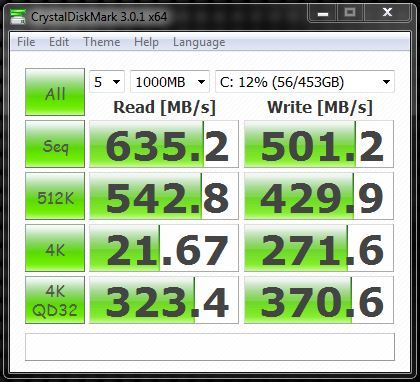 QUOTE(TT lim @ Dec 22 2011, 11:48 PM) i use the sata 3 from intel chipset,the read sequence kinda low,but how about the 4k? u can compare with my M4 128GB's on raid0 with firmware 009  |
|
|
|
|
|
owikh84
|
Dec 23 2011, 06:41 AM
|
i7 Clan
|
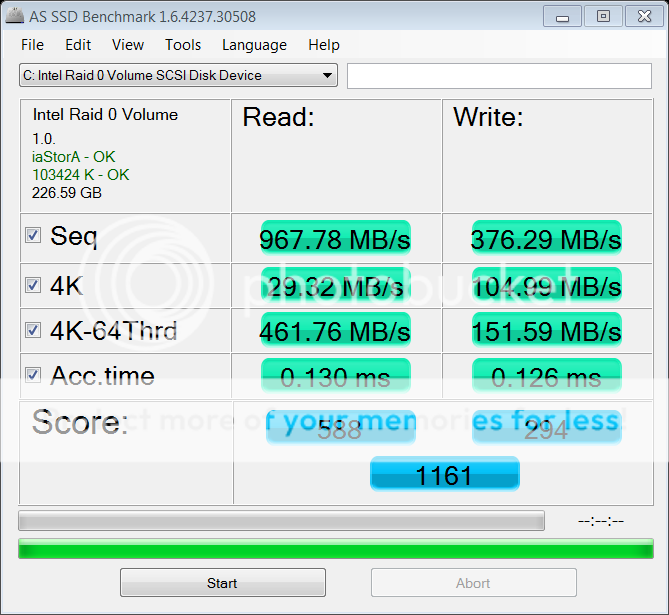
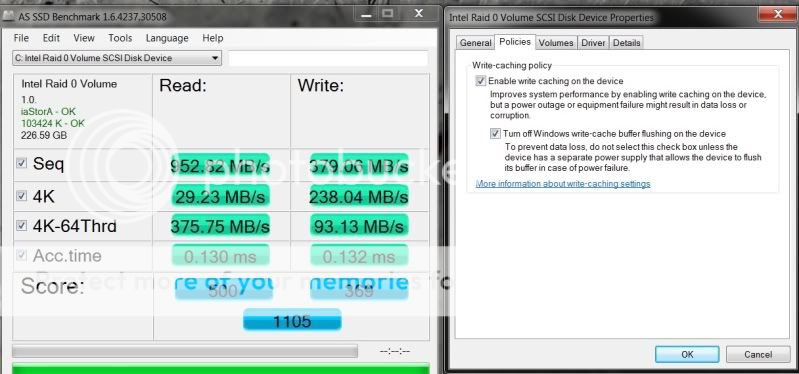
QUOTE(TT lim @ Dec 23 2011, 04:03 AM) bro pls help why your as ssd using iaStor and my system using iaStorA. as ssd show 103424k OK and my system only 1024k OKTQ  that was on SB Z68 platform alright i've rerun the AS on SB-E X79 (iaStorA) it shows some differences especially on the 4K writes being cut to half.  » Click to show Spoiler - click again to hide... « disabled write-caching buffer flushing but this will hurt the multithreaded 4K » Click to show Spoiler - click again to hide... « i would seek for advice from Asus & Intel later.. This post has been edited by owikh84: Dec 23 2011, 07:07 AM |
|
|
|
|
|
owikh84
|
Dec 26 2011, 03:32 PM
|
i7 Clan
|
QUOTE(Demon_Eyes_Kyo @ Dec 26 2011, 12:49 PM) Hi guys, my ssd had blue screen earlier (windows drive), unable to detect the drive after that. I reinstalled windows on a old hdd lying around, to check the intel ssd tool, drive can be detected again but seems like the disk space became 8mb. Is it pretty much gone case? Using intel x-18 btw. It's the infamous 8MB bug due to improper shutdown etc. Pls flash ur SSD to the latest firmware. |
|
|
|
|
|
owikh84
|
Dec 30 2011, 12:18 AM
|
i7 Clan
|
QUOTE(BeastX @ Dec 29 2011, 05:21 PM) Rather expensive lesson (or just RM60, I suppose)... Mini-PCIe is not mSATA... even though it's the exact same pin/form factor. mSATA SDD..... and 2.5" SATA SDD.... later being cheaper.... Both have very similar physical connectors and form factor, but different electronically. |
|
|
|
|
|
owikh84
|
Jan 6 2012, 06:34 PM
|
i7 Clan
|
QUOTE(antonio @ Jan 6 2012, 03:48 PM) I dunno lol...  yes...to compile and edit with links and information... Like the mechanical keyboard thread... +1. Need a volunteer to open V2 thread.  The F4 BSOD ive never seen before on my M4. But my PC keeps freezing frequently recently, i pressed reset button immediately so cant really see the BSOD. just hung there. |
|
|
|
|
|
owikh84
|
Jan 10 2012, 02:15 PM
|
i7 Clan
|
QUOTE(Mr.Lonely @ Jan 10 2012, 01:54 PM) hi, guys i m finally made my decision ordered a crucial M4 128GB =) from united state of A. now waiting for shipment!! xD~ but the recent 5000 hours issue bother me >< don't worry there will be a new firmware coming out next week to fix the F4 BSOD.  QUOTE M4 customers,
We are aware of an issue that is currently affecting a small number of users whereby their m4 causes their system to require a restart. This issue occurs after approximately 5,000 hours of actual “on time” use. Following the initial reboot, the system then requires subsequent restarts after each additional hour of use. However, the data on the SSD is unaffected and will not be lost due to this condition.
Through our investigation, we have determined the root cause of the problem and will be releasing a firmware update that rectifies the situation. We are currently running through our validation and compatibility process. Once this process is complete, the firmware will be made available to our customers. Although we understand the desire of some people to start using unreleased firmware now, we want to ensure that our solution works across multiple chipsets, systems, and operating systems before publishing the release code. We are currently targeting the week of January 16th, 2012 to publicly release the new firmware update.
We understand the impact that this is having on some users right now and apologize for this inconvenience. We appreciate your continued support, feedback, and patience as we finalize code and resolve this issue. SOS |
|
|
|
|
|
owikh84
|
Jan 11 2012, 02:32 PM
|
i7 Clan
|
QUOTE(josephting @ Jan 11 2012, 02:15 PM) I can hardly find any retailers of Crucial m4 here in Malaysia. do a bulk to save shipping cost. last year i bought 4 pcs of M4 128GB for RM2336 shipped so that's about RM584 each HEREbut good luck on RMA as u might need to send it back to USA. hint: DHL express: RM165 |
|
|
|
|
|
owikh84
|
Jan 11 2012, 04:48 PM
|
i7 Clan
|
QUOTE(Mr.Lonely @ Jan 11 2012, 04:10 PM) but i think SSD is quite reliable right? haha SSD is no doubt more durable than conventional HDD, but there's still a risk of failure. |
|
|
|
|



 Quote
Quote

 0.0188sec
 1.12
1.12
 7 queries
 GZIP Disabled