


also "radacct" ??

and none of these ports i use for uTorrent & DC++ or any other application on my LAN...

Does anyone knows what are these ports doing on UniFi network?

This post has been edited by klseet: Sep 7 2010, 09:52 AM
Unifi Official TM UniFi High Speed Broadbrand Thread V6, News: RM200 for installation after Sept
|
|
 Sep 7 2010, 09:48 AM Sep 7 2010, 09:48 AM
Return to original view | Post
#81
|
 
Junior Member
130 posts Joined: Mar 2008 
|
I was looking at the firewall log file for the last 15min, strange this ip 110.159.xxx.248 somehow consistently trying to comes in through TCP 4525, 4740, 1639 [so far]:
also "radacct" ??
and none of these ports i use for uTorrent & DC++ or any other application on my LAN... Does anyone knows what are these ports doing on UniFi network? This post has been edited by klseet: Sep 7 2010, 09:52 AM |
|
|
|
|
|
Sep 7 2010, 10:48 AM
Return to original view | Post
#82
|
|
Junior Member
130 posts Joined: Mar 2008
|
QUOTE(billytong @ Sep 7 2010, 10:16 AM) You know right now the only thing keeping me from bothering the BTU login password, is any future TM's "update" Same feeling here, really scary don't know what will happen next .... really at TM's mercy ...    The only thing right now I'm hoping my router still can detect and stop some of these unknown port services which trying to comes in my network ...  Anywhere I already reported and emailed print screen for them to investigate, hope they are "able" to resolve la...  |
|
|
Sep 7 2010, 11:14 AM
Return to original view | Post
#83
|
|
Junior Member
130 posts Joined: Mar 2008
|
QUOTE(ayamstim @ Sep 7 2010, 10:51 AM) Out of curiosity, can we track the culprit down with the SIP ID that it was changed to? I go to "Maintain->Log" and enable the log, saw some information on log display but not sure whether can see anything or not? |
|
|
Sep 7 2010, 11:51 AM
Return to original view | Post
#84
|
|
Junior Member
130 posts Joined: Mar 2008
|
QUOTE(billytong @ Sep 7 2010, 11:22 AM) just curious, if it is not ur IP why bother censored it. I only detected those consistent unknown random ports try to comes in my WHR-G300N router through vlan.500 for internet only, yes that's why I'm concern ... Hope the non censored version is sent to TMGuess what, they just called me, they confirmed that IP 110.159.xxx.248 is actually belongs to them  The CS staff can't explain why anymore and now is escalating to his superior to call me to explain further ..... I think I'm in for surprises, again ... |
|
|
Sep 7 2010, 01:35 PM
Return to original view | Post
#85
|
|
Junior Member
130 posts Joined: Mar 2008
|
QUOTE(rizvanrp @ Sep 7 2010, 12:53 PM) Don't worry about it. As long as you're behind NAT and you haven't set any matching port forwarding rules, the router will always drop those connections. It's persistent attempts rom the same IP, keep changing TCP ports from 1xxx to 4xxxeven got port number labeled with radacct, zephyr-clt, etc .... it seem to me some kind of random port scan & attempt to comes in, an act resemble hacking .... So is this kind of action "normal" for UniFi ??  Yes, I'm lucky behind NAT+Firewall, but I do have some ports mapping running behind NAT, what if it manage to scan and got the right port?? and what about those without firewall?? Sigh, this is really annoying and I only realise now ..... |
|
|
Sep 7 2010, 01:50 PM
Return to original view | Post
#86
|
|
Junior Member
130 posts Joined: Mar 2008
|
QUOTE(HenDa @ Sep 7 2010, 01:42 PM) under the router. where we insert username and password of unifi for WAN connection, there is 1 textbox for service (name) optional, what do we need to put there? Er, what router & connection method are you using? |
|
|
|
|
|
Sep 7 2010, 02:00 PM
Return to original view | Post
#87
|
|
Junior Member
130 posts Joined: Mar 2008
|
QUOTE(HenDa @ Sep 7 2010, 01:52 PM) original setting and the router given by TM then it should be setup already by TM right?anywhere, under WAN pppoe, you need to enter user id [something like <your ID>@unifi] and the password field, no need any service name. your user id & password was emailed to you when you registered UniFi  |
|
|
Sep 7 2010, 03:15 PM
Return to original view | Post
#88
|
|
Junior Member
130 posts Joined: Mar 2008
|
QUOTE(shahada @ Sep 7 2010, 02:58 PM) This kind of action is "normal" for the Internet. I can understand that, I can also see many other random IPs trying to access other ports too and many of them are UniFi users too with IP 110.159.xxx.xxxWith the whole world connected, there's bound to be a few thousand hackers out there scanning ports and IPs, and your bound to get hit by some of them..... But I'm referring to this particular IP 110.159.xxx.248, it's persistent & continuous since 9:30am until now while I'm typing, and I was told by CS it belong to their technical  So, this is still "normal"?? |
|
|
Sep 7 2010, 04:02 PM
Return to original view | Post
#89
|
|
Junior Member
130 posts Joined: Mar 2008
|
QUOTE(klseet @ Sep 7 2010, 11:51 AM) I only detected those consistent unknown random ports try to comes in my WHR-G300N router through vlan.500 for internet only, yes that's why I'm concern ... CS supervisor called and said my case now transferred to their internal "Abuse Team" for investigation, he can't tell when ..... Guess what, they just called me, they confirmed that IP 110.159.xxx.248 is actually belongs to them The CS staff can't explain why anymore and now is escalating to his superior to call me to explain further ..... I think I'm in for surprises, again ...  Anyone heard about this TM "Abuse Team" ?? |
|
|
Sep 7 2010, 04:35 PM
Return to original view | Post
#90
|
|
Junior Member
130 posts Joined: Mar 2008
|
QUOTE(billytong @ Sep 7 2010, 04:14 PM) you are transfered to "Abuse team" Abuse of complaining?! hahaha, that's funny!  No lah, the CS supervisor said actually this is not "technical" problem which they [1300881221] cannot handle it, I ask that "team" contact number but he said they'll contact me ..... hmmmm |
|
|
Sep 8 2010, 04:42 PM
Return to original view | Post
#91
|
|
Junior Member
130 posts Joined: Mar 2008
|
Hi guys,
Just ran some test with "shahada": 1. download big file from: http://ubuntu.bytecraft.com.my/releases/10...etbook-i386.iso speed about 420~500kb/s (with uTorrent & DC++ on), took about 25min to complete 2. download checksum file from: http://www.toast442.org/md5/ run MD5, drag & drop the big iso file into it, select "Generate Checksum" and click "Run", the result: 
So I supposed it seem ok no loss packet right? But when I run Pingtest the result:  I ran few times, it's about 1~3% packet loss, so what does it means? Got packet loss in my case or not??  Btw, my current connection as follows: HuaweiBTU[LAN1] ----> [WAN]Buffalo WHR-G300N (dd-wrt with VLAN2.500 tagging & PPPoE profile) HuaweiBTU[LAN2] ----> [WAN]DIR615[LAN4] ----> IPTV I'm keeping my RB250GS for emergency, meanwhile I just want to use that DIR-615 gao-gao first!! This post has been edited by klseet: Sep 8 2010, 04:43 PM |
|
|
Sep 8 2010, 04:46 PM
Return to original view | Post
#92
|
|
Junior Member
130 posts Joined: Mar 2008
|
QUOTE(rizvanrp @ Sep 8 2010, 04:43 PM) Fiberhome BTUs only have 1 profile and if I recall when I logged into pr0d1gy's Huawei when we were figuring out how to do the PPPoE stuff.. I never saw a 'jack' account in there. Er, "Jack" has been there all the while ler, at least on my Huawei BTU ....But you can ask him to reconfirm seeing as he's probably the first guy on LYN to make the BTU settings backup when he wrote his guide. |
|
|
Sep 8 2010, 04:51 PM
Return to original view | Post
#93
|
|
Junior Member
130 posts Joined: Mar 2008
|
QUOTE(rizvanrp @ Sep 8 2010, 04:49 PM) Really? That's weird.. I don't remember seeing it when I accessed pr0d's but I could be mistaken. The only thing I noticed within the XML config file itself was the existence of two accounts to access the Huawei BTU.. one with admin privs and another without. I think Huawei got 2 A/C:I have to do some testing at this point, would be cool if you can let me access your Huawei BTU seet ;D 1. telecomadmin [as discover by both you & pr0] 2. root [normal user access only] is there any other unknown to us? no problem bro, just let me know how do i "invite" you into my BTU!!  This post has been edited by klseet: Sep 8 2010, 04:52 PM |
|
|
|
|
|
Sep 8 2010, 05:46 PM
Return to original view | Post
#94
|
|
Junior Member
130 posts Joined: Mar 2008
|
QUOTE(stephen_ksf @ Sep 8 2010, 05:01 PM) now i got another problem.. VOIP back on on tues... but today im getting calls since 2pm.. every 5-10 mins once... answered... only beeping sound... beep.. beep... beep... Hi Stephen, long time no see! driving me nuts!  You mean your VOIP ring, you answer but no one talking over the other side? This is strange, I don't have this problem before/after the VOIP problem .... You sure not someone trying to joke with you ?! QUOTE(jackyhaw @ Sep 8 2010, 05:24 PM) I hope TM really need to look in to the big security issue in Unifi, if continue like this all our privacy will broken out. All unifi user are under risk now, please someone write the email to newspaer bring up this issue. and let TM look in to it. As we are user not much we can do. Now I'm thinking whether can I "unsubscribe" that VOIP alone with TM ...... This post has been edited by klseet: Sep 8 2010, 05:48 PM |
|
|
Sep 8 2010, 08:08 PM
Return to original view | Post
#95
|
|
Junior Member
130 posts Joined: Mar 2008
|
QUOTE(rizvanrp @ Sep 8 2010, 06:17 PM) Anyway, I'm done checking out the Huawei Echolife (thanks seet!). Thanks Riz for your investigation & advice ! Obtained some really useful information.. the Echolife has 4 basic ports which are open at all times (and listening), TCP 80, 22, 23 and 8011. TCP 80, 22 and 23 and blocked from WAN/LAN access using an inbuilt iptables firewall. TCP 8011 however, is open at all times and I'm not sure what it's being used for. As for this security issue, there's no real way to change the telecomadmin and root account passwords through the GUI... you have to download the config file, modify the password and reupload it. Haven't tested it myself but it should work. You also want to look at the 'services' passwords such as the telnet and SSH pass which is root/admin and change that too. I did however get some info regarding how we can use our own SIP devices with Unifi  Will be working on that in a bit. Will be working on that in a bit. Just to be honest, half of the time I'm totally lost when looking at the screen & steps you performed Ok, this is what I have done for my Huawei: Note: Before starting, save a copy of the setting file 1. Disable telnet 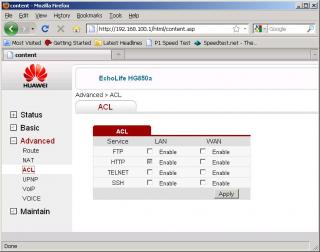
2. Disable UPNP 
3. Remove SIP - Jack 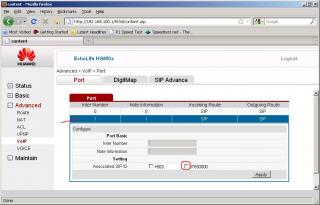
4. Remove VOIP - Jack 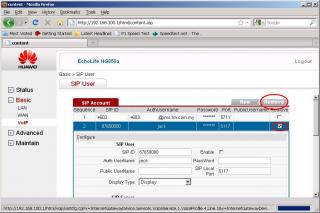
5. Download setting file 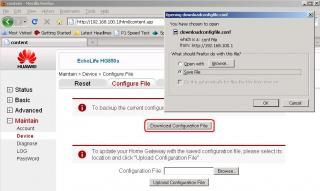
6. Use Notepad and open the setting file, look for users "root" [2 changes telnet & logon] and "telecomadmin" [1 logon only], change only the Userpassword="<anything you like>" and TelnetPassword="<anything you like>" fields only: 

Save the file to another name 7. Then upload the new setting file 8. Power off everything, wait for 1min, then power on again. Did I miss out anything else? Except for the unknown TCP 8011 service, hopefully the above can prevent the BTU from being "hijack" again, let's see how it goes .... This post has been edited by klseet: Sep 8 2010, 08:12 PM |
|
|
Sep 8 2010, 08:56 PM
Return to original view | Post
#96
|
|
Junior Member
130 posts Joined: Mar 2008
|
QUOTE(yushin @ Sep 8 2010, 08:31 PM) Guys, good news. This is good news another alternative! I have confirmed HP Procurve 1700-8G can replace The Dlink for VLAN tagging and bridging work. Now I can really put the Dlink to rest. *now to test the IPTV thing...*  Can you provide more information like some print screen, result, where to buy/$ .... QUOTE(billytong @ Sep 8 2010, 08:51 PM) Just fyi, if you remove the 'jack' @ screen no4, the 'jack' 8765000 number should not be appear on screen no3 anymore.(at least on my case because i remove earlier b4 this guide) However i still puzzled why we got 2 SIP entries, 0 and 1 (@ screen no3) That's what I thought earlier, but when I do screen4 remove the VOIP only, after re-boot "jack" comes back again ...So I did screen 3 & 4 and "jack" is gone after reboot! |
|
|
Sep 8 2010, 09:12 PM
Return to original view | Post
#97
|
|
Junior Member
130 posts Joined: Mar 2008
|
QUOTE(shahada @ Sep 8 2010, 06:43 PM) Yeah, if your checksum is 10bec11e0ab5a9c195289b861b71e51e the file is correct. On mine, I got different checksums and the file is corrupted. Ok, I just did another download test using RB250GS configure like:Packet loss is a slightly different issue than the corrupted downloads ... With packet loss it means that some of the packets being sent from one side to another didn't make it. It could either be a router along the way dropped it due to being overloaded, or it got corrupted along the line and the receiving network equipment detected the corruption and dropped the packet. Packet loss is "not too bad an issue" as the higher level of the network stack (TCP) will request the other end to retransmit missing packets. So at the end of the day when it reaches your application (browser, ftp, whatever) you will see "perfect" data. The only downside to packet loss is that slows your transfer, as the receiver has to re-request packets when it sees something missing. The data corruption issue is a bit more sinister though ... in a proper network, the TCP level checks the integrity of the data and requests re-transmission of bad packets, so the application level sees perfect data. Yet those facing the data corruption problem are not seeing any errors ... but still getting bad data. It means somewhere along the path from the two ends, the network stack is not doing the right thing. I can live with some packet loss but not data corruption! I'm trying to figure out the spread of those facing the data corruption issue and if there is any common denominator. It seems though that only SOME users are seeing it, not all. I'm also wondering if it is something at the home side or the center. I asked klseet to test as I thought he was using the RB250, if you get data corruption problems on that it means the dlink is innocent. 8-) Since i have the problem, I guess I have to wait till I get hold of a RB250 to prove that. regards, .sha HuaweiBTU[LAN1] ----> [LAN5]RB250GS[LAN4] ----> IPTV .....................................................[LAN3] ----> Buffalo WHR-G300N (without vlan tagging) ----> PC I download the Ubuntu iso and on the IPTV at the same time, checksum still the same: 
While downloading & on IPTV, run pingtest and I noticed packet loss is almost 0% on RB250GS     So I think now narrow down to either: 1. the line connection issue? 2 the router? Btw, may I know what is this Ubuntu? Another Linux base OS? Is the iso for installation? This post has been edited by klseet: Sep 8 2010, 09:16 PM |
|
|
Sep 8 2010, 09:17 PM
Return to original view | Post
#98
|
|
Junior Member
130 posts Joined: Mar 2008
|
QUOTE(vergas @ Sep 8 2010, 09:14 PM)   Still bad.... I think you may have to call CS complain gao-gao liao .... Btw, what equipments & setup you have? This post has been edited by klseet: Sep 8 2010, 09:17 PM |
|
|
Sep 9 2010, 10:52 AM
Return to original view | Post
#99
|
|
Junior Member
130 posts Joined: Mar 2008
|
For RB250GS potential buyers, Soliton already informed us stock arrived few days ago:
http://forum.lowyat.net/index.php?showtopi...post&p=36141665 I've roughly estimate the costing as below: http://forum.lowyat.net/index.php?showtopi...post&p=35878372 So in summary, if you cash & carry from Soliton SG, the price is SGD59, you may claim back the 7% VAT while leaving SG. My suggestion only bring the item without the box, so you can say it's your own used computer items should the border custom ask. If we compile & group our order to deliver to KL, it would be considered as export out of SG, so there is no VAT and the cost is about SGD55 + say estimate averaging shipping cost SGD4 total about SGD59, exclude potential custom tax [about 10% for network equipment??] On behalf of you guys, I've spoken to Landasan, no indication whether they will bring in or not, but it really sound to me that they will not bring-in unless they have thousands of order. I've also discussed with Soliton, they are ok for us to tell them what we want to write on the shipping invoice, also whatever the cost to appear. So, we may consider writing some rather unclear description like "Computer Accessaries", say with SGD20 per unit or even lesser only?? In fact, the sales guy Yitong, is waiting for our confirmation, this batch they have 100 units only and seem to be selling fast ..... If you guys willing to bite the bullet @ estimate SGD59 with the hope no custom tax, I can assist to arrange on behalf. If you guys want to cash n carry there or individual order to ship to KL, you may always contact Yitong directly @ +65 6245 0962 Just mention you are from Malaysia LYN forum and recommended by Mr.Seet will do. Cheers!  |
|
|
Sep 9 2010, 11:23 AM
Return to original view | Post
#100
|
|
Junior Member
130 posts Joined: Mar 2008
|
(BULK) RB250GS , potential buyer list:
1. azri 2. PGGTrader 3. ldragon (2 units) 4. alextong8386 5. chungss 6. Yushin 7. flame7651 8. Paultantk 9. StanleYz 10. avex|mode 11. hotspot 12. leongkh2 13. Evirober 14. -pWs- (2 units) 15. mox123 16. jchue73 17. Mytown 18. GreenSamurai 19. Susuwatari 20. khairuza2002 21. Keevster 22. ruffstuff 23. ad2000 24. rizfield 25. Moogle Stiltzkin 26. d3vilsim cafee - already purchased List updated, individual kindly re-confirm through PM, may I suggest cut-off date by this weekend? @Calvin871989, appreciate if you could you assist members to update the list at the front page, thanks! Soliton just informed us the speed post EMS shipping option as follows: Option 1: 10~20 units in a box = SGD73 Option 2: 30~40 units in a box = SGD114 So if got > 10 confirmed then start start option 1 already ! |
|
Topic ClosedOptions
|
| Change to: |  0.0787sec 0.0787sec
 0.28 0.28
 8 queries 8 queries
 GZIP Disabled GZIP Disabled
Time is now: 2nd December 2025 - 01:34 AM |
 Quote
Quote