

Disk Partition Recovery, When BASIC becomes DYNAMIC suddenly
Disk Partition Recovery, When BASIC becomes DYNAMIC suddenly
|
|
 May 15 2010, 02:35 PM May 15 2010, 02:35 PM
|
 
Senior Member
739 posts Joined: Mar 2010 
|
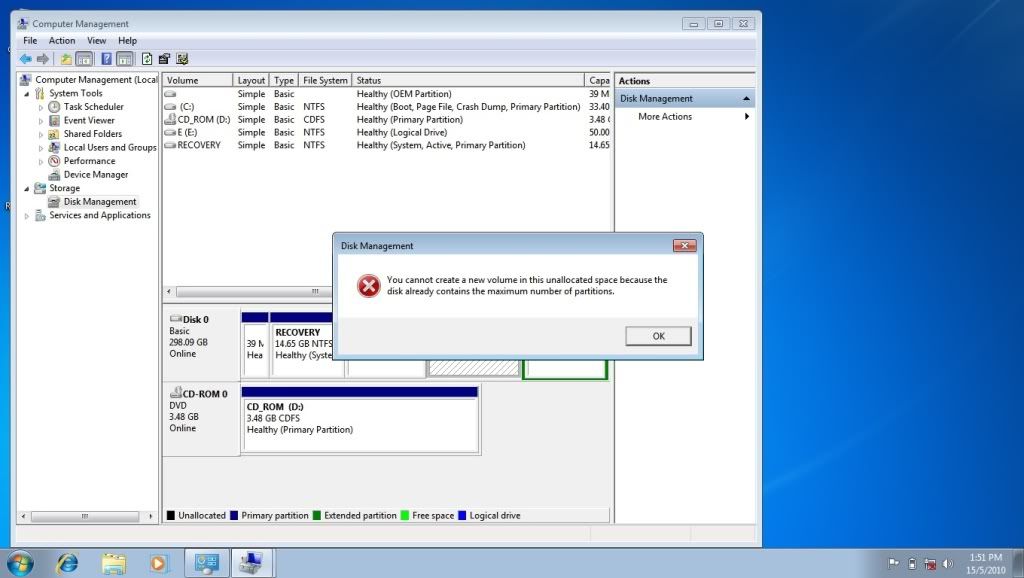
I have 1 drive with unallocated, and i have maximum partition in my notebook already (4 partition), so i cannot format this unallocated drive. wat should i do with it?
|
|
|
|
|
|
Jun 27 2010, 09:46 PM
|

Senior Member
707 posts Joined: Feb 2010 
|
my new lappy pre installed with win 7 and only has one partition... is it possible to re create 2 partition without compromising my win 7...
|
|
|
Jun 28 2010, 08:55 PM
|
|
Junior Member
141 posts Joined: Mar 2007
|
thanks guys lucky that i found this thred
my harddisk crash and thanks to u guys i manage to retrive all my data in it |
|
|
Jul 5 2010, 11:39 AM
|
|
Senior Member
2,096 posts Joined: May 2008
|
QUOTE(saigetsu @ Jun 27 2010, 09:46 PM) my new lappy pre installed with win 7 and only has one partition... is it possible to re create 2 partition without compromising my win 7... It is like that in Windows 7. I also tried to ask the technical person to create few parts but this can't be done tat tech says.   |
|
|
Jul 6 2010, 11:07 PM
|

Junior Member
38 posts Joined: Mar 2008
|
I would like to copy my C drive with OS and all licensed softwares to another HDD. The new HDD will need to function just like my C drive. Will Disk Image work?
Also my D drive is currently a recovery disk, if I Disk Image the whole drive to another HDD, will it still function as recovery disk? This post has been edited by phreakout: Jul 6 2010, 11:36 PM |
|
|
Jul 7 2010, 09:59 AM
|

Junior Member
22 posts Joined: Jun 2010
|
there is one tools i always like to use to recover my damage hard disk.. it almost help me recovered 100% files in my damage hard disk.. the software name is call file scavenger~ you need full version only can recover your files.. else you only could scan your damage hard disk but not recover..
|
|
|
|
|
|
Jul 7 2010, 11:13 AM
|

Junior Member
88 posts Joined: Jun 2010
|
QUOTE(super macgyver @ May 11 2005, 08:45 PM) where to download it? yea lah.. where to download that software??? i oso want to know.. |
|
|
Jul 9 2010, 12:23 AM
|

Junior Member
112 posts Joined: Jul 2009 From: Crawling Below The Wind
|
guys....i messed up with my HD, now 1 partition is missing. Can suggest me what current software recovery can help me recover it?
 |
|
|
Jul 9 2010, 12:39 AM
|

Senior Member
3,532 posts Joined: May 2008
|
use getdataback portable!
Added on July 9, 2010, 12:39 amonly 8mb size... Added on July 9, 2010, 12:42 am 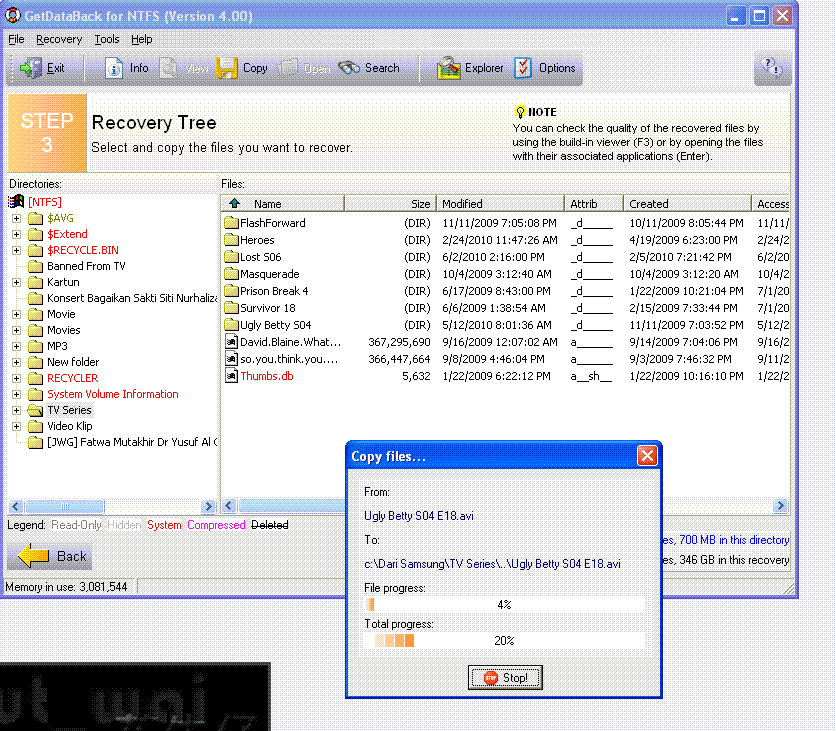 This post has been edited by adie82: Jul 9 2010, 12:42 AM |
|
|
Jul 9 2010, 02:17 AM
|
|
Junior Member
112 posts Joined: Jul 2009 From: Crawling Below The Wind
|
Doest GetDataBack can recover partition for Hitachi ATA HD?? I could not understand the description given from the internet
 Added on July 9, 2010, 3:57 amThanks for the tips Mr adie82  Ok. So this what i found using the software My 1st Partition - Drive C:  My 2nd Partition - Drive D (Previously b4 this thing happens)  Another pic to consider  Actually my HD was 320GB but somehow i was messed-up (i forgot what did i do )Both partition were evenly separated. but 2nd partition was less from what it should be. Can someone give me a tip?? What did i miss? How am i going to recover the other 140++GB?? The HD brand is Hitachi This post has been edited by Noning: Jul 9 2010, 04:57 AM |
|
|
Jul 16 2010, 12:20 AM
|

Junior Member
150 posts Joined: Dec 2005
|
hi guys i encounter a really weird prob recently
i got a new pc around April and i took a 160gb hd from my previous pc and install win 7 ultimate on it and use it on my new pc. Until now, July, one day i feel like rebooting my pc (did not reboot for like 1 month), after that my windows cannot boot at all! I try to do system repair/recovery, but no luck. And to my surprise, i used the command prompt provided in the windows 7 dvd and browse through my C drive, i found the drive now contains the exact data BEFORE i install windows 7! Those data were from my old pc and i recognize them due to there are collections of movies on it. Anyone else encounter this before? |
|
|
Jul 19 2010, 04:35 PM
|
|
Senior Member
2,096 posts Joined: May 2008
|
What do you mean cannot boot at all? Even cannot enter Windows 7 Splash Screen?
Starting your computer in Windows 7 Safe Mode can help you diagnose and solve many serious problems, especially when starting Windows normally is not possible. To begin entering Windows 7 Safe Mode, turn on or restart your PC. Just before the Windows 7 splash screen shown above appears, press the F8 key to enter Advanced Boot Options. |
|
|
Jul 30 2010, 12:37 AM
|

Senior Member
618 posts Joined: Dec 2006 From: Metal Box Enterprise JB
|
hi
my bro have a problem when he's using the WINTOFLASH to 'burn' the window 7 into his external harddisk, something happen n he stopped it by using ctrl+alt+del but after that, his external harddisk become undetectable by his lappy the computer can actually "detecte" it , but it show nothing =[ is it possible to format the external harddisk w/o using window ( eg, in bios, etc) ? thanks for helping |
|
|
|
|
|
Jul 30 2010, 12:55 AM
|

Junior Member
224 posts Joined: Jan 2006
|
QUOTE(blue16 @ Jul 30 2010, 12:37 AM) hi Bro,my bro have a problem when he's using the WINTOFLASH to 'burn' the window 7 into his external harddisk, something happen n he stopped it by using ctrl+alt+del but after that, his external harddisk become undetectable by his lappy the computer can actually "detecte" it , but it show nothing =[ is it possible to format the external harddisk w/o using window ( eg, in bios, etc) ? thanks for helping You may also consider download a linux liveCD such as ubuntu, and boot it up through the CDROM. Then goto "system" and look for Gparted, a sort of partition manager in linux, but a lot more powerful, and I believe you would see your ex-HDD then. Then from there, you could partition it again to whatever format you desire. I hope this would help to solve your problems. Best of luck |
|
|
Jul 30 2010, 01:25 AM
|
|
Senior Member
618 posts Joined: Dec 2006 From: Metal Box Enterprise JB
|
QUOTE(casey @ Jul 30 2010, 12:55 AM) Bro, so i download the liveCD from somewhere and ned to install the ,eerr ubuntu for example?You may also consider download a linux liveCD such as ubuntu, and boot it up through the CDROM. Then goto "system" and look for Gparted, a sort of partition manager in linux, but a lot more powerful, and I believe you would see your ex-HDD then. Then from there, you could partition it again to whatever format you desire. I hope this would help to solve your problems. Best of luck then after installing the Ubuntu i jst do al the Gparted stuff ,is it correct? is that any alternative way to work around becoz this one involve quite many thing  |
|
|
Nov 27 2010, 12:28 PM
|

Junior Member
126 posts Joined: Jan 2010 From: Bandar Kinrara, Puchong
|
Hi, i'm also having problem with my HDD. Bought 2 secondhand HDD, 160GB each. My friend suggest to used low level format. When try, it cannot detect hdd. (previously i've format the hdd using in winxp and ok - 160GB still there). After that, when log in, only show 34GB only - unallocated. How to find the balance of HDD space? Already tried EASEUS Data Recovery Wizard Professional 4.3.6 (Retail), but can't recover the lost partition. Can someone help?
|
|
|
Dec 5 2010, 11:09 PM
|

Junior Member
321 posts Joined: Jun 2010
|
i had encountered a problem,half of my partition of hard disk had missing.Anyone can help me?
|
|
|
Dec 5 2010, 11:13 PM
|

Senior Member
4,858 posts Joined: Jun 2006 From: Tawau, Sabah 
|
i tried using software but my problem still persist..
 -----  i tried checkdisk but also to no avail.. is this a bug with the system? all my backup is in the partition.. |
|
|
Dec 9 2010, 07:48 PM
|
|
Junior Member
126 posts Joined: Jan 2010 From: Bandar Kinrara, Puchong
|
QUOTE(denon91 @ Dec 6 2010, 12:09 AM) i had encountered a problem,half of my partition of hard disk had missing.Anyone can help me? Have U try look in disk manager? |
|
|
Dec 21 2010, 01:57 AM
|

Senior Member
1,677 posts Joined: Sep 2007 From: Pills & Thrills
|
guys, can sm1 recommend place/shop doing data recovery. i dropped my ext hdd 2day. my hdd rosak already....
 This post has been edited by bad melatonin: Dec 21 2010, 02:00 AM |
| Change to: |  0.0272sec 0.0272sec
 0.87 0.87
 6 queries 6 queries
 GZIP Disabled GZIP Disabled
Time is now: 14th December 2025 - 10:40 AM |
 Quote
Quote