Welcome Guest ( Log In | Register )

22 Pages « < 7 8 9 10 11 > » Bottom

Outline · [ Standard ] · Linear+

 Disk Partition Recovery, When BASIC becomes DYNAMIC suddenly

views
     
cheenjeat008
post Jan 14 2007, 10:46 AM

On my way
****
Senior Member
543 posts

Joined: Dec 2004
From: Kuala Lumpur


QUOTE(jimlim007 @ Oct 16 2006, 04:50 AM)
Help Help Help !!! icon_question.gif  icon_question.gif  icon_question.gif 

I lose my 127 GB data after using Partition Magic v8.5 performed the Resizing Partition & Creating Partition. Data gone because in the middle of process Partition Magic doing Resizing have "error", and turn my harddisk partition into very weird partition name #D~*) instead of D and it show my drive partition have 127GB free space. Holy shit... cry.gif  cry.gif  cry.gif  cry.gif

Problem: 127Gb data gone
Root Cause: Middle of process of partition magic doing partition resizing (i do this bcos plan to created another partition)
Drive Info: Seagate 200GB PATA detected as 127GB; created under 1 NTFS partition (127GB)
OS: Winxp Pro (no service pack)

Currently, i already recreated this drive (200GB) into 2 partitions under NTFS and running system now. However, i still want to recover back my previous data if there is a chance even need to erase my current system files. this is ok as long as able to get back data

So, with using Active Recovery or Ontrack Easy Recovery pro, is it will successfully cover back my previous single NTFS partition with 127GB fully data? drool.gif  drool.gif  drool.gif  drool.gif  drool.gif
*
First of all, when your hdd is in problem, Never repartition it into another format.
When you have install the windows XP or any other software back into old drive, it will overlap the old data and you will have lower change to recover your data.

Must find a spare hdd, install a fresh winXP, then install any recovery program.
You will have higher chances to recover your data.


abnerx
post Jan 16 2007, 09:32 PM

Getting Started
**
Junior Member
61 posts

Joined: Feb 2005
Hey ppl..sadly I find myself posting here nw cry.gif My hardisk have landed with sum problems. I have 2 hardisk fixed on my system. One with the OS in it and another with all my personal and important documents/files. Sadly yesterday, I found my Maxtor 40Gb hardisk containning all my important files having a set of funny or rather weird characters as its name shakehead.gif

The hardisk was named with all these weird charachters;

user posted image

Once I double click on the drive, I get a list of files and folders than cant be opened. Below are the error messages that pops up;

user posted image

user posted image


Im new to all this stuff, I look forward for help from all the gurus here to help me solve my problem. I really need all those data on my hardisk. What should I do now? Use one of those data recovery tools? ..im lost icon_question.gif

Thanx for all your time!
kelvinkaw84
post Jan 17 2007, 10:46 AM

Getting Started
**
Junior Member
101 posts

Joined: Jan 2007


QUOTE(cozack @ Apr 21 2005, 07:11 PM)
anyone.. ?

it was like this, my friends got Seagate HD (80G) and have two partition on it.he used it as extrenal storage (USB). suddenly, one of the partition can't be read/access at all, the other one can. so he send it to one of the IT shop (at Lowyat - Hypermarket something) to recover it since he need his project data on it.

To make it worst, after he send it to that shop... both of the partition can't be read anymore and the disk now mark as DYNAMIC Disc (Unreadble) when used Disk management.

so, question is, is there any way to recover that partition? if does.. how to do it?

thanks in advance.
*
I think only one way u can do it. take your hard disk and plug into another PC, then do backup(copy all your data and save into that PC). After that,try to format your hard disk. If the same problem still happen, then i think is your hard disk got bad sector.
kelvinkaw84
post Jan 17 2007, 10:52 AM

Getting Started
**
Junior Member
101 posts

Joined: Jan 2007


QUOTE(abnerx @ Jan 16 2007, 09:32 PM)
Hey ppl..sadly I find myself posting here nw cry.gif  My hardisk have landed with sum problems. I have 2 hardisk fixed on my system. One with the OS in it and another with all my personal and important documents/files. Sadly yesterday, I found my Maxtor 40Gb hardisk containning all my important files having a set of funny or rather weird characters as its name  shakehead.gif

The hardisk was named with all these weird charachters;

user posted image

Once I double click on the drive, I get a list of files and folders than cant be opened. Below are the error messages that pops up;

user posted image

user posted image
Im new to all this stuff, I look forward for help from all the gurus here to help me solve my problem. I really need all those data on my hardisk. What should I do now? Use one of those data recovery tools? ..im lost icon_question.gif

Thanx for all your time!
*
Is it when u open the external drive, the error is prompt out on screen? ok....you can try to change the drive name and path..after that,try to open it.

abnerx
post Jan 17 2007, 12:52 PM

Getting Started
**
Junior Member
61 posts

Joined: Feb 2005
QUOTE(kelvinkaw84 @ Jan 17 2007, 10:52 AM)
Is it when u open the external drive, the error is prompt out on screen? ok....you can try to change the drive name and path..after that,try to open it.
*
its an internal drive and I have tried fixin it on another pc but same thing hapens sad.gif
auyongck
post Jan 20 2007, 09:38 PM

Getting Started
**
Junior Member
70 posts

Joined: Sep 2005


I have a 80Gb SATA seagate hard disk, but it cant detect in my BIOS , meaning cant find any driver. sad.gif

But my hard disk is spining/runing, Is there a possible to repair? my 6 year data is inside, i am sure that all the wayar that i plug is correct. cry.gif

Anyone can help?
super macgyver
post Jan 24 2007, 07:18 PM

★~13k Spam Club~★
********
All Stars
19,324 posts

Joined: Jan 2003


QUOTE(auyongck @ Jan 20 2007, 09:38 PM)
I have a 80Gb SATA seagate hard disk, but it cant detect in my BIOS , meaning cant find any driver. sad.gif

But my hard disk is spining/runing, Is there a possible to repair? my 6 year data is inside, i am sure that all the wayar that i plug is correct.  cry.gif

Anyone can help?
*
try sum rescue tool in seagate website.
auyongck
post Jan 25 2007, 02:45 PM

Getting Started
**
Junior Member
70 posts

Joined: Sep 2005


QUOTE(super macgyver @ Jan 24 2007, 07:18 PM)
try sum rescue tool in seagate website.
*
cant detect..how to rescue cry.gif
unknowndevices
post Jan 25 2007, 04:49 PM

***StaRs oF NakamA uP***
*******
Senior Member
2,915 posts

Joined: Jan 2005


got notebook of 120GB...and wanted to do partition for my hardisk... nod.gif
is it advisable to use Magic Partition...will it caused data error/lost/hanged in future... sweat.gif
of is it advisable to use normal partition...mean have to reformat and install everything back... unsure.gif
need advice here...thank you... thumbup.gif
SUSMatrix
post Jan 25 2007, 04:56 PM

King of Char Siew!
********
Senior Member
15,022 posts

Joined: Jan 2003
From: Damansara Jaya/Bandar Utama


QUOTE(unknowndevices @ Jan 25 2007, 04:49 PM)
got notebook of 120GB...and wanted to do partition for my hardisk... nod.gif
is it advisable to use Magic Partition...will it caused data error/lost/hanged in future... sweat.gif
of is it advisable to use normal partition...mean have to reformat and install everything back... unsure.gif
need advice here...thank you... thumbup.gif
*
The rule of the game is always do a FREAKIN BACKUP of ur important data whenever you wanna try something dangerous. Heck, even when you're not, you're suppose to make a backup anyway.

If you're too lazy to do backup, no one can help ya.

unknowndevices
post Jan 25 2007, 05:52 PM

***StaRs oF NakamA uP***
*******
Senior Member
2,915 posts

Joined: Jan 2005


QUOTE(Matrix @ Jan 25 2007, 04:56 PM)
The rule of the game is always do a FREAKIN BACKUP of ur important data whenever you wanna try something dangerous. Heck, even when you're not, you're suppose to make a backup anyway.

If you're too lazy to do backup, no one can help ya.
*
actually...by doing DOS based partition...need to install everything back right... unsure.gif
but i'm might lost some software that provided by the manufacturers...no software cds given... blush.gif
so...from what i seen...magic partition you can avoid the perform of from installing all the software back... smile.gif
that's why...is it advisable to use perform with magic or DOS? unsure.gif
miloy2k
post Jan 29 2007, 02:01 AM

[[[[[IMPERIAL ARMY]]]]]
********
All Stars
15,773 posts

Joined: Jan 2003
From: Capital Wasteland


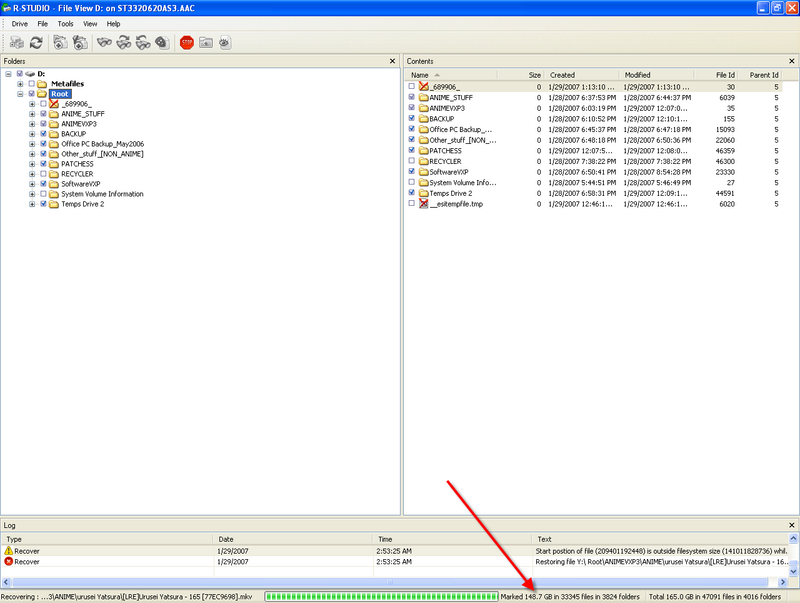
Using R-Studio 3.6 to recover my 165gb of my data ... so far still running sweat.gif rolleyes.gif

user posted image

for some unknown reason my 320gb hd become 3 partition where by it should only have 2 rclxub.gif It happen after I plug in other hd in the system (another sata hd)
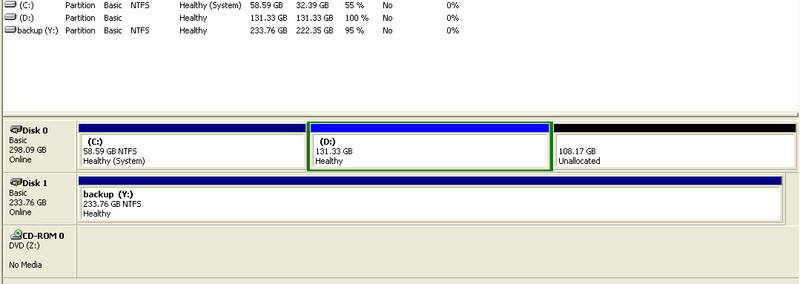
user posted image

anyone know what causing it happen? unsure.gif

This post has been edited by miloy2k: Jan 29 2007, 02:21 AM
wak
post Jan 31 2007, 04:57 PM

New Member
*
Junior Member
37 posts

Joined: Dec 2006
QUOTE(abnerx @ Jan 16 2007, 03:32 AM)
Hey ppl..sadly I find myself posting here nw cry.gif  My hardisk have landed with sum problems. I have 2 hardisk fixed on my system. One with the OS in it and another with all my personal and important documents/files. Sadly yesterday, I found my Maxtor 40Gb hardisk containning all my important files having a set of funny or rather weird characters as its name  shakehead.gif

The hardisk was named with all these weird charachters;

user posted image

Once I double click on the drive, I get a list of files and folders than cant be opened. Below are the error messages that pops up;

user posted image

user posted image
Im new to all this stuff, I look forward for help from all the gurus here to help me solve my problem. I really need all those data on my hardisk. What should I do now? Use one of those data recovery tools? ..im lost icon_question.gif

Thanx for all your time!
*
Have you tried with other file manager? Windows Commander?
Google telling me that your WindowsExplorer having some problem.
NOX
post Feb 1 2007, 11:57 AM

Getting Started
**
Junior Member
278 posts

Joined: Jan 2003
From: SEREMBAN < > PETALING JAYA

Need Help here.. my fren HDD which is MAXTOR 200gb ide die on him.. there is no disk activity a.k.a not spinning.. can he repair it or anyway to copy data inside? he now very angry with MAXTOR.. just 8 month aleady dead.. this drive is use for his Hello Project Collection.. so very desperate to recover.. Onegai..

p/s: that's why i use Western Digital.. my last maxtor 80gb also die on me(but after use for bout 3 year la).. maxtor quality is not good..
miloy2k
post Feb 7 2007, 07:09 AM

[[[[[IMPERIAL ARMY]]]]]
********
All Stars
15,773 posts

Joined: Jan 2003
From: Capital Wasteland


QUOTE(NOX @ Feb 1 2007, 11:57 AM)
Need Help here.. my fren HDD which is MAXTOR 200gb ide die on him.. there is no disk activity a.k.a not spinning.. can he repair it or anyway to copy data inside? he now very angry with MAXTOR.. just 8 month aleady dead.. this drive is use for his Hello Project Collection.. so very desperate to recover.. Onegai..

p/s: that's why i use Western Digital.. my last maxtor 80gb also die on me(but after use for bout 3 year la).. maxtor quality is not good..
*
nothing else is new sleep.gif

Maxtor/Seagate/W. D has fail me b4 sad.gif

the best thing to do is backup ur data often nod.gif
NOX
post Feb 8 2007, 11:36 AM

Getting Started
**
Junior Member
278 posts

Joined: Jan 2003
From: SEREMBAN < > PETALING JAYA

any way for him to recover back data? just the spiinning thing@motor problem right? can he transfer the disk into another let say spoilt 200gb with good motor? do u get the idea?
luvjim
post Feb 8 2007, 03:04 PM

to the moon and back
******
Senior Member
1,036 posts

Joined: Mar 2006
here's my prob...hope the pro's can help me...

actually i just want to format the C drive, as usual boot with XP CD and select the drive to delete and format it.
as listed there is another D drive...but when i select C and delete the C partition, it also delete my D drive!! (im not sure where my E and F drive go also). It's only show C and D drive....

my HDD is 80gb and i only use 20000mb for my new XP. i formatted the 20000mb and left the rest i din format.

issit possible for me to do recovery for the unformatted space??
i lost all my photos and my bro's backup.. cry.gif
gochev.george
post Feb 8 2007, 03:43 PM

New Member
*
Junior Member
6 posts

Joined: Feb 2007


QUOTE(cozack @ Apr 21 2005, 02:11 PM)
anyone.. ?

it was like this, my friends got Seagate HD (80G) and have two partition on it.he used it as extrenal storage (USB). suddenly, one of the partition can't be read/access at all, the other one can. so he send it to one of the IT shop (at Lowyat - Hypermarket something) to recover it since he need his project data on it.

To make it worst, after he send it to that shop... both of the partition can't be read anymore and the disk now mark as DYNAMIC Disc (Unreadble) when used Disk management.

so, question is, is there any way to recover that partition? if does.. how to do it?

thanks in advance.
*
Hi
Ok if plug in the hard disk in ATA slot,take bootable CD with win98,go Bios firmware set to boot device like first : CD-ROM or CD/DVD
then save settings,restart when you se the Boot Menu click on : run windows without CDROM support, wait to see A:/
type fdisk
Create the partitions(Primary logic,Extended ...)
when you create ,restart the PC (CTRL+DEL+DEL) so the system update the data recovery.
Then click again on the field bellow "run windows without CDROM support"
It will show "A:\
type "format C:" then Enter
after operation complete type format "D"
If are create 2 partitions
It have another way,but it's not guarantied.
Standard way - Plug in the hard in ATA or SATA slot and then boot it from WINDOWS XP CD, if system detect HARD DRIVE - Good
If not - Use the upper case. But I think you have on drive BAD SECTORS.It is a very very bad.That case smelling like NEW HDD,cou'se in the future you'll meet other problems,like WINDOWS not Respond,many restart or system faulire.
Good Luck thumbup.gif

This post has been edited by gochev.george: Feb 8 2007, 03:50 PM
cheenjeat008
post Feb 9 2007, 02:15 AM

On my way
****
Senior Member
543 posts

Joined: Dec 2004
From: Kuala Lumpur


QUOTE(wak @ Jan 31 2007, 04:57 PM)
Have you tried with other file manager? Windows Commander?
Google telling me that your WindowsExplorer having some problem.
*
It might cause by sudden electrical shock or unstable power supply....
Mcrae
post Mar 30 2007, 02:17 AM

fu la weh...
*****
Senior Member
955 posts

Joined: Jan 2003
From: Ipoh/MMU Melaka/MMU Cyber<->Puchong


Guys i wanna ask something bout my hard disk, weird problem happens.

My problem was my hdd had remaining of 2GB left space, but after i played a round game of Serius Sam then i quit, i saw my hdd space remained 22MB left sad.gif what has happened ? Even i restarted my pc, my hdd still detects my hdd remaining space was still 22MB... where has the rest suddenly gone ?

22 Pages « < 7 8 9 10 11 > » Top
 

Change to:
| Lo-Fi Version
0.0259sec    0.70    6 queries    GZIP Disabled
Time is now: 17th December 2025 - 11:39 AM