

Why ATi graphic card always so hot ? so many years also the same ?
AMD Radeon™ Discussion V3, Prepare Red! Green has attacked!
AMD Radeon™ Discussion V3, Prepare Red! Green has attacked!
|
|
 Sep 30 2010, 03:51 PM Sep 30 2010, 03:51 PM
Return to original view | Post
#1
|
 
Senior Member
3,762 posts Joined: May 2008 
|
Why ATi graphic card always so hot ? so many years also the same ?
|
|
|
|
|
|
Sep 30 2010, 06:08 PM
Return to original view | Post
#2
|
|
Senior Member
3,762 posts Joined: May 2008
|
QUOTE(Clem1982 @ Sep 30 2010, 04:15 PM) Then u can get the Nvidia GTX480 to compare the temperature I really need help with my graphic card 3870 , I had post at hardware forum q&a but non of them know how to fix my problem.  That card can easily heat up water to mix a good cup of coffee are you experiencing heat issues with ur ATi GC? What r u using now?   http://forum.lowyat.net/topic/1579657 |
|
|
Sep 30 2010, 07:42 PM
Return to original view | Post
#3
|
|
Senior Member
3,762 posts Joined: May 2008
|
QUOTE(law1777 @ Sep 30 2010, 06:47 PM) this guy is probably still using 2000/3000 or never have an update about latest green n red camps' card. for your information bro, ATI cards are now cooler than nvidias' QUOTE(DarkSilver @ Sep 30 2010, 07:12 PM) Yea. True. There should be a price-drop after the lauching of HD6000-Series. So , can you explain why my graphic card so hot ?  Added on September 30, 2010, 7:12 pm You're living inside the cave, I can predict it. Either way, you must be Nvidia Fanboy which want to troll here and piss people off only. http://forum.lowyat.net/topic/1579657 |
|
|
Sep 30 2010, 08:46 PM
Return to original view | Post
#4
|
|
Senior Member
3,762 posts Joined: May 2008
|
QUOTE(everling @ Sep 30 2010, 08:06 PM) He already stated he has problems with his HD 3870. No need to predict. I plan to switch but Ati really give a lot of problem , like now I am having .Maxieos, maybe you should consider replacing your HD 3870. Particularly when the HD 6000 arrives. The HD 5670 already outperforms it. Added on September 30, 2010, 8:51 pm QUOTE(tech3910 @ Sep 30 2010, 08:25 PM) 1) lag of knowledge of the product u're using. Did you actually look into my other thread post ? If not i hope you will read it to help me out . Thanks . 2) does not utilized the CCC features nor features on 3rd party s/w. 3) lag of maintenance (cleaning & reapplying thermal paste) 4) lag of total understanding. (GPU has 120c threshold, 3870 is design to run @ ~90c on load with auto fan.)  This post has been edited by Maxieos: Sep 30 2010, 08:51 PM |
|
|
Sep 30 2010, 09:16 PM
Return to original view | Post
#5
|
|
Senior Member
3,762 posts Joined: May 2008
|
I just wanted to fix my graphic card , that's all
 , I dont know anything much , indeed my graphic card is hot at 60'c idle , so many years it's still hot staying at 60'c. , I dont know anything much , indeed my graphic card is hot at 60'c idle , so many years it's still hot staying at 60'c.Sorry if I had offended when I speak .  Added on September 30, 2010, 9:19 pm QUOTE(tech3910 @ Sep 30 2010, 09:05 PM) 1) not powering up If you can kindly look into my thread post , the card I was using doesn't have power play.I had been asking but no one reply at all.So i try and ask here .2) restart during load 3) OC even a little will result in crash Added on September 30, 2010, 9:11 pm ur temperature is normal. dat is wat u expect from OC version, wit slight voltage bump. wit m'sia weather, dat temperature is perfectly fine. probably long time dint clean fan or change thermal paste. or maybe casing ventilation not good. use ATI tray tools instead of rivatuner. u can change clock speed & adjust voltage too. http://forum.lowyat.net/topic/1579657/+20 Any help really appreciate This post has been edited by Maxieos: Sep 30 2010, 09:19 PM |
|
|
Sep 30 2010, 10:14 PM
Return to original view | Post
#6
|
|
Senior Member
3,762 posts Joined: May 2008
|
QUOTE(DarkSilver @ Sep 30 2010, 09:22 PM) That's why you can't speak something like "ATi was always lame and hot!" or "ATi is problematic always!". Erm ,one thing , I never apply word "lame" or "problematic" and the reply was done with a question , "why"It's problematic for you "only". But, not for everyone and I would say MAJORITY. By the way, there's no fix for your GPU. It's designed to run that hot and it won't spoil with that heat. I the "why" really makes you angry , here i sorry , I dont know asking this question will make people mad here. QUOTE(Clem1982 @ Sep 30 2010, 08:58 PM) What kind of problem? your card heating up is a normal thing, the HD3870 is designed to run at that temperature u can look at other forums like this -->http://www.hardwareheaven.com/amd-graphics...at-problem.html I went to the website , and I read all , it seems like only bios fix can help but it's 50/50 chance to fix it. The one thing is I can't find the fix bios at the forum link you posted , and fix bios link where I can get it from ? The newer cards are much cooler and smaller cause of the smaller more advanced architecture that generates less heat. U might wanna compare the newer cards with the 3870 ur having, be it ATi or Nvidia the heat is always there...if all else fails, then you should go for watercooling Lets say If I flash my bios and get corrupted , is there anyway to recover it back ? thanks |
|
|
|
|
|
Sep 30 2010, 11:11 PM
Return to original view | Post
#7
|
|
Senior Member
3,762 posts Joined: May 2008
|
QUOTE(DarkSilver @ Sep 30 2010, 10:45 PM) » Click to show Spoiler - click again to hide... « Because MAJORITY do not encounter that but you're. So, you can't say that. It offended those who have good impression on ATi. , here I apologize for my word saying "why" , so will you accept my apology ? QUOTE(Onion-KiD @ Sep 30 2010, 10:30 PM) The Many kind of bios u can found from here: TechPowerUp And the Guide for you:Yup, TechPowerUp again. And... Your current 3870 bios is O.C Edition. The lowers you can go is 810Mhz only. while other can lower to 300Mhz. Try look any bios. Make sure GDDR4? Sorry my friend, my knowledge no enough. This is the best i can help u now. currently QUOTE(Cyclonechuah @ Sep 30 2010, 10:32 PM) If you flash your bios and get bricked, i don't think there's any way to recover it back. I understand about the overclock will tend to produce more heat , but right now I am having problem with the power play option.for my own information, a card that is overclocked are designed to withstand that heat. OC version graphic card are tends to be more hotter since they produce high performance, and here's the trade off, you trade heat for performance. There doesn't have a OC card that is grants you more performance as well as less heat. In my opinion, get over it, flashing bios is just flashing it back to default normal graphic card, and that means you will lost the performance gain. So please do get all the information before you flashing bios, because flashing bios might be able to fix your problem but it's also will leads you to other problems. Edited : Spelling Error The card which I am using doesn't active power play option of 300mhz for 2d , which is stay at 3d speed 810mhz once I boot up.In other words , this card having bios problem which does not able to active power play at all. Since it's an AMD ATI talk at hardware thread , i dont want to interfere with any discussing on my problem.Hope anyone who are expert in bios mod or fixing this problem could help me out my HW q&a thread post .Thank you http://forum.lowyat.net/topic/1579657/ |
|
|
Sep 30 2010, 11:31 PM
Return to original view | Post
#8
|
|
Senior Member
3,762 posts Joined: May 2008
|
QUOTE(everling @ Sep 30 2010, 11:17 PM) His problem is not with the word 'why', so he cannot accept your apology with using the word 'why'. oh , I really dont know about statement is so sensitive.Never know this generation here is so different.Sorry for the misunderstanding His problem is with you complaining that "ATI WAS ALWAYS SO HOT" and similar stuff. That is a false statement for current generation of ATI cards. You should apologise for this slander. Yeh here again I apologize my slander |
|
|
Sep 30 2010, 11:49 PM
Return to original view | Post
#9
|
|
Senior Member
3,762 posts Joined: May 2008
|
QUOTE(Onion-KiD @ Sep 30 2010, 11:36 PM) Ati Tray Tools... Thats new for me (Due to I don't have any problem with Ati before). Yes but I dont understand which option I should tick ? Relax, be gentlemen, there is no need to shout around while our friend making mistake/need simple help. Patience, explain, prove it. He solve his problem, you gain fame/knowledge. Both happy. Don't make you look bad. Btw Maxieos, you can try Ati Tray Tools suggest by Mr tech3910  Added on September 30, 2010, 11:50 pmSorry I am new here , I dont understand any of those info there. This post has been edited by Maxieos: Sep 30 2010, 11:50 PM |
|
|
Oct 1 2010, 12:22 AM
Return to original view | Post
#10
|
|
Senior Member
3,762 posts Joined: May 2008
|
QUOTE(tech3910 @ Oct 1 2010, 12:09 AM) let it install by default.... The max I can set down is 648Mhz , can'tgo to 2d mode at all.Attached thumbnail(s) 
|
|
|
Oct 1 2010, 12:37 AM
Return to original view | Post
#11
|
|
Senior Member
3,762 posts Joined: May 2008
|
When I slide it to 300mhz , it temp is still the same , fan speed is still the same.
I think I understand why. What about voltage setting ? This post has been edited by Maxieos: Oct 1 2010, 12:38 AM Attached thumbnail(s) 
|
|
|
Oct 1 2010, 12:58 AM
Return to original view | Post
#12
|
|
Senior Member
3,762 posts Joined: May 2008
|
QUOTE(tech3910 @ Oct 1 2010, 12:47 AM) u can safely slide the GPU clock bck to, say 300MHz & 500MHz for memory. Ok , I try now , just now I tested sliding to 300mhz run the same temp , hoping it can goes down like 5'c to 10'cfor voltage, u can put lowest, i think shud b fine. in comparison, my 4870 is running @ 100/200 @ 1.1vcore. fan speed, adjust if u like..... QUOTE(8tvt @ Oct 1 2010, 12:50 AM) why don't buy 5series.. much cooler and low power consumption.. It's not that i dont wanted to buy , just that non of the current latest graphic card having a svideo output which I use it to output to my tv.3870 is old edy.. IINM i'm using it 3-4years back.. |
|
|
Oct 1 2010, 01:09 AM
Return to original view | Post
#13
|
|
Senior Member
3,762 posts Joined: May 2008
|
Seems like even I set to almost the lowest the temp is still stay at 60'c , I think I am out of luck .

Anyhow gtg , I think even I flash my bios would be same result , thanks for all the help , seems like this card is use to be this kind temperature . So ati 4xxx series , which one is better than this card ? what about the temp ? |
|
|
|
|
|
Oct 1 2010, 03:30 PM
Return to original view | Post
#14
|
|
Senior Member
3,762 posts Joined: May 2008
|
QUOTE(8tvt @ Oct 1 2010, 09:50 AM) leyley, what's the graph for? i'm asking Maxieos is he need gpu for gaming or just HT setup.. that's the best for low power/heat 4series.. which have s-video out.. but if the budget permit.. just grab 4870 and downclock as i did.. gaming also still strong.. and i can put aside 5series gpu till now.. QUOTE(8tvt @ Oct 1 2010, 10:02 AM) here it is.. I am not too into gaming , maybe some Sims 3 and Civilization 5 on 22 inch.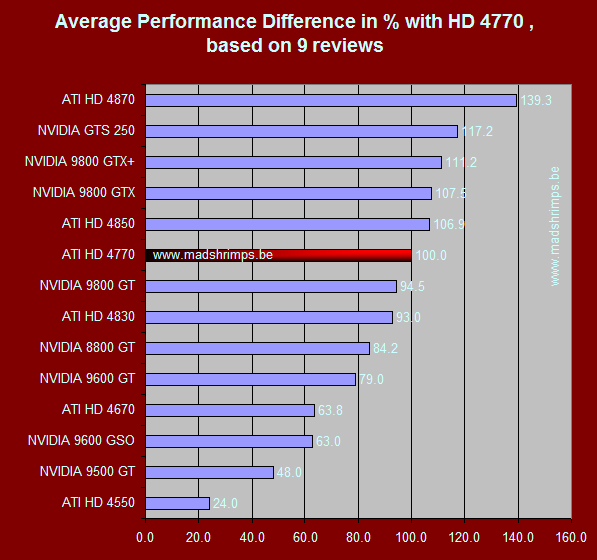 What the current price for 4770 ? garage sales didn't sell them and never update |
|
|
Oct 1 2010, 07:26 PM
Return to original view | Post
#15
|
|
Senior Member
3,762 posts Joined: May 2008
|
QUOTE(Onion-KiD @ Oct 1 2010, 06:07 PM) Maxieos, your card is like this? [attachmentid=1811320] exactly , the same card and look.So any option for it ? it's same temp 60'c idle when first get itNaybe need open it do cleaning if you no yet do. =) |
|
|
Oct 1 2010, 10:10 PM
Return to original view | Post
#16
|
|
Senior Member
3,762 posts Joined: May 2008
|
yeh , just tested again , downclock it to 150mhz and also the fan speed set to 10% the temp also the same range 58'c - 63'c no change at all.
So gpu is the problem but it run's well .I have a though of buying a new casing whether it helps to improve the air flow. CM 690 II would it be the right choice ? And , which series or ATI card run better than my card and lower temp like around 30'c - 40'c idle ? Added on October 1, 2010, 10:17 pm QUOTE(moshpit21 @ Oct 1 2010, 08:21 PM) HERE WE GO: GeCube ATI Radeon 3870 X-Turbo III: The link is actually idle or load ? http://www.hardwarezone.com.my/articles/vi...2450&cid=3&pg=7 This forum is from Sg where they mention normal idle is 40'c+ and load is 60'c++ http://forums.vr-zone.com/overclockers-hid...bo-iii-air.html I still suspect now my casing air flow.Since my processor is 60'c idle without any overclock This post has been edited by Maxieos: Oct 1 2010, 10:17 PM |
|
|
Oct 1 2010, 11:17 PM
Return to original view | Post
#17
|
|
Senior Member
3,762 posts Joined: May 2008
|
QUOTE(8tvt @ Oct 1 2010, 10:23 PM) why not change the fan @ 40%? My fan speed is at 50% idle if you look back my previous picture.otherwise just fit a better cooler.. Added on October 1, 2010, 10:29 pmand for ur information that he's using 100% fan speed and maybe during night which the temp even cooler.. enough ler i'm getting boring with this old stories.. QUOTE(Onion-KiD @ Oct 1 2010, 10:37 PM) Why set the fan speed at 10%? =.=" The fan speed way too low liao. Like 8tvt say, 40% or higher. I mean I set the underclock at 150mhz , fan speed 80% still 58'c .I tested running at 300mhz with 10% fan speed also the same 60'c.Even Latest card with that 10% fan speed will having high temp too. Which mean either the card factory temp is working at 60'c or either my casing less air flow until it stay at 60'c even it set 10'c fan speed = same , down clock = same . So conclusion , either change casing or apply those gel into the graphic card but I dont know how to disassemble it |
|
Topic ClosedOptions
|
| Change to: |  0.0485sec 0.0485sec
 0.59 0.59
 7 queries 7 queries
 GZIP Disabled GZIP Disabled
Time is now: 14th December 2025 - 01:09 PM |
 Quote
Quote