Welcome Guest ( Log In | Register )

Bump Topic Topic Closed RSS Feed
6 Pages < 1 2 3 4 > » Bottom

Outline · [ Standard ] · Linear+

 AMD Radeon™ Discussion V3, Prepare Red! Green has attacked!

views
     
JoBigShow
post Jul 22 2010, 05:02 AM

Ω Ξ Ψ Σ Д Ӫ Ж Π ✿
*****
Senior Member
969 posts

Joined: Jul 2009
From: ɹndɯnן ɐןɐnʞ


QUOTE(huzzLEE_82 @ Jul 22 2010, 01:19 AM)
u mean if 60fps & +-90++ fps wasn't noticeable bro?
huhuhuhu after all me still using old school w2207 yet...huhuhu cry.gif
*
Do not concern yourself for the highest FPS possible, what you need to focus on is to minimize FPS drop from 60 frames.

55~60.1 fps is where you want to be first, that means when you play a game try the 'Video settings' that you could get that range of fps...after that when you feel like you want nicer eye-candy looking graphics, you could compromise fps..

Your 5870 needs 1920 X 1080 24" LCD for it to be satisfied laugh.gif
Plus your rig (from your sig) deserves a big monitor! ohmy.gif
My pairing of 5850 with AOC 24" is superb rclxms.gif

QUOTE(moshpit21 @ Jul 22 2010, 02:58 AM)
was waiting for this too.. disappointed hahaha

btw how do you know if it is postponed till end of this month?
*
Tweeter bro...

http://twitter.com/CatalystMaker
JoBigShow
post Jul 24 2010, 04:14 AM

Ω Ξ Ψ Σ Д Ӫ Ж Π ✿
*****
Senior Member
969 posts

Joined: Jul 2009
From: ɹndɯnן ɐןɐnʞ


QUOTE(tuonn @ Jul 24 2010, 03:24 AM)
that is true information...
hd5850 is made for OC..yeah... smile.gif
*
By far, I think the 5850 has such an enormous headroom for OC'ing compared to any other cards I know...can OC more than 275mhz from it's stock clock (when you have aftermarket cooler) thumbup.gif
JoBigShow
post Jul 25 2010, 07:07 PM

Ω Ξ Ψ Σ Д Ӫ Ж Π ✿
*****
Senior Member
969 posts

Joined: Jul 2009
From: ɹndɯnן ɐןɐnʞ


QUOTE(gto87 @ Jul 25 2010, 02:43 PM)
I didn't think the performance matters by now. Maybe in a few months time, the price of HD5850 (the former best bang for buck)will drop eventually if more people buy GTX460. The price gap between HD5870 and HD5850 will be huge and considering that it's the best single core card in HD5000's line, ATI will have no choice but to drop it's price to reduce the gap.
*
Hope ATi don't do something as bullshitty as 'launching' a 5860 to bridge the gap between the 5850 and 5870 instead of just reduce the price of the 5870, ATi is generating reasonable revenues for the 5870 at it's current price, dropping it only possible if the production is more than the demands...but as you all know 5870 is in high demands worldwide despite it's price tag...

The 5830 is is the 'hot seat' for price reduction, the 5850 is 50/50 for a major price reduction, probably less than RM100... sad.gif

As for the 5770, not sure if it will get a decent price cut because from statistics, the 5770 has a pretty big demand in market, could be more than the 5850 because logically most people (moderate to average gamers, or within their budget, etc.) tends to get the 5770 because the 5850 is too pricey (the price gap is too wide)


Added on July 25, 2010, 7:46 pmTerry Makedon ( http://twitter.com/CatalystMaker ) confirms Catalyst 10.7 will launch on Monday, 26th July

http://www.legitreviews.com/news/8599/

That's like, tomorrow! thumbup.gif

This post has been edited by JoBigShow: Jul 25 2010, 07:46 PM
JoBigShow
post Jul 25 2010, 10:58 PM

Ω Ξ Ψ Σ Д Ӫ Ж Π ✿
*****
Senior Member
969 posts

Joined: Jul 2009
From: ɹndɯnן ɐןɐnʞ


QUOTE(Cinta Laura @ Jul 25 2010, 08:17 PM)
yeah hope the driver stable laugh.gif

i have a question, if we get better @ stable driver . can FPS at the game become more better than the not stable driver ? wondering  nod.gif
*
Run a benchmark (e.g. 3D Mark Vantage, in-game benchmark like in RE5, Dirt2, Crysis, etc.) right now with your current driver and then later (tomorrow hopefully) update the driver and run a benchmark again to see any improvements. biggrin.gif

I hope for the stability first and performance gain second...but since Nvidia steps up the game with their new cards, it would be fitting to gain a bit of performance from the drivers for the ATi cards...
it's been over 8 months already that the 5 Series was launched, perhaps it's about time for the Catalyst Team to fully unleashed these cards.... hmm.gif Even the previously 4 Series didn't take this long to be fully unleashed... whistling.gif
JoBigShow
post Jul 27 2010, 03:46 AM

Ω Ξ Ψ Σ Д Ӫ Ж Π ✿
*****
Senior Member
969 posts

Joined: Jul 2009
From: ɹndɯnן ɐןɐnʞ


QUOTE(DarkSilver @ Jul 27 2010, 03:23 AM)
I am not interested on this CCC 10.7 WHQL. There's even CCC 10.8 Beta 5 and CCC 10.7 OGL ES2 around officially.
I am waiting for TwL Modded Driver(latest driver based) instead.  tongue.gif  tongue.gif
Much more stable and better performance.  thumbup.gif
*
Yeah, just new features (or features that should have been available ages ago) that is new: http://blogs.amd.com/play/2010/07/26/ati-c...%E2%80%99s-new/

Do post a link when the TMD is available bro, I want more power! bruce.gif
JoBigShow
post Jul 27 2010, 04:48 AM

Ω Ξ Ψ Σ Д Ӫ Ж Π ✿
*****
Senior Member
969 posts

Joined: Jul 2009
From: ɹndɯnן ɐןɐnʞ


Alright, had just ran a benchy with 3DMark Vantage. biggrin.gif
[Powercolor 5850 stock clock @ 725/1000 ]

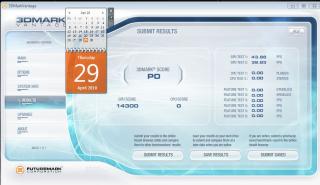
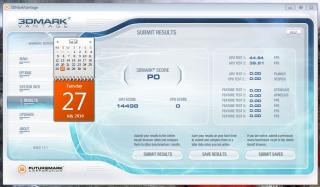
10.3 (the first driver to leap in performance and stability) vs. 10.4 (best WHQL driver so far for the the Catalyst 10 series) vs. 10.7 (current up-to-date driver)
let's see the progression:

10.3
Attached Image

10.4
Attached Image

10.7
Attached Image

From this synthetic benchmark:
I'm reluctant to say that the Catalyst Team has 'hit the wall' in bringing out more performance from the 5 Series, but somehow it's inevitable to say that the results indicates them running out of ideas of how to 'boost up' the performance majorly...only about 200 points improved from Vantage isn't convincing data....at least I was expecting 15xxx points dry.gif

This post has been edited by JoBigShow: Jul 27 2010, 05:02 AM
JoBigShow
post Jul 27 2010, 08:25 PM

Ω Ξ Ψ Σ Д Ӫ Ж Π ✿
*****
Senior Member
969 posts

Joined: Jul 2009
From: ɹndɯnן ɐןɐnʞ


QUOTE(faiz2036 @ Jul 27 2010, 03:37 PM)
my rig show the beta 10.7 perform better than 10.7 whql int 3dmark vantage. smile.gif
*
Official drivers (WHQL) have to follow a certain protocol and regulation which prioritize stability & safety first before performance.
That's why 'unofficial' drivers always edge on the performance part, but the stability at your own discretion.
Unless the modded driver (the outmost unofficial driver out there tongue.gif ) which are multiply tested to perform at highest peak with stability.

Just like a Nissan Skyline with it's RB engine, official gotta capped at 180km/h due to regulations, but when unofficially modded can reach easily to 300km/h biggrin.gif

QUOTE(CrossFirE @ Jul 27 2010, 05:33 PM)
hey guys, my budget to buy a GC is rm 250 to rm 300. which series should i get and which one is good? should i buy the one with second hand or new one and which series le?
*
For that budget, you might want to think about the Radeon HD4850, I think for 2nd hand you can nego below RM300.
But better get a new one with full length warranty, only below RM330 but you'll be satisfied with it for the next 2 years.. thumbup.gif
Any low-end 5 Series isn't worth that budget, plus you don't really need DirectX11 at the moment. hmm.gif

QUOTE(hasyir @ Jul 27 2010, 06:13 PM)
why i can only use screen resolution up to 1600x1200 only on my 32" fhd lcd?im using hd5850...

plus d picture quality is quite blurry...not tht sharp...
is it bcoz of my cable?
im using vga cable n dvi converter...
*
Haha, I thought you gonna go for the 5870? laugh.gif

Blurriness: What's the native res for your monitor? 720p or 1080p or 1080i?
Not an expert in monitors:
1) but I think you need to use the HDMI cable to hook onto your LCD to your card, see what does this do first,

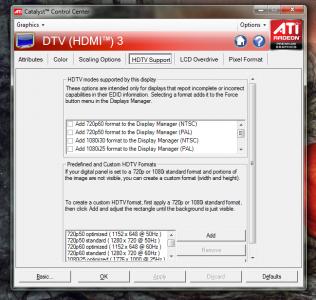
2)Alternately you should set the 'HDTV support' on the Catalyst Control Center.
Ok, Open CCC > Go to Graphics, choose Desktops & Displays, then right click the bottom small monitor icon and click Configure> HDTV Support
At this point, try adding the desired format, fiddle around until you can remedy this problem.

QUOTE(supernothing @ Jul 27 2010, 06:50 PM)
guys, who selling the cheapest 5850 now? feels like it's time to crossfire brows.gif
*
I see you have an Nvidia card in your sig for Phsyx, I wonder if can do CF while using Phsyx... hmm.gif


Added on July 27, 2010, 8:30 pm
QUOTE(Nosferatu @ Jul 27 2010, 03:44 PM)
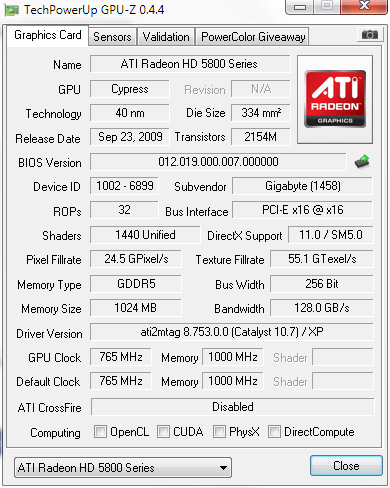
Is this normal? When using 10.6, I saw a check at DirectCompute.
Now using 10.7 and it seems like DirectCompute is absent. rclxub.gif
user posted image
*
Without DirectCompute, your card will find it erroneous to compute DIrectX 11 or can't properly process the shaders bro, I think you should clean re~install the drivers in Safe Mode...
Or probably just a major bug on the GPU-Z, regardless, do try to reinstall the driver...

This post has been edited by JoBigShow: Jul 27 2010, 08:30 PM

JoBigShow
post Jul 28 2010, 02:01 AM

Ω Ξ Ψ Σ Д Ӫ Ж Π ✿
*****
Senior Member
969 posts

Joined: Jul 2009
From: ɹndɯnן ɐןɐnʞ


QUOTE(hasyir @ Jul 28 2010, 01:18 AM)
i found a better deal for hd5850...hehehe
my lcd is fhd 1080p..
where to find d catalyst control centre?sory noob question...hehe
ill try out ur suggestion n will let u know d result later..thx bro!
*
Just 'Right Click' anywhere on your Desktop and select 'Catalyst ™ Control Center' OR it's that red 'ATi' icon in your Tasksbar.
Remember to try both of my troubleshoots ( 1. try use HDMI cable and 2. fiddle with the Catalyst HDTV settings)

Some LCD reso are maxed @1600x1200, but DO PROVIDE details of this LCD monitor of yours, what exact brand, series, etc....probably I can look around about your monitor.. nod.gif
JoBigShow
post Jul 29 2010, 12:16 AM

Ω Ξ Ψ Σ Д Ӫ Ж Π ✿
*****
Senior Member
969 posts

Joined: Jul 2009
From: ɹndɯnן ɐןɐnʞ


QUOTE(hasyir @ Jul 28 2010, 01:51 PM)
im using LG 32LF20FR lcd...
i checked at their website d lcd should be able to use 1920x1080 resolution..

so now i have to get a hdmi cable n update my ccc?
rclxub.gif

btw, how do u guys monitor your cpu temp?what software are u guys using?
thx for all d helps! rclxm9.gif
*
To monitor your CPU temp, you need to download: http://www.techpowerup.com/downloads/1691/..._Temp_3.40.html
Once you installed the software, do drag the '.exe' file to : Start > Open Programs > Startup (folder) so you can start monitoring your cpu temp every time you started your PC.

Anyways, back the LCD issue, I've check your LG, and it's a pretty great LCD for it's price.

Now you need to initiated the 1920 X 1080 reso, before buying/getting an HDMI cable:
~do fiddle around with the LCD's Setting if there is an option to change resolution
~usually you change resolution from Windows & Catalyst, so open up Catalyst Control Center or right click on the Desktop an click 'Screen Resolution' to change it via OS.
In Catalyst, go to: Graphics > Desktop Properties to select your reso.

I think you don't need to get HDMI cable considering you haven't change the resolution settings yet, probably by default the reso is 1600 x 1200, so you need to set it to 1920 X 1080.

QUOTE(CrossFirE @ Jul 28 2010, 04:45 PM)
thanks bro.. i heard that some of the lowyat shop offer rm 299 only for this card? is this card hot and noisy?
*
Nah, not noisy or too hot like the 9800GT, but for it's price, it's has good performance...so value for money.
Yeah, Low Yat Plaza want to clear stock so it's selling pretty cheap these days.
JoBigShow
post Jul 29 2010, 12:53 AM

Ω Ξ Ψ Σ Д Ӫ Ж Π ✿
*****
Senior Member
969 posts

Joined: Jul 2009
From: ɹndɯnן ɐןɐnʞ


QUOTE(hasyir @ Jul 29 2010, 12:44 AM)
mind telling me what is d correct temp tht im looking for?

regarding d resolution prob, i already try ur method..both using d ccc n via OS..
but still d max resolution it can go is 1600x1200..

what else can i do bro?if u or anyone tht think can help me out here n happen to have msn id or ym id...do pm me k..
im really rclxub.gif  now...huhuhu
*
CPU temps depends on the cooler itself, stock cooler have high LOAD temps and mediocre IDLE temp.
Since you have a quad ( i5) there will be up to 3 proc you need to monitor.

For better cooling, you need to get aftermarket coolers. rclxms.gif

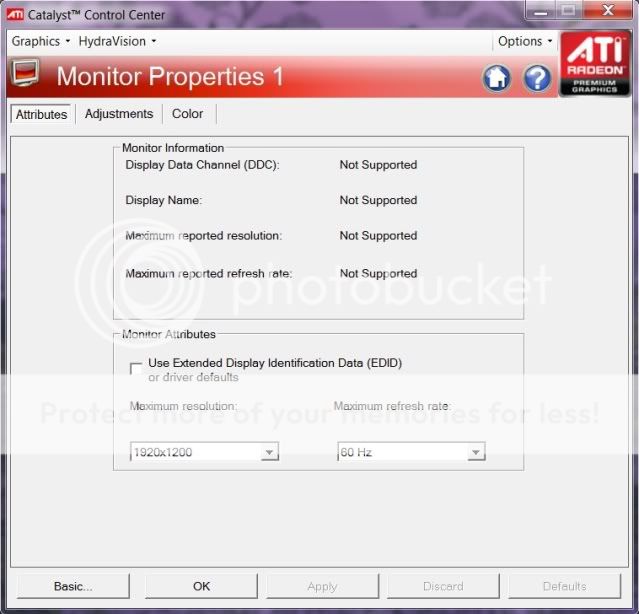
Alright, have you found this on Catalyst yet?
Attached Image


Added on July 29, 2010, 1:04 am
QUOTE(^KamilskaZ^ @ Jul 29 2010, 12:18 AM)
bought a new machine with amd system.

amd x2 245
Tforce TA770+ mainboard
Powercolor HD 5770 PCS+
2gb kingston ddr2 800mhz
WD Green 500gb
LG dvdrw
Coolermaster Extreme 460watt.

gonna build up tomorrow.but can this psu enough to load Powercolor HD 5770 PCS+?
*
I've checked the CM 460 Ex specs, the rails are rated @ 18A with 312W. Not too bad for a '460W' PSU.
QUOTE
ATI rates the Radeon HD 5770 for 18W of power consumption at idle and 108W maximum board power at load

From that statement, you'll have decent headroom...meaning can overclock big~time, BUT only recommended for SINGLE card,
Cross-Firing is way too tight on the headroom hence needs higher wattage PSU if you plan to do so. (like 600W for safe and decent headroom)


This post has been edited by JoBigShow: Jul 29 2010, 01:04 AM
JoBigShow
post Jul 29 2010, 01:12 AM

Ω Ξ Ψ Σ Д Ӫ Ж Π ✿
*****
Senior Member
969 posts

Joined: Jul 2009
From: ɹndɯnן ɐןɐnʞ


QUOTE(hasyir @ Jul 29 2010, 01:05 AM)
what kind of aftermarket cooler?
so how do i know my current temp reading is acceptable or not?

where do u get tht option on ccc?
i dont have it on my ccc...
*
Open CCC > Go to Graphics, choose Desktops & Displays, then right click the bottom small monitor icon and click Configure> HDTV Support

But I think you need the HDMI cable to get this sweat.gif
Just try anyways to see if there's similar settings for the VGA/DVI... (I forgot since I stop using D-sub VGA & DVI since I got my 5850 end of last year..)

Anyways there's quite a number of settings in Configure for you to fiddle around with, see if you can manage to set it to the right reso...
JoBigShow
post Jul 29 2010, 01:55 AM

Ω Ξ Ψ Σ Д Ӫ Ж Π ✿
*****
Senior Member
969 posts

Joined: Jul 2009
From: ɹndɯnן ɐןɐnʞ


QUOTE(hasyir @ Jul 29 2010, 01:32 AM)
even after i go to configure...theres no 'HDTV Support" option..
i think maybe bcoz my lcd is detected as crt monitor?
do i need a driver for my lcd?but it doest comes wif any driver when i bought it...

here's d screenshot:
» Click to show Spoiler - click again to hide... «

*
Great, it detects the proper reso for this monitor is 1920 X 1200, but now to get it to set it to that? hmm.gif

The HDMI cable will give you more options in Configure though, like 'Attributes', 'GPU Scaling', 'Scaling Options', 'HDTV Support', 'LCD Overdrive' and 'Pixel Format'.

With your screenshot, the only option is to tick and untick the EDID. sweat.gif

Indeed there's a miscommunication between your card and the LCD monitor, Catalyst is limited to rectify this, so what's left is your LCD Settings itself.
There's has to be an option in that LG to choose between inputs. I know my 32" Sharp LCD in the living room has this setting. (to choose from the analogue Astro input, or DVD digital input, etc.)

Still if you can't find the options, the last resort is to get a HDMI cable. (P.S.: No need to buy those expensive 1m Monster™ HDMI cable, save money and get an alright cable below RM40)
JoBigShow
post Jul 29 2010, 07:23 AM

Ω Ξ Ψ Σ Д Ӫ Ж Π ✿
*****
Senior Member
969 posts

Joined: Jul 2009
From: ɹndɯnן ɐןɐnʞ


QUOTE(gto87 @ Jul 29 2010, 06:28 AM)
http://www.techspot.com/review/283-geforce...radeon-hd-5800/

This is the latest benchmark (June 2010) done using all 4 top GCs in market today. I'm sorry if somebody posted this before, but just to highlight that this is one of the most conclusive review for time being.

I'm not a fanboy and I'm not saying ATI is winning currently, but only GTX460 (a tweaked G92 chip iinm) impressed me in the current GTX400 series cards.
*
Marketing~wise, the GTX460 scores points with the consumers because of it's price, value~per~performance.
I would have gotten the GTX460 over the 5850 if they were to be launched at the same time because the 5850 falls a bit high up the price range for most consumers (noted that majority of GC consumers aren't working/career folk with two to three iPhones)

But again, if you take every graphic cards and stack them up from low, mid to high end, the 5850 is still bang~for~the~bucks overall, it's balanced performance (pwned all mid~end cards and considered high-end) and price tag (lowest price of the high end cards...excluding 5970 because that card is considered above high~end)

Having said, it would be a big mistake if I were to choose the GTX460 over the 5850, because the fact of the matter is, the 5850 dwells in the High-End card category and the GTX460 only dreams to be there.. (that's why there has the OC and SOC Version) tongue.gif
So if you want a piece of a premium card and lowest of it's price, the 5850 still the choice...AT THE MOMENT that is... nod.gif


Anyways the review, I like the new method of testing the cards, it's more practical then just running those "auto-pilot" benchmarks...
So they are suggesting the HD5870 wins the round? whistling.gif

This post has been edited by JoBigShow: Jul 29 2010, 07:25 AM
JoBigShow
post Jul 29 2010, 09:32 PM

Ω Ξ Ψ Σ Д Ӫ Ж Π ✿
*****
Senior Member
969 posts

Joined: Jul 2009
From: ɹndɯnן ɐןɐnʞ


QUOTE(allsick @ Jul 29 2010, 06:50 PM)
anyone running on 2 monitors and having flickering issues when playing game/video? its f***ing annoying
*
Yeah, people sometimes got this flickering thingy with dual monitor.
Have you update to Catalyst 10.7?
According to the release notes, this issue should have been resolved with this driver update.

http://www2.ati.com/relnotes/catalyst_107_release_notes.pdf

If still having this issue with 10.7:
I'm not sure that this hotfix does the job, but do try it anyways and see if it fix your problem. nod.gif

http://www.mediafire.com/?5s3nxoe7s32j2e3

THIS IS CCC 10.7 HOTFIX CONSIDERING YOU ALREADY UPDATE THE DRIVER.
IF HAVEN'T YET UPDATE, GO TO: http://game.amd.com/us-en/drivers_catalyst.aspx

Do report back if the problem still occurs bro..


Added on July 29, 2010, 9:52 pm
QUOTE(victor2212 @ Jul 29 2010, 02:56 PM)
May i know is 10.7 ccc good? im still using 10.4 . cause 10.5 has heat issues, 10.6 still has it also.
*
Yup, the 10.5 is no where recommended to be used.
Ok, if you haven't encounter any issues, then just stick to the 10.4, these latest drivers are more into fixing stuff rather than performance boost.
Regardless, I'm using 10.7 now, I think is as good as the 10.4 but with additional bug fixes (e.g. VLC Player)

QUOTE(law1777 @ Jul 29 2010, 03:10 PM)
as always. ATI is always having the driver issues when their cards are superb
*
Prolly the cards are too superb for them to handle in the first place tongue.gif

QUOTE(huzzLEE_82 @ Jul 29 2010, 03:28 PM)
ok just know CCC 10.7 been released...
so later after office hour i can try it...
now using 10.6.....is there any significant improvement in 10.7?
*
Just few improvements, but it's always recommended to update drivers to avoid any possible oncoming issues.
BTW, the 10.7 does a bit better compared to 10.6, only less than 10 minutes on the PC to update this driver, so go for it. biggrin.gif

QUOTE(selferino @ Jul 29 2010, 03:30 PM)
all i noe the major one just the one regarding the acceleration with conjuction with latest VLC player..
*
VLC Player... been using that even before 8800GT was released and never encounter such problems with it. hmm.gif

Don't knowwhy the ATi Team makes such a fuss over it prior to the release of Catalyst 10.7. (could have done this since Catalyst 10.1)
I got the nagging feeling that they are running out of ideas of how to push the cards for more performance, thus trying to look "busy" when working on improving the VLC Player.

This post has been edited by JoBigShow: Jul 29 2010, 09:52 PM
JoBigShow
post Jul 29 2010, 11:01 PM

Ω Ξ Ψ Σ Д Ӫ Ж Π ✿
*****
Senior Member
969 posts

Joined: Jul 2009
From: ɹndɯnן ɐןɐnʞ


QUOTE(allsick @ Jul 29 2010, 10:45 PM)
My gigabyte5850oc runs at 400/1200 at idle, and during movies .
Flickering issue disappears if i use AMDgpu tool to tune it to a higher frequency. 950/1200. Maybe its the idle problem.
*
How is that happening? hmm.gif
At any rate you should be set the frequency to it's stock clocks.
BTW that's a good OC! thumbup.gif Now it is leveled as the 5870. laugh.gif

How you manage to stabilize it? I need to bump up the voltage to 1.15v (same as 5780 stock voltage) to get past 900mhz on my PC 5850.
Anyways, if you CAN'T get it fix via driver update (or any previous drivers), then it's for sure the VGA BIOS...

QUOTE(kahjye @ Jul 29 2010, 10:48 PM)
you`re using a 10.5? 10.6?
did u OC it in ur CCC?
*
Could be that, maybe forgot to revert back to stock clock in Catalyst Overdrive? These things happens...

This post has been edited by JoBigShow: Jul 29 2010, 11:03 PM
JoBigShow
post Jul 30 2010, 08:13 PM

Ω Ξ Ψ Σ Д Ӫ Ж Π ✿
*****
Senior Member
969 posts

Joined: Jul 2009
From: ɹndɯnן ɐןɐnʞ


QUOTE(allsick @ Jul 30 2010, 07:55 PM)
happened the whole time from 10.1.
*
READ THIS THREAD:
Title: ATI 5850 Flicker at desktop? OC'ing fixes?

http://www.overclockers.com/forums/showthread.php?t=626988

This guy has the exact issue as you, and with lots of replies on the post, I didn't read the whole thing, but probably you can find a solution there.
JoBigShow
post Aug 1 2010, 01:24 AM

Ω Ξ Ψ Σ Д Ӫ Ж Π ✿
*****
Senior Member
969 posts

Joined: Jul 2009
From: ɹndɯnן ɐןɐnʞ


QUOTE(Eugene91 @ Jul 31 2010, 03:43 PM)
My ASUS EAH5770 CUCore can reach max temps 78C idle-ing around 44C-46C @ stock voltage 1.2v

Now undervolted to 1.125v which normal 5770's voltage are set at.. max temps 72C idle-ing 44C-46C..

I wonder why ASUS set the voltage much higher.. the clocks Core/Memory are stock 5770 clocks.. hmm..

Would I run into any problems running it undervolted? not at stock 1.2v ?
*
Seriously 1.2V for the 5770 TOP... more than the 5850, only 1.087v at stock, and I even manage to stabilized it at 1.0v with stock clocks of 725/1000.
Isn't this card was suppose to shipped with engine/core voltage at 1.125V??? hmm.gif

Anyways, most owners bump up to 1.285v ~ 1.299v to be able to do 1000mhz (with 1400+mhz memory) clock with this card drool.gif
I don't recommend to past above 1.3v unless you have sufficient cooling though.

Yeah, sometimes undervolting/underclocking can be as good as overvolting/overclocking to see how low, or how 'green' can a card be operated at a stable condition.
I think you can undervolt a little bit more if you are concerned of the voltage, just keep in tab the stability of the card. nod.gif
JoBigShow
post Aug 1 2010, 11:17 AM

Ω Ξ Ψ Σ Д Ӫ Ж Π ✿
*****
Senior Member
969 posts

Joined: Jul 2009
From: ɹndɯnן ɐןɐnʞ


QUOTE(V3nz @ Aug 1 2010, 10:26 AM)
will this spoilt my gc or pc? sweat.gif
*
No.
When you do underclocked the card, do pay attention to such encounter with anomalies such as: black-screen (sound still available, but most of the time just black screen only), flickering, vertical lines, pc freezes, etc.
If not, then its' still stable. nod.gif I yes, just restart the PC and bump up an increment of voltage and see if stable.
But of course this would usually happen when the card in on full 3D mode when playing games...

Bro, I used to like to underclock gc and proc bcoz it tests the hardware of how low of the voltage needed to operate stably, plus can be environmentally friendly in the rig tongue.gif
JoBigShow
post Aug 1 2010, 11:29 AM

Ω Ξ Ψ Σ Д Ӫ Ж Π ✿
*****
Senior Member
969 posts

Joined: Jul 2009
From: ɹndɯnן ɐןɐnʞ


Bro Darksilver and other 'mod driver' users if you're reading this:

TwL from guru3d forum has updated the latest mod driver: Final Build v3.73 10.8b5 baseline - [01.08.2010]

Have you guys tried it yet? biggrin.gif
Just itching to try but not yet confident in these unofficial drivers sweat.gif

http://forums.guru3d.com/showthread.php?t=322616

This post has been edited by JoBigShow: Aug 1 2010, 11:30 AM
JoBigShow
post Aug 2 2010, 04:45 AM

Ω Ξ Ψ Σ Д Ӫ Ж Π ✿
*****
Senior Member
969 posts

Joined: Jul 2009
From: ɹndɯnן ɐןɐnʞ


QUOTE(wyyam @ Aug 1 2010, 06:23 PM)
I nid a little help here..
When i 1st time install CCC 10.7, n restart afterward, i cant open the CCC software writing there "GPU not suppported" wat is the problem?
But after reinstall back, it went back normal.
I scare got problem with the installation.. Is it normal?

N do i nid to install the latest hotfix for it? is it recommended? since i got no problem at the moment..

ATI Catalyst™ 10.5a Hotfix - is it the latest hotfix?
but i m using 5850, so shud i go n install it?
*
Do you always install updated drivers without clean installation every time?
Could be that after all these overlaps of registries (derived from multiple installation of drivers without cleaning out the previous drivers) could cause the new drivers and the "residues" of the old drivers to tangled up.
You should un-install the drivers in Safe Mode using software such as 'Driver Sweeper', 'Driver Cleaner Pro', etc. And then proceed with clean/fresh installation.

I'm not that convinced that 10.7 is the culprit of the problem since this driver works fine.
But if you did the clean installation but still fail, then you should opt for a previous driver than 10.7, like the 10.4. (But NO to 10.5, it's the worst driver so far)

QUOTE(DarkSilver @ Aug 2 2010, 12:03 AM)
I am going to test this out. However, I need to download it right now(slow).
My house had been run out of electric for days(until now haven't fix) due to my land lord didn't pay the TNB.  doh.gif  doh.gif
Now, I need to use my friend's slow internet connection to download and bring my Desktop over his place to test.  sad.gif
*
Sad, no matter how powerful a rig is, without electricity, it's hopeless wacko.gif

Alright, I'll be keen to hear from your reports on this mod driver icon_rolleyes.gif

6 Pages < 1 2 3 4 > » Top
Topic ClosedOptions
 

Change to:
| Lo-Fi Version
0.0226sec    0.81    7 queries    GZIP Disabled
Time is now: 4th December 2025 - 06:11 PM