

QUOTE(lloyd1030 @ Jul 12 2010, 09:24 PM)
Anyone here using SEA 02.36 sbf? Do you have the speech to text button in your soft keyboard and the search widget?

U mean something like this?http://forum.lowyat.net/topic/1445162
Motorola Milestone official thread V2, Flashing sbf & rooting guides @ 1st post
|
|
 Jul 14 2010, 06:45 PM Jul 14 2010, 06:45 PM
Return to original view | Post
#1
|
 
Junior Member
287 posts Joined: Jan 2007 
|
QUOTE(lloyd1030 @ Jul 12 2010, 09:24 PM) Anyone here using SEA 02.36 sbf? Do you have the speech to text button in your soft keyboard and the search widget? U mean something like this?http://forum.lowyat.net/topic/1445162 |
|
|
|
|
|
Aug 12 2010, 11:24 PM
Return to original view | Post
#2
|
|
Junior Member
287 posts Joined: Jan 2007
|
Thank goodness for Motorola to have included a dedicated 3D Graphics Processor Unit (GPU) in our Milestone.
Did u know that HTC Desire and Nexus ONE cannot play certain 3D games like N.O.V.A while our Milestone can? I've downloaded and installed N.O.V.A on my Milestone and could play it while those on HTC Desire and N1 cannot play. Samsung Galaxy S also can play N.O.V.A bcs it also has a dedicated 3D GPU. This post has been edited by pcphobic: Aug 12 2010, 11:25 PM |
|
|
Sep 10 2010, 07:04 PM
Return to original view | Post
#3
|
|
Junior Member
287 posts Joined: Jan 2007
|
OMG. It's so easy to root and overclock the Motorola Milestone! Woohoo!!!
http://www.youtube.com/watch?v=eoG0NCVZHeM |
|
|
Sep 12 2010, 02:16 PM
Return to original view | Post
#4
|
|
Junior Member
287 posts Joined: Jan 2007
|
QUOTE(Anti-Missle @ Sep 11 2010, 10:15 PM) Just enquiring, Not true! I think you mean cannot boot custom ROM. I heard that some milestone models can not be rooted??? If it is really true, which ones should I look out? There is a difference between ROOT and Custom ROM. My Milestone is "rooted". Now I have super admin access to my phone. It is still running on the stock Android 2.1 ROM. It's so easy to root and overclock the Motorola Milestone. Just watch my video below: http://www.youtube.com/watch?v=eoG0NCVZHeM |
|
|
Sep 13 2010, 01:15 AM
Return to original view | Post
#5
|
|
Junior Member
287 posts Joined: Jan 2007
|
QUOTE(nubnub75 @ Sep 12 2010, 10:30 PM) Hi everybody! I'm looking for a good GPS phone that can give me free turn by turn audio directions. Is the Milestone any good? And what's the price for an original Milestone now? Thx for your time. Do to some reason, Google has disabled the Voice Turn By Turn Navigation for Android phones outside of the USA.But no worries, because some kind soul has been cracking Google Map and post in on the web for us to download a special version called Brut Google Map (now is version 16). Using the Brut Google Map, I get the some feature as the original Google Map with the added function of the Voice Turn by Turn Navigation. See my video below: http://www.youtube.com/watch?v=xyHOO7B38u4 Alternative is to install Papago X5 with MalFree Map (which I am also using). This post has been edited by pcphobic: Sep 13 2010, 01:15 AM |
|
|
Sep 13 2010, 08:50 PM
Return to original view | Post
#6
|
|
Junior Member
287 posts Joined: Jan 2007
|
QUOTE(haroldz123 @ Sep 13 2010, 01:40 PM) give link to latest brut google map Not true. Root only gives you Super User access to your phone. It does not change anything. I am able to access and download apps via the Android Market when connected to wi-fi on my rooted Milestone that is still running stock Android 2.1i unroot using androot app but found out market cannot access the internet using wifi Added on September 13, 2010, 9:02 pmBrut Google Map version 16 http://dl.dropbox.com/u/10439360/maps4.4.0.4414-brut16.apk Added on September 13, 2010, 11:04 pmNo problems. Good thing about Android is that it has a community that is open and shares info. Lot's of Android forums on the net too and lots of open source apps out there too. This post has been edited by pcphobic: Sep 13 2010, 11:04 PM |
|
|
|
|
|
Sep 14 2010, 05:35 PM
Return to original view | Post
#7
|
|
Junior Member
287 posts Joined: Jan 2007
|
QUOTE(haroldz123 @ Sep 14 2010, 03:48 PM) rooted using androot, OC using milestone overclock Certain apps like MotoNav can only be removed using a Terminal Emulator like this app:now tryin to remove some bloatware aka stupid trial stock app http://www.appbrain.com/app/com.android.term After u have installed it, go google for "How to remove or uninstall motonav from motorola milestone" and u will find a few forum postings teaching you the Linux Command line to back up and remove it. I've removed my original MotoNav already. QUOTE(edmundlah @ Sep 14 2010, 09:47 AM) Thanks for the link pcphobic! No worries. Glad to share info with you all. Another tip to make your stock Android UI and App Launcher Drawer more responsive is to use LauncherPro. You can find it from the Android Market. It will transform your UI to become smoother and more responsive. This post has been edited by pcphobic: Sep 14 2010, 05:44 PM |
|
|
Sep 15 2010, 02:08 AM
Return to original view | Post
#8
|
|
Junior Member
287 posts Joined: Jan 2007
|
QUOTE(Rubik @ Sep 14 2010, 10:05 PM) I currently have 4 GPS programs installed, Google Navigation (Brut), Papago X5, Sygic Mobile Maps & MotoNAV . After testing them, i think the best is Google Nav followed by Sygic I agree. Google Maps Navigation is the easiest to use. When I first tried using Papago X5, I sat in my car for nearly 15 minutes to figure out how to use it.I also have the cracked version of MotoNav (did u know MotoNav is actually rebranding of iGO My Way?) and found that the map is out of date. But so far, Papago X5 is the best option if u want to use GPS without 3G. Added on September 15, 2010, 2:09 am QUOTE(edmundlah @ Sep 14 2010, 09:40 PM) Aw.. man.. need to pay for the widgets for the Launcher pro UI.. No need if u know how. This post has been edited by pcphobic: Sep 15 2010, 02:09 AM |
|
|
Sep 19 2010, 02:09 PM
Return to original view | Post
#9
|
|
Junior Member
287 posts Joined: Jan 2007
|
QUOTE(Charger67 @ Sep 18 2010, 10:10 PM) Hi, i just switched to milestone from HTC MAGIC (2.2 cynogen mod). Bro, please update your Android version to Android 2.1My milestone come with only android 2.0, there are few problems i ecountered, First, the market seems to inferior to magic, i can't even search some of the programs i using on my magic last time like Launcher Pro, ADW Launcher, Opera browser, DSP manager.... to name a few Some of them, Even i download manually it won't install or run properlly. Is it becouse of the android version or this phone isn't compatible with this programes, anyone using those programes i mentioned above?  Second, area around the phone speaker seems heated up after talking or using the phone for some time, feels like going to burn my ears  Third, i found the destop scrolling seems to be more laggy than magic on original clock speed, is this becouse of the os version or its normal?  My milestone did'n come with SD card, can't use MotoNav, anyone have the source or mind to share?  I already rooted the phone, any stable ROMS to recommend? Apart some problems i mentioned, milestome is still a great phone  Added on September 18, 2010, 10:14 pm Yeah, hard to find nowdays, after searching many stalls on SG Wang, felt lucky i can grab one The reason u cannot find those apps u mentioned on the market is because those apps are for Android 2.1 and above. |
|
|
Sep 19 2010, 05:36 PM
Return to original view | Post
#10
|
|
Junior Member
287 posts Joined: Jan 2007
|
QUOTE(Motorola Rule @ Sep 19 2010, 04:16 PM) guys, i got a prob witjh my ms. when i plug in the charger, the phone immediately acts all weird up. but when i pull out the charger, it seems to be fine... What u mean weird? Did u plug in properly? Can u take a video of this weird situation and show us?pls help me motorola sifus |
|
|
Sep 19 2010, 08:49 PM
Return to original view | Post
#11
|
|
Junior Member
287 posts Joined: Jan 2007
|
QUOTE(sanosizo @ Sep 19 2010, 05:42 PM) 1. Some ppl/shop sometimes labelled the xt720 as ms2 Not just Milestone heat up... all other phones using 3G does that too.2. All ms should be updated to 2.36 becos it fixes a lot of bugs 3. If your phone acting weird when plugged in to wall charger, is it the original charger or not? 4. Its normal for ms to heat up. Its pretty scary actually, happens mostly if its on 3g network. Normally I only use 3g when tethering or browsing heavy pages. |
|
|
Oct 5 2010, 12:41 AM
Return to original view | Post
#12
|
|
Junior Member
287 posts Joined: Jan 2007
|
Ferrari Gets a Limited Edition Motorola Milestone
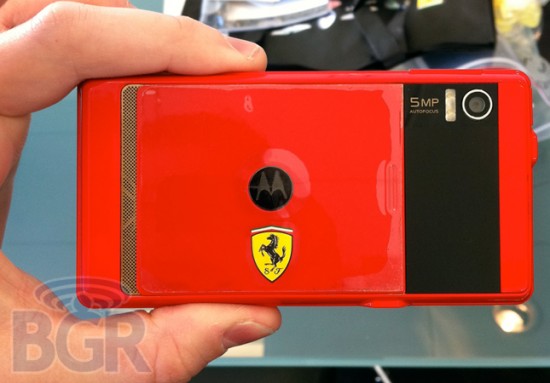 http://phandroid.com/2010/10/04/ferrari-ge...rola-milestone/ Added on October 5, 2010, 12:44 am QUOTE(donnwyt @ Oct 1 2010, 04:13 PM) hey guys, any recommendation for an anti-fingerprint screen guard for the milestone? First of all, I heard our screen are pretty resistant to scratches. For me, I don't use any screen protector. I put a phone sleeve or jacket (I am using a nokia phone pouch) on it b4 putting it into my pocket.  Also if you use the side edges of your finger tips, u will get less fingerprint smudges. http://www.youtube.com/watch?v=vw9egIY0XbQ This post has been edited by pcphobic: Oct 5 2010, 12:46 AM |
|
|
Dec 24 2010, 02:43 AM
Return to original view | Post
#13
|
|
Junior Member
287 posts Joined: Jan 2007
|
I have tried 3 custom ROMS for Milestone and they are Cyanogenmod 6, Cronos and G.O.T
Both Cyanogenmod and Cronos Froyo are installed via the Open Recovery Menu from Androidaini while G.O.T is installed via a software called RSDlite via your Windows PC. From my experience, newbies would find it easier to install G.O.T The 2 recommended G.O.T firmware to use are RTUK and RTEU. I have tested the UK Froyo firmware (RTUK) for my Starhub Motorola Milestone and it is pretty good. One bonus... it removed that ugly Starhub logo with the original "M" Motorola logo at the start up screen. For more info on how to install G.O.T please go to http://forum.xda-developers.com/showthread.php?t=811221 The only bug about G.O.T is that Facebook don't sync with your phone contacts. This post has been edited by pcphobic: Dec 24 2010, 02:45 AM |
|
|
|
|
|
Jan 2 2011, 01:45 AM
Return to original view | Post
#14
|
|
Junior Member
287 posts Joined: Jan 2007
|
The first thing all Android owners and newbies should do is sync your contacts with Google Contacts.
That way, u won't have to worry about backing up your contacts or losing your contacts if u lost your phone. I have factory reset my phone for fun many times without worry. Each time I reset, I login to my google account and viola!!! magically.. all my contacts reappear again in my freshly reset android phone. So please... please... import your contact list into Google Contacts aka Gmail Contacts List (My Contacts Group). I have ZERO contacts stored in my SIM card.. none at all. http://www.youtube.com/watch?v=vyJkH9YUYq0 Added on January 2, 2011, 1:57 am QUOTE(easygoer @ Dec 31 2010, 12:23 PM) as a milestone user, we are hijacking its bootloader in its very early stage (before it loads its original kernel -> booting (loading M logo)). I found that out the hard way. The trick is to prevent the phone from booting up to normal android mode. For me, forced it to reboot into the Boot loader mode (press power and up on the D pad) and then leave it there until RSDLite status says "PASS".u have to make sure that your milestone didn't boot its kernel after flashing vulnerable recovery. to be spesific, when you flash vulnerable recovery (vr) using RSDlite, it sure will reboot itself. while rebooting, you have to get in to recovery mode as soon as possible before M logo appears. if you can't then you have to flash vr again. hope it helps. But I later I found out there was an easier more straight forward way... which is to install the G.O.T Custom Froyo rom for Milestone. This G.O.T rom is flashed via RSDlite with the vulnerable recovery already built into the sbf file. So for newbies, the best way is first try out G.O.T custom ROM. I followed the instructions from http://forum.xda-developers.com/showthread.php?t=811221 After that, my Milestone was free to install CM6 and Cronos. This post has been edited by pcphobic: Jan 2 2011, 01:57 AM |
|
|
Jan 22 2011, 05:58 PM
Return to original view | Post
#15
|
|
Junior Member
287 posts Joined: Jan 2007
|
For those Motorola Milestone owners who cannot wait for Froyo,
check out Cronos custom ROM for Milestone from http://www.cronosproject.org/forum/viewforum.php?f=59 Check out the cool flipping menu and USB Tethering. http://www.youtube.com/watch?v=cSF8z7KjRPw http://www.youtube.com/watch?v=Ma0-V4luLjg |
|
|
Jan 25 2011, 10:57 PM
Return to original view | Post
#16
|
|
Junior Member
287 posts Joined: Jan 2007
|
|
|
|
Mar 16 2011, 03:15 PM
Return to original view | Post
#17
|
|
Junior Member
287 posts Joined: Jan 2007
|
|
|
|
Mar 17 2011, 01:40 AM
Return to original view | Post
#18
|
|
Junior Member
287 posts Joined: Jan 2007
|
QUOTE(cyewe @ Mar 16 2011, 11:53 PM) milestone user reporting in I am using CyanogenMod 7 (Gingerbread) now. Still alot of bugs and battery drain issues. just got my phone today. rooted and flashed to latest cm6. very nice and firm phone just got my phone today. rooted and flashed to latest cm6. very nice and firm phone  anything i should know more about good roms/other mods ? anything i should know more about good roms/other mods ?Added on March 17, 2011, 12:18 amanyone got this similar prob, my milestone battery status shows 40% then after use like 10mins, still 40%, then few moments later, terus drop to 30%. never go through 39%,38%.... any fix ? For Custom Froyo, I used to use CRONOS Froyo ROM |
|
|
Apr 2 2011, 10:31 AM
Return to original view | Post
#19
|
|
Junior Member
287 posts Joined: Jan 2007
|
Anybody tried Modern Combat 2?
Added on April 2, 2011, 10:34 am QUOTE(Ratatouyee @ Mar 31 2011, 10:33 AM) Hello bros... If I were u, I would break the locked bootloader for good with G.O.T update and go the Custom ROM way. I am currently on CRONOS Gingerbread ROM.Need some help here,I'm using Milestone 1st generation -upgraded to froyo 2.2.1 , rooted it using Superoneclick v1.5.5-short fuse, then install Milestone overclock 1.4.7, once click apply the overclock my phone just reboot and the overclocking fail..haih...why this will happen on my phone...now my phone slow like snail...even want to make a call also lazy.. Pls help bros... Thanks http://forum.xda-developers.com/showthread.php?t=811221 This post has been edited by pcphobic: Apr 2 2011, 10:34 AM |
|
|
Apr 26 2011, 01:35 AM
Return to original view | Post
#20
|
|
Junior Member
287 posts Joined: Jan 2007
|
Hi do u want a lag free Custom Gingerbread ROM (Android 2.3.3) that allows u to play Angry Birds and Modern Combat 2?
Do you want your Milestone to be snappy like in the video below? http://youtu.be/z1vBcNsDkn0  If you do then use what I use. I did the following things to get a smoother snappier experience on Cronos Ginger ver.1.1 1) LauncherPro Plus ver.0.8.3 2) Overclocked 3) Installed Autokiller Memory Optimizer 4) Tweak SD card cache size for faster read/write speed 5) Apps to Ext 2 (optional) You can get a copy of Cronos Ginger ver.1.1 from this link: http://cronos.bertol.de/CGMM-1.1.0_.zip 1. LauncherPro Plus ver.0.8.3: Advanced Settings > Memory Usage Settings > Memory Usage Preset = Light Advanced Settings > App Drawer > Opening speed = 10 Homescreen Settings > Number of screens = 3 (optional) Download: http://dl.dropbox.com/u/22333837/launcher.v0.8.3.apk 2. Overclocked settings: CPU speed: 900Mhz Voltage: 56vsel How to: http://www.cronosproject.org/forum/viewtop...&p=31686#p31686 3. Autokiller Memory Optimizer: Hidden app = 24 Content provider = 28 Empty app = 28 Ref: http://www.cronosproject.org/forum/viewtopic.php?f=61&t=912 Also see Settings to play Modern Combat 2: http://www.cronosproject.org/forum/viewtopic.php?f=61&t=925 4. Tweak SD card cache size for faster read/write speed: See this posting for instructions - http://www.cronosproject.org/forum/viewtopic.php?f=61&t=944 5. How to enable Ext 2 on Cronos Ginger: See this posting for instructions - http://www.cronosproject.org/forum/viewtopic.php?f=61&t=945 Added on April 26, 2011, 1:42 am QUOTE(imranzero @ Apr 25 2011, 09:05 PM) anyone know what is the battery last for normal usage ..texting,phone call,wifi a bit...i've just buy new battery..is sunglobal. I am using CRONOS custom ROM for Motorola Milestone. If overnight leave the phone on 2G and go to sleep, after 6 to 7 hours, the battery drain is 10%.So far I have managed to go about my day for 10 to 12 hours and it only drained 30% based on my usage. Things that drains battery on your Android phone are: 3G When you know you won't be using your phone for a long period of time such as when you are in the office or at home, switch the data connection to 2G. 2G uses less battery. Tip: Use a widget to help you switch between 3G to 2G like the following widget. 2G-3G OnOff by CurveFish http://www.appbrain.com/app/2g-3g-onoff/co...etwork2g3gonoff Wi-fi Even though wi-fi uses less battery than 3G, but if you accidentally leave it on all the time when you are away from any wireless hotspot, it is actually draining more battery as the phone keeps on hunting for the nearest wireless hotspot. So remember to turn off Wi-Fi after using it. GPS Turn off GPS when you are done using any apps that requires GPS. GPS uses a lot of battery when communicating with the Satellite. Tip: Use the default Power Control widget to quickly switch the GPS on/off. LCD screen Turn off Auto Brightness option. Turn down the brightness to around 12-15% brightness. Tip: Use a widget that will help you toggle through level of brightness like the following widget OneClick Widget by WeDroid http://www.appbrain.com/app/oneclick-widge....oneClickWidget Live Wallpaper It may be cool and fun but Live Wallpaper puts a strain on the CPU and this consumes battery So avoid using Live Wallpaper. Tip: Select wallpaper that are dark in color. Widgets or apps that poll too often Widgets/apps that poll the internet often for data are like Email apps, RSS feed apps, Instant Messaging client like Fring, MSN & Ebuddy and widgets like Facebook and Twitter. There is no reason why you would want to get by the minute update if you are busy at work or at home when you can get your updates via your PC. IM chat apps like Fring, MSN & Ebuddy uses Pull technology where they keep polling the server often to notify the server of your current status (offline, online, away or busy). Some poll the server as often as once every minute. So best to avoid such IM apps. Instead go for those that utilises Push technology. The built-in Talk app and Gmail actually uses Push technology where the server pushes notification to your phone whenever a new message is ready to be downloaded to your phone. Therefore push technology uses less battery. Tip: Set the rate of updates to less often like once every 3 or 4 hours. You can also use the Talk chat client on your PC instead of your phone which you can download from http://www.google.com/talk Added on April 26, 2011, 1:49 am QUOTE(imranzero @ Apr 24 2011, 03:51 AM) hi guys, i will perform my 1st time flashing android for my milestone...i would like to ask something Me and my friends all managed to successfully install custom ROM after breaking our phone free aka Jailbreak using the G.O.T method.to install this rom : Leaked official APAC: http://forum.xda-developers.com/showthread.php?t=929646 is this the correct method? just replace the 5th step with this rom? Flashing SBF, rooting & installing custom ROM guides: Method 1 - Provided by our very own member, Charcoal http://forum.lowyat.net/topic/1461907/+1640# Please see this link http://forum.xda-developers.com/showthread.php?t=811221 I seldom hangout in this forum. I am mostly at XDA Developers forum and Cronos forum - http://www.cronosproject.org/forum/viewforum.php?f=57 This post has been edited by pcphobic: Apr 26 2011, 03:50 PM |
| Change to: |  0.0301sec 0.0301sec
 0.46 0.46
 7 queries 7 queries
 GZIP Disabled GZIP Disabled
Time is now: 5th December 2025 - 03:43 AM |
 Quote
Quote
