

from certain perspective it did work at 6000dpi such as 6000dpi speed..accuracy and precision don know never try yet..kone[+] should be a good mouse but too priced for me
Gaming Mouse V4, Click Click Click !
Gaming Mouse V4, Click Click Click !
|
|
 Oct 30 2010, 05:10 PM Oct 30 2010, 05:10 PM
Return to original view | Post
#121
|
 
Senior Member
1,774 posts Joined: Dec 2009 
|
from certain perspective it did work at 6000dpi such as 6000dpi speed..accuracy and precision don know never try yet..kone[+] should be a good mouse but too priced for me
|
|
|
|
|
|
Oct 30 2010, 06:20 PM
Return to original view | Post
#122
|
|
Senior Member
1,774 posts Joined: Dec 2009
|
nope just your line let me think you got bit upset ..nvm nth happen..maybe some misunderstanding
|
|
|
Oct 30 2010, 08:52 PM
Return to original view | Post
#123
|
|
Senior Member
1,774 posts Joined: Dec 2009
|
kone [+] got got 12 button to record macro
add in the shift button then programmable button is 24?? how many mouse can do so?? not even naga |
|
|
Oct 30 2010, 10:39 PM
Return to original view | Post
#124
|
|
Senior Member
1,774 posts Joined: Dec 2009
|
if i not mistaken the roccat official review for kone [+] explaining very detail for the shift button..can go and have a look the video almost 15 min lol
|
|
|
Oct 31 2010, 01:07 AM
Return to original view | Post
#125
|
|
Senior Member
1,774 posts Joined: Dec 2009
|
lol since when da become laser sensor mouse
da sensor is infrared which something like optical but cant see any red light there and releasing heat..totally different from laser sensor |
|
|
Oct 31 2010, 09:24 AM
Return to original view | Post
#126
|
|
Senior Member
1,774 posts Joined: Dec 2009
|
QUOTE(AlexLai @ Oct 31 2010, 02:56 AM) Currently distro's retail price for a Kinzu is RM159. You can get a Kinzu for RM99 from Moderno in SS15. And SS design isn't meant to be beautiful, it's practical and powerful just like a Volvo. xai is like volvo s80..good design, grand design and high performance |
|
|
|
|
|
Oct 31 2010, 11:00 AM
Return to original view | Post
#127
|
|
Senior Member
1,774 posts Joined: Dec 2009
|
after you get used to better and better stuff, then you will think they are nothing special
then try go back to those previous stuff, then you will know they did serve you better without you notice it.. that day i ply dota at my fren house by using his laptop without any external keyboard..simple optical mouse and a simple mousepad, i don know what i am doing in the game, totally out of control |
|
|
Oct 31 2010, 05:29 PM
Return to original view | Post
#128
|
|
Senior Member
1,774 posts Joined: Dec 2009
|
QUOTE(zandara @ Oct 31 2010, 11:34 AM) LOL at this statement. Seem like mouse affect u alot... But for me nothing different with any sensor. Even a RM 25 logitech optical mouse can do. go ahead just grab my kinzu oem from computer zone in lowyat  Just go for Kinzu for lappy. OEM one. now it only selling at 49 fast grab it if you really interesting because most of kinzu oem is out of stock in lowyat retailer Added on October 31, 2010, 5:31 pm QUOTE(Cyclonechuah @ Oct 31 2010, 01:13 PM) Well, Find one that suits your hand shape, if they got demo, try to go to their shop, and try to hold the mouse and have a try. yup agree but most of the shop are not displaying or having any browsing unit for gaming mouse since they are quite expensiveExpensive mouse mouse just giving you a choices of having a more comfortable mouse and more convenient mouse that has functions that simplified on what you mostly do. Just aim for comfort and the good news is i found that now ALL IT of lowyat is displaying all current model of razer mouse..can go and have a try..today i did try and realize the shape differences between mamba and DA Added on October 31, 2010, 5:33 pm QUOTE(CoolBoy89 @ Oct 31 2010, 03:00 PM) If u're looking for an affordable yet good in performance mouse.. Can try Deathadder. So far im satisfied with it and it does not harm my wallet now don think DA is a very comfortable mouse d within choices of ergonomic mouse, i will vote them as followed (top 3) 1. ikari laser / optical (can get from edifier since he selling cheap now so i think is better choice than DA) 2. mionix nao 5k (shape similar to ikari as well) 3. naga (today i only realize the biggest side panel of naga providing the pinky rest and it is comfortable to hold) This post has been edited by jasmineivan: Oct 31 2010, 05:33 PM |
|
|
Oct 31 2010, 09:06 PM
Return to original view | Post
#129
|
|
Senior Member
1,774 posts Joined: Dec 2009
|
just try it out at all IT or pc fair booth..the 1 with biggest size side panel really comfortable after i compare it to da and mamba (for my hand)
|
|
|
Nov 3 2010, 04:44 PM
Return to original view | Post
#130
|
|
Senior Member
1,774 posts Joined: Dec 2009
|
QUOTE(CoolBoy89 @ Nov 2 2010, 03:33 PM) There's no so called 'best mouse' dude.. Razer is famous because they have alot of blings in their products Agreed, just personal preference, others only can comment the quality, performance, sensor tracking power for you. Just pick the mouse that suits your hand and your taste Just pick the mouse that suits your hand and your taste  Final decision is based on how you set your mind, opinion here for Razer is blingy, trendy, spec not bad, performance depends on which model you talking about, last 1 is quality control (really dependent on your luck, some time can say purchase of Razer product is a high risk investment) Added on November 3, 2010, 4:45 pm QUOTE(TechnoG @ Nov 3 2010, 11:23 AM) 《NEWS RELEASE》GIGABYTE Extends its Gaming Series Peripherals with M6980 & M6900 Gaming Mice First impression is the design look ugly from my perspective.http://www.facebook.com/#!/notes/gigab...150114862818709  Streamline-shaped GIGABYTE M6980 Macro Gaming Mouse is a seven-button ergonomic laser mouse supported by GIGABYTE’s GHOST™ macro engine. Equipped with 8KB onboard memory, GHOST™ macro engine allows for up to 3 portable onboard profile settings. The mouse also features up to 7080 gaming grade fps, on-the-fly DPI switching, 4-way scrolling, and rubberized coating surface. Not only are the 7 buttons customizable, the LED lighting system also flickers to display “breathing effect”<span> as an indicator for DPI and profiles.</span> Designed with 2000dpi laser sensor, 1000rps report rate and 20G acceleration, the sensitive M6980 Macro Gaming Mouse offers gamers precision and accuracy during engaged gaming activity. Product Features * 2000DPI laser gaming senso</span> * GHOST™ Macro Engine with 8KB onboard memory</span> * Gaming-grade tracking up to 7080FPS</span> * On-the-fly DPI Switching</span> * 7 customizable buttons; 3 profile settings</span> * LED lighting system as DPI indicator</span> * Customizable color lighting via GHOSTTM Engine as profile indicator</span>  Sharing the same exterior look with M6980, streamline-shaped ergonomic GIGABYTE M6900 Precision Gaming Mouse is a five-button gaming grade optical mouse. 30G acceleration ensures no signal is missed during rapid movement. Equipped with 3200dpi optical sensor, “+/-“ on-the-fly DPI switching, 5 programmable buttons and 2-way tilt-wheel, M6900 Precision Gaming Mouse is especially designed to satisfy FPS gamers. Product Features * 3200DPI Pro-optical gaming sensor * Gaming-grade 30G acceleration * On-the-fly DPI switching * 5 customized buttons and 4-way tilt-wheel functionality * Software user interface features easy drag-down menu and adjustable resolution Added on November 3, 2010, 4:47 pm QUOTE(victor2212 @ Nov 3 2010, 12:31 PM) Mx518 has 7 buttons. Now only i realize MX518 got that much of buttons??Left click, right click, button 4, button 5, scroll wheel. (not 5 buttons?? Where is another 2 extra??) This post has been edited by jasmineivan: Nov 3 2010, 04:47 PM |
|
|
Nov 3 2010, 08:58 PM
Return to original view | Post
#131
|
|
Senior Member
1,774 posts Joined: Dec 2009
|
QUOTE(victor2212 @ Nov 3 2010, 08:34 PM) owh yeah my mistake its 8 programable buttons. The dpi switching button and the tabbing button programmable??its 8.  2 dpi buttons, 2 side buttons, left click, right click, scroll wheel , and the tabbing button = 8 |
|
|
Nov 4 2010, 01:54 AM
Return to original view | Post
#132
|
|
Senior Member
1,774 posts Joined: Dec 2009
|
Now only I know MX518 got such an advance feature which lot gaming mouse like DA, Ikari optical cant do it.
|
|
|
Nov 7 2010, 11:16 PM
Return to original view | Post
#133
|
|
Senior Member
1,774 posts Joined: Dec 2009
|
Look nice. But i am not owning a PS3 ^^
|
|
|
|
|
|
Nov 8 2010, 10:44 PM
Return to original view | Post
#134
|
|
Senior Member
1,774 posts Joined: Dec 2009
|
I did own neither ps3 and ps2, but i got psp, i sure won't sure psp to play fps, stupid way of aiming.
|
|
|
Nov 9 2010, 08:09 PM
Return to original view | Post
#135
|
|
Senior Member
1,774 posts Joined: Dec 2009
|
QUOTE(Lil Kiasu @ Nov 9 2010, 05:32 PM) Guys, this is something unique~ Don't think is suitable for gaming?? Axsotic 3D mouse~ Added on November 9, 2010, 6:27 pmbtw, my friend offered 175 to let go my Kova~ is it worth it?  Kova for me is nice mouse, i won't let it go unless you wan liquefy it for raise a kone[+]'s fund. |
|
|
Nov 9 2010, 08:33 PM
Return to original view | Post
#136
|
|
Senior Member
1,774 posts Joined: Dec 2009
|
QUOTE(Lil Kiasu @ Nov 9 2010, 08:12 PM) indeed... but I rarely use it since I got the Diamondback so might as well let it go to a better home~ Then why you get the Kova? Myself prefer kova more than Diamondback at least newer sensor. but still dunno if 175 is a good price to let go~ and the money I can do many stuffs with it~ but still dunno if 175 is a good price to let go~ and the money I can do many stuffs with it~ |
|
|
Nov 10 2010, 02:58 AM
Return to original view | Post
#137
|
|
Senior Member
1,774 posts Joined: Dec 2009
|
QUOTE(teamloks @ Nov 9 2010, 11:24 PM) i dont know what u talking about lul >.> I think you still don't know what they talking about, you need some tutorial before you really splashing your money.I don't mind give you a simple explanation here. Not based on any statistic but my own observation, most of the mice in the market are Ambidextrous mice. As mentioned, it can be used for both left hander and righties. The mouse itself is left and right symmetrical. Example: you can google and youtube for steelseries Xai or Kinzu (they are ambi mice) Ergonomic mouse is usually bigger in size, higher hump. The design is only either can fit for righties or lefties. Somebody also will think those mice shape is a bit weird compared to other ordinary mice. Personal opinion, choosing ambi or ergo mouse is based on preference type of grip style. For palm gripper, resting whole palm on the mouse, move whole arm across the mouse pad will need a ergonomic mouse. For claw and finger tip gripper need a ambidextrous mouse since the big size of ergo mouse is not allow the user to claw grip it. Better illustration, better search it from youtube. |
|
|
Nov 10 2010, 02:07 PM
Return to original view | Post
#138
|
|
Senior Member
1,774 posts Joined: Dec 2009
|
QUOTE(Ken.shin- @ Nov 10 2010, 01:58 PM) personally i prefer ambi due to my small hands. Yup, no point to adapt your grip style for the mouse.finding the ergo mice a lil too bulky for me. Instead should looking for something that suite you palm. I am okay with both ikari and kinzu, using kinzu for my laptop, claw grip it is suitable. Will looking for Xai, just like a bigger Kinzu then can both claw grip, palm grip and semi claw palm grip. |
|
|
Nov 10 2010, 09:58 PM
Return to original view | Post
#139
|
|
Senior Member
1,774 posts Joined: Dec 2009
|
QUOTE(victor2212 @ Nov 10 2010, 02:23 PM) ergonomic is curved or have a special design which only right hand can be used. Ergonomic mice unnecessary is curve in shape.ambidexterous is just normal no special shape , which both hand can be used example of ergonomic 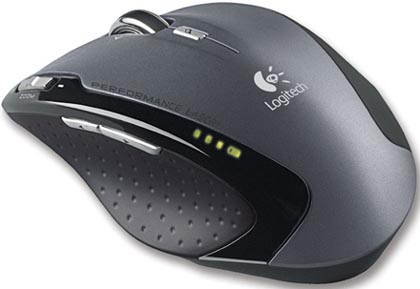 example of ambidexterous  Example Ikari, the middle part of it is actually quite straight, just designed both side panel to rest your thumb at left hand side, ring finger and pinky at right hand side. |
|
|
Nov 11 2010, 12:11 AM
Return to original view | Post
#140
|
|
Senior Member
1,774 posts Joined: Dec 2009
|
QUOTE(killer zone II @ Nov 10 2010, 10:41 PM) guys.. er. this is not spoon feeding ya as im do some research but the answer i met not satisfy me. hence i looked up for some user experience. What you means by not powerful enough? my question is, which is the bestest mouse for FPS? my answer lead to ikari optical/laser. is that true? or got a better mouse outside? currently im just using logitech MX518. kinda not powerful enough for me. For fps, my opinion is comfortability always come into picture the first. For long period gaming, a not comfortable mouse is very tiring. |
|
Topic ClosedOptions
|
| Change to: |  0.0630sec 0.0630sec
 0.51 0.51
 7 queries 7 queries
 GZIP Disabled GZIP Disabled
Time is now: 5th December 2025 - 01:05 AM |
 Quote
Quote