

yahoo! finally the x10 mini will start selling in sweden tomorrow at euro290...
but hv to wait b4 it reaches msia.
http://www.unwiredview.com/2010/05/26/smal...90eur-incl-vat/
SE Xperia X10 mini
SE Xperia X10 mini
|
|
 May 26 2010, 10:02 PM, updated 16y ago May 26 2010, 10:02 PM, updated 16y ago
Show posts by this member only | Post
#1
|
 
Junior Member
133 posts Joined: Sep 2005  
|
yahoo! finally the x10 mini will start selling in sweden tomorrow at euro290...
but hv to wait b4 it reaches msia. http://www.unwiredview.com/2010/05/26/smal...90eur-incl-vat/ |
|
|
|
|
|
May 26 2010, 10:13 PM
Show posts by this member only | Post
#2
|

Junior Member
110 posts Joined: Sep 2007
|
got hd mini
got x10 mini next mini is?? milestone mini of iphone mini? hahah |
|
|
May 26 2010, 10:39 PM
Show posts by this member only | Post
#3
|

Senior Member
1,570 posts Joined: Nov 2005
|
the looks doesn't appeal to me...
|
|
|
May 26 2010, 11:09 PM
Show posts by this member only | Post
#4
|

Senior Member
2,141 posts Joined: Sep 2008 From: Muddy Banks
|
QUOTE(hiroka88 @ May 26 2010, 10:13 PM) got hd mini next mini is X10 mini Progot x10 mini next mini is?? milestone mini of iphone mini? hahah  |
|
|
May 26 2010, 11:44 PM
Show posts by this member only | Post
#5
|

All Stars
23,688 posts Joined: Aug 2007 From: Outer Space 
|
QUOTE(hiroka88 @ May 26 2010, 10:13 PM) got hd mini china already produced iPhone mini. got x10 mini next mini is?? milestone mini of iphone mini? hahah  |
|
|
May 30 2010, 07:11 PM
Show posts by this member only | Post
#6
|

Senior Member
5,040 posts Joined: Nov 2005 
|
will be available in mid june for 1099.
|
|
|
|
|
|
May 30 2010, 07:41 PM
Show posts by this member only | Post
#7
|

Senior Member
1,017 posts Joined: Feb 2010 From: Terengganu
|
Only available with Android 1.6 aka Donut..
Which's already centuries back compare to Froyo.. But equivalent with it's 2.55" screen size and resolution.. Upcoming wildfire is much more better though..  |
|
|
Jun 3 2010, 04:21 PM
Show posts by this member only | Post
#8
|

Senior Member
2,021 posts Joined: May 2009 From: Kℓαทg 吧生
|
Girl's phone
 , why? size too small, just take a look before purchase , why? size too small, just take a look before purchase |
|
|
Jun 5 2010, 06:03 PM
Show posts by this member only | Post
#9
|
|
Senior Member
1,017 posts Joined: Feb 2010 From: Terengganu
|
QUOTE(leoyew @ Jun 3 2010, 04:21 PM) Girl's phone Don't ever plan to get this phone.., why? size too small, just take a look before purchaseTo make a reference, her brother, X10 also has problems already.. Laggy, firmware outdated, and many more..  |
|
|
Jun 5 2010, 11:17 PM
|

Senior Member
2,296 posts Joined: Mar 2008 From: Hell |Heaven
|
QUOTE(AskarPerang @ May 26 2010, 11:44 PM) china already produced iPhone mini. I even saw iPhone open case for sale at lelong before  |
|
|
Jun 6 2010, 01:10 AM
|
|
Senior Member
1,017 posts Joined: Feb 2010 From: Terengganu
|
QUOTE(dhui @ Jun 5 2010, 11:17 PM) I even saw iPhone open case for sale at lelong before What do u mean? Open case?? |
|
|
Jun 6 2010, 02:33 AM
|

Senior Member
2,239 posts Joined: Aug 2008
|
QUOTE(faridaizuddin @ Jun 6 2010, 02:10 AM) What do u mean? Open case?? Casing only or without casing i guess |
|
|
Jun 6 2010, 09:08 AM
|
|
Senior Member
2,296 posts Joined: Mar 2008 From: Hell |Heaven
|
QUOTE(freakenstein @ Jun 6 2010, 02:33 AM) Casing only or without casing i guess That's not what I mean, erm, I dunno the terms, is the phone like LG Lollipop  |
|
|
|
|
|
Jun 6 2010, 09:46 AM
|
|
Senior Member
1,017 posts Joined: Feb 2010 From: Terengganu
|
QUOTE(dhui @ Jun 6 2010, 09:08 AM) That's not what I mean, erm, I dunno the terms, is the phone like LG Lollipop Do u mean this kind of phone??  
|
|
|
Jun 6 2010, 08:22 PM
|

Senior Member
798 posts Joined: Nov 2006 From: ~~dont remember~~
|
QUOTE(faridaizuddin @ Jun 5 2010, 06:03 PM) Don't ever plan to get this phone.. I've plan to get this phone cause I think it compact and pretty smooth from what I saw.To make a reference, her brother, X10 also has problems already.. Laggy, firmware outdated, and many more.. But only if >800 lol This post has been edited by amalost: Jun 6 2010, 08:23 PM |
|
|
Jun 7 2010, 12:28 AM
|
|
Senior Member
1,017 posts Joined: Feb 2010 From: Terengganu
|
QUOTE(amalost @ Jun 6 2010, 08:22 PM) I've plan to get this phone cause I think it compact and pretty smooth from what I saw. LOL! But only if >800 lol Impossible! Coz it's SE.. That's fact!  |
|
|
Jun 7 2010, 01:01 AM
|
|
Senior Member
2,296 posts Joined: Mar 2008 From: Hell |Heaven
|
QUOTE(faridaizuddin @ Jun 6 2010, 09:46 AM) Do u mean this kind of phone?? Yes, i saw it with my bro, n we laugh
China so geng! |
|
|
Jun 7 2010, 01:16 AM
|
|
Senior Member
1,017 posts Joined: Feb 2010 From: Terengganu
|
Yeah..
China is like a photocopy machine but only with black and white toner instead of colorful one.. |
|
|
Jun 7 2010, 01:32 AM
|
|
Senior Member
2,296 posts Joined: Mar 2008 From: Hell |Heaven
|
QUOTE(faridaizuddin @ Jun 7 2010, 01:16 AM) Yeah.. Haha.. but they are very "creative" ,.. not only photocopying, but also "innovative" China is like a photocopy machine but only with black and white toner instead of colorful one.. |
|
|
Jun 7 2010, 01:56 AM
|
|
Senior Member
1,017 posts Joined: Feb 2010 From: Terengganu
|
QUOTE(dhui @ Jun 7 2010, 01:32 AM) Haha.. but they are very "creative" ,.. not only photocopying, but also "innovative" Later Nokia also will introduce their phone that'll using 2 SIM..Sounds like copying China brand right?? |
|
|
Jun 7 2010, 03:26 AM
|
|
Senior Member
2,296 posts Joined: Mar 2008 From: Hell |Heaven
|
QUOTE(faridaizuddin @ Jun 7 2010, 01:56 AM) Later Nokia also will introduce their phone that'll using 2 SIM.. Lol... seems like dual simcard already become China's trademark Sounds like copying China brand right?? Actually I feel China very pro, they can make a replica phone almost 99% same. Just take an example of iphone  |
|
|
Jun 10 2010, 09:41 PM
|
|
Senior Member
532 posts Joined: Oct 2009
|
did anyone actually buy this phone? Any feedback?
|
|
|
Jun 10 2010, 11:18 PM
|
|
Senior Member
2,141 posts Joined: Sep 2008 From: Muddy Banks
|
Should be called Xperia TINY instead
|
|
|
Jun 11 2010, 09:59 AM
|

Senior Member
4,709 posts Joined: Jan 2003
|
yup..i saw it..really tiny but a bit fat maybe due to its size which make it look plump lol.. anyway, its really cute..
|
|
|
Jun 11 2010, 12:10 PM
|

Junior Member
341 posts Joined: Jul 2005
|
Let me just help to add the pic in...
 |
|
|
Jun 11 2010, 04:42 PM
|
|
Senior Member
532 posts Joined: Oct 2009
|
RM1050 Ori in Penang. Ap just Rm80 cheaper. How much in KL?
|
|
|
Jun 11 2010, 05:44 PM
|
|
Senior Member
2,141 posts Joined: Sep 2008 From: Muddy Banks
|
RM 1k oni?
 |
|
|
Jun 11 2010, 06:09 PM
|
|
Senior Member
4,709 posts Joined: Jan 2003
|
QUOTE(tracktion3 @ Jun 11 2010, 04:42 PM) RM1050 Ori in Penang. Ap just Rm80 cheaper. How much in KL? i saw it at rm1050 too in the shop..but din ask if its ori or ap... |
|
|
Jun 11 2010, 10:19 PM
|
|
Senior Member
532 posts Joined: Oct 2009
|
no ori unit in Pg yet. They just said about the price. Many shops cant say what the price is in Pg. They dont even know whats in the box. As far as I know other country gets a 2G memory. Those stalls said no memory in there. I suspect those are the APs. So, just have to wait.
I kinda like the idea of small form. I love the PDA feature, but I dont spent hours looking at the screen. So, I'm kinda ok for the size. The only problem are, dont know if the Android 2.1 release early next year will provide video call, file transfer via bluetooth. The battery is confirm not easily replace. Need to send to SE center for that if required and dont know how much. mesti kena kaw kaw if change battery... |
|
|
Jun 11 2010, 10:23 PM
|
|
Senior Member
4,709 posts Joined: Jan 2003
|
i dun think android 2.1 got video call function.. but i got one problem..the screen so small, typing long msg or surfing net will be a problem.. unless only use it as normal fon..it will be attractive enuff..
|
|
|
Jun 11 2010, 11:10 PM
|
|
Senior Member
532 posts Joined: Oct 2009
|
QUOTE(Hico @ Jun 11 2010, 10:23 PM) i dun think android 2.1 got video call function.. but i got one problem..the screen so small, typing long msg or surfing net will be a problem.. unless only use it as normal fon..it will be attractive enuff.. I do agree. Is small and if people likes to reply long SMS.. not a good idea. Or those spent time typing and FB should stay away as well. But for those who just wants to read update, I guess thats just find. The video call can be made if you get the right software installed. Need to go to android market to buy it I guess. But remember, SE Android utilized some sort of UXP interface which sound like interesting. Want to take the risk? oh well. read here.. http://blogs.sonyericsson.com/products/201...ade-in-q4-2010/ Look at these video...pretty cool for a tiny device... This post has been edited by tracktion3: Jun 11 2010, 11:12 PM |
|
|
Jun 11 2010, 11:21 PM
|
|
Senior Member
4,709 posts Joined: Jan 2003
|
QUOTE(tracktion3 @ Jun 11 2010, 11:10 PM) I do agree. Is small and if people likes to reply long SMS.. not a good idea. Or those spent time typing and FB should stay away as well. But for those who just wants to read update, I guess thats just find. its sound cool..but end of yr..android 2.3 maybe also announced.. but then x10 mini only can upgrade till 2.1..thats kinda slow.. dun even mention abt 2.2.. video call by skype or google talk? not quite sure abt it.. but no front camera is also another problem even got video call.. but the battery is a big problem...unless it doesnt consume much battery..or else one day charge for 1 time or more will give headache to the users... and replacing a new battery will also cost a bomb maybe.. tis is really a big disadvantage and risk.. x10 mini pro will be another attractive product with qwerty keypad.. i am more interested with it as it give another better option for typing especially on the small screen .. The video call can be made if you get the right software installed. Need to go to android market to buy it I guess. But remember, SE Android utilized some sort of UXP interface which sound like interesting. Want to take the risk? oh well. read here.. http://blogs.sonyericsson.com/products/201...ade-in-q4-2010/ Look at these video...pretty cool for a tiny device... |
|
|
Jun 11 2010, 11:34 PM
|

Senior Member
1,121 posts Joined: Nov 2004 From: Earth
|
got review in gsmarena.com liao
Key features * Quad-band GSM/GPRS/EDGE support * 3G with HSPA * Customized Android OS v1.6 with Timescape UI * Ultra compact body * 2.55" capacitive touchscreen of QVGA resolution * Qualcomm MSM7227 600 MHz CPU * 5 megapixel autofocus camera with LED flash and VGA video recording * Wi-Fi 802.11 b/g * Built-in GPS receiver and digital compass * Accelerometer sensor for auto-rotate and turn-to-mute * Standard miniUSB port for charging and data * Stereo Bluetooth (A2DP) * microSD card slot with support for up to 8GB cards (2GB card included) * 3.5mm-compatible audio jack * Direct access to the official Android repository Main disadvantages * QVGA resolution doesn’t do Android graphics justice and limits the number of compatible apps * Battery not user replaceable * Limited Android homescreen functionality * No smart dialing * Typing long messages is very hard on the small screen * No Bluetooth file transfers from the gallery * No Flash support for the web browser * Very basic camera interface |
|
|
Jun 12 2010, 09:20 AM
|
|
Senior Member
532 posts Joined: Oct 2009
|
The review is not as bad as I thought. Is good actually. I mean for a small device. The QVGA is enuf for a small screen but not good for some aps written for more than QVGA resolution.
Well, hope the Android 2.1 and the new UXP interface helps to lower these limitations.... Added on June 12, 2010, 9:21 amoh yah.. an android in sub 1k... hmmm a bargain isnt it? This post has been edited by tracktion3: Jun 12 2010, 09:21 AM |
|
|
Jun 12 2010, 04:11 PM
|

All Stars
13,313 posts Joined: Jan 2008
|
9xx only... is a good price ...
price like tattoo.. |
|
|
Jun 15 2010, 10:15 AM
|
|
Senior Member
532 posts Joined: Oct 2009
|
Called SE Malaysia, the Ori only be out in of this month.
|
|
|
Jun 15 2010, 10:34 AM
|
|
Senior Member
4,709 posts Joined: Jan 2003
|
any details abt the ori's price? do u manage to play with it? hows is the peformance and first impression?
|
|
|
Jun 15 2010, 10:36 AM
|

All Stars
10,950 posts Joined: Jan 2009 From: Hatton Cross
|
it is Mini.. so . it is small...
not suitable for me.. I would prefer "its brother" Xperia X10 |
|
|
Jun 15 2010, 10:44 AM
|
|
Senior Member
4,709 posts Joined: Jan 2003
|
its means to be that small  ! for normal calling, texting or minor browsing or updating some info on web should be good.. the problem is the built in battery and the os version really draw me out... its brother x10 also suffer from lagging i read.and i tried x10 b4..really not as smooth as nexus or legend even... a bit waste with its powerful sepc.. at least atm until it got the newer update.. ! for normal calling, texting or minor browsing or updating some info on web should be good.. the problem is the built in battery and the os version really draw me out... its brother x10 also suffer from lagging i read.and i tried x10 b4..really not as smooth as nexus or legend even... a bit waste with its powerful sepc.. at least atm until it got the newer update.. |
|
|
Jun 15 2010, 10:45 AM
|
|
All Stars
13,313 posts Joined: Jan 2008
|
QUOTE(kae7 @ Jun 15 2010, 10:36 AM) it is Mini.. so . it is small... mayb suit for lady..they dun like big big fon... not suitable for me.. I would prefer "its brother" Xperia X10 price now 900 only This post has been edited by x132755: Jun 15 2010, 10:46 AM |
|
|
Jun 15 2010, 02:35 PM
|
|
Senior Member
532 posts Joined: Oct 2009
|
QUOTE(x132755 @ Jun 15 2010, 10:45 AM) mayb suit for lady..they dun like big big fon... RM900 for AP unit? does it come with 2G memory? How about warranty? Cover both the TFT and touch screen?price now 900 only This post has been edited by tracktion3: Jun 15 2010, 02:38 PM |
|
|
Jun 15 2010, 11:29 PM
|

Senior Member
816 posts Joined: Jan 2003
|
Waiting for Mini Pro... I see SE ads, guys using Mini is also very suitable wor..
|
|
|
Jun 16 2010, 08:32 AM
|
|
Senior Member
532 posts Joined: Oct 2009
|
I'm a guy, I dont like big phone either. I mean, I cant easily put it in my pocket. I'm using SE W880 for ages now, is time......
|
|
|
Jun 16 2010, 04:47 PM
|
|
All Stars
13,313 posts Joined: Jan 2008
|
QUOTE(tracktion3 @ Jun 15 2010, 02:35 PM) RM900 for AP unit? does it come with 2G memory? How about warranty? Cover both the TFT and touch screen? 880 now, set no cw mem card..wrnty depend on which AP, some 2 yr, some 18 mths.. |
|
|
Jun 16 2010, 10:47 PM
|
|
Senior Member
532 posts Joined: Oct 2009
|
QUOTE(x132755 @ Jun 16 2010, 04:47 PM) 880 now, set no cw mem card.. interesting, can AP unit be updated later? I mean now it has android 1.6. Already announce 2.1 will be release. wrnty depend on which AP, some 2 yr, some 18 mths.. If include a 8GB memory how much? |
|
|
Jun 17 2010, 12:11 PM
|
|
All Stars
13,313 posts Joined: Jan 2008
|
QUOTE(x132755 @ Jun 16 2010, 04:47 PM) 880 now, set no cw mem card.. sorry, latest revisewrnty depend on which AP, some 2 yr, some 18 mths.. for ap set, cw 2gb card & extra 1 cover.. |
|
|
Jun 17 2010, 12:14 PM
|

Junior Member
383 posts Joined: Jan 2009 From: OH YEAH
|
to PHAT
|
|
|
Jun 17 2010, 03:25 PM
|
|
Senior Member
532 posts Joined: Oct 2009
|
QUOTE(x132755 @ Jun 17 2010, 12:11 PM) sorry, latest revise Very interesting. I just want to know whether AP unit can be updated or not. Also, the warranty covers the touch screen and the LCD screen?for ap set, cw 2gb card & extra 1 cover.. |
|
|
Jun 17 2010, 04:03 PM
|
|
All Stars
13,313 posts Joined: Jan 2008
|
QUOTE(tracktion3 @ Jun 17 2010, 03:25 PM) Very interesting. I just want to know whether AP unit can be updated or not. Also, the warranty covers the touch screen and the LCD screen? some can some cannotwrnty cover lcd  |
|
|
Jun 17 2010, 05:03 PM
|

Junior Member
420 posts Joined: Apr 2005 From: Seri kembangan 
|
Original Arrive tomorrow~~~
http://forum.lowyat.net/topic/1460678 This post has been edited by gtrowa2003: Jun 17 2010, 05:04 PM |
|
|
Jun 17 2010, 05:41 PM
|
|
Senior Member
532 posts Joined: Oct 2009
|
QUOTE(gtrowa2003 @ Jun 17 2010, 05:03 PM) sounds good. since the battery and the touch screen may need service, I better get ori.tmrw is good. I called SE yesterday, they said end of the month....  |
|
|
Jun 21 2010, 10:14 PM
|

Senior Member
6,660 posts Joined: Jan 2003 From: Palace of sexology 
|
battery life a bit weak. cna't even last a day
|
|
|
Jun 23 2010, 11:02 AM
|
|
Senior Member
532 posts Joined: Oct 2009
|
QUOTE(vexus @ Jun 21 2010, 10:14 PM) battery life a bit weak. cna't even last a day you can check whats running. Turn off GPS if you dont need it. Even the icon is not showing, you might be turning it on. Go to setting>about the phone> battery status. You could see what using up battery. The screen so far is eating the power the most. So if you keep on playin on it, it will not last a day. Some games from android market is really addictable. Juts got mine yesterday. Play with it and setup everything including wisepilot. If you dont have dataplan, make sure timescape is on manual mode. Or else, it will update the screen base on the time you set. Set longer to pay less but not so real time update. downloaded bluetooth file transfer. very good |
|
|
Jun 23 2010, 01:33 PM
|
|
Senior Member
2,141 posts Joined: Sep 2008 From: Muddy Banks
|
Tested a demo ori set yesterday
There is bugs in the messaging system. All default typing language is Chinese Simplified. When the chinese input s turned off, it becomes Chinese Traditional.  wanna target lalamuis. XD |
|
|
Jun 23 2010, 01:38 PM
|
|
Senior Member
4,709 posts Joined: Jan 2003
|
QUOTE(tracktion3 @ Jun 23 2010, 11:02 AM) you can check whats running. Turn off GPS if you dont need it. Even the icon is not showing, you might be turning it on. Go to setting>about the phone> battery status. hows the smoothness ? got any lagging so far after install the game etc..? how much do u get it? ori set?You could see what using up battery. The screen so far is eating the power the most. So if you keep on playin on it, it will not last a day. Some games from android market is really addictable. Juts got mine yesterday. Play with it and setup everything including wisepilot. If you dont have dataplan, make sure timescape is on manual mode. Or else, it will update the screen base on the time you set. Set longer to pay less but not so real time update. downloaded bluetooth file transfer. very good |
|
|
Jun 23 2010, 01:54 PM
|
|
Senior Member
532 posts Joined: Oct 2009
|
Ori RM1050. Comes with 4G memory yeee ha . 2 covers. If you choose white, it comes with pink. If you choose black, it comes with red.
Free screen protector but I removed it as it made the screen less sensetive. so I wonder if I need to have one since it is a scratc proof Very smooth actually. No lagging at all. I install many free software from android market. The games are really fun. When upgrade to 2.1, I think it will be even better. I hope so. |
|
|
Jun 23 2010, 02:07 PM
|

Junior Member
150 posts Joined: Oct 2005
|
QUOTE(tracktion3 @ Jun 23 2010, 01:54 PM) Ori RM1050. Comes with 4G memory yeee ha . 2 covers. If you choose white, it comes with pink. If you choose black, it comes with red. where you bought?Free screen protector but I removed it as it made the screen less sensetive. so I wonder if I need to have one since it is a scratc proof Very smooth actually. No lagging at all. I install many free software from android market. The games are really fun. When upgrade to 2.1, I think it will be even better. I hope so.ori from SE? i was finding where i can get this phone...  |
|
|
Jun 23 2010, 02:24 PM
|
|
Senior Member
532 posts Joined: Oct 2009
|
X peria Mini 5mp camera.. not bad le:
Normal shot: 
Micro shot: 
Added on June 23, 2010, 2:36 pm QUOTE(art_535 @ Jun 23 2010, 02:07 PM) where you bought? got it from perangin mall, penang. Is original.ori from SE? i was finding where i can get this phone... The touch screen need sometime to get used too. but it takes me a day to play around and get used to it. Yes is small, but the screen is bigger than my current phone actually. The video VGA is pretty good too. Not as nice as the vivaz HD of course. But good enuf and good quality. This phone is perfect for those got unlimited data plan. You get all the updates you need in real time. But for those who are not, w wifi update also great wise pilot works nice. Not the best, but it works. I need GPS when I go to KL anyway. Tested with my wife Vivaz with wisepilot, works great. next, I need to see if papago can be isntalled. I'll wait until the Android 2.1 install. The fishing & guitar game is really fun. ha ha ha ha I personally play guitar and the phone game me a funny way of playing guitar. ha ha ha This post has been edited by tracktion3: Jun 23 2010, 02:36 PM |
|
|
Jun 23 2010, 05:53 PM
|
|
Senior Member
4,709 posts Joined: Jan 2003
|
QUOTE(tracktion3 @ Jun 23 2010, 01:54 PM) Ori RM1050. Comes with 4G memory yeee ha . 2 covers. If you choose white, it comes with pink. If you choose black, it comes with red. hmm..not a bad deal! the black colour u choose issit front is black back side is white? or whole hp is black? cos i saw from shop is black with white.. i dun like the white colour.. black more attractive Free screen protector but I removed it as it made the screen less sensetive. so I wonder if I need to have one since it is a scratc proof Very smooth actually. No lagging at all. I install many free software from android market. The games are really fun. When upgrade to 2.1, I think it will be even better. I hope so. hw abt the battery? how long can it last it u use it heavily or normal use only? |
|
|
Jun 23 2010, 06:42 PM
|
|
Senior Member
532 posts Joined: Oct 2009
|
QUOTE(Hico @ Jun 23 2010, 05:53 PM) hmm..not a bad deal! the black colour u choose issit front is black back side is white? or whole hp is black? cos i saw from shop is black with white.. i dun like the white colour.. black more attractive yah.. the white actually is a pearl white. I bough the white one. Is unique to in away... hw abt the battery? how long can it last it u use it heavily or normal use only? Today I tested my GPS. Wisepilot used 14% of the total battery. the display used up 55% wow. The rest are pretty low. so the display really eat up the battery if you keep on playing with it. Or else, if idle, it will take up 14%. So, assume idle mode 20% for whole day. That could last perhaps 3-4 days plus some simple call. well, which gadget could last more than 1 day if you keep the display on more than 3-4 hours? whuaa ha ha so, the comparison may not be fair. but, I compare to my old phone. I hardly look at the screen unless I pick up call and sms. But this current one got so many to see, FB lah, youtube lah. and the game... is killing me, then got gps pulak. Saja turn it on to go home.... waste my time only... whuaa ha ha so far, I'm very happy with the phone. Never hang, never lag...really COOL! This post has been edited by tracktion3: Jun 23 2010, 06:43 PM |
|
|
Jun 23 2010, 11:07 PM
|
|
Junior Member
133 posts Joined: Sep 2005
|
QUOTE(tracktion3 @ Jun 23 2010, 02:24 PM) X peria Mini 5mp camera.. not bad le: hi tracktion3,Normal shot:
Micro shot:
Added on June 23, 2010, 2:36 pm got it from perangin mall, penang. Is original. The touch screen need sometime to get used too. but it takes me a day to play around and get used to it. Yes is small, but the screen is bigger than my current phone actually. The video VGA is pretty good too. Not as nice as the vivaz HD of course. But good enuf and good quality. This phone is perfect for those got unlimited data plan. You get all the updates you need in real time. But for those who are not, w wifi update also great wise pilot works nice. Not the best, but it works. I need GPS when I go to KL anyway. Tested with my wife Vivaz with wisepilot, works great. next, I need to see if papago can be isntalled. I'll wait until the Android 2.1 install. The fishing & guitar game is really fun. ha ha ha ha I personally play guitar and the phone game me a funny way of playing guitar. ha ha ha mind sharing which shop at prangin mall? i started this thread cos i wanted the phone, been waiting so long for it. i was just at prangin mall on friday chacking out the SE shop at ground flr, they told me phone not in yet... thks. |
|
|
Jun 23 2010, 11:12 PM
|
|
Junior Member
420 posts Joined: Apr 2005 From: Seri kembangan
|
i still got 3 unit is free 4GB Micro SD ~ ^^
http://forum.lowyat.net/index.php?showtopic=1460678&hl= now got 3 colour back cover black - red black - green white - pink |
|
|
Jun 24 2010, 12:38 AM
|
|
Senior Member
532 posts Joined: Oct 2009
|
QUOTE(pskk @ Jun 23 2010, 11:07 PM) hi tracktion3, the groundfloor, somewhere in the center. they sell more SE phones. they own 3 booth actually. the company name is Starfone communication. Just arrive Tuesday. So if you go last week, not yet lah. But AP got already a few weeks back.mind sharing which shop at prangin mall? i started this thread cos i wanted the phone, been waiting so long for it. i was just at prangin mall on friday chacking out the SE shop at ground flr, they told me phone not in yet... thks. |
|
|
Jun 24 2010, 09:46 AM
|
|
Junior Member
133 posts Joined: Sep 2005
|
QUOTE(tracktion3 @ Jun 24 2010, 12:38 AM) the groundfloor, somewhere in the center. they sell more SE phones. they own 3 booth actually. the company name is Starfone communication. Just arrive Tuesday. So if you go last week, not yet lah. But AP got already a few weeks back. hi tracktion3,thanks, actually i was there again on this monday, but to the SE shop. I will go there today again to the shop you mentioned. so far, any issue with the phone? my biggest concern is the virtual keyboard, with the small screen....will it be 'difficult' when u type msg? This post has been edited by pskk: Jun 24 2010, 09:48 AM |
|
|
Jun 24 2010, 10:55 AM
|
|
Senior Member
532 posts Joined: Oct 2009
|
QUOTE(pskk @ Jun 24 2010, 09:46 AM) hi tracktion3, So far, no issues. But take note on these:thanks, actually i was there again on this monday, but to the SE shop. I will go there today again to the shop you mentioned. so far, any issue with the phone? my biggest concern is the virtual keyboard, with the small screen....will it be 'difficult' when u type msg? 1. The phone is design to get connected. So if you dont have unlimited data package, make sure to turn off the data traffic. Or else, you will accidentally update your FB, twitter of what ever you register there thru the 3G WAP. 2. The key pad is design for the mini. so is not the same as other phone. You will need to get sometime to get used to. If you have big thumb, then it will be a problem to sms with one hand. but since this is a smart phone, using 2 hands is very common. The screen is sensitive, you just need to learn. I'm almost there and only 2 days of ownership. going to sms like a pro soon . ha ha ha 3. GPS need data loading. so you need to turn on your 3G. this may take a few RM from your account. Is just some small data load. Is not much depending on locations. So, turn off all these including the 3G if you dont use it. 4. You need to PC Companion instead of PC suite. So, backing up your contact is a pain as you need to do it online. But I copy my contact to my SIM card instead. so far... thats all... |
|
|
Jun 24 2010, 12:27 PM
|

Junior Member
55 posts Joined: May 2005
|
QUOTE(tracktion3 @ Jun 24 2010, 10:55 AM) So far, no issues. But take note on these: is using gps really need connection? no offline mode? i might want to use 1 of the gps software to track n keep my jogging data... im used to use the nokia's sporttracker software and also garmin on my current nokia phone... now im thinking to get this mini or x6... 1. The phone is design to get connected. So if you dont have unlimited data package, make sure to turn off the data traffic. Or else, you will accidentally update your FB, twitter of what ever you register there thru the 3G WAP. 2. The key pad is design for the mini. so is not the same as other phone. You will need to get sometime to get used to. If you have big thumb, then it will be a problem to sms with one hand. but since this is a smart phone, using 2 hands is very common. The screen is sensitive, you just need to learn. I'm almost there and only 2 days of ownership. going to sms like a pro soon . ha ha ha 3. GPS need data loading. so you need to turn on your 3G. this may take a few RM from your account. Is just some small data load. Is not much depending on locations. So, turn off all these including the 3G if you dont use it. 4. You need to PC Companion instead of PC suite. So, backing up your contact is a pain as you need to do it online. But I copy my contact to my SIM card instead. so far... thats all... |
|
|
Jun 24 2010, 02:34 PM
|
|
All Stars
13,313 posts Joined: Jan 2008
|
good news! , ori is on sale now... 1k only..
market now most in black color.. This post has been edited by x132755: Jun 24 2010, 02:35 PM |
|
|
Jun 24 2010, 02:52 PM
|
|
Senior Member
532 posts Joined: Oct 2009
|
QUOTE(predatorX @ Jun 24 2010, 12:27 PM) is using gps really need connection? no offline mode? i might want to use 1 of the gps software to track n keep my jogging data... im used to use the nokia's sporttracker software and also garmin on my current nokia phone... now im thinking to get this mini or x6... I think if we turn off many non-related update in the GPS, no data will be downloaded. but, the 3G need to be on. The GPS it self is free, or not really. wisepilot will last for 30days trial. Later need to buy the licence. Or wait for papago or if I need, buy the weekly usage. Is around RM12 per week. Not too bad as I dont need it that often anyway. turn on GPS only when I need it when I go down KL. |
|
|
Jun 24 2010, 04:45 PM
|
|
Junior Member
150 posts Joined: Oct 2005
|
QUOTE(x132755 @ Jun 24 2010, 02:34 PM) good news! , ori is on sale now... 1k only.. is it...ori from SE. market now most in black color.. where can i get the phone, especially in klang area. |
|
|
Jun 24 2010, 05:25 PM
|
|
Junior Member
133 posts Joined: Sep 2005
|
QUOTE(tracktion3 @ Jun 24 2010, 10:55 AM) So far, no issues. But take note on these: hi tracktion3,1. The phone is design to get connected. So if you dont have unlimited data package, make sure to turn off the data traffic. Or else, you will accidentally update your FB, twitter of what ever you register there thru the 3G WAP. 2. The key pad is design for the mini. so is not the same as other phone. You will need to get sometime to get used to. If you have big thumb, then it will be a problem to sms with one hand. but since this is a smart phone, using 2 hands is very common. The screen is sensitive, you just need to learn. I'm almost there and only 2 days of ownership. going to sms like a pro soon . ha ha ha 3. GPS need data loading. so you need to turn on your 3G. this may take a few RM from your account. Is just some small data load. Is not much depending on locations. So, turn off all these including the 3G if you dont use it. 4. You need to PC Companion instead of PC suite. So, backing up your contact is a pain as you need to do it online. But I copy my contact to my SIM card instead. so far... thats all... thks....i but i alredi bought it just now. alredi hv problems......not able to import my contacts fm my sim card. went to maxis, no problem with simcard...went back to phone shop...in the end it can import fm 64bit sim card but 128 bit cant. so far m not too impressed, text folder no outbox/sent folder/save or create your own folder for save msgs. i save a lots of important msgs..... also for call logs, same problems as the text folder, no received, called or missed called separate folder...all lump up in 1 folder.... camera flash cant keep permanent...so cant use as torchlight. m not a high tech guy...so all those 3g or wifi or data traffic...i hardly use n turn all off. probably will play with it for a few days, if dont like it...will get another simple phone....no more touch screen. thks for your adv though. This post has been edited by pskk: Jun 24 2010, 05:26 PM |
|
|
Jun 24 2010, 05:56 PM
|
|
Senior Member
532 posts Joined: Oct 2009
|
QUOTE(pskk @ Jun 24 2010, 05:25 PM) hi tracktion3, Hmm, I didnt know it wont work on 128bit card. I guess some of the features you need doesnt appear in the phone anymore.thks....i but i alredi bought it just now. alredi hv problems......not able to import my contacts fm my sim card. went to maxis, no problem with simcard...went back to phone shop...in the end it can import fm 64bit sim card but 128 bit cant. so far m not too impressed, text folder no outbox/sent folder/save or create your own folder for save msgs. i save a lots of important msgs..... also for call logs, same problems as the text folder, no received, called or missed called separate folder...all lump up in 1 folder.... camera flash cant keep permanent...so cant use as torchlight. m not a high tech guy...so all those 3g or wifi or data traffic...i hardly use n turn all off. probably will play with it for a few days, if dont like it...will get another simple phone....no more touch screen. thks for your adv though. As for torchlight, u can turn it on permanently, just switch video mode and on the light. Or simple solution is download aps from Android Market. as for managing sms, I think they are apps in android market that could help that. I dont know either. SMS is not really important for me. honestly, to be in Androids platform mobile, it would be more fun to be techy. Or else, you might suffer some difficulties. You will have lots of questions which related to your old phones capability which you may not realized. For example: 1. bluetooth transfer, you need to download apps from Android Market or those available free, you need to install that in phone or else, android doesnt come with that feature. so far, most android phones will not have that feature. 2. No video calls, not sure if this will be solved in the update soon to Enclair 2.1 3.NO birthday reminder, again.. download from Android market. So, Androids phones really have lots of capability. You just need to find the one you one and install. In some cases, you need to buy it too. So.. all the best, and maybe this phone can jump start your interest to discover the world of Androids......  |
|
|
Jun 24 2010, 09:10 PM
|

Junior Member
457 posts Joined: Feb 2010
|
hi guys, got my mini last week for 899 at a shop in subang.. first impression was.. damn this is small. Am new to the android OS and so decided to give it a try based on the reviews i read.. the package came with box, usb charger cum data cable, 3.5mm headphone and a 2g card and a back cover (red).
love the one hand navigation and the non bulky side of it.. those who look for a bigger screen should stay away from this phone as it is not designed for comfortable viewing of web pages.. also bluetooth does not send or receive files though i heard that android market has an app for it.. the 5mp camera does a pretty good work although it has the least function i have ever seen in a phone.. but the plus side is android marketplace has apps to give it more effects... have not really explore the phone yet but with the 2.1 promised for third quarter this year it should be a blast.. 2.2 or 2.6? i think i have my hands full for now..  |
|
|
Jun 24 2010, 09:37 PM
|
|
Senior Member
532 posts Joined: Oct 2009
|
QUOTE(weng98 @ Jun 24 2010, 09:10 PM) hi guys, got my mini last week for 899 at a shop in subang.. first impression was.. damn this is small. Am new to the android OS and so decided to give it a try based on the reviews i read.. the package came with box, usb charger cum data cable, 3.5mm headphone and a 2g card and a back cover (red). yah, i installed bluetooth file transfer. Works great. can transfer while view pictures or video.love the one hand navigation and the non bulky side of it.. those who look for a bigger screen should stay away from this phone as it is not designed for comfortable viewing of web pages.. also bluetooth does not send or receive files though i heard that android market has an app for it.. the 5mp camera does a pretty good work although it has the least function i have ever seen in a phone.. but the plus side is android marketplace has apps to give it more effects... have not really explore the phone yet but with the 2.1 promised for third quarter this year it should be a blast.. 2.2 or 2.6? i think i have my hands full for now.. i just a saperate SMS aps. works like wonders. also, a voice activated aps. It will read out the name of the person when calls or sms comes in. it work in parallel with your ring tone too. |
|
|
Jun 25 2010, 10:58 AM
|
|
Junior Member
150 posts Joined: Oct 2005
|
bought this unit yesterday...
cool man...nice in my hand but same problem happen with pskk, cannot transfer contact. huhuhu.... where can i download android software..can suggest any forum or site... |
|
|
Jun 25 2010, 11:18 AM
|
|
All Stars
13,313 posts Joined: Jan 2008
|
QUOTE(art_535 @ Jun 25 2010, 10:58 AM) bought this unit yesterday... ANDROID MARKET cool man...nice in my hand but same problem happen with pskk, cannot transfer contact. huhuhu.... where can i download android software..can suggest any forum or site... |
|
|
Jun 25 2010, 03:11 PM
|
|
Senior Member
532 posts Joined: Oct 2009
|
I have my contacts sycn to my outlook with my old phones. So, to get that back to and Android, you need to download a software. I tested companionlink. Works well. 14 days trial. You need to install companionlink to your computer. And install DejaOffice in your Android from the market. I just completed my sync. Now uninstall both software. Just need to do it once. In teh future, need to sync using SE apps. :S
|
|
|
Jun 26 2010, 07:40 AM
|

Junior Member
122 posts Joined: Oct 2008
|
bro tracktion3
great reading all the highlights of the X10 mini. sure love to own one an android fan over here i know that there are great apps in the android market but due to the X10 mini's small screen not all apps are available, right?. Any comments on that? What apps have u installed? thanks. |
|
|
Jun 26 2010, 08:51 AM
|
|
Senior Member
532 posts Joined: Oct 2009
|
QUOTE(pianrasa @ Jun 26 2010, 07:40 AM) bro tracktion3 So far, I have loaded many games and aps in my phone from the market. All of them works. I didnt experience any problems. I even uninstall some after that as I dont like the games or aps. I've chosen those high rating games and apps.great reading all the highlights of the X10 mini. sure love to own one an android fan over here i know that there are great apps in the android market but due to the X10 mini's small screen not all apps are available, right?. Any comments on that? What apps have u installed? thanks.So far Astro file manager is a must. Really cool aps. Also, mute phone in a single click. Bluetooth file transfer is a must too. It asked me whether I need to turn on my bluetooth or not when I transfer and whether I need to off it after the transfer. Really neat. Also installed advance task killer. You can find some apk extention files if you google around and move the files to a folder in the mem card and run installation. I did that for a few games and aps as you cant get it from the market. I tried to install the Google Maps 4.3 manually following the steps given in this forum, but it didnt work. Cant root the SE phones actually. But I dont think I need it. I cant find away to install papago yet. That one, I'll wait until we get the 2.1 Froyo in next few months. I love the miniature aspect of this phone thats why I bought it. Those who already get used to larger screen may need to avoid it. Shooting photo is a low light area with flash is not doing well. your hand need to be very firm or else the result is blur. Vivaz on the other hand doing so well. My wife Vivaz.. is and excellent camera phone. But is a symbian... which actually has lots of stable software for that screen size too. Nice. |
|
|
Jun 26 2010, 11:40 AM
|
|
Junior Member
122 posts Joined: Oct 2008
|
QUOTE(tracktion3 @ Jun 26 2010, 08:51 AM) So far, I have loaded many games and aps in my phone from the market. All of them works. I didnt experience any problems. I even uninstall some after that as I dont like the games or aps. I've chosen those high rating games and apps. thanks for the elaborated insights on the android apps. it seems that the issue of the limited apps available to the HTC Tattoo (same small screen n resolution) which was released last year has been mostly addressed. now there's no holding back for me So far Astro file manager is a must. Really cool aps. Also, mute phone in a single click. Bluetooth file transfer is a must too. It asked me whether I need to turn on my bluetooth or not when I transfer and whether I need to off it after the transfer. Really neat. Also installed advance task killer. You can find some apk extention files if you google around and move the files to a folder in the mem card and run installation. I did that for a few games and aps as you cant get it from the market. I tried to install the Google Maps 4.3 manually following the steps given in this forum, but it didnt work. Cant root the SE phones actually. But I dont think I need it. I cant find away to install papago yet. That one, I'll wait until we get the 2.1 Froyo in next few months. I love the miniature aspect of this phone thats why I bought it. Those who already get used to larger screen may need to avoid it. Shooting photo is a low light area with flash is not doing well. your hand need to be very firm or else the result is blur. Vivaz on the other hand doing so well. My wife Vivaz.. is and excellent camera phone. But is a symbian... which actually has lots of stable software for that screen size too. Nice.  great suggestion on the Astro, Bluetooth n task killer app. high ratings for sure. What's your take on the stock calendar app? is there a better alternative? also interested to know available office app which would allow documents editing. sorry for asking lots and loads of questions i used to own 5800xm and it was a fine phone to work with for awhile but android supports way much cooler apps not to mention much more user friendly ui. even nokia is ditching symbian for meego but i digress . Don't mind the screen size and surely don't mind the camera performance. ps: u wrote "I'll wait until we get the 2.1 Froyo in next few months". i know it's an honest mistake, 2.1 is actually eclair. any chance SE supporting froyo (2.2) for the mini? |
|
|
Jun 26 2010, 03:25 PM
|
|
Senior Member
532 posts Joined: Oct 2009
|
oh yah.. is an enclair for 2.1 not froyo 2.2. My mistake.
You need the birthday reminder also. I dont use much calendar except the brithday, which is good. Another great camara aps I install is Camera Zoom FX. It only have one problem, the flash cant be turn on. The rest, the features are pretty good. All the FX effect works pretty good though. Added on June 26, 2010, 3:35 pmalso.. I dont need those document reader... man.. how to read on this screen? ha ha ha.... This post has been edited by tracktion3: Jun 26 2010, 03:50 PM |
|
|
Jun 26 2010, 04:26 PM
|
|
Junior Member
122 posts Joined: Oct 2008
|
only need to do some light editing.punching in numbers in spreadsheet. keeping tabs on my daily expenses, nothing serious. thanks for all the suggestions/reviews bro
|
|
|
Jun 26 2010, 04:32 PM
|
|
Senior Member
532 posts Joined: Oct 2009
|
another suggestion for media player is meridian media player, you could download this from the market.
The fart droid is a funny tool and not to mention DilDroid.. ha ha ha ha |
|
|
Jun 26 2010, 08:08 PM
|
|
Junior Member
122 posts Joined: Oct 2008
|
QUOTE(tracktion3 @ Jun 26 2010, 04:32 PM) another suggestion for media player is meridian media player, you could download this from the market. you've probably known this..but helix launcher will allow you to put more than a widget per home screen. have you tried it? The fart droid is a funny tool and not to mention DilDroid.. ha ha ha ha |
|
|
Jun 27 2010, 11:32 AM
|
|
Senior Member
532 posts Joined: Oct 2009
|
QUOTE(pianrasa @ Jun 26 2010, 08:08 PM) you've probably known this..but helix launcher will allow you to put more than a widget per home screen. have you tried it? yeah, I saw a few of this kind of apps. Usually it will take more memory and I kinda like what SE provided already. Simple and not Apple-like. installed tools: 1. Meridian player... pretty good. 2. Flashlight, simple and easy. Tries blow me.. which is not really needed lah. turn on flash light need to blow one meh? 3. Audio Manage. - good to manage all type of audio volume....right tone, alert, media... etc. installed something for fun : 1. Fart droid... really funny 2. Pic Say... for editing photos.. sometimes spent too much time in the market.. and yes, still so many aps to go play. I dont think it can ever finish with new one loaded... like every day. :S Is addictive....  |
|
|
Jun 27 2010, 11:50 AM
|

Junior Member
11 posts Joined: Jan 2010
|
which is better x10 mini or x10 mini pro
|
|
|
Jun 27 2010, 08:15 PM
|
|
Junior Member
122 posts Joined: Oct 2008
|
QUOTE(tracktion3 @ Jun 27 2010, 11:32 AM) yeah, I saw a few of this kind of apps. Usually it will take more memory and I kinda like what SE provided already. Simple and not Apple-like. true,takes ram n eats battery life. had a chance to play around with the mini. it really is mini n compact. the ui is really responsive. i know it uses T9, does it support BM? |
|
|
Jun 27 2010, 10:05 PM
|
|
Senior Member
532 posts Joined: Oct 2009
|
i think u guys should know this. click and hold the center button will show you the 6 apps previously open. Android standard actually...
|
|
|
Jun 28 2010, 02:03 PM
|
|
Junior Member
150 posts Joined: Oct 2005
|
i got problem here, regarding contacts number.
why there is no sync between phone calling and sms. example; if i stored number 0123456789, and put name on it, when calling the name appear, but when sms it appear the number (+60123456789). anyone got the same problem. |
|
|
Jun 28 2010, 03:58 PM
|
|
Junior Member
278 posts Joined: Apr 2005
|
anyone can share their phone ah, review little bit ah?
i heard tat this phone cant copy sim car phone book to phone, only can syn phone book from outlook contact list? 2nd is built in battery if spoilt need to send back to SE to change it? 3rd type sms very hard coz is not qwerty keyboard n the keyboard show very small , big finger hard to press ? |
|
|
Jun 28 2010, 07:02 PM
|
|
Senior Member
532 posts Joined: Oct 2009
|
QUOTE(art_535 @ Jun 28 2010, 02:03 PM) i got problem here, regarding contacts number. base on my experience, you need to add prefix +6 to the numbers.I change mine de. Is a bit of work yes. why there is no sync between phone calling and sms. example; if i stored number 0123456789, and put name on it, when calling the name appear, but when sms it appear the number (+60123456789). anyone got the same problem. Added on June 28, 2010, 7:05 pm QUOTE(linkokkeen @ Jun 28 2010, 03:58 PM) anyone can share their phone ah, review little bit ah? i heard tat this phone cant copy sim car phone book to phone, only can syn phone book from outlook contact list?i heard tat this phone cant copy sim car phone book to phone, only can syn phone book from outlook contact list? 2nd is built in battery if spoilt need to send back to SE to change it? 3rd type sms very hard coz is not qwerty keyboard n the keyboard show very small , big finger hard to press ?Some say 128 type cant copy.. mine is ok. I guess is 64 type. 2nd is built in battery if spoilt need to send back to SE to change it? yup. 3rd type sms very hard coz is not qwerty keyboard n the keyboard show very small , big finger hard to press ?hard presss no, is a capacitive type. But accuracy is a challenge until you get used to it. This post has been edited by tracktion3: Jun 28 2010, 07:05 PM |
|
|
Jun 28 2010, 08:08 PM
|
|
Junior Member
122 posts Joined: Oct 2008
|
hi. my questions are regarding PC Companion that SE provided with the mini. How does it compare with Nokia PC Suite?
1. Does SE PC Companion allow u write and send sms from the pc? 2. When u received a message, can u straight away read it in SE PC Companion? In Nokia PC Suite, a message pop up will appear on the PC monitor and i can read the message and then reply. 3. Can u edit contacts and calendar in SE PC Companion? in Nokia PC Suite, the changes take place immediately without having to sync. 4. Does SE PC Companion allow u to browse ur memory card? there are a lot more things that can be done with Nokia PC Suite but those are the important ones for me. pls share any extra functions of SE PC Companion. Just want to know b4 buying the x10 mini. Thanks. |
|
|
 Jun 28 2010, 09:10 PM Jun 28 2010, 09:10 PM
|
|
Junior Member
457 posts Joined: Feb 2010
|
QUOTE(art_535 @ Jun 28 2010, 02:03 PM) i got problem here, regarding contacts number. yes i have the same problem too.. you need to insert the international prefix eg..(+6)012 345 6789 when saving contacts, if you save the contact without the international prefix and you received calls from that contact the contact photos would not appear.. why there is no sync between phone calling and sms. example; if i stored number 0123456789, and put name on it, when calling the name appear, but when sms it appear the number (+60123456789). anyone got the same problem. |
|
|
Jun 29 2010, 05:29 PM
|
|
Senior Member
532 posts Joined: Oct 2009
|
QUOTE(pianrasa @ Jun 26 2010, 08:08 PM) you've probably known this..but helix launcher will allow you to put more than a widget per home screen. have you tried it? hey.... I saja install this aps. Works pretty well. It didnt slow down the system and the best thing, I can costumize more short cut, folder and widget. Pretty good I would say. |
|
|
Jun 29 2010, 05:41 PM
|
|
Junior Member
122 posts Joined: Oct 2008
|
QUOTE(tracktion3 @ Jun 29 2010, 05:29 PM) hey.... I saja install this aps. Works pretty well. It didnt slow down the system and the best thing, I can costumize more short cut, folder and widget. Pretty good I would say. wonderful!.. care to share ur experience regarding PC Companion? |
|
|
Jun 29 2010, 07:01 PM
|
|
Senior Member
532 posts Joined: Oct 2009
|
QUOTE(pianrasa @ Jun 29 2010, 05:41 PM) wonderful!.. care to share ur experience regarding PC Companion? PC Companion SUCKS! Really wish more apps to be release to replace this one. Good thing maybe i can keep your contact online even when your phone and PC kaput! |
|
|
Jun 29 2010, 07:10 PM
|
|
Junior Member
122 posts Joined: Oct 2008
|
QUOTE(tracktion3 @ Jun 29 2010, 05:29 PM) hey.... I saja install this aps. Works pretty well. It didnt slow down the system and the best thing, I can costumize more short cut, folder and widget. Pretty good I would say. Helix Launcher vs SE UX (User eXperience) which one do u prefer? and why? |
|
|
Jun 29 2010, 07:18 PM
|
|
Senior Member
532 posts Joined: Oct 2009
|
QUOTE(pianrasa @ Jun 29 2010, 07:10 PM) Helix Launcher vs SE UX (User eXperience) which one do u prefer? and why? I would choose helix launcher for now. You can add more short cut on a page. But for those who have trouble with the screen size, maybe you need to consider the SE UI as it was design with simplification in mind. |
|
|
Jun 29 2010, 08:05 PM
|
|
Junior Member
122 posts Joined: Oct 2008
|
how bout themes on the X10 mini? a lot of options? or r u stuck with the blue (stock) theme only?
|
|
|
Jun 29 2010, 08:09 PM
|

Senior Member
2,949 posts Joined: Apr 2006
|
I'm hoping to get this phone for my wife next month. I think this phone really is suitable for ladies.
 |
|
|
Jun 29 2010, 08:18 PM
|
|
Senior Member
532 posts Joined: Oct 2009
|
for the price of RM1K now, it is the cheapest Android so far. Soon will be updated to Android 2.1 Enclair. By then, I need to back up what ever I got now before Upgrade.
Or, you can wait for HTC Wildfire too.. |
|
|
Jun 30 2010, 12:06 AM
|
|
Senior Member
816 posts Joined: Jan 2003
|
Mini pro starts shipping today...looking forward...
|
|
|
Jun 30 2010, 12:15 AM
|
|
Junior Member
122 posts Joined: Oct 2008
|
wonder how much it wld cost.. Excited!
|
|
|
Jun 30 2010, 12:31 AM
|
|
Senior Member
2,949 posts Joined: Apr 2006
|
so which telco will be the carrier? Or are there none?
C'mon man, about time SE join the fray of the big boys of androids. |
|
|
Jun 30 2010, 09:59 AM
|
|
Junior Member
150 posts Joined: Oct 2005
|
QUOTE(tracktion3 @ Jun 29 2010, 07:18 PM) I would choose helix launcher for now. You can add more short cut on a page. where can i get the helx launcher. is it in the market, which categories is it.But for those who have trouble with the screen size, maybe you need to consider the SE UI as it was design with simplification in mind. |
|
|
Jun 30 2010, 10:16 AM
|
|
Senior Member
532 posts Joined: Oct 2009
|
QUOTE(art_535 @ Jun 30 2010, 09:59 AM) where can i get the helx launcher. is it in the market, which categories is it. You can download from here.http://helixproject.ruqqq.sg/ download the one for Donut on X10 mini. Future can download other version for enclair. http://helixproject.ruqqq.sg/download.php?id=19 |
|
|
Jun 30 2010, 11:35 AM
|
|
Junior Member
150 posts Joined: Oct 2005
|
QUOTE(tracktion3 @ Jun 30 2010, 10:16 AM) You can download from here. Donut is for what, where i need to put the file in the phone.http://helixproject.ruqqq.sg/ download the one for Donut on X10 mini. Future can download other version for enclair. http://helixproject.ruqqq.sg/download.php?id=19 noob android..hehehe |
|
|
Jun 30 2010, 12:34 PM
|
|
Senior Member
532 posts Joined: Oct 2009
|
QUOTE(art_535 @ Jun 30 2010, 11:35 AM) Donut is for what, where i need to put the file in the phone. 1. Download this filenoob android..hehehe http://helixproject.ruqqq.sg/download.php?id=19 2. Connect your phone and mount it. You can see your phone as an extrenal storage. 3. Put this file in the phone SD card. You may create a folder call Apps, just for organize purposes. 4. Disconnect USB properly. 5. If you use Astro file manager, locate the apps folder and run aps. 6. Or, use the one come with the phone call Application Installer. It will search for the apk file in teh SD card. Choose the file and install. Done. To activate, press center button of your phone and choose the home screen you prefer. |
|
|
Jun 30 2010, 02:04 PM
|

Senior Member
1,850 posts Joined: Jan 2003
|
Guys,
I just bought this phone last nite. I cannot SMS chinese language. Can anybody teach me how to sms chinese? Thank you |
|
|
Jun 30 2010, 02:11 PM
|
|
Senior Member
4,709 posts Joined: Jan 2003
|
dl google pinyin
Added on June 30, 2010, 2:28 pm QUOTE(skyer @ Jun 30 2010, 12:06 AM) Mini pro starts shipping today...looking forward... how much will it cost? when will msia on sale? seems better choice as it got removable battery now!! if the price is ok, really a good althernative small little phone with qwerty keypad! This post has been edited by Hico: Jun 30 2010, 02:28 PM |
|
|
Jun 30 2010, 03:42 PM
|
|
Senior Member
1,850 posts Joined: Jan 2003
|
QUOTE(Hico @ Jun 30 2010, 02:11 PM) dl google pinyin TQ, i thought google pin yin is only applicable for web surfing. what about the sms setting?Added on June 30, 2010, 2:28 pm how much will it cost? when will msia on sale? seems better choice as it got removable battery now!! if the price is ok, really a good althernative small little phone with qwerty keypad! I find all kind of language you can change, but only cannot change to SIMPLIFIED CHINESE. |
|
|
Jun 30 2010, 04:09 PM
|

Junior Member
105 posts Joined: Jan 2007 From: Taiping
|
bought mine yesterday...still playing around...install helix,astro file manager n other app...any other good app for this phone
|
|
|
Jun 30 2010, 04:24 PM
|

Senior Member
734 posts Joined: Oct 2007
|
a good and small yet android phone, awaiting pro to come out soon.
This post has been edited by mikecmy: Jun 30 2010, 04:25 PM |
|
|
Jun 30 2010, 04:31 PM
|
|
Junior Member
150 posts Joined: Oct 2005
|
QUOTE(tracktion3 @ Jun 30 2010, 12:34 PM) 1. Download this file thanks a lot http://helixproject.ruqqq.sg/download.php?id=19 2. Connect your phone and mount it. You can see your phone as an extrenal storage. 3. Put this file in the phone SD card. You may create a folder call Apps, just for organize purposes. 4. Disconnect USB properly. 5. If you use Astro file manager, locate the apps folder and run aps. 6. Or, use the one come with the phone call Application Installer. It will search for the apk file in teh SD card. Choose the file and install. Done. To activate, press center button of your phone and choose the home screen you prefer. |
|
|
Jun 30 2010, 05:03 PM
|
|
All Stars
13,313 posts Joined: Jan 2008
|
QUOTE(pianrasa @ Jun 30 2010, 12:15 AM) wonder how much it wld cost.. Excited! 100 + |
|
|
Jun 30 2010, 05:03 PM
|
|
Junior Member
11 posts Joined: Jan 2010
|
may i know
can we upload picture to fb using x10mini? n can view flash content on the web or not? |
|
|
Jun 30 2010, 05:35 PM
|
|
Senior Member
532 posts Joined: Oct 2009
|
QUOTE(ravemaster87 @ Jun 30 2010, 05:03 PM) may i know Yes you can. Then can download those pics for used as contact pics also. But you can download friends pic using the web version. You can download your pics using the version comes with the phone. Oh btw, there is an upgrade for that version too. can we upload picture to fb using x10mini? n can view flash content on the web or not? flash content... nope. I think only Froyo can do that right? I manage to download googlemap 4.3 apk. It came with navigation but is not working here. yet. I cant remember which site I got it from. Then found the voice search here. Use the version 1.5. http://nimbu.amorvi.com/2010/04/add-voice-...h-to-htc-phones the speech stuff works only with wifi on or 3G. If u use unlimited data plan, this is cool. I get it work on my map as well as my handcent sms. just press mic, and speak to your phone. It will type what those words. then send. This will be a great feature, if u want sms while driving. but then again, need to practice those speech.... |
|
|
Jun 30 2010, 07:12 PM
|
|
Senior Member
4,709 posts Joined: Jan 2003
|
QUOTE(x132755 @ Jun 30 2010, 05:03 PM) 100 + wats tat??? 100+? |
|
|
Jun 30 2010, 07:13 PM
|
|
Junior Member
433 posts Joined: Jan 2003
|
The normal X10 is so beautiful, how come this mini looks like a block of butter?
That is one fugly phone. |
|
|
Jun 30 2010, 07:34 PM
|
|
Senior Member
532 posts Joined: Oct 2009
|
QUOTE(Madgeiser @ Jun 30 2010, 07:13 PM) The normal X10 is so beautiful, how come this mini looks like a block of butter? Whuaaa ha ha ha, thats funny.. actually, it does look like a block of small butter.... That is one fugly phone. but is more like a mini sushi SPAM..  other larger ones like iphone, HTC, Samsung look like a larger SPAM... ha ha ha  |
|
|
Jun 30 2010, 07:34 PM
|
|
Junior Member
457 posts Joined: Feb 2010
|
QUOTE(Madgeiser @ Jun 30 2010, 07:13 PM) The normal X10 is so beautiful, how come this mini looks like a block of butter? wanker!That is one fugly phone. |
|
|
Jun 30 2010, 11:22 PM
|
|
All Stars
13,313 posts Joined: Jan 2008
|
QUOTE(Hico @ Jun 30 2010, 07:12 PM) wats tat??? 100+? the pro mayb expansive more 100+ compare to mini..  |
|
|
Jul 1 2010, 12:02 AM
|
|
Senior Member
4,709 posts Joined: Jan 2003
|
QUOTE(x132755 @ Jun 30 2010, 11:22 PM) the pro mayb expansive more 100+ compare to mini.. wow..if really true that will be great.. but i saw in US the pre order price start from 400usd.. hopefully will be cheaper lo in here ..any news when will it arrive in msia??This post has been edited by Hico: Jul 1 2010, 12:05 AM |
|
|
Jul 1 2010, 05:43 PM
|
|
Junior Member
122 posts Joined: Oct 2008
|
QUOTE(Hico @ Jul 1 2010, 12:02 AM) wow..if really true that will be great.. but i saw in US the pre order price start from 400usd.. hopefully will be cheaper lo in here ..any news when will it arrive in msia?? the PRO version is USD100 more expensive than the mini when previously launched. that's roughly about RM300+ (if u do a direct conversion). the price difference doesn't really justify the qwerty keyboard. plus the PRO camera and the battery are LOWER in specs. the PRO is a bit thicker too.anyways, the price might be lower, no one can tell for sure at the moment. |
|
|
Jul 1 2010, 06:28 PM
|
|
Senior Member
4,709 posts Joined: Jan 2003
|
QUOTE(pianrasa @ Jul 1 2010, 05:43 PM) the PRO version is USD100 more expensive than the mini when previously launched. that's roughly about RM300+ (if u do a direct conversion). the price difference doesn't really justify the qwerty keyboard. plus the PRO camera and the battery are LOWER in specs. the PRO is a bit thicker too. i tot pro camera and battery are both the same spec ? except one is built in and one is own replaceable? actually if like rm100-200 different like vivaz and pro is acceptable.. but usd100 different.. hmmm anyways, the price might be lower, no one can tell for sure at the moment. then should be around rm1300+ when reach msia..tats really a bit too high.. i hope it can below rm1200. |
|
|
Jul 1 2010, 06:38 PM
|
|
Junior Member
457 posts Joined: Feb 2010
|
as this is an SE Experia X10 Mini thread.. wonder how many of you guys own one?
1- me 2- itsuki 3- neo18 4- art_535 5- i am assuming traktion3 has one too.. This post has been edited by weng98: Jul 2 2010, 12:13 AM |
|
|
Jul 1 2010, 07:24 PM
|
|
Junior Member
122 posts Joined: Oct 2008
|
QUOTE(Hico @ Jul 1 2010, 06:28 PM) i tot pro camera and battery are both the same spec ? except one is built in and one is own replaceable? actually if like rm100-200 different like vivaz and pro is acceptable.. but usd100 different.. hmmm my mistake on the camera spec..both of them indeed share the same 5 mega-pixel camera. as for the battery.. the PRO comes with Li-Po 930 mAh vs the MINI Li-Po 950 mAh. not much of a difference on paper. real life usage might be different. then should be around rm1300+ when reach msia..tats really a bit too high.. i hope it can below rm1200. yup..anything above 1.2k for the PRO is a bit too steep.. Added on July 1, 2010, 7:27 pm QUOTE(weng98 @ Jul 1 2010, 06:38 PM) as this is an SE Experia X10 Mini thread.. wonder how many of you guys own one? holding my breath for the PRO but don't really mind the MINI. price will be a determining factor. so NO, i don't have the MINI yet at the moment..hope i don't turn blue... me- 1 This post has been edited by pianrasa: Jul 1 2010, 07:27 PM |
|
|
Jul 1 2010, 07:37 PM
|
|
Senior Member
1,185 posts Joined: Aug 2005
|
saw this today. it's too small even for an average small hands of a guy like me. i think this is marketed towards ladies more.
if clumsy a bit, the phone might just slip off from pocket without you knowing due to the size. |
|
|
Jul 1 2010, 10:07 PM
|
|
Junior Member
105 posts Joined: Jan 2007 From: Taiping
|
QUOTE(weng98 @ Jul 1 2010, 06:38 PM) as this is an SE Experia X10 Mini thread.. wonder how many of you guys own one? me...me- 1 |
|
|
Jul 2 2010, 10:14 AM
|
|
Senior Member
532 posts Joined: Oct 2009
|
after using helix launcher for a few days, I notice that the smaller icon actually doesnt really help me. Even though we could customize the screen and put more short cut, but it actually somehow feel like to cramp for a small screen. I guess is useful for other bigger screen phone, but the UI create by SE is so far for the purpose of this small screen.
Added on July 2, 2010, 10:14 amAnd so.. I have decided to removed helix.. This post has been edited by tracktion3: Jul 2 2010, 10:14 AM |
|
|
Jul 2 2010, 10:20 AM
|
|
Junior Member
122 posts Joined: Oct 2008
|
QUOTE(tracktion3 @ Jul 2 2010, 10:14 AM) after using helix launcher for a few days, I notice that the smaller icon actually doesnt really help me. Even though we could customize the screen and put more short cut, but it actually somehow feel like to cramp for a small screen. I guess is useful for other bigger screen phone, but the UI create by SE is so far for the purpose of this small screen. i see ur point. so, any other apps (good ones) that u want to share ur thoughts about?Added on July 2, 2010, 10:14 amAnd so.. I have decided to removed helix.. |
|
|
Jul 2 2010, 11:00 AM
|
|
Senior Member
532 posts Joined: Oct 2009
|
QUOTE(pianrasa @ Jul 2 2010, 10:20 AM) i see ur point. so, any other apps (good ones) that u want to share ur thoughts about? Already mentioned most them here.. but one more, because for me, when I drive, I use speaker phone. So I have one apps I download from the market call "Car Mode". I add this as one of my 4 corner short cut. The reason is I can tap on it and all my call that came in will be using the speaker phone. No need to manually turn it on.Added on July 2, 2010, 11:03 amoh btw, adding the "Power Control" widget is very usefull. U can turn off your GPS/Wireless/BT/Back light/data easily. It is meant to save power... Added on July 2, 2010, 11:09 amoh I forgot to add. This apps is cool. It is call "SayMyName" When you get a call or sms, you will hear the phone reads the name of the caller or sender. if unknown, it will say "unknown". If the caller or SMS is from "Kungfu Panda" it will read.. Say "Kungfu Panda". You need to set it to read both words. I know who call or SMS me before even looking at the screen of the phone. Added on July 2, 2010, 11:55 amand finaly, a clock widget call DigiClock. I like this one because it could show the day and date at the same time. I cant seems to add the day in my stock digital clock widget. The funny thing is, in stanby, you can see the day. Not when you unlock it. The DigiClock also come with a feature when you tap it, it can open alarm or any other shortcut you want. Pretty cool. The only thing is, I wish it can be bigger just like the stock one. This post has been edited by tracktion3: Jul 2 2010, 11:55 AM |
|
|
Jul 2 2010, 12:22 PM
|
|
Senior Member
2,949 posts Joined: Apr 2006
|
QUOTE(ahtiven @ Jul 1 2010, 07:37 PM) saw this today. it's too small even for an average small hands of a guy like me. i think this is marketed towards ladies more. My point exactly. Thats why my wife is eager to get one for herself. Too bad they don't have it in pink/violet color.if clumsy a bit, the phone might just slip off from pocket without you knowing due to the size. |
|
|
Jul 2 2010, 12:41 PM
|
|
Senior Member
532 posts Joined: Oct 2009
|
QUOTE(funnyTONE @ Jul 2 2010, 12:22 PM) My point exactly. Thats why my wife is eager to get one for herself. Too bad they don't have it in pink/violet color. you buy white, it comes with pink. You buy Black, it comes with Red. Or, Black with Green.Pink got lah.,.. but is like dual tone... the white is a pearl white. I like it. |
|
|
Jul 2 2010, 05:24 PM
|
|
Junior Member
11 posts Joined: Jan 2010
|
r there many games for dis x10mini?
|
|
|
Jul 2 2010, 05:29 PM
|

Senior Member
5,172 posts Joined: Jan 2003 From: Equine Park
|
this phone is just too cute!
|
|
|
Jul 2 2010, 06:10 PM
|
|
Senior Member
532 posts Joined: Oct 2009
|
QUOTE(ravemaster87 @ Jul 2 2010, 05:24 PM) r there many games for dis x10mini? goto android market and download all if your phone memory allowed... he he he... or google and download those apk files from the web... soooooo many This post has been edited by tracktion3: Jul 2 2010, 06:11 PM |
|
|
Jul 2 2010, 11:26 PM
|

Junior Member
445 posts Joined: Jan 2008 
|
is x10 mini worth to buy RM1050 ori? i never buy a smart-phone before..
or should i wait for x10 mini pro release? thanks~ |
|
|
Jul 3 2010, 03:23 AM
|

Senior Member
1,134 posts Joined: Apr 2005 From: kay eel
|
Anyone can write a quick review on this phone?
wanted to buy for my gf but afraid it's not great for her |
|
|
Jul 3 2010, 07:13 AM
|
|
Junior Member
122 posts Joined: Oct 2008
|
QUOTE(aleluya @ Jul 3 2010, 03:23 AM) Anyone can write a quick review on this phone? the X10 mini is getting good reviews throughout the net. it's stylish, compact and quite a performer. u can google for the reviews. there are also plenty of videos on the mini on youtube. seeing it in action will give u a better idea.wanted to buy for my gf but afraid it's not great for her |
|
|
Jul 3 2010, 02:09 PM
|
|
Senior Member
816 posts Joined: Jan 2003
|
I just tried to play with the mini. Before I turned on the phone, my friend said it's just too small. But once I turned on the phone, because of the user friendly interface, the perception of "small" gone.
I saw from other source saying that Mini Pro is just 10 Euro more expensive than the Mini. ... getting really excited. Singapore SE has dropped the "coming soon" icon from Mini Pro... |
|
|
Jul 3 2010, 07:40 PM
|
|
Senior Member
4,709 posts Joined: Jan 2003
|
QUOTE(skyer @ Jul 3 2010, 02:09 PM) I just tried to play with the mini. Before I turned on the phone, my friend said it's just too small. But once I turned on the phone, because of the user friendly interface, the perception of "small" gone. tats great.. i am waiting to try this small little phone too..if the price is right, it might be my next baby! I saw from other source saying that Mini Pro is just 10 Euro more expensive than the Mini. ... getting really excited. Singapore SE has dropped the "coming soon" icon from Mini Pro... |
|
|
Jul 3 2010, 09:08 PM
|
|
Junior Member
122 posts Joined: Oct 2008
|
the screen of the X10 mini is scratch resistant. so one doesn't need the screen protector right? any comments on that? is it really scratch resistant?
|
|
|
Jul 3 2010, 09:30 PM
|

Junior Member
169 posts Joined: Sep 2005 From: Penang
|
scratch resistance is not scratch proof. will still apply screen protector even if its scratch proof.
|
|
|
Jul 3 2010, 09:36 PM
|
|
Senior Member
4,709 posts Joined: Jan 2003
|
true. the best example is iphone 4.lol
|
|
|
Jul 3 2010, 09:40 PM
|
|
Junior Member
122 posts Joined: Oct 2008
|
QUOTE(Enzam @ Jul 3 2010, 09:30 PM) scratch resistance is not scratch proof. will still apply screen protector even if its scratch proof. so the screen can still be scratched?my other question, does the screen feel as responsive with the screen protector on? (does it register input as well as without the screen protector?) |
|
|
Jul 3 2010, 10:26 PM
|
|
Senior Member
734 posts Joined: Oct 2007
|
QUOTE(pianrasa @ Jul 3 2010, 09:40 PM) so the screen can still be scratched? yes, it's resistant not scratch proof.. there will still be scratches..my other question, does the screen feel as responsive with the screen protector on? (does it register input as well as without the screen protector?) from my point of view, it's as responsive with SP on as without SP |
|
|
Jul 3 2010, 10:32 PM
|
|
Junior Member
122 posts Joined: Oct 2008
|
QUOTE(mikecmy @ Jul 3 2010, 10:26 PM) yes, it's resistant not scratch proof.. there will still be scratches.. that clears things up..thanks.. so bro mikecmy, still no news on the PRO version? patience wearing thin over here.. from my point of view, it's as responsive with SP on as without SP |
|
|
Jul 3 2010, 10:36 PM
|
|
Senior Member
734 posts Joined: Oct 2007
|
QUOTE(pianrasa @ Jul 3 2010, 10:32 PM) that clears things up..thanks.. so bro mikecmy, still no news on the PRO version? patience wearing thin over here.. nope, no news.. neither ori nor ap.. lots of cus also waiting for PRO. hehe. |
|
|
Jul 3 2010, 10:40 PM
|
|
Senior Member
532 posts Joined: Oct 2009
|
the mini only have 4 corner for short cut. So, we need to utilized our widget as short cut. So
2 more greats apps: 1. LEDLight. You can add the widget which is very useful to turn on the LED as torch light. I like this one rather than using the screen light. The LED light is very bright. 2. Apps organizer. Very usefull to group aps and add a widget. |
|
|
Jul 3 2010, 10:51 PM
|
|
Senior Member
816 posts Joined: Jan 2003
|
QUOTE(tracktion3 @ Jul 3 2010, 10:40 PM) the mini only have 4 corner for short cut. So, we need to utilized our widget as short cut. So Thanks for the apps recommendation. I will keep this as note and install them when I get my PRO.. 2 more greats apps: 1. LEDLight. You can add the widget which is very useful to turn on the LED as torch light. I like this one rather than using the screen light. The LED light is very bright. 2. Apps organizer. Very usefull to group aps and add a widget.  |
|
|
Jul 4 2010, 12:16 AM
|
|
Senior Member
532 posts Joined: Oct 2009
|
just to share this video.. dammn funnie I laugh till I cry.. well, the german bit up argentina 4:0 just to make sure the number 4 represent something. whuaa ha ha ha
just kidding..... pleaase dont hurt me... |
|
|
Jul 4 2010, 12:38 AM
|
|
Senior Member
1,134 posts Joined: Apr 2005 From: kay eel
|
Just got my gf X10 mini..
|
|
|
Jul 4 2010, 09:36 PM
|
|
Senior Member
532 posts Joined: Oct 2009
|
I started using sync.
Hmmm come to think about it, this new idea is much better than sync with outlook contact. If you lost your nb, hdd or/and the phone, at least this cloud computing make a lot of sense. I can go ahead, update my contact via wifi anywhere with wifi at any time. I dont even need a computer around. You can always sync with your 3G on. But the idea is, no computer needed. So is pretty good idea. So i take my word back, the online sync not suck. but, a good technology. The problem will be privacy and security. This post has been edited by tracktion3: Jul 4 2010, 09:39 PM |
|
|
Jul 4 2010, 10:06 PM
|
|
Senior Member
5,040 posts Joined: Nov 2005
|
Just got it today.
Pretty impressed with the responsiveness and speed .. somehow faster than X10. Its small n compact..just like a mini cooper. hehe Serving as a basic phone + a lot more. 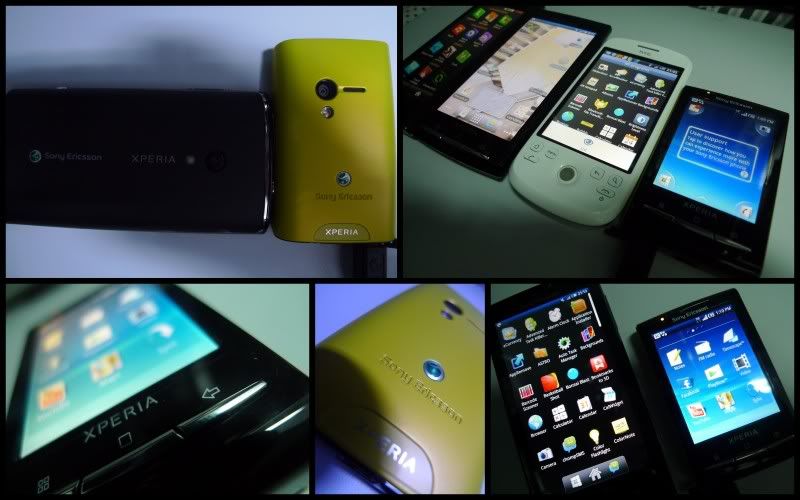 |
|
|
Jul 4 2010, 11:54 PM
|
|
Senior Member
1,134 posts Joined: Apr 2005 From: kay eel
|
Btw, is there any way to transfer SMS from SE C903 to this X10 mini?
|
|
|
Jul 5 2010, 12:13 AM
|
|
Senior Member
734 posts Joined: Oct 2007
|
guys,
x10 doesn't come with market is it? we have to dl ourselves? |
|
|
Jul 5 2010, 12:18 AM
|
|
Junior Member
122 posts Joined: Oct 2008
|
QUOTE(mikecmy @ Jul 5 2010, 12:13 AM) guys, from what i gather from forums, certain (maybe all, not sure) android phones officially meant for Malaysia do not come with market. however, there's a way to install it.x10 doesn't come with market is it? we have to dl ourselves? |
|
|
Jul 5 2010, 01:08 AM
|
|
Senior Member
1,134 posts Joined: Apr 2005 From: kay eel
|
ARGHHHHH
it's so freaking hard to transfer contacts and stuffs from C903 to X10 Mini!!! Sim Card doesn't even recognise |
|
|
Jul 5 2010, 07:30 AM
|
|
Senior Member
532 posts Joined: Oct 2009
|
QUOTE(mikecmy @ Jul 5 2010, 12:13 AM) guys, It come with it. I guess yours is AP unit? Not ori?x10 doesn't come with market is it? we have to dl ourselves? Added on July 5, 2010, 7:37 am QUOTE(aleluya @ Jul 5 2010, 01:08 AM) ARGHHHHH My best suggestion is to sync online. If C903 doesnt come with wifi, you need to spend some $ to sync it through 3G instead. Then, sync it back to your X10mini via wifi. it's so freaking hard to transfer contacts and stuffs from C903 to X10 Mini!!! Sim Card doesn't even recognise If u have unlimited data plan, it doesnt matter wifi or 3g... download the PC companion at SE support site and follow the instruction.... so simplify, 1. Download PC Companion, create account at SE site. 2. activate the a/c per email used to create the a/c. 3. Use your phone to log on to your a/c. 4. sync the old phone to the site. 5. change sim card, and sync back to your new phone. take note, not sure if old firmware of the old phone has this feature... :S This post has been edited by tracktion3: Jul 5 2010, 07:52 AM |
|
|
Jul 5 2010, 09:50 AM
|
|
Senior Member
1,134 posts Joined: Apr 2005 From: kay eel
|
I already did the sync for both phone.
For SMS part, it takes a lot of work which I gave up on that lol |
|
|
Jul 5 2010, 10:13 AM
|

Senior Member
4,482 posts Joined: Jul 2005
|
Does the AP set comes with market then? Planning to get X10 mini pro as well. haha
|
|
|
Jul 5 2010, 10:52 AM
|
|
Senior Member
532 posts Joined: Oct 2009
|
Oh btw... just FYI.
Their are 2 common things you cant do with android phones. At least for this mini X10. 1. You cant forward and send contact via SMS. You cant even received them. If your friend forward you a contact, you wont even get it. The apps are being sold and is not available in Adroid local market. 2. You cant do video call. Again, you need an app for that and you need to buy it. But that again, is not available in local Android Market. Maybe we need a CONS list on Android phones etc etc etc... and solution. |
|
|
Jul 5 2010, 12:14 PM
|
|
Junior Member
252 posts Joined: Feb 2005
|
i just want to know...
how about big pdf reader.... its good on x10 mini? |
|
|
Jul 5 2010, 02:18 PM
|
|
Junior Member
122 posts Joined: Oct 2008
|
this might be a bit ridiculous considering the X10 mini's small screen..but has anyone tried installing a soft qwerty on the mini? comments pls.
|
|
|
Jul 5 2010, 07:16 PM
|
|
Senior Member
1,134 posts Joined: Apr 2005 From: kay eel
|
Erk.. Here's a big problem, the input way, there's no simplified chinese???
|
|
|
Jul 5 2010, 09:59 PM
|
|
Junior Member
133 posts Joined: Sep 2005
|
i've to admit, after i bought the 1st unit, i passed it my son as i felt using the text msgs was hard with the small touchscreen.
then today i bought a 2nd unit for my wife....ha ha. |
|
|
Jul 5 2010, 10:56 PM
|
|
Senior Member
5,040 posts Joined: Nov 2005
|
taken with a x10 mini..
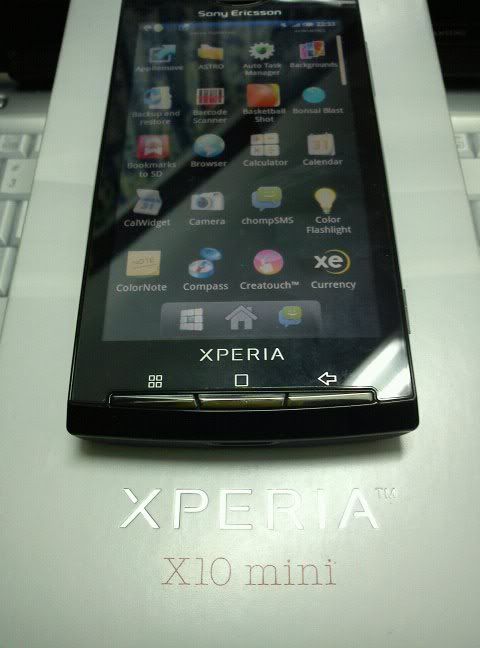 |
|
|
Jul 6 2010, 09:43 AM
|
|
Senior Member
532 posts Joined: Oct 2009
|
many said we dont need the ATK. ( Advance Task Killer) and even the expert said it too. So, I turn it off last night with my battery fully charge. And just now about a min ago, my batter left 1/2. It didnt happen that way when I have ATK on where it went 1/2 battery only in the evening.
So ATK, could be good to save battery. Others may need to try this out and share your experience. |
|
|
Jul 6 2010, 01:47 PM
|
|
Senior Member
5,040 posts Joined: Nov 2005
|
QUOTE(tracktion3 @ Jul 6 2010, 09:43 AM) many said we dont need the ATK. ( Advance Task Killer) and even the expert said it too. So, I turn it off last night with my battery fully charge. And just now about a min ago, my batter left 1/2. It didnt happen that way when I have ATK on where it went 1/2 battery only in the evening. from ur experience , its already obvious its a must to have ATK.So ATK, could be good to save battery. Others may need to try this out and share your experience. of get Auto Task killer...u dont have to do it manually, just mark the apps u wanna close...then everytime it will auto close those u marked. |
|
|
Jul 6 2010, 04:45 PM
|
|
Senior Member
532 posts Joined: Oct 2009
|
QUOTE(rayzrblade @ Jul 6 2010, 01:47 PM) from ur experience , its already obvious its a must to have ATK. Yes, those I ignore are ATK, My DigiClock and SayMyName. of get Auto Task killer...u dont have to do it manually, just mark the apps u wanna close...then everytime it will auto close those u marked. until now, only used up 10%. made 5 calls and at least 10 sms this morning too. so not too bad. Added on July 6, 2010, 4:49 pmoh btw, your widget may take some juice from your bat if you allow them to refresh every moment. So turn off the auto refresh if you don't need it. The one I ignore is the DigiClock. Instead of using the stock one, I installed this one. I like it as you can see the day and date. The stock one only can see date. But you can see the day one standby screen though. I wonder if thats a bug. Another good thing is, one tap on digiclock I open my alarm. Sweet! This post has been edited by tracktion3: Jul 6 2010, 04:49 PM |
|
|
Jul 6 2010, 08:20 PM
|
|
Senior Member
5,040 posts Joined: Nov 2005
|
any owners experience occasional camera shutter lag?
even start up camera also lag.. after restart..back to normal.. |
|
|
Jul 6 2010, 08:40 PM
|
|
Senior Member
532 posts Joined: Oct 2009
|
QUOTE(rayzrblade @ Jul 6 2010, 08:20 PM) any owners experience occasional camera shutter lag? lag for how long? a bit is kinda normal for me. even start up camera also lag.. after restart..back to normal.. |
|
|
Jul 6 2010, 08:54 PM
|
|
Senior Member
5,040 posts Joined: Nov 2005
|
QUOTE(tracktion3 @ Jul 6 2010, 08:40 PM) lag for how long? a bit is kinda normal for me. very lag.. bout 3-4 secs..so lag that it didnt snap the object u took..it snaps when u move away from the object.. |
|
|
Jul 6 2010, 10:36 PM
|
|
Senior Member
532 posts Joined: Oct 2009
|
QUOTE(rayzrblade @ Jul 6 2010, 08:54 PM) very lag.. bout 3-4 secs..so lag that it didnt snap the object u took..it snaps when u move away from the object.. hmmm the camera has auto focus. Light press will focus, then once auto focus complete, then snap photo. It lag I guess it cant focus. I dont have problem for that.Added on July 7, 2010, 11:41 amSwype cant be used on QVGA screen. So, the best is to install SlideIT. Works like a charm Love it and SMS made easy too. You can activate the speech to text too if you are online wifi or 3G. But it takes a while to learn. just a short while for me though. Is a must for the x10 mini. This post has been edited by tracktion3: Jul 7 2010, 11:41 AM |
|
|
Jul 7 2010, 12:34 PM
|
|
Junior Member
252 posts Joined: Feb 2005
|
QUOTE(doublef @ Jul 5 2010, 12:14 PM) i just want to know... can anyone who got x10 mini test for me?how about big pdf reader.... its good on x10 mini? |
|
|
Jul 7 2010, 01:25 PM
|
|
Senior Member
5,040 posts Joined: Nov 2005
|
QUOTE(tracktion3 @ Jul 6 2010, 10:36 PM) hmmm the camera has auto focus. Light press will focus, then once auto focus complete, then snap photo. It lag I guess it cant focus. I dont have problem for that. err..ya..i know there auto focus and all..Added on July 7, 2010, 11:41 amSwype cant be used on QVGA screen. So, the best is to install SlideIT. Works like a charm Love it and SMS made easy too. You can activate the speech to text too if you are online wifi or 3G. But it takes a while to learn. just a short while for me though. Is a must for the x10 mini. but its way too lag..u didnt get what i m trying to say.. 1. on camera ( lag a bit ) 2. press shuter button till FOCUSED 3. press and snap photo. 4. move away from object 5. wait a while 6. showing photo taken not the object BUT its the scene when i MOVED away... get it? |
|
|
Jul 7 2010, 02:53 PM
|
|
Senior Member
532 posts Joined: Oct 2009
|
QUOTE(rayzrblade @ Jul 7 2010, 01:25 PM) err..ya..i know there auto focus and all.. is kinda normal if I understand you correctly. Didnt really feel that much lag honestly. preview showed up very quickly, and I press button again to take another shot. So not much delay or lag for all the steps u mention above. Maybe you could compare that with another X10mini at the shop. but its way too lag..u didnt get what i m trying to say.. 1. on camera ( lag a bit ) 2. press shuter button till FOCUSED 3. press and snap photo. 4. move away from object 5. wait a while 6. showing photo taken not the object BUT its the scene when i MOVED away... get it? or watch this video. there is a scene here he used the camera. Thats how mine behave as well. http://www.youtube.com/watch?v=Kwda1OZY0bE |
|
|
Jul 7 2010, 10:31 PM
|
|
Senior Member
5,040 posts Joined: Nov 2005
|
http://lh3.ggpht.com/_kcl7ZHuJYz8/TDMw60us...00/DSC00008.jpg
http://lh5.ggpht.com/_kcl7ZHuJYz8/TDMwCc4c...44/DSC00010.jpg This post has been edited by rayzrblade: Jul 7 2010, 10:42 PM |
|
|
Jul 8 2010, 02:06 AM
|
|
Junior Member
252 posts Joined: Feb 2005
|
how about pdf reader? fast?
|
|
|
Jul 8 2010, 08:57 AM
|
|
Junior Member
105 posts Joined: Jan 2007 From: Taiping
|
How use the A-gps in x10 mini...
|
|
|
Jul 8 2010, 01:22 PM
|
|
Senior Member
532 posts Joined: Oct 2009
|
those who use x10 mini... SlideIt is a MUST! I love this software. Really easy to use. Oh man!
|
|
|
Jul 9 2010, 04:30 PM
|
|
Senior Member
4,482 posts Joined: Jul 2005
|
X10 Mini can use SlideIT@#!?!@#!?
|
|
|
Jul 9 2010, 04:36 PM
|
|
Junior Member
150 posts Joined: Oct 2005
|
anybody used weather apps?
|
|
|
Jul 9 2010, 04:43 PM
|
|
Junior Member
43 posts Joined: May 2010
|
QUOTE(tracktion3 @ Jul 8 2010, 01:22 PM) those who use x10 mini... SlideIt is a MUST! I love this software. Really easy to use. Oh man! have u try swype b4? i think swype more accurate after i tried both.. |
|
|
Jul 9 2010, 04:55 PM
|
|
Senior Member
4,482 posts Joined: Jul 2005
|
hey where did you get the apps? buying em or downloading them somewhere?
|
|
|
Jul 9 2010, 05:09 PM
|
|
Junior Member
91 posts Joined: Jan 2006
|
newbie here... just bought x10mini last night at midvalley maybank treatpoint fair...
why the phone will automatically turn on when charging....? when i switch off the phone, plug in the charger....switch on the plug..the phone automatically turn on again...pls help.... This post has been edited by termite9: Jul 9 2010, 05:13 PM |
|
|
Jul 9 2010, 05:56 PM
|

Junior Member
228 posts Joined: Dec 2007
|
Cheapest i found on is RM835 with 18 mths warranty. Good buy?
|
|
|
Jul 9 2010, 07:09 PM
|
|
Junior Member
122 posts Joined: Oct 2008
|
QUOTE(tracktion3 @ Jul 8 2010, 01:22 PM) those who use x10 mini... SlideIt is a MUST! I love this software. Really easy to use. Oh man! how do use SlideIT on X10 mini T9 keypad? or when u install SlideIT, u get a soft qwerty keyboard instead? |
|
|
Jul 9 2010, 08:53 PM
|
|
Senior Member
532 posts Joined: Oct 2009
|
QUOTE(Cacti @ Jul 9 2010, 04:43 PM) have u try swype b4? i think swype more accurate after i tried both.. Swype is not applicable on this X10mini QVGA screen... unfortunately....Added on July 9, 2010, 8:54 pm QUOTE(pianrasa @ Jul 9 2010, 07:09 PM) how do use SlideIT on X10 mini T9 keypad? or when u install SlideIT, u get a soft qwerty keyboard instead? touch long on the screen, it will pop out input type. Choose slideit. Then, you can start using slide. Very fast.. I love it.Added on July 9, 2010, 8:54 pm QUOTE(kidmad @ Jul 9 2010, 04:55 PM) hey where did you get the apps? buying em or downloading them somewhere? just google.. u can get it free.. Added on July 9, 2010, 8:58 pm QUOTE(kidmad @ Jul 9 2010, 04:30 PM) X10 Mini can use SlideIT@#!?!@#!? errrrr I think most Android can? no? I tried Swype, it didnt work in QVGA screen... so slide it worked. I'm happy with it.Added on July 9, 2010, 9:00 pm QUOTE(jimmyay @ Jul 9 2010, 05:56 PM) Cheapest i found on is RM835 with 18 mths warranty. Good buy? Very darn cheep. But watch out, that could be AP unit. No memory card and please check if google market or others preinstalled available? And the most important thing, can AP unit be updated to Android 2.1 later...... just take note, I heard some could, some can not.This post has been edited by tracktion3: Jul 9 2010, 09:00 PM |
|
|
Jul 9 2010, 09:05 PM
|
|
Junior Member
27 posts Joined: Nov 2008
|
QUOTE(termite9 @ Jul 9 2010, 05:09 PM) newbie here... just bought x10mini last night at midvalley maybank treatpoint fair... How much you bought? Any freebies ?why the phone will automatically turn on when charging....? when i switch off the phone, plug in the charger....switch on the plug..the phone automatically turn on again...pls help.... This post has been edited by homepp: Jul 9 2010, 09:12 PM |
|
|
Jul 9 2010, 11:45 PM
|
|
Senior Member
1,378 posts Joined: Dec 2009
|
QUOTE(tracktion3 @ Jul 8 2010, 01:22 PM) those who use x10 mini... SlideIt is a MUST! I love this software. Really easy to use. Oh man! after watching this video .i still don't understand how to write those sms ?looks weird.is swype similar as thisis this phone better than x6.im comparing those 2 but i think x10 is clear winner |
|
|
Jul 9 2010, 11:56 PM
|
|
Junior Member
91 posts Joined: Jan 2006
|
QUOTE(homepp @ Jul 9 2010, 09:05 PM) How much you bought? Any freebies ? maybank treaatpoint fair rm1099 , 12months 0% instalment...no 1 can help me....? |
|
|
Jul 10 2010, 12:22 AM
|
|
Senior Member
532 posts Joined: Oct 2009
|
QUOTE(shark7 @ Jul 9 2010, 11:45 PM) after watching this video .i still don't understand how to write those sms ?looks weird.is swype similar as this actually is very simple and swype is similar like this. For example:is this phone better than x6.im comparing those 2 but i think x10 is clear winner 1. You want to spell the word "You". So 1st, you touch the letter "Y" and then just slide to "O" and then to "U". then the word YOU will appear automatically. 2. Lets say you want to spell the word "understand" just go to the letter "U" and start sliding to the next letter n, d, e, r s ...... Even though you might missed a few letters, the recommended word(s) will pop out. The best thing is, a big finger and small button works very well too.. Once you used slideit or swype, you wont go to the normal way anymore.... ... Added on July 10, 2010, 12:29 am QUOTE(termite9 @ Jul 9 2010, 05:09 PM) newbie here... just bought x10mini last night at midvalley maybank treatpoint fair... this is normal. I guess is just how the phone works. Not a problem for me...why the phone will automatically turn on when charging....? when i switch off the phone, plug in the charger....switch on the plug..the phone automatically turn on again...pls help.... This post has been edited by tracktion3: Jul 10 2010, 12:29 AM |
|
|
Jul 10 2010, 12:49 AM
|
|
Senior Member
1,378 posts Joined: Dec 2009
|
QUOTE(tracktion3 @ Jul 10 2010, 12:22 AM) actually is very simple and swype is similar like this. For example: thanks for the info.i wanted to try androids phone.and this is the cheapest right ?1. You want to spell the word "You". So 1st, you touch the letter "Y" and then just slide to "O" and then to "U". then the word YOU will appear automatically. 2. Lets say you want to spell the word "understand" just go to the letter "U" and start sliding to the next letter n, d, e, r s ...... Even though you might missed a few letters, the recommended word(s) will pop out. The best thing is, a big finger and small button works very well too.. Once you used slideit or swype, you wont go to the normal way anymore.... ... Added on July 10, 2010, 12:29 am this is normal. I guess is just how the phone works. Not a problem for me... hurm.i want to know bout the wifi ?is it fast ?and does the android market got apps like ym,msn,fb for free ? currently im looking fwd with the fb,ym,msn stuff . i have nokia x3 and try using ovi store,then check my prepaid,it deducts my RM,how bout android market ? This post has been edited by shark7: Jul 10 2010, 12:49 AM |
|
|
Jul 10 2010, 12:58 AM
|
|
Senior Member
532 posts Joined: Oct 2009
|
QUOTE(shark7 @ Jul 10 2010, 12:49 AM) thanks for the info.i wanted to try androids phone.and this is the cheapest right ? those apps you mention are all free.....hurm.i want to know bout the wifi ?is it fast ?and does the android market got apps like ym,msn,fb for free ? currently im looking fwd with the fb,ym,msn stuff . i have nokia x3 and try using ovi store,then check my prepaid,it deducts my RM,how bout android market ? android market, if you use wifi.... of course free lah.. if you use your 3G, or course you need to pay. not sure how much is HTC wildfire... I guess is quite the same too... i mean the price..... |
|
|
Jul 10 2010, 01:11 AM
|
|
Senior Member
1,378 posts Joined: Dec 2009
|
QUOTE(tracktion3 @ Jul 10 2010, 12:58 AM) those apps you mention are all free..... yup,so which is better ?htc or xperia .? nver look at htc videos at youtube.but it does hve a big screen.but i don;t care bout the screen after watching xperia android market, if you use wifi.... of course free lah.. if you use your 3G, or course you need to pay. not sure how much is HTC wildfire... I guess is quite the same too... i mean the price..... actually i wanted a phone similar to iphone that has many apps,fast wifi but cheaper .and htc wildfire ,does it use stylus pen or hand like iphone and xperia ? but xperia looks so smooth la like iphone ..but looks better |
|
|
Jul 10 2010, 01:58 AM
|
|
Senior Member
1,134 posts Joined: Apr 2005 From: kay eel
|
Just wondering any idea on when x10 mini pro will be coming ouit?
|
|
|
Jul 11 2010, 12:51 AM
|
|
Senior Member
5,040 posts Joined: Nov 2005
|
[quote=termite9,Jul 9 2010, 05:09 PM]
newbie here... just bought x10mini last night at midvalley maybank treatpoint fair... why the phone will automatically turn on when charging....? when i switch off the phone, plug in the charger....switch on the plug..the phone automatically turn on again...pls help.... [/quote] It's like that. It happened to my x 10 too Added on July 9, 2010, 9:00 pm Very darn cheep. But watch out, that could be AP unit. No memory card and please check if google market or others preinstalled available? And the most important thing, can AP unit be updated to Android 2.1 later...... just take note, I heard some could, some can not. [/quote] Even AP also came from some country. It sure can update. Maybe faster than Malaysia. |
|
|
Jul 11 2010, 02:13 PM
|
|
Senior Member
816 posts Joined: Jan 2003
|
QUOTE(aleluya @ Jul 10 2010, 01:58 AM) Just wondering any idea on when x10 mini pro will be coming ouit? I sent to SE, and this is their reply, feeling after reading:With regard to your enquiry, we would like to inform you that Sony Ericsson Xperia X10 mini pro will be available in Malaysia in few months time. Should you be interested on the said model, kindly refer to any of the nearest dealers and kindly insist for Sony Ericsson warranty sticker, Sony Ericsson warranty card and SIRIM security strip to ensure that you've purchased an approved authorized Sony Ericsson phone from your dealer. This post has been edited by skyer: Jul 11 2010, 02:15 PM |
|
|
Jul 11 2010, 06:14 PM
|
|
Junior Member
122 posts Joined: Oct 2008
|
can anybody point me where can i get a screen protector for the X10 Mini?
|
|
|
Jul 12 2010, 06:09 AM
|

Junior Member
87 posts Joined: May 2007
|
Anyone having problems connecting to wifi? The phone will show wifi has full signal bar but when I tried entering android market it says there's no connection.
This post has been edited by mikeyliml: Jul 12 2010, 06:10 AM |
|
|
Jul 12 2010, 09:46 AM
|
|
Junior Member
43 posts Joined: May 2010
|
some sellers told me x10 mini pro should be available in the 3rd week of july..so most probably end of the month or begining of next month if any delay..taiwan or other country mostly available for sale oledi..
|
|
|
Jul 12 2010, 09:51 AM
|
|
Senior Member
4,482 posts Joined: Jul 2005
|
hurmm... now i really need to consider. I've x10mini is able to support SlideIT most probably ill get the non-pro version. Anyway for x10 mini do they have a QWERTY virtual keyboard?
|
|
|
Jul 12 2010, 10:08 AM
|
|
Senior Member
532 posts Joined: Oct 2009
|
QUOTE(kidmad @ Jul 12 2010, 09:51 AM) hurmm... now i really need to consider. I've x10mini is able to support SlideIT most probably ill get the non-pro version. Anyway for x10 mini do they have a QWERTY virtual keyboard? No QWERTY, it came with it special design keyscreen for small screen. but if you install slideit, it will be QWERTY and never go back to the one by SE. |
|
|
Jul 12 2010, 10:15 AM
|
|
Junior Member
43 posts Joined: May 2010
|
QUOTE(tracktion3 @ Jul 12 2010, 10:08 AM) No QWERTY, it came with it special design keyscreen for small screen. but if you install slideit, it will be QWERTY and never go back to the one by SE. u mean dun have the selection anymore?? how if unistall the slideit..will it go back to ori one? |
|
|
Jul 12 2010, 10:26 AM
|
|
Senior Member
532 posts Joined: Oct 2009
|
QUOTE(mikeyliml @ Jul 12 2010, 06:09 AM) Anyone having problems connecting to wifi? The phone will show wifi has full signal bar but when I tried entering android market it says there's no connection. wifi connected doesnt mean the dsl modem connected to the internet. Check the modem. If you are outside, same principle apply. I dont have this problem. You need to turn on backgroud data to use the market. it will prompt you if u didnt turn it on. |
|
|
Jul 12 2010, 11:01 AM
|
|
Junior Member
150 posts Joined: Oct 2005
|
QUOTE(pianrasa @ Jul 11 2010, 06:14 PM) can anybody point me where can i get a screen protector for the X10 Mini? yup..i'm also looking at the same itemsAdded on July 12, 2010, 11:01 am QUOTE(art_535 @ Jul 9 2010, 04:36 PM) anybody used weather apps? anybody used this apps.This post has been edited by art_535: Jul 12 2010, 11:01 AM |
|
|
Jul 12 2010, 11:11 AM
|
|
Senior Member
532 posts Joined: Oct 2009
|
QUOTE(Cacti @ Jul 12 2010, 10:15 AM) u mean dun have the selection anymore?? how if unistall the slideit..will it go back to ori one? input method can be selected. Is up to you which one you want to set to default. The original one is there. You dont have to uninstall slide it to use the ORI. Just choose your method of input. Press long on the are, then it will prompt you. I dont think you need the pro version with slide it. Is so easy and simple, slideit will make those keypad redundant. |
|
|
Jul 12 2010, 04:02 PM
|
|
Junior Member
122 posts Joined: Oct 2008
|
QUOTE(tracktion3 @ Jul 12 2010, 11:11 AM) input method can be selected. Is up to you which one you want to set to default. The original one is there. You dont have to uninstall slide it to use the ORI. Just choose your method of input. Press long on the are, then it will prompt you. bro tracktion3,I dont think you need the pro version with slide it. Is so easy and simple, slideit will make those keypad redundant. appreciate if u can answer these questions below regarding SlideIT. 1. does it support malay language? i know there are language packs for SlideIT, but i couldn't find the malay version. 2. Can the user insert new words/vocabs/short forms into the program? in other words, can it learn new words? 3. does it work in landscape mode? thank you in advance. |
|
|
Jul 12 2010, 04:44 PM
|
|
Senior Member
532 posts Joined: Oct 2009
|
QUOTE(pianrasa @ Jul 12 2010, 04:02 PM) bro tracktion3, Hey Bro,appreciate if u can answer these questions below regarding SlideIT. 1. does it support malay language? i know there are language packs for SlideIT, but i couldn't find the malay version. 2. Can the user insert new words/vocabs/short forms into the program? in other words, can it learn new words? 3. does it work in landscape mode? thank you in advance. 1. does it support malay language? i know there are language packs for SlideIT, but i couldn't find the malay version. Honestly I dont know. I sms in eng most of the time. I dont have to use slide it for those words not in dictionary... ha ha... just press one letter at a time, dont slide, it work like normal key pad. 2. Can the user insert new words/vocabs/short forms into the program? in other words, can it learn new words? YES YES and YES. You can even create shortcut per your like. for example ASAP : As soon as possible. IMHO = In my humble opinion. TT = Teh Tarik 3. does it work in landscape mode? YES. and for X10 mini on landscape is even easier... |
|
|
Jul 12 2010, 06:11 PM
|
|
Junior Member
150 posts Joined: Oct 2005
|
anybody got the problem, suddenly appear notification sd card is removed.
|
|
|
Jul 12 2010, 08:14 PM
|
|
Senior Member
532 posts Joined: Oct 2009
|
QUOTE(art_535 @ Jul 12 2010, 06:11 PM) anybody got the problem, suddenly appear notification sd card is removed. replying using my x10 mini browser and type with SlideIT. hahaI don't have that problem. check your card whether is loose or not. go to sony Ericsson forum.I think I saw someone complaint the same think before. This post has been edited by tracktion3: Jul 12 2010, 08:43 PM |
|
|
Jul 14 2010, 12:24 PM
|
|
Junior Member
27 posts Joined: Nov 2008
|
Hi tracktion3, how many lines of sms can display when using SlideIt? Mind to share the sms screen? How about the chinese text input?
|
|
|
Jul 14 2010, 02:16 PM
|
|
Senior Member
532 posts Joined: Oct 2009
|
QUOTE(homepp @ Jul 14 2010, 12:24 PM) Hi tracktion3, how many lines of sms can display when using SlideIt? Mind to share the sms screen? How about the chinese text input? It depends on your orientation, horizontal(landscape) you can see 3 lines. Vertical (potrait) you can see only 2 lines. I have no idea about Chinese Input text, I dont use it. But I think you can install the language packs from the market. |
|
|
Jul 14 2010, 06:50 PM
|
|
Newbie
3 posts Joined: Mar 2009
|
QUOTE(tracktion3 @ Jul 14 2010, 02:16 PM) It depends on your orientation, horizontal(landscape) you can see 3 lines. Vertical (potrait) you can see only 2 lines. I have no idea about Chinese Input text, I dont use it. But I think you can install the language packs from the market. Added on July 14, 2010, 6:55 pmi just got this phone for 2days, overall im quite satisfied with it... just on the messaging part....i don't really like it as when i use msn / ebuddy..typing message is so difficult and i can't see people replying me, as i keep need to, keep on pressing the back button kinda troublesome for me..maybe i haven't get use to iti have installed Slide IT also but i dont really how to use it on such a small screen..helppppp This post has been edited by carmenmah: Jul 14 2010, 06:55 PM |
|
|
Jul 14 2010, 11:18 PM
|
|
Senior Member
532 posts Joined: Oct 2009
|
QUOTE(carmenmah @ Jul 14 2010, 06:50 PM) Added on July 14, 2010, 6:55 pmi just got this phone for 2days, overall im quite satisfied with it... just on the messaging part....i don't really like it as when i use msn / ebuddy..typing message is so difficult and i can't see people replying me, as i keep need to, keep on pressing the back button kinda troublesome for me..maybe i haven't get use to iti have installed Slide IT also but i dont really how to use it on such a small screen..helppppp did you activate it? click the app and activate it. Or when you open MSN for example, click and hold long enough and the screen will pop up. select input type. choose slideit.... hopes this helps... I dont use MSN, so not sure.... whether that works or not. |
|
|
Jul 15 2010, 01:09 PM
|
|
Senior Member
1,378 posts Joined: Dec 2009
|
im still not sure whether to buy this phone or wave ..
jus askin,which is better ?ap set or ori ?besides the warranty ?ap set can go to android market ? ap cheaper now rm800+ . is wifi troublesome ?i mean the screen is small so is it hard ? and these are important for me - does this phone has ym ?how its looks like ? about the fb,some phone cannot log out/"like"/no notification .how about this phone ? how bout bluteooth ?i heard must downlod at android app and can't receive file or somthing like that This post has been edited by shark7: Jul 15 2010, 01:34 PM |
|
|
Jul 15 2010, 01:23 PM
|
|
Newbie
3 posts Joined: Mar 2009
|
QUOTE(tracktion3 @ Jul 14 2010, 11:18 PM) just slide it... just kidding. Hi tracktion3did you activate it? click the app and activate it. Or when you open MSN for example, click and hold long enough and the screen will pop up. select input type. choose slideit.... hopes this helps... I dont use MSN, so not sure.... whether that works or not. thanks so much.. i think my hands is too big..hahaha..so i could able to slide it on such a small screen or maybe i havent get use to it... temporary i will stick back to normal typing by the way, how to install or change the theme and reset the icon back to original? did anyone facing the phone book list problem... i need to re-key in all my phone book list because mine have +601xxxx but all those incoming call does not appear +601xxxx, its just come out like 01x-xxx..is there any shortcut to do so thanks so muchie |
|
|
Jul 15 2010, 03:01 PM
|
|
Senior Member
532 posts Joined: Oct 2009
|
QUOTE(carmenmah @ Jul 15 2010, 01:23 PM) Hi tracktion3 press the center button long enuf, it will prompt you to select your home screen. I assume u isntall some sort fo launcher...thanks so much.. i think my hands is too big..hahaha..so i could able to slide it on such a small screen or maybe i havent get use to it... temporary i will stick back to normal typing by the way, how to install or change the theme and reset the icon back to original? did anyone facing the phone book list problem... i need to re-key in all my phone book list because mine have +601xxxx but all those incoming call does not appear +601xxxx, its just come out like 01x-xxx..is there any shortcut to do so thanks so muchie The phone number problem... yah... common problem... |
|
|
Jul 15 2010, 08:16 PM
|
|
Junior Member
122 posts Joined: Oct 2008
|
bro tracktion3,
on a scale of 0 to 10, how do u rate ur overall experience with the X10 Mini? did u ever wish that the screen should be larger? |
|
|
Jul 16 2010, 12:52 AM
|
|
Newbie
3 posts Joined: Mar 2009
|
QUOTE(tracktion3 @ Jul 15 2010, 03:01 PM) press the center button long enuf, it will prompt you to select your home screen. I assume u isntall some sort fo launcher... i couldn't any way in the setting or software or any application to change the theme..The phone number problem... yah... common problem... did u change ur theme? Added on July 16, 2010, 1:24 am QUOTE(tracktion3 @ Jul 14 2010, 02:16 PM) It depends on your orientation, horizontal(landscape) you can see 3 lines. Vertical (potrait) you can see only 2 lines. hihi...mine phone came with chinese input but i dont read chinese...so i didnt use itI have no idea about Chinese Input text, I dont use it. But I think you can install the language packs from the market. This post has been edited by carmenmah: Jul 16 2010, 01:24 AM |
|
|
Jul 17 2010, 09:18 PM
|
|
Senior Member
532 posts Joined: Oct 2009
|
People,
I had my 1st hang of the phone while playing Carom3D Trial version. The screen just go blank. When I charge it, the screen came back but all the button no respond. So I cant turn the touch screen on. So how to reset this phone? Battery is built in so you cant remove it. The method explain in this link. But the best way to reset is by pressing the middle button and the power button at the same time for 5 seconds. http://se-blog.com/how-to-reset-the-x10-mini/ btw. x10 mini pro got removable battery... hmm? This post has been edited by tracktion3: Jul 17 2010, 09:20 PM |
|
|
Jul 17 2010, 10:19 PM
|
|
Junior Member
122 posts Joined: Oct 2008
|
QUOTE(tracktion3 @ Jul 17 2010, 09:18 PM) People, "Press and hold this little button for a few seconds, and it’ll be like if you removed the battery and put it back again. Another way to force a reset should be by pressing the middle button and the power button at the same time for 5 seconds." excerpt from the link that bro tracktion3 had given.I had my 1st hang of the phone while playing Carom3D Trial version. The screen just go blank. When I charge it, the screen came back but all the button no respond. So I cant turn the touch screen on. So how to reset this phone? Battery is built in so you cant remove it. The method explain in this link. But the best way to reset is by pressing the middle button and the power button at the same time for 5 seconds. http://se-blog.com/how-to-reset-the-x10-mini/ btw. x10 mini pro got removable battery... hmm? did it do the trick? i presumed that ur X10 mini came back functioning normally after the procedure? tired waiting for the PRO, getting X10 mini instead... love the PRO qwerty, but willing to settle for an on screen qwerty on the X10 mini. saw it on youtube, quite good.. click on the link below for demo.. Xperia X10 Mini - Typing using an on-screen QWERTY keyboard |
|
|
Jul 17 2010, 10:38 PM
|
|
Senior Member
532 posts Joined: Oct 2009
|
QUOTE(pianrasa @ Jul 17 2010, 10:19 PM) "Press and hold this little button for a few seconds, and it’ll be like if you removed the battery and put it back again. Another way to force a reset should be by pressing the middle button and the power button at the same time for 5 seconds." excerpt from the link that bro tracktion3 had given. Yes....it work perfectly. Very easy, is like re-starting your phone. I dont blame if on the phone. It sound like the the apps that causing the system to hang.... but this is the 1st after installing dont know how many apps from the market and non market too. did it do the trick? i presumed that ur X10 mini came back functioning normally after the procedure? tired waiting for the PRO, getting X10 mini instead... love the PRO qwerty, but willing to settle for an on screen qwerty on the X10 mini. saw it on youtube, quite good.. click on the link below for demo.. Xperia X10 Mini - Typing using an on-screen QWERTY keyboard Android is really...... powerful... Added on July 17, 2010, 11:56 pmSome update in wifi. I discovered that, if you have problem with wifi where the symptom is, it wont connect to your modem, and the funny thing is, it will connect if you reboot your modem. I found some sort of bug. If you have above problem, go to setting>security & location> My location> turn off - use Wireless networks(establish your position using wireless network). and try again.. wifi will connect again now...weird, hope this can be fixed in 2.1 temporary.. this works..... This post has been edited by tracktion3: Jul 17 2010, 11:56 PM |
|
|
Jul 18 2010, 04:57 PM
|
|
Senior Member
5,040 posts Joined: Nov 2005
|
QUOTE(pianrasa @ Jul 15 2010, 08:16 PM) bro tracktion3, Am using a x 10 and a mini. on a scale of 0 to 10, how do u rate ur overall experience with the X10 Mini? did u ever wish that the screen should be larger? I found out I use mini more than x 10. For a quick update on fb or tweeter, the mini should so the job. If u need long surfing then x 10 is your choice |
|
|
Jul 18 2010, 07:10 PM
|
|
Senior Member
532 posts Joined: Oct 2009
|
QUOTE(rayzrblade @ Jul 18 2010, 04:57 PM) Am using a x 10 and a mini. similar for me. tight now I use my x10 mini to update this forum. if you plan to use the phone often for going to the net,I suggest you get a bigger screen. for a quick update,x10 mini is perfect for me. like I said,SlideIT is s must.I found out I use mini more than x 10. For a quick update on fb or tweeter, the mini should so the job. If u need long surfing then x 10 is your choice Added on July 18, 2010, 7:23 pmanother quick update. updating your modem firm ware help to fix the wifi outside issue. my a d sl modem is belkin This post has been edited by tracktion3: Jul 18 2010, 07:23 PM |
|
|
Jul 18 2010, 07:50 PM
|
|
Senior Member
1,134 posts Joined: Apr 2005 From: kay eel
|
Just wondering will there be any theme support for X10 mini?
|
|
|
Jul 18 2010, 08:22 PM
|
|
Senior Member
1,695 posts Joined: Oct 2009
|
The looks sucks.. the spec not good oso...
|
|
|
Jul 18 2010, 08:33 PM
|
|
Junior Member
122 posts Joined: Oct 2008
|
QUOTE(Jurlique @ Jul 18 2010, 08:22 PM) The looks sucks.. the spec not good oso... it's a matter of preference bro... with the X10 mini, u get what u paid for and then some more.. personally i like it very much (after playing with it for awhile)..mine is going to arrive in a couple of days.. can't wait! |
|
|
Jul 18 2010, 10:26 PM
|
|
Senior Member
1,134 posts Joined: Apr 2005 From: kay eel
|
QUOTE(Jurlique @ Jul 18 2010, 08:22 PM) The looks sucks.. the spec not good oso... it's a half smart phone, it doesn't suck at all; if you hate it leave it.I think it does great wonder but yes, it does lack a few function from normal phone as well |
|
|
Jul 19 2010, 02:24 AM
|

Senior Member
2,603 posts Joined: May 2006 From: USJ Taipan + PJ SS2
|
Sony Ericsson X10 mini latest price is RM935 for Original Thorus set.
This post has been edited by Clareen: Jul 19 2010, 01:01 PM |
|
|
Jul 19 2010, 04:08 PM
|
|
Senior Member
816 posts Joined: Jan 2003
|
QUOTE(Clareen @ Jul 19 2010, 02:24 AM) Sony Ericsson X10 mini latest price is RM935 for Original Thorus set. I saw the "Coming Soon" logo for Mini PRO dropped from SE Malaysia page already. May I know whether it's on sale already? How much is for the Original set?This post has been edited by skyer: Jul 19 2010, 04:12 PM |
|
|
Jul 19 2010, 07:45 PM
|
|
Junior Member
252 posts Joined: Feb 2005
|
Ya it dropped the coming soon logo...
No, it not in sale yet... i already search everywhere for x10 mini pro.. but no luck... in facebook it say will be sell out beginning 19 July 2010, but when i called sony ericsson it say will be launch at end of august... The rumor of the price is RM 1299... For me it kinda overpriced compared to x10 mini now... And i think only Thorus dealer only get this phone to sell out... To all seller out there... Please help us out.. Ask your dealer if got this X10 mini pro selling out, because we desperate need it. Thank You. |
|
|
Jul 19 2010, 08:19 PM
|
|
Junior Member
122 posts Joined: Oct 2008
|
QUOTE(aleluya @ Jul 18 2010, 10:26 PM) it's a half smart phone, it doesn't suck at all; if you hate it leave it. care to elaborate on the last sentence bro? what function(s) does it lacking?I think it does great wonder but yes, it does lack a few function from normal phone as well |
|
|
Jul 20 2010, 08:23 AM
|
|
Senior Member
532 posts Joined: Oct 2009
|
QUOTE(pianrasa @ Jul 19 2010, 08:19 PM) care to elaborate on the last sentence bro? what function(s) does it lacking? I got one. You cant forward contact via SMS or received it via sms. He he he all android got this problem I believe. There are apps that can make this work though. But you need to pay. |
|
|
Jul 20 2010, 08:33 AM
|
|
Senior Member
1,378 posts Joined: Dec 2009
|
QUOTE(tracktion3 @ Jul 20 2010, 08:23 AM) I got one. i heard camera cannot zoom ?going to get x10mini in few hours.hopefully it worth rm900+You cant forward contact via SMS or received it via sms. He he he all android got this problem I believe. There are apps that can make this work though. But you need to pay. must register gmail first then can only go to android market eh ? i heard some of the sellers said that |
|
|
Jul 20 2010, 09:10 AM
|
|
Senior Member
532 posts Joined: Oct 2009
|
yeah, camara cant zoom. Well, you can download apps to do that like Camera Zoom FX. But those are digital zoom. Not clear. The best is to get phone with optical zoom.... but then again.. is a phone.
I dont like to use zoom anyway... especially digital zoom. Waste of time.. I cant remember if I need to register gmail. I do have an a/c. If free anyway, whats wrong with creating an a/c in gmail? |
|
|
Jul 20 2010, 01:49 PM
|
|
Junior Member
37 posts Joined: Dec 2007
|
QUOTE(tracktion3 @ Jul 15 2010, 03:01 PM) press the center button long enuf, it will prompt you to select your home screen. I assume u isntall some sort fo launcher... So traktion3, no one knows how to fix the problem with the phone number?The phone number problem... yah... common problem... |
|
|
Jul 20 2010, 04:14 PM
|
|
Senior Member
532 posts Joined: Oct 2009
|
QUOTE(rinezry @ Jul 20 2010, 01:49 PM) So traktion3, no one knows how to fix the problem with the phone number? you mean the prefix of +60XXXXX?nope... I dont have solution for that... maybe can try the apps, that you can download for trial. Both phone and your outlook contact need to be sync. From there, you can add the prefix if I could recall... hmmm |
|
|
Jul 20 2010, 05:49 PM
|
|
Senior Member
1,378 posts Joined: Dec 2009
|
QUOTE(tracktion3 @ Jul 20 2010, 09:10 AM) yeah, camara cant zoom. Well, you can download apps to do that like Camera Zoom FX. But those are digital zoom. Not clear. The best is to get phone with optical zoom.... but then again.. is a phone. nothin.jus a bit troublesomeI dont like to use zoom anyway... especially digital zoom. Waste of time.. I cant remember if I need to register gmail. I do have an a/c. If free anyway, whats wrong with creating an a/c in gmail? i just got my x10 mini.i nver ask for which colour but i got white and green colour. when i first open the phone it asks for an update,but can't update. i wnt to go android market but how ?through wifi can ? does it deduct my credit ? and can i go to android market via pc and download app and transfer the apps to the phone via usb cable ? and u guys are using what apps ? i know tracktion 3 using slideIT and guitar recommend other apps too.thanks |
|
|
Jul 20 2010, 06:26 PM
|
|
Senior Member
532 posts Joined: Oct 2009
|
QUOTE(shark7 @ Jul 20 2010, 05:49 PM) nothin.jus a bit troublesome using wifi will not take your creadit. is free. make sure you turn off your data line.. just incase, accidental... used of your 3G.i just got my x10 mini.i nver ask for which colour but i got white and green colour. when i first open the phone it asks for an update,but can't update. i wnt to go android market but how ?through wifi can ? does it deduct my credit ? and can i go to android market via pc and download app and transfer the apps to the phone via usb cable ? and u guys are using what apps ? i know tracktion 3 using slideIT and guitar recommend other apps too.thanks |
|
|
Jul 20 2010, 06:39 PM
|
|
Senior Member
1,378 posts Joined: Dec 2009
|
QUOTE(tracktion3 @ Jul 20 2010, 06:26 PM) using wifi will not take your creadit. is free. make sure you turn off your data line.. just incase, accidental... used of your 3G. how to turn it off.btw im using slide it but its damn hard,how to make the phone to be like horizontal when using slide it ?like watching youtube horizontal,vertical is hard to msj the only hard thing bout this phone is messaging. and i try searching speedx 3d games but no luck ?anyone try it ? and also this app - http://www.youtube.com/watch?v=w7IJ1A6myhw .the android market say seach no result and sometime it say error,retry bla2 and i noticed the upper bar of the phone(battery and stuff)after finish download there will be an icon.how to remove it.i also see bluetooth icon , |
|
|
Jul 20 2010, 07:23 PM
|
|
Senior Member
532 posts Joined: Oct 2009
|
QUOTE(shark7 @ Jul 20 2010, 06:39 PM) how to turn it off.btw im using slide it but its damn hard,how to make the phone to be like horizontal when using slide it ? you can set the horizontal setting at the setting> sound & display > Orientationlike watching youtube horizontal,vertical is hard to msj the only hard thing bout this phone is messaging. and i try searching speedx 3d games but no luck ?anyone try it ? and also this app - http://www.youtube.com/watch?v=w7IJ1A6myhw .the android market say seach no result and sometime it say error,retry bla2 and i noticed the upper bar of the phone(battery and stuff)after finish download there will be an icon.how to remove it.i also see bluetooth icon , data line can be disable at setting>mobile networks>data traffic, You can add a widget to on or off data traffic too. I suggest you do. I off mine all the time. I got speedx 3d he he he.... very challenging game... you want... just google.. he heAdded on July 20, 2010, 7:24 pmoh btw, I watch the video.. slideit can cut the time by half.. ha ha ha This post has been edited by tracktion3: Jul 20 2010, 07:24 PM |
|
|
Jul 20 2010, 08:25 PM
|
|
Senior Member
1,378 posts Joined: Dec 2009
|
QUOTE(tracktion3 @ Jul 20 2010, 07:23 PM) you can set the horizontal setting at the setting> sound & display > Orientation i already did that data traffic.quite useful.and the orientation.when i click on the slideit apps,it works,but when i write new msj,it doeesn't go horizontal .still vertical.data line can be disable at setting>mobile networks>data traffic, You can add a widget to on or off data traffic too. I suggest you do. I off mine all the time. I got speedx 3d he he he.... very challenging game... you want... just google.. he heAdded on July 20, 2010, 7:24 pmoh btw, I watch the video.. slideit can cut the time by half.. ha ha ha btw the speedx 3d doesn't available on android market ?i search via the phone. and when i put usb cable to pc,the phone charge itself,but my pc looks like doesn't regonize the x10 mini.when i click at it,my pc say insert a disk |
|
|
Jul 20 2010, 11:25 PM
|
|
Senior Member
532 posts Joined: Oct 2009
|
QUOTE(shark7 @ Jul 20 2010, 08:25 PM) i already did that data traffic.quite useful.and the orientation.when i click on the slideit apps,it works,but when i write new msj,it doeesn't go horizontal .still vertical. your X10 mini is an AP unit? The ori comes with apps and driver inside the SD card, it will automatically call for install. But, you need to download the latest one from SE. Go download PC companion.btw the speedx 3d doesn't available on android market ?i search via the phone. and when i put usb cable to pc,the phone charge itself,but my pc looks like doesn't regonize the x10 mini.when i click at it,my pc say insert a disk |
|
|
Jul 20 2010, 11:37 PM
|
|
Senior Member
1,378 posts Joined: Dec 2009
|
QUOTE(tracktion3 @ Jul 20 2010, 11:25 PM) your X10 mini is an AP unit? The ori comes with apps and driver inside the SD card, it will automatically call for install. But, you need to download the latest one from SE. Go download PC companion. its ok already.actually there already pc companion in the sd card.i did not check the phone.it ask for somethingat my msj(default msj style)always got chinese text.i dunno chinese but its like already default,i can change it but a bit annoying.the seller already change it for me but i dunno what i mess up ,it bcome chinese text again. and why when i use slide it,i can't make it horizontal.??i already did what u said,it works when i open the apps,but when msj,only vertical. and does speed forge 3d works on mini?looks like a not bad game already google on pc bout speedx 3d.found it.so which folder should i put ? and i just installed it but when i just about to open it,it says error but the i can see the menu screen and music of the game,then a popup saying.error,plz redownload again at android market . This post has been edited by shark7: Jul 20 2010, 11:43 PM |
|
|
Jul 20 2010, 11:48 PM
|
|
Senior Member
532 posts Joined: Oct 2009
|
QUOTE(shark7 @ Jul 20 2010, 11:37 PM) its ok already.actually there already pc companion in the sd card.i did not check the phone.it ask for something Ahhh now I know why u said cant see it horizontal... Because you use the stock sms apps. at my msj(default msj style)always got chinese text.i dunno chinese but its like already default,i can change it but a bit annoying.the seller already change it for me but i dunno what i mess up ,it bcome chinese text again. and why when i use slide it,i can't make it horizontal.??i already did what u said,it works when i open the apps,but when msj,only vertical. and does speed forge 3d works on mini?looks like a not bad game already google on pc bout speedx 3d.found it.so which folder should i put ? and i just installed it but when i just about to open it,it says error but the i can see the menu screen and music of the game,then a popup saying.error,plz redownload again at android market . go download handcent sms from the market... you will love it... |
|
|
Jul 20 2010, 11:50 PM
|
|
Junior Member
122 posts Joined: Oct 2008
|
does anybody know how to hard reset (meaning wiping all the data) on the mini?
|
|
|
Jul 20 2010, 11:56 PM
|
|
Senior Member
532 posts Joined: Oct 2009
|
QUOTE(pianrasa @ Jul 20 2010, 11:50 PM) does anybody know how to hard reset (meaning wiping all the data) on the mini? goto setting>SD Card,USB masstorage>factory data reset.... |
|
|
Jul 21 2010, 12:00 AM
|
|
Senior Member
1,378 posts Joined: Dec 2009
|
QUOTE(tracktion3 @ Jul 20 2010, 11:48 PM) Ahhh now I know why u said cant see it horizontal... Because you use the stock sms apps. thanks.it work now but can u teach me how to use it .i can't use it.lets say i wnt to write "look"go download handcent sms from the market... you will love it... so i should do it like this,press l,then slide to "o""o"press around 3 secs ?then slide to k? is that the way ? ya bout my games problem,hope u can help anyone know the apps barscanner code?i use it ,but it give useless info ?maybe they can't regonize malaysian products |
|
|
Jul 21 2010, 12:06 AM
|
|
Junior Member
122 posts Joined: Oct 2008
|
QUOTE(tracktion3 @ Jul 20 2010, 11:56 PM) goto setting>SD Card,USB masstorage>factory data reset.... thanks a lot bro.. |
|
|
Jul 21 2010, 12:11 AM
|
|
Senior Member
532 posts Joined: Oct 2009
|
QUOTE(shark7 @ Jul 21 2010, 12:00 AM) thanks.it work now but can u teach me how to use it .i can't use it.lets say i wnt to write "look" just slide...i dont wait...so i should do it like this,press l,then slide to "o""o"press around 3 secs ?then slide to k? is that the way ? ya bout my games problem,hope u can help anyone know the apps barscanner code?i use it ,but it give useless info ?maybe they can't regonize malaysian products |
|
|
Jul 21 2010, 12:21 AM
|
|
Senior Member
1,378 posts Joined: Dec 2009
|
QUOTE(tracktion3 @ Jul 21 2010, 12:11 AM) just slide...i dont wait... i try that also but sometime it doesn't understand what im typing, |
|
|
Jul 21 2010, 12:28 AM
|
|
Junior Member
122 posts Joined: Oct 2008
|
anybody has the experience of updating their mini phone software?
i'm updating mine, painfully slow.. |
|
|
Jul 21 2010, 07:28 AM
|
|
Senior Member
532 posts Joined: Oct 2009
|
QUOTE(pianrasa @ Jul 21 2010, 12:28 AM) anybody has the experience of updating their mini phone software? update available? Since when? I didnt know the X10mini got update. Should be the 2.1 Enclair?i'm updating mine, painfully slow.. |
|
|
Jul 21 2010, 07:40 AM
|
|
Junior Member
122 posts Joined: Oct 2008
|
QUOTE(tracktion3 @ Jul 21 2010, 07:28 AM) update available? Since when? I didnt know the X10mini got update. Should be the 2.1 Enclair? connect ur mini to SE PC Companion (via usb) and it will let u know that an update is available for ur phone software (unfortunately it's not 2.1 eclair, just a build update i guess). the process of updating will take awhile. make sure u follow the steps shown in pc companion.This post has been edited by pianrasa: Jul 21 2010, 07:41 AM |
|
|
Jul 21 2010, 07:51 AM
|
|
Senior Member
532 posts Joined: Oct 2009
|
QUOTE(pianrasa @ Jul 21 2010, 07:40 AM) connect ur mini to SE PC Companion (via usb) and it will let u know that an update is available for ur phone software (unfortunately it's not 2.1 eclair, just a build update i guess). the process of updating will take awhile. make sure u follow the steps shown in pc companion. alright. Will check it out. I tried before a few weeks time, but no update available,Can you check your version. Go to setting>about phone> Build Number> mine is 1.0.A.1.36 |
|
|
Jul 21 2010, 07:55 AM
|
|
Junior Member
122 posts Joined: Oct 2008
|
QUOTE(tracktion3 @ Jul 21 2010, 07:51 AM) alright. Will check it out. I tried before a few weeks time, but no update available, mine is 1.1.A.0.8Can you check your version. Go to setting>about phone> Build Number> mine is 1.0.A.1.36 |
|
|
Jul 21 2010, 07:59 AM
|
|
Junior Member
37 posts Joined: Dec 2007
|
QUOTE(tracktion3 @ Jul 21 2010, 07:51 AM) alright. Will check it out. I tried before a few weeks time, but no update available, Update will take approximately 30 to 60++ minutes depending on your internet connection (I'm on the slowest Streamyx speed, so it took forever to update last night). Can't see anything different though, eg the issue with the caller ID (see previous posts) is still there Can you check your version. Go to setting>about phone> Build Number> mine is 1.0.A.1.36 |
|
|
Jul 21 2010, 01:38 PM
|
|
Junior Member
22 posts Joined: Nov 2009
|
erm...can an ap set upgrade? X10 mini can upgrade to 2.1 soon right?
I wondering wan to buy x10 mini or not...What problem does X10 mini got? |
|
|
Jul 21 2010, 02:14 PM
|
|
Junior Member
122 posts Joined: Oct 2008
|
QUOTE(yue90 @ Jul 21 2010, 01:38 PM) erm...can an ap set upgrade? X10 mini can upgrade to 2.1 soon right? my X10 Mini is Thorus set and i can update without problems. i used to own AP phones before and there never was a problem in updates. X10 Mini AP should receive updates just fine IMHO.I wondering wan to buy x10 mini or not...What problem does X10 mini got? |
|
|
Jul 21 2010, 04:14 PM
|
|
Junior Member
22 posts Joined: Nov 2009
|
ic....now de ap set only RM 800.... sounds nt bad =D
|
|
|
Jul 21 2010, 05:57 PM
|
|
Senior Member
1,378 posts Joined: Dec 2009
|
QUOTE(pianrasa @ Jul 21 2010, 07:55 AM) mine is 1.1.A.0.8 my firmware is 1.6and my version is same as yours 1.1.A.0.8 btw what new on the update ?if nothin or only minor changes .no need to update right |
|
|
Jul 21 2010, 07:45 PM
|
|
Junior Member
122 posts Joined: Oct 2008
|
QUOTE(shark7 @ Jul 21 2010, 05:57 PM) my firmware is 1.6 it depends. most of the times updates would bring more stability, performance increase and bug fixes (these changes won't necessarily be noticeable to the naked eye) to ur phone. in this recent minor update (build 1.1.A.0.8), i think 'smart dialing' feature is incorporated in contacts. and my version is same as yours 1.1.A.0.8 btw what new on the update ?if nothin or only minor changes .no need to update right on the other hand, there are known cases where updates broke or made the phone less functional (as it introduces new bugs to the phone). the best thing to do is wait for awhile before getting the update. let other people (such as me, ) try it out and see what happens (my contacts FC a few times after the update). nevertheless, what we're really waiting is for Eclair (android v. 2.1) to be available for our Minis. |
|
|
Jul 21 2010, 09:03 PM
|
|
Senior Member
1,378 posts Joined: Dec 2009
|
QUOTE(pianrasa @ Jul 21 2010, 07:45 PM) it depends. most of the times updates would bring more stability, performance increase and bug fixes (these changes won't necessarily be noticeable to the naked eye) to ur phone. in this recent minor update (build 1.1.A.0.8), i think 'smart dialing' feature is incorporated in contacts. so my phone is already updated.on the other hand, there are known cases where updates broke or made the phone less functional (as it introduces new bugs to the phone). the best thing to do is wait for awhile before getting the update. let other people (such as me, ) try it out and see what happens (my contacts FC a few times after the update). nevertheless, what we're really waiting is for Eclair (android v. 2.1) to be available for our Minis. btw whats the differences between update using pc companion and update through the phone ?mine are latest what is FC btw ? now i can use slideit,its easy,i write in malay word,thats why la slide it dun understand |
|
|
Jul 21 2010, 11:07 PM
|
|
Senior Member
532 posts Joined: Oct 2009
|
updated mine and these are the changes I notice:
1. there are 2 additional apps added. A game call roller coaster. and then another one is more important... backup & restore. The backup and restore is important. I remember reading in somewhere when we need to update to Android 2.1, the backup and backup of apps that we already install including contacts, and SMS etc. So, this could be the sign of getting ready for 2.1 arrive. 2. The network is better now. somehow I can reconnect easily. 3. The clock widget now has date on it. 4. disabling data traffic, the icon on the left top notification bar can be cleared. Earlier on can not. Kinda worry because now I dont know if it is on or off? thats all so far.... |
|
|
Jul 21 2010, 11:07 PM
|
|
Junior Member
122 posts Joined: Oct 2008
|
QUOTE(shark7 @ Jul 21 2010, 09:03 PM) so my phone is already updated. basically u get the same thing whether via OTA (Over The Air) or PC (but the size of the file update is a whole lot bigger).not sure why (this is based on my experience updating Nokia phones). btw whats the differences between update using pc companion and update through the phone ?mine are latest what is FC btw ? now i can use slideit,its easy,i write in malay word,thats why la slide it dun understand FC = Force Close (my contacts and messaging apps FC not due to the update but rather because of the contact picture being too high in resolution ).there are language packs available for SlideIT so it can work in many languages. sadly, i don't think there is support for Malay language pack. the default T9 keypad suites me just fine bcoz i like to type using short forms and there is support for Malay language. besides i can always train it by spelling in new words. |
|
|
Jul 21 2010, 11:14 PM
|
|
Junior Member
150 posts Joined: Oct 2005
|
QUOTE(tracktion3 @ Jul 21 2010, 11:07 PM) updated mine and these are the changes I notice: wah..got new update. tomorrow need to update at my office, fast internet connection...huhuh1. there are 2 additional apps added. A game call roller coaster. and then another one is more important... backup & restore. The backup and restore is important. I remember reading in somewhere when we need to update to Android 2.1, the backup and backup of apps that we already install including contacts, and SMS etc. So, this could be the sign of getting ready for 2.1 arrive. 2. The network is better now. somehow I can reconnect easily. 3. The clock widget now has date on it. 4. disabling data traffic, the icon on the left top notification bar can be cleared. Earlier on can not. Kinda worry because now I dont know if it is on or off? thats all so far.... |
|
|
Jul 21 2010, 11:14 PM
|
|
Junior Member
122 posts Joined: Oct 2008
|
QUOTE(tracktion3 @ Jul 21 2010, 11:07 PM) updated mine and these are the changes I notice: i updated my phone a day after purchasing it so i couldn't really tell the difference 1. there are 2 additional apps added. A game call roller coaster. and then another one is more important... backup & restore. The backup and restore is important. I remember reading in somewhere when we need to update to Android 2.1, the backup and backup of apps that we already install including contacts, and SMS etc. So, this could be the sign of getting ready for 2.1 arrive. 2. The network is better now. somehow I can reconnect easily. 3. The clock widget now has date on it. 4. disabling data traffic, the icon on the left top notification bar can be cleared. Earlier on can not. Kinda worry because now I dont know if it is on or off? thats all so far.... but bro, how bout the searching feature in contacts? before the update it would only show 1st name results. after the update, last name results are also shown. m i right?This post has been edited by pianrasa: Jul 21 2010, 11:15 PM |
|
|
Jul 21 2010, 11:20 PM
|
|
Senior Member
532 posts Joined: Oct 2009
|
QUOTE(pianrasa @ Jul 21 2010, 11:14 PM) i updated my phone a day after purchasing it so i couldn't really tell the difference no changes on that for me.... it looks the same for contact. but bro, how bout the searching feature in contacts? before the update it would only show 1st name results. after the update, last name results are also shown. m i right? |
|
|
Jul 22 2010, 02:45 AM
|

Junior Member
216 posts Joined: Mar 2009
|
hey guys, hows gps on the mini?
i only know waze, does it have garmin? i've read someone said need to on 3G for the gps and i tot gps is free, even if my nokia i on a-gps it will only cost a few cents. This post has been edited by Evrae90: Jul 22 2010, 02:50 AM |
|
|
Jul 22 2010, 10:37 AM
|
|
Junior Member
150 posts Joined: Oct 2005
|
QUOTE(tracktion3 @ Jul 21 2010, 11:07 PM) updated mine and these are the changes I notice: why i check software updates, there is no update available?1. there are 2 additional apps added. A game call roller coaster. and then another one is more important... backup & restore. The backup and restore is important. I remember reading in somewhere when we need to update to Android 2.1, the backup and backup of apps that we already install including contacts, and SMS etc. So, this could be the sign of getting ready for 2.1 arrive. 2. The network is better now. somehow I can reconnect easily. 3. The clock widget now has date on it. 4. disabling data traffic, the icon on the left top notification bar can be cleared. Earlier on can not. Kinda worry because now I dont know if it is on or off? thats all so far.... check through OTA and using PC Companion. Problem solved..need to install Update Service This post has been edited by art_535: Jul 22 2010, 12:11 PM |
|
|
Jul 22 2010, 10:02 PM
|
|
Senior Member
532 posts Joined: Oct 2009
|
1. there are 2 additional apps added. A game call roller coaster. and then another one is more important... backup & restore. The backup and restore is important. I remember reading in somewhere when we need to update to Android 2.1, the backup and backup of apps that we already install including contacts, and SMS etc. So, this could be the sign of getting ready for 2.1 arrive.
2. The network is better now. somehow I can reconnect easily. 3. The clock widget now has date on it. 4. disabling data traffic, the icon on the left top notification bar can be cleared. Earlier on can not. Kinda worry because now I dont know if it is on or off? thats all so far.... 5. Just realized that when I receive a call, I need to unlock screen 1st. The old one it will turn on the screen and then only slide to pick up the call. Now I have to unlock the screen 1st which is good in a way. |
|
|
Jul 22 2010, 10:20 PM
|
|
Senior Member
1,378 posts Joined: Dec 2009
|
QUOTE(tracktion3 @ Jul 22 2010, 10:02 PM) 1. there are 2 additional apps added. A game call roller coaster. and then another one is more important... backup & restore. The backup and restore is important. I remember reading in somewhere when we need to update to Android 2.1, the backup and backup of apps that we already install including contacts, and SMS etc. So, this could be the sign of getting ready for 2.1 arrive. num 5.why is that good ?2. The network is better now. somehow I can reconnect easily. 3. The clock widget now has date on it. 4. disabling data traffic, the icon on the left top notification bar can be cleared. Earlier on can not. Kinda worry because now I dont know if it is on or off? thats all so far.... 5. Just realized that when I receive a call, I need to unlock screen 1st. The old one it will turn on the screen and then only slide to pick up the call. Now I have to unlock the screen 1st which is good in a way. btw can sony xperia x10mini records conversation ? |
|
|
Jul 22 2010, 10:44 PM
|
|
Senior Member
532 posts Joined: Oct 2009
|
num 5 is good, it prevent accidental call pick up. You never know even you pun in pocket etc, it may accidentally press the return of menu button.
So, now have to unlock 1st... record conversation?.. hmm maybe use a record application? I got one install, never try it. It should be ok since the phone can multitask? |
|
|
Jul 23 2010, 03:06 PM
|
|
All Stars
13,313 posts Joined: Jan 2008
|
mini pro is on sale now..
too great~~ price just 1170 ori set |
|
|
Jul 25 2010, 02:58 PM
|

Senior Member
1,945 posts Joined: Mar 2008 From: Malaya
|
jz bought mine for RM800, trade in my older W890 for RM200 = RM600
now i haz android liao! still noob n familiarizing, it's goin to take a while anyways, i like it simple n small! |
|
|
Jul 25 2010, 03:08 PM
|

Junior Member
129 posts Joined: Sep 2008
|
800 so cheap????
|
|
|
Jul 25 2010, 03:13 PM
|
|
Senior Member
1,945 posts Joined: Mar 2008 From: Malaya
|
QUOTE(Darrenhans @ Jul 25 2010, 03:08 PM) 800 so cheap???? AP set, standard 1yr warranty, lcd 3mnths. alr ask them d crucial part if wanna repair which is d lcd n it cost RM150...not bad i say  |
|
|
Jul 25 2010, 03:32 PM
|
|
Junior Member
10 posts Joined: Nov 2008
|
Just got myself the X10 mini pro yesterday (been waiting for that cuz I hate typing messages on touch screens) and already loving the gorgeous photos taken with the camera. so being a noob, is there anything that i must absolutely do first? (upgrade the software etc). Im currently on Nokia E71.
|
|
|
Jul 25 2010, 05:34 PM
|
|
Junior Member
252 posts Joined: Feb 2005
|
i just buy x10 mini pro.. now charging.. what can i say is.. qwert key may no worth RM RM200++ because touch screen more fun and easy to play with... So.. to who want saved budget X10 mini worth to buy it compare to pro version.
The best part for this mini pro is APPLICATION IS FUKING FREE.. no more copy transfer paste hack and crack.... Now my problem is how to transfer all contact from N81 to this android... Anyone can help? Thank you. |
|
|
Jul 25 2010, 05:35 PM
|

Junior Member
7 posts Joined: Jan 2003
|
is it the difference between x10 min and x10 mini pro is only the keyboard? others remain same? does x10 mini pro come with virtue keyboard on screen as well?
|
|
|
Jul 25 2010, 07:42 PM
|
|
Junior Member
122 posts Joined: Oct 2008
|
QUOTE(chocobo @ Jul 25 2010, 05:35 PM) is it the difference between x10 min and x10 mini pro is only the keyboard? others remain same? does x10 mini pro come with virtue keyboard on screen as well? the Pro has both virtual (when closed) and physical keyboard plus a removable battery. the pro is also slightly thicker, bigger and heavier than the X10 mini. however the Pro doesn't come with an extra back cover but the X10 mini comes with one.Added on July 25, 2010, 7:43 pm QUOTE(doublef @ Jul 25 2010, 05:34 PM) i just buy x10 mini pro.. now charging.. what can i say is.. qwert key may no worth RM RM200++ because touch screen more fun and easy to play with... So.. to who want saved budget X10 mini worth to buy it compare to pro version. bro doublef, want to swap with my X10 mini (ori set)? don't mind to top up a little.. The best part for this mini pro is APPLICATION IS FUKING FREE.. no more copy transfer paste hack and crack.... Now my problem is how to transfer all contact from N81 to this android... Anyone can help? Thank you. This post has been edited by pianrasa: Jul 25 2010, 07:43 PM |
|
|
Jul 25 2010, 09:01 PM
|
|
Junior Member
252 posts Joined: Feb 2005
|
no... lol
|
|
|
Jul 25 2010, 09:10 PM
|
|
Junior Member
122 posts Joined: Oct 2008
|
QUOTE(doublef @ Jul 25 2010, 09:01 PM) no... lol guessed so.. just asking.. |
|
|
Jul 25 2010, 09:23 PM
|
|
Senior Member
1,945 posts Joined: Mar 2008 From: Malaya
|
imo TS shud post more info at d 1st page on 'must have' apps, how to etc for us to share
i'm still getting used to it tho |
|
|
Jul 25 2010, 11:05 PM
|
|
Senior Member
1,378 posts Joined: Dec 2009
|
QUOTE(Sib @ Jul 25 2010, 09:23 PM) imo TS shud post more info at d 1st page on 'must have' apps, how to etc for us to share agree. i'm still getting used to it tho btw by intalling many apps.will it make the phone lag ? bcause i was playing raging thunder 2 without any lag before,then after 2 pages of new app,it lag a bit |
|
|
Jul 26 2010, 06:03 AM
|
|
Senior Member
1,945 posts Joined: Mar 2008 From: Malaya
|
guys, can tis phone support micro SDHC? or only micro SD?
pls advise  |
|
|
Jul 26 2010, 02:35 PM
|
|
Senior Member
532 posts Joined: Oct 2009
|
I just notice, the new firmware would be able to read the number in this format (012)123-4567.
Many of us when we transfer our number to the phone, it will be converted from 016-1234567 to (016)123-4567. Then we will have problem where when people call us and we dont recognize the number or who is dialing. Im happy to say that, this is fixed. The updated firmware recognize this format now (016)123-4567 when people dial or sms in. |
|
|
Jul 26 2010, 04:26 PM
|
|
Senior Member
1,378 posts Joined: Dec 2009
|
QUOTE(tracktion3 @ Jul 26 2010, 02:35 PM) I just notice, the new firmware would be able to read the number in this format (012)123-4567. new firmware ?u just update ?Many of us when we transfer our number to the phone, it will be converted from 016-1234567 to (016)123-4567. Then we will have problem where when people call us and we dont recognize the number or who is dialing. Im happy to say that, this is fixed. The updated firmware recognize this format now (016)123-4567 when people dial or sms in.i dun understand.meaning the +6012-34567 will not appear in the phone ?the name of the contact will appear now ? |
|
|
Jul 26 2010, 04:39 PM
|

Senior Member
2,084 posts Joined: Jul 2005
|
QUOTE(doublef @ Jul 25 2010, 05:34 PM) i just buy x10 mini pro.. now charging.. what can i say is.. qwert key may no worth RM RM200++ because touch screen more fun and easy to play with... So.. to who want saved budget X10 mini worth to buy it compare to pro version. welcome to the world of Android. I am using hTC Desire. Sign-up Google services like gmail, calendar.... etc. You can use Gmail contact to manage your contact and synch to your phone OTA. i export my contact fr SIM and import to gmail contact then synch.The best part for this mini pro is APPLICATION IS FUKING FREE.. no more copy transfer paste hack and crack.... Now my problem is how to transfer all contact from N81 to this android... Anyone can help? Thank you. |
|
|
Jul 26 2010, 05:32 PM
|
|
Junior Member
36 posts Joined: Apr 2010
|
Anybody managed to receive files via bluetooth on the x10 mini/pro?
|
|
|
Jul 26 2010, 06:27 PM
|
|
Junior Member
122 posts Joined: Oct 2008
|
QUOTE(tribaleps @ Jul 26 2010, 05:32 PM) Anybody managed to receive files via bluetooth on the x10 mini/pro? exactly the same question i had in mind. tried but failed. had no problem with nokia before though. anybody out there willing to inject in some ideas? |
|
|
Jul 26 2010, 06:52 PM
|
|
Senior Member
532 posts Joined: Oct 2009
|
QUOTE(shark7 @ Jul 26 2010, 04:26 PM) new firmware ?u just update ? yes, the name and contact will appear with both format: +012-1234567 or (012)123-4567 both this format will still show the contact name of the person. i dun understand.meaning the +6012-34567 will not appear in the phone ?the name of the contact will appear now ? Well, is the resent update of the 1.6 firmware what I mean..... Added on July 26, 2010, 7:58 pm QUOTE(tribaleps @ Jul 26 2010, 05:32 PM) Anybody managed to receive files via bluetooth on the x10 mini/pro? Android to android or SE to SE it works. But from computer to X10 mini, you need to root x10 mini which is not available yet. If sending from the x10 mini to other devices... no problem, assuming you already install bluetooth file transfer from the market. This post has been edited by tracktion3: Jul 26 2010, 07:58 PM |
|
|
Jul 26 2010, 09:19 PM
|
|
Senior Member
1,378 posts Joined: Dec 2009
|
QUOTE(tracktion3 @ Jul 26 2010, 06:52 PM) yes, the name and contact will appear with both format: +012-1234567 or (012)123-4567 both this format will still show the contact name of the person. i try to update via phone,it says mine was latest.Well, is the resent update of the 1.6 firmware what I mean..... Added on July 26, 2010, 7:58 pm Android to android or SE to SE it works. But from computer to X10 mini, you need to root x10 mini which is not available yet. If sending from the x10 mini to other devices... no problem, assuming you already install bluetooth file transfer from the market. what i notice is,when i called someone,it shows a name,when someone called or msj me,it shows the +6012-345678 going to test again |
|
|
Jul 26 2010, 09:41 PM
|

Senior Member
2,881 posts Joined: Oct 2006 From: Kota Kinabalu, Sabah.
|
anyway to root and flash x10mini to 2.1?
|
|
|
Jul 26 2010, 09:45 PM
|
|
Junior Member
36 posts Joined: Apr 2010
|
Sending seems to work... but not when receiving.
|
|
|
Jul 26 2010, 09:58 PM
|
|
Senior Member
532 posts Joined: Oct 2009
|
QUOTE(tenchi0205 @ Jul 26 2010, 09:41 PM) anyway to root and flash x10mini to 2.1? no. To root is like to make yourself like IT admin of the phone OS. Oh well, maybe no point to do it now until we get the 2.1 later on...Added on July 26, 2010, 10:00 pm QUOTE(shark7 @ Jul 26 2010, 09:19 PM) i try to update via phone,it says mine was latest. Can you check your version. Go to setting>about phone> Build Number>what i notice is,when i called someone,it shows a name,when someone called or msj me,it shows the +6012-345678 going to test again the latest number is 1.1.A.0.8 This post has been edited by tracktion3: Jul 26 2010, 10:00 PM |
|
|
Jul 26 2010, 10:02 PM
|
|
Senior Member
2,881 posts Joined: Oct 2006 From: Kota Kinabalu, Sabah.
|
so now only cant send file thru bluetooth with android 1.6
|
|
|
Jul 26 2010, 10:17 PM
|
|
Senior Member
532 posts Joined: Oct 2009
|
QUOTE(tenchi0205 @ Jul 26 2010, 10:02 PM) so now only cant send file thru bluetooth with android 1.6 not true also.... hmm how should I explain...read this.. http://www.absolutelyandroid.com/blueftp/ |
|
|
Jul 26 2010, 10:45 PM
|
|
Senior Member
2,881 posts Joined: Oct 2006 From: Kota Kinabalu, Sabah.
|
QUOTE(tracktion3 @ Jul 26 2010, 10:17 PM) thanks bro for clearing for me |
|
|
Jul 27 2010, 03:30 PM
|
|
Senior Member
816 posts Joined: Jan 2003
|
Just got myself the Mini Pro, nice phone I would say. I end up using the touchscreen more than the keyboard... bought at 1160 ori set.
|
|
|
Jul 27 2010, 03:31 PM
|
|
Senior Member
1,945 posts Joined: Mar 2008 From: Malaya
|
QUOTE(skyer @ Jul 27 2010, 03:30 PM) Just got myself the Mini Pro, nice phone I would say. I end up using the touchscreen more than the keyboard... bought at 1160 ori set. u're not d only one This post has been edited by Sib: Jul 27 2010, 03:33 PM |
|
|
Jul 27 2010, 03:39 PM
|
|
Senior Member
816 posts Joined: Jan 2003
|
By the way, one annoying thing is, everytime after the screen off, when I want to tap the screen, it asks for unlock. Anyway to disable unlock?
|
|
|
Jul 27 2010, 04:37 PM
|
|
Senior Member
1,945 posts Joined: Mar 2008 From: Malaya
|
QUOTE(skyer @ Jul 27 2010, 03:39 PM) By the way, one annoying thing is, everytime after the screen off, when I want to tap the screen, it asks for unlock. Anyway to disable unlock? for me i'd go to settings > sounds n display > screen timeout i set it to 30sec n usually will lock d phone by myself |
|
|
Jul 27 2010, 09:38 PM
|
|
Senior Member
532 posts Joined: Oct 2009
|
QUOTE(skyer @ Jul 27 2010, 03:39 PM) By the way, one annoying thing is, everytime after the screen off, when I want to tap the screen, it asks for unlock. Anyway to disable unlock? errr you want the screen to be active all time, no need to lock? kinda weird request.... not sure why you need that. If the screen active all the time, you may make accidental call etc...Added on July 27, 2010, 9:40 pm QUOTE(skyer @ Jul 27 2010, 03:30 PM) Just got myself the Mini Pro, nice phone I would say. I end up using the touchscreen more than the keyboard... bought at 1160 ori set. I already mention earlier... oh well, at least your bat can be changed easily next time.This post has been edited by tracktion3: Jul 27 2010, 09:40 PM |
|
|
Jul 27 2010, 10:23 PM
|

Junior Member
17 posts Joined: Oct 2008 From: ✯City of Weirdo✯
|
QUOTE(tracktion3 @ Jul 26 2010, 02:35 PM) I just notice, the new firmware would be able to read the number in this format (012)123-4567. i still got problem with +6012 thing when i got the phone x10 mini pro even my build is 1.1.A.0.8Many of us when we transfer our number to the phone, it will be converted from 016-1234567 to (016)123-4567. Then we will have problem where when people call us and we dont recognize the number or who is dialing. Im happy to say that, this is fixed. The updated firmware recognize this format now (016)123-4567 when people dial or sms in.And i want to know... X10 mini pro owner now using what pouch and casing for their phone? Because i cant find any flip-out casing for x10 mini pro yet.... This post has been edited by punxjunx: Jul 27 2010, 10:43 PM |
|
|
Jul 27 2010, 10:26 PM
|
|
Junior Member
122 posts Joined: Oct 2008
|
QUOTE(skyer @ Jul 27 2010, 03:39 PM) By the way, one annoying thing is, everytime after the screen off, when I want to tap the screen, it asks for unlock. Anyway to disable unlock? there is an app that does just that.. It simply disables the lock screen.. here's the link for the app.. it's called 'No Lock'Added on July 27, 2010, 10:28 pm QUOTE(tracktion3 @ Jul 27 2010, 09:38 PM) errr you want the screen to be active all time, no need to lock? kinda weird request.... not sure why you need that. If the screen active all the time, you may make accidental call etc... by the time u need a battery replacement.. u'd be itching for a new phone.. Added on July 27, 2010, 9:40 pm I already mention earlier... oh well, at least your bat can be changed easily next time. This post has been edited by pianrasa: Jul 27 2010, 10:28 PM |
|
|
Jul 27 2010, 10:38 PM
|
|
Senior Member
1,945 posts Joined: Mar 2008 From: Malaya
|
is there a way to change d default blue theme?
|
|
|
Jul 27 2010, 11:12 PM
|
|
Senior Member
816 posts Joined: Jan 2003
|
QUOTE(pianrasa @ Jul 27 2010, 10:26 PM) there is an app that does just that.. It simply disables the lock screen.. here's the link for the app.. it's called 'No Lock' Wow! That app is what I want exactly. Thanks a lot Pianrasa. Added on July 27, 2010, 10:28 pm by the time u need a battery replacement.. u'd be itching for a new phone.. Added on July 27, 2010, 11:29 pmHmmm...out of my expectation, the way Bluetooth File Transfer app works is by "probing" to the sending device first, instead of the other way round, i.e. sending device probes the receiving device. This post has been edited by skyer: Jul 27 2010, 11:29 PM |
|
|
Jul 27 2010, 11:42 PM
|
|
Junior Member
122 posts Joined: Oct 2008
|
QUOTE(skyer @ Jul 27 2010, 11:12 PM) Wow! That app is what I want exactly. Thanks a lot Pianrasa. glad to point the way Added on July 27, 2010, 11:29 pmHmmm...out of my expectation, the way Bluetooth File Transfer app works is by "probing" to the sending device first, instead of the other way round, i.e. sending device probes the receiving device. fyi, bluetooth file transfer for X10 mini (donut) will be fully supported in the up coming eclair update.. hopefully soon... this is the statement extracted from SE's Website "07-27-2010 Bluetooth™ file transfer functionality will be available in a future phone software releases. The current phone software doesn't support transferring files via Bluetooth™. Sony Ericsson is planning to introduce this functionality in future phone software releases. Note: It is possible to transfer files via Bluetooth™ using a third party application available in Android™ Market." |
|
|
Jul 28 2010, 08:09 AM
|
|
Senior Member
532 posts Joined: Oct 2009
|
I hope they do something like sending & receiving contact via sms too...
Added on July 28, 2010, 1:57 pmanyone want to exchange covers. I got extra "Pink". Any color beside pink is good for me. This post has been edited by tracktion3: Jul 28 2010, 01:57 PM |
|
|
Jul 29 2010, 01:06 AM
|
|
Junior Member
17 posts Joined: Oct 2008 From: ✯City of Weirdo✯
|
i got problem with contact show me +601..... I already update the phone... Can someone help me?
|
|
|
Jul 29 2010, 02:25 AM
|
|
Junior Member
216 posts Joined: Mar 2009
|
sup guys getting my x10 mini later.
btw cynetwork selling new x10 mini for 783 |
|
|
Jul 29 2010, 06:53 AM
|
|
Junior Member
19 posts Joined: Feb 2010
|
QUOTE(tracktion3 @ Jul 28 2010, 08:09 AM) I hope they do something like sending & receiving contact via sms too... Me also I have 1 black and 1 red looking to xchange to other colorsAdded on July 28, 2010, 1:57 pmanyone want to exchange covers. I got extra "Pink". Any color beside pink is good for me. |
|
|
Jul 29 2010, 07:31 AM
|
|
Senior Member
532 posts Joined: Oct 2009
|
QUOTE(alza826 @ Jul 29 2010, 06:53 AM) Me also I have 1 black and 1 red looking to xchange to other colors I only have pink. if you like. I prefer the black. But I guess you already using that one. |
|
|
Jul 29 2010, 07:42 AM
|
|
Junior Member
19 posts Joined: Feb 2010
|
QUOTE(tracktion3 @ Jul 29 2010, 07:31 AM) I only have pink. if you like. I prefer the black. But I guess you already using that one. I bought 2 mini's with the same color package, so I dont mind changing the pink with black. Yr pink used before? |
|
|
Jul 29 2010, 09:42 AM
|
|
Junior Member
37 posts Joined: Dec 2007
|
Here's another question for you X10 Mini experts out there ... I used the Facebook application (instead of the Browser > www.facebook.com way) to log in to my FB account yesterday, which works fine, but how do I logout from the application?
Going to Settings > Sony Ericsson will only allow me to logout if I'm using Timescape, but I'm not using Timescape so I can't use that option. How lor? |
|
|
Jul 29 2010, 05:50 PM
|
|
Senior Member
532 posts Joined: Oct 2009
|
QUOTE(alza826 @ Jul 29 2010, 07:42 AM) I bought 2 mini's with the same color package, so I dont mind changing the pink with black. Yr pink used before? Is totally new. Still in the plastic rap. Want to exchange? I'm from Penang though. |
|
|
Jul 29 2010, 06:53 PM
|
|
Junior Member
122 posts Joined: Oct 2008
|
QUOTE(rinezry @ Jul 29 2010, 09:42 AM) Here's another question for you X10 Mini experts out there ... I used the Facebook application (instead of the Browser > www.facebook.com way) to log in to my FB account yesterday, which works fine, but how do I logout from the application? here's how bro,Going to Settings > Sony Ericsson will only allow me to logout if I'm using Timescape, but I'm not using Timescape so I can't use that option. How lor? go to setting/applications/manage applications/facebook/clear data. that's it. the facebook app will ask u for the username and password when u want to log in again. u can't however log out from the app. so u need to clear the data every time if u don't want other people who are using ur phone from accessing ur facebook account. This post has been edited by pianrasa: Jul 29 2010, 07:57 PM |
|
|
Jul 29 2010, 08:13 PM
|
|
Junior Member
19 posts Joined: Feb 2010
|
QUOTE(tracktion3 @ Jul 29 2010, 05:50 PM) Is totally new. Still in the plastic rap. Want to exchange? I'm from Penang though. use pos laju safer and fast. |
|
|
Jul 29 2010, 08:26 PM
|
|
Junior Member
37 posts Joined: Dec 2007
|
QUOTE(pianrasa @ Jul 29 2010, 06:53 PM) here's how bro, Yeah, that works. Thanks bro!go to setting/applications/manage applications/facebook/clear data. that's it. the facebook app will ask u for the username and password when u want to log in again. u can't however log out from the app. so u need to clear the data every time if u don't want other people who are using ur phone from accessing ur facebook account. |
|
|
Jul 29 2010, 09:24 PM
|
|
Senior Member
532 posts Joined: Oct 2009
|
QUOTE(alza826 @ Jul 29 2010, 08:13 PM) use pos laju safer and fast. You got PM |
|
|
Jul 29 2010, 10:44 PM
|
|
Senior Member
1,378 posts Joined: Dec 2009
|
QUOTE(rinezry @ Jul 29 2010, 09:42 AM) Here's another question for you X10 Mini experts out there ... I used the Facebook application (instead of the Browser > www.facebook.com way) to log in to my FB account yesterday, which works fine, but how do I logout from the application? there an option to log out from fb if using the already installed fb apps .Going to Settings > Sony Ericsson will only allow me to logout if I'm using Timescape, but I'm not using Timescape so I can't use that option. How lor? however i can't find a way to log out if using se browser,it will show some error btw since x10 mini batt can't be taken out,anyone has advise on what time to charge the phone ? is it when there reallly low battery ? i charged it sometime when i want to go out eventhough the battery is like half. and this phone charge not bad wor,like around 40mins-1hour + already full. This post has been edited by shark7: Jul 29 2010, 10:47 PM |
|
|
Jul 29 2010, 11:08 PM
|
|
Junior Member
17 posts Joined: Oct 2008 From: ✯City of Weirdo✯
|
what accesories/pouch u guys had for x10 mini pro?
|
|
|
Jul 30 2010, 12:31 AM
|
|
Senior Member
816 posts Joined: Jan 2003
|
The only way to close apps is to : press the back arrow or the main menu button, right?
|
|
|
Jul 30 2010, 01:29 AM
|

Senior Member
1,833 posts Joined: Dec 2008
|
guys, what gps software can i use with this??
|
|
|
Jul 30 2010, 07:14 AM
|
|
Junior Member
122 posts Joined: Oct 2008
|
QUOTE(skyer @ Jul 30 2010, 12:31 AM) The only way to close apps is to : press the back arrow or the main menu button, right? pressing the back or the home button doesn't really close the app(s). they just fade in the background. if u noticed, when u long press the home button, 6 of ur recently used apps will appear. when u open a 7th app (which is not one of the 6 apps earlier) one of the 6 apps will be killed by android and the 7th app will take its place. that's how android so called 'multitasking' works, 6 apps will always be in the background either running or pausing/dormant. this eats up battery life and that's why we need apps like 'Advanced Task Killer'.IMHO, Symbian (ie Nokia) has the best multitasking because of better control of the apps running. |
|
|
Jul 30 2010, 07:56 AM
|
|
Junior Member
37 posts Joined: Dec 2007
|
QUOTE(shark7 @ Jul 29 2010, 10:44 PM) there an option to log out from fb if using the already installed fb apps . shark7, I cannot find the "logout" option you're talking about in the FB app. Where is this exactly? pianrasa's way works for me. As for the browser, you'll find the "logout" link at the bottom of the page, but if you are already connected to FB via the application, you cannot access your FB account through the browser, that's why you see that error message. however i can't find a way to log out if using se browser,it will show some error btw since x10 mini batt can't be taken out,anyone has advise on what time to charge the phone ? is it when there reallly low battery ? i charged it sometime when i want to go out eventhough the battery is like half. and this phone charge not bad wor,like around 40mins-1hour + already full. Regarding charging, in the manual SE recommends that you charge your phone often as it makes the battery lasts longer. pianrasa, have you figured out how to fix the problem with the caller ID? If I save a contact (eg Paul) using the number +601XXXXXXXX, the phone will recognise the caller ID (eg Paul’s name will appear) when I receive an sms, but not when I receive a call (Paul’s name is not displayed, but instead his phone number is displayed as 01XXXXXXXX). Vice-versa, if I save a contact (eg Paul) using the number 01XXXXXXXX, the phone will recognise the caller ID (eg Paul’s name will appear) when I receive a call, but not when I receive an sms (Paul’s name is not displayed, but instead his phone number is displayed as +601XXXXXXXX). This post has been edited by rinezry: Jul 30 2010, 07:59 AM |
|
|
Jul 30 2010, 08:06 AM
|
|
Senior Member
532 posts Joined: Oct 2009
|
as far as I tested, Android can handle more than 6 apps running multi task.
Try opening more than 6 apps but dont close it. Just click home screen to find another apps to open like those games. I tested more than 8 games multi task. Then, I go open the 7th. the 8th and notice it continue where I left them. Symbian do multitask too, but way toooo slow apps. FYI, I'm testing to turn off ATK for a few days and see the bat result. Interestingly, is not really that bad. My 1 day test might be wrong. So need more days to see what happen. |
|
|
Jul 30 2010, 09:04 AM
|
|
Junior Member
122 posts Joined: Oct 2008
|
QUOTE(rinezry @ Jul 30 2010, 07:56 AM) pianrasa, have you figured out how to fix the problem with the caller ID? Strange that i don't experience the caller ID problem. my contacts appear just as they should either from calls or sms. before getting the X10 mini i already knew about the +601XX... issue so i decided to take the safe but rather long and painful route of of keying in the contacts.. If I save a contact (eg Paul) using the number +601XXXXXXXX, the phone will recognise the caller ID (eg Paul’s name will appear) when I receive an sms, but not when I receive a call (Paul’s name is not displayed, but instead his phone number is displayed as 01XXXXXXXX). Vice-versa, if I save a contact (eg Paul) using the number 01XXXXXXXX, the phone will recognise the caller ID (eg Paul’s name will appear) when I receive a call, but not when I receive an sms (Paul’s name is not displayed, but instead his phone number is displayed as +601XXXXXXXX). i transfered all my contacts from my nokia (through copy and paste) on the pc to SE website (u get to access the website thru SE PC Companion). all copied contacts were added with the +6 prefix. (i decided to copy only those numbers which are important. a good time to clean up ur contacts )once every contact was keyed in (on the website), i used the Sync app on the X10 mini to sync the contacts between the X10 mini and the SE website. it worked like a charm. fyi i do from time to time save contacts directly on the phone every time an unknown number (from calls and sms) showed up on my mini with no issue. just wondering, have u updated ur phone recently? ur phone Build number should read 1.1.A.0.8 (after updating). heard that the Build managed to iron out the +6 prefix issue. that's how i did it bro.. hope it can shed some light on ur predicament. Added on July 30, 2010, 9:39 am QUOTE(tracktion3 @ Jul 30 2010, 08:06 AM) as far as I tested, Android can handle more than 6 apps running multi task. how i tested the multitasking.Try opening more than 6 apps but dont close it. Just click home screen to find another apps to open like those games. I tested more than 8 games multi task. Then, I go open the 7th. the 8th and notice it continue where I left them. Symbian do multitask too, but way toooo slow apps. FYI, I'm testing to turn off ATK for a few days and see the bat result. Interestingly, is not really that bad. My 1 day test might be wrong. So need more days to see what happen. 1. launched Peggle (a game). played it / push home button while the ball is still bouncing.. 2. launched Roller Coster (a game). played it / push home button while the game is still running. 3. launched another app / pressed home button (i don't have many games installed )4. launched another app / pressed home button 5. launched another app / pressed home button 6. launched another app / pressed home button 7. launched another app / from this step, i long pressed the home button, Peggle (the 1st app) no longer appeared on the multitasking window. so decided to launch the app from the menu. lo and behold, the game did not continue from where i left of (remember the bouncing ball?). the game simply started all over again. if i were to launch another app (no. 8) then Roller Coster will be killed by android. if follows the sequence. Symbian apps are just lame.. that's why we are on andriod right? Let us know how ur battery test turns out. This post has been edited by pianrasa: Jul 30 2010, 09:39 AM |
|
|
Jul 30 2010, 11:26 AM
|
|
Junior Member
37 posts Joined: Dec 2007
|
QUOTE(pianrasa @ Jul 30 2010, 09:04 AM) just wondering, have u updated ur phone recently? ur phone Build number should read 1.1.A.0.8 (after updating). heard that the Build managed to iron out the +6 prefix issue. Yeah, have done the update, build number is also the same. But still have the same issue. I saved all my contacts in the sim card when using the previous Samsung phone, so when I switched on the X10 Mini with the sim card already inserted, I just allowed the phone to import the contacts from the sim. Maybe I should do what you have done, key in the contacts manually and see what happens eh? Shit there goes my weekend!By the way, where is the "Save Contacts in Sim" or "Save Contacts in Phone" option in the X10 Mini? |
|
|
Jul 30 2010, 11:45 AM
|
|
Junior Member
122 posts Joined: Oct 2008
|
QUOTE(rinezry @ Jul 30 2010, 11:26 AM) By the way, where is the "Save Contacts in Sim" or "Save Contacts in Phone" option in the X10 Mini? i don't think the X10 Mini has that option. all contacts will be saved onto the phone memory. |
|
|
Jul 30 2010, 12:10 PM
|
|
Senior Member
532 posts Joined: Oct 2009
|
QUOTE(pianrasa @ Jul 30 2010, 09:04 AM) Strange that i don't experience the caller ID problem. my contacts appear just as they should either from calls or sms. before getting the X10 mini i already knew about the +601XX... issue so i decided to take the safe but rather long and painful route of of keying in the contacts.. You wont see the 1st and 2nd apps you open in the "last 6 open apps" when you press the home button for a few second after you open more than 6 apps. But, if you go and open these 1st 2 apps which dont appear in the last 6, you will notice you will continue from where you left them. i transfered all my contacts from my nokia (through copy and paste) on the pc to SE website (u get to access the website thru SE PC Companion). all copied contacts were added with the +6 prefix. (i decided to copy only those numbers which are important. a good time to clean up ur contacts )once every contact was keyed in (on the website), i used the Sync app on the X10 mini to sync the contacts between the X10 mini and the SE website. it worked like a charm. fyi i do from time to time save contacts directly on the phone every time an unknown number (from calls and sms) showed up on my mini with no issue. just wondering, have u updated ur phone recently? ur phone Build number should read 1.1.A.0.8 (after updating). heard that the Build managed to iron out the +6 prefix issue. that's how i did it bro.. hope it can shed some light on ur predicament. Added on July 30, 2010, 9:39 am how i tested the multitasking. 1. launched Peggle (a game). played it / push home button while the ball is still bouncing.. 2. launched Roller Coster (a game). played it / push home button while the game is still running. 3. launched another app / pressed home button (i don't have many games installed )4. launched another app / pressed home button 5. launched another app / pressed home button 6. launched another app / pressed home button 7. launched another app / from this step, i long pressed the home button, Peggle (the 1st app) no longer appeared on the multitasking window. so decided to launch the app from the menu. lo and behold, the game did not continue from where i left of (remember the bouncing ball?). the game simply started all over again. if i were to launch another app (no. 8) then Roller Coster will be killed by android. if follows the sequence. Symbian apps are just lame.. that's why we are on andriod right? Let us know how ur battery test turns out. The last 6 apps is just shows the last 6 apps. But, it doesnt mean those you open earlier were killed. They are still running. Try it. you will understadn what I mean. |
|
|
Jul 30 2010, 12:32 PM
|
|
Junior Member
122 posts Joined: Oct 2008
|
QUOTE(tracktion3 @ Jul 30 2010, 12:10 PM) You wont see the 1st and 2nd apps you open in the "last 6 open apps" when you press the home button for a few second after you open more than 6 apps. But, if you go and open these 1st 2 apps which dont appear in the last 6, you will notice you will continue from where you left them. that's exactly what i did. because 'Peggle' did not appear among the 6 apps (in multitasking window), i launched it in the menu. the game however did not pick up where i left off. i started to load from the beginning. The last 6 apps is just shows the last 6 apps. But, it doesnt mean those you open earlier were killed. They are still running. Try it. you will understadn what I mean. however the 'calculator' app would pick up where i left off even after a few days of not using it. after digging around here's what i found Multitasking the Android Way pls go through it..it's not as clear cut to explain.. |
|
|
Jul 30 2010, 12:38 PM
|
|
Senior Member
1,833 posts Joined: Dec 2008
|
which gps software is the best with this phone?? isit usable with the smallish screen?? its quite important because i love to go food hunting to far places..hahaha
|
|
|
Jul 30 2010, 01:07 PM
|
|
Senior Member
532 posts Joined: Oct 2009
|
QUOTE(pianrasa @ Jul 30 2010, 12:32 PM) that's exactly what i did. because 'Peggle' did not appear among the 6 apps (in multitasking window), i launched it in the menu. the game however did not pick up where i left off. i started to load from the beginning. Yeah.. it does explain, the open apps will be killed by android, if it needs to when memory is out. But , the best is, even if it is killed, the apps can remember the last time it was killed and it can go back to that state.however the 'calculator' app would pick up where i left off even after a few days of not using it. after digging around here's what i found Multitasking the Android Way pls go through it..it's not as clear cut to explain.. "In some ways, Android's process management can be seen as a form of swap space: application processes represent a certain amount of in-use memory; when memory is low, some processes can be killed (swapped out); when those processes are needed again, they can be re-started from their last saved state (swapped in)." I read something similar where people said we dont need APK. So I test it again. He could be right. It wont save a lot of bat if most best used on the screen. And I notice the Battery Use @ About Phone show better details. and those apps we kill, didnt take much of bat power actually. But what interesting is, 40% of the time bat used when phone is idle. The cell standaby taken 26% and display take another 28%. The rest of the apps take small amount. So will actually those apps running in back ground take a lot of bat when idle? It is a normal thing that bat will drain when idle, it just depend how fast. After 5.5 hours since I unplug from the power, my bat level at 77%. 40% of the 23% used drainned during idle. That is 9.2%. Another 28% by the screen when I turn on the phone which is 6.4%. And another 23% by the cell phone radio... which is about 6%. So, if I dont activate the screen. So roughly, I can estimate my bat life can last for......36 hours niah.. how? Idel took about 1.7% of the bat during idle and 1.1% for the phone radio. So, simple math, up to 36hours... 100% bat gone. only 1.5 days. Plus all those surfing and games... not even 1 day kow tim liaw. |
|
|
Jul 30 2010, 01:28 PM
|
|
Junior Member
122 posts Joined: Oct 2008
|
QUOTE(tracktion3 @ Jul 30 2010, 01:07 PM) I read something similar where people said we dont need APK. So I test it again. He could be right. It wont save a lot of bat if most best used on the screen. And I notice the Battery Use @ About Phone show better details. and those apps we kill, didnt take much of bat power actually. But what interesting is, 40% of the time bat used when phone is idle. The cell standaby taken 26% and display take another 28%. The rest of the apps take small amount. after reading this thread i've uninstalled the ATK. and like u i'm starting to believe that android doesn't really require it.. it works just fine on its own. |
|
|
Jul 30 2010, 01:40 PM
|
|
Senior Member
532 posts Joined: Oct 2009
|
QUOTE(pianrasa @ Jul 30 2010, 01:28 PM) after reading this thread i've uninstalled the ATK. and like u i'm starting to believe that android doesn't really require it.. it works just fine on its own. yah.. these is my 3rd days without APK. Averagely no diffrent with or without ATK. Also, the phone run faster in away.. but I need to confirm this. With ATK, it can run really slow at time.... My internal memory left abour 22mb only. Before the latest firmware update, when ever it drop lower than 20mb, there will be a prompt. So, this could be the reason why the phone run slower also. I installed too many apps. The biggest are those 3D games... |
|
|
Jul 30 2010, 02:01 PM
|

Senior Member
1,398 posts Joined: Mar 2007
|
read this guys, http://geekfor.me/faq/you-shouldnt-be-usin...r-with-android/
Linux handles memory different from Windows Even an app is in the background, it isn't really "Running", it is just "sleeping" behind until some1 wants to use it again. And also, the 6 apps are the RECENT apps that you used, not apps that are running in the background. This post has been edited by jujx: Jul 30 2010, 02:02 PM |
|
|
Jul 30 2010, 11:00 PM
|
|
Senior Member
1,378 posts Joined: Dec 2009
|
QUOTE(pianrasa @ Jul 30 2010, 07:14 AM) pressing the back or the home button doesn't really close the app(s). they just fade in the background. if u noticed, when u long press the home button, 6 of ur recently used apps will appear. when u open a 7th app (which is not one of the 6 apps earlier) one of the 6 apps will be killed by android and the 7th app will take its place. that's how android so called 'multitasking' works, 6 apps will always be in the background either running or pausing/dormant. this eats up battery life and that's why we need apps like 'Advanced Task Killer'. i heard advance task killer eats battery ?IMHO, Symbian (ie Nokia) has the best multitasking because of better control of the apps running. ya bout that apps.,i just knew bout it.thanks for the info .so how to close it if not using any downloaded apps like advance task killer??i always press the back button anybody here use juice something(app for saving battery ?) @rinezry. bout the fb.if im not mistaken,when i open the installed fb on the x10 mini. i press the left(unlock phone) or middle button(menu),but i think its the left button,then it will ask u bout log out,pic and others |
|
|
Jul 31 2010, 02:23 PM
|
|
Junior Member
122 posts Joined: Oct 2008
|
for those of u interested in rooting ur X10 mini.. here the link
|
|
|
Aug 1 2010, 02:43 AM
|
|
Junior Member
216 posts Joined: Mar 2009
|
who wanna trade pink cover? i got 1 pink cover nvr used before, looking for red or white
This post has been edited by Evrae90: Aug 1 2010, 02:45 AM |
|
|
Aug 1 2010, 02:11 PM
|
|
Junior Member
37 posts Joined: Dec 2007
|
QUOTE(shark7 @ Jul 30 2010, 11:00 PM) @rinezry. You're right, left button gives you the logout option. D'oh! bout the fb.if im not mistaken,when i open the installed fb on the x10 mini. i press the left(unlock phone) or middle button(menu),but i think its the left button,then it will ask u bout log out,pic and others |
|
|
Aug 2 2010, 12:00 AM
|

Senior Member
787 posts Joined: Aug 2009 From: Kuala Lumpur, Malaysia
|
x10 mini pro is the shizzo!
|
|
|
Aug 2 2010, 02:17 PM
|

Junior Member
58 posts Joined: Mar 2009 From: future
|
hi, anyone wat apps needed for bluetooth file transfer?
my old phone cant detect x10 mini!! |
|
|
Aug 2 2010, 06:30 PM
|
|
Junior Member
122 posts Joined: Oct 2008
|
QUOTE(hermozo09 @ Aug 2 2010, 02:17 PM) hi, anyone wat apps needed for bluetooth file transfer? U probably won't believe this but the application u need is actually called bluetooth file transfer. Even after installing the application I couldn't really get bluetooth file transfer to properly work. Wait for the 2.1 update. Bluetooth file transfer will be fully supported then.my old phone cant detect x10 mini!! Added on August 2, 2010, 6:36 pm QUOTE(adibyusoff @ Aug 2 2010, 12:00 AM) x10 mini pro is the shizzo! I gather u loved your mini pro. Between the physical & on screen keyboard, which one do u prefer? If u use both, care to share the percentage of each? I was actually waiting for the pro but it took ages to arrive. :*)This post has been edited by pianrasa: Aug 2 2010, 06:36 PM |
|
|
Aug 3 2010, 03:38 AM
|
|
Junior Member
216 posts Joined: Mar 2009
|
im using the normal mini, never liked qwerty keypads.
the traditional 9 key keyboard is really good > N97 |
|
|
Aug 3 2010, 01:15 PM
|

Senior Member
526 posts Joined: Feb 2009 From: Kay-El
|
guys i'm facing the +60 and without the prefix in phonebook issue as well.
Sigh and its on the new firmware too.. no fix for it By the way do you guys face this problem where your phone book has all ur contacts, but when you try to add a recipient from your new sms message..only certain contacts will show up..i realized many of my contacts from my phone book don't show up as a selection when i press the add recipient button, as though the phonebook and sms phonebook is seperate..what could be the cause? |
|
|
Aug 3 2010, 01:33 PM
|
|
Junior Member
58 posts Joined: Mar 2009 From: future
|
lol, this is my first android phone... din know its so complicated, spending the whole day trying to understand "him"
This post has been edited by hermozo09: Aug 3 2010, 01:34 PM |
|
|
Aug 3 2010, 01:50 PM
|
|
Senior Member
526 posts Joined: Feb 2009 From: Kay-El
|
my legend doesn't have this much complications seriously..no idea why SE's mini is like this...but i love this phone anyway...hahah
|
|
|
Aug 3 2010, 05:53 PM
|

Junior Member
4 posts Joined: Jul 2010
|
@dhui lg mobile is from korea = A = lol . at least learn where the phones are from before insulting it .
i just got the x10 . personally, i think it sucks . it took this thing 10 minutes to connect to my mac . sucks theres no bluetooth transfer . sound quality ain't so great either, it only sounds good if you flip the phone back , which could well easily damage your screen . oh yeah . typing is frustrating . i'll recommend you guys to stick with the x10 mini pro . at least it has a qwerty keyboard . but this is just my opinion, don't come around attacking me and getting all worked up and getting all sensitive . everyone has an opinion kthx . can somebody tell me how to get rid of this royal blue and change it to black or something ? This post has been edited by aika094: Aug 3 2010, 06:30 PM |
|
|
Aug 3 2010, 07:20 PM
|
|
Junior Member
122 posts Joined: Oct 2008
|
QUOTE(aika094 @ Aug 3 2010, 05:53 PM) @dhui lg mobile is from korea = A = lol . at least learn where the phones are from before insulting it . bluetooth file transfer will be fully supported via the upcoming eclair (that is 2.1) update. SE promised that it's going to be soon.i just got the x10 . personally, i think it sucks . it took this thing 10 minutes to connect to my mac . sucks theres no bluetooth transfer . sound quality ain't so great either, it only sounds good if you flip the phone back , which could well easily damage your screen . oh yeah . typing is frustrating . i'll recommend you guys to stick with the x10 mini pro . at least it has a qwerty keyboard . but this is just my opinion, don't come around attacking me and getting all worked up and getting all sensitive . everyone has an opinion kthx . can somebody tell me how to get rid of this royal blue and change it to black or something ? yeah, agreed on the positioning of the speaker.. the sound gets muffled if u lay the mini down on it's back. doesn't bother me that much though. using a home screen launcher such as adw.launcher will disguise the blue theme what not.. it still pops up in in certain apps such as contacts.. my overall experience with the mini has been pleasant. typing with the T9 keypad becomes second nature after a week of usage.. still nothing beats a qwerty.. but the predictive feature does come in handy.. |
|
|
Aug 3 2010, 07:34 PM
|

Junior Member
85 posts Joined: Nov 2009
|
In my previous phone, when I put an album folder with mp3 songs+cover photo into the music folder, the album photo will show up when I play the album. This is however not the case when I did the same thing in X10 mini. Anyone encounter the same problem and how do you rectify it?
|
|
|
Aug 3 2010, 08:13 PM
|
|
Junior Member
122 posts Joined: Oct 2008
|
QUOTE(dixonjasa @ Aug 3 2010, 07:34 PM) In my previous phone, when I put an album folder with mp3 songs+cover photo into the music folder, the album photo will show up when I play the album. This is however not the case when I did the same thing in X10 mini. Anyone encounter the same problem and how do you rectify it? Make sure that the album cover appear when u are playing the song on the pc (using Windows Media Player for example). then when u transfer the song to the mini the album cover will appear.however, u need to update the song with a cover if it doesn't have already using any media player on ur pc (ur safest bet it to use the SE Media Go player, i'm using it and it works). transfer the updated song to the mini and the cover will appear when u are playing the song. u don't need to put in any extra cover inside the album folder on ur mini. that's how i do it. |
|
|
Aug 3 2010, 09:49 PM
|
|
Senior Member
532 posts Joined: Oct 2009
|
try Meridian media player from the market. Very cool apps actually. Scan everything in your SD card..
|
|
|
Aug 3 2010, 09:54 PM
|
|
Junior Member
122 posts Joined: Oct 2008
|
already tried it and it's gr8! love the widget also..
|
|
|
Aug 4 2010, 11:31 AM
|
|
Junior Member
4 posts Joined: Jul 2010
|
heres pics of mine :
 ^sorry if its so yellow . fb kills picture qualities  ^loads in mp4 videos, which is pretty awesome actually . loaded in nishino kana's new song, "if" i guess the phone itself is okay, just for a few minor flaws such as bluetooth transfer and the frustration of typing on this thing, which i assume will just take some while to get used too . other than that, i guess i'm okay with it . once again, themes wise, can somebody direct me on how to remove this awful royal blue color into something else ? thank you <3This post has been edited by aika094: Aug 4 2010, 11:34 AM |
|
|
Aug 4 2010, 11:39 AM
|
|
Junior Member
37 posts Joined: Dec 2007
|
QUOTE(aika094 @ Aug 3 2010, 05:53 PM) but this is just my opinion, don't come around attacking me and getting all worked up and getting all sensitive . everyone has an opinion kthx . At the front screen, click left button. Choose "Change wallpaper" and go on from there ...can somebody tell me how to get rid of this royal blue and change it to black or something ? As for your opinion, you should know that this is a dumbed-down version of all the other smartphones out there in the market. There's only a limited amount of things you can do with a phone this small, so one can't expect the X10 Mini to operate like an Iphone or N97 etc. etc. You only have yourself to blame for not doing any research before buying this phone. |
|
|
Aug 4 2010, 01:26 PM
|
|
Senior Member
526 posts Joined: Feb 2009 From: Kay-El
|
er...i think my post was knocked out..so nobody had problems with the prefixes of the phone like contacts not showing names and all?
Edit: i did read the front pages, but it seems when i add the +6 prefix, only sms will show up the names, not on the phone book...anybody managed to solve this issue? This post has been edited by keagan: Aug 4 2010, 01:31 PM |
|
|
Aug 4 2010, 01:59 PM
|
|
Junior Member
37 posts Joined: Dec 2007
|
QUOTE(keagan @ Aug 4 2010, 01:26 PM) er...i think my post was knocked out..so nobody had problems with the prefixes of the phone like contacts not showing names and all? It's a common problem keagan, though I think some may have solved it by the way you transfer your contacts from your old phone to the X10 Mini. Go back a few pages and you'll see pianrasa's response to my question regarding this issue. Fyi I still have this problem, so I have made double entries (+60XX & 0XX) for people I get in touch mostly to temporarily solve this issue.Edit: i did read the front pages, but it seems when i add the +6 prefix, only sms will show up the names, not on the phone book...anybody managed to solve this issue? |
|
|
Aug 4 2010, 06:54 PM
|
|
Junior Member
4 posts Joined: Jul 2010
|
QUOTE(rinezry @ Aug 4 2010, 12:39 PM) At the front screen, click left button. Choose "Change wallpaper" and go on from there ... yeah, hi . i got this phone for free . and wth, this is my review and opinion on it, i'm not blaming anyone ? As for your opinion, you should know that this is a dumbed-down version of all the other smartphones out there in the market. There's only a limited amount of things you can do with a phone this small, so one can't expect the X10 Mini to operate like an Iphone or N97 etc. etc. You only have yourself to blame for not doing any research before buying this phone. what has it got to do with me wanting it to work like an iPhone ? oh let's step back, i don't even recall mentioning such a thing, please read the case properly before jumping into conclusions . seriously . " but this is just my opinion, don't come around attacking me and getting all worked up and getting all sensitive . everyone has an opinion kthx . " seriously dude, not cool at all . = A = and no . it only changes the wallpaper . not anything else . played around with the phone again . i guess its okay . cute . more on the girl side if you ask me . This post has been edited by aika094: Aug 4 2010, 07:02 PM |
|
|
Aug 4 2010, 08:02 PM
|
|
Junior Member
19 posts Joined: Feb 2010
|
QUOTE(aika094 @ Aug 4 2010, 06:54 PM) yeah, hi . i got this phone for free . and wth, this is my review and opinion on it, i'm not blaming anyone ? Relax its only a phone.what has it got to do with me wanting it to work like an iPhone ? oh let's step back, i don't even recall mentioning such a thing, please read the case properly before jumping into conclusions . seriously . " but this is just my opinion, don't come around attacking me and getting all worked up and getting all sensitive . everyone has an opinion kthx . " seriously dude, not cool at all . = A = and no . it only changes the wallpaper . not anything else . played around with the phone again . i guess its okay . cute . more on the girl side if you ask me . |
|
|
Aug 4 2010, 08:25 PM
|
|
Junior Member
122 posts Joined: Oct 2008
|
QUOTE(aika094 @ Aug 4 2010, 06:54 PM) yeah, hi . i got this phone for free . and wth, this is my review and opinion on it, i'm not blaming anyone ? u r asking people not to attack u but ur tone of writing really begs for it.. u never said that u wanted the mini to function as an iphone but the other guy was just making a comparison between the mini and the iphone... come on..light up.. what has it got to do with me wanting it to work like an iPhone ? oh let's step back, i don't even recall mentioning such a thing, please read the case properly before jumping into conclusions . seriously . " but this is just my opinion, don't come around attacking me and getting all worked up and getting all sensitive . everyone has an opinion kthx . " seriously dude, not cool at all . = A = and no . it only changes the wallpaper . not anything else . played around with the phone again . i guess its okay . cute . more on the girl side if you ask me . people took the effort of giving u suggestion(s) to solve the problem/issues u have with the phone, at least show some gratitude and not sounding like this "and no . it only changes the wallpaper . not anything else." even if it the method suggested was not really the solution u were looking for... |
|
|
Aug 4 2010, 11:37 PM
|
|
Senior Member
526 posts Joined: Feb 2009 From: Kay-El
|
QUOTE(rinezry @ Aug 4 2010, 01:59 PM) It's a common problem keagan, though I think some may have solved it by the way you transfer your contacts from your old phone to the X10 Mini. Go back a few pages and you'll see pianrasa's response to my question regarding this issue. Fyi I still have this problem, so I have made double entries (+60XX & 0XX) for people I get in touch mostly to temporarily solve this issue. thanks a lot bro! coz i didn't really see what was the solution...thanks a lot =) hopefully the big update will solve this matter |
|
|
Aug 5 2010, 08:08 AM
|
|
Junior Member
37 posts Joined: Dec 2007
|
QUOTE(aika094 @ Aug 4 2010, 06:54 PM) yeah, hi . i got this phone for free . and wth, this is my review and opinion on it, i'm not blaming anyone ? Meeoooowww, I loike! what has it got to do with me wanting it to work like an iPhone ? oh let's step back, i don't even recall mentioning such a thing, please read the case properly before jumping into conclusions . seriously . " but this is just my opinion, don't come around attacking me and getting all worked up and getting all sensitive . everyone has an opinion kthx . " seriously dude, not cool at all . = A = and no . it only changes the wallpaper . not anything else . played around with the phone again . i guess its okay . cute . more on the girl side if you ask me . Relax lah sis, I recall someone saying all this in the previous posts: "i just got the x10 . personally, i think it sucks" "sound quality ain't so great either, it only sounds good if you flip the phone back , which could well easily damage your screen" "typing is frustrating" I was just stating an obvious fact, comparing this phone with the other smartphones out there. No need to get "all worked up and getting all sensitive" about it lor, because after all, it is "just my opinion", and "everyone has an opinion", right? Added on August 5, 2010, 8:19 am QUOTE(pianrasa @ Aug 4 2010, 08:25 PM) u r asking people not to attack u but ur tone of writing really begs for it.. u never said that u wanted the mini to function as an iphone but the other guy was just making a comparison between the mini and the iphone... come on..light up.. pianrasa, if it was me, and I wanted a black background but the phone doesn't have that option, I'd just take a photo of something black using this phone, and then change the wallpaper using the photo I have just taken, because you do have an option to use photos from your album and make it as a wallpaper.people took the effort of giving u suggestion(s) to solve the problem/issues u have with the phone, at least show some gratitude and not sounding like this "and no . it only changes the wallpaper . not anything else." even if it the method suggested was not really the solution u were looking for... Yeah ... I know, I'm smart  But no need to thank me bro, we're all trying to help each other out in this forum This post has been edited by rinezry: Aug 5 2010, 08:24 AM |
|
|
Aug 5 2010, 11:43 AM
|
|
Junior Member
122 posts Joined: Oct 2008
|
yeah.. that method works but wouldn't it be cool if u can change the theme completely from blue to something else? changing the wallpaper would only disguise the blue theme on the home screen. it will still appear in (stock) apps such as contacts, messaging, albums etc... (which is not a big deal actually) but android users chose android because of its level of customization rite?
perhaps someone has found a way to change the theme.. pls share.. btw 'Thank You' This post has been edited by pianrasa: Aug 5 2010, 11:45 AM |
|
|
Aug 5 2010, 11:45 AM
|
|
Senior Member
1,945 posts Joined: Mar 2008 From: Malaya
|
|
|
|
Aug 6 2010, 09:30 AM
|
|
Junior Member
109 posts Joined: Aug 2008 From: Klang
|
Is this phone recommended? I'm lazy to go through 19 pages of reviews so I think one conclusion would be ideal. I want the 3.5 jack and also the wifi which is found in this phone. I'm pretty happy with that two features.
|
|
|
Aug 6 2010, 08:56 PM
|
|
Senior Member
1,945 posts Joined: Mar 2008 From: Malaya
|
QUOTE(Jamess @ Aug 6 2010, 09:30 AM) Is this phone recommended? I'm lazy to go through 19 pages of reviews so I think one conclusion would be ideal. I want the 3.5 jack and also the wifi which is found in this phone. I'm pretty happy with that two features. if u dun mind d size n tiny screen compared to other android phones |
|
|
Aug 7 2010, 01:09 PM
|
|
Senior Member
816 posts Joined: Jan 2003
|
Can Mini Pro play WMA files? Mine seems not able to do so...
|
|
|
Aug 8 2010, 08:50 PM
|
|
Junior Member
122 posts Joined: Oct 2008
|
QUOTE(skyer @ Aug 7 2010, 01:09 PM) Can Mini Pro play WMA files? Mine seems not able to do so... not sure bout the mini pro..but i can play .wma files on my mini just fine. they are in fact identical except for the physical keyboard. |
|
|
Aug 8 2010, 10:27 PM
|
|
Senior Member
1,378 posts Joined: Dec 2009
|
who has problem with +6 .download this apps,number fixer .it will make all the number have +6 which is a bit easier than putting +6 in every number on your contact list
|
|
|
Aug 9 2010, 03:05 AM
|
|
Newbie
3 posts Joined: Sep 2008
|
i have a problem...... cant play wma files on my x10 mini....can anyone help me out??like which app to use in order to play wma files?? thx....
|
|
|
Aug 9 2010, 03:18 AM
|

Senior Member
11,159 posts Joined: Jul 2010 From: Kuala Lumpur
|
X10 Mini for sale here
|
|
|
Aug 10 2010, 08:18 AM
|
|
Junior Member
193 posts Joined: Feb 2005
|
got myself a mini pro... android really rocks !!!
tracktion3 was right, SlideIT is simply amazing & cant live without rarely use qwerty now Added on August 10, 2010, 11:59 ammy mini pro couldn't play wma as well "This post has been edited by youngman778: Aug 10 2010, 11:59 AM |
|
|
Aug 10 2010, 01:54 PM
|
|
Junior Member
122 posts Joined: Oct 2008
|
QUOTE(jerry_chan23 @ Aug 9 2010, 03:05 AM) i have a problem...... cant play wma files on my x10 mini....can anyone help me out??like which app to use in order to play wma files?? thx.... u guys,try transferring the wma files using SE Media Go. the wma files played just fine on my X10 Mini using stock music player. btw, i'm on build 1.1.A.0.8. |
|
|
Aug 10 2010, 02:15 PM
|
|
Junior Member
193 posts Joined: Feb 2005
|
i used copy paste... when opened with stock music player, complain "unsupported file format"
@pianrasa, when u use Media Go, does it convert? still wma when reach ur phone ? |
|
|
Aug 10 2010, 02:52 PM
|

Senior Member
1,458 posts Joined: Nov 2006 From: Selangor
|
QUOTE(youngman778 @ Aug 10 2010, 02:15 PM) i used copy paste... when opened with stock music player, complain "unsupported file format" If i not mistake Media Go will convert the video automatically... but cant remember become what format...@pianrasa, when u use Media Go, does it convert? still wma when reach ur phone ? |
|
|
Aug 10 2010, 03:11 PM
|
|
Junior Member
122 posts Joined: Oct 2008
|
QUOTE(youngman778 @ Aug 10 2010, 02:15 PM) i used copy paste... when opened with stock music player, complain "unsupported file format" Media Go does convert wma files. in my case, into mp3 format. fyi, i always use Media Go to transfer just about any multimedia files into X10 Mini.@pianrasa, when u use Media Go, does it convert? still wma when reach ur phone ? |
|
|
Aug 10 2010, 03:12 PM
|
|
Junior Member
193 posts Joined: Feb 2005
|
QUOTE(Atsutane-Shirane @ Aug 10 2010, 02:52 PM) If i not mistake Media Go will convert the video automatically... but cant remember become what format... QUOTE(pianrasa @ Aug 10 2010, 03:11 PM) Media Go does convert wma files. in my case, into mp3 format. fyi, i always use Media Go to transfer just about any multimedia files into X10 Mini. that make more sense little sharing here, by turn-off the animation (settings > sound & display > animation) notice apps runs faster and overall exp more smoother This post has been edited by youngman778: Aug 10 2010, 03:14 PM |
|
|
Aug 10 2010, 03:17 PM
|
|
Junior Member
122 posts Joined: Oct 2008
|
QUOTE(youngman778 @ Aug 10 2010, 03:12 PM) that make more sense it will be less taxing on the processor. but i still prefer the fluid app transitions. the fade effect is cool. little sharing here, by turn-off the animation (settings > sound & display > animation) notice apps runs faster and overall exp more smoother |
|
|
Aug 10 2010, 03:43 PM
|
|
Junior Member
193 posts Joined: Feb 2005
|
hehee.... pros & cons here.
up to individual preferences then ~_~ |
|
|
Aug 10 2010, 09:13 PM
|
|
Senior Member
816 posts Joined: Jan 2003
|
QUOTE(pianrasa @ Aug 10 2010, 01:54 PM) u guys, I also have the same problem, can't play WMA files. try transferring the wma files using SE Media Go. the wma files played just fine on my X10 Mini using stock music player. btw, i'm on build 1.1.A.0.8. I will try to use SE Media go ... Added on August 10, 2010, 9:14 pmBy the way, when Msgs come in, the screen won't light up right? This post has been edited by skyer: Aug 10 2010, 09:14 PM |
|
|
Aug 10 2010, 10:52 PM
|
|
Junior Member
122 posts Joined: Oct 2008
|
QUOTE(skyer @ Aug 10 2010, 09:13 PM) I also have the same problem, can't play WMA files. the screen won't light up when using the stock messaging app. if u want, u can try Handcent Sms. the screen will light up with an instant reply pop up. u will even get the iphone sms style bubble conversation.I will try to use SE Media go ... Added on August 10, 2010, 9:14 pmBy the way, when Msgs come in, the screen won't light up right? |
|
|
Aug 10 2010, 11:18 PM
|
|
Junior Member
49 posts Joined: Jul 2006
|
QUOTE(Neo18 @ Jun 30 2010, 04:42 PM) TQ, i thought google pin yin is only applicable for web surfing. what about the sms setting? you can try press and hold on the text field for a while, then it will prompt input method, you can choose chinese there...I find all kind of language you can change, but only cannot change to SIMPLIFIED CHINESE. the "eng" word at bottom left is for spell check purposes.. stupid one... actual the messaging on x10 mini is confusing.. lucky i brough mini pro, so i can rely on the keyboard Added on August 11, 2010, 12:18 amJust got my mini pro from a friend from SG, they get free phone every 2 years... so she spare this offer to me this time... anyway, i'm qwerty person, previous phone was e71, so i live with qwerty... i use qwerty on mini because i cannot tahan the option on the virtual keyboard... unless i use the slideit... anyway, here some simple review.. pro, small, light, cute yet powerful in it range.. 5mp was great, dont expect it have such nice quality... there are alots of apps in market place.. so no worry no game to play. cons, the number problem, i believe is SE sw problem, hope tey can fix it.. really not cool... touchscreen not so good, especially the bottom part... frankly, i hate the blue bg... i change all the wallpaper up to menu, but message, contact is stiill blue.. want to root it.. the light sensor is quite bad, alwayy light up the keyboard on a bright day because my palm was shadow the sensor, hence i cant read the keyboard at all... what have i done.. app: adw theme launcher.. love it.. evangelion clock.. very cool digital clock atk gesture search(*****) - must have... easily search contacts by handwriting on the screen. audio on/off acontact - nicer look and hate the blue background.. also have better search by group. ringdroid - a cool way to cut your mp3 in the phone..(tho we can do it on a pc) i seriously hope the number problem and the blue background can be fix... then it will make a very solid phone... This post has been edited by kakit: Aug 11 2010, 12:18 AM |
|
|
Aug 11 2010, 12:06 PM
|
|
Junior Member
122 posts Joined: Oct 2008
|
i've seen the problem with the +60 prefix cropped too many times.. i'm sure not all X10 mini users are facing that.. let's do a poll. state whether ur X10 mini ORI or AP and whether u are experiencing that problem.. ths is just a hunch..let me be the 1st.
1. pianrasa / ORI / NO PROBLEM. 2. 3. 4. This post has been edited by pianrasa: Aug 11 2010, 12:07 PM |
|
|
Aug 11 2010, 01:59 PM
|
|
Junior Member
37 posts Joined: Dec 2007
|
QUOTE(pianrasa @ Aug 11 2010, 12:06 PM) i've seen the problem with the +60 prefix cropped too many times.. i'm sure not all X10 mini users are facing that.. let's do a poll. state whether ur X10 mini ORI or AP and whether u are experiencing that problem.. ths is just a hunch..let me be the 1st. 1. pianrasa / ORI / NO PROBLEM. 2. rinezry / AP / PROBLEM. 3. 4. |
|
|
 Aug 11 2010, 02:47 PM Aug 11 2010, 02:47 PM
|
|
Junior Member
4 posts Joined: Jul 2010
|
QUOTE(pianrasa @ Aug 4 2010, 09:25 PM) u r asking people not to attack u but ur tone of writing really begs for it.. u never said that u wanted the mini to function as an iphone but the other guy was just making a comparison between the mini and the iphone... come on..light up.. what tone ? w↓ people took the effort of giving u suggestion(s) to solve the problem/issues u have with the phone, at least show some gratitude and not sounding like this "and no . it only changes the wallpaper . not anything else." even if it the method suggested was not really the solution u were looking for... he's the one who was going about on my opinion . and what do you like want me to say besides "no . it only changes the wallpaper . not anything else " ? it's true isn't it ? OT2 QUOTE(rinezry @ Aug 5 2010, 09:08 AM) "i just got the x10 . personally, i think it sucks" yes . i did say that . "sound quality ain't so great either, it only sounds good if you flip the phone back , which could well easily damage your screen" "typing is frustrating" I was just stating an obvious fact, comparing this phone with the other smartphones out there. No need to get "all worked up and getting all sensitive" about it lor, because after all, it is "just my opinion", and "everyone has an opinion", right? no i did not disagree with what i said nor did i disagree with you . only disagreed on the wallpaper comment . i only made a comment about you stating that i wanted it to work like an iPhone and you jumping into conclusions thinking that i expected it too (let's face it, you started up the sentence with "as for your opinion" it was aimed at me) and also because you made a comment about my opinion when i said not too . orz;; This post has been edited by aika094: Aug 11 2010, 03:37 PM |
|
|
Aug 11 2010, 04:11 PM
|
|
Junior Member
19 posts Joined: Feb 2010
|
QUOTE(aika094 @ Aug 11 2010, 02:47 PM) what tone ? w↓ Forget this old topic. Let share more on what this phone can do.he's the one who was going about on my opinion . and what do you like want me to say besides "no . it only changes the wallpaper . not anything else " ? it's true isn't it ? OT2 yes . i did say that . no i did not disagree with what i said nor did i disagree with you . only disagreed on the wallpaper comment . i only made a comment about you stating that i wanted it to work like an iPhone and you jumping into conclusions thinking that i expected it too (let's face it, you started up the sentence with "as for your opinion" it was aimed at me) and also because you made a comment about my opinion when i said not too . orz;; This post has been edited by alza826: Aug 11 2010, 04:11 PM |
|
|
Aug 11 2010, 04:44 PM
|
|
Junior Member
122 posts Joined: Oct 2008
|
QUOTE(alza826 @ Aug 11 2010, 04:11 PM) Forget this old topic. Let share more on what this phone can do. couldn't agree more with u |
|
|
Aug 11 2010, 06:02 PM
|
|
Junior Member
193 posts Joined: Feb 2005
|
let's move it forward dude...
sharing info is the main purpose of us being here juz now, my mini pro complained SD card was disconnected, but in fact I did nothing.... so, I have to remove the card and reinsert it, only then it's ok. anyone experience this? |
|
|
Aug 11 2010, 06:17 PM
|
|
Junior Member
122 posts Joined: Oct 2008
|
QUOTE(youngman778 @ Aug 11 2010, 06:02 PM) let's move it forward dude... i don't have a PRO version but my guess is the SD Card moved out of place. that can happen if u slide it a lot. the snapping action back and forth could be the reason. if u noticed, when securing the SD Card into its place, there's no 'clicking' or 'locking'. it just slides in. all my previous Nokia have this 'clicking' or 'locking'.sharing info is the main purpose of us being here juz now, my mini pro complained SD card was disconnected, but in fact I did nothing.... so, I have to remove the card and reinsert it, only then it's ok. anyone experience this? again.. just a guess here.. i could be wrong.. |
|
|
Aug 11 2010, 06:40 PM
|
|
Junior Member
49 posts Joined: Jul 2006
|
QUOTE(rinezry @ Aug 11 2010, 02:59 PM) Hi pianrasa, can you share what locale & text you set in your phone... i suspend it could due to regional setting... if that case, i think the only way is to flash the phone with local region.. |
|
|
Aug 11 2010, 06:55 PM
|
|
Junior Member
122 posts Joined: Oct 2008
|
QUOTE(kakit @ Aug 11 2010, 06:40 PM) Kakit/ap/problem... i've seen the problem with the +60 prefix cropped too many times.. i'm sure not all X10 mini users are facing that.. let's do a poll. state whether ur X10 mini ORI or AP and whether u are experiencing that problem.. ths is just a hunch..let me be the 1st. Hi pianrasa, can you share what locale & text you set in your phone... i suspend it could due to regional setting... if that case, i think the only way is to flash the phone with local region.. 1. pianrasa / ORI / NO PROBLEM. 2. rinezry / AP / PROBLEM. 3. kakit / AP / PROBLEM. 4. 5. ... my locale & text setting is set to English (US). when entering text, i use both English and Malay. we need more input from X10 mini owners to clarify whether this prefix issue stems from AP phones. This post has been edited by pianrasa: Aug 11 2010, 07:16 PM |
|
|
Aug 11 2010, 10:59 PM
|
|
Junior Member
49 posts Joined: Jul 2006
|
hey all,
something to update you guys... you guys fenzy to have your contacts to sync with your facebook image? understand is not easy to do it via mini x10 nor google contact.. i find this app solve mos the problem... it call Google contact Sync (GCS)... it connect to both your gc and fb.. then you just need to manual select those google contact to be sync... i just tidy up my contacts using that... now all my contacts will be forever in google contacts... i update 1 number.. my iphone and android will get the update too.. nice man.. welcome to the world of cloud services. |
|
|
Aug 12 2010, 02:00 AM
|

Junior Member
38 posts Joined: Jan 2010
|
1. pianrasa / ORI / NO PROBLEM.
2. rinezry / AP / PROBLEM. 3. kakit / AP / PROBLEM. 4.auto/AP/ NO PROBLEM just wait for friend or ppl call/sms you. add their number from the missed calls with the +60 prefix |
|
|
Aug 12 2010, 10:54 PM
|
|
Junior Member
49 posts Joined: Jul 2006
|
QUOTE(auto774948 @ Aug 12 2010, 03:00 AM) 1. pianrasa / ORI / NO PROBLEM. so each of your friend have 2 numbers? 1 w/o +60. and 1 with +60?2. rinezry / AP / PROBLEM. 3. kakit / AP / PROBLEM. 4.auto/AP/ NO PROBLEM just wait for friend or ppl call/sms you. add their number from the missed calls with the +60 prefix |
|
|
Aug 13 2010, 01:30 AM
|

Senior Member
1,045 posts Joined: Jan 2003 From: gombak, subang, setapak, canberra,
|
is it the sound same as x10? too soft?
|
|
|
Aug 13 2010, 01:34 AM
|
|
Senior Member
816 posts Joined: Jan 2003
|
Mine is ORI set, yet, my phone can't recognize numbers which do not have +60. So embarassing when I couldn't recognize my contacts.
Added on August 13, 2010, 12:42 pmOne question: What do you do to the stock application, when you are using a third-party application from Market? Just leave it there? Or how? I'm using Handcent SMS recommended by Pianrasa, then I found a problem. When SMS comes in, Handcent SMS will notify, then the Message also will notify. This makes me feel that I am doing redundant things in my phone...any advice? This post has been edited by skyer: Aug 13 2010, 12:42 PM |
|
|
Aug 13 2010, 01:54 PM
|
|
Senior Member
532 posts Joined: Oct 2009
|
QUOTE(skyer @ Aug 13 2010, 01:34 AM) Mine is ORI set, yet, my phone can't recognize numbers which do not have +60. So embarassing when I couldn't recognize my contacts. trun off default message notification. just use the one on Handcent. Go to setting to turn it off.Added on August 13, 2010, 12:42 pmOne question: What do you do to the stock application, when you are using a third-party application from Market? Just leave it there? Or how? I'm using Handcent SMS recommended by Pianrasa, then I found a problem. When SMS comes in, Handcent SMS will notify, then the Message also will notify. This makes me feel that I am doing redundant things in my phone...any advice? |
|
|
Aug 13 2010, 02:20 PM
|
|
Senior Member
2,096 posts Joined: May 2008
|
Don't know why after using the latest version of Handcent SMS, sometimes it will slow/hang in the SMS.
|
|
|
Aug 13 2010, 04:49 PM
|
|
Junior Member
193 posts Joined: Feb 2005
|
anyone able to view microsoft excel file (.xls) here? wat's the apps?
does it able to edit the file as well? help... |
|
|
Aug 13 2010, 05:48 PM
|
|
Junior Member
122 posts Joined: Oct 2008
|
QUOTE(youngman778 @ Aug 13 2010, 04:49 PM) anyone able to view microsoft excel file (.xls) here? wat's the apps? for that my bro u need Documents To Go. the free version will let u view excell, word, pdf and powerpoint files. U need the full version for editing. of course, it will cost u.does it able to edit the file as well? help... |
|
|
Aug 13 2010, 06:04 PM
|
|
Senior Member
816 posts Joined: Jan 2003
|
Ok, I discovered something strange.
My phone was originally 1.1.A version. After having it for almost 3 weeks, today only I installed PC Companion. To my surprise, PC Companion said there is a new software available. I thought it was a new firmware. However, once my phone updated, it is still 1.1.A version. The thing is, now the problem of not displaying contacts appropriately has been solved!  Weird huh? |
|
|
Aug 13 2010, 06:29 PM
|
|
Junior Member
37 posts Joined: Jul 2008
|
my phone also having no problem in displaying contact's name for both call in and sms also. all my contact save in normal format ie.01xxxxxxxx
|
|
|
Aug 13 2010, 07:16 PM
|
|
Senior Member
1,458 posts Joined: Nov 2006 From: Selangor
|
QUOTE(skyer @ Aug 13 2010, 06:04 PM) Ok, I discovered something strange. Other people can confirm update using PC Companion fix the problem...?My phone was originally 1.1.A version. After having it for almost 3 weeks, today only I installed PC Companion. To my surprise, PC Companion said there is a new software available. I thought it was a new firmware. However, once my phone updated, it is still 1.1.A version. The thing is, now the problem of not displaying contacts appropriately has been solved! Weird huh? |
|
|
Aug 13 2010, 09:20 PM
|
|
Senior Member
1,945 posts Joined: Mar 2008 From: Malaya
|
QUOTE(Atsutane-Shirane @ Aug 13 2010, 07:16 PM) Other people can confirm update using PC Companion fix the problem...? me, update it thru PC companion too as soon as i bought d phone few weeks ago as for saving all d contacts before updating, i've sync my phone to d SE's profile page. after updating then i sync it back n got my contacts back |
|
|
Aug 14 2010, 03:11 PM
|
|
Junior Member
49 posts Joined: Jul 2006
|
QUOTE(Atsutane-Shirane @ Aug 13 2010, 08:16 PM) Other people can confirm update using PC Companion fix the problem...? let me try...Added on August 14, 2010, 4:36 pm QUOTE(skyer @ Aug 13 2010, 07:04 PM) Ok, I discovered something strange. Well, i try install the companion, and check for update, nothing for me... still stuck with the number problem... really start to pissing me off. that is a basic of all device that store contacts...My phone was originally 1.1.A version. After having it for almost 3 weeks, today only I installed PC Companion. To my surprise, PC Companion said there is a new software available. I thought it was a new firmware. However, once my phone updated, it is still 1.1.A version. The thing is, now the problem of not displaying contacts appropriately has been solved! Weird huh? This post has been edited by kakit: Aug 14 2010, 04:36 PM |
|
|
Aug 14 2010, 05:22 PM
|
|
Junior Member
37 posts Joined: Jul 2008
|
QUOTE(kakit @ Aug 14 2010, 03:11 PM) let me try... why no going to sony ericson service center for updating ?Added on August 14, 2010, 4:36 pm Well, i try install the companion, and check for update, nothing for me... still stuck with the number problem... really start to pissing me off. that is a basic of all device that store contacts... Added on August 14, 2010, 5:43 pmmy x10 mini suddently showing network problem, 3g signal disappear, can anybody help me to solve this problem This post has been edited by hohwaihong: Aug 14 2010, 05:43 PM |
|
|
Aug 14 2010, 07:22 PM
|
|
Senior Member
816 posts Joined: Jan 2003
|
Another thing I noticed after "updating" (from 1.1.A to 1.1.A) , the screen will lit up when SMS comes in ... hehe. No need to use handcent.
By the way, anyone face this problem? The notification area above sometimes could not be pulled down??? |
|
|
Aug 14 2010, 10:07 PM
|
|
Senior Member
532 posts Joined: Oct 2009
|
handcent having problem with MMS. I tested mine and discover it can't send MMS. I thought it was the new digi line I just converted. But is not. If you want to send MMS, use the stock messaging aps. It will make the 3G upload/download logo on the notification bar to appear. This is not just on x10 mini. A few android phone brand face the same problem. So pending the latest handcent to fix this problem.
But no problem when people send you MMS. Read this link for similar issue found in US. http://bbs.handcent.com/viewtopic.php?f=5&t=2512&start=10 |
|
|
Aug 14 2010, 11:03 PM
|
|
Junior Member
15 posts Joined: Aug 2008
|
dear all,
i set my locale to US english and all the music players i tried couldn't display the songs title in chinese/japanese font unless i switch to chinese. is there a workaround to display the title properly under english system? thx |
|
|
Aug 15 2010, 12:20 AM
|
|
Senior Member
816 posts Joined: Jan 2003
|
1) There is no way to create play list in Mini?
2) Following question 1, anyone have any idea whether 2.1 firmware supports playlist creation on phone? 3) Before I "update" (from 1.1.A to 1.1.A), the Chinese keyboard selects Chinese Input by default. However, after update, the Chinese Keyboard always chooses English Input as default. Anyone experience this ? This post has been edited by skyer: Aug 15 2010, 12:21 AM |
|
|
Aug 15 2010, 05:48 AM
|
|
Junior Member
122 posts Joined: Oct 2008
|
QUOTE(skyer @ Aug 15 2010, 12:20 AM) 1) There is no way to create play list in Mini? My replies:2) Following question 1, anyone have any idea whether 2.1 firmware supports playlist creation on phone? 3) Before I "update" (from 1.1.A to 1.1.A), the Chinese keyboard selects Chinese Input by default. However, after update, the Chinese Keyboard always chooses English Input as default. Anyone experience this ? 1) The only way is using the PC (if u r using the stock music player). 2) U can however create playlist(s) on the phone itself using other music/media players such as Meridian Media Player Pioneer . So to answer ur question, it's not a matter of firmware but rather software support. 3) Never got the 'update' u mentioned earlier. still at 1.1.A.0.8 (which by the way is running fine. no problem with the dreaded +60 prefix or the input quirk u mentioned) |
|
|
Aug 15 2010, 07:24 PM
|
|
Senior Member
532 posts Joined: Oct 2009
|
I installed Papago and tested today. It works like a charm. I thought the site put for android 2.1? So gatai tangan go and try. Didnt know it actually works. I dont know whether is the latest map or not. But it works really well..... Tested in Penang and very effective and fast. Even faster than Garmin XT. So fast position the Satellite very fast... excellent... wisepilot I dont need you..
want to try... go here and follow the steps... http://androidin.wordpress.com/2010/08/13/...-malaysia-v1-1/ |
|
|
Aug 15 2010, 09:06 PM
|
|
Junior Member
19 posts Joined: Feb 2010
|
QUOTE(tracktion3 @ Aug 15 2010, 07:24 PM) I installed Papago and tested today. It works like a charm. I thought the site put for android 2.1? So gatai tangan go and try. Didnt know it actually works. I dont know whether is the latest map or not. But it works really well..... Tested in Penang and very effective and fast. Even faster than Garmin XT. So fast position the Satellite very fast... excellent... wisepilot I dont need you.. Just installed and works like a charmwant to try... go here and follow the steps... http://androidin.wordpress.com/2010/08/13/...-malaysia-v1-1/ |
|
|
Aug 16 2010, 02:40 PM
|
|
Junior Member
150 posts Joined: Oct 2005
|
anyone know, where i can find screen protector for x10 mini.
anyone sold in the garage. |
|
|
Aug 16 2010, 03:32 PM
|

Senior Member
1,524 posts Joined: Dec 2008 From: Somewhere Under The Sky
|
any x10mini pro user here ? mind have some review ?
thx |
|
|
Aug 16 2010, 10:36 PM
|
|
Junior Member
49 posts Joined: Jul 2006
|
QUOTE(devil94 @ Aug 16 2010, 04:32 PM) any x10mini pro user here ? mind have some review ? the review is everywhere in this topic, i suggest you read the comment all the way from the begining...thx Added on August 16, 2010, 10:37 pm QUOTE(tracktion3 @ Aug 15 2010, 08:24 PM) I installed Papago and tested today. It works like a charm. I thought the site put for android 2.1? So gatai tangan go and try. Didnt know it actually works. I dont know whether is the latest map or not. But it works really well..... Tested in Penang and very effective and fast. Even faster than Garmin XT. So fast position the Satellite very fast... excellent... wisepilot I dont need you.. sound interesting... lets do it... the world smallest gps device.. hahahawant to try... go here and follow the steps... http://androidin.wordpress.com/2010/08/13/...-malaysia-v1-1/ This post has been edited by kakit: Aug 16 2010, 10:37 PM |
|
|
Aug 17 2010, 09:18 AM
|
|
Senior Member
532 posts Joined: Oct 2009
|
QUOTE(kakit @ Aug 16 2010, 10:36 PM) the review is everywhere in this topic, i suggest you read the comment all the way from the begining... It is the smallest android with papago. And the result is amazing. The screen is small, but I used a holder that I installed on the right sight of the driver. The holder is a long type, but it align and just right above my speedometer. I can see it very clearly. Sound loud. And one thing about papago is, the yellow arrow is big and wide. can see easily. The pop up junction view is a bit small though. But can be understood. Just dont try to read those words in the pop up. SO tiny.Added on August 16, 2010, 10:37 pm sound interesting... lets do it... the world smallest gps device.. hahaha I think X10 mini met its target. But for a larger screen android, HTC, Samsung should be better. I heard x10 lag very badly. The Mini X10 on the other hand, work smoothly. |
|
|
Aug 17 2010, 04:50 PM
|
|
Junior Member
150 posts Joined: Oct 2005
|
QUOTE(tracktion3 @ Aug 17 2010, 09:18 AM) It is the smallest android with papago. And the result is amazing. The screen is small, but I used a holder that I installed on the right sight of the driver. The holder is a long type, but it align and just right above my speedometer. I can see it very clearly. Sound loud. And one thing about papago is, the yellow arrow is big and wide. can see easily. The pop up junction view is a bit small though. But can be understood. Just dont try to read those words in the pop up. SO tiny. is it free when we used the Papago or used the data rate?I think X10 mini met its target. But for a larger screen android, HTC, Samsung should be better. I heard x10 lag very badly. The Mini X10 on the other hand, work smoothly. |
|
|
Aug 17 2010, 06:43 PM
|
|
Senior Member
1,458 posts Joined: Nov 2006 From: Selangor
|
QUOTE(art_535 @ Aug 17 2010, 04:50 PM) is it free when we used the Papago or used the data rate? It should be free since the map already inside your memory card...This post has been edited by Atsutane-Shirane: Aug 17 2010, 06:43 PM |
|
|
Aug 17 2010, 10:08 PM
|
|
Senior Member
1,378 posts Joined: Dec 2009
|
QUOTE(tracktion3 @ Aug 17 2010, 09:18 AM) It is the smallest android with papago. And the result is amazing. The screen is small, but I used a holder that I installed on the right sight of the driver. The holder is a long type, but it align and just right above my speedometer. I can see it very clearly. Sound loud. And one thing about papago is, the yellow arrow is big and wide. can see easily. The pop up junction view is a bit small though. But can be understood. Just dont try to read those words in the pop up. SO tiny. tq for this infoI think X10 mini met its target. But for a larger screen android, HTC, Samsung should be better. I heard x10 lag very badly. The Mini X10 on the other hand, work smoothly. but how does this app detects where i am ?1st time i open this app,it say location service unavailable,take me to the confirguration page ?ok.(then se menu comes out,it say charges may apply,agree or disagree)i agree but it din't deduct my credit,and nothin change ? |
|
|
Aug 17 2010, 10:55 PM
|
|
Senior Member
532 posts Joined: Oct 2009
|
QUOTE(shark7 @ Aug 17 2010, 10:08 PM) tq for this info I think you run wisepilot instead. I ditch wisepilot. Cant uninstalled it as I didnt root my phone. But I dont use it. Install Papago instead. My comment above is for Papago.but how does this app detects where i am ?1st time i open this app,it say location service unavailable,take me to the confirguration page ?ok.(then se menu comes out,it say charges may apply,agree or disagree)i agree but it din't deduct my credit,and nothin change ? |
|
|
Aug 17 2010, 11:58 PM
|
|
Senior Member
1,378 posts Joined: Dec 2009
|
QUOTE(tracktion3 @ Aug 17 2010, 10:55 PM) I think you run wisepilot instead. I ditch wisepilot. Cant uninstalled it as I didnt root my phone. But I dont use it. Install Papago instead. My comment above is for Papago. nope,i use papago.i download it at the link u give .already install with the instruction,after open it,it says something like thatthen,i try to use it,it detects me from kuala lumpur,but im from subang,slangor your papago,u just open it,and it already detects which area u live ? btw does this apps ate the battery a lot ? |
|
|
Aug 18 2010, 07:43 AM
|
|
Senior Member
532 posts Joined: Oct 2009
|
QUOTE(shark7 @ Aug 17 2010, 11:58 PM) nope,i use papago.i download it at the link u give .already install with the instruction,after open it,it says something like that Hmmmmm I didnt have those messages. If you follow the instruction, it should be fine. You need to extract libpapago.so to the NaviSEA folder, move the folder to the SD card and then only run the apk. then,i try to use it,it detects me from kuala lumpur,but im from subang,slangor your papago,u just open it,and it already detects which area u live ? btw does this apps ate the battery a lot ? just need to turn on the satellite, and then run papago. walah. ONce it detected you, it shows you where you are straight. Of course indoors cant really work. Even in a car, if you sit behind, very good tinted car can block the signal. In front at least the front one usually dont use higher great. Added on August 18, 2010, 7:44 amoh wait, you need to turn on the satellite, those messages will appear if you dont 1st time, is the meesage from SE aps, not papago. So is Ok. Dont turn on dataline, turn on your GPS instead. This post has been edited by tracktion3: Aug 18 2010, 07:48 AM |
|
|
Aug 18 2010, 10:05 AM
|
|
Senior Member
1,378 posts Joined: Dec 2009
|
QUOTE(tracktion3 @ Aug 18 2010, 07:43 AM) Hmmmmm I didnt have those messages. If you follow the instruction, it should be fine. You need to extract libpapago.so to the NaviSEA folder, move the folder to the SD card and then only run the apk. .in the navisea folder,it already contain the libpapago.so but i just paste the libpapago.so from the libpapago.zipjust need to turn on the satellite, and then run papago. walah. ONce it detected you, it shows you where you are straight. Of course indoors cant really work. Even in a car, if you sit behind, very good tinted car can block the signal. In front at least the front one usually dont use higher great. Added on August 18, 2010, 7:44 amoh wait, you need to turn on the satellite, those messages will appear if you dont 1st time, is the meesage from SE aps, not papago. So is Ok. Dont turn on dataline, turn on your GPS instead. how do u turn on the satelite ?i notice there an satelite icon on the upper right,but after press it,no respond. so u mean turn on the gps from se apps ? i try,thanks. |
|
|
Aug 18 2010, 10:21 AM
|
|
Senior Member
532 posts Joined: Oct 2009
|
QUOTE(shark7 @ Aug 18 2010, 10:05 AM) .in the navisea folder,it already contain the libpapago.so but i just paste the libpapago.so from the libpapago.zip well.. is a very long way....gotohow do u turn on the satelite ?i notice there an satelite icon on the upper right,but after press it,no respond. so u mean turn on the gps from se apps ? i try,thanks. setting>security & location>use GPS. click this one. The same as the one prompt by papago for you. I suggest all x10mini to add the power widget. To do this, 1. at home screen, click the left button 2. select arrange widgets 3. click add widget button. 4. from the list, scroll down and select "Power Control". this widget use useful as short cut to turn on gps,bluetooth, the backligh, wifi, etc... add a "data traffic" widget also, if you want to turn on and off the data traffic from time to time... |
|
|
 Aug 18 2010, 11:22 AM Aug 18 2010, 11:22 AM
|
|
Junior Member
37 posts Joined: Jul 2008
|
QUOTE(tracktion3 @ Aug 18 2010, 10:21 AM) well.. is a very long way....goto may i know what is the purpose of turnig the data traffic on & off ? what will be the consiquences if i do not turn the data traffic off and leave it on all the time ?setting>security & location>use GPS. click this one. The same as the one prompt by papago for you. I suggest all x10mini to add the power widget. To do this, 1. at home screen, click the left button 2. select arrange widgets 3. click add widget button. 4. from the list, scroll down and select "Power Control". this widget use useful as short cut to turn on gps,bluetooth, the backligh, wifi, etc... add a "data traffic" widget also, if you want to turn on and off the data traffic from time to time... |
|
|
Aug 18 2010, 01:29 PM
|
|
Senior Member
532 posts Joined: Oct 2009
|
QUOTE(hohwaihong @ Aug 18 2010, 11:22 AM) may i know what is the purpose of turnig the data traffic on & off ? what will be the consiquences if i do not turn the data traffic off and leave it on all the time ? the data traffic will enable you to use the 3G line to go to the internet, facebook update etc. If you leave this one, there is a big chance you will surf the net or get something updated via your 3G data line. For those who pay for unlimited data plan like DiGi, Maxis etc, thats probably ok. But if your are not, end of the month your bill may touch RM600 ha ha ha haha. Since there is a lot of wifi hot spot, I do not need data line. Even social networking, I sometimes get update and view from the phone. Not all the time. To download aps from the market, I do it at home via my home wifi. |
|
|
Aug 18 2010, 02:37 PM
|
|
Junior Member
37 posts Joined: Jul 2008
|
QUOTE(tracktion3 @ Aug 18 2010, 01:29 PM) the data traffic will enable you to use the 3G line to go to the internet, facebook update etc. If you leave this one, there is a big chance you will surf the net or get something updated via your 3G data line. For those who pay for unlimited data plan like DiGi, Maxis etc, thats probably ok. But if your are not, end of the month your bill may touch RM600 ha ha ha haha. Thanks a lot for your infoSince there is a lot of wifi hot spot, I do not need data line. Even social networking, I sometimes get update and view from the phone. Not all the time. To download aps from the market, I do it at home via my home wifi. |
|
|
Aug 18 2010, 02:59 PM
|
|
Junior Member
15 posts Joined: Aug 2008
|
thank u tracktion3 for recommending the papago, it works beautifully bt the phone battery drains like crazy, nt really practical if u dont have a car charger for ur mini.
btw, anyone has a solution to enable the music player to display chinese font under english interface? |
|
|
Aug 18 2010, 04:40 PM
|
|
Senior Member
532 posts Joined: Oct 2009
|
QUOTE(gundam_0083 @ Aug 18 2010, 02:59 PM) thank u tracktion3 for recommending the papago, it works beautifully bt the phone battery drains like crazy, nt really practical if u dont have a car charger for ur mini. most GPS need a car charger anyway. just get those usb car charger. use the same cable. UN hissing that. no problem. most computer shop go itbtw, anyone has a solution to enable the music player to display chinese font under english interface? |
|
|
Aug 18 2010, 05:00 PM
|

Senior Member
1,497 posts Joined: Jun 2009 From: Kuala Lumpur
|
QUOTE(tracktion3 @ Aug 18 2010, 04:40 PM) most GPS need a car charger anyway. just get those usb car charger. use the same cable. UN hissing that. no problem. most computer shop go it Yes, is very important to have a car charger, exspecially when face emergency matter but ur phone no battery |
|
|
Aug 19 2010, 03:13 AM
|
|
Junior Member
17 posts Joined: Oct 2008 From: ✯City of Weirdo✯
|
i got problem when try to install papago to x10 mini pro, it said parse error...
|
|
|
Aug 19 2010, 10:48 AM
|
|
Senior Member
1,378 posts Joined: Dec 2009
|
QUOTE(tracktion3 @ Aug 18 2010, 10:21 AM) well.. is a very long way....goto do u turn on the data traffic when using papago ?setting>security & location>use GPS. click this one. The same as the one prompt by papago for you. I suggest all x10mini to add the power widget. To do this, 1. at home screen, click the left button 2. select arrange widgets 3. click add widget button. 4. from the list, scroll down and select "Power Control". this widget use useful as short cut to turn on gps,bluetooth, the backligh, wifi, etc... add a "data traffic" widget also, if you want to turn on and off the data traffic from time to time... |
|
|
Aug 19 2010, 12:09 PM
|
|
Senior Member
532 posts Joined: Oct 2009
|
QUOTE(shark7 @ Aug 19 2010, 10:48 AM) do u turn on the data traffic when using papago ? Nope. No need. |
|
|
Aug 19 2010, 02:21 PM
|

Junior Member
51 posts Joined: Apr 2008
|
any one can help me here ??? my x10 mini cant access anddroid market throught wifi and also gprs ?? how to solve this problem?
|
|
|
Aug 19 2010, 02:34 PM
|
|
Junior Member
37 posts Joined: Jul 2008
|
QUOTE(yaryu @ Aug 19 2010, 02:21 PM) any one can help me here ??? my x10 mini cant access anddroid market throught wifi and also gprs ?? how to solve this problem? Did u on the wifi function ? |
|
|
Aug 19 2010, 04:36 PM
|
|
Senior Member
2,096 posts Joined: May 2008
|
QUOTE(yaryu @ Aug 19 2010, 02:21 PM) any one can help me here ??? my x10 mini cant access anddroid market throught wifi and also gprs ?? how to solve this problem? Must be not turning on the Network Connection If using Maxis try download GPRS/MMS Phone settings too. They will send it with SMS. |
|
|
Aug 19 2010, 05:17 PM
|
|
Junior Member
37 posts Joined: Jul 2008
|
received my x10 mini on 7/8 and sent it back to Thorus on 18/8 b'cos the handphone can not be charged, Thorus called me today and let me know that they are not going to replace a new phone for me just b'cos i sent it to Maxicom SE authorised service centre for software updating, feel very unhappy with this kind of reason, software updating is very common for an android phone , right ? somemore i went to SE authorised service centre not simply walked in to any service centre, even i do not update the software at the service centre , i can always update it from the SE PC companion, right ? why are they given such an unresposible excuse !!
 |
|
|
Aug 19 2010, 10:18 PM
|
|
Senior Member
1,378 posts Joined: Dec 2009
|
QUOTE(tracktion3 @ Aug 19 2010, 12:09 PM) Nope. No need. i already turn on the gps..but still..it detects me from kl ..im from slangor..weird,must be something wrongand my x10 speaker can't be used anymore .anyone know whats the problem ? it works well until this evening,.there nothing can be heard from the phone now,its like silent..but i already put it high volume i can only hear it if using earphone.. |
|
|
Aug 19 2010, 10:32 PM
|
|
Senior Member
532 posts Joined: Oct 2009
|
QUOTE(shark7 @ Aug 19 2010, 10:18 PM) i already turn on the gps..but still..it detects me from kl ..im from slangor..weird,must be something wrong something is not right. It works for me.and my x10 speaker can't be used anymore .anyone know whats the problem ? it works well until this evening,.there nothing can be heard from the phone now,its like silent..but i already put it high volume i can only hear it if using earphone.. As for your phone speaker, this you turn it off? Install audiomanager from the market. and use it widget to manage the audio for various. |
|
|
Aug 19 2010, 10:44 PM
|
|
Senior Member
1,378 posts Joined: Dec 2009
|
QUOTE(tracktion3 @ Aug 19 2010, 10:32 PM) something is not right. It works for me. i did put it in silent mode before,then i press the volume up till full,it works well,suddenly my friend say he call me but i din;t pick up,then i realize something wrong with the speaker,but if use earphone ,can hear clearlyAs for your phone speaker, this you turn it off? Install audiomanager from the market. and use it widget to manage the audio for various. playing games or apps also no sound.. Added on August 19, 2010, 10:49 pmhey thanks a lot traction3,it works,now my speaker is ok already. what cause the speaker to silent ?u know ? This post has been edited by shark7: Aug 19 2010, 10:49 PM |
|
|
Aug 20 2010, 12:10 AM
|
|
Senior Member
532 posts Joined: Oct 2009
|
QUOTE(shark7 @ Aug 19 2010, 10:44 PM) i did put it in silent mode before,then i press the volume up till full,it works well,suddenly my friend say he call me but i din;t pick up,then i realize something wrong with the speaker,but if use earphone ,can hear clearly u might off it accidentally. but get that audiomanager... very useful for me. Also get a silent mode widget, it helps to silent the phone in one click.playing games or apps also no sound.. Added on August 19, 2010, 10:49 pmhey thanks a lot traction3,it works,now my speaker is ok already. what cause the speaker to silent ?u know ? |
|
|
Aug 20 2010, 12:26 AM
|
|
Junior Member
19 posts Joined: May 2005 From: Petaling Jaya
|
QUOTE(tracktion3 @ Aug 19 2010, 10:32 PM) something is not right. It works for me. Those apps will kill ur memory..just use the volume button to turn it silent...mine works perfectly..As for your phone speaker, this you turn it off? Install audiomanager from the market. and use it widget to manage the audio for various. as i use, few things that i learn about this phone..never allow TimeScape to update frequently if u use prepaid..same goes sonyerricson sync..btw...im still noob in Android.. ..X10 nice interface small speaker batt talktime up to 10hrs easy to sync contact with FB nice phonebook VS X10mini pro basic interface large speaker (louder) only 4hrs batt talktime have to use TimeScape to sync phonebook basic phonebook so far, im satisfied as X10 mini pro user.. |
|
|
Aug 20 2010, 12:28 AM
|
|
Senior Member
532 posts Joined: Oct 2009
|
QUOTE(chinoz_zim @ Aug 20 2010, 12:26 AM) Those apps will kill ur memory..just use the volume button to turn it silent...mine works perfectly.. those apps dont kill your memory lah... so small niah. is productivity. helped u to manage your phone. X10 mini speaker is loud for me... as i use, few things that i learn about this phone..never allow TimeScape to update frequently if u use prepaid..same goes sonyerricson sync..btw...im still noob in Android.. ..X10 nice interface small speaker batt talktime up to 10hrs easy to sync contact with FB nice phonebook VS X10mini pro basic interface large speaker (louder) only 4hrs batt talktime have to use TimeScape to sync phonebook basic phonebook so far, im satisfied as X10 mini pro user.. |
|
|
Aug 20 2010, 11:38 AM
|
|
Junior Member
51 posts Joined: Apr 2008
|
ZZzzzzzz...... i stilll cant use my android market in my mini...... event i use data service (digi) to access to internet still cannot use...... wth
|
|
|
Aug 20 2010, 06:13 PM
|
|
Senior Member
816 posts Joined: Jan 2003
|
Found something:
I used Advanced Task Killer. Yes, I could kill the apps. But I noticed a far more battery drained when ATK is running. Then I switched to JuiceDefender. The result is superb! I have not charged my phone since the night before yesterday. But one question, is JuiceDefender still running even when it was not listed in the running app? |
|
|
Aug 20 2010, 11:15 PM
|
|
Junior Member
49 posts Joined: Jul 2006
|
QUOTE(shark7 @ Aug 19 2010, 11:18 PM) i already turn on the gps..but still..it detects me from kl ..im from slangor..weird,must be something wrong Hi Shark7,and my x10 speaker can't be used anymore .anyone know whats the problem ? it works well until this evening,.there nothing can be heard from the phone now,its like silent..but i already put it high volume i can only hear it if using earphone.. well, could it because you were testing it at home? cause phone gps may not work indoor, maybe you would like to do a outdoor test in your car. just drive around and see if the phone find where you are... |
|
|
Aug 20 2010, 11:23 PM
|
|
Senior Member
1,378 posts Joined: Dec 2009
|
QUOTE(kakit @ Aug 20 2010, 11:15 PM) Hi Shark7, ya,the 1st time i try this was at home,yesterday i went out,but forget to check the gps when driving,if i drive,will it auto detect my location or have to manually set the location ?well, could it because you were testing it at home? cause phone gps may not work indoor, maybe you would like to do a outdoor test in your car. just drive around and see if the phone find where you are... |
|
|
Aug 21 2010, 04:29 AM
|

Junior Member
138 posts Joined: Aug 2008
|
Sorry, anyone have problem with the buttons? Got one for my gf last month, now the unlock button aren't responding. Hardware quality is really bad.
Well I thought of giving SE a chance, but it seems that they disappointed me again all these time. I bought for her an original set from Sony Centre with warranty. Now after just ONE month when the button is broken, I went to several Sony Centres. All of them didn't really entertain me and asked me to go other Sony Centre because they don't do these services. I was told to be able to claim my warranty at any Sony Centre but now they didn't even bother to serve me. Aren't there any rules or regulations set by SONY for their Sony Centres. Seems like ran by some irresponsible owners who just want to sell but not service. Disappointed. No more SE phone for me. Should have waited for iPhone4 for my gf, but I thought RM1099 SE xperia X10 mini would be suitable for casual user like her.This post has been edited by Alviano: Aug 22 2010, 02:32 PM |
|
|
Aug 21 2010, 07:28 AM
|
|
Senior Member
532 posts Joined: Oct 2009
|
QUOTE(shark7 @ Aug 20 2010, 11:23 PM) ya,the 1st time i try this was at home,yesterday i went out,but forget to check the gps when driving,if i drive,will it auto detect my location or have to manually set the location ? Need to be outdoor. Even some cars with good tint on their windows, you could have problem. But usually. front windscreen is not using heavy tint hence it should be find. If indoor, go to your windows or somewhere where the sky could see you.... he he he he Added on August 21, 2010, 7:31 am QUOTE(Alviano @ Aug 21 2010, 04:29 AM) Sorry, anyone have problem with the buttons? Got one for my gf last month, now the unlock button aren't responding. Hardware quality is really bad. try reset the phone by pressing the on/off button and the center button simultaneously for about 5-10 second. System will reboot. see if it works. Well I thought of giving SE a chance, but it seems that they disappointed me again all these time. This post has been edited by tracktion3: Aug 21 2010, 07:33 AM |
|
|
Aug 22 2010, 01:29 AM
|

Junior Member
49 posts Joined: Aug 2009
|
hye to all x10 mini users,
newbie here on x10 mini i have samll question here. how to transfer all contacts phonebook from my previous HP(SE Z610i) to my x10 mini?? thanksss... |
|
|
Aug 22 2010, 09:27 AM
|
|
Junior Member
38 posts Joined: Jan 2010
|
QUOTE(tracktion3 @ Aug 15 2010, 07:24 PM) I installed Papago and tested today. It works like a charm. I thought the site put for android 2.1? So gatai tangan go and try. Didnt know it actually works. I dont know whether is the latest map or not. But it works really well..... Tested in Penang and very effective and fast. Even faster than Garmin XT. So fast position the Satellite very fast... excellent... wisepilot I dont need you.. thanks you're my god want to try... go here and follow the steps... http://androidin.wordpress.com/2010/08/13/...-malaysia-v1-1/ for today only |
|
|
Aug 22 2010, 06:04 PM
|
|
Senior Member
1,458 posts Joined: Nov 2006 From: Selangor
|
QUOTE(Crow's Kingdom @ Aug 22 2010, 01:29 AM) hye to all x10 mini users, If your old phone support SyncML... maybe you can find a way to sync your contact into gmail account... then u can sync back to ur x10...newbie here on x10 mini i have samll question here. how to transfer all contacts phonebook from my previous HP(SE Z610i) to my x10 mini?? thanksss... |
|
|
Aug 22 2010, 09:39 PM
|
|
Junior Member
49 posts Joined: Aug 2009
|
QUOTE(Atsutane-Shirane @ Aug 22 2010, 06:04 PM) If your old phone support SyncML... maybe you can find a way to sync your contact into gmail account... then u can sync back to ur x10... thx for the reply,will give a try.i think my old SE Z610i does not have SyncML. only use Sony Ericsson PC suite only to backup all my contact etc.  feel hard to use my X10 mini now and mayb take weeks to learn this phone. |
|
|
Aug 22 2010, 10:17 PM
|
|
Junior Member
38 posts Joined: Jan 2010
|
tested the papago today, nice works flawlessly, love the big arrows.
heres some basic stuff left button is for option, extra options middle button is menu right button is back if u go to menu slide your finger left and right to go to different slides, like an iphone. This post has been edited by auto774948: Aug 23 2010, 01:19 AM |
|
|
Aug 23 2010, 10:47 AM
|
|
Junior Member
37 posts Joined: Jul 2008
|
QUOTE(Crow's Kingdom @ Aug 22 2010, 09:39 PM) thx for the reply,will give a try. go to se web and tab communityi think my old SE Z610i does not have SyncML. only use Sony Ericsson PC suite only to backup all my contact etc. feel hard to use my X10 mini now and mayb take weeks to learn this phone. |
|
|
Aug 23 2010, 10:55 AM
|

Junior Member
23 posts Joined: Jul 2010
|
Is this Papago same as the one can use in Xperia X10?
|
|
|
Aug 24 2010, 12:56 AM
|
|
Senior Member
1,378 posts Joined: Dec 2009
|
papago works fine now.
how do u see the gps while driving ?using a holder ?stick at the aircond ? and what to buy to charge phone in a car ? |
|
|
Aug 24 2010, 03:57 AM
|
|
Junior Member
17 posts Joined: Oct 2008 From: ✯City of Weirdo✯
|
does anyone find a book type pouch for sony ericsson x10 mini pro yet?
|
|
|
Aug 26 2010, 10:14 AM
|
|
Senior Member
532 posts Joined: Oct 2009
|
X10 mini won mobile award.... very the cool
http://www.gaj-it.com/23610/sony-xperia-x1...s-mobile-award/ Added on August 26, 2010, 10:40 ambtw, handcent update now fixed the MMS issue. Hooray... This post has been edited by tracktion3: Aug 26 2010, 10:40 AM |
|
|
Aug 26 2010, 12:51 PM
|

Senior Member
1,204 posts Joined: Mar 2010 From: Kuching
|
this phone is really cute
|
|
|
Aug 26 2010, 01:54 PM
|
|
Junior Member
150 posts Joined: Oct 2005
|
QUOTE(tracktion3 @ Aug 26 2010, 10:14 AM) X10 mini won mobile award.... very the cool i've try download mms given by my fren, but unsuccessful.http://www.gaj-it.com/23610/sony-xperia-x1...s-mobile-award/ Added on August 26, 2010, 10:40 ambtw, handcent update now fixed the MMS issue. Hooray... any other setting? btw, data traffic enable. This post has been edited by art_535: Aug 26 2010, 01:55 PM |
|
|
Aug 27 2010, 04:17 PM
|

Junior Member
72 posts Joined: Sep 2009
|
QUOTE(art_535 @ Aug 16 2010, 02:40 PM) anyone know, where i can find screen protector for x10 mini. Noticed many people asking this question cause cannot seem to find people providing SP..anyone sold in the garage. I happen to know someone who sells SP in bulk for quite many types of phones.. Try to PM this fella AskarPerang Hope this answer solved your problems looking forward to owning one too..Added on August 28, 2010, 12:13 amCan anyone tell me where is the cheapest place I can buy an ORI set of Mini and Mini Pro and how much respectively? Also would like to know the goodies that come with it thanks! Added on August 29, 2010, 6:35 pmthis thread not active already.. lol.. anyone can tell me the latest version firmware and update for the phone? AP can update or not? This post has been edited by Kwill: Aug 29 2010, 06:35 PM |
|
|
Aug 31 2010, 02:39 PM
|

Junior Member
36 posts Joined: Dec 2008
|
|
|
|
Aug 31 2010, 08:32 PM
|

Senior Member
2,708 posts Joined: Oct 2008 From: Johor Bahru
|
haha just got an X10 mini for my mum, she like it alot.
Edit: Did it already... haha Added on August 31, 2010, 9:13 pmoh yea sifus, just wanna ask, how useful is the task manager killer or something like that? really saves battery life? This post has been edited by DoubleU: Aug 31 2010, 10:32 PM |
|
|
Aug 31 2010, 10:58 PM
|
|
Senior Member
1,378 posts Joined: Dec 2009
|
i just got a scratch for my x10 screen..
btw,i got some problems.my friends sent a msj,but i will receive the msj few hours or a day late. i think its the memory is full and heavy,after i delete a few apps,suddenly received a lot of msj. doubleU,i heard task manager killer(not sure the name bout that apps) but its something like task killer,it kills your battery. |
|
|
Sep 1 2010, 11:20 AM
|
|
Junior Member
206 posts Joined: Jan 2003
|
I have an ap phone but it doesn't have the market icon on the phone. How can I download android market on the phone?
|
|
|
Sep 1 2010, 10:59 PM
|

Senior Member
5,367 posts Joined: Aug 2009
|
Hi,
i am currently interested to buy x10 Mini Pro, but still in evaluation. may i know what is the disadvantages of this smartphone? |
|
|
Sep 1 2010, 11:02 PM
|

All Stars
14,082 posts Joined: Aug 2009 From: Malaysia
|
QUOTE(Mr.Docter @ Sep 1 2010, 10:59 PM) Hi, Small screen dude >"<i am currently interested to buy x10 Mini Pro, but still in evaluation. may i know what is the disadvantages of this smartphone? And the full qwerty is small too.. |
|
|
Sep 1 2010, 11:17 PM
|

Senior Member
1,717 posts Joined: May 2008
|
QUOTE(DoubleU @ Aug 31 2010, 08:32 PM) Added on August 31, 2010, 9:13 pmoh yea sifus, just wanna ask, how useful is the task manager killer or something like that? really saves battery life? |
|
|
Sep 1 2010, 11:20 PM
|
|
Senior Member
2,708 posts Joined: Oct 2008 From: Johor Bahru
|
QUOTE(Mr.Docter @ Sep 1 2010, 10:59 PM) Hi, hm, been using the phone for 2 days now... the screen reso is quite low, and another is that the home screen can oni put one widget per page, so some widgets don't work so well.i am currently interested to buy x10 Mini Pro, but still in evaluation. may i know what is the disadvantages of this smartphone? QUOTE(PrinceCaspien @ Sep 1 2010, 11:17 PM) i'm not a pro but running unwanted programs in the background whithout you knowing will of course eat up your battery life, use juice defender to disable apn when not using your phone- should save battery too. but killing processes is bad no? the app also say shouldn't use for regular maintenance |
|
|
Sep 2 2010, 10:55 AM
|
|
Junior Member
72 posts Joined: Sep 2009
|
hey guys is there any way that I can delete the applications thats in the phone? because I have been to the app settings but only things can do are force stopping and clear cache only, no delete option..
|
|
|
Sep 2 2010, 11:57 AM
|
|
Junior Member
37 posts Joined: Jul 2008
|
Hi can anybody help me to analyse the battery usage figure below:-
phone idle 50%, cell standby 31%, display 15%, android system 4% i do not know why my battery life being eaten up so fast, for eg. battery fully charged at 9.30pm, tomorrow morning around 9pm, half had gone , until around 4pm then low battery signal come out, in between , i only use my phone for calling only, and it was around 6 to 7 calls , average 30sec per call, can anybody help me to find out why the battery life being eaten up so fast. |
|
|
Sep 2 2010, 01:32 PM
|
|
Junior Member
72 posts Joined: Sep 2009
|
still getting used to this phone.. not mine though.. haha, considering whether wanna get one.. dunno if it suits me..
|
|
|
Sep 2 2010, 02:33 PM
|
|
Senior Member
2,708 posts Joined: Oct 2008 From: Johor Bahru
|
QUOTE(Kwill @ Sep 2 2010, 10:55 AM) hey guys is there any way that I can delete the applications thats in the phone? because I have been to the app settings but only things can do are force stopping and clear cache only, no delete option.. erm, apps that is preinstalled? or those you downloaded from app store? |
|
|
Sep 2 2010, 02:45 PM
|
|
Junior Member
72 posts Joined: Sep 2009
|
QUOTE(DoubleU @ Sep 2 2010, 02:33 PM) erm, apps that is preinstalled? or those you downloaded from app store? its preinstalled.. called Peggle.. Just discovered I can't delete that particular application somehow..hahaha.. other applications can though.. |
|
|
Sep 2 2010, 03:03 PM
|
|
Senior Member
2,708 posts Joined: Oct 2008 From: Johor Bahru
|
haha yea i can't delete peggle either.... but nvm i want play xD
|
|
|
Sep 2 2010, 03:19 PM
|
|
Senior Member
532 posts Joined: Oct 2009
|
QUOTE(Kwill @ Sep 2 2010, 02:45 PM) its preinstalled.. called Peggle.. Just discovered I can't delete that particular application somehow.. root it.. then you can.. whuaaa ha ha hahahaha.. other applications can though.. |
|
|
Sep 2 2010, 04:56 PM
|
|
Junior Member
72 posts Joined: Sep 2009
|
I think my friend messed up with the settings cause the language is now some kinda language thats certainly not english.. so thought of deleting.. hahaha..
QUOTE(tracktion3 @ Sep 2 2010, 03:19 PM) root it.. then you can.. whuaaa ha ha ha just to be sure, does rooting void the warranty? And what does it do? |
|
|
Sep 2 2010, 11:37 PM
|
|
Senior Member
532 posts Joined: Oct 2009
|
QUOTE(Kwill @ Sep 2 2010, 04:56 PM) I think my friend messed up with the settings cause the language is now some kinda language thats certainly not english.. so thought of deleting.. hahaha.. I think so....just to be sure, does rooting void the warranty? And what does it do? |
|
|
Sep 3 2010, 11:01 AM
|
|
Junior Member
72 posts Joined: Sep 2009
|
QUOTE(tracktion3 @ Sep 2 2010, 11:37 PM) I think so.... brother tracktion, since you are one of those early buyers of Mini X10.. what can you tell me about about the phone? Currently testing out Mini Pro, feels that the phone not so sturdy cause when I press the back button the phone makes a faint clicking sound.. is the phone hard to hold due to its size?do I need to install anti-virus for the phone? |
|
|
Sep 3 2010, 05:49 PM
|
|
Junior Member
37 posts Joined: Jul 2008
|
QUOTE(hohwaihong @ Sep 2 2010, 11:57 AM) Hi can anybody help me to analyse the battery usage figure below:- phone idle 50%, cell standby 31%, display 15%, android system 4% i do not know why my battery life being eaten up so fast, for eg. battery fully charged at 9.30pm, tomorrow morning around 9pm, half had gone , until around 4pm then low battery signal come out, in between , i only use my phone for calling only, and it was around 6 to 7 calls , average 30sec per call, can anybody help me to find out why the battery life being eaten up so fast.  nobody can help me on that ? is it something wrong with my battery ? i charged my battery yesterday night arond 11pm, and now i have to charge again, not even one day , for all x10 mini user, do u charge battery as frequent as me ? nobody can help me on that ? is it something wrong with my battery ? i charged my battery yesterday night arond 11pm, and now i have to charge again, not even one day , for all x10 mini user, do u charge battery as frequent as me ? |
|
|
Sep 3 2010, 10:41 PM
|
|
Senior Member
532 posts Joined: Oct 2009
|
QUOTE(Kwill @ Sep 3 2010, 11:01 AM) brother tracktion, since you are one of those early buyers of Mini X10.. what can you tell me about about the phone? Currently testing out Mini Pro, feels that the phone not so sturdy cause when I press the back button the phone makes a faint clicking sound.. is the phone hard to hold due to its size? Hi, for me this phone is not perfect. but is one of the cheapest android phone. I love it, I dont use data plan so I dont really need to brows the internet often. Usually I do that with my PC.do I need to install anti-virus for the phone? So this phone is good for me to make calls. The speaker is very loud. Not so bright though under the sun, but then I dont really make calls under the sun ha ha ha. I installed an apps called "Car Mode" which is one of my shortcut. I use this when I put the phone on the holder and turn on car mode which enable the speakerphone all the time. no lagging for this phone. I dont use ATK anymore. Battery last longer after charging many times. When new, the phone feels like cant last. Now my bat can last 2.5 days even I play some games. I installed Papago X5. Works really great. From time to time, I visted the market 2-3 times a week. Run some update etc. Handcent SMS works great. Also, I installed say my name aps which speak out the caller or SMS person. So I know who SMS or call me. some games I got from the web and installed manually like speedx 3d and super KO boxing. Very nice Also... mic droid. Very useful for me to record... anyway...... is not the best android, but it is enough for me......... u want a very nice one.. go to those larger screen... Added on September 3, 2010, 10:42 pm QUOTE(hohwaihong @ Sep 3 2010, 05:49 PM) nobody can help me on that ? is it something wrong with my battery ? i charged my battery yesterday night arond 11pm, and now i have to charge again, not even one day , for all x10 mini user, do u charge battery as frequent as me ?This post has been edited by tracktion3: Sep 3 2010, 10:42 PM |
|
|
Sep 3 2010, 11:53 PM
|

Junior Member
59 posts Joined: Jun 2009 From: Subang Jaya
|
not sure u guys realise or not...
im using digi... when my contact in the phone book i didnt save the +6 in front, den in messaging will appear number oni. no name wan... den when i've saved +6 in front.... messaging will show name already but den the call history will only show number... no name.... any advise how to fix? ======================= JuiceDefender work wonders. Handcent Sms is great as well. anymore apps to recommend? |
|
|
Sep 4 2010, 12:49 AM
|
|
Junior Member
49 posts Joined: Jul 2006
|
QUOTE(frozendream @ Sep 4 2010, 12:53 AM) not sure u guys realise or not... the +6 problem is happen to alot of us too, what can you do is replace the native sms and call contacts app to handcent sms and fullscreen caller picture, which they able to regonise the phone number better... and wait for 2.1 upgrade from sonyericsson..im using digi... when my contact in the phone book i didnt save the +6 in front, den in messaging will appear number oni. no name wan... den when i've saved +6 in front.... messaging will show name already but den the call history will only show number... no name.... any advise how to fix? ======================= JuiceDefender work wonders. Handcent Sms is great as well. anymore apps to recommend? ------------------------ guys, i read SE announce say there will be a 2.1 upgrade to all x10 family, i believe it will include mini and mini pro too, any news you got? |
|
|
Sep 4 2010, 07:11 AM
|
|
Senior Member
532 posts Joined: Oct 2009
|
QUOTE(frozendream @ Sep 3 2010, 11:53 PM) not sure u guys realise or not... when I updated my phone... the prefix +6 issue no more... but some report still has this problem. Weird indeed. Try to update your phone using SEUS. Sony Ericsson Update Service. go to SE web to download....im using digi... when my contact in the phone book i didnt save the +6 in front, den in messaging will appear number oni. no name wan... den when i've saved +6 in front.... messaging will show name already but den the call history will only show number... no name.... any advise how to fix? ======================= JuiceDefender work wonders. Handcent Sms is great as well. anymore apps to recommend? |
|
|
Sep 4 2010, 11:28 PM
|

Junior Member
9 posts Joined: Aug 2010
|
how to solve the +6 problem,it appear on my x10 which just bought recently..
|
|
|
Sep 5 2010, 12:54 AM
|
|
Senior Member
2,708 posts Joined: Oct 2008 From: Johor Bahru
|
lol, i just add both numbers to my contacts (Only got less than 50 contacts on my phone, so its okay)
hm, so lets create a list of recommended apps for the x10? Apps -handcentsms (alternative to the native SE sms app, has customizable background etc.) -juice defender (save battery) -papago x5 (GPS app) [not working] -mic droid (autotune app) -talkingtom (another autotune app, with interactive cat >>> see here) -google goggles (app to take photos can google search them. Quite fun and interesting) Games -speedx 3d (click here, to get QR image) [not working] -super KO boxing. ( click here, to get the QR image) [not working] -abduction (click here, to get the QR image) -super stacker (click here, to get QR image) -Dot 2 (click here, to get QR image) @tracktion3, what app are you using to read out the names? also to use GPS on the x10 mini, need internet/3g connection? cause its a-gps right? i'm not too clear on this. and did you get a free version of speedx 3d or did you buy one? This post has been edited by DoubleU: Sep 7 2010, 05:24 PM |
|
|
Sep 5 2010, 03:00 PM
|
|
Junior Member
6 posts Joined: Sep 2010
|
hi do u guys know does x10 mini pro support and app that can communicate with dogs? i heard of it last time but not sure does it really exist? any further review about X10 mini ?
how much selling in KL? pg is about rm 1150 |
|
|
Sep 6 2010, 12:50 AM
|
|
Senior Member
532 posts Joined: Oct 2009
|
QUOTE(DoubleU @ Sep 5 2010, 12:54 AM) lol, i just add both numbers to my contacts (Only got less than 50 contacts on my phone, so its okay) Those games I got was from the web, google around and you can get a free ones. The apps that could say the names is call say my name, you can download from the market. Well you can get something similar too.hm, so lets create a list of recommended apps for the x10? Apps -handcentsms (alternative to the native SE sms app, has customizable background etc.) -juice defender (save battery) -papago x5 (GPS app) -mic droid (autotune app) -talkingtom (another autotune app, with interactive cat >>> see here) -google goggles (app to take photos can google search them. Quite fun and interesting) Games -speedx 3d (click here, to get QR image) -super KO boxing. ( click here, to get the QR image) -abduction (click here, to get the QR image) @tracktion3, what app are you using to read out the names? also to use GPS on the x10 mini, need internet/3g connection? cause its a-gps right? i'm not too clear on this. and did you get a free version of speedx 3d or did you buy one? |
|
|
Sep 6 2010, 03:36 PM
|
|
Junior Member
150 posts Joined: Oct 2005
|
anyone have rooted x10 mini?
|
|
|
Sep 7 2010, 12:35 AM
|
|
Junior Member
72 posts Joined: Sep 2009
|
QUOTE(gym-proace @ Sep 4 2010, 11:28 PM) how to solve the +6 problem,it appear on my x10 which just bought recently.. the easiest and most logical solution might be to manually add them into your phone 1 by 1.. this is the only time having many friends serves as a difficulty.. hope I answered your question, there is another way though but will be quite a hassle.. if you are interested in this method you can leave me a pm (only recommended for EXTREME many friends situation) |
|
|
Sep 7 2010, 10:47 AM
|
|
Junior Member
37 posts Joined: Jul 2008
|
yes when is new. after a while, it last longer.... but is very common to charge smart phone daily
[/quote] Added on September 7, 2010, 10:54 am[quote=hohwaihong,Sep 7 2010, 10:47 AM] yes when is new. after a while, it last longer.... but is very common to charge smart phone daily [/quote] [/quote] tq tracktion3 , but i charge my phone twice a day 9am & 9pm, is it normal ? somemore i'm not a heavy user This post has been edited by hohwaihong: Sep 7 2010, 10:54 AM |
|
|
Sep 7 2010, 10:59 AM
|
|
Senior Member
526 posts Joined: Feb 2009 From: Kay-El
|
do you leave ur internet connection connected all the time? if yes..den its normal
|
|
|
Sep 7 2010, 11:13 AM
|
|
Junior Member
37 posts Joined: Jul 2008
|
QUOTE(keagan @ Sep 7 2010, 10:59 AM) do you leave ur internet connection connected all the time? if yes..den its normal no , i unable data traffic. How offen do u charge your phone ? |
|
|
Sep 7 2010, 01:59 PM
|
|
Junior Member
6 posts Joined: Sep 2010
|
hi i search for papago x5 but it show that the application does not exist in the market
|
|
Topic ClosedOptions
|
| Change to: |  0.3136sec 0.3136sec
 0.85 0.85
 6 queries 6 queries
 GZIP Disabled GZIP Disabled
Time is now: 20th December 2025 - 03:27 AM |
 Quote
Quote