Welcome Guest ( Log In | Register )

Bump Topic Topic Closed RSS Feed
8 Pages « < 4 5 6 7 8 >Bottom

Outline · [ Standard ] · Linear+

Hardware Apple iPad Discussion Thread | V2, Everything about iPad

views
     
stringfellow
post Jun 3 2010, 06:19 PM

Ultrawide | 4K | VR
********
Senior Member
11,305 posts

Joined: Jan 2003
Thanks to yesterday's poisoning, I've just bought The Early Edition and Night Stand HD apps. Early Edition for that newspaper look on RSS feeds (Pulse still looks better), while Night Stand HD for that "table-clock" look. Perfect with any docks/stands.
stringfellow
post Jun 7 2010, 08:20 AM

Ultrawide | 4K | VR
********
Senior Member
11,305 posts

Joined: Jan 2003
QUOTE(Edoras @ Jun 6 2010, 10:26 PM)
Anyone have purchased any good "Clock" app?
*
Night Stand HD & FlipTime XL.
stringfellow
post Jun 7 2010, 10:36 PM

Ultrawide | 4K | VR
********
Senior Member
11,305 posts

Joined: Jan 2003
QUOTE(limyusiong @ Jun 7 2010, 10:25 PM)
what notebk u talking bout wo???600 grams notebk? ru sure???even simple netbook ord weight more than 1kg la...
*
Notebook as in writing pad/book. Buku tulis. I know that in the days of electronic note-taking that these things are almost quaint and obsolete, but some may need this until the iPad comes with proper note-taking app. As in jotting down and/or scribbling short sentences with a stylus.
stringfellow
post Jun 7 2010, 11:02 PM

Ultrawide | 4K | VR
********
Senior Member
11,305 posts

Joined: Jan 2003
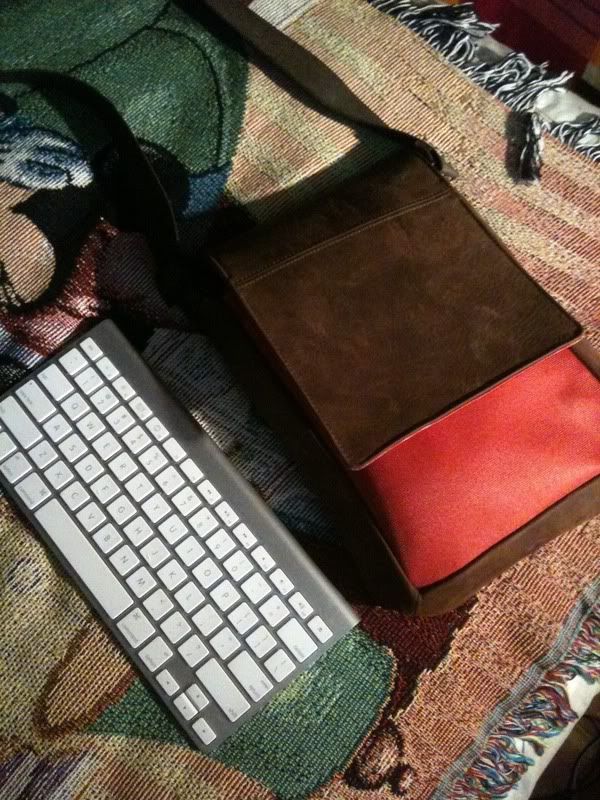
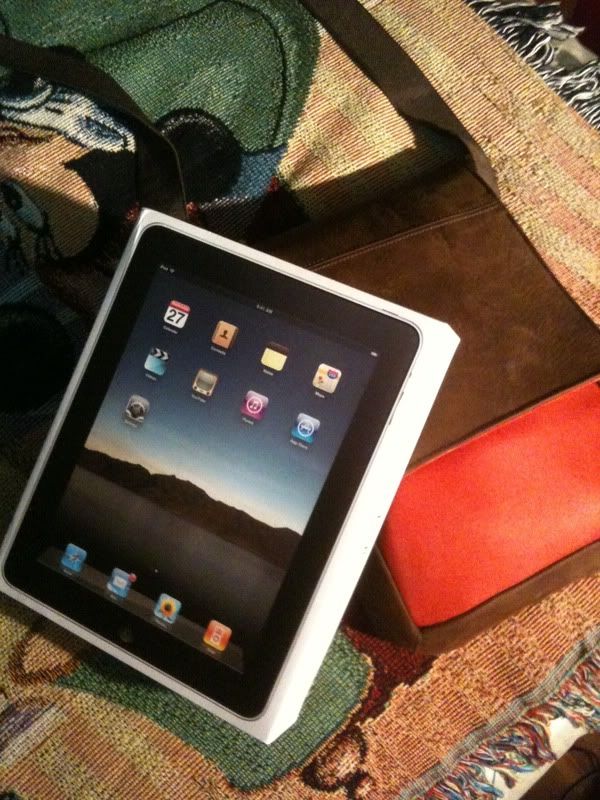
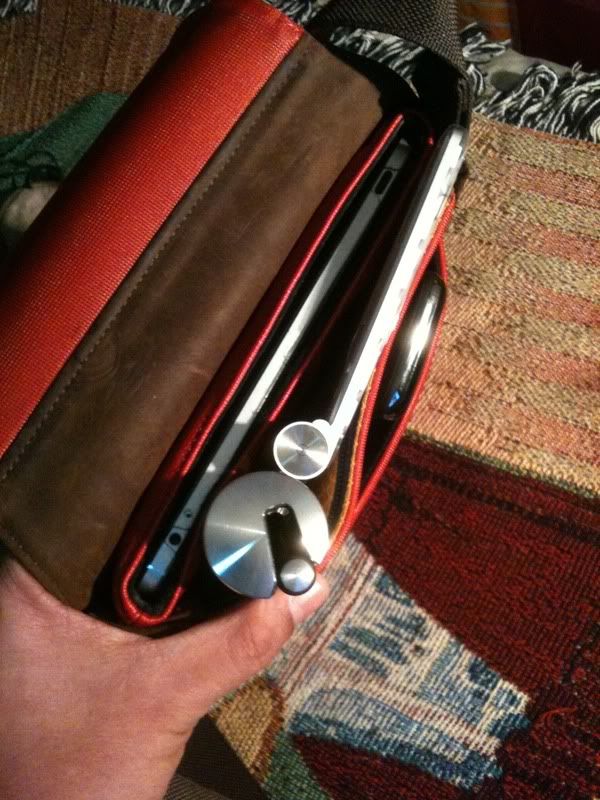
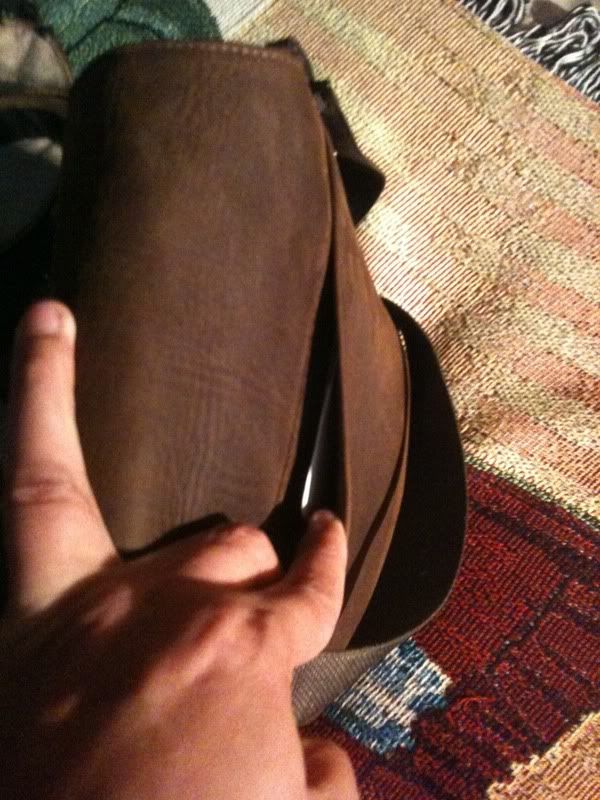
Presenting the Waterfield Muzetto!

user posted image
Seen in size comparison with the Apple BT wireless keyboard

user posted image
Size compared to the iPad packaging

user posted image
user posted image
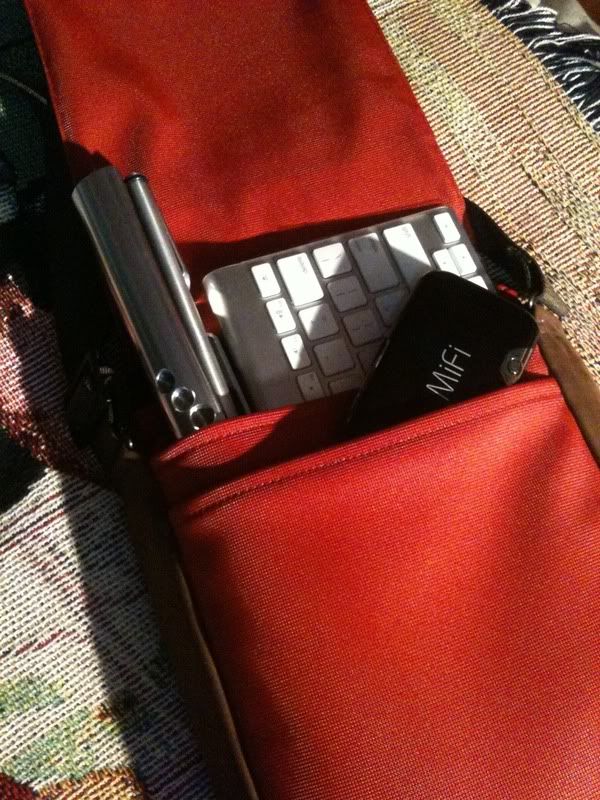
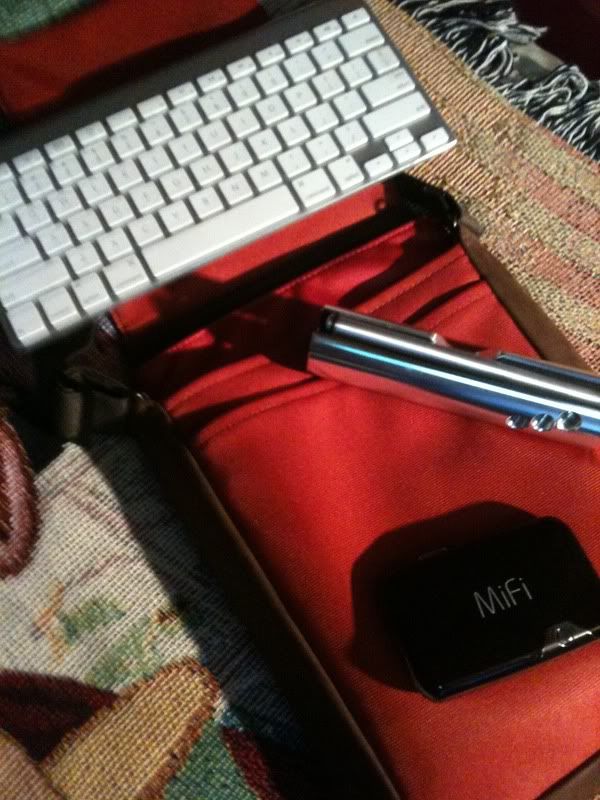
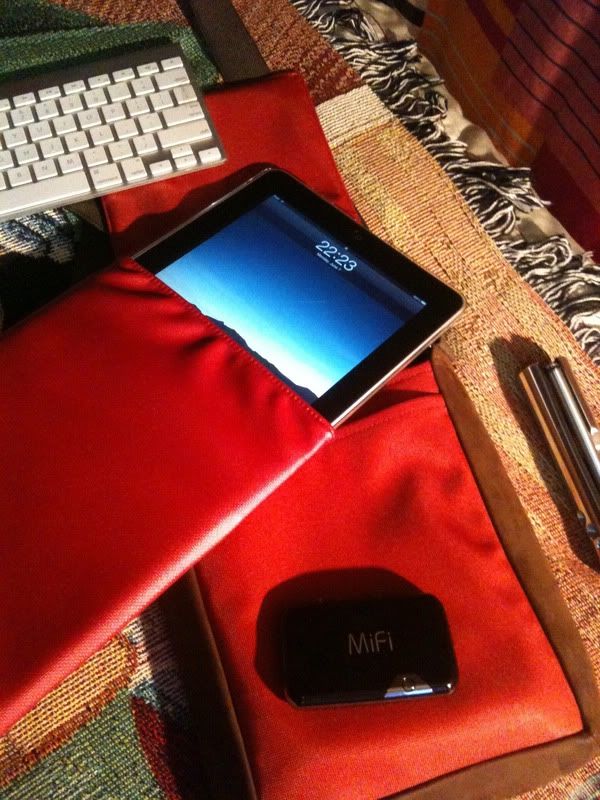
Novatel MiFi, ElementCase Joule and the Apple BT Wireless Keyboard fits snugly in the Muzetto.

user posted image
Testament to Waterfield's commitment to how their bag fits the design of the iPad. Everything fits perfectly!

user posted image
user posted image
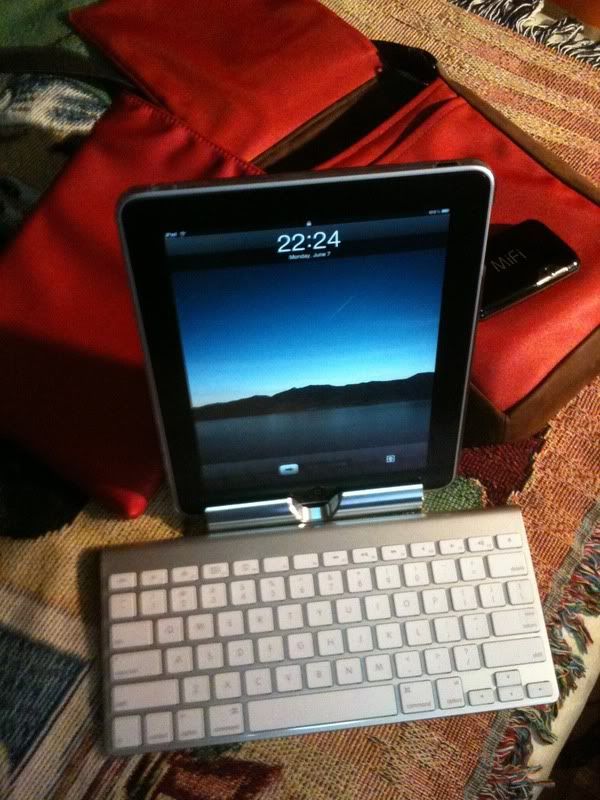
The iPad out of the Waterfield iPad Slip Case, and on the Joule stand paired with the BT Wireless Keyboard.

user posted image
The pocket at the back for small notebooks(buku tulis) and writing pad.


The inside main pocket also has a zippered pocket that you can fit in wiping cloths and keys. I don't carry chargers as the iPad itself has proven to be long-lasting in terms of battery life.

This post will be mirrored in the iPad accessories thread.
stringfellow
post Jun 9 2010, 12:45 PM

Ultrawide | 4K | VR
********
Senior Member
11,305 posts

Joined: Jan 2003
Study related books, you don't go for iBooks, you go for iTunes U. Granted, iTunes U is more lecture material with thesis and such, but I don't know what specifics you need for your course material.

AS for referential books, you stand a better chance going through Amazon Kindle ebook downloads than iBooks. For the time being iBooks selection is meager compared to Kindle Store.

If it is apps you're looking, try Blausen Human Atlas HD, or if your needs are more than just viewing human anatomy, try this website www.imedicalapps.com and follow through with their suggestions. Some of the apps recommended there may not seem to jump out to you as a medical-based applications, but they are useful for daily usage of a medical student. Good luck!

This post has been edited by stringfellow: Jun 9 2010, 12:50 PM
stringfellow
post Jun 9 2010, 06:39 PM

Ultrawide | 4K | VR
********
Senior Member
11,305 posts

Joined: Jan 2003
QUOTE(Edoras @ Jun 9 2010, 06:21 PM)
If you feel an iPad serves more as an entertaining device, I think its not worth buying an iPad...
*
Think again.
stringfellow
post Jun 9 2010, 09:16 PM

Ultrawide | 4K | VR
********
Senior Member
11,305 posts

Joined: Jan 2003
QUOTE(Edoras @ Jun 9 2010, 08:51 PM)
But Jetstar rented it out to their customers. In this case, its quite okay. Cheap entertainment for customers.

However, in my personal opinion, as a student buying an iPad for entertainment is not justifiable. Better use the hard-earned money to buy a proper Laptop/computer for educational purposes.
*
Read his post.
QUOTE
One of my points of getting it is for travel. Since i travel to classes everyday by train and also catching flight back to msia and to. BTW, i'm studying in moscow. I already own an iPhone since the 2G era and i feel iPad can serve more as an entertainment object more than my iPhone..am i wrong?


He is "upgrading" his entertainment experience to an iPad instead of watching it on a smaller iPhone screen. It is one of his points, not the only point. With the iPad and the larger screen it opens up lots of possibility, more so than what is possible on the iPhone's smaller screen. During his travel time, now instead of delegating that "entertainment" aspect only on playing games or watching clips on iPhone, he can now do so on the larger screen and comfortably watch full-length movies on the iPad screen without losing his sight further.

I would agree with you if he is getting it solely for the entertainment aspect. But since he mentioned traveling on trains, which on average I would assume to be 30 minutes and above, "entertainment" now is wholly possible via iPad's larger screen. It is an option. Sure, you can get a laptop and do the same, but how much more accessible is watching a movie ("entertainment") on a laptop compared to the iPad. Now, if he chose to get the iPad and not a proper laptop for coursework, then that would be the wrong move, and the point you mention would be valid. IMO of course.

The iPad is an entertainment device to me, with my traveling routine. I suspect his routine may mirror mine, only his is on trains on the ground, while mine is in the "bus".
stringfellow
post Jun 9 2010, 10:27 PM

Ultrawide | 4K | VR
********
Senior Member
11,305 posts

Joined: Jan 2003
Only Blu-rays with Digital Copy that ships with the packaging can be copied into your iTunes library and synced over to the iPad. Some either ships together with the Blu-ray packaging ,or need to be connected to iTunes and downloaded from iTunes itself. The Digital Copy that comes the Blu-ray will still need to be authenticated by iTunes, so when you first slot it into your Mac, iTunes will pop open and point that a Digital Copy is available and you need to type in the code that comes with the packaging (usually on a slip of paper) to authenticate.

Remember, if you've authenticated and downloaded the Digital Copy into ONE library/account, you cannot redownload it into a different account/library. One copy per packaging only.


stringfellow
post Jun 9 2010, 10:34 PM

Ultrawide | 4K | VR
********
Senior Member
11,305 posts

Joined: Jan 2003
user posted image


Blu-rays with these designations only has them. But some of the Digital copies are not compatible with iTunes, but compatible with Windows Media Player instead. Digital Copy compatible files for iTunes are .m4v format with DRM, while the Windows Media Player compatible Digital Copy are .wmv with DRM.

I have the Digital Copy of Hancock that only works with WMP, and that was the only one. After that, all Digital Copy files are iTunes compatible.
stringfellow
post Jun 10 2010, 11:40 PM

Ultrawide | 4K | VR
********
Senior Member
11,305 posts

Joined: Jan 2003
There's no MiFi in existence that utilizes WiFi-N. They've only starting to appear on mobile devices. Stationary wireless routers is otherwise.
stringfellow
post Jun 11 2010, 05:43 PM

Ultrawide | 4K | VR
********
Senior Member
11,305 posts

Joined: Jan 2003
Posting this from Apple Store Paris. Takes a while to change the keyboard settings to US, French keyboard is a mess.

The results? Only Apple iPad Cases, iPad Dock, iPad 10W chargers and VGA connectors are available here. The hard-to-find Apple Cam Kit is nowhere to be found. What is worse, all models of iPads are sold out with waiting list down to the third week. Sigh.

Gonna grab something to eat here before starting my Segway tour back again. Postponed it to 2pm due to short of time. If I whip out the Joule here, these Frenchies are probably gonna freak! laugh.gif


stringfellow
post Jun 12 2010, 02:36 PM

Ultrawide | 4K | VR
********
Senior Member
11,305 posts

Joined: Jan 2003
QUOTE(nawzi @ Jun 12 2010, 06:05 AM)
Where u got info iPhone charger can charge iPad?
It's very different power voltage


Added on June 12, 2010, 6:10 am

Bro, that's why majority iTunes user have both US/Msia account.
*
QUOTE(Edoras @ Jun 12 2010, 06:48 AM)
Charging ipad ---> http://support.apple.com/kb/HT4060


Added on June 12, 2010, 6:49 am
Charging ipad ---> http://support.apple.com/kb/HT4060
*
The iPhone charger can be used to charge the iPad, only that it'll charge it at a slower rate than the 10W iPad charger. I've been switching between the two chargers and they both works. In fact I'm charging the iPad using the iPhone charger now. Also used it in-flight charging it from the seat power access point using the iPhone charger. Mo issues there.
stringfellow
post Jun 13 2010, 10:51 PM

Ultrawide | 4K | VR
********
Senior Member
11,305 posts

Joined: Jan 2003
Those looking for a decent video converter for HD movies can look no further than WinX HD Video Converter for Mac. Until June 30th, it's free for download before they charge it for USD39.95.


Added on June 13, 2010, 11:04 pmJaDu Skadoosh iPad Stand Review. Complete with pictures, but it looks like he didnt post the stand accepting the iPad with a cover. From the author of the review:-

QUOTE
Does it Work With My iPad Case/Shell/Film?

I always am concerned about compatibility of iPad accessories with the vast array of cases and films that people use to protect their iPads.  I can say that the Skadoosh iPad Stand will easily fit MOST cases that don’t significantly increase the width of the iPad.  This means that it definitely will fit ANY film, or thin shell that you place on the iPad.  According to their website, it will accommodate any case that adds less than 3mm (1/8 inch) to the thickness of the iPad.  For even more fine tune support, they have the back support crossbar on an off-axis, so that by rotating the bar around its axis, you can just slightly modify the point at which the crossbar makes contact with the iPad.


And lastly, a pic to satisfy my craving for it while waiting for the package to arrive. *jeling at Beavis68* :-

user posted image

Full review will be done either by me, Beavis68 or any of the other 9 bulk purchasers of the Skadoosh stand in the iPad-related Accessories thread. Coming soon!


This post has been edited by stringfellow: Jun 13 2010, 11:10 PM
stringfellow
post Jun 14 2010, 12:22 AM

Ultrawide | 4K | VR
********
Senior Member
11,305 posts

Joined: Jan 2003
QUOTE(Eralus @ Jun 14 2010, 12:10 AM)
i try convert video using handbrake..damn so long to finish woo even only for 700mb size...

that stand looks more stable and nice design compare to apple ipad stand..the apple ipad stand after using it several time, i think it not so stable lah bro...can easily drop
*
I use Quicktime Pro, and yes, it does take the same (sometimes more) time as the length of the movie to do a conversion, unless it's a conversion that QTP manages well, like Quicktime==>MP4, or Xvid/Avi==>Mp4, in most cases, using my Mac Mini 2.0Ghz, it finishes conversion at 75% of the length of the time of the movie. This is for the SD-quality movies.

HD is a totally different story. I still use QTP, but I use custom presets that I have found by trial-and-error after trying to maintain and preserve the quality of the HD image quality and trying to juggle it with acceptable filesize. The end result is a stunning 720p presentation, but the effort going through it? 22 hours alone doing "Monsters VS Aliens" on the same Mac Mini.

As for the Apple iPad Dock, it is not meant to do any heavy-lifting, other than being a simple docking mechanism for your iPad. Poking your iPad on the dock is perfectly fine, but I assume the "not so stable lah" comment was due to the fact that you used the Switcheasy Nude on the iPad and then use in on the dock, which is not the recommendation by Apple, since the dock is meant to be used with a naked iPad (or with the high-grade wrap).

We have since moved on from that. From "high-grade wrap" for that naked feel/look, to Switcheasy Nude + iPad Dock combo, and now to Switcheasy Nude + ElementCase Joule Stand or the Switcheasy Nude + JaDu Skadoosh Stand coming soon. I feel that the last two combos are the perfect solution for the iPad + Stand/Dock combo.
stringfellow
post Jun 14 2010, 04:13 PM

Ultrawide | 4K | VR
********
Senior Member
11,305 posts

Joined: Jan 2003
QUOTE(davidmak @ Jun 14 2010, 04:05 PM)
Ya, thats the downside of using matte finished screen protector. Light is dispersed and it doesn't look 'sharp'. The clear one is good in this area but hard to clean. I am currently using it without any screen protector. Finger print is easy to wipe off due to the oleo phobic coating. But I have to careful even though it is glass.
*
Think again and again.

user posted image

user posted image

Those are extreme close-ups macro shots on Powersupport Antiglare screen protector, and yes they are of the matte kind. If those are "doesn't look sharp" to you, then I don't know what is "sharp" here anymore.

Simple way of putting it, don't buy cheap screen protectors, you get what you pay for. For something as good as the Powersupport Antiglare, you pay upwards of RM100.


Added on June 14, 2010, 4:25 pmMy own personal recommendations for the "best of the best" there is, IMO, for accessories for the iPad:-
» Click to show Spoiler - click again to hide... «

The rest are just second place products, and you know what they say on second places, you either place first or don't place at all. tongue.gif

This post has been edited by stringfellow: Jun 14 2010, 05:49 PM
stringfellow
post Jun 14 2010, 09:38 PM

Ultrawide | 4K | VR
********
Senior Member
11,305 posts

Joined: Jan 2003
QUOTE(dannygeni @ Jun 14 2010, 09:13 PM)
Anyone want to bulk this item..

http://www.gq-magazine.co.uk/entertainment...lide#ContentTop.

String bro u need this..


Added on June 14, 2010, 9:17 pmThis also

http://ipadbags.com/2010/06/05/weve-got-il...nogram-satchel/
*
LOL bro, contrary to popular beliefs, I don't really like branded labels like these. All LV or Gucci does is pick a relatively good leather material, manufacture it relatively better than the regular producers of these kinds of items, but slaps a high price for it because of the branding. I'm more comfortable with practical items, although if they do have nice looks, it's a bonus. Hence why I go with the Waterfield branding. They're from a company that originates from the need of carrying their electronics on a day-to-day basis, and also to carry them throughout their commute. Gary (CEO of Waterfield) himself establishes the designs from his own practical needs of carrying his own gadgets and electronics while he bikes around on his bicycles in New York and San Francisco. That's the form of practicality that attracts me.

A good heads-up though, to others who would want their iPads to be enveloped in luxury and instant brand recognition. I'm perfectly happy with my minimalistically designed Muzetto and its iPad Slip Case. icon_rolleyes.gif

I want this though, just for the novelty sake of it:-


USD400-500! sweat.gif

This post has been edited by stringfellow: Jun 14 2010, 09:55 PM
stringfellow
post Jun 14 2010, 10:34 PM

Ultrawide | 4K | VR
********
Senior Member
11,305 posts

Joined: Jan 2003
user posted image


Finally! A sharp-tipped stylus/pen for iPad! I'm assuming from the pic that the sharp tip is used for writing, instead of the fat,rounder tip at the other end. Who wants to buy this first? tongue.gif

This post has been edited by stringfellow: Jun 14 2010, 10:34 PM
stringfellow
post Jun 15 2010, 11:59 AM

Ultrawide | 4K | VR
********
Senior Member
11,305 posts

Joined: Jan 2003
QUOTE(euphoriaa @ Jun 15 2010, 12:02 AM)
i want! count me in if u're bulking those.  drool.gif  drool.gif
*
QUOTE(roguester @ Jun 15 2010, 01:34 AM)
Like you String, I have been on the lookout for a pointy stylus, so that I can do some sketches or designs on my Ipad. Ordered a few Pogos and a Dagi a few days back. Might go for the Pendel if theres good feedback from users.
*
QUOTE(fortynine @ Jun 15 2010, 09:49 AM)
Sweetness!

Been using Pogo Stylus for note taking and some light doodling and sketching. Awesome as it is - the Pogo, I reckon Pendel would do a better job, given the pointy tip. Unfortunately. Sold Out for the time being. haih...
*
Hang tight. A possible bulk is coming, courtesy of one of our forum member. News to come.

QUOTE(davidmak @ Jun 15 2010, 09:58 AM)
Yes, I'm really talking about the cheap ones. You can't really fault with us because these are the options available for us (at an affordable price). Of course, we spent top dollar for pads and wouldn't spend a hundred for an accessory. Sometimes, the calculator just doesn't click. Cause it doesn't make sense to some of us. But it doesn't mean we don't deserve something nice. biggrin.gif

Thats why I decided to go without the screen protector. Of course, if I'm using it for field work then it would make sense to get some protection.

p/s: By the way, it doesn't mean we don't know such an existence of product. We're just looking for viable alternatives.
*
What doesn't make sense to me is that, you're willing to spend thousands of RM on a product, but not equally passionate enough to spend as much on its protection. The iPad itself is only enjoyably used if it is properly protected and used with the same visual clarity it has before or after the screen protector is placed. So it is either (A)spend RM118 for a quality screen protector that may one day save your screen from scratches and requiring repair, or (B) either use second-grade(cheap) screen protectors and watch visual clarity fizzle away and destroy your enjoyment of using the iPad, or © dont use a screen protector at all and risk the screen being damaged while being in possession. Option © sure is riskier, especially with regards to the fact that all of us here purchase our iPads WITHOUT local warranty and any damage to the iPad would require referring the iPad back to its country of purchase. So spend RM118 on a quality screen protector or spend nothing and risk more than RM118 just to send it back and lose days of usage without it with you? Weigh it out.

Option (B) isn't a good option either because you'll be cursing the day fingerprints sticks to the screen protector, or the blurriness of the text because of its low quality. Trust me, I had cheapo screen protectors before this, and "wiping screens furiously" to get the fingerprints out is an understatement. Plus, it's not like the Powersupport Antiglare is some exotic, hard-to-find screen protector, Machines sells them. I'm perfectly fine if you're saying that you ran out of budget because getting the iPad drains the bank account, but still intend to get a good screen protector. But skimping on it for a cheapo low quality or bypassing it totally at the risk of damaging your vision or worse, your iPad? Not a good judgment call there, isnt it?

stringfellow
post Jun 15 2010, 01:51 PM

Ultrawide | 4K | VR
********
Senior Member
11,305 posts

Joined: Jan 2003
QUOTE
So if we are to tell them... if you can't afford this screen protector, maybe you shouldn't buy an iPAD may not be fair. Gadget is for everyone. Everyone deserves to own something nice in their life.


I did not say that. Read what I wrote. I get that the purchase may drain your account, but instead of getting "the best there is" but getting the crappier second-rate SP instead, doesnt make sense. Save up enough and wait until the funds are enough, then get the best one, instead of using the crappier SP and suffer through the blurriness and smudges. I would even go as far as agreeing on not having any screen protectors if you're planning to get crappier SPs that blurs and smudges everything to hell. Use it naked until you get the best SC there is, and get one when you have saved up enough. Being stingy with your electronics can have dire repercussions especially when it is not covered in warranty locally.

As for leaving the iPad naked, even wiping it wouldn't be safe from scratches. Grains of sand or other abrasives can be trapped between your wiping cloth and the iPad screen, and dragged along on the surface of the screen while you wipe it. Your intention may be to wipe it, but you are inadvertantly introducing minute scratch ridges when you do because you're unaware of the microscopic granulars of sand/abrasive trapped in between your iPad and the wiping cloth.
stringfellow
post Jun 15 2010, 02:09 PM

Ultrawide | 4K | VR
********
Senior Member
11,305 posts

Joined: Jan 2003
A resourceful Macrumors member by the name of sandydlc has consolidated most of the possible iPad cases available in the market into a single thread at Macrumors forum. Most of the links are for folio style cases, so if that tickles your fancy, head to that link there.

8 Pages « < 4 5 6 7 8 >Top
Topic ClosedOptions
 

Change to:
| Lo-Fi Version
0.0254sec    0.88    7 queries    GZIP Disabled
Time is now: 22nd December 2025 - 01:42 PM