Outline ·
[ Standard ] ·
Linear+
Hardware Your Mac Apple Hardware Setup v2, Showcase your Apple Hardare/Collections
|
CreamMilk
|
 Jun 16 2010, 04:31 PM Jun 16 2010, 04:31 PM
|

|
QUOTE(zemmien @ Jun 14 2010, 05:06 PM) latest setup with new kenwood set. » Click to show Spoiler - click again to hide... « Hi, anybody know what is the accessory name that use to hold the mbp? The similar thing i could find in apple store is "Twelve South BackPack Adjustable Shelf", but it doesn't look the one in the picture  |
|
|
|
|
|
zemmien
|
Jun 16 2010, 07:23 PM
|
|
|
QUOTE(CreamMilk @ Jun 16 2010, 04:31 PM) Hi, anybody know what is the accessory name that use to hold the mbp? The similar thing i could find in apple store is "Twelve South BackPack Adjustable Shelf", but it doesn't look the one in the picture here mate http://www.raindesigninc.com/mstand.html |
|
|
|
|
|
kimurastanley
|
Jun 19 2010, 09:08 AM
|
|
|
Rearrange my setup  |
|
|
|
|
|
llsphinxll
|
Jun 19 2010, 03:01 PM
|
|
|
QUOTE(kimurastanley @ Jun 19 2010, 09:08 AM) Rearrange my setup why your macbook white in such odd position? you shud get the BookArc. think the solve the problem you are having over there bro. |
|
|
|
|
|
kimurastanley
|
Jun 19 2010, 03:53 PM
|
|
|
QUOTE(llsphinxll @ Jun 19 2010, 03:01 PM) why your macbook white in such odd position? you shud get the BookArc. think the solve the problem you are having over there bro. BookArc is quite expensive le.. |
|
|
|
|
|
JohnnyBeGud
|
Jun 19 2010, 04:37 PM
|
Getting Started

|
QUOTE(kimurastanley @ Jun 19 2010, 03:53 PM) BookArc is quite expensive le.. Nice setup bro..but isn't it difficult to turn on your mb? I mean you have to open the lid first right? looks too troublesome every time you want to switch on when you arrange it that way.. |
|
|
|
|
|
kimurastanley
|
Jun 19 2010, 08:01 PM
|
|
|
QUOTE(JohnnyBeGud @ Jun 19 2010, 04:37 PM) Nice setup bro..but isn't it difficult to turn on your mb? I mean you have to open the lid first right? looks too troublesome every time you want to switch on when you arrange it that way.. yup, a bit troublesome when wanna switch on. But just get used to that lo |
|
|
|
|
|
cRazYee
|
Jun 21 2010, 10:55 AM
|
|
|
QUOTE(kimurastanley @ Jun 19 2010, 09:08 AM) Rearrange my setup huge screen for small ikea table just like mine |
|
|
|
|
|
deadman8836
|
Jun 22 2010, 07:02 PM
|
|
|
I was wondering what software/setup I need to do so that my external display works while my Macbook White is closed.... I am sorry if this question has been asked before =/
|
|
|
|
|
|
JohnnyBeGud
|
Jun 22 2010, 08:24 PM
|
Getting Started
|
QUOTE(deadman8836 @ Jun 22 2010, 07:02 PM) I was wondering what software/setup I need to do so that my external display works while my Macbook White is closed.... I am sorry if this question has been asked before =/ Plug in the power adapter, plug in any usb device such as external hdd or keyboard or mouse. Close the lid, then wake your mb using your secondary keyboard. That's it  |
|
|
|
|
|
Hanifah H.
|
Jun 22 2010, 09:04 PM
|
Getting Started
|
QUOTE(JohnnyBeGud @ Jun 22 2010, 08:24 PM) Plug in the power adapter, plug in any usb device such as external hdd or keyboard or mouse. Close the lid, then wake your mb using your secondary keyboard. That's it sometimes i wish Apple would have just included an option in the system pref to do that, like on windows... very troublesome la to do all that lol everytime also need to turn on the macbook, and then quickly close the lid..... If got a setting in system pref, i think it will make everyones life easier  This post has been edited by Hanifah H.: Jun 22 2010, 09:06 PM This post has been edited by Hanifah H.: Jun 22 2010, 09:06 PM |
|
|
|
|
|
xaw5126
|
Jun 23 2010, 06:53 PM
|
|
|
eh?
leave it on la. why need to switch it off?
|
|
|
|
|
|
Hanifah H.
|
Jun 23 2010, 08:48 PM
|
Getting Started
|
QUOTE(xaw5126 @ Jun 23 2010, 06:53 PM) eh? leave it on la. why need to switch it off? ya, can leave on, close lid, then use mouse/keyboard to wake the macbook. but isnt it troublesome? lol isntead of closing the lid all the time, they shud have an option in system pref, to change the primarily display to external monitor just by clicking, instead of closing lid |
|
|
|
|
|
deadman8836
|
Jun 24 2010, 01:09 AM
|
|
|
Thank you people!! OMG, u guys are just great!!! It did not occur my mind that it can woken up with that... I got freaked when my external display went to sleep too.... thanks away people!!
Added on June 24, 2010, 1:09 amThank you people!! OMG, u guys are just great!!! It did not occur my mind that it can woken up with that... I got freaked when my external display went to sleep too.... thanks away people!!
This post has been edited by deadman8836: Jun 24 2010, 01:09 AM
|
|
|
|
|
|
CreamMilk
|
Jun 26 2010, 08:58 PM
|
|
|
My 2 weeks old macbook, still waiting for mac mini to arrive... » Click to show Spoiler - click again to hide... « |
|
|
|
|
|
llsphinxll
|
Jun 27 2010, 05:03 PM
|
|
|
bro which hp monitor is that if you dont mind me asking.
|
|
|
|
|
|
radioterbang
|
Jun 27 2010, 09:22 PM
|
Getting Started
|
QUOTE(llsphinxll @ Jun 27 2010, 05:03 PM) bro which hp monitor is that if you dont mind me asking. HP w2228h, discontinued already I think |
|
|
|
|
|
gengstapo
|
Jun 27 2010, 09:49 PM
|
|
|
QUOTE(radioterbang @ Jun 27 2010, 09:22 PM) HP w2228h, discontinued already I think Darn, look like a real workstation with real MacPro.. Im so into it~    This post has been edited by gengstapo: Jun 27 2010, 09:50 PM This post has been edited by gengstapo: Jun 27 2010, 09:50 PM |
|
|
|
|
|
llsphinxll
|
Jul 3 2010, 07:19 PM
|
|
|
QUOTE(zemmien @ Jun 14 2010, 05:06 PM) latest setup with new kenwood set. 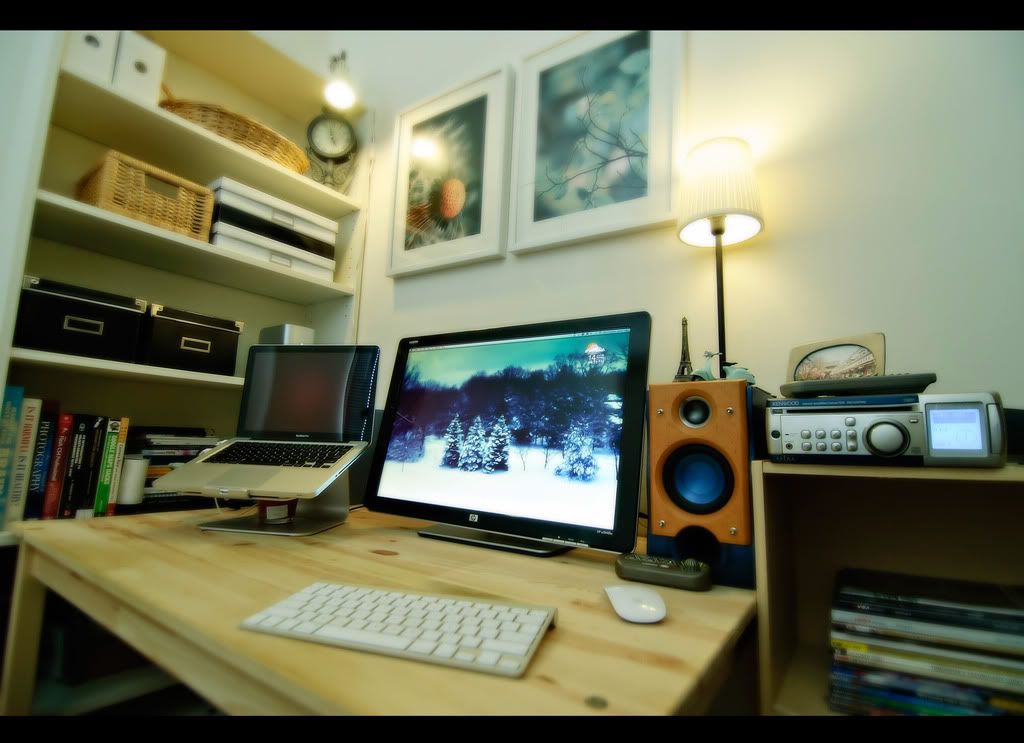 hey im thinking about purchasing about purchasing a monitor to be connected to my mbp. but im worried that the mbp might get hot if it is left closed, and not opened. unlike my sony vaio that i have connected to my current display, it is not made out of alum hence, the surface is not as hot as compared to the mbp. really need advice on users that have already connected their mbp with external monitors: do i need to open the laptop even when connected to an external monitor to avoid heat being trapped while it is closed. thanks in advance.  |
|
|
|
|




 Quote
Quote









 0.0238sec
 0.94
0.94
 6 queries
 GZIP Disabled