

QUOTE(leng2 @ Apr 23 2010, 08:54 AM)
yeah, i installed synaptics as well... btw, is it possible if i use the okr for my current "new" setup?

sure you can use OKR, why not? i have used that before, needs about half an hour to complete recovery
Lenovo ideapad Y460/Y560 Thread, Gaming nerd in a business package
|
|
 Apr 23 2010, 11:13 AM Apr 23 2010, 11:13 AM
Return to original view | Post
#21
|
 
Senior Member
1,282 posts Joined: Dec 2004 From: penang 
|
QUOTE(leng2 @ Apr 23 2010, 08:54 AM) yeah, i installed synaptics as well... btw, is it possible if i use the okr for my current "new" setup? sure you can use OKR, why not? i have used that before, needs about half an hour to complete recovery |
|
|
|
|
|
Apr 23 2010, 12:16 PM
Return to original view | Post
#22
|
|
Senior Member
1,282 posts Joined: Dec 2004 From: penang
|
QUOTE(jotaro12 @ Apr 23 2010, 11:56 AM) You used Lenovo power management to lower/tweak your CPU clock or other software? try to use latest ati driver maybe can solve the problem Don't have free time lately but was planning to go extreme to max out CPU constantly @2.93Ghz w/ OC GPU to crack 3Dmark 06 score(somehow I can't use ATI Tool on my system, it just BSOD after I finished the installation Don't have free time lately but was planning to go extreme to max out CPU constantly @2.93Ghz w/ OC GPU to crack 3Dmark 06 score(somehow I can't use ATI Tool on my system, it just BSOD after I finished the installation  ) )ya i used the lenovo power management to control cpu speed |
|
|
Apr 24 2010, 11:37 PM
Return to original view | Post
#23
|
|
Senior Member
1,282 posts Joined: Dec 2004 From: penang
|
QUOTE(Izwan898 @ Apr 24 2010, 11:26 PM) Not too comfy? Haizzz....keyboard really important for me...irresponsive cannot be tolerated liao~~.... experience will tell you better go and try it  |
|
|
Apr 25 2010, 12:34 AM
Return to original view | Post
#24
|
|
Senior Member
1,282 posts Joined: Dec 2004 From: penang
|
QUOTE(wztech @ Apr 25 2010, 12:11 AM) sometimes laa....must use a bit of force when typing make sure the key really go in.... yea i have same situation as youhave lots of typos when first using it...but now can lived with it already...maybe mine is defective?!  it is my problem + keyboard problem first.. since just bought a new lappy, dare not press keyboard so hard, this leads me to typing error sometimes. and the keyboard too needs to be press with slightly more pressure but now i am using it like a normal keyboard.. it seems working fine now, less typing error |
|
|
Apr 25 2010, 06:31 PM
Return to original view | Post
#25
|
|
Senior Member
1,282 posts Joined: Dec 2004 From: penang
|
can someone help me to clarify is it my ACPI TZ00 temperature normal ?
i thought the ACPI temperature should be around room temperature but my ACPI temperature follows the temperature of CPU core if CPU hit 70C , then the ACPI also hit 70C can other Y460 user to help me to clarify this ? thanks  
|
|
|
Apr 25 2010, 06:48 PM
Return to original view | Post
#26
|
|
Senior Member
1,282 posts Joined: Dec 2004 From: penang
|
thanks for clarification ^ ^
|
|
|
|
|
|
Apr 27 2010, 01:33 PM
Return to original view | Post
#27
|
|
Senior Member
1,282 posts Joined: Dec 2004 From: penang
|
hey guys i saw china y460 version has a 3G broadband included in the notebook
i have checked my y460 , it does not have 3G modem integrated in the laptop does your y460 has the 3G broadband? how to check it : you should see a sim card slot located somewhere near to intel wifi card as shown in the picture below:  This post has been edited by gstoh: Apr 27 2010, 01:34 PM |
|
|
Apr 28 2010, 06:15 PM
Return to original view | Post
#28
|
|
Senior Member
1,282 posts Joined: Dec 2004 From: penang
|
QUOTE(jotaro12 @ Apr 28 2010, 06:03 PM) Stylish and portability, M11x. Performance horse and budget wise, Y460. yap agree that Y460 pawn M11x in term of gaming performance ^^ |
|
|
May 1 2010, 10:50 AM
Return to original view | Post
#29
|
|
Senior Member
1,282 posts Joined: Dec 2004 From: penang
|
haih .. now having a bit problem with the keyboard..
sometimes i start my laptop , and the keyboad is not functioning at all in windows = = this error occured twice so far... i have to restart laptop for the keyboard to work is software error or hardware failure ? bios problem ? This post has been edited by gstoh: May 1 2010, 10:57 AM |
|
|
May 1 2010, 01:09 PM
Return to original view | Post
#30
|
|
Senior Member
1,282 posts Joined: Dec 2004 From: penang
|
QUOTE(jotaro12 @ May 1 2010, 11:06 AM) Might be a software/hardware problem rather than BIOS. If possible just call Lenovo and let them know the situation and see how would they suggest. is not happen to me .. y550 also has this problem If it happens too often, I'll just call them but it's up to you.  google it then u know .. |
|
|
May 2 2010, 12:24 AM
Return to original view | Post
#31
|
|
Senior Member
1,282 posts Joined: Dec 2004 From: penang
|
QUOTE(jotaro12 @ May 1 2010, 09:45 PM) Just a preview of my few mins ago "early project" what tool you use to overclock 5650 ? atitool ? CAUTION: Below is the result of strictly trained professional and do not intend to use/implement to your lappy without having N thoughts about blew up. Cheers !  » Click to show Spoiler - click again to hide... « Will add it on 1st page later. |
|
|
May 2 2010, 01:08 AM
Return to original view | Post
#32
|
|
Senior Member
1,282 posts Joined: Dec 2004 From: penang
|
QUOTE(jotaro12 @ May 2 2010, 12:39 AM) The AMD GPU clock tool. your temperature is cool even it is overclock ! did you use cooler that time ? |
|
|
May 9 2010, 12:26 AM
Return to original view | Post
#33
|
|
Senior Member
1,282 posts Joined: Dec 2004 From: penang
|
QUOTE(TealTurino @ May 8 2010, 02:14 PM) I just booked the Y460 and paid the deposit for the RM 3599 version. I was planning to get the SXPS 16 with ATI 5730 but I don't want to play the waiting game forever. Y460 is the only laptop readily available locally with ATI 5650. Other laptops like ASUS or 4820tg Acer are either out of stock or only have the ATI 5450 option. Y460 will not throtle the CPU speed even it is hot(more than 90C) , that's why it can produce a lot of heat when stressingI tried to find reviews of this laptop online but so far I can only find news listing about Y460. Thus I relied mostly on this forum thread to know more about this laptop. From what I gather, Y460 runs hot but if I use a laptop cooler, it should be fine. Will there be throttling issues like the SXPS when the cpu goes above 80C? Lastly, I heard that dx11 games run faster than dx10. However a lot of times, I heard low to mid end cards like 5450 and 5650 are unable to use dx11 though on paper they can. I'm confused by these two seemingly contradictory statements. Could an expert enlighten me please? Thanks. if you want your y460 to produce less heat, then you can manually throtle your cpu power, it definitely procduce less heat, but poorer performnace too. you can either choose performnace or heat reduction, you can't have both |
|
|
|
|
|
May 11 2010, 04:16 PM
Return to original view | Post
#34
|
|
Senior Member
1,282 posts Joined: Dec 2004 From: penang
|
3DMark Vantage benchmark using Y460
Setting is Performance Sore: P3472 GPU: 2928 CPU: 7844 
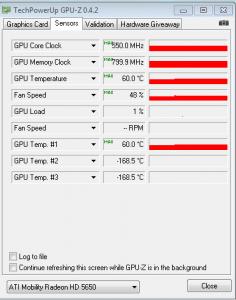
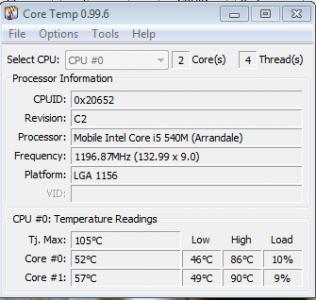
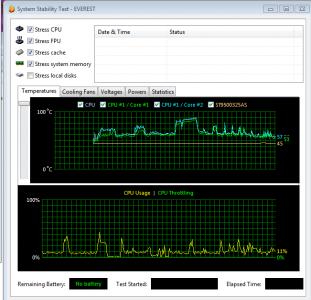
This post has been edited by gstoh: May 11 2010, 04:17 PM |
|
|
May 18 2010, 08:03 PM
Return to original view | Post
#35
|
|
Senior Member
1,282 posts Joined: Dec 2004 From: penang
|
QUOTE(samlee860407 @ May 17 2010, 09:59 AM) leng2, jotaro purchase the care pack at rm270, while mine is at rm340. i got same warranty problem as youI already call up lenovo for my warranty problem, and they will check it after i email them my invoice now my notebook macam ok back liao after i reinstall the rapid storage driver and restart few times. sigh...have to settle my warranty problem 1st, then baru settle the HDD i mean i purchased extended warranty but it did not extend ... = ='' |
|
|
May 22 2010, 10:57 AM
Return to original view | Post
#36
|
|
Senior Member
1,282 posts Joined: Dec 2004 From: penang
|
QUOTE(unknownhammie @ May 21 2010, 05:15 PM) Not sure if it is upgradable / addable. lolz. Waiting news i saw some ppl DIY in china forumjust buy a PCI-E ssd to plug it in and it works! O_O, of course you need a compatible driver to make it work |
|
|
May 22 2010, 12:29 PM
Return to original view | Post
#37
|
|
Senior Member
1,282 posts Joined: Dec 2004 From: penang
|
QUOTE(jotaro12 @ May 22 2010, 11:56 AM) The tricky part is even it's working, does it work like what rapid drive does or just a normal HDD+SSD combo? Too bad not many resellers selling PCI-e mini SSD...if not, I might give it a try yap it works like the rapid drive. according to china y460 review but only compatible to the msata ssd if not mistaken ...  http://cnc.ideapad.it168.com/viewthread.php?tid=601110 this is another china site i saw.. they swap the ssd from lenovo with rapid driver to non-rapid drive lenovo http://bbs.5ichecker.com/viewthread.php?tid=22135 the socket used is msata O_O This post has been edited by gstoh: May 22 2010, 01:28 PM |
|
|
May 22 2010, 01:30 PM
Return to original view | Post
#38
|
|
Senior Member
1,282 posts Joined: Dec 2004 From: penang
|
QUOTE(jotaro12 @ May 22 2010, 01:29 PM) Interesting... Seems like there are a few lucky owners on China. The TSI technology which they confirm is the rapid drive technology really amaze me as you can see the EE sticker doesn't have the rapid drive word rather than the TSI sticker. Anyhow, now we all know how rapid drive works(just mini SSD+HDD), maybe we can try to look for parts!! is mSATA SSD not mini SSD |
|
|
May 22 2010, 05:56 PM
Return to original view | Post
#39
|
|
Senior Member
1,282 posts Joined: Dec 2004 From: penang
|
QUOTE(-pWs- @ May 22 2010, 04:19 PM) Wow. Where to get that MSATA SSD? i guess soon will reach malaysia because the mSATA is new standard just finalized in Q4 of 2009Damn  Just have my INTEL SSD yesterday. Just have my INTEL SSD yesterday. -pWs- |
|
|
May 22 2010, 10:32 PM
Return to original view | Post
#40
|
|
Senior Member
1,282 posts Joined: Dec 2004 From: penang
|
QUOTE(samlee860407 @ May 22 2010, 06:34 PM) hm...wait....about the MSATA SSD that is mSATA not mini PCI-Emeans just need to get it, plug it in y460 to the PCI-E slot? then rapid drive will work? Added on May 22, 2010, 6:36 pmand even if cant make rapiddrive work, i can also have 2 HDD? 1 msata SDD and 1 my ori sdd? not bad also ma yea it should work as rapid drive or just another SDD appear in ur laptop |
| Change to: |  0.0374sec 0.0374sec
 0.93 0.93
 7 queries 7 queries
 GZIP Disabled GZIP Disabled
Time is now: 1st December 2025 - 06:06 PM |
 Quote
Quote