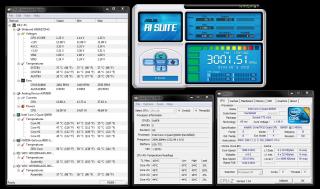
Finally my q6600 is running at 3.6GhZ. Thanx to every1 who shared their tips and thoughts
Next project -> lapping my q6600
again. thanx every1
http://valid.canardpc.com/show_oc.php?id=1134696

This post has been edited by jaya7: Apr 15 2010, 09:24 AM
Q6600 overclocked 3.60ghz, Finally :)
|
|
Apr 6 2010, 05:01 PM, updated 16y ago
Show posts by this member only | Post
#1
|
![]() ![]()
Junior Member
59 posts Joined: Oct 2005 |
Hi Guys,
Finally my q6600 is running at 3.6GhZ. Thanx to every1 who shared their tips and thoughts Next project -> lapping my q6600 again. thanx every1 http://valid.canardpc.com/show_oc.php?id=1134696 ![]() This post has been edited by jaya7: Apr 15 2010, 09:24 AM |
|
|
|
|
|
Apr 6 2010, 05:27 PM
Show posts by this member only | Post
#2
|
![]() ![]() ![]() ![]() ![]() ![]() ![]()
Senior Member
8,686 posts Joined: Mar 2009 |
did you run stress test on it?
55c at idle is consider high temperature.. your casing have good air flow? This post has been edited by saturn85: Apr 6 2010, 05:34 PM |
|
|
Apr 6 2010, 05:35 PM
Show posts by this member only | Post
#3
|
![]() ![]() ![]() ![]() ![]() ![]() ![]() ![]()
All Stars
10,530 posts Joined: Nov 2004 From: Petaling Jaya & Mid Valley |
Q6600 @ 3.0 is pretty easy to get... u can actually reduce ur Vcore...
try going 2-3 steps down on ur vcore from stock and run stress test for a few hours to ensure stability try getting the lowest vcore thats stable with ur clocks and thatll help reduce the temps |
|
|
Apr 6 2010, 05:37 PM
Show posts by this member only | Post
#4
|
![]() ![]() ![]() ![]() ![]() ![]() ![]()
Senior Member
5,644 posts Joined: Feb 2008 From: Heaven to HELL |
QUOTE(mADmAN @ Apr 6 2010, 05:35 PM) Q6600 @ 3.0 is pretty easy to get... u can actually reduce ur Vcore... even 1.24v also shouldn't b dat high temperature.try going 2-3 steps down on ur vcore from stock and run stress test for a few hours to ensure stability try getting the lowest vcore thats stable with ur clocks and thatll help reduce the temps @ts try: 1)open ur case pannel 2) apply fresh thermal paste 3) clean ur heatsink 4) disable auto fan |
|
|
Apr 6 2010, 06:29 PM
Show posts by this member only | Post
#5
|
|
Elite
4,746 posts Joined: Dec 2007 From: Speed rule |
Try to take a reading using core temp??
|
|
|
Apr 6 2010, 08:01 PM
Show posts by this member only | Post
#6
|
![]() ![]()
Junior Member
282 posts Joined: Jan 2009 |
1.24v seems does not produce that kind of heat...but try;
check ur hsf whether it fixed properly, reapply termal paste if hsf edi fixed properly, check ur casing air ventiation some suggest get a decent 3rd party cooler if u wanna to oc higher... |
|
|
|
|
|
Apr 6 2010, 08:22 PM
Show posts by this member only | Post
#7
|
![]() ![]() ![]() ![]() ![]() ![]() ![]()
Senior Member
2,173 posts Joined: Jan 2006 |
Asus AI Suite is not accurate. Try CPUID HWMonitor....
|
|
|
Apr 6 2010, 10:39 PM
Show posts by this member only | Post
#8
|
![]() ![]()
Junior Member
59 posts Joined: Oct 2005 |
I've opened the case now.. so the airflow is better. here's the reading from CPUID HWMonitor. Should i reduce the VCore? Thanx everyone
I havent reduced the Vcore but i can see it fluctuates. between 1.144 and 1.248 (max). is the only way to reduce Vcore is by using BIOS?? This post has been edited by jaya7: Apr 6 2010, 10:49 PM Attached thumbnail(s) |
|
|
Apr 6 2010, 10:46 PM
Show posts by this member only | Post
#9
|
![]() ![]() ![]() ![]() ![]() ![]() ![]()
Senior Member
5,644 posts Joined: Feb 2008 From: Heaven to HELL |
izzit go o B3 stepping?
try checking the temperature using care temp. mek sure the tj. max value is 100c hav u off auto fan? |
|
|
Apr 6 2010, 10:52 PM
|
![]() ![]()
Junior Member
59 posts Joined: Oct 2005 |
QUOTE(tech3910 @ Apr 6 2010, 10:46 PM) izzit go o B3 stepping? Stepping = Btry checking the temperature using care temp. mek sure the tj. max value is 100c hav u off auto fan? Revision = G0 I've turned off auto fan. here's the result with core temp test. This post has been edited by jaya7: Apr 6 2010, 11:09 PM Attached thumbnail(s) |
|
|
Apr 6 2010, 11:00 PM
|
![]() ![]() ![]() ![]() ![]() ![]() ![]()
Senior Member
5,644 posts Joined: Feb 2008 From: Heaven to HELL |
QUOTE(jaya7 @ Apr 6 2010, 10:52 PM) Stepping = B google & dl a s/w called "core temp"...Revision = G0 I've turned off auto fan. how do i check temperature using care temp? please bear with me. 1st time overclocking den just run it. post a screenshot here.... btw.....u sure ur hsf is clean? how long izzit since u change thermal paste? stock thermal paste? |
|
|
Apr 6 2010, 11:14 PM
|
![]() ![]()
Junior Member
59 posts Joined: Oct 2005 |
QUOTE(tech3910 @ Apr 6 2010, 11:00 PM) google & dl a s/w called "core temp"... screenshots r up. I changed P5Q-PRO board on sunday. So the heatsink is clean, thermal paste is new. Using Thermalfusion 400 (Cooler Master). Im running FIFA10 now, and the temp is at 48c. I know change of better HSF will improve the temp, but to what level. If new 3rd party HSF can drop the temp to 40c i could live with that den just run it. post a screenshot here.... btw.....u sure ur hsf is clean? how long izzit since u change thermal paste? stock thermal paste? |
|
|
Apr 6 2010, 11:22 PM
|
![]() ![]() ![]()
Junior Member
312 posts Joined: May 2008 From: Nowhere |
40c + idle is normal on stock hsf. i assume 55c that u mention is on load?
|
|
|
|
|
|
Apr 6 2010, 11:27 PM
|
![]() ![]() ![]() ![]() ![]() ![]() ![]()
Senior Member
5,644 posts Joined: Feb 2008 From: Heaven to HELL |
last time ie OC mine to 3.0 wit stock fan, only ~40c idle (no air-con)...
u sure u put the hsf nicely? i mean sure no broken legs o dint pin in properly? how bout load temperature? try stress testing wit Intel Burn Test (latest version is 2.4) run 5 loops. for stability. on core temp while running.....monitor the temperature..... i suggest i stop the test if temperature reach 90c later post another screenshot. |
|
|
Apr 6 2010, 11:29 PM
|
![]() ![]()
Junior Member
59 posts Joined: Oct 2005 |
yeap, thats on load. i play FIFA10 like all the time, with nothing else but windows services running at the back. So is that all right ? with load temp reaching 55C ?
Added on April 6, 2010, 11:32 pm QUOTE(tech3910 @ Apr 6 2010, 11:27 PM) last time ie OC mine to 3.0 wit stock fan, only ~40c idle (no air-con)... Ill double check that again u sure u put the hsf nicely? i mean sure no broken legs o dint pin in properly? how bout load temperature? try stress testing wit Intel Burn Test (latest version is 2.4) run 5 loops. for stability. on core temp while running.....monitor the temperature..... i suggest i stop the test if temperature reach 90c later post another screenshot. This post has been edited by jaya7: Apr 6 2010, 11:32 PM |

|
|
Apr 6 2010, 11:36 PM
|
![]() ![]() ![]() ![]() ![]() ![]() ![]()
Senior Member
5,644 posts Joined: Feb 2008 From: Heaven to HELL |
dat is very normal for load temperature.....
i guess it is fine..... now, i suggest either u try lower the vcore as low as possible if u edi satisfied wit the clock speed, or, oc more, see the max current vcore can bring u. |
|
|
Apr 7 2010, 12:23 AM
|
![]() ![]()
Junior Member
59 posts Joined: Oct 2005 |
QUOTE(tech3910 @ Apr 6 2010, 11:36 PM) dat is very normal for load temperature..... I went into BIOS, turned Fan control to Turbo mode, Disabled CPU spectru, but did not touch the Vcores. Left them on Auto. Now i'm getting 40~42C when Idle. (actually when im using IE i guess it is fine..... now, i suggest either u try lower the vcore as low as possible if u edi satisfied wit the clock speed, or, oc more, see the max current vcore can bring u. What Voltage core u suggest would be suitable ? |
|
|
Apr 7 2010, 12:29 AM
|
![]() ![]() ![]() ![]() ![]() ![]() ![]()
Senior Member
5,644 posts Joined: Feb 2008 From: Heaven to HELL |
QUOTE(jaya7 @ Apr 7 2010, 12:23 AM) I went into BIOS, turned Fan control to Turbo mode, Disabled CPU spectru, but did not touch the Vcores. Left them on Auto. Now i'm getting 40~42C when Idle. (actually when im using IE every CPU has different stable voltage.....u hav to find out for urself.What Voltage core u suggest would be suitable ? try lowered it bit by bit..... do IBT test each time u lowered it... y dun find the max oc for dat vcore? hahaha.... This post has been edited by tech3910: Apr 7 2010, 12:50 AM |
|
|
Apr 7 2010, 12:37 AM
|
![]() ![]()
Junior Member
59 posts Joined: Oct 2005 |
QUOTE(tech3910 @ Apr 7 2010, 12:29 AM) every CPU has different stable voltage.....u hav to find out for urself. I think max was 1.55v. didnt catch it properly. U suggest i should try lowering it?try lowered it bit by bit..... do IBT test each time u lowered it... y dun find the max of for dat vcore? hahaha.... |
|
|
Apr 7 2010, 12:41 AM
|
![]() ![]() ![]() ![]() ![]() ![]() ![]()
Senior Member
5,644 posts Joined: Feb 2008 From: Heaven to HELL |
|
| Change to: | 0.0192sec
0.31
6 queries
GZIP Disabled
Time is now: 9th December 2025 - 05:22 AM |