Welcome Guest ( Log In | Register )

Outline · [ Standard ] · Linear+

 Q6600 overclocked 3.60ghz, Finally :)

views
     
tech3910
post Apr 6 2010, 05:37 PM

Anonymous
*******
Senior Member
5,644 posts

Joined: Feb 2008
From: Heaven to HELL


QUOTE(mADmAN @ Apr 6 2010, 05:35 PM)
Q6600 @ 3.0 is pretty easy to get... u can actually reduce ur Vcore...

try going 2-3 steps down on ur vcore from stock and run stress test for a few hours to ensure stability

try getting the lowest vcore thats stable with ur clocks and thatll help reduce the temps
*
even 1.24v also shouldn't b dat high temperature.

@ts
try:

1)open ur case pannel
2) apply fresh thermal paste
3) clean ur heatsink
4) disable auto fan
tech3910
post Apr 6 2010, 10:46 PM

Anonymous
*******
Senior Member
5,644 posts

Joined: Feb 2008
From: Heaven to HELL


izzit go o B3 stepping?
try checking the temperature using care temp. mek sure the tj. max value is 100c

hav u off auto fan?
tech3910
post Apr 6 2010, 11:00 PM

Anonymous
*******
Senior Member
5,644 posts

Joined: Feb 2008
From: Heaven to HELL


QUOTE(jaya7 @ Apr 6 2010, 10:52 PM)
Stepping = B
Revision = G0

I've turned off auto fan.

how do i check  temperature using care temp? please bear with me. 1st time overclocking  blush.gif
*
google & dl a s/w called "core temp"...
den just run it.
post a screenshot here....

btw.....u sure ur hsf is clean?
how long izzit since u change thermal paste?
stock thermal paste?
tech3910
post Apr 6 2010, 11:27 PM

Anonymous
*******
Senior Member
5,644 posts

Joined: Feb 2008
From: Heaven to HELL


last time ie OC mine to 3.0 wit stock fan, only ~40c idle (no air-con)...
u sure u put the hsf nicely?
i mean sure no broken legs o dint pin in properly?

how bout load temperature?
try stress testing wit Intel Burn Test (latest version is 2.4)
run 5 loops. for stability.
on core temp while running.....monitor the temperature.....
i suggest i stop the test if temperature reach 90c

later post another screenshot.
tech3910
post Apr 6 2010, 11:36 PM

Anonymous
*******
Senior Member
5,644 posts

Joined: Feb 2008
From: Heaven to HELL


dat is very normal for load temperature.....
i guess it is fine.....

now, i suggest either u try lower the vcore as low as possible if u edi satisfied wit the clock speed,
or, oc more, see the max current vcore can bring u.
tech3910
post Apr 7 2010, 12:29 AM

Anonymous
*******
Senior Member
5,644 posts

Joined: Feb 2008
From: Heaven to HELL


QUOTE(jaya7 @ Apr 7 2010, 12:23 AM)
I went into BIOS, turned Fan control to Turbo mode, Disabled CPU spectru, but did not touch the Vcores. Left them on Auto. Now i'm getting 40~42C when Idle. (actually when im using IE biggrin.gif)

What Voltage core u suggest would be suitable ?
*
every CPU has different stable voltage.....u hav to find out for urself.
try lowered it bit by bit.....
do IBT test each time u lowered it...

y dun find the max oc for dat vcore?
hahaha.... biggrin.gif

This post has been edited by tech3910: Apr 7 2010, 12:50 AM
tech3910
post Apr 7 2010, 12:41 AM

Anonymous
*******
Senior Member
5,644 posts

Joined: Feb 2008
From: Heaven to HELL


QUOTE(jaya7 @ Apr 7 2010, 12:37 AM)
I think max was 1.55v. didnt catch it properly. U suggest i should try lowering it?
*
no...
i'm saying wit dat 1.24vcore, oc it summore.....find max oc......
tech3910
post Apr 7 2010, 01:33 AM

Anonymous
*******
Senior Member
5,644 posts

Joined: Feb 2008
From: Heaven to HELL


QUOTE(jaya7 @ Apr 7 2010, 01:02 AM)
i lowered Vcore to 1.2875v (using from Vid). Its running at 45C on idle. hmmm...

i pushed it 3.10Ghz now. still at 45C idle.. next im going for 3.20Ghz.. is that wise, or i shud change my HSF 1st.
*
depends on ur load temperature on Intel Burn Test.....
u shud keep it bellow 90c on load.

This post has been edited by tech3910: Apr 7 2010, 02:42 AM
tech3910
post Apr 7 2010, 05:07 PM

Anonymous
*******
Senior Member
5,644 posts

Joined: Feb 2008
From: Heaven to HELL


push it summore..... biggrin.gif

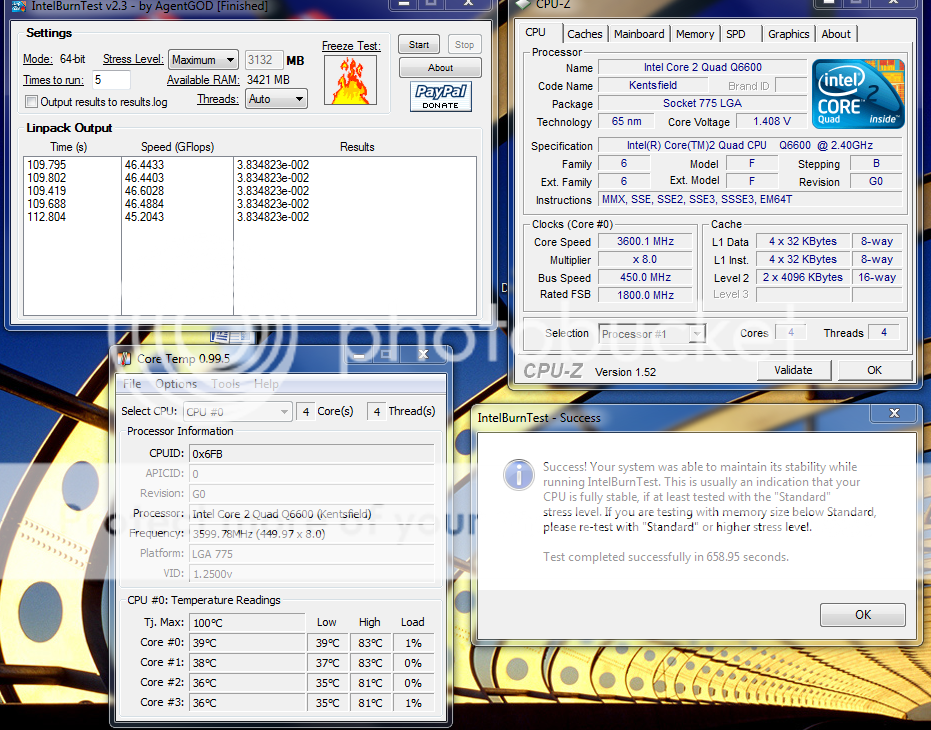
btw....on stress level...put maximum......& run minimum of 5 loops......

show screenshot like dis.....

» Click to show Spoiler - click again to hide... «


This post has been edited by tech3910: Apr 7 2010, 05:11 PM
tech3910
post Apr 7 2010, 05:38 PM

Anonymous
*******
Senior Member
5,644 posts

Joined: Feb 2008
From: Heaven to HELL


QUOTE(hong1380 @ Apr 7 2010, 05:13 PM)
running on that settings...its like killing the processor for me..lol
*
wit sufficient cooling, i dun see any problem running on dat setting 24/7.....

actually i don't run dat setting 24/7, just wanna see my q6600 can reach 3.6 o not....
coz every q6600 users hopes his/her processor can hit 3.6...... blush.gif

usually, for intense gaming, the setting is on my siggy....
but during non gaming season like now, just doing dl, i set tit to 410*6 + under volt it to 1.024vcore..... thumbup.gif
tech3910
post Apr 8 2010, 08:00 PM

Anonymous
*******
Senior Member
5,644 posts

Joined: Feb 2008
From: Heaven to HELL


the temperature different between 2 s/w boz dey uses different tj. max value....
stick wit core temp, more accurate.

oc from bios la.
disable eist & c1e for improve overclocking.
tech3910
post Apr 8 2010, 10:30 PM

Anonymous
*******
Senior Member
5,644 posts

Joined: Feb 2008
From: Heaven to HELL


QUOTE(jaya7 @ Apr 8 2010, 10:03 PM)
tweaking from BIOS. raised to 377*9 now. able to POST at vcore 1.33125v smile.gif Intel Burn Test was successful. Idle temp is ard 38C. Load was at 44C when running burn test.
*
tip:

say 378*9 ~ 3.4GHz
& 425*8 = 3.4GHz

the 425*8 setting will b faster coz fsb is faster.....
tech3910
post Apr 8 2010, 11:40 PM

Anonymous
*******
Senior Member
5,644 posts

Joined: Feb 2008
From: Heaven to HELL


QUOTE(jaya7 @ Apr 8 2010, 11:12 PM)
i hit 3.60 with 400*9 vcore at 1.41. idle temp seems to be at 40C. but when i look at core temp its average 44-45c. i compared to your screenshot, i can see yuor core temp showing average 39c.. is something wrong with my settings??
*
i'm using 3rd party cooler...
plus wen i do dat oc dat time, i just wanna benchmark, hence blast my air-con
also, thermal paste also meks few Celsius different......

i'm using tuniq tx-3..... biggrin.gif

i wan push it further, but i wont do dat till i hav better cooling.....
the load temperature edi 80+......
if no a/c, 90+

This post has been edited by tech3910: Apr 8 2010, 11:44 PM
tech3910
post Apr 9 2010, 12:17 AM

Anonymous
*******
Senior Member
5,644 posts

Joined: Feb 2008
From: Heaven to HELL


idle temperature dun matter much, load temperature more important....
i see ur load temperature is fantastic......

btw.....unstable oc maybe cause from other thing such as ram timing too tight/frequency too high, o nb voltage.

This post has been edited by tech3910: Apr 9 2010, 12:20 AM
tech3910
post Apr 9 2010, 01:14 AM

Anonymous
*******
Senior Member
5,644 posts

Joined: Feb 2008
From: Heaven to HELL


i think for nb voltage, leave it auto is good enough.....

wat ram u using & wat speed & timing it is currently running at?
tech3910
post Apr 9 2010, 01:39 AM

Anonymous
*******
Senior Member
5,644 posts

Joined: Feb 2008
From: Heaven to HELL


i think ur ram shouldn't problem given enough dram voltage is pump in...

btw, for q6600 safe operating limit, keep it bellow 1.5vcore.


Change to:
| Lo-Fi Version
0.0170sec    0.48    7 queries    GZIP Disabled
Time is now: 10th December 2025 - 02:45 AM