Welcome Guest ( Log In | Register )

Outline · [ Standard ] · Linear+

 Display Calibration Fundamentals : My Take, Display Calibration

views
     
TSanfieldude
post Mar 23 2010, 08:12 AM, updated 8y ago

Look at all my stars!!
*******
Senior Member
3,858 posts

Joined: Jan 2008
A Beginner’s Guide to Display Calibration

This guide is work in progress. I will update with pictures as time goes by, please be patient.

What is Calibration?

Calibrate - To check, adjust, or determine by comparison with a standard (the graduations of a quantitative measuring instrument)

Calibration - The act or process of calibrating or the state of being calibrated.

Display calibration is centred on calibration of your display to standards.

Movie studios/directors adhere to standards when mastering movies/films.

One key feature of the standards for movies (colour) is the white point. The reference white point is defined as D65 for both North American and European standards. The white point refers to an x,y coordinate of 0.3127, 0.329 in the CIE Chromacity chart. CIE(Commission Internationale de l’Eclairage) is the international body responsible for the measurement of color.

6500K however, is a measure of the correlated colour temperature (CCT) of the white. Where D65 specifically targets a white point, the colour temperature is slightly misleading. It is possible to have a white that is 6500K in colour temperature (as it depends on whether the red and the blue channels primarily) but not hitting D65 white. For all practical purposes, D65 is a better representation of calibrating to a standard as if you do hit the 0.3127, 0.329, you automatically hit 6500K CCT.

The different standards that are available out there are:
· ITU-R Recommendation BT.709 (“Rec. 709”) – the standard for both North American and European high definition television - HD
· ITU-R Recommendation BT.601 (“Rec. 601”) and SMPTE-C – the standard for NTSC 480i/60Hz standard definition television (SMPTE-C has supplanted Rec. 601), and
· PAL/SECAM – the standard defined by the European Broadcasting Union (EBU) for 576i/50Hz standard definition television.

Once a display is calibrated to these standards (or as close to these standards as your display will allow) you do not need to wonder if the picture is accurate and tweak your settings for every movie. If your post calibration results are good, the pictures that you are viewing are as close to what the director intended for you to see.

This post has been edited by anfieldude: May 10 2010, 02:03 PM
TSanfieldude
post Mar 23 2010, 08:13 AM

Look at all my stars!!
*******
Senior Member
3,858 posts

Joined: Jan 2008
Key Components/Terminology

1. Brightness
2. Contrast
3. Sharpness
4. Colour (Hue, Saturation, Lightness)
5. Tint
6. Greyscale
7. Gamma


In order to carry out basic calibration, you would need a test disc and preferably colorimeter/spectrophotometer/lightmeter & calibration software.

Test Patterns
Test patterns or test discs are needed for you to set some of the basic stuff even without a meter. I would recommend the free AVSHD709 (for HD sources, Blu Ray and Media Players) or TomHuffmans free NTSC DVD test patterns. You can also purchase the GetGray test disc (available in PAL and NTSC), DVE HD Basic Calibration Blu Ray/DVD or the fantastic Spears and Munsil HD Benchmark

We will discuss the most basic component of display calibration, one that can be done without any meters (most of the time)

Setting Brightness
Brightness is actually the setting of the black level that for me is the basis of a proper calibration. My preference on the test pattern on setting brightness would be the brightness (PLUGE Low– Picture Line Up GEnerator) pattern on S&M Test Disc. However, since most of you would not be buying the test discs all the explanation would be based on AVSHD709 free test disc. Pull up the Basic Settings, 1st pattern (called brightness and contrast). On this pattern you will see flashing bars labeled 1-25 against a video black of 16. First check that you cannot see all the way down to the label of below 5. If you do these bars flashing, you need to check the settings of you Blu Ray player or your display. What is probably happening is that you are sending a RGB Full signal (also lookout if your display has a setting for 0 IRE, 7.5IRE, select 7.5IRE for the correct setup). For all BD or DVD material, it is based on a video level setting of 16 and above. This is the 1st setting you need to check. Once you select the correct output from your player (typically most players have an Auto setting, this setting normally sets to YCbCr it depends on the EDID that your display is sending out), you are ready to set the brightness. It is better to set the brightness in a dark environment. Turn up the brightness until you can see the bars below 16 flash. Then turn it down until 17 can barely be seen. Now go to the next pattern. The next pattern is brightness and a contrast pattern together. For displays that have different outputs based on dark/bright content in the same screen (plasmas, crt) check your brightness setting that you set earlier. Same method used here, in this case see if you can get at least 19 and above flashing and the 16 and below not flashing. The correct brightness setting is the higher one from pattern 1 and 2. ie, if using the 1st pattern you got a brightness of +1, and on the 2nd pattern you got a brightness of +2 then , use +2.

This post has been edited by anfieldude: Apr 8 2010, 03:12 PM
TSanfieldude
post Mar 23 2010, 08:13 AM

Look at all my stars!!
*******
Senior Member
3,858 posts

Joined: Jan 2008
Setting Contrast.
Setting of contrast on a digital display without meters is difficult, as most digital displays do not clip white levels above digital white of 235. Pull up the contrast setting pattern on the AVS HD709, 3rd pattern on the basic setting page. You should be able to see as many bars as possible above 235. If you do not see anything above 230 then your set is clipping whites. Else adjust contrast up/down to show as many bars above 235 as possible. Most digital displays will show quite a bit above 235. Another thing to look out for is if the contrast is set too high, the whites start to look reddish, bluish or greenish. In this case, you need to set contrast in tandem with another pattern. In the Misc Patterns, go to the RGB High Clipping. This is essentially a clipping of the individual RGB channels that make up white. The problem with turning up contrast too high is that some of the individual channels get clipped. This in turn, makes the white either too green, red or blue. Turn down contrast until the all channels clip at about the same level.

If there does not seem to be any clipping at all for white, red, green & blue channels (highly unlikely as all digital displays will clip one channel or another), set contrast using a 100% white window (from either Calman window patterns or HCFR window patterns) to the level that pleases you eyes and is not uncomfortable.

Setting Colour/Tint
I am not going to go into this as unless you have a filter it is impossible to set this by eye. Even with a filter, the best way to set colour is to use a meter. I will add this if there is a need for this. I will explain this later as it is a complex matter.

Setting Sharpness
Setting sharpness is pretty subjective. Using the sharpness setting and the sharpness test patterns, play around with the sharpness settings to get as sharp a picture as you can while looking for halos or white edges near the black lines. Also look out for moiré and lines that seem to merge. Also, select the picture mode that reduces the artifacts. All displays have various modes, ie, dot by dot, just scan, full, wide etc. In most cases, dot by dot is the one that normally has zero over scan. Play around with them to see which one gives you the least artifacts with the sharpness setting. The Spears and Munsil disc has a better pattern to set sharpness and I have tested it with various displays. The adjustments you make in the display responds well to what you see in the test pattern that makes setting sharpness easier.

That about covers the basic settings that you can carry out without a proper meter. In order to carry out a complete calibration, you need to have a meter and complete the calibration of greyscale, gamma and colour.


This post has been edited by anfieldude: Mar 23 2010, 08:21 AM
TSanfieldude
post Mar 23 2010, 08:14 AM

Look at all my stars!!
*******
Senior Member
3,858 posts

Joined: Jan 2008
The next few areas require the use of a colorimeter or a spectrophotometer to set correctly. I will explain these briefly for now and add more detail when I get the time to complete the documentation

Greyscale
Greyscale is the calibration of the shades of white. White is the basis of colours, greyscale calibration is done to set the white shades correctly. Typically, the display controls that calibrate greyscale are labeled as white balance and have Red/Green/Blue bias/cut/gain/offset/high/low. They control the individual RGB channels that make up white.

Gamma
Gamma is a luminance measurement. This is a measurement or parameter that controls the light levels are different input levels. Setting gamma correctly is essential to the “3D” pop that people look for in a digital display. Gamma is commonly targeted by calibrators range from 2.2 – 2.5 but this depends purely on your viewing environment. Lower gamma is normally selected for high ambient light surroundings and higher gamma is for darker environments. I find targeting a gamma of 2.35 is best for semi dark environments and 2.15 for bright environments. In a dark room, a set that tracks gamma correctly at 2.35 with good black levels will produce an image that is very 3D, especially if the set also tracks good greyscale.


This post has been edited by anfieldude: Mar 23 2010, 08:23 AM
TSanfieldude
post Mar 23 2010, 08:15 AM

Look at all my stars!!
*******
Senior Member
3,858 posts

Joined: Jan 2008
Colour/Tint
Colour is a whole new can of worms. There are set colour points in the CIE chart for each colour. Red, Green and Blue are the primary colours and Cyan, Magenta and Yellow are the secondary colours. To do a proper calibration of Colour using a Colour Management System would require the use of a Spectrophotometer (colorimeters are okay as well, its just that the spectros are supposedly better in them). Each colour has its own theoretical Hue, Saturation and Lightness. The Hue and the Saturation are represented in the CIE Chart that I described earlier. A display with a good CMS would typically have independent controls to move all of the above.

The Colour controls on the different sets behave differently. On some sets, the colour control effects saturation and on others they only control lightness.

The Tint controls normally just rotate the secondary colours, however, it depends on the implementation of the display.

Saturation is a measure of how far away from the white point in the CIE chart is the particular colour. If the colour is over-saturated, it means that it is further away from the white and as such seems richer.

When hue is off, the colour seems to resemble more of a another colour rather than itself. Eg, Cyan’s hue seems to be shifted towards green instead of blue, meaning that the cyan seems to have more green than blue.

Lightness is a measure of how bright the colour is. It is possible for a colour to have accurate hue and saturation but because the lightness it wrong, it seems too bright.

All these parameters are those that are needed to be right in order for the colours to be correctly decoded accurately. I have seen numerous displays that have no controls for a CMS and the basic colour and tint just do not do much. Then, there are some displays that have all the controls you can imagine. I hope in the future all display manufacturers provide a full 3D CMS that the consumer can use to fine tune his display.


This post has been edited by anfieldude: Mar 23 2010, 08:25 AM
TSanfieldude
post Mar 23 2010, 08:18 AM

Look at all my stars!!
*******
Senior Member
3,858 posts

Joined: Jan 2008
The one thing that has happened in the past couple of years is the emergence of affordable home theater enthusiasts calibration packages that allow more and more people to calibrate displays. Along with this, the masses are adopting and understanding that calibration actually improves the overall home theater experience and adds to the excitement. With a properly calibrated set, you do not need to wonder if the pictures you are viewing are off and you can enjoy the movie more.

The choice is yours, you can either become and enthusiast and buy your own calibration software/hardware, or you can hire someone to do it for you so that you do not need to invest into this area.

I have been using Calman software for the past few years to calibrate displays of family and friends. I have been very happy with the support I have gotten from the team. The link is provided below and they ship to Malaysia.

SpectraCal Website

Another newcomer to the enthusiast and professional calibration arena is Chromapure. Their software is slightly different and their up and coming in the industry.

Chromapure

These are the 2 affordable solutions I know out in the market.

I have used Calman for a couple of years and have been following their growth for some time. The enthusiasts are lucky to have affordable solutions for home calibration with both of these players in the market.

This post has been edited by anfieldude: Mar 28 2010, 04:19 PM
zerorulez
post Mar 23 2010, 08:26 AM

Regular
******
Senior Member
1,251 posts

Joined: Aug 2008
From: In Between Places...


cool... finally the thread we've been longing for... nice work from calibration guru anfiel... notworthy.gif notworthy.gif
low98944
post Mar 23 2010, 08:30 AM

...oooOOOooo...
*******
Senior Member
5,533 posts

Joined: Mar 2008
From: Area 51
Fianlly, guru give lesson to all of us. rclxm9.gif notworthy.gif
jimmyteng18
post Mar 23 2010, 08:39 AM

On my way
****
Senior Member
669 posts

Joined: Mar 2009


Nice write-up, guru. Thks for the effort.
chewkl
post Mar 23 2010, 09:08 AM

Peasant
Group Icon
Elite
2,170 posts

Joined: Jan 2003
Mods please sticky this. thumbup.gif
SUSserendipity168
post Mar 23 2010, 11:50 AM

Getting Started
**
Junior Member
179 posts

Joined: Feb 2010
Thanks for sharing cheers.gif
butter finger
post Mar 23 2010, 11:58 AM

Casual
***
Junior Member
317 posts

Joined: Jan 2009
TQ boss
dirtrun
post Mar 23 2010, 12:11 PM

Look at all my stars!!
*******
Senior Member
3,136 posts

Joined: Sep 2005
Hi..

To those who are reading tis thrd n hv no inkling wat he is talkin abt .. I d suggest Pm bro A and ask nicely so he ll calibrate ur display for you..

Kudos to bro A
D
echoesian
post Mar 23 2010, 01:28 PM

Look at all my stars!!
*******
Senior Member
3,294 posts

Joined: Dec 2005


Thanks for your efforts bro...
saiya
post Mar 23 2010, 01:35 PM

Getting Started
**
Junior Member
209 posts

Joined: Aug 2005


goodjob
ape
post Mar 23 2010, 03:23 PM

Enthusiast
*****
Senior Member
849 posts

Joined: Apr 2006
master of display calibration gives lesson here...ya pls sticky it...
TSanfieldude
post Mar 23 2010, 06:03 PM

Look at all my stars!!
*******
Senior Member
3,858 posts

Joined: Jan 2008

Please give me some time to improve on this thread. I will be doing bit by bit. Also if there are any questions, pls ask here and I will answer and improve on the thread documentation for ease of understanding.
junwei
post Mar 23 2010, 08:59 PM

Getting Started
**
Junior Member
252 posts

Joined: Apr 2007
nice work bro and thanks for the introduction to start me up on calman calibration through the phone.


QUOTE(anfieldude @ Mar 23 2010, 06:03 PM)
Please give me some time to improve on this thread. I will be doing bit by bit. Also if there are any questions, pls ask here and I will answer and improve on the thread documentation for ease of understanding.
*
gocitygo
post Mar 23 2010, 09:14 PM

Casual
***
Junior Member
397 posts

Joined: Mar 2008
anfield, respect notworthy.gif
Maniac
post Mar 24 2010, 02:13 AM

That Tech Guy Who Use Nikon For Video
Group Icon
VIP
5,938 posts

Joined: Jan 2003
From: Now In The City of Merlion


pinned on top!! good sharing! biggrin.gif
geforce1999
post Mar 24 2010, 09:06 AM

Movie Lover.
******
Senior Member
1,336 posts

Joined: Jan 2009
From: Battown in Johor


Good learning from display guru here notworthy.gif
asherteoh
post Mar 24 2010, 02:19 PM

Getting Started
**
Validating
159 posts

Joined: Nov 2008


good stuff here! although i don't quite understand everything teacher Anfiel is saying.... teacher.. you mind helping me tune my 428XG? smile.gif
TSanfieldude
post Mar 28 2010, 12:10 PM

Look at all my stars!!
*******
Senior Member
3,858 posts

Joined: Jan 2008

One question that keeps coming up is :

My picture looks good already. Will I see the benefits of calibration?

My answer is:

Calibration of the display is the same as tuning of your car. When u tune ur car correctly, you will get the best of the petrol consumption that the car is capable of. You also unlock the full power capabilities of your car. Sometimes when change ur oil filter and new engine oil, as u drive ur car out of the service centre, ur car is response is smooth and u admire ur car more. However, on another note, there are people who could not care less, they look at the car as a vehicle to take u from point A to point B, occasionally complaining about mileage and sometimes annoyed about the lack of power while driving. However, they could not care less about how it performs. So there are different kinds of people and they are sensitive to diffferent things.

The same applies to display calibration. Calibrating ur display brings the best out of display that it is capable of producing. In most cases, it helps to save electricity consumption as u calibrate the display to the optimum based on ur environment. When a display is properly calibrated (this depends on different display capabilities, u cannot compare a Ferrari to a local car, same applies to displays), u get proper flesh tones, u do not need to wonder if the director purposely skewed the hues of the colours or not, since ur display is calibrated to HD standards. U then get the best of ur display.

Can it be seen by ur eyes? If u look and pay attention, of course it can, same like when u get ur car tuned.

Some people choose to ignore it. Some don't. It's ur choice.


gocitygo
post Mar 28 2010, 12:57 PM

Casual
***
Junior Member
397 posts

Joined: Mar 2008
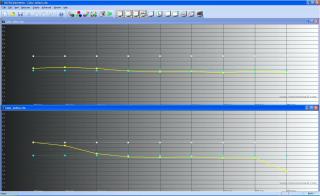
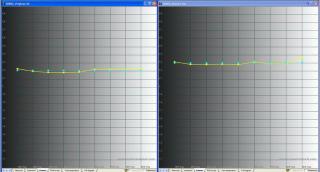
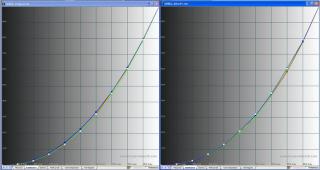
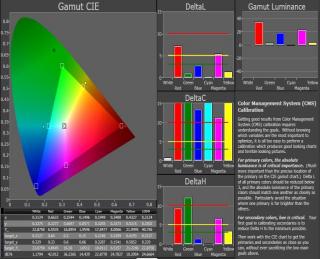
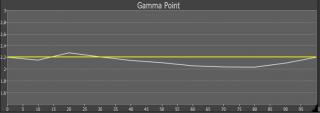
Anfield, I'm using Xrite i1 with ColorHCFR on my projector. While doing greyscale calibration, I found out the Red too high in the original setting. I have to adjust the Red and Blue (RGB Gain/Offset) to get the 6500K target. The RGB post calibration looks OK but the Gamma is about 1.9 instead target 2.2. Is there anything missing here? notworthy.gif

Attached Image
Attached Image
Attached Image
TSanfieldude
post Mar 28 2010, 04:01 PM

Look at all my stars!!
*******
Senior Member
3,858 posts

Joined: Jan 2008
QUOTE(gocitygo @ Mar 28 2010, 12:57 PM)
Anfield, I'm using Xrite i1 with ColorHCFR on my projector.  While doing greyscale calibration, I found out the Red too high in the original setting.  I have to adjust the Red and Blue (RGB Gain/Offset) to get the 6500K target.  The RGB post calibration looks OK but the Gamma is about 1.9 instead target 2.2.  Is there anything missing here?  notworthy.gif

Attached Image
Attached Image
Attached Image
*
gocitygo,

What picture mode did u start with on the optoma? What gamma did u select?

I believe ur initial gamma that u selected was averaging 1.8 to start. I think u either choose Cinema or PC gamma. I believe Cinema starts at 2.35 and PC is closer to 2.2.

Check and let me know and I will help u with it.

I have calibrated a HD65 b4 and could easily track a gamma of 2.35 for a dark room.
gocitygo
post Mar 28 2010, 04:16 PM

Casual
***
Junior Member
397 posts

Joined: Mar 2008
Thanks for grand sifu help.

Original setting:
display mode = cinema
degamma = film

New setting;
display mode = cinema
degamma = video

Is that always tunes with R/B instead of G (RGB gains/offset) in greyscale calibration? In my case, I cutdown R gain a lots (-22). Not sure it will cause the color composition to off red? I'm not able to do Color calibration due to HD-65 limitation of CMS.
TSanfieldude
post Mar 28 2010, 04:25 PM

Look at all my stars!!
*******
Senior Member
3,858 posts

Joined: Jan 2008
QUOTE(gocitygo @ Mar 28 2010, 04:16 PM)
Thanks for grand sifu help. 

Original setting:
display mode = cinema
degamma = film

New setting;
display mode = cinema
degamma = video

Is that always tunes with R/B instead of G (RGB gains/offset) in greyscale calibration?  In my case, I cutdown R gain a lots (-22).  Not sure it will cause the color composition to off red?  I'm not able to do Color calibration due to HD-65 limitation of CMS.
*
gocitygo,

I believe I used cinema and film as well. Try PC in gamma and it should be better.

Is this a i2 display lt?

There are 2 trains of thought on what is the best way to achieve D65. I normally follow the "not touching green" camp but occasionally I add +1/-1 to green to improve on the cals.

U can try adding green as well.

What is the life of ur lamp? Are u using eco mode?

Can u refresh my memory on what other display modes were there?
gocitygo
post Mar 28 2010, 04:42 PM

Casual
***
Junior Member
397 posts

Joined: Mar 2008
The lamp is about 200hrs (STD mode). Yes, I'm using i1 Display LT, the affordable version smile.gif

Display mode = Cinema/Bright/Photo/TV/User.

Degamma = Film/Video/Graphic/PC. I tried Film before but giving unstable D65 across IRE. Will try PC mode as you suggest.

BTW, I set ZERO both Brilliant Color & True Vivid setting. Image AI = Off and Color Temp = Medium.

This post has been edited by gocitygo: Mar 28 2010, 04:46 PM
TSanfieldude
post Mar 28 2010, 05:16 PM

Look at all my stars!!
*******
Senior Member
3,858 posts

Joined: Jan 2008
QUOTE(gocitygo @ Mar 28 2010, 04:42 PM)
The lamp is about 200hrs (STD mode).  Yes, I'm using i1 Display LT, the affordable version smile.gif

Display mode = Cinema/Bright/Photo/TV/User.

Degamma = Film/Video/Graphic/PC.  I tried Film before but giving unstable D65 across IRE.  Will try PC mode as you suggest.

BTW, I set ZERO both Brilliant Color & True Vivid setting.  Image AI = Off and Color Temp = Medium.
*
Another thing to try would be colour temperature low as it would be more red to start with.
pierreye
post Mar 28 2010, 05:24 PM

Regular
******
Senior Member
1,308 posts

Joined: Oct 2004
From: Penang & Ipoh


QUOTE(anfieldude @ Mar 28 2010, 04:25 PM)
gocitygo,

I believe I used cinema and film as well. Try PC in gamma and it should be better.

Is this a i2 display lt?

There are 2 trains of thought on what is the best way to achieve D65. I normally follow the "not touching green" camp but occasionally I add +1/-1 to green to improve on the cals.

U can try adding green as well.

What is the life of ur lamp? Are u using eco mode?

Can u refresh my memory on what other display modes were there?
*
Just my 2 cents, normally I'll try to find out the display deficiency in which color. That would be your cap. For example, majority of the UHP lamp is red deficient. You will see that it will run out of red when approaching 100% White. In this case as an example, if +512 is the highest number, I'll cap red at +512 and adjust Green and Blue to match D65. This would ensure you have the smoothest D65 greyscale tracking. Another option is just ignore the red deficiency issue as long as 90% white is D65. This is to get good greyscale up to 90% white but give you a bit more brightness at 100% white (You seldom have movies with lots of 100% white on screen).

This post has been edited by pierreye: Mar 28 2010, 05:26 PM
gocitygo
post Mar 28 2010, 05:26 PM

Casual
***
Junior Member
397 posts

Joined: Mar 2008
Would give that a try. Thanks. icon_rolleyes.gif

Anyone else doing own calibration? It is a good platform to exchange idea thumbup.gif
yltan
post Mar 28 2010, 08:21 PM

Getting Started
**
Junior Member
194 posts

Joined: May 2006
QUOTE(gocitygo @ Mar 28 2010, 05:26 PM)
Would give that a try.  Thanks.  icon_rolleyes.gif

Anyone else doing own calibration?  It is a good platform to exchange idea  thumbup.gif
*
Planning to start calibrate my projector using the DVE Essential soon.

Maybe gocitygo can share how you do your calibration using Xrite i1.
TSanfieldude
post Mar 28 2010, 09:16 PM

Look at all my stars!!
*******
Senior Member
3,858 posts

Joined: Jan 2008
QUOTE(pierreye @ Mar 28 2010, 05:24 PM)
Just my 2 cents, normally I'll try to find out the display deficiency in which color. That would be your cap. For example, majority of the UHP lamp is red deficient. You will see that it will run out of red when approaching 100% White. In this case as an example, if +512 is the highest number, I'll cap red at +512 and adjust Green and Blue to match D65. This would ensure you have the smoothest D65 greyscale tracking. Another option is just ignore the red deficiency issue as long as 90% white is D65. This is to get good greyscale up to 90% white but give you a bit more brightness at 100% white (You seldom have movies with lots of 100% white on screen).
*
If u r running out of any particular colour, u r probably clipping that channel. The easiest way to fix that would be to reduce contrast until u stop clipping. Of course, if that is reducing ur luminance too much, then u need to compromise. I agree with you that I would compromise on the higher end rather than the mid and low end.
chewkl
post Apr 1 2010, 09:46 AM

Peasant
Group Icon
Elite
2,170 posts

Joined: Jan 2003
Bro Anfieldude, what do U think about the new Panny S2 calibrated results on the 2nd post here?

http://www.avsforum.com/avs-vb/showthread.php?t=1232441
TSanfieldude
post Apr 1 2010, 01:29 PM

Look at all my stars!!
*******
Senior Member
3,858 posts

Joined: Jan 2008
QUOTE(chewkl @ Apr 1 2010, 09:46 AM)
Bro Anfieldude, what do U think about the new Panny S2 calibrated results on the 2nd post here?

http://www.avsforum.com/avs-vb/showthread.php?t=1232441
*
Slightly better than last year. However, the gamma is the same and that is a major issue in my book. Colour decoding slightly better, greyscale slightly better. Green cast still there and needs calibration to remove.
chewkl
post Apr 1 2010, 02:12 PM

Peasant
Group Icon
Elite
2,170 posts

Joined: Jan 2003
Thanks bro. Will be waiting for Sammy's 2010 plasma panel then. biggrin.gif
jchong
post Apr 1 2010, 03:48 PM

****************
*******
Senior Member
5,989 posts

Joined: Nov 2005
QUOTE(anfieldude @ Mar 28 2010, 12:10 PM)
One question that keeps coming up is :

My picture looks good already. Will I see the benefits of calibration?
*
To add to anfield's post, it is definitely possible to see the benefits of calibration. If your display is off in the first place, the difference can be quite apparent. Or if you have a large display, again more apparent.

Anfield was kind enough to help calibrate my projector and I could start seeing the difference even though the optimal potential of the projector had not been reached yet.
TSanfieldude
post Apr 1 2010, 04:06 PM

Look at all my stars!!
*******
Senior Member
3,858 posts

Joined: Jan 2008
QUOTE(chewkl @ Apr 1 2010, 02:12 PM)
Thanks bro. Will be waiting for Sammy's 2010 plasma panel then. biggrin.gif
*
I hope u find what u r looking for. Just remember, there is no perfect display. All have their strengths and weaknesses.
chewkl
post Apr 1 2010, 04:13 PM

Peasant
Group Icon
Elite
2,170 posts

Joined: Jan 2003
QUOTE(anfieldude @ Apr 1 2010, 04:06 PM)
I hope u find what u r looking for. Just remember, there is no perfect display. All have their strengths and weaknesses.
*
With all due respect, U are wrong bro. KRP is perfect to me, just that I can't afford it. cry.gif
dirtrun
post Apr 1 2010, 05:28 PM

Look at all my stars!!
*******
Senior Member
3,136 posts

Joined: Sep 2005
QUOTE(yltan @ Mar 28 2010, 08:21 PM)
Planning to start calibrate my projector using the DVE Essential soon.

Maybe gocitygo can share how you do your calibration using Xrite i1.
*

Hmmnn..

I tink those using DVE n Avia calibration discs are jus touchin de surface here.. Bro A here uses much more advanced ways to calibrate..
Not tat I m knockin those 2 sofware.. I use them myself..

One gud pt - will I see a difference after calibration.. I guess it also depends how far u hv gone into tis hobby.. the further in u r then u tend to look for problms instead of luking at de big picture .. anal, maybe but its true.. fortunately for me .. I m so blur tat I dont see much deficiencies in my peasant system la..

Kekeke tongue.gif
D


Added on April 1, 2010, 5:28 pm
QUOTE(chewkl @ Apr 1 2010, 04:13 PM)
With all due respect, U are wrong bro. KRP is perfect to me, just that I can't afford it. cry.gif
*
Haha..

Pure case of YMMV.. woh..

This post has been edited by dirtrun: Apr 1 2010, 05:28 PM
TSanfieldude
post Apr 1 2010, 05:32 PM

Look at all my stars!!
*******
Senior Member
3,858 posts

Joined: Jan 2008
QUOTE(chewkl @ Apr 1 2010, 04:13 PM)
With all due respect, U are wrong bro. KRP is perfect to me, just that I can't afford it. cry.gif
*
The KRP also has its flaws...
chewkl
post Apr 2 2010, 08:34 AM

Peasant
Group Icon
Elite
2,170 posts

Joined: Jan 2003
I guess it is as close as it can get to perfect, at least for a couple of years more before the other players catch up and exceed it. smile.gif
pierreye
post Apr 2 2010, 10:48 AM

Regular
******
Senior Member
1,308 posts

Joined: Oct 2004
From: Penang & Ipoh


If you look for perfect display, it must have the following ingredient.

1. Meet or exceed 100% for CIE gamut.
2. 11 point gamma correction.
3. greyscale colour temperature control (RGB gain/cut)
4. full working 3D CMS.
5. Very low black level.

Then with a good probe, you can adjust it to the BT.709 colorspace standard. Unless you are still watching DVD, you need to recheck BT.601 colorspace too.

This post has been edited by pierreye: Apr 2 2010, 11:05 AM
yltan
post Apr 2 2010, 11:48 AM

Getting Started
**
Junior Member
194 posts

Joined: May 2006
[quote=dirtrun,Apr 1 2010, 05:28 PM]
Hmmnn..

I tink those using DVE n Avia calibration discs are jus touchin de surface here.. Bro A here uses much more advanced ways to calibrate..
Not tat I m knockin those 2 sofware.. I use them myself..

That is what I have. But you need to have the filter for DVE. Maybe Anfield can help do calibrate for my projector?
dirtrun
post Apr 2 2010, 12:14 PM

Look at all my stars!!
*******
Senior Member
3,136 posts

Joined: Sep 2005
QUOTE(yltan @ Apr 2 2010, 11:48 AM)
That is what I have. But you need to have the filter for DVE. Maybe Anfield can help do calibrate for my projector?
*

Pm.. him ..

He is veri accomodatin..

On de filters.. U mean DVE dont include de filters?? My Ovations Avia includes tis in de pckg.. thou' its only d plastic colored tingy..

D

pierreye
post Apr 2 2010, 04:12 PM

Regular
******
Senior Member
1,308 posts

Joined: Oct 2004
From: Penang & Ipoh


If your projector had blue only mode (which turn off red and green) then you don't need the filter. Even the tint/color control is not accurate based on the Calman reading. If you have CMS, just leave tint/color at default. It's very easy to screw up the color using tint/saturation control.
TSanfieldude
post Apr 2 2010, 04:39 PM

Look at all my stars!!
*******
Senior Member
3,858 posts

Joined: Jan 2008
QUOTE(pierreye @ Apr 2 2010, 04:12 PM)
If your projector had  blue only mode (which turn off red and green) then you don't need the filter. Even the tint/color  control is not accurate based on the Calman reading. If you have CMS, just leave tint/color at default. It's very easy to screw up the color using tint/saturation control.
*
My personal opinion is that for getting colours right, u need a meter (preferably a spectro). Also a working CMS is a must, else the display must track Rec 709 accurately. But a 3D CMS is the way to go.
formalin
post Apr 9 2010, 02:12 PM

Getting Started
**
Junior Member
114 posts

Joined: Aug 2009
QUOTE(anfieldude @ Apr 1 2010, 05:32 PM)
The KRP also has its flaws...
*
Bro anfieldude,

It is possible to post the best possible setting for KRP-500A ?? icon_question.gif

This post has been edited by formalin: Apr 9 2010, 02:13 PM
TSanfieldude
post Apr 9 2010, 03:08 PM

Look at all my stars!!
*******
Senior Member
3,858 posts

Joined: Jan 2008
QUOTE(formalin @ Apr 9 2010, 02:12 PM)
Bro anfieldude,

It is possible to post the best possible setting for KRP-500A ??  icon_question.gif
*
I don't have a KRP-500A to do that.
asherteoh
post Apr 9 2010, 08:44 PM

Getting Started
**
Validating
159 posts

Joined: Nov 2008


QUOTE(anfieldude @ Apr 9 2010, 03:08 PM)
I don't have a KRP-500A to do that.
*
he has 600M tongue.gif
opjust
post Apr 16 2010, 07:11 PM

Enthusiast
*****
Senior Member
721 posts

Joined: Sep 2009


anyone has callibrate toshiba zv?
TSanfieldude
post Apr 21 2010, 09:11 PM

Look at all my stars!!
*******
Senior Member
3,858 posts

Joined: Jan 2008
All,

Do let me know what other stuff you would like me to cover in Display Calibration or anything related to something that is not brand or technology specific. I will try to put more details in the 1st page. If there is enuf interest, I don't mind adding a step by step calibration guide to use a meter to calibrate. However, there are others that do it well.
junwei
post Apr 24 2010, 11:03 PM

Getting Started
**
Junior Member
252 posts

Joined: Apr 2007
Bro anfieldude can setup a team to train video calibration in Penang and those interested can fly there, pay a fee n attend the course n share ideas together. and if anfieldude doesn't wanna to collect the fee, we can donate it to charity :)hehe


Added on April 24, 2010, 11:09 pmFrom what I've read so far in this thread, people who is interested and have technical knowledge will probably understand at least 60% and above of what is mentioned here.

The rest are probably scratching their heads trying to figure out what those terms (d65,rec 709, +512, 3D CMS, etc).

Maybe do a simple definitions on what these terms and meanings are.
like, why we need to get D65 and what it means, etc tongue.gif

Then everyone will understand further.


This post has been edited by junwei: Apr 24 2010, 11:09 PM
TSanfieldude
post Apr 27 2010, 06:02 PM

Look at all my stars!!
*******
Senior Member
3,858 posts

Joined: Jan 2008
QUOTE(junwei @ Apr 24 2010, 11:03 PM)
Bro anfieldude can setup a team to train video calibration in Penang and those interested can fly there, pay a fee n attend the course n share ideas together. and if anfieldude doesn't wanna to collect the fee, we can donate it to charity :)hehe


Added on April 24, 2010, 11:09 pmFrom what I've read so far in this thread, people who is interested and have technical knowledge will probably understand at least 60% and above of what is mentioned here.

The rest are probably scratching their heads trying to figure out what those terms (d65,rec 709, +512, 3D CMS, etc).

Maybe do a simple definitions on what these terms and meanings are.
like, why we need to get D65 and what it means, etc tongue.gif

Then everyone will understand further.
*
Thanks for the suggestion. I will update the material when I get the chance.
Alias
post Apr 28 2010, 10:02 PM

Getting Started
**
Junior Member
247 posts

Joined: Jan 2003
anfielddude,
apart from the sizes (600m & 500a), is there any more difference in terms of specs and hardware between those two?
TSanfieldude
post Apr 29 2010, 11:42 AM

Look at all my stars!!
*******
Senior Member
3,858 posts

Joined: Jan 2008
QUOTE(Alias @ Apr 28 2010, 10:02 PM)
anfielddude,
apart from the sizes (600m & 500a), is there any more difference in terms of specs and hardware between those two?
*
I posted the reply in the Pioneer Thread. See link below.

Link to Pioneer Thread

This post has been edited by anfieldude: Apr 29 2010, 11:44 AM
gocitygo
post May 2 2010, 09:45 AM

Casual
***
Junior Member
397 posts

Joined: Mar 2008
-edit-

This post has been edited by gocitygo: May 2 2010, 09:47 AM
gocitygo
post May 2 2010, 10:20 AM

Casual
***
Junior Member
397 posts

Joined: Mar 2008
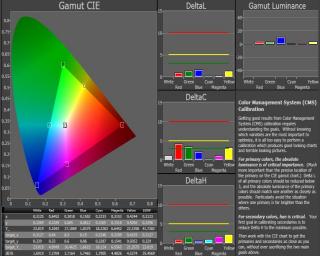
Anfield & Gang, my first calibration on 508XG. Any suggesting for further improvement is most welcome. notworthy.gif

At first, I was surprise to see the Gamma curve shocking.gif , too good to be true on the original setting. Until I realized the RGB and Color Temp were quite off.

The whole calibration process took so long (~3 hrs) for newbie like me. At one hand look for how-to procedures and on other the hand try to familiarize the software. But the whole learning process is fun and rewarding. Better do it at late night so that no one is ka-ka-chau-chau. I really recommend AV enthusiasts to try on this, either DIY or pay professional calibrators to do it. Imaging the significant improvement you can get from the existing hardwares just with a small price to invest versus your HT investment cost. Now, I'm realize for almost 30yrs, I am looking at something off the standard laugh.gif

On the CIE curves, I found the R & G points slightly off from target. Already tried on the CMS setting and still cannot get the (x,y) on the dot. Any suggestion?

Attached Image

Attached Image

Attached Image

Attached Image

Attached Image

Note:
a) Meter: Xrite i1 display LT.
b) Software: Color HCFR, Color space standard: HDTV-REC 709
c) Test disc: AVS HD 709
d) Left graph with original settings and right graph with new settings.


This post has been edited by gocitygo: May 2 2010, 11:47 AM
TSanfieldude
post May 2 2010, 11:16 AM

Look at all my stars!!
*******
Senior Member
3,858 posts

Joined: Jan 2008
QUOTE(gocitygo @ May 2 2010, 10:20 AM)
Anfield & Gang,  my first calibration on 508XG. Any suggesting for further improvement is most welcome.  notworthy.gif

» Click to show Spoiler - click again to hide... «

*
gocitygo,

Pls post the .chc file so I can take a look a the data.

I suppose u calibrated in Colour Space 2 and the 1st graph is with Colour Space 1.

For the Pio's I would not touch the CMS more than +/- 2 clicks as it effects greyscale quite badly. I suspect there is some clipping but let me take a look a the chc file bfore I comment.

gocitygo
post May 2 2010, 11:39 AM

Casual
***
Junior Member
397 posts

Joined: Mar 2008
QUOTE(anfieldude @ May 2 2010, 11:16 AM)
gocitygo,

Pls post the .chc file so I can take a look a the data.

I suppose u calibrated in Colour Space 2 and the 1st graph is with Colour Space 1.

For the Pio's I would not touch the CMS more than +/- 2 clicks as it effects greyscale quite badly. I suspect there is some clipping but let me take a look a the chc file bfore I comment.
*
Wow, you are keng chau. Yes, the original with Color Space 1 and the new with Color Space 2. I found out the Color Space 1 too much Red and need to cut a lots during Grayscale calibration.

If don't adjust the CMS too much, how to get the (x,y) for the Primary & Secondary colors?

Attached is the chc files. Thanks

This post has been edited by gocitygo: May 2 2010, 11:56 AM


Attached File(s)
Attached File  508XG.zip ( 5.25k ) Number of downloads: 58
TSanfieldude
post May 2 2010, 01:42 PM

Look at all my stars!!
*******
Senior Member
3,858 posts

Joined: Jan 2008
QUOTE(gocitygo @ May 2 2010, 11:39 AM)
Wow, you are keng chau.  Yes, the original with Color Space 1 and the new with Color Space 2. I found out the Color Space 1 too much Red and need to cut a lots during Grayscale calibration.

If don't adjust the CMS too much, how to get the (x,y) for the Primary & Secondary colors?

Attached is the chc files.  Thanks
*
gocitygo,

1stly, the red point on ur CIE chart is not accurate as u used the Display i1LT. This is a known issue. Also ur green point is also not accurate. Selecting colour space 2 on the 8G actually gets ur primaries almost spot on. So the CMS is unnecessary.

Also, I think u can decrease the Red High by one click and try to improve ur greyscale. At the moment, there is an excess of red by a bit.

However, I would not do too much as it might be off due to the meter and not the actual. After the calibration, did u pull up a greycale ramp and confirm that there is not red tint/blue tint in the grey? Also pls do pm me ur final greyscale numbers (rgb gain/offset). I suspect that the meter might be reading red too low and u might be boosting too much. There is a known problem with the display i1lt with the Kuros due to PWM and it normally either reads red or green channels wrongly.

Either way, ur methods seem correct. Good start.

On the primary and secondaries, I believe u used 100% colours instead of 75% colours. 75% might be better as to not allow the APL to kick in on the plasmas.
gocitygo
post May 2 2010, 04:34 PM

Casual
***
Junior Member
397 posts

Joined: Mar 2008
Bro Anfield, thanks for the sharing.


TSanfieldude
post May 2 2010, 08:07 PM

Look at all my stars!!
*******
Senior Member
3,858 posts

Joined: Jan 2008
QUOTE(gocitygo @ May 2 2010, 04:34 PM)
Bro Anfield, thanks for the sharing.
*
gocitygo,

My pleasure. Also when u start getting more advance, the Calman software is much better than HCFR in the options for the charts and some dynamic charts that help calibration quite a bit.
ameenskywalker
post May 4 2010, 01:26 AM

Casual
***
Junior Member
343 posts

Joined: Mar 2005
From: This means more !


quick question... where do i get all these calibration BD like DVE HD Basics ?
TSanfieldude
post May 4 2010, 05:16 PM

Look at all my stars!!
*******
Senior Member
3,858 posts

Joined: Jan 2008
QUOTE(ameenskywalker @ May 4 2010, 01:26 AM)
quick question... where do i get all these calibration BD like DVE HD Basics ?
*
Amazon is a good place to start. I have seen it in some AV shops but it is expensive. Maybe u can get one of the forumers who frequently sells BDs to bring it for u.

PM arj, mpwy among others.
madmoz
post May 7 2010, 05:32 PM

New Member
*******
Senior Member
4,250 posts

Joined: Nov 2006


i am terrible at this kinda thing... i wonder how much will it cost to have someone calibrate my sony klv40v550 for me?
TSanfieldude
post May 10 2010, 08:36 AM

Look at all my stars!!
*******
Senior Member
3,858 posts

Joined: Jan 2008
QUOTE(madmoz @ May 7 2010, 05:32 PM)
i am terrible at this kinda thing... i wonder how much will it cost to have someone calibrate my sony klv40v550 for me?
*
Pls PM me for further details.
ediaikau
post Jun 1 2010, 11:46 PM

Getting Started
**
Junior Member
52 posts

Joined: Jan 2009


anfieldude sifu, i own a tosh 42 rv600e, how much does it cost to calibrate it? any cheaper alternatives?
TSanfieldude
post Jun 2 2010, 10:05 AM

Look at all my stars!!
*******
Senior Member
3,858 posts

Joined: Jan 2008
QUOTE(ediaikau @ Jun 1 2010, 11:46 PM)
anfieldude sifu, i own a tosh 42 rv600e, how much does it cost to calibrate it? any cheaper alternatives?
*
Pls PM with details and we can discuss there.
darenlks
post Jun 7 2010, 01:04 PM

On my way
****
Senior Member
639 posts

Joined: Feb 2009


Anfieldude,

Uploaded the printscreens on my calibration result for my ZV. Click spoiler to view. Pls let me know any improvement needed based on the result smile.gif

» Click to show Spoiler - click again to hide... «

Edit : Added Color Data images and uploaded .chc files Attached File  ZV600E.zip ( 7.65k ) Number of downloads: 34


Actually I've started my calibration using Moive mode (This mode has the lowest brightness pre-set amongst all other modes available in this tv) but the end result is the picture is quite dark and can't bear with it after few hours watching, so I've done another round of calibration using Standard mode instead and found it much better to suit my room environment

This post has been edited by darenlks: Jun 7 2010, 01:49 PM
TSanfieldude
post Jun 7 2010, 01:09 PM

Look at all my stars!!
*******
Senior Member
3,858 posts

Joined: Jan 2008
QUOTE(darenlks @ Jun 7 2010, 01:04 PM)
Anfieldude,

Uploaded the printscreens on my calibration result for my ZV. Click spoiler to view. Pls let me know any improvement needed based on the result  smile.gif 

» Click to show Spoiler - click again to hide... «


Actually I've started my calibration using Moive mode (This mode has the lowest brightness pre-set amongst all other modes available in this tv) but the end result is the picture is quite dark and can't bear with it after few hours watching, so I've done another round of calibration using Standard mode instead and found it much better to suit my room environment
*
daren,

Post the .chc file as it would be easier for me to load the data and look at it on with HCFR.
TSanfieldude
post Jun 7 2010, 01:12 PM

Look at all my stars!!
*******
Senior Member
3,858 posts

Joined: Jan 2008
QUOTE(darenlks @ Jun 7 2010, 01:04 PM)
Anfieldude,

Uploaded the printscreens on my calibration result for my ZV. Click spoiler to view. Pls let me know any improvement needed based on the result  smile.gif 

» Click to show Spoiler - click again to hide... «


Actually I've started my calibration using Moive mode (This mode has the lowest brightness pre-set amongst all other modes available in this tv) but the end result is the picture is quite dark and can't bear with it after few hours watching, so I've done another round of calibration using Standard mode instead and found it much better to suit my room environment
*
Daren,

Are these results for Standard Mode? Or Movie Mode?

The greyscale looks pretty good. There does not seem to be any data in the CIE chart. Did u do the colours?
darenlks
post Jun 7 2010, 01:34 PM

On my way
****
Senior Member
639 posts

Joined: Feb 2009


QUOTE(anfieldude @ Jun 7 2010, 01:12 PM)
Daren,

Are these results for Standard Mode? Or Movie Mode?

The greyscale looks pretty good. There does not seem to be any data in the CIE chart. Did u do the colours?
*
These results using Standard Mode. The result for Movie mode is qutie similar just that it has much lower contrast but with Gamma value set to -8 in my tv setting while Standard mode is set to -9 while maintaining higher contrast and backlight level to get close to 2.2 gamma.

ehh...how to upload the .chc files ? hmm.gif

Edit : Found the option to upload files blush.gif

This post has been edited by darenlks: Jun 7 2010, 01:42 PM
TSanfieldude
post Jun 7 2010, 01:39 PM

Look at all my stars!!
*******
Senior Member
3,858 posts

Joined: Jan 2008
QUOTE(darenlks @ Jun 7 2010, 01:34 PM)
These results using Standard Mode. The result for Movie mode is qutie similar just that it has much lower contrast but with Gamma value set to -8 in my tv setting while Standard mode is set to -9 while maintaining higher contrast and backlight level to get close to 2.2 gamma.

ehh...how to upload the .chc files ?  hmm.gif
*
U shd be able to just upload a file in the attachment portion.
darenlks
post Jun 7 2010, 01:44 PM

On my way
****
Senior Member
639 posts

Joined: Feb 2009


QUOTE(anfieldude @ Jun 7 2010, 01:39 PM)
U shd be able to just upload a file in the attachment portion.
*
Yup, found it. Didn't scroll to the bottom enough to see the option tongue.gif

I've also included the calibration result using Movie mode in the zip file
TSanfieldude
post Jun 7 2010, 03:30 PM

Look at all my stars!!
*******
Senior Member
3,858 posts

Joined: Jan 2008
QUOTE(darenlks @ Jun 7 2010, 01:44 PM)
Yup, found it. Didn't scroll to the bottom enough to see the option  tongue.gif

I've also included the calibration result using Movie mode in the zip file
*
daren,

The last test u shd do is the saturation shift and luminance shift test. This shd be the measures "saturation" section. This will tell if the mode u hv selected is linear at all colour saturation.

But your results are very good. All in all the display behaves quite well. Black levels are pretty decent. Greyscale tracks very well. The 10% and 20% have a blue tinge, but it is impossible to remove without messing up the greyscale.

Did u do the colours at 100% patterns? It looks like u did at 100%. I would advise u to redo it at 75% brightness to see if it is also tracking well. It is better to do the colours at 75% brightness as it is more representative of the actual real world colour luminance. Also HCFR does not show the colour luminance charts accuracy. Did u change anything after ur greyscale calibration on contrast? This is becoz, if u look at ur 100% white during the colour calibration it is almost 30cd/m2 higher than during greyscale. Anyway, based on ur colour calibration, ur red and green luminance (Brightness) needs to be boosted by almost 1%. Ur blue luminance is too high and needs to be reduced. Ur yellow and cyan luminances are way too low and ur magenta is too high. Since u hv a cms, I would suggest to bring this down. The targets for the luminance for hd colour space for red, green, blue, yellow, cyan, magenta is 21.2%, 71.5%, 7.21%, 78.7%, 28.5% and 92.8%. Ur hue for the secondaries are pretty good, the blue and green saturations are off and I doubt u can do anything about them. But I suggest u get the brightness corrected for each colour. Right now ur colour luminances are imbalanced. With the CMS u shd be able to dial it in. This is one of the drawbacks of the HCFR software that does not show the third dimension in the CIE chart.

But kudos on ur 1st calibration. The set seems to track gamma and greyscale very well and is aplus. The colour needs to be further refined.
gocitygo
post Jun 7 2010, 07:54 PM

Casual
***
Junior Member
397 posts

Joined: Mar 2008
QUOTE(darenlks @ Jun 7 2010, 01:04 PM)
Anfieldude,

Uploaded the printscreens on my calibration result for my ZV. Click spoiler to view. Pls let me know any improvement needed based on the result   smile.gif 

» Click to show Spoiler - click again to hide... «

Edit : Added Color Data images and uploaded .chc files Attached File  ZV600E.zip ( 7.65k ) Number of downloads: 34


Actually I've started my calibration using Moive mode (This mode has the lowest brightness pre-set amongst all other modes available in this tv) but the end result is the picture is quite dark and can't bear with it after few hours watching, so I've done another round of calibration using Standard mode instead and found it much better to suit my room environment
*
Welcome to the club rclxms.gif . Great to see more kaki into DIY Cal.

Be ready to poison by master Anfield.... he he

What meter you are using?

This post has been edited by gocitygo: Jun 7 2010, 09:42 PM
darenlks
post Jun 7 2010, 08:47 PM

On my way
****
Senior Member
639 posts

Joined: Feb 2009


QUOTE(anfieldude @ Jun 7 2010, 03:30 PM)
daren,

The last test u shd do is the saturation shift and luminance shift test.  This shd be the measures "saturation" section. This will tell if the mode u hv selected is linear at all colour saturation.

But your results are very good. All in all the display behaves quite well. Black levels are pretty decent. Greyscale tracks very well. The 10% and 20% have a blue tinge, but it is impossible to remove without messing up the greyscale.

Did u do the colours at 100% patterns? It looks like u did at 100%. I would advise u to redo it at 75% brightness to see if it is also tracking well. It is better to do the colours at 75% brightness as it is more representative of the actual real world colour luminance. Also HCFR does not show the colour luminance charts accuracy. Did u change anything after ur greyscale calibration on contrast? This is becoz, if u look at ur 100% white during the colour calibration it is almost 30cd/m2 higher than during greyscale. Anyway, based on ur colour calibration, ur red and green luminance (Brightness) needs to be boosted by almost 1%. Ur blue luminance is too high and needs to be reduced. Ur yellow and cyan luminances are way too low and ur magenta is too high. Since u hv a cms, I would suggest to bring this down. The targets for the luminance for hd colour space for red, green, blue, yellow, cyan, magenta is 21.2%, 71.5%, 7.21%, 78.7%, 28.5% and 92.8%.  Ur hue for the secondaries are pretty good, the blue and green saturations are off and I doubt u can do anything about them. But I suggest u get the brightness corrected for each colour. Right now ur colour luminances are imbalanced. With the CMS u shd be able to dial it in. This is one of the drawbacks of the HCFR software that does not show the third dimension in the CIE chart.

But kudos on ur 1st calibration. The set seems to track gamma and greyscale very well and is aplus. The colour needs to be further refined.
*
Spot on bro. I followed the dummy guide which asked me to skip the rest and straight to the 100% saturation patterns. Will redo it at 75% as advised.

The contrast was set before greyscale calibration so the only changes I could think of was that I did tweak around the Color setting in my tv user menu during RGB colors adjustment but decreased it back later to the original setting. Then I proceed to do the Tint control adjustment but didn't manage to get the balanced adjustment amongst Cyan, Magenta and Yellow as not able to get all of their color coordinates close to the desired values. I then proceed to measure all the primary and secondary colors by adjusting the Hue, Saturation and Brightness values in CMS, aiming to get all colors below 10 of deltaE. This was where I could see both Blue and Magenta are above 10 and the rest are good at 4-7 range. The problematic was the Blue, its reading even reached 20 ! By continuous adjusting the both colors in CMS, finally managed to keep them below 10 of deltaE. The adjustment was done pretty much based on the deltaE values as my guide sweat.gif. Will have to spend more time adjusting each color.


Btw, the luminance % of hd color space you mentioned, are they based on the 100% or 75% White luminance since you advise to redo it at 75% ?


Added on June 7, 2010, 8:49 pm
QUOTE(gocitygo @ Jun 7 2010, 07:54 PM)
Welcome to the club  rclxms.gif .  Great to me more kaki into DIY Cal.

Be ready to poison by master Anfield.... he he

What meter you are using?
*
Follow your footstep, i2display lt icon_rolleyes.gif

This post has been edited by darenlks: Jun 7 2010, 08:49 PM
TSanfieldude
post Jun 7 2010, 09:39 PM

Look at all my stars!!
*******
Senior Member
3,858 posts

Joined: Jan 2008
QUOTE(darenlks @ Jun 7 2010, 08:47 PM)
Spot on bro. I followed the dummy guide which asked me to skip the rest and straight to the 100% saturation patterns. Will redo it at 75% as advised.

The contrast was set before greyscale calibration so the only changes I could think of was that I did tweak around the Color setting in my tv user menu during RGB colors adjustment but decreased it back later to the original setting. Then I proceed to do the Tint control adjustment but didn't manage to get the balanced adjustment amongst Cyan, Magenta and Yellow as not able to get all of their color coordinates close to the desired values. I then proceed to measure all the primary and secondary colors by adjusting the Hue, Saturation and Brightness values in CMS, aiming to get all colors below 10 of deltaE. This was where I could see both Blue and Magenta are above 10 and the rest are good at 4-7 range. The problematic was the Blue, its reading even reached 20 ! By continuous adjusting the both colors in CMS, finally managed to keep them below 10 of deltaE. The adjustment was done pretty much based on the deltaE values as my guide sweat.gif. Will have to spend more time adjusting each color.

Btw, the luminance % of hd color space you mentioned, are they based on the 100% or 75% White luminance since you advise to redo it at 75% ?


Added on June 7, 2010, 8:49 pm

Follow your footstep, i2display lt  icon_rolleyes.gif
*
daren,

It does not matter whether its 100% or 75% as long as the corresponding white pattern is the same value. However, there are some displays that will show different results between them. A good set shd not, but many sets do. So my suggestion is to use 75% patterns as it will a better reflection of what u will display most of the time. U do not need to use the colour and tint settings since ur set has a full cms. The one thing that I told u about is the Y value of the colours. This is the brightness control on ur CMS for each colour. HCFR does not ever show it on any chart but use the % I showed u earlier and change the brightness of each colour until u achieve the % for each one. The math is simple Y of the colour/Y of white at the same brightness. If a colour in the beginning is already inside the triangle, it means that the colour is undersaturated. There is no way to oversaturate it ever, so select a mode that starts outside the CIE triangle to bring it in.

The actual Delta E that shd be used for colour is 1994 DeltaE. However, HCFR uses Delta E UV which is not accurate for colour as it does not take into consideration the Y value. My suggestion is to get ur hands wet with HCFR then move on to Chromapure or Calman and then u can get a better representation of the calibration results.

Then do the saturation charts as that is an important indicator on what happens at lower saturations. If u find that u are getting bad shifts in saturation and luminance at different saturations, u might need to stop using the CMS as it does more harm than good.
darenlks
post Jun 8 2010, 12:11 AM

On my way
****
Senior Member
639 posts

Joined: Feb 2009


QUOTE(anfieldude @ Jun 7 2010, 09:39 PM)
daren,

It does not matter whether its 100% or 75% as long as the corresponding white pattern is the same value. However, there are some displays that will show different results between them. A good set shd not, but many sets do. So my suggestion is to use 75% patterns as it will a better reflection of what u will display most of the time. U do not need to use the colour and tint settings since ur set has a full cms. The one thing that I told u about is the Y value of the colours. This is the brightness control on ur CMS for each colour. HCFR does not ever show it on any chart but use the % I showed u earlier and change the brightness of each colour until u achieve the % for each one. The math is simple Y of the colour/Y of white at the same brightness. If a colour in the beginning is already inside the triangle, it means that the colour is undersaturated. There is no way to oversaturate it ever, so select a mode that starts outside the CIE triangle to bring it in.

The actual Delta E that shd be used for colour is 1994 DeltaE. However, HCFR uses Delta E UV which is not accurate for colour as it does not take into consideration the Y value. My suggestion is to get ur hands wet with HCFR then move on to Chromapure or Calman and then u can get a better representation of the calibration results.

Then do the saturation charts as that is an important indicator on what happens at lower saturations. If u find that u are getting bad shifts in saturation and luminance at different saturations, u might need to stop using the CMS as it does more harm than good.
*
Thanks. Now I understand better what you meant. This is helpful for my next calibration on CMS smile.gif
TSanfieldude
post Jun 9 2010, 10:06 AM

Look at all my stars!!
*******
Senior Member
3,858 posts

Joined: Jan 2008
QUOTE(darenlks @ Jun 8 2010, 12:11 AM)
Thanks. Now I understand better what you meant. This is helpful for my next calibration on CMS  smile.gif
*
Post the charts when u get round to checking it again. Also the saturation charts. U might find that playing with the CMS might not be a good idea or the initial colour mode u selected was not linear at all saturations. That does more harm than actually having a good post calibrated chart.
dynamike
post Jun 16 2010, 09:59 AM

Getting Started
**
Junior Member
115 posts

Joined: May 2007


Hi to all. Ive just bought a Panasonic 42x28k yesterday...Can anyone care to share display setting or charts for the plasma after break in? Only as a guide...Ive dont have the gadgets,cant play with it. Thank you.
cslee007
post Jun 30 2010, 11:11 AM

New Member
*
Junior Member
33 posts

Joined: Jun 2010
Hi, sifus.

I had bought Panasonic plasma TH-P42X10k, a HD ready with 1024 x 768 pixels.
Applicable scanning format:
525 (480)/60i
525 (480)/60P
625 (576)/50i
625 (576)/50P
750 (720)/60P
1125 (1080)/50i
1125 (1080)/60i
1125 (1080)/24P (HDMI only)
1125 (1080)/50P (HDMI only)
1125 (1080)/60P (HDMI only)

I had connected Philips DVD player dvp3126k with component cable to the plasma. The displays only show 576i. Am I supposed to get 576i or better display of 720 or 1080?
Or am I messing up with the setting?

Btw, what is 50i & 50P?

TSanfieldude
post Jun 30 2010, 02:29 PM

Look at all my stars!!
*******
Senior Member
3,858 posts

Joined: Jan 2008
QUOTE(cslee007 @ Jun 30 2010, 11:11 AM)
Hi, sifus.

I had bought Panasonic plasma TH-P42X10k, a HD ready with 1024 x 768 pixels.
Applicable scanning format:
525 (480)/60i
525 (480)/60P
625 (576)/50i
625 (576)/50P
750 (720)/60P
1125 (1080)/50i
1125 (1080)/60i
1125 (1080)/24P (HDMI only)
1125 (1080)/50P (HDMI only)
1125 (1080)/60P (HDMI only)

I had connected Philips DVD player dvp3126k with component cable to the plasma. The displays only show 576i. Am I supposed to get 576i or better display of 720 or 1080?
Or am I messing up with the setting?

Btw, what is 50i & 50P?
*
Does ur DVD upscale thru component? Else, choose from 576i or 576p on ur DVD player and see which looks better to ur eyes.

Some players do not upscale thru component so ur choices are only 576i/p.

Some players upscale thru HDMI, try if u hv and see which looks better to ur eyes. Whatever u display receives will be scaled by its internal chip to 1024 X 768.

Again, upscaling is not the same as actually having an HD source.
TSanfieldude
post Jul 16 2010, 02:04 PM

Look at all my stars!!
*******
Senior Member
3,858 posts

Joined: Jan 2008
All,

Spectracal is currently carrying a special on the I1 Display2 for a price of USD49 for the meter alone. For those, who do not want the software and want to use HCFR then this is a good time to buy as it is really cheap. I would adivse to buy it with Calman software, as Calman V4.0 is really good and easy to use however, if u do not want the USD49 is really a good price. Its a good way to start calibrating ur display.

This post has been edited by anfieldude: Jul 16 2010, 02:07 PM
chewkl
post Jul 16 2010, 02:21 PM

Peasant
Group Icon
Elite
2,170 posts

Joined: Jan 2003
QUOTE(anfieldude @ Jul 16 2010, 02:04 PM)
All,

Spectracal is currently carrying a special on the I1 Display2 for a price of USD49 for the meter alone. For those, who do not want the software and want to use HCFR then this is a good time to buy as it is really cheap. I would adivse to buy it with Calman software, as Calman V4.0 is really good and easy to use however, if u do not want the USD49 is really a good price. Its a good way to start calibrating ur display.
*
Where can it be had for USD49?
TSanfieldude
post Jul 16 2010, 02:59 PM

Look at all my stars!!
*******
Senior Member
3,858 posts

Joined: Jan 2008
QUOTE(chewkl @ Jul 16 2010, 02:21 PM)
Where can it be had for USD49?
*
Spectracal Store

I have attached a link above. Pls remember that this is a colorimeter.
chewkl
post Jul 16 2010, 03:05 PM

Peasant
Group Icon
Elite
2,170 posts

Joined: Jan 2003
Thanks bro.

Item total:$49.00
Shipping to Malaysia:$195.00
Total:$244.00 USD

sweat.gif


TSanfieldude
post Jul 16 2010, 03:13 PM

Look at all my stars!!
*******
Senior Member
3,858 posts

Joined: Jan 2008
QUOTE(chewkl @ Jul 16 2010, 03:05 PM)
Thanks bro.

Item total:$49.00
Shipping to Malaysia:$195.00
Total:$244.00 USD

sweat.gif
*
Something does not add up. Contact them by email and ask them to use USPS shipping. I have bought stuff from them before (lots of stuff) shipping was never that much even with more things.

Edit: I will contact them and update what is going on here. Somethind is wrong.

This post has been edited by anfieldude: Jul 16 2010, 03:15 PM
kyap
post Jul 16 2010, 03:24 PM

Getting Started
**
Junior Member
176 posts

Joined: Jan 2003


I would like to get one also but the shipping is $199.00 to Malaysia..........
TSanfieldude
post Jul 16 2010, 03:30 PM

Look at all my stars!!
*******
Senior Member
3,858 posts

Joined: Jan 2008
QUOTE(kyap @ Jul 16 2010, 03:24 PM)
I would like to get one also but the shipping is $199.00 to Malaysia..........
*
I will check and post here on the response.
KronenZerg
post Jul 16 2010, 11:56 PM

Casual
***
Junior Member
393 posts

Joined: Nov 2006
Izzit necessary to calibrate all LCD or Plasma tv sets? If so, how frequent ..
Sorry for asking cos i am new n intend to buy a plasma tv.

No offence .. i am didnt know we have calibrate it cos most of the tvs comes calibrated.
Of cos, the contrast, lighting etc .. is can be determine by one eyesight ...

Nvrtheless .. thanks for guide, anfielddude ..
TSanfieldude
post Jul 17 2010, 07:43 AM

Look at all my stars!!
*******
Senior Member
3,858 posts

Joined: Jan 2008
QUOTE(chewkl @ Jul 16 2010, 03:05 PM)
Thanks bro.

Item total:$49.00
Shipping to Malaysia:$195.00
Total:$244.00 USD

sweat.gif
*
All,

Spectracal has corrected its mistake. The mistake was due to a weight mistake that someone made in the website. The shipping charges are now USD65. However, I would urge those interested to send them an email as they can also ship via USPS international shipping which is cheaper (That shd be about USD40). I think it is the lowest u can get. Alternatively, u can get someone to bring in from US (by shipping to a local US address or Vpost).

Hope it works out.
ar188
post Jul 19 2010, 10:53 PM

Look at all my stars!!
*******
Senior Member
9,206 posts

Joined: Jun 2006
QUOTE(anfieldude @ Jul 17 2010, 07:43 AM)
All,

Spectracal has corrected its mistake. The mistake was due to a weight mistake that someone made in the website. The shipping charges are now USD65. However, I would urge those interested to send them an email as they can also ship via USPS international shipping which is cheaper (That shd be about USD40). I think it is the lowest u can get. Alternatively, u can get someone to bring in from US (by shipping to a local US address or Vpost).

Hope it works out.
*
or 2-3 fella tumpang.. like how you buy BDs from us.. (instead of only one piece)
jchong
post Jul 20 2010, 10:14 AM

****************
*******
Senior Member
5,989 posts

Joined: Nov 2005
QUOTE(anfieldude @ Jul 17 2010, 07:43 AM)
All,

Spectracal has corrected its mistake. The mistake was due to a weight mistake that someone made in the website. The shipping charges are now USD65. However, I would urge those interested to send them an email as they can also ship via USPS international shipping which is cheaper (That shd be about USD40). I think it is the lowest u can get. Alternatively, u can get someone to bring in from US (by shipping to a local US address or Vpost).

Hope it works out.
*
I just checked my bill, last time when I bought the Display2 from them. USPS shipping was USD$35.
TSanfieldude
post Jul 20 2010, 11:05 AM

Look at all my stars!!
*******
Senior Member
3,858 posts

Joined: Jan 2008
QUOTE(jchong @ Jul 20 2010, 10:14 AM)
I just checked my bill, last time when I bought the Display2 from them. USPS shipping was USD$35.
*
Sounds about right. So for all of u who are interested in doing ur own calibration, I would urge u to send an email to SC and ask them to prepare a custom quote for cheaper shipping option.

chewkl
post Jul 20 2010, 11:08 AM

Peasant
Group Icon
Elite
2,170 posts

Joined: Jan 2003
QUOTE(anfieldude @ Jul 20 2010, 11:05 AM)
Sounds about right. So for all of u who are interested in doing ur own calibration, I would urge u to send an email to SC and ask them to prepare a custom quote for cheaper shipping option.
*
Bro, remember to write and email to them as well for U know what. I might be leaving earlier then expected and will have more days...
helob
post Jul 20 2010, 02:44 PM

Getting Started
**
Junior Member
265 posts

Joined: Jan 2003
QUOTE(ar188 @ Jul 19 2010, 10:53 PM)
or 2-3 fella tumpang.. like how you buy BDs from us.. (instead of only one piece)
*
Excellent suggestion.
Since the instrument is going to be used infrequently, why don't we share out a few and have them circular around?
Any copy right legality on circulation?


TSanfieldude
post Jul 20 2010, 03:32 PM

Look at all my stars!!
*******
Senior Member
3,858 posts

Joined: Jan 2008
QUOTE(helob @ Jul 20 2010, 02:44 PM)
Excellent suggestion.
Since the instrument is going to be used infrequently, why don't we share out a few and have them circular around?
Any copy right legality on circulation?
*
Sounds great, but remember that this is a colorimeter and it uses filters internally to mimic the eye. So in essence, it degrades with time and humidity. I would ensure that it is kept well in a cool place and handled with care. Of course, if u could profile it against a spectro that would help.

No copyright of the instrument. The software is licensed to an individual (Calman) and is pretty good. However, if u r using the freeware HCFR then there shd be no issue.
Fusion
post Jul 21 2010, 02:49 PM

.:ATI:.
******
Senior Member
1,201 posts

Joined: Jan 2003


i have a unit of Spyder 3 pro and recently i manage to get a copy of the spyder 3 TV to calibrate my LCD. After calibration, the picture has improved but i find that the software is very simple and hardly even touched other setting such as Tint. Will the Calman be an improvement if compares to the Spyder 3 TV?

after calibration, i realized that different source has a different video quality. after calibrating the DVD player, do i have to calibrate another setting for my media player as well? When i ran the color chart for the media player, the setting is very different from my DVD player.....
TSanfieldude
post Jul 22 2010, 07:48 AM

Look at all my stars!!
*******
Senior Member
3,858 posts

Joined: Jan 2008
QUOTE(Fusion @ Jul 21 2010, 02:49 PM)
i have a unit of Spyder 3 pro and recently i manage to get a copy of the spyder 3 TV to calibrate my LCD. After calibration, the picture has improved but i find that the software is very simple and hardly even touched other setting such as Tint. Will the Calman be an improvement if compares to the Spyder 3 TV?

after calibration, i realized that different source has a different video quality. after calibrating the DVD player, do i have to calibrate another setting for my media player as well? When i ran the color chart for the media player, the setting is very different from my DVD player.....
*
The softwares provided with the Spyder TV is limited. Calman will allow more options. However, it is not automatic. U would need to to each portion while reading what comes out of ur meter. Greyscale, cms can all be done with calman.

Each source does have different outputs. However, the white point for both SD and HD is the same. What media player was that?
Fusion
post Jul 31 2010, 10:31 AM

.:ATI:.
******
Senior Member
1,201 posts

Joined: Jan 2003


QUOTE(anfieldude @ Jul 22 2010, 07:48 AM)
The softwares provided with the Spyder TV is limited. Calman will allow more options. However, it is not automatic. U would need to to each portion while reading what comes out of ur meter. Greyscale, cms can all be done with calman.

Each source does have different outputs. However, the white point for both SD and HD is the same. What media player was that?
*
i am currently using the DVico 4100 media player and a pioneer DVD player...as for my LCD, its an old Samsung model...Samsung LA37S81BX/SHI 37" LCD TV....there is not much adjustment that can be done on the TV and after adjusting the brightness n contrast, the Black Level is nicer but i lose out a lot of detail on darker images. when i get the detail, the black looks more like grey than black....its kind of frustrating.....


TSanfieldude
post Jul 31 2010, 11:07 AM

Look at all my stars!!
*******
Senior Member
3,858 posts

Joined: Jan 2008
QUOTE(Fusion @ Jul 31 2010, 10:31 AM)
i am currently using the DVico 4100 media player and a pioneer DVD player...as for my LCD, its an old Samsung model...Samsung LA37S81BX/SHI 37" LCD TV....there is not much adjustment that can be done on the TV and after adjusting the brightness n contrast, the Black Level is nicer but i lose out a lot of detail on darker images. when i get the detail, the black looks more like grey than black....its kind of frustrating.....
*
I am pretty sure Samsung has greyscale adjustments in the service menu.

Use the MP4 files from AVSHD709 to adjust brightness and contrast correctly. Do u hv a gamma adjustment? Set gamma appropriately for better shadow details. Make sure there is not black crush.
specuvestor
post Aug 3 2010, 10:59 AM

Getting Started
**
Junior Member
132 posts

Joined: Jul 2010


QUOTE(anfieldude @ Jul 31 2010, 11:07 AM)
I am pretty sure Samsung has greyscale adjustments in the service menu.

Use the MP4 files from AVSHD709 to adjust brightness and contrast correctly. Do u hv a gamma adjustment? Set gamma appropriately for better shadow details. Make sure there is not black crush.
*
Hi Anfieldude

I am very curious to know:

1) if color temperature affects your gamma target ie D65 say 2.4 gamma and D90 is 2.2 gamma??

2) There has been debate on AVS on target gamma. What is your target gamma for CRT (Is it the magical 2.2?) and modern HDTV like plasma?

Thanks for the teaching lesson smile.gif

This post has been edited by specuvestor: Aug 3 2010, 11:21 AM
TSanfieldude
post Aug 3 2010, 03:32 PM

Look at all my stars!!
*******
Senior Member
3,858 posts

Joined: Jan 2008
QUOTE(specuvestor @ Aug 3 2010, 10:59 AM)
Hi Anfieldude

I am very curious to know:

1) if color temperature affects your gamma target ie D65 say 2.4 gamma and D90 is 2.2 gamma??

2) There has been debate on AVS on target gamma. What is your target gamma for CRT (Is it the magical 2.2?) and modern HDTV like plasma?

Thanks for the teaching lesson smile.gif
*
1. Not that I hv seen. HD target for white point is D65. x 0.3127, y 0.33. If u hit this target , the colour temperature is also met. Gamma and colour temperature are not related. Gamma is luminance of each white point at different IRE. In other words, its the Y. (x,y, Y) As you can see, x,y are the white points, where the control of Y is really gamma.

2. I hv not calibrated any CRTs lately, but most of them hit a gamma of 2.5 I believe becoz of the nature of the CRT.

My own targets for modern HDTVs are for daytime viewing and a 100% IRE white of ~50ft/L - 2.15 (if possible), for nighttime viewing, 100% white of ~ 35ft/L and gamma of 2.35.


asherteoh
post Aug 4 2010, 06:25 PM

Getting Started
**
Validating
159 posts

Joined: Nov 2008


QUOTE(anfieldude @ Aug 3 2010, 03:32 PM)
1. Not that I hv seen. HD target for white point is D65. x 0.3127, y 0.33. If u hit this target , the colour temperature is also met. Gamma and colour temperature are not related. Gamma is luminance of each white point at different IRE. In other words, its the Y. (x,y, Y) As you can see, x,y are the white points, where the control of Y is really gamma.

2. I hv not calibrated any CRTs lately, but most of them hit a gamma of 2.5 I believe becoz of the nature of the CRT.

My own targets for modern HDTVs are for daytime viewing and a 100% IRE white of ~50ft/L - 2.15 (if possible), for nighttime viewing, 100% white of ~ 35ft/L and gamma of 2.35.
*
bro... just remembered this. can u send me plasma's my calman reports? just want to check on something. thanks
TSanfieldude
post Aug 4 2010, 11:12 PM

Look at all my stars!!
*******
Senior Member
3,858 posts

Joined: Jan 2008
QUOTE(asherteoh @ Aug 4 2010, 06:25 PM)
bro... just remembered this. can u send me plasma's my calman reports? just want to check on something. thanks
*
Ok. Will contact u.

BTW on ur display day setting was 40ft/L (thats the max for the set without clipping gamma 2.2) and night was 33ft/L (gamma 2.28)...
senoqc
post Aug 5 2010, 10:19 PM

Casual
***
Junior Member
371 posts

Joined: Jul 2010


hx bro...
since i was a noob.. plis somebody twll me the best setting on tv to match with ps3.. btw i'm using panasonic 42" u29 fullhd... plisss
specuvestor
post Aug 6 2010, 05:06 PM

Getting Started
**
Junior Member
132 posts

Joined: Jul 2010


QUOTE(anfieldude @ Aug 3 2010, 03:17 PM)
specuvestor,

NTSC based DVDs are 60i, PAL based are 50i.

Some displays or video processors can rebuild the 24p info from these sources via pulldown or algorithms to undo the PAL speedup.

There are no native 24p content DVDs out there.

NTSC is based on SMPTE C and PAL is PAL colour space.
*
Hi Anfieldude

In order for my pio 508xg to inverse telecine from 480/60i or 576/50i, does it need to ALWAYS receive an interlaced signal? In other words if I output as 480p or 576p does the TV still able to do 24fps or are some flags removed from the i/p conversion that the TV will not be able to recognise the movie source?

Thanks in advance
TSanfieldude
post Aug 7 2010, 08:00 AM

Look at all my stars!!
*******
Senior Member
3,858 posts

Joined: Jan 2008
QUOTE(specuvestor @ Aug 6 2010, 05:06 PM)
Hi Anfieldude

In order for my pio 508xg to inverse telecine from 480/60i or 576/50i, does it need to ALWAYS receive an interlaced signal? In other words if I output as 480p or 576p does the TV still able to do 24fps or are some flags removed from the i/p conversion that the TV will not be able to recognise the movie source?

Thanks in advance
*

Specuvestor,

The pio refreshes when set to Pure Cinema Advance at it receives a 480i/60, 480p/60, 720p/60, 1080i/60. If the flags are correct it will recreate. It does not recreate if it receives a 576i/p signal.

However, I would need to build a probe to confirm this in actual. This is based on info and my observation.
asherteoh
post Aug 7 2010, 12:14 PM

Getting Started
**
Validating
159 posts

Joined: Nov 2008


QUOTE(anfieldude @ Aug 4 2010, 11:12 PM)
Ok. Will contact u.

BTW on ur display day setting was 40ft/L (thats the max for the set without clipping gamma 2.2) and night was 33ft/L (gamma 2.28)...
*
cool.... i checked my mail but still no report from u. do send me the report when u're free
paskal
post Oct 5 2010, 02:17 PM

armchair commando couch potato
*******
Senior Member
2,801 posts

Joined: Jan 2003
From: Darul Aman
guys, think i'll be buying the X-Rite i1Display 2 Colorimeter from SpectraCal.
the price is still USD49.

anyone else wanna join?
we could share the shipping costs. this would be a fun experience to learn display calibration.
TSanfieldude
post Oct 5 2010, 02:27 PM

Look at all my stars!!
*******
Senior Member
3,858 posts

Joined: Jan 2008
QUOTE(paskal @ Oct 5 2010, 02:17 PM)
guys, think i'll be buying the X-Rite i1Display 2 Colorimeter from SpectraCal.
the price is still USD49.

anyone else wanna join?
we could share the shipping costs. this would be a fun experience to learn display calibration.
*
Paskal, the offer of Display 2 is only for existing customers or calman users. They will gladly sell it with the home edition software at usd248. If u do not want the software, ur best bet would be to get the meter from amazon or b&h photo and using hcfr. If u need any advice during calibration , post here and I will gladly help.
paskal
post Oct 5 2010, 06:15 PM

armchair commando couch potato
*******
Senior Member
2,801 posts

Joined: Jan 2003
From: Darul Aman
QUOTE(anfieldude @ Oct 5 2010, 02:27 PM)
Paskal, the offer of Display 2 is only for existing customers or calman users. They will gladly sell it with the home edition software at usd248. If u do not want the software, ur best bet would be to get the meter from amazon or b&h photo and using hcfr. If u need any advice during calibration , post here and I will gladly help.
*
i could checkout the display 2 alone without any other product. requested a quote from them with shipping using USPS. waiting for their clarification and pricing. hopefully they're able to sell it at USD49 hehe
TSanfieldude
post Oct 5 2010, 07:29 PM

Look at all my stars!!
*******
Senior Member
3,858 posts

Joined: Jan 2008
QUOTE(paskal @ Oct 5 2010, 06:15 PM)
i could checkout the display 2 alone without any other product. requested a quote from them with shipping using USPS. waiting for their clarification and pricing. hopefully they're able to sell it at USD49 hehe
*
Good for you. Hope it works out.
yltan
post Nov 18 2010, 11:56 AM

Getting Started
**
Junior Member
194 posts

Joined: May 2006
Looking to calibrate my displays. Anyone care to do the services at Shah Alam?
CANONPIXMA
post Nov 26 2010, 09:33 PM

Enthusiast
*****
Senior Member
712 posts

Joined: Nov 2008


thanks for sharing the good info!!
SUSOptiplex330
post Dec 31 2010, 08:44 AM

10k Club
********
Senior Member
12,696 posts

Joined: Aug 2008
QUOTE(anfieldude @ Mar 23 2010, 08:13 AM)


Setting Brightness
Brightness is actually the setting of the black level that for me is the basis of a proper calibration. My preference on the test pattern on setting brightness would be the brightness (PLUGE Low– Picture Line Up GEnerator) pattern on S&M Test Disc. However, since most of you would not be buying the test discs all the explanation would be based on AVSHD709 free test disc. Pull up the Basic Settings, 1st pattern (called brightness and contrast). On this pattern you will see flashing bars labeled 1-25 against a video black of 16. First check that you cannot see all the way down to the label of below 5.  If you do these bars flashing, you need to check the settings of you Blu Ray player or your display. What is probably happening is that you are sending a RGB Full signal (also lookout if your display has a setting for 0 IRE, 7.5IRE, select 7.5IRE for the correct setup). For all BD or DVD material, it is based on a video level setting of 16 and above. This is the 1st setting you need to check. Once you select the correct output from your player (typically most players have an Auto setting, this setting normally sets to YCbCr it depends on the EDID that your display is sending out), you are ready to set the brightness. It is better to set the brightness in a dark environment. Turn up the brightness until you can see the bars below 16 flash. Then turn it down until 17 can barely be seen. Now go to the next pattern. The next pattern is brightness and a contrast pattern together. For displays that have different outputs based on dark/bright content in the same screen (plasmas, crt) check your brightness setting that you set earlier. Same method used here, in this case see if you can get at least 19 and above flashing and the 16 and below not flashing. The correct brightness setting is the higher one from pattern 1 and 2. ie, if using the 1st pattern you got a brightness of +1, and on the 2nd pattern you got a brightness of +2 then , use +2.
*
Hi
I tried 2 different calibration pattern including this one and gotten the same result with Brightness set at +2 (with this one pattern, the "17" is barely flashing).

But every time I looked at movies with lots of dark scene, the picture has some sort of whitish powdery look indicating Brightness being too high. I have to set it at -2 for me to be happy with it.

So in essence, the pattern tells me to set at +2 but in real life, I prefer the picture quality of -2. Or may be I am using the pattern wrong?

TSanfieldude
post Dec 31 2010, 08:57 AM

Look at all my stars!!
*******
Senior Member
3,858 posts

Joined: Jan 2008
QUOTE(Optiplex330 @ Dec 31 2010, 08:44 AM)
Hi
I tried 2 different calibration pattern including this one and gotten the same result with Brightness set at +2 (with this one pattern, the "17" is barely flashing).

But every time I looked at movies with lots of dark scene, the picture has some sort of whitish powdery look indicating Brightness being too high. I have to set it at -2 for me to be happy with it.

So in essence, the pattern tells me to set at +2 but in real life, I prefer the picture quality of -2. Or may be I am using the pattern wrong?
*
Are u adjusting it at the same environment as u r watching it? I believe u use the panny u series that does not hv great black levels? What mode r u using? R u adjusting and watching in a dark room? When set to -2 what do u see on the test patterns?
SUSOptiplex330
post Dec 31 2010, 09:03 AM

10k Club
********
Senior Member
12,696 posts

Joined: Aug 2008
QUOTE(anfieldude @ Dec 31 2010, 08:57 AM)
Are u adjusting it at the same environment as u r watching it? I believe u use the panny u series that does not hv great black levels? What mode r u using? R u adjusting and watching in a dark room? When set to -2 what do u see on the test patterns?
*
Yes, I tried to do calibration on my 50U using the pattern in the same environment that I am watching aka lighting level. The mode is "Normal". Since I find the picture better with -2, I have not bother to go back to see the pattern.

As you know the 50U have very reflective screen so like you once mentioned, I switched off all the light and switched on a small light behind the TV and the picture quality turns from "good" to "wow". Thanks.

TSanfieldude
post Dec 31 2010, 09:13 AM

Look at all my stars!!
*******
Senior Member
3,858 posts

Joined: Jan 2008
QUOTE(Optiplex330 @ Dec 31 2010, 09:03 AM)
Yes, I tried to do calibration on my 50U using the pattern in the same environment that I am watching aka lighting level. The mode is "Normal". Since I find the picture better with -2, I have not bother to go back to see the pattern.

As you know the 50U have very reflective screen so like you once mentioned, I switched off all the light and switched on a small light behind the TV and the picture quality turns from "good" to "wow". Thanks.
*
The downside to what u r doing is is black crush and leads to loss of shadow detail. There a couple of reasons why u r seeing what u r seeing. The gamma in normal mode is funky and does not track well. To start with the gamma is best tracked in cinema mode. Even then it only tracks at 1.9 or so which is bright. I believe true cinema might be slightly better at about 1.9+. Also it is most likely that the u series is coming out of black too fast. There is a setting in the service menu to improve this but shd only be done by someone who knows what they r doing and with a proper meter that can read low light levels. Anyway, I will check on this if I can this weekend. What u hv done is essentially to compromise shadow details for black levels.What u essentially get is compressed dynamic range.

This post has been edited by anfieldude: Dec 31 2010, 09:22 AM
SUSOptiplex330
post Dec 31 2010, 09:17 AM

10k Club
********
Senior Member
12,696 posts

Joined: Aug 2008
QUOTE(anfieldude @ Dec 31 2010, 09:13 AM)
The downside to what u r doing is is black crush and leads to loss of shadow detail. There a couple of reasons why u r seeing what u r seeing. The gamma in normal mode is funky and does not track well. To start with the gamma is best tracked in cinema mode. Even then it only tracks at 1.9 or so which is bright. I believe true cinema might be slightly better at about 1.9+. Also it is most likely that the u series is coming out of black too fast. There is a setting in the service menu to improve this but shd only be done by someone who knows what they r doing and with a proper meter that can read low light levels. Anyway, I will check on this if I can this weekend. What u hv done is essentially to compromise black levels for shadow details.
*
May i ask what do you mean by "coming out of black too fast"?. I break-in my set using the color slides so should have about 200 hrs on the U by now.

And are you suggesting I should set mode to "true cinema" instead?

Thanks.

This post has been edited by Optiplex330: Dec 31 2010, 09:18 AM
TSanfieldude
post Dec 31 2010, 09:25 AM

Look at all my stars!!
*******
Senior Member
3,858 posts

Joined: Jan 2008
QUOTE(Optiplex330 @ Dec 31 2010, 09:17 AM)
May i ask what do you mean by "coming out of black too fast"?. I break-in my set using the color slides so should have about 200 hrs on the U by now.

And are you suggesting I should set mode to "true cinema" instead?

Thanks.
*
That statement is with regards to how the gamma curve is at just above black.
Cinema with warm colour temp or true cinema are more accurate.
SUSOptiplex330
post Jan 2 2011, 09:56 AM

10k Club
********
Senior Member
12,696 posts

Joined: Aug 2008
QUOTE(Optiplex330 @ Dec 31 2010, 08:44 AM)
Hi
I tried 2 different BRIGHTNESS calibration pattern including this one and gotten the same result with Brightness set at +2 (with this one pattern, the "17" is barely flashing).

But every time I looked at movies with lots of dark scene, the picture has some sort of whitish powdery look indicating Brightness being too high. I have to set it at -2 for me to be happy with it.

So in essence, the pattern tells me to set at +2 but in real life, I prefer the picture quality of -2. Or may be I am using the pattern wrong?
*
I took your advise and tried it out with True Cinema mode. Yes, you are right. The test pattern seems to indicate +2 and actual watching movies seems to indicate 0 (which is better than the previous -2). Still a novice and experimenting. Thanks

I was wondering, if I set Contrast to the maximum, will I be able to have see more details in shadow?


TSanfieldude
post Jan 2 2011, 02:14 PM

Look at all my stars!!
*******
Senior Member
3,858 posts

Joined: Jan 2008
QUOTE(Optiplex330 @ Jan 2 2011, 09:56 AM)
I took your advise and tried it out with True Cinema mode. Yes, you are right. The test pattern seems to indicate +2 and actual watching movies seems to indicate 0 (which is better than the previous -2). Still a novice and experimenting. Thanks

I was wondering, if I set Contrast to the maximum, will I be able to have see more details in shadow?
*
If u set contrast too high, as I explained in the 1st post you will then start crushing whites. U will then start losing details in the bright areas.
bijan
post Jan 17 2011, 03:17 PM

Getting Started
**
Junior Member
108 posts

Joined: Jan 2003
From: Kuala Lumpur


hello sifus... wanna ask, I've been struggling to calibrate my hdtv.. i have read this guide and several ones on the net and the picture calibrated in my hdtv is not good enough... since I dun trust my eyes to correctly calibrate I've thinking to buy a colormeter (spyder 2 / spyder 3) and used it with hcfr.. is this an easy task ? have anyone try this?
klimal
post Jan 17 2011, 06:11 PM

Regular
******
Senior Member
1,136 posts

Joined: Oct 2009
QUOTE(bijan @ Jan 17 2011, 03:17 PM)
hello sifus... wanna ask, I've been struggling to calibrate my hdtv.. i have read this guide and several ones on the net and the picture calibrated in my hdtv is not good enough... since I dun trust my eyes to correctly calibrate I've thinking to buy a colormeter (spyder 2 / spyder 3) and used it with hcfr.. is this an easy task ? have anyone try this?
*
It is not a simple task.
Get it done the correct way.
Anfieldude did it for me when he came down to KL and it made a BIG difference. rclxms.gif
TSanfieldude
post Jan 17 2011, 06:52 PM

Look at all my stars!!
*******
Senior Member
3,858 posts

Joined: Jan 2008
QUOTE(bijan @ Jan 17 2011, 03:17 PM)
hello sifus... wanna ask, I've been struggling to calibrate my hdtv.. i have read this guide and several ones on the net and the picture calibrated in my hdtv is not good enough... since I dun trust my eyes to correctly calibrate I've thinking to buy a colormeter (spyder 2 / spyder 3) and used it with hcfr.. is this an easy task ? have anyone try this?
*
If u want to go DIY, don't get the spyder unless u're using an LCD. I would advise the i2display LT as a minimum. There are better probes than that.
bijan
post Jan 18 2011, 10:39 AM

Getting Started
**
Junior Member
108 posts

Joined: Jan 2003
From: Kuala Lumpur


thanks anfieldude & klimal, yeah I'm using LCD and spyder is one of the chepest out there or at least what I have found.

Anyhow just wanted to share a link which I find useful, maybe you guys have known this link

http://www.curtpalme.com/forum/viewtopic.php?t=10457

thinking of trying the guide on think link and see how it goes. smile.gif
TSanfieldude
post Jan 18 2011, 10:51 AM

Look at all my stars!!
*******
Senior Member
3,858 posts

Joined: Jan 2008
QUOTE(bijan @ Jan 18 2011, 10:39 AM)
thanks anfieldude & klimal, yeah I'm using LCD and spyder is one of the chepest out there or at least what I have found.

Anyhow just wanted to share a link which I find useful, maybe you guys have known this link

http://www.curtpalme.com/forum/viewtopic.php?t=10457

thinking of trying the guide on think link and see how it goes. smile.gif
*
Thats a good site to start. If u hv not bought a spyder I wld advise to get the i2 display as the spyders are inaccurate , sometimes u get lucky sometimes not.
bijan
post Jan 18 2011, 11:17 AM

Getting Started
**
Junior Member
108 posts

Joined: Jan 2003
From: Kuala Lumpur


noted..thanks for the advice anfieldude smile.gif
specuvestor
post Feb 7 2011, 04:15 PM

Getting Started
**
Junior Member
132 posts

Joined: Jul 2010


Hi Anfieldude

Does RGB input into a TV gets gamma corrected as well?? or are all source gamma corrected including 709 spec?

So color space are all gamma corrected?? To what gamma then??

Any reason why we bother to gamma correct the source nowadays when we are going digital?

Thanks!!

This post has been edited by specuvestor: Feb 7 2011, 04:16 PM
TSanfieldude
post Feb 8 2011, 03:40 PM

Look at all my stars!!
*******
Senior Member
3,858 posts

Joined: Jan 2008
QUOTE(specuvestor @ Feb 7 2011, 04:15 PM)
Hi Anfieldude

Does RGB input into a TV gets gamma corrected as well?? or are all source gamma corrected including 709 spec?

So color space are all gamma corrected?? To what gamma then??

Any reason why we bother to gamma correct the source nowadays when we are going digital?

Thanks!!
*
spec,

The gamma correction at source (I am using this term as at the studios during mastering/camera) is a little complex. I have been reading and trying to get my head around this using Poynton's material and think I understand it but its a little difficult to put it in words at the moment.

The exact number of gamma correction is up in the air though 2.2 and 2.35 (as final gamma to be viewed from our displays) gets tossed up quite a bit. The problem is the confusion comes as the studios/mastering houses move from reference CRTs to reference LCDs etc.

I think since film stock is what is used for filming final correction is necessary taking into account that it is finally going to viewed by displays that the commoner uses. This is also due to different cameras being used etc. Everything shd be gamma corrected.

I will try to write up something on this soon.

However, in my opinion whenever I calibrate a display I find that somewhere between 2.2 - 2.35 is ok for dimly lit environment (this depends on the viewing environment and the peak white) and for brightly lit areas even as low as 2 is ok.

This post has been edited by anfieldude: Feb 8 2011, 05:50 PM
specuvestor
post Feb 8 2011, 04:10 PM

Getting Started
**
Junior Member
132 posts

Joined: Jul 2010


ya gamma really toughest subject.

What I cannot understand is that it was perfect for CRT and perfect for analog compression

But like you say now using HDTV and all digital. Why still gamma correct at source?? Might as well send an uncorrected image and end user adjust the native picture depending on room lighting

Am wondering if there is any benefit for gamma corrected at source nowadays or it is just a legacy thingy

So all color space are gamma corrected???
TSanfieldude
post Feb 8 2011, 05:55 PM

Look at all my stars!!
*******
Senior Member
3,858 posts

Joined: Jan 2008
QUOTE(specuvestor @ Feb 8 2011, 04:10 PM)
ya gamma really toughest subject.

What I cannot understand is that it was perfect for CRT and perfect for analog compression

But like you say now using HDTV and all digital. Why still gamma correct at source?? Might as well send an uncorrected image and end user adjust the native picture depending on room lighting

Am wondering if there is any benefit for gamma corrected at source nowadays or it is just a legacy thingy

So all color space are gamma corrected???
*
I believe its a mix of both. Legacy for sure as overhauling from the cameras to the studios is a painful thing.

Another is I also do not believe that the modern hdtvs are really fully digital (when it comes to light intesity vs voltage) anyway. I have seen some data published by EEtimes that indicates that TFT LCD panels are not totally digital in response and are somewhat similar to the CRTs albeit without a 2.5 function as CRT has.

So I think in order to keep things simple, it would be easier for everyone to agree on a standard gamma correction at source tailored at correcting the natural response of the CRT (so in essence, built in correction at cameras and further correction if necessary at the studios) rather than changing everything to a linear response that is expected (but not practical) by digital hdtvs.
podrunner
post Feb 8 2011, 06:09 PM

Look at all my stars!!
*******
Senior Member
2,214 posts

Joined: Feb 2009
My needs are simple.....I just need Anfieldude to fly to Kuching with his Calman kit.
specuvestor
post Feb 8 2011, 06:51 PM

Getting Started
**
Junior Member
132 posts

Joined: Jul 2010


QUOTE(anfieldude @ Feb 8 2011, 05:55 PM)
So I think in order to keep things simple, it would be easier for everyone to agree on a standard gamma correction at source tailored at correcting the natural response of the CRT (so in essence, built in correction at cameras and further correction if necessary at the studios) rather than changing everything to a linear response that is expected (but not practical) by digital hdtvs.
I thought the gamma correction is standardised at source to be 2.1 (if I remember correctly??) for light emittance nature of CRT?

why is linear response not practical??

QUOTE(podrunner @ Feb 8 2011, 06:09 PM)
My needs are simple.....I just need Anfieldude to fly to Kuching with his Calman kit.
solution simple also: just fly him there laugh.gif

This post has been edited by specuvestor: Feb 8 2011, 06:53 PM
TSanfieldude
post Feb 8 2011, 07:16 PM

Look at all my stars!!
*******
Senior Member
3,858 posts

Joined: Jan 2008
QUOTE(specuvestor @ Feb 8 2011, 06:51 PM)
I thought the gamma correction is standardised at source to be 2.1 (if I remember correctly??) for light emittance nature of CRT?

why is linear response not practical??
solution simple also: just fly him there  laugh.gif
*
Due to the nature of the the need to convert from digital to analogue (ie signal to actual voltage adjustment), there will be losses and natural tendencies of real world stuff to not adhere to a straight line. Of course, this is improving by day, but a lot of the stuff is still analogue.

Gamma correction is normally an inverse of function that a CRT with a fudge factor mostly due to NTSC encoding reasons (so in essence the correction is more like 1/2.2 vs 1/2.5. There is also a linear section near black that needs further correction, so yeah, its a little complicated.

The maths and physics behind video/imaging systems is very intriguing. Spending time understanding the equations is a lot of fun. Literature by Charles Poynton and Bruce Lindbloom are really a must for anyone interested in the science of video/imaging.
specuvestor
post Feb 9 2011, 02:35 PM

Getting Started
**
Junior Member
132 posts

Joined: Jul 2010


ok thanks I only read Poynton... will check out Lindbloom
TSanfieldude
post Feb 9 2011, 03:14 PM

Look at all my stars!!
*******
Senior Member
3,858 posts

Joined: Jan 2008
QUOTE(specuvestor @ Feb 9 2011, 02:35 PM)
ok thanks I only read Poynton... will check out Lindbloom
*
Lindbloom deals mostly with the mathematical portion.
TTOO
post Feb 10 2011, 09:40 PM

New Member
*
Junior Member
14 posts

Joined: Nov 2009

Hi Anfieldude,

I calibrated the Brightness/Contrast of my Panasonic AE300 projector using AVSHD basic patterns as advised and is so far very happy with the picture quality. Source is my new Samsung BD-C5500 connected via component output.

Have not attempted to set Color/Tint as I do not have any filter or meter. Is there any other adjustments that you will recommend that I can do by eye?

This post has been edited by TTOO: Feb 10 2011, 09:41 PM
TSanfieldude
post Feb 11 2011, 10:07 AM

Look at all my stars!!
*******
Senior Member
3,858 posts

Joined: Jan 2008
QUOTE(TTOO @ Feb 10 2011, 09:40 PM)
Hi Anfieldude,

I calibrated the Brightness/Contrast of my Panasonic AE300 projector using AVSHD basic patterns as advised and is so far very happy with the picture quality. Source is my new Samsung BD-C5500 connected via component output.

Have not attempted to set Color/Tint as I do not have any filter or meter. Is there any other adjustments that you will recommend that I can do by eye?
*
Not really. I guess the only other one could be sharpness.
TTOO
post Feb 11 2011, 11:08 AM

New Member
*
Junior Member
14 posts

Joined: Nov 2009

QUOTE(anfieldude @ Feb 11 2011, 10:07 AM)
Not really. I guess the only other one could be sharpness.
*
Yes... did that too. Thanks for sharing.
TSanfieldude
post Feb 16 2011, 10:36 AM

Look at all my stars!!
*******
Senior Member
3,858 posts

Joined: Jan 2008
QUOTE(TTOO @ Feb 11 2011, 11:08 AM)
Yes... did that too. Thanks for sharing.
*
There's only that much that can be done without a meter, but doing the basics by itself improves quite a bit.
Boy96
post Feb 28 2011, 10:19 PM

That's a tripod.
*******
Senior Member
3,848 posts

Joined: Dec 2009
From: Ampang


Need to recalibrate my LG 42LX6500

the blacks are sooo gray... I dunno why...
kelvyn
post Mar 24 2011, 02:08 PM

Look at all my stars!!
*******
Senior Member
3,173 posts

Joined: May 2007
Sorry for this noob question.

Does LCD TV need to perform calibrations?
If yes, then how to go about doing this?
TSanfieldude
post Mar 24 2011, 02:30 PM

Look at all my stars!!
*******
Senior Member
3,858 posts

Joined: Jan 2008
QUOTE(kelvyn @ Mar 24 2011, 02:08 PM)
Sorry for this noob question.

Does LCD TV need to perform calibrations?
If yes, then how to go about doing this?
*
All displays benefit from calibration. It sets the display to its optimum to play back content as close as possible to the targets that they were mastered to for viewing.

If u read the 1st page, there are a few ways to do it.

U can do basic calibration by following the steps outlined there.

Of course, there is only so much you can do with a test disc and eyes.

To carry out advanced calibration (greyscale, gamma, colour points etc), u would need to invest in a colorimeter or spectrophotometer to do it. Or u could hire someone to do it for u....


Added on March 24, 2011, 2:35 pm
QUOTE(Boy96 @ Feb 28 2011, 10:19 PM)
Need to recalibrate my LG 42LX6500

the blacks are sooo gray... I dunno why...
*
Boys96,

Have u set the brightness correctly as I outlined in post 1?

Do blacks become grey in dim environment or even bright environment?

Is the display screen a matte screen or a glossy screen?

Is light hitting the display when it happens?

Is it only in 3D mode?

This post has been edited by anfieldude: Mar 24 2011, 02:35 PM
ahmadkhairil
post Apr 11 2011, 11:05 AM

New Member
*
Junior Member
46 posts

Joined: Jun 2008


where can i source the xrite i1 locally especially in penang?

there's a few company listed in xrite in klang valley only
TSanfieldude
post Apr 11 2011, 11:24 AM

Look at all my stars!!
*******
Senior Member
3,858 posts

Joined: Jan 2008
QUOTE(ahmadkhairil @ Apr 11 2011, 11:05 AM)
where can i source the xrite i1 locally especially in penang?

there's a few company listed in xrite in klang valley only
*
Are u looking for the eye One Pro or the i2 display lite?

The distributors in Klang don't really carry too many spectros.


bad2928
post Apr 11 2011, 12:26 PM

On my way
****
Senior Member
628 posts

Joined: Apr 2010


is it a warm color temperature is the correct than natural?i dont understand my most of calibrated hdtv use that setting,it look yellowish to me

sorry for noob question......
TSanfieldude
post Apr 11 2011, 01:09 PM

Look at all my stars!!
*******
Senior Member
3,858 posts

Joined: Jan 2008
QUOTE(bad2928 @ Apr 11 2011, 12:26 PM)
is it a warm color temperature is the correct than natural?i dont understand my most of calibrated hdtv use that setting,it look yellowish to me

sorry for noob question......
*
Warm "normally" comes closest to D65 white. However, the white balance settings (RGB gain/cuts) also need to be set. This can only be done correctly with a meter.

D65 white tends to look different than "blue" whites that most people tend to think is correct.

D65 is the white point that movies are mastered to.
bad2928
post Apr 11 2011, 01:25 PM

On my way
****
Senior Member
628 posts

Joined: Apr 2010


QUOTE(anfieldude @ Apr 11 2011, 01:09 PM)
Warm "normally" comes closest to D65 white. However, the white balance settings (RGB gain/cuts) also need to be set. This can only be done correctly with a meter.

D65 white tends to look different than "blue" whites that most people tend to think is correct.

D65 is the white point that movies are mastered to.
*
thanks,now i understand why.
ahmadkhairil
post Apr 11 2011, 03:24 PM

New Member
*
Junior Member
46 posts

Joined: Jun 2008


QUOTE(anfieldude @ Apr 11 2011, 11:24 AM)
Are u looking for the eye One Pro or the i2 display lite?

The distributors in Klang don't really carry too many spectros.
*
Something for diy/home use, i2 display lite i suppose, and also colour checker passport, my passion are movie, gaming wit a bit of photoshop
TSanfieldude
post Apr 11 2011, 03:54 PM

Look at all my stars!!
*******
Senior Member
3,858 posts

Joined: Jan 2008
QUOTE(ahmadkhairil @ Apr 11 2011, 03:24 PM)
Something for diy/home use, i2 display lite i suppose, and also colour checker passport, my passion are movie, gaming wit a bit of photoshop
*
Ok. I know some photo shops in Komtar carry the Spyder. I would advise against it. My advise would be to either google Calman or Chromapure to buy a bundle of the meter and the software. U could also get the meter from B&H photo or Amazon in the US and use the free HCFR. Both Spectracal (Calman) and Chromapure ships to Malaysia. Most likely tax for colorimeter is 10%. Let me know if u need my help.

I also remember seeing the i2 display lite once in komtar photo shop but the last time I went it was not there anymore. It was extremely expensive compared to US.

Colour checker, I'm not familiar and experienced with as I am more into displays an not into photography/photo related. The targets might be different.
ahmadkhairil
post Apr 11 2011, 04:32 PM

New Member
*
Junior Member
46 posts

Joined: Jun 2008


The $49 offer for the colorimeter u mentioned in the thread earlier is it still ongoing? How limited is hcfr compared wit calman in ur experience
TSanfieldude
post Apr 11 2011, 05:57 PM

Look at all my stars!!
*******
Senior Member
3,858 posts

Joined: Jan 2008
QUOTE(ahmadkhairil @ Apr 11 2011, 04:32 PM)
The $49 offer for the colorimeter u mentioned in the thread earlier is it still ongoing? How limited is hcfr compared wit calman in ur experience
*
No more. It was only for existing Calman users anyway. HCFR works fine for a diy. The support for meters is limited and there is not much customization u can do. Chromapure and Calman are much better in that regards. But it does what its intended to do.
Kiding
post May 9 2011, 12:09 AM

Regular
******
Senior Member
1,135 posts

Joined: Jan 2003
From: Seri Kembangan


Just bought the X-rite i1Display LT from amazon, then spend four hours to learn how to use colorHCFR for my Optoma HD20 projector

Below is the result

Luminance (Before Calibration)

user posted image

Luminance (After Calibration)

user posted image

Gamma (Before Calibration)

user posted image

Gamma (After Calibration)

user posted image

RGB (Before Calibration)

user posted image


RGB (After Calibration)

user posted image

Color Temperature (Before Calibration)

user posted image


Color Temperature (After Calibration)

user posted image


I'm quite satisfy with the RGB and Color Temperature calibrated result, but the gamma is not that good, I tried few ways to make it flat such as changing the gamma curve and offset, make a few tries and I still unable to get it flat at above 70% grey, I wonder how to adjust the HD20 parameters to get it right rclxub.gif


TSanfieldude
post May 9 2011, 12:16 AM

Look at all my stars!!
*******
Senior Member
3,858 posts

Joined: Jan 2008
QUOTE(Kiding @ May 9 2011, 12:09 AM)
Just bought the X-rite i1Display LT from amazon, then spend four hours to learn how to use colorHCFR for my Optoma HD20 projector

Below is the result

» Click to show Spoiler - click again to hide... «

I'm quite satisfy with the RGB and Color Temperature calibrated result, but the gamma is not that good, I tried few ways to make it flat such as changing the gamma curve and offset, make a few tries and I still unable to get it flat at above 70% grey, I wonder how to adjust the HD20 parameters to get it right  rclxub.gif
*
Kiding,

U r seeing clipping in the high IREs. Its typical if u r running contrast too high. Pls try reducing contrast until the gamma at the 90% stops clipping.

Pls send me the HCFR files and I will take a look as well.
Kiding
post May 9 2011, 11:35 AM

Regular
******
Senior Member
1,135 posts

Joined: Jan 2003
From: Seri Kembangan


QUOTE(anfieldude @ May 9 2011, 12:16 AM)
Kiding,

U r seeing clipping in the high IREs. Its typical if u r running contrast too high. Pls try reducing contrast until the gamma at the 90% stops clipping.

Pls send me the HCFR files and I will take a look as well.
*
Okay, thanks for the suggestion, I will try to correct tonight.

Below is the HCFR files, please have a look.

Attached File  aftercalibrate.zip ( 8.02k ) Number of downloads: 21

TSanfieldude
post May 9 2011, 02:43 PM

Look at all my stars!!
*******
Senior Member
3,858 posts

Joined: Jan 2008
QUOTE(Kiding @ May 9 2011, 11:35 AM)
Okay, thanks for the suggestion, I will try to correct tonight.

Below is the HCFR files, please have a look.

Attached File  aftercalibrate.zip ( 8.02k ) Number of downloads: 21

*
Will spend some time later to review the data.

There are various gamma options on the Optoma. I believe Cinema was almost 2.5 and PC was close to 2.2 the last time I calibrated one. Reducing contrast shd elimnate the clipping.
Kiding
post May 10 2011, 12:14 AM

Regular
******
Senior Member
1,135 posts

Joined: Jan 2003
From: Seri Kembangan


QUOTE(anfieldude @ May 9 2011, 02:43 PM)
Will spend some time later to review the data.

There are various gamma options on the Optoma. I believe Cinema was almost 2.5 and PC was close to 2.2 the last time I calibrated one. Reducing contrast shd elimnate the clipping.
*
After lower my contrast and change the gamma curve type to 1, the gamma chart is better now, but at above 70% grey, the value is now shoot up sweat.gif Luminance chart also get improved, only the RGB has slightly higher delta value. take another one and half hours to calibrate yawn.gif Will further calibrate the RGB next time when free.

Anyway, thanks for the advice. below charts are the result of second calibration

Gamma Chart

user posted image

Luminance Chart

user posted image

Attached File  after2.zip ( 4.21k ) Number of downloads: 11

TSanfieldude
post May 10 2011, 06:00 PM

Look at all my stars!!
*******
Senior Member
3,858 posts

Joined: Jan 2008
QUOTE(Kiding @ May 10 2011, 12:14 AM)
After lower my contrast and change the gamma curve type to 1, the gamma chart is better now, but at above 70% grey, the value is now shoot up  sweat.gif Luminance chart also get improved, only the RGB has slightly higher delta value. take another one and half hours to calibrate  yawn.gif Will further calibrate the RGB next time when free.

Anyway, thanks for the advice. below charts are the result of second calibration

» Click to show Spoiler - click again to hide... «


Attached File  after2.zip ( 4.21k ) Number of downloads: 11

*
Looks much better now. U might be able to push up contrast 1 notch though.

Do post ur HCFR files as well.

Did u do the gamut? While it does not have a CMS, u still need to set colour and tint correctly. This will effect gresycale sometimes if u hv to make big changes. Let me know if u need assistance.
Kiding
post May 11 2011, 09:44 PM

Regular
******
Senior Member
1,135 posts

Joined: Jan 2003
From: Seri Kembangan


QUOTE(anfieldude @ May 10 2011, 06:00 PM)
Looks much better now. U might be able to push up contrast 1 notch though.

Do post ur HCFR files as well.

Did u do the gamut? While it does not have a CMS, u still need to set colour and tint correctly. This will effect gresycale sometimes if u hv to make big changes. Let me know if u need assistance.
*
The HCFG file is attached as after2.zip, you may download it.

I didn't run the advanced color management, too tired to do it, my SVS sub will come in this weekend laugh.gif and then need to run the REW too sweat.gif probably will do it when have more free time.
TSanfieldude
post May 15 2011, 12:08 PM

Look at all my stars!!
*******
Senior Member
3,858 posts

Joined: Jan 2008
QUOTE(Kiding @ May 11 2011, 09:44 PM)
The HCFG file is attached as after2.zip, you may download it.

I didn't run the advanced color management, too tired to do it, my SVS sub will come in this weekend  laugh.gif and then need to run the REW too  sweat.gif  probably will do it when have more free time.
*
Post it when u get around to it. Sometimes after adjustments in the colour and tint, the greyscale is altered.


This post has been edited by anfieldude: May 22 2011, 02:02 PM
Mickey C
post May 28 2011, 06:41 PM

On my way
****
Senior Member
616 posts

Joined: May 2011
I used HDTV Calibration Wizard to calibrate my Plasma HDTV.
Result very good...
DannyOP
post Jun 4 2011, 07:39 PM

Look at all my stars!!
*******
Senior Member
5,220 posts

Joined: Jan 2003
Where to get the wizard?
TSanfieldude
post Jun 4 2011, 08:00 PM

Look at all my stars!!
*******
Senior Member
3,858 posts

Joined: Jan 2008
QUOTE(DannyOP @ Jun 4 2011, 07:39 PM)
Where to get the wizard?
*
Danny if u r looking for a disc, try the Spears and Munsil or DVE. They might be easier. Disney World of Wonders disc is also not too bad.
ahmadkhairil
post Jun 4 2011, 08:39 PM

New Member
*
Junior Member
46 posts

Joined: Jun 2008


@anfieldude
is it necessary to calibrate for every av input?

Do you calibrate seperately for sd/hd source
TSanfieldude
post Jun 4 2011, 11:08 PM

Look at all my stars!!
*******
Senior Member
3,858 posts

Joined: Jan 2008
QUOTE(ahmadkhairil @ Jun 4 2011, 08:39 PM)
@anfieldude
is it necessary to calibrate for every av input?

Do you calibrate seperately for sd/hd source
*
Yes.

HD colour space and SD colour spaces are different for one. The other point is that displays refresh different signals at different refresh rates. Most of the times, that changes the greyscale and colour points,
waihoe
post Jun 10 2011, 02:37 PM

New Member
*
Junior Member
19 posts

Joined: Nov 2005
@anfieldude,

Hi,
After following your many posts on various threads on this forum (many thanks for all the info & experience), i've decided i''ll need to invest on Calman.

I have some question from which you might know the answer to.

- Does i1Display2 support projectors?
- Which pattern disc should i go for? DVE HD or Spears & Munsil? (i have the DVD version of DVE)
- How big of a difference are there between different Colorimeter? (ie, i1Display2 to X2 to DTP-94 to ...) <- i know this would be a bit difficult to answer as i myself don't know how/what i'll be using it yet.

For sure i'll be using it for PC (currently borrows Spyder3 Elite to calibrate) and for a flat panel (have not bought one but eyeing for 50VT20 or possibly 50VT30) but also looking into the possibility of using projection.

Thanks in advance for any questions answered. I truly will appreciate your knowledge and experience.

I also gathering you perform on-site calibration too. (PM me for details?)

Cheers!
WH.
TSanfieldude
post Jun 11 2011, 01:53 AM

Look at all my stars!!
*******
Senior Member
3,858 posts

Joined: Jan 2008
QUOTE(waihoe @ Jun 10 2011, 02:37 PM)
@anfieldude,

Hi,
After following your many posts on various threads on this forum (many thanks for all the info & experience), i've decided i''ll need to invest on Calman.

I have some question from which you might know the answer to.

- Does i1Display2 support projectors?
- Which pattern disc should i go for? DVE HD or Spears & Munsil? (i have the DVD version of DVE)
- How big of a difference are there between different Colorimeter? (ie, i1Display2 to X2 to DTP-94 to ...)  <- i know this would be a bit difficult to answer as i myself don't know how/what i'll be using it yet.

For sure i'll be using it for PC (currently borrows Spyder3 Elite to calibrate) and for a flat panel (have not bought one but eyeing for 50VT20 or possibly 50VT30) but also looking into the possibility of using projection.

Thanks in advance for any questions answered. I truly will appreciate your knowledge and experience.

I also gathering you perform on-site calibration too. (PM me for details?)

Cheers!
WH.
*
1. The i1 display 2 is a colorimeter. It supports projectors, plasmas and lcds.
2. Both the DVE and S&M do not have all the necessary test patterns to calibrate the displays (the DVE has most but some of them are full screen that is not really suitable for plasmas and pjs). U could get the free AVS HD 709 disc.
3. With higher price normally comes better build or quality.

That said, all colorimeters drift with time. The cheaper ones might drift faster. The spectros are much better for this. Also colorimeters tend not to read colours that accurately (even the high end ones). The higher end colorimeters (K-10. C5E) have onboard storage so it can be recalibrated. The X2 or the DTP-94 do not but Calman has tables in the software that they can store offsets after they recalibrate the meter.

I will PM on calibration details in a PM.

This post has been edited by anfieldude: Jun 11 2011, 01:55 AM
waihoe
post Jun 16 2011, 11:45 AM

New Member
*
Junior Member
19 posts

Joined: Nov 2005
QUOTE(anfieldude @ Jun 11 2011, 01:53 AM)
1. The i1 display 2 is a colorimeter. It supports projectors, plasmas and lcds.
2. Both the DVE and S&M do not have all the necessary test patterns to calibrate the displays (the DVE has most but some of them are full screen that is not really suitable for plasmas and pjs). U could get the free AVS HD 709 disc.
3. With higher price normally comes better build or quality.

That said, all colorimeters drift with time. The cheaper ones might drift faster. The spectros are much better for this.  Also colorimeters tend not to read colours that accurately (even the high end ones). The higher end colorimeters (K-10. C5E) have onboard storage so it can be recalibrated. The X2 or the DTP-94 do not but Calman has tables in the software that they can store offsets after they recalibrate the meter.

I will PM on calibration details in a PM.
*
Anfieldude,

Thanks for your replies. Will take note of what you've said. thumbup.gif
I went to look at the 50VT20K again last night and look pretty set on getting that.

Still awaiting for your PM... whistling.gif
TSanfieldude
post Jun 30 2011, 04:42 PM

Look at all my stars!!
*******
Senior Member
3,858 posts

Joined: Jan 2008

I recently completed the THX Video Calibration Certification. Will write more of the experience in the days to come.
Kiding
post Jun 30 2011, 06:14 PM

Regular
******
Senior Member
1,135 posts

Joined: Jan 2003
From: Seri Kembangan


QUOTE(anfieldude @ Jun 30 2011, 04:42 PM)
I recently completed the THX Video Calibration Certification. Will write more of the experience in the days to come.
*
Congratulation, sifu rclxms.gif rclxms.gif rclxms.gif
htkaki
post Jul 3 2011, 11:06 PM

Maxx Audio Visual
********
Senior Member
14,193 posts

Joined: May 2005
From: Sbn / KL


QUOTE(anfieldude @ Jun 30 2011, 04:42 PM)
I recently completed the THX Video Calibration Certification. Will write more of the experience in the days to come.
*
Congrats!! rclxms.gif thumbup.gif
geforce1999
post Jul 4 2011, 11:13 AM

Movie Lover.
******
Senior Member
1,336 posts

Joined: Jan 2009
From: Battown in Johor


QUOTE(anfieldude @ Jun 30 2011, 04:42 PM)
I recently completed the THX Video Calibration Certification. Will write more of the experience in the days to come.
*
Congrats. Will need your assistance after I upgrade my projector a couple years later notworthy.gif
DannyOP
post Jul 4 2011, 07:39 PM

Look at all my stars!!
*******
Senior Member
5,220 posts

Joined: Jan 2003
QUOTE(anfieldude @ Jun 30 2011, 04:42 PM)
I recently completed the THX Video Calibration Certification. Will write more of the experience in the days to come.
*
Congrats! Can I book your time once my projector is in?
TSanfieldude
post Jul 5 2011, 08:19 PM

Look at all my stars!!
*******
Senior Member
3,858 posts

Joined: Jan 2008
QUOTE(DannyOP @ Jul 4 2011, 07:39 PM)
Congrats! Can I book your time once my projector is in?
*
Sure give me a call when its in.
pierreye
post Jul 6 2011, 12:55 PM

Regular
******
Senior Member
1,308 posts

Joined: Oct 2004
From: Penang & Ipoh


QUOTE(anfieldude @ Jun 30 2011, 04:42 PM)
I recently completed the THX Video Calibration Certification. Will write more of the experience in the days to come.
*
Wow bro. I didn't know you are so extreme into video calibration. Anyway, congrats on the certification. I think kind of hard to get anyone certified in THX Video Calibration in Penang. I previously met a self proclaim THX certified calibrator but when I see him setting up the video projector, I really doubt he know how to set even the basic contrast and brightness setting as he just eye ball it using movie material. Not even a simple test pattern to set the correct video level blink.gif .

Anyway, hope you can share with us some tips for self learn calibrator. The calibration that I always struggle is CMS. Need lots of iteration between CMS and greyscale to nail it perfectly.
TSanfieldude
post Jul 6 2011, 01:38 PM

Look at all my stars!!
*******
Senior Member
3,858 posts

Joined: Jan 2008
QUOTE(pierreye @ Jul 6 2011, 12:55 PM)
Wow bro. I didn't know you are so extreme into video calibration. Anyway, congrats on the certification. I think kind of hard to get anyone certified in THX Video Calibration in Penang. I previously met a self proclaim THX certified calibrator but when I see him setting up the video projector, I really doubt he know how to set even the basic contrast and brightness setting as he just eye ball it using movie material. Not even a simple test pattern to set the correct video level  blink.gif .

Anyway, hope you can share with us some tips for self learn calibrator. The calibration that I always struggle is CMS. Need lots of iteration between CMS and greyscale to nail it perfectly.
*
No problem pierreye. CMS was also discussed in depth during the training.

As far as I know, there is no THX certified professional (home theater or video calibration) in Penang. There are some THX Certified Professional (Home Theater I & II) in KL which is not for video. THX Certified Professional Video Calibration, I believe I am the 1st in Malaysia, Singapore. There is a chap in Thailand that is THX Certified Video Professional before me. The THX website shd be updated in about a month that shd show my status in Penang.
Docan
post Jul 12 2011, 11:37 AM

Getting Started
**
Junior Member
132 posts

Joined: Aug 2009
When you coming??
TSanfieldude
post Jul 12 2011, 06:05 PM

Look at all my stars!!
*******
Senior Member
3,858 posts

Joined: Jan 2008
QUOTE(Docan @ Jul 12 2011, 11:37 AM)
When you coming??
*
PM Sent.
terranova
post Jul 18 2011, 11:14 AM

Regular
******
Senior Member
1,161 posts

Joined: Jan 2003
QUOTE(anfieldude @ Jun 30 2011, 04:42 PM)
I recently completed the THX Video Calibration Certification. Will write more of the experience in the days to come.
*
Haven't been following the forums lately. Congrats bro! ISF next?
TSanfieldude
post Jul 18 2011, 01:43 PM

Look at all my stars!!
*******
Senior Member
3,858 posts

Joined: Jan 2008
QUOTE(terranova @ Jul 18 2011, 11:14 AM)
Haven't been following the forums lately. Congrats bro! ISF next?
*
Yes terra.Will pm later since trip is confirmed.
Fusion
post Aug 9 2011, 03:25 PM

.:ATI:.
******
Senior Member
1,201 posts

Joined: Jan 2003


guys....need some input from you regarding calibration for new TV

i plan to get the new Panasonic TH-P50U30k but from the shop, the black is very grey and compares to LED, it loses to LED in reproduction of dark image....is this due to the calibration?....i have alwaz thought Plasma has much better black than LCD or even LED? Has the technology of LED surpass Plasma for contrast ratio?

i have the Spyder 3 TV for calibration...if i get the Panasonic, will this be enough to calibrate the monitor?
TSanfieldude
post Aug 10 2011, 01:17 PM

Look at all my stars!!
*******
Senior Member
3,858 posts

Joined: Jan 2008
QUOTE(Fusion @ Aug 9 2011, 03:25 PM)
guys....need some input from you regarding calibration for new TV

i plan to get the new Panasonic TH-P50U30k but from the shop, the black is very grey and compares to LED, it loses to LED in reproduction of dark image....is this due to the calibration?....i have alwaz thought Plasma has much better black than LCD or even LED? Has the technology of LED surpass Plasma for contrast ratio?

i have the Spyder 3 TV for calibration...if i get the Panasonic, will this be enough to calibrate the monitor?
*
The blacks on the entry level Full HD Panny are not as good as some of the better LED backlit LCDs , but the viewing angles are motion is still better than most LEDs.

It all comes down to cost as well. If u are planning to pit a entry level plasma with a LED (which is normally much more expensive for the same size of plasma) its unfair. Also remember that the comparing blacks in a bright environment between plasma and LCD/LEDs is not reflective of how it will look in ur house.

The technology of LED backlit LCDs for ANSI contrast have not surpassed a good plasma as yet.

The Spyder is not really suitable, unless u r very lucky.
Fusion
post Aug 11 2011, 10:53 AM

.:ATI:.
******
Senior Member
1,201 posts

Joined: Jan 2003


bro ....thanks for the feedback....i will probably go for the P50VT20K...its looks much better in comparison to the U series....

Since i have the Spyder 3TV, mayb i should try to use Calman with the Spyder 3...

I find that there is a problem with my Spyder 3 unit....after calibration, the image is very red and when i used it on my computer using Spyder 3 Pro software...the image is also a bit red ....is this due to the Spyder 3 unit?
Docan
post Aug 11 2011, 01:47 PM

Getting Started
**
Junior Member
132 posts

Joined: Aug 2009
Fusion,, get Anfielddude to calibrate for you...."wow" factor.
TSanfieldude
post Aug 11 2011, 01:48 PM

Look at all my stars!!
*******
Senior Member
3,858 posts

Joined: Jan 2008
QUOTE(Fusion @ Aug 11 2011, 10:53 AM)
bro ....thanks for the feedback....i will probably go for the P50VT20K...its looks much better in comparison to the U series....

Since i have the Spyder 3TV, mayb i should try to use Calman with the Spyder 3...

I find that there is a problem with my Spyder 3 unit....after calibration, the image is very red and when i used it on my computer using Spyder 3 Pro software...the image is also a bit red ....is this due to the Spyder 3 unit?
*
Yes, that is an indication that u got a bad probe...Did u buy it from Spectracal? If yes, did it come with the tables? Also, the VT20 would need CMS work, the Spyder would not be accurate for that.
Fusion
post Aug 11 2011, 02:23 PM

.:ATI:.
******
Senior Member
1,201 posts

Joined: Jan 2003


if the spyder is not accurate, would it be better to just leave the VT20 to default value?...how is the performance of the default setting for this TV?

for the Spyder 3, i have actually bought it from Davis previously....is there any firmware update that could help solve the problem?
TSanfieldude
post Aug 11 2011, 05:31 PM

Look at all my stars!!
*******
Senior Member
3,858 posts

Joined: Jan 2008
QUOTE(Fusion @ Aug 11 2011, 02:23 PM)
if the spyder is not accurate, would it be better to just leave the VT20 to default value?...how is the performance of the default setting for this TV?

for the Spyder 3, i have actually bought it from Davis previously....is there any firmware update that could help solve the problem?
*
It is not an issue with the firmware but a hardware limitation. Pls PM me for specific display stuff.
pierreye
post Aug 20 2011, 12:19 PM

Regular
******
Senior Member
1,308 posts

Joined: Oct 2004
From: Penang & Ipoh


I got a replacement P42X30K for my 4 years old PV60H which develop a black strip on the panel. Below is the calibration chart using the following setting:

Viewing Mode: Cinema
Contrast:67 (to get 40ft/L for 100% White)
Brightness: 0
Colour:48
Sharpness: 0
Tint: 0
Colour Balance: Warm
Vivid Colour: Off
Eco Mode: Off
P-NR: Off

Before Calibration:

Attached Image
Attached Image


Cinema with Warm profile Calibration:
Attached Image
Attached Image
Attached Image
Attached Image

True Cinema Calibration:
Greyscale is similar with Cinema mode. Color is much better and conform to THX. Need to dial down color by 2 clicks to pull down the luminance. Gamma slightly improve.

Attached Image
Attached Image

Black Level measure at 0.0305 ft/L
White Level measure at 40.78 ft/L
On/Off Contrast Ratio: 1337


Summary: No CMS and gamma selection limit the tuning option. This is expected for low end unit. Color is oversaturated for Green and you can see that the green grass doesn't look natural. Red luminance is too high. Overall picture quality is OK for non critical viewing and some people prefer over saturated color. I would prefer BENQ W6000 projector compare to P42X30K plasma TV for Hollywood movie.

Second Update: Using True Cinema give me a much better color. THX color is achieved with very good result with some color luminance slightly higher. Green grass is natural compare to Cinema mode + warm temp.

This post has been edited by pierreye: Aug 21 2011, 12:05 AM
TSanfieldude
post Aug 20 2011, 12:31 PM

Look at all my stars!!
*******
Senior Member
3,858 posts

Joined: Jan 2008
Pierreye, if there is s true cinema mode try that. Colour is slightly more accurate and u get better gamma tracking. Closer to 2.1.
pierreye
post Aug 20 2011, 12:39 PM

Regular
******
Senior Member
1,308 posts

Joined: Oct 2004
From: Penang & Ipoh


I check both true cinema and cinema with warm temp and both is slightly too red. Problem with True Cinema mode is I can't tune the color temp in the service menu.
TSanfieldude
post Aug 20 2011, 01:19 PM

Look at all my stars!!
*******
Senior Member
3,858 posts

Joined: Jan 2008
U shd be able to. Select true cinema and calibrate cinema in service menu. They r the same template.
pierreye
post Aug 20 2011, 02:58 PM

Regular
******
Senior Member
1,308 posts

Joined: Oct 2004
From: Penang & Ipoh


I see. I'll try out True Cinema again. Thanks for info. As for color temp, do I select warm in the service menu?


Added on August 20, 2011, 5:26 pmManaged to do the second calibration with True Cinema mode. Anfieldude is right, it give me accurate THX color and need to slightly turn down the color control to pull down the luminance a bit.

This post has been edited by pierreye: Aug 20 2011, 05:26 PM
klimal
post Aug 25 2011, 11:26 AM

Regular
******
Senior Member
1,136 posts

Joined: Oct 2009
Is this any good?Greyscale and Color Calibration for Dummies http://www.curtpalme.com/forum/viewtopic.php?t=10457
Can I use the recommended software and hardware to get useful results?
Is it hard to use? sweat.gif
TSanfieldude
post Aug 25 2011, 02:25 PM

Look at all my stars!!
*******
Senior Member
3,858 posts

Joined: Jan 2008
QUOTE(klimal @ Aug 25 2011, 11:26 AM)
Is this any good?Greyscale and Color Calibration for Dummies http://www.curtpalme.com/forum/viewtopic.php?t=10457
Can I use the recommended software and hardware to get useful results?
Is it hard to use? sweat.gif
*
Doc, if ur willing spend the time and money u can do a good job calibrating displays. I would get a proper spectro and a good colorimeter if u r planning to calibrate projectors. Let me know if u need help with software/hardware options and any other advice regarding calibrations.
klimal
post Aug 25 2011, 04:14 PM

Regular
******
Senior Member
1,136 posts

Joined: Oct 2009
I am only thinking of calibrating my own projector.

Just like when I started with REW, it looks formidable now.

How about the Eye One meter? Is it ok to start with this?

Is rather affordable, and will help me to get to grips with the software and set-up.

TSanfieldude
post Aug 25 2011, 06:37 PM

Look at all my stars!!
*******
Senior Member
3,858 posts

Joined: Jan 2008
QUOTE(klimal @ Aug 25 2011, 04:14 PM)
I am only thinking of calibrating my own projector.

Just like when I started with  REW, it looks formidable now.

How about the Eye One meter? Is it ok to start with this?

Is rather affordable, and will help me to get to grips with the software and set-up.
*
The i1 Display2 /LT is a entry colorimeter and will work for a start. U can use it with the freeware HCFR.

I would ask that you also check out X-Rite's new i1 Display 3 that is much better but not supported by HCFR. Still, they are both colorimeters and will degrade with time and since they use filters to work, might not be accurate for Colour Management Work.

If u go with Chromapure/Calman, they support more meters and u can profile the colorimeter with a spectro (since u only use it for ur projector, it will work for longer time). I can setup the profile with my spectro, but would need to get temp licenses from Calman to support that. But they meters cost more and the software is not free.
pierreye
post Aug 26 2011, 11:15 AM

Regular
******
Senior Member
1,308 posts

Joined: Oct 2004
From: Penang & Ipoh


Can I profile my i1 Pro with your calibrated i1 Pro with Calman 4.0 spectrometer license? I see during the initial measurement, the software had an option to profile against another meter.

Also, how much for hardware calibration? My i1 Pro already 3 years and I think it's time for recalibration. Will download i1diagnostics to check first.

This post has been edited by pierreye: Aug 26 2011, 11:15 AM
TSanfieldude
post Aug 26 2011, 02:41 PM

Look at all my stars!!
*******
Senior Member
3,858 posts

Joined: Jan 2008
QUOTE(pierreye @ Aug 26 2011, 11:15 AM)
Can I profile my i1 Pro with your calibrated i1 Pro with Calman 4.0 spectrometer license? I see during the initial measurement, the software had an option to profile against another meter.

Also, how much for hardware calibration? My i1 Pro already 3 years and I think it's time for recalibration. Will download i1diagnostics to check first.
*
It might not work due to similar driver used for both devices. We can try though. The easier way would be to take a read with my i1 pro then urs and note the differences. Mine was recertified but it did not need recalibration. We can plan on something next week if ur around. Recertification is usd175.

This post has been edited by anfieldude: Aug 26 2011, 11:08 PM
pierreye
post Aug 26 2011, 10:46 PM

Regular
******
Senior Member
1,308 posts

Joined: Oct 2004
From: Penang & Ipoh


I'll call you next week. I'm thinking to get CalPC too for ICC profiling.

peter32
post Sep 11 2011, 12:57 AM

心旷神怡
******
Senior Member
1,162 posts

Joined: Sep 2008
From: PJ


QUOTE(Fusion @ Aug 9 2011, 03:25 PM)
guys....need some input from you regarding calibration for new TV

i plan to get the new Panasonic TH-P50U30k but from the shop, the black is very grey and compares to LED, it loses to LED in reproduction of dark image....is this due to the calibration?....i have alwaz thought Plasma has much better black than LCD or even LED? Has the technology of LED surpass Plasma for contrast ratio?

i have the Spyder 3 TV for calibration...if i get the Panasonic, will this be enough to calibrate the monitor?
*
I have chanced upon an occasion, where the shop displayed both P50U30K and another Panasonic THX rated plasma tv side by side with same video images. It is true to say that U30K's black is just a dark grey. This is one of the reason why I did not get the unit despite its great price for the size. That THX plasma, can't really recall the code no. now, has excellent black. That display unit was sold for I think around 6K if my memory do not fail me.


Added on September 11, 2011, 1:04 am
QUOTE(Fusion @ Aug 9 2011, 03:25 PM)
guys....need some input from you regarding calibration for new TV

i plan to get the new Panasonic TH-P50U30k but from the shop, the black is very grey and compares to LED, it loses to LED in reproduction of dark image....is this due to the calibration?....i have alwaz thought Plasma has much better black than LCD or even LED? Has the technology of LED surpass Plasma for contrast ratio?

i have the Spyder 3 TV for calibration...if i get the Panasonic, will this be enough to calibrate the monitor?
*
I have chanced upon an occasion, where the shop displayed both P50U30K and another Panasonic THX rated plasma tv side by side with same video images. It is true to say that U30K's black is just a dark grey. This is one of the reason why I did not get the unit despite its great price for the size. That THX plasma, can't really recall the code no. now, has excellent black. That display unit was sold for I think around 6K if my memory do not fail me.

This post has been edited by peter32: Sep 11 2011, 01:04 AM
klimal
post Sep 12 2011, 05:03 PM

Regular
******
Senior Member
1,136 posts

Joined: Oct 2009
What do you guys think of this Calman for a beginner?

jchong
post Sep 12 2011, 05:15 PM

****************
*******
Senior Member
5,989 posts

Joined: Nov 2005
That package is ok. Only issue is for projector use, it's not easy to mount the i1 meter - no problem if you use the meter for TV. Need to get some kind of tripod mounted clamp.
Kiding
post Sep 12 2011, 08:16 PM

Regular
******
Senior Member
1,135 posts

Joined: Jan 2003
From: Seri Kembangan


QUOTE(jchong @ Sep 12 2011, 05:15 PM)
That package is ok. Only issue is for projector use, it's not easy to mount the i1 meter - no problem if you use the meter for TV. Need to get some kind of tripod mounted clamp.
*
I use masking tape to mount i1display to Manfrotto tripod head, easy and simple laugh.gif icon_rolleyes.gif
pierreye
post Sep 13 2011, 07:29 PM

Regular
******
Senior Member
1,308 posts

Joined: Oct 2004
From: Penang & Ipoh


I'm using custom mount holder for i1 Pro with Mic boom. I feel that mic boom is more flexible than camera tripod. Mic boom is more flexible for audyssey tuning too.

http://www.amazon.com/Stage-Stands-7701B-T...e/dp/B000978D58
jchong
post Sep 14 2011, 07:38 AM

****************
*******
Senior Member
5,989 posts

Joined: Nov 2005
pierreye, where did you get the custom mount holder from? Got a link to it?
pierreye
post Sep 14 2011, 08:08 AM

Regular
******
Senior Member
1,308 posts

Joined: Oct 2004
From: Penang & Ipoh


Spectracal sell the custom holder but I DIY my own holder. I'll show you the photo later + using the mic boom.
klimal
post Sep 14 2011, 02:21 PM

Regular
******
Senior Member
1,136 posts

Joined: Oct 2009
Yes, I am also thinking of getting a mic boom too.
The camera tripod's locking mechanism and 'head' is bulky and I am sure is causing some interference with the measurement.
For the 7th and 8th Audyssey XT measurement, I had to tilt the tripod at an awkward angle, resting the legs of the tripod against the back-rest of the sofa.
pierreye
post Sep 14 2011, 06:16 PM

Regular
******
Senior Member
1,308 posts

Joined: Oct 2004
From: Penang & Ipoh


Here you go. Mic boom is more flexible to get reading from screen, direct from projector using difussor and using it for Audyssey mic. It allow multiple tilting angle and won't interfere with your seat.


Added on September 14, 2011, 11:41 pm
QUOTE(klimal @ Sep 12 2011, 05:03 PM)
What do you guys think of this Calman  for a beginner?
*
I would go for this.
http://www.chromapure.com/products-d3pro.asp

It seems to be very accurate probe that had been calibrated to an accurate meter.

This post has been edited by pierreye: Sep 14 2011, 11:41 PM


Attached thumbnail(s)
Attached Image Attached Image Attached Image Attached Image Attached Image
yonggoh
post Oct 4 2011, 02:27 PM

Regular
******
Senior Member
1,314 posts

Joined: Dec 2008
From: Kuching, Sarawak


my display results after the magic wand of anfieldude! smile.gif


Attached thumbnail(s)
Attached Image
TSanfieldude
post Oct 4 2011, 07:16 PM

Look at all my stars!!
*******
Senior Member
3,858 posts

Joined: Jan 2008
QUOTE(yonggoh @ Oct 4 2011, 02:27 PM)
my display results after the magic wand of anfieldude! smile.gif
*
Hope u r enjoying ur THX calibrated display!
Docan
post Oct 5 2011, 12:34 PM

Getting Started
**
Junior Member
132 posts

Joined: Aug 2009
Fren, you said its ISF not THX yes?
TSanfieldude
post Oct 5 2011, 01:14 PM

Look at all my stars!!
*******
Senior Member
3,858 posts

Joined: Jan 2008
QUOTE(Docan @ Oct 5 2011, 12:34 PM)
Fren, you said its ISF not THX yes?
*
Docan,
ISF and THX standards are the same as they all meet the relevant specs. In the case of yonggoh, there is a request to submit calibration to thx for the plaque and letter. THX and ISF are the 2 official bodies that are kinda of the bodies that are championing the cause to educate the mass market in the necessities and benefits of calibration. In my case I am certified by both bodies, so rest assured it meets both the bodies requirements.
klimal
post Oct 5 2011, 02:37 PM

Regular
******
Senior Member
1,136 posts

Joined: Oct 2009
anfieldude,
when will you be doing mine?
TSanfieldude
post Oct 5 2011, 03:04 PM

Look at all my stars!!
*******
Senior Member
3,858 posts

Joined: Jan 2008
QUOTE(klimal @ Oct 5 2011, 02:37 PM)
anfieldude,
when will you be doing mine?
*
Will be in town this week. We'll discuss on pm.

This post has been edited by anfieldude: Oct 5 2011, 03:04 PM
geforce1999
post Oct 5 2011, 04:38 PM

Movie Lover.
******
Senior Member
1,336 posts

Joined: Jan 2009
From: Battown in Johor


QUOTE(anfieldude @ Oct 5 2011, 03:04 PM)
Will be in town this week. We'll discuss on pm.
*
By any chance you will be able to come down south in Johor, ulu ulu town like Kluang, Johor? blush.gif
klimal
post Oct 7 2011, 10:01 AM

Regular
******
Senior Member
1,136 posts

Joined: Oct 2009
anfieldude came last night and did the calibration.
Spent about 2hours plus to 3 hours but the end result was astounding. rclxms.gif
Much better shadow details and the 'pop' in the colors is thumbup.gif thumbup.gif

DannyOP
post Oct 7 2011, 03:16 PM

Look at all my stars!!
*******
Senior Member
5,220 posts

Joined: Jan 2003
QUOTE(klimal @ Oct 7 2011, 10:01 AM)
anfieldude came last night and did the calibration.
Spent about 2hours plus to 3 hours but the end result was astounding. rclxms.gif
Much better shadow details and the 'pop' in the colors  is  thumbup.gif  thumbup.gif
*
Wow lucky dude smile.gif hope to see similar results when mine is done.
yonggoh
post Oct 7 2011, 04:28 PM

Regular
******
Senior Member
1,314 posts

Joined: Dec 2008
From: Kuching, Sarawak


QUOTE(klimal @ Oct 7 2011, 10:01 AM)
anfieldude came last night and did the calibration.
Spent about 2hours plus to 3 hours but the end result was astounding. rclxms.gif
Much better shadow details and the 'pop' in the colors  is  thumbup.gif  thumbup.gif
*
james bond black and white opening scene to test? wink.gif
klimal
post Oct 7 2011, 05:41 PM

Regular
******
Senior Member
1,136 posts

Joined: Oct 2009
QUOTE(yonggoh @ Oct 7 2011, 04:28 PM)
james bond black and white opening scene to test? wink.gif
*
Please elaborate rclxub.gif
TSanfieldude
post Oct 7 2011, 07:39 PM

Look at all my stars!!
*******
Senior Member
3,858 posts

Joined: Jan 2008
QUOTE(klimal @ Oct 7 2011, 05:41 PM)
Please elaborate  rclxub.gif
*
I normally use casino royale to test the accuracy of the calibration. In this case as it was a dune with no bd drive. We tested using other scenes.
klimal
post Oct 8 2011, 12:13 PM

Regular
******
Senior Member
1,136 posts

Joined: Oct 2009
QUOTE(anfieldude @ Oct 7 2011, 07:39 PM)
I normally use casino royale to test the accuracy of the calibration. In this case as it was a dune with no bd drive. We tested using other scenes.
*
oic..the opening sequence.
Is it on the new AVS test clips?
dirtrun
post Oct 8 2011, 03:46 PM

Look at all my stars!!
*******
Senior Member
3,136 posts

Joined: Sep 2005
QUOTE(anfieldude @ Oct 7 2011, 07:39 PM)
I normally use casino royale to test the accuracy of the calibration. In this case as it was a dune with no bd drive. We tested using other scenes.
*
Casablanca???
ape
post Oct 10 2011, 09:39 AM

Enthusiast
*****
Senior Member
849 posts

Joined: Apr 2006
Got the chance to calibrate my projector by anfieldude last weekend, the results are as follows:

1) The picture more 'pop'.
2) More shadow details.
3) The black level is more solid.

Another good thing is he also found out i have lost some resolution by using digital keystone previously, adjusted back to "0" keystone, the picture is sharper apparently..
Blastomuss
post Oct 10 2011, 12:33 PM

New Member
*
Junior Member
40 posts

Joined: Dec 2007
My PJ was also calibrated by Anfieldude last weekend. The results are the same as yours. The only set back is my PJ could not achieved the desired brightness.
ape
post Oct 10 2011, 12:52 PM

Enthusiast
*****
Senior Member
849 posts

Joined: Apr 2006
mine aslo same, my projector can only achieve <4 lumens. how about yrs?
pierreye
post Oct 10 2011, 01:09 PM

Regular
******
Senior Member
1,308 posts

Joined: Oct 2004
From: Penang & Ipoh


I just got the Lumagen Radiance Mini from Anfieldude. I haven't calibrate my Panny Plasma yet but a quick try on few of the functions that I'm looking for does fulfill my requirement.

1. As I'm using HTPC for my plasma, Panny TV had a problem with Full RGB where it can't output BTB. Anything below 16 is crush. Also setting the HTPC output to YCbCr do solved the BTB problem but due to double conversion (due to all video card need to process in RGB), there are some minor banding in smooth gradient. I try out RGB Full from PC and use Lumagen to force YCbCr 4:2:2 10bit output to Panny TV. Looks like this solve the crushing issue plus smoother gradient.

2. 21 point gamma correction solved the ATI and Panny combo where the gamma average around 1.9 - 2.1. No longer need settings in ATI control panel and set the gamma at 0.9 to pull the average closer to 2.2.

3. CMS to solve the oversaturated green in Panny TV.

4. Vertical Shift for 2D and 3D format. Good for my projector where I need to shift widescreen to the bottom and use top masking only.

Question: Is the build in test pattern for Lumagen as good as AV Foundry VideoForge pattern generator?

Still waiting for OEM i1Display Pro from Spectracal for 3D projector tuning due to better low light measurement. Going to profile against the i1Pro. The dark reading in i1Pro every few minutes is a pain in the ass for 3D calibration. I need to take the glasses off, put on the cap and redo the dark reading then put back the glasses again.

This post has been edited by pierreye: Oct 10 2011, 01:33 PM
TSanfieldude
post Oct 10 2011, 02:36 PM

Look at all my stars!!
*******
Senior Member
3,858 posts

Joined: Jan 2008
QUOTE(pierreye @ Oct 10 2011, 01:09 PM)
I just got the Lumagen Radiance Mini from Anfieldude. I haven't calibrate my Panny Plasma yet but a quick try on few of the functions that I'm looking for does fulfill my requirement.

1. As I'm using HTPC for my plasma, Panny TV had a problem with Full RGB where it can't output BTB. Anything below 16 is crush. Also setting the HTPC output to YCbCr do solved the BTB problem but due to double conversion (due to all video card need to process in RGB), there are some minor banding in smooth gradient. I try out RGB Full from PC and use Lumagen to force YCbCr 4:2:2 10bit output to Panny TV. Looks like this solve the crushing issue plus smoother gradient.

2. 21 point gamma correction solved the ATI and Panny combo where the gamma average around 1.9 - 2.1. No longer need settings in ATI control panel and set the gamma at 0.9 to pull the average closer to 2.2.

3. CMS to solve the oversaturated green in Panny TV.

4. Vertical Shift for 2D and 3D format. Good for my projector where I need to shift widescreen to the bottom and use top masking only.

Question: Is the build in test pattern for Lumagen as good as AV Foundry VideoForge pattern generator?

Still waiting for OEM i1Display Pro from Spectracal for 3D projector tuning due to better low light measurement. Going to profile against the i1Pro. The dark reading in i1Pro every few minutes is a pain in the ass for 3D calibration. I need to take the glasses off, put on the cap and redo the dark reading then put back the glasses again.
*
pierreye,

Will test the internal patterns vs my VideoForge, but I recall someone else doing it and confirming that they match.

Also the good thing is that the Lumagen has the necessary saturation patterns and if u r using it with Chromapure then u call do the saturation stability charts as well.

Its a very powerful VideoProcessor and the scaling/deinterlacing is really second to none. I will review it in detail when I hv the time.

Blastomuss/ape, both ur pjs were about the same....Grey screen and in the case of blastomuss the size caused it as well.
klimal
post Oct 10 2011, 04:00 PM

Regular
******
Senior Member
1,136 posts

Joined: Oct 2009
QUOTE(ape @ Oct 10 2011, 12:52 PM)
mine aslo same, my projector can only achieve <4 lumens. how about yrs?
*
I was quite surprised at the low initial reading of the luminence as I expected higher.
Based on the calculator, I expected a high 16-18 ft.lambert but it was actually around 7 shocking.gif
After calibration we managed close to 10 ft lambert.

Why the hugh variance?
jchong
post Oct 10 2011, 04:17 PM

****************
*******
Senior Member
5,989 posts

Joined: Nov 2005
QUOTE(klimal @ Oct 10 2011, 04:00 PM)
I was quite surprised at the low initial reading of the luminence as I expected higher.
Based on the calculator, I expected a high 16-18 ft.lambert but it was actually around 7  shocking.gif
After calibration we managed close to 10 ft lambert.

Why the hugh variance?
*
10 ft lambert is quite low. Maybe due to low screen gain from your gray screen?
klimal
post Oct 10 2011, 04:27 PM

Regular
******
Senior Member
1,136 posts

Joined: Oct 2009
Even with a screen gain of 0.8, based on another calculator, it gave 18 FL.
Attached Image

jchong
post Oct 10 2011, 06:19 PM

****************
*******
Senior Member
5,989 posts

Joined: Nov 2005
In the example above I wonder if the 18 FL is based on the quoted 1300 ANSI lumens spec?

Because you may have used the cinema mode (for best PQ) where brightness drops to around 560 ANSI lumens.

This post has been edited by jchong: Oct 10 2011, 06:27 PM
ape
post Oct 10 2011, 06:31 PM

Enthusiast
*****
Senior Member
849 posts

Joined: Apr 2006
doc, u r using white screen right? I am using grey screen btw..
klimal
post Oct 10 2011, 06:52 PM

Regular
******
Senior Member
1,136 posts

Joined: Oct 2009
i am using a grey screen too.

In this calculator, I input 550 Ansi Lumen, and it gives me acceptable screen brightness too rclxub.gif
Attached Image
TSanfieldude
post Oct 10 2011, 08:56 PM

Look at all my stars!!
*******
Senior Member
3,858 posts

Joined: Jan 2008


Doc,

Post calibrated pjs rarely give high brightness. Some DLPs do give up to 15-17ft/L but they are normally high gain screens. The larger the screen the lower the brightness. The actual brightness also depends on the distance from the screen.

The highest white window/field I hv measured is about 15ft/L from the new X3/RS40. The numbers I typically get post calibration are anywhere between 3ft/L to a 15ft/L.

The darker the room the better the picture looks like. Also remember that a large screen with decent brightness always seems brighter to a smaller screen that is almost 10times brighter. This i because the size effect and the amount of light it illuminates on the screen.
pierreye
post Oct 10 2011, 09:40 PM

Regular
******
Senior Member
1,308 posts

Joined: Oct 2004
From: Penang & Ipoh


BENQ W6k is around 18ft/L brand new. I feel it is slightly too bright to my taste and I mod a fix iris to bring down to around 12ft/L. I feel it's just nice around that figure.

Just spend around 2hrs. calibrating with Lumagen and Panny plasma. Using Calman 4 in interactive mode, I can use Lumagen as pattern generator and also tune directly through Calman without going through Lumagen interface. Try out the 21 point greyscale and gamma which help me to nail a perfect 2.22 gamma plus it solved the slightly pinkish greyscale at 95% white. Also, gamut is almost perfect except blue which is slightly undersaturated.

A quick test with few movies show quite a drastic improvement. The 3D pop is improve and edges seems to be more refine. Skin tone is realistic and the grass looks very natural (using LOTR: The Two Towers). Overall this unit is a keeper. Haven't test out the scaler. I'll try to input 720p from PS3 and scale to 1080p to compare.
TSanfieldude
post Oct 10 2011, 10:06 PM

Look at all my stars!!
*******
Senior Member
3,858 posts

Joined: Jan 2008
QUOTE(pierreye @ Oct 10 2011, 09:40 PM)
BENQ W6k is around 18ft/L brand new. I feel it is slightly too bright to my taste and I mod a fix iris to bring down to around 12ft/L. I feel it's just nice around that figure.

Just spend around 2hrs. calibrating with Lumagen and Panny plasma. Using Calman 4 in interactive mode, I can use Lumagen as pattern generator and also tune directly through Calman without going through Lumagen interface. Try out the 21 point greyscale and gamma which help me to nail a perfect 2.22 gamma plus it solved the slightly pinkish greyscale at 95% white. Also, gamut is almost perfect except blue which is slightly undersaturated.

A quick test with few movies show quite a drastic improvement. The 3D pop is improve and edges seems to be more refine. Skin tone is realistic and the grass looks very natural (using LOTR: The Two Towers). Overall this unit is a keeper. Haven't test out the scaler. I'll try to input 720p from PS3 and scale to 1080p to compare.
*
Cool.

I prefered the granularity of the controls in the Lumagen but I believe the new version of Calman is supposed to offer the fine controls as well. It tends to overshoot if u move the interactive too much. But its controls are out of this world. For those with coarse 2 point systems for greyscale and and non working CMS, this solves a lot of problems.
pierreye
post Oct 10 2011, 10:11 PM

Regular
******
Senior Member
1,308 posts

Joined: Oct 2004
From: Penang & Ipoh


Yes. You can set the value manually through Calman 4.3.2. The auto tuning is not as good as manual tuning. 21 points is really superb to solve the gamma and imbalance greyscale that can't be solved with 2 points cut/gain control.

Before I forgot, please send me your maybank a/c no.
klimal
post Oct 10 2011, 10:36 PM

Regular
******
Senior Member
1,136 posts

Joined: Oct 2009
QUOTE(anfieldude @ Oct 10 2011, 08:56 PM)
Doc,

Post calibrated pjs rarely give high brightness. Some DLPs do give up to 15-17ft/L but they are normally high gain screens. The larger the screen the lower the brightness. The actual brightness also depends on the distance from the screen.

The highest white window/field I hv measured is about 15ft/L from the new X3/RS40. The numbers I typically get post calibration are anywhere between 3ft/L to a 15ft/L.

The darker the room the better the picture looks like. Also remember that a large screen with decent brightness always seems brighter to a smaller screen that is almost 10times brighter. This i because the size effect and the amount of light it illuminates on the screen.
*
So I am not the exception to this hmm.gif
Guess I 'll have to accept the current FL until the next upgrade.
Either a high gain screen or a more powerful PJ. sweat.gif
ape
post Oct 11 2011, 07:47 AM

Enthusiast
*****
Senior Member
849 posts

Joined: Apr 2006
QUOTE(klimal @ Oct 10 2011, 10:36 PM)
So I am not the exception to this  hmm.gif
Guess I 'll have to accept the current FL until the next upgrade.
Either a high gain screen or a more powerful PJ. sweat.gif
*
The other alternative is using duo projector to double up the fl.
klimal
post Oct 11 2011, 09:08 AM

Regular
******
Senior Member
1,136 posts

Joined: Oct 2009
QUOTE(ape @ Oct 11 2011, 07:47 AM)
The other alternative is using duo projector to double up the fl.
*
What pj are you using?


TSanfieldude
post Oct 11 2011, 09:23 AM

Look at all my stars!!
*******
Senior Member
3,858 posts

Joined: Jan 2008
QUOTE(klimal @ Oct 11 2011, 09:08 AM)
What pj are you using?
*
Same as u.
pierreye
post Oct 11 2011, 09:32 AM

Regular
******
Senior Member
1,308 posts

Joined: Oct 2004
From: Penang & Ipoh


Better to go for slightly higher gain screen, say 1.3 gain. Nowadays, I seldom recommend grey screen if you can control your ambient light. Previously I had a Da-Lite Cinema Vision High Contrast Grey Screen (very slight grey) and I feel the POP is not so good.
klimal
post Oct 11 2011, 10:15 AM

Regular
******
Senior Member
1,136 posts

Joined: Oct 2009
QUOTE(anfieldude @ Oct 11 2011, 09:23 AM)
Same as u.
*
Did they have the same blue anomaly as mine?
gdee
post Oct 11 2011, 11:02 AM

Getting Started
**
Junior Member
114 posts

Joined: Sep 2010


QUOTE(pierreye @ Oct 11 2011, 09:32 AM)
Better to go for slightly higher gain screen, say 1.3 gain. Nowadays, I seldom recommend grey screen if you can control your ambient light. Previously I had a Da-Lite Cinema Vision High Contrast Grey Screen (very slight grey) and I feel the POP is not so good.
*
Is that really the case? I've got a grey screen on the way. Still not too late to change I think. I've been projecting on a white wall(not sure what gain) in the mean time and it seems to brighten up the room quite some. Should I still go for white instead of grey?
jchong
post Oct 11 2011, 11:50 AM

****************
*******
Senior Member
5,989 posts

Joined: Nov 2005
QUOTE(gdee @ Oct 11 2011, 11:02 AM)
Is that really the case? I've got a grey screen on the way. Still not too late to change I think. I've been projecting on a white wall(not sure what gain) in the mean time and it seems to brighten up the room quite some. Should I still go for white instead of grey?
*
The key is whether you have ambient light control. If you can have a very dark room then consider going for white screen.
pierreye
post Oct 11 2011, 11:58 AM

Regular
******
Senior Member
1,308 posts

Joined: Oct 2004
From: Penang & Ipoh


If you have a man cave, go for 1.3 gain. It helps for 3D projector too as the output is around 25%-30% of 2D mode. In fact, some of users go for 2.4 gain screen for side ambient rejection plus much brighter for 3D. Only problem with 2.4 gain screen is narrow viewing angle plus your projector need to mount as close to the center of the screen as possible to get the max gain.

This post has been edited by pierreye: Oct 11 2011, 11:59 AM
gdee
post Oct 11 2011, 01:03 PM

Getting Started
**
Junior Member
114 posts

Joined: Sep 2010


Great. I got a dark enough room and have a non 3d pj. Thanks for the useful advice jchong & pierreye.
klimal
post Oct 11 2011, 05:12 PM

Regular
******
Senior Member
1,136 posts

Joined: Oct 2009
QUOTE(gdee @ Oct 11 2011, 01:03 PM)
Great. I got a dark enough room and have a non 3d pj. Thanks for the useful advice jchong & pierreye.
*
What is the size of your screen and the throw distance?
gdee
post Oct 11 2011, 05:15 PM

Getting Started
**
Junior Member
114 posts

Joined: Sep 2010


92" at 11 feet
klimal
post Oct 11 2011, 05:45 PM

Regular
******
Senior Member
1,136 posts

Joined: Oct 2009
QUOTE(gdee @ Oct 11 2011, 05:15 PM)
92" at 11 feet
*
Mine is at 12' distance, 92" screen.
I think you will get greater fL since your room is a dedicated one and shorter distance.
The other thing to consider is the black level, which is inverse to distance and image brightness with entry level pj.

This post has been edited by klimal: Oct 11 2011, 05:46 PM
pierreye
post Oct 11 2011, 09:44 PM

Regular
******
Senior Member
1,308 posts

Joined: Oct 2004
From: Penang & Ipoh


Yesterday after calibration with Lumagen Radiance, I forgot to go into the menu and save the settings. Today, I retest the same scene and my first impression is why it doesn't have the 3D pop and sharpness I get yesterday. Then I check the menu and found out the settings is back to default. Well, at least it confirm the unit is working and not placebo effect.

I remember someone in the forum own a JVC HD250. I believe this is a must have item for you.
htkaki
post Oct 11 2011, 10:31 PM

Maxx Audio Visual
********
Senior Member
14,193 posts

Joined: May 2005
From: Sbn / KL


QUOTE(anfieldude @ Oct 11 2011, 09:23 AM)
Same as u.
*
Bro, might need your help to tune a JVC projector in Nov/Dec. It will probably be a curved screen.
TSanfieldude
post Oct 12 2011, 10:49 PM

Look at all my stars!!
*******
Senior Member
3,858 posts

Joined: Jan 2008
QUOTE(htkaki @ Oct 11 2011, 10:31 PM)
Bro, might need your help to tune a JVC projector in Nov/Dec. It will probably be a curved screen.
*
No problem. Curved screen huh. Not done to many of those. But its the same.
pierreye
post Oct 13 2011, 09:38 AM

Regular
******
Senior Member
1,308 posts

Joined: Oct 2004
From: Penang & Ipoh


Anfieldude, need your advice on taking measurement for Plasma TV using off screen method. I read in other forum that mention the dark calibration for every few minutes for i1Pro is due to the temperature fluatuation. I'm thinking to put the probe on a tripod 6 inches from the screen and mod a hood to block out ambient light that will cover the probe to the TV. As plasma panel is quite hot, if I can further distance the probe from the panel, it should not drift too fast.

Also there is another issue with i1Pro too near to plasma panel. I think the FOV is too narrow and for low light reading, the sub pixel dithering might cause inconsistency in the reading. I had post in Spectracal forum regarding the distance for i1Pro from the screen to match i1Display Pro 35 degree FOV but haven't got an answer yet.
TSanfieldude
post Oct 13 2011, 11:23 AM

Look at all my stars!!
*******
Senior Member
3,858 posts

Joined: Jan 2008
QUOTE(pierreye @ Oct 13 2011, 09:38 AM)
Anfieldude, need your advice on taking measurement for Plasma TV using off screen method. I read in other forum that mention the dark calibration for every few minutes for i1Pro is due to the temperature fluatuation. I'm thinking to put the probe on a tripod 6 inches from the screen and mod a hood to block out ambient light that will cover the probe to the TV. As plasma panel is quite hot, if I can further distance the probe from the panel, it should not drift too fast.

Also there is another issue with i1Pro too near to plasma panel. I think the FOV is too narrow and for low light reading, the sub pixel dithering might cause inconsistency in the reading. I had post in Spectracal forum regarding the distance for i1Pro from the screen to match i1Display Pro 35 degree FOV but haven't got an answer yet.
*
pierreye,

Its a known issue. That is one of the reasons I profile the K-10 to the i1Pro before the temperature drift occurs and then use the K-10 going forward. I hv done tests on plasmas with the i1Pro on the plasma vs off the plasma. Also a freshly dark level calibrated reading vs a non fresh dark level calibrated one. I also did some repeatibility measurements before on a i1Pro left on plasma for extended periods of time. There were differences in the readings but more in the low end where it is reaching the capability of the i1Pro. The high end is pretty decent but as u know the i1Pro does fluctuate a little as well even in the high end. While the errors are still within 1-2 DE its still annoying. I believe it is due to the nature of refresh of the plasmas (or the LCDs, LED backit LCDs) that gives slightly different readings.

The low end below about 5ft/L starts to jump more and is more accurate after a fresh dark cal.

On my plasma, I did not see too much drift with extended heat as long as I did regular recals. So nowadays, I profile quickly then just check once in a while the profiled K-10 vs the i1Pro. The K-10 checks the refresh rates all the time and the readings are almost always the same meaning the repeatibility is fantastically accurate in both the bright and dark areas.

I also know that the FOV issue is a real issue on the OEM idisplay and the i1pro more so for DLPs, so watch out. There is a UHP sync mode that is better, but I am not sure if it is available during profiling. Another LYN member is working thru some problems on this.

Since u r getting a colorimeter, I would not worry so much for now.

Also, on the i1pro the drifts in colour at 75% and 100% are almost neglible even without the dark cal.

I hope to compare the accuracy of the i1pro vs the jeti 1211 when I get the 1211, but I think the difference will be minimal but the jeti will return extremely repeatable results as it aslo checks and locks the refresh rate before each read. Also the jeti does an internal black read before each read.

pierreye
post Oct 13 2011, 03:26 PM

Regular
******
Senior Member
1,308 posts

Joined: Oct 2004
From: Penang & Ipoh


Thanks for the advice. Doing 21 point color balance and gamma is difficult especially on lower IRE. Pratically I had to redo dark reading for every step to ensure repeatability.

With OEMi1D, the reading is quite consistent and repeatable after profile against the i1Pro. I found out for Panasonic plasma for test pattern at 10 IRE and below, the ABL will auto kick in. You can see that the test pattern after few seconds will automatically dim down. With OEMi1D, I can read the value before it dim now which i1Pro can't due to longer time needed to get the avg reading. At 5% IRE, it measure 0.06 and can drop down to 0.02 after ABL kick in. It's kind of annoying as it is difficult to calibrate for an accurate gamma. ABL also kick in for 85% IRE. I believe that is the reason why previously I can get consistent gamma reading when the contrast is at 60 but once I increase it to 80 to boost light output, ABL will kick in. Only way to get a consistent reading is to use APL test pattern but the AVS 709 test patterrn only had 11 steps.

This post has been edited by pierreye: Oct 13 2011, 09:47 PM
TSanfieldude
post Oct 18 2011, 10:01 AM

Look at all my stars!!
*******
Senior Member
3,858 posts

Joined: Jan 2008
QUOTE(pierreye @ Oct 13 2011, 03:26 PM)
Thanks for the advice. Doing 21 point color balance and gamma is difficult especially on lower IRE. Pratically I had to redo dark reading for every step to ensure repeatability.

With OEMi1D, the reading is quite consistent and repeatable after profile against the i1Pro. I found out for Panasonic plasma for test pattern at 10 IRE and below, the ABL will auto kick in. You can see that the test pattern after few seconds will automatically dim down. With OEMi1D, I can read the value before it dim now which i1Pro can't due to longer time needed to get the avg reading. At 5% IRE, it measure 0.06 and can drop down to 0.02 after ABL kick in. It's kind of annoying as it is difficult to calibrate for an accurate gamma. ABL also kick in for 85% IRE. I believe that is the reason why previously I can get consistent gamma reading when the contrast is at 60 but once I increase it to 80 to boost light output, ABL will kick in. Only way to get a consistent reading is to use APL test pattern but the AVS 709 test patterrn only had 11 steps.
*
Does the abl also kick in for the test patterns from the lumagen. It has 3sizes if I recall. The I shd be able to try the smallest size. The selection shd be under hardware on the left. If not we need to try it on my pattern generator. Is this on the py800?

This post has been edited by anfieldude: Oct 18 2011, 10:02 AM
pierreye
post Oct 18 2011, 01:50 PM

Regular
******
Senior Member
1,308 posts

Joined: Oct 2004
From: Penang & Ipoh


Yes. It happens with Lumagen test pattern and AVSHD test pattern. This is on PY800.
TSanfieldude
post Oct 18 2011, 03:14 PM

Look at all my stars!!
*******
Senior Member
3,858 posts

Joined: Jan 2008
QUOTE(pierreye @ Oct 18 2011, 01:50 PM)
Yes. It happens with Lumagen test pattern and AVSHD test pattern. This is on PY800.
*
What was the peak luminance you are getting with the contrast set at 80? The VT20/V20 could easily hit 38ft/L (with decent gamma at 2.2, dips at 10%), so could the U20. The U30 i did could not hit more than 30ft/l even when I cranked up contrast. It does not clip WTW so that made some changes which I believe is due to energy star requirements.
pierreye
post Oct 18 2011, 05:04 PM

Regular
******
Senior Member
1,308 posts

Joined: Oct 2004
From: Penang & Ipoh


Well, it depends on the test pattern size. From the Lumagen test patterrn windows medium size, I can get around 26.7ft/L. Small size can go up to 35ft/L. You can see the fluctuation by leaving the test pattern on around 5 seconds for 10 IRE and below or 85 IRE and above. I check out in avsforum and seems like some of them also face the same issue on ABL (Dynamic Contrast that can't be defeated). Some suggest using APL windows to maintain the brightness level across the IRE but no conclusive result yet.

This post has been edited by pierreye: Oct 18 2011, 05:07 PM
TSanfieldude
post Oct 18 2011, 06:02 PM

Look at all my stars!!
*******
Senior Member
3,858 posts

Joined: Jan 2008
QUOTE(pierreye @ Oct 18 2011, 05:04 PM)
Well, it depends on the test pattern size. From the Lumagen test patterrn windows medium size, I can get around 26.7ft/L. Small size can go up to 35ft/L. You can see the fluctuation by leaving the test pattern on around 5 seconds for 10 IRE and below or 85 IRE and above. I check out in avsforum and seems like some of them also face the same issue on ABL (Dynamic Contrast that can't be defeated). Some suggest using APL windows to maintain the brightness level across the IRE but no conclusive result yet.
*
We could use very small windows that will not trigger ABL. The ABL on the pannys are a little aggresive. More so for the 2011 sets. The Kuros are slightly better especially the 42" and the 50". The 60" are better than most sets except the 42 and 50in.
pierreye
post Oct 19 2011, 08:20 PM

Regular
******
Senior Member
1,308 posts

Joined: Oct 2004
From: Penang & Ipoh


Redo the greyscale and gamma with Calman 4.4 RC1. 4.3.2 had a bug when using OEMi1D. Now the greyscale tint is no longer an issue except somewhere around 40 IRE. Will re-measure from 30 IRE to 50 IRE with i1Pro to verify the greyscale. Using smaller windows no longer trigger the ABL in higher IRE but the auto dimming at 10 IRE and below still happening.

This post has been edited by pierreye: Oct 19 2011, 08:21 PM
TSanfieldude
post Oct 19 2011, 09:17 PM

Look at all my stars!!
*******
Senior Member
3,858 posts

Joined: Jan 2008
QUOTE(pierreye @ Oct 19 2011, 08:20 PM)
Redo the greyscale and gamma with Calman 4.4 RC1. 4.3.2 had a bug when using OEMi1D. Now the greyscale tint is no longer an issue except somewhere around 40 IRE. Will re-measure from 30 IRE to 50 IRE with i1Pro to verify the greyscale. Using smaller windows no longer trigger the ABL in higher IRE but the auto dimming at 10 IRE and below still happening.
*
Will have to watch for that the next time when I do a panny (10% window). Good to know that the OEMiD is a pretty good meter. Also looks like u r getting the hang of the Lumagen now... smile.gif
klimal
post Oct 27 2011, 06:16 PM

Regular
******
Senior Member
1,136 posts

Joined: Oct 2009
From AVSforum, coderguy has a new projectorcalculator that also gives the fL figures for BEST MODE.
Usin it, it gives me 18fL for Best Mode, Lamp High.

In actual world, my fL dropped to 10fL after calibration.
If after calibration, the fL drops so much, what is the use of such a calculator sine the results are so far off the mark.

I assume most people will want to have their pj calibrated, but to lose so much fL to such low 10fL is something I am unable to reconcile.
The 'pop' in colours and image will be lost at such low luminence, even for a DLP, IMHO.

This post has been edited by klimal: Oct 27 2011, 06:20 PM
TSanfieldude
post Oct 27 2011, 09:50 PM

Look at all my stars!!
*******
Senior Member
3,858 posts

Joined: Jan 2008
QUOTE(klimal @ Oct 27 2011, 06:16 PM)
From AVSforum, coderguy has a new projectorcalculator that also gives the fL figures for BEST MODE.
Usin it, it gives me 18fL for Best Mode, Lamp High.

In actual world, my fL dropped to 10fL after calibration.
If after calibration, the fL drops so much, what is the use of such a calculator sine the results are so far off the mark.

I assume most people will want to have their pj calibrated, but to lose so much fL to such low 10fL is something I am unable to reconcile.
The 'pop' in colours and image will be lost at such low luminence, even for a DLP, IMHO.
*
Doc,

Its true. Again, its important to know that most screens do not have as high a gain as advertised. The Best mode with lamp high, is almost always red deficient so in real life the image is tinted green/blue.

10ft/L in a light controlled room is very bright. Remember its 10ft/L on a big screen. It will seem much brighter than 30ft/L on a small screen. The larger the space it illuminates the brigher the image seems.

Most of pjs I calibrate come anywhere between 3-14ft/L. The brightest post calibration so far has been the JVC coming in at around 15ft/L. Pierreye's BenQ comes in slightly higher.

Also take note that since I have the K-10 that is capable of reading low light levels accurately, I did not adjust the K-10 to ensure I was hitting peak light output, more so I adjusted to mimic how ur eye would see it.

By adjusting the angle and working on getting the highest peak output seen by the meter, I could easily have gotten about 20-30% higher.

This post has been edited by anfieldude: Oct 27 2011, 09:53 PM
Keng
post Oct 28 2011, 06:16 PM

Getting Started
**
Junior Member
142 posts

Joined: Sep 2004
Guys,

Just got myself a 50" FHD plasma & am doing break-in. I'm trying to gather info on how to calibrate the tv later when i've reached say, 100h of playing break-in images.

Do I really need to purchase the calibration tools like mentioned by TS in the 1st page or can I just play certain images with series of colors like how to calibrate a PC monitor?

Your reply is very much appreciated, cheers
TSanfieldude
post Oct 28 2011, 06:31 PM

Look at all my stars!!
*******
Senior Member
3,858 posts

Joined: Jan 2008
QUOTE(Keng @ Oct 28 2011, 06:16 PM)
Guys,

Just got myself a 50" FHD plasma & am doing break-in. I'm trying to gather info on how to calibrate the tv later when i've reached say, 100h of playing break-in images.

Do I really need to purchase the calibration tools like mentioned by TS in the 1st page or can I just play certain images with series of colors like how to calibrate a PC monitor?

Your reply is very much appreciated, cheers
*
If u want to carry out a complete calibration of your display for greyscale, gamma and colours u would need the tools. If u want to set the basic settings, u can download or get the basic test discs and set brightness, contrast, sharpness by eye.

PC monitors can also be calibrated, running the series of colours without a meter to read is not calibration.


jchong
post Oct 28 2011, 06:33 PM

****************
*******
Senior Member
5,989 posts

Joined: Nov 2005
QUOTE(Keng @ Oct 28 2011, 06:16 PM)
Guys,

Just got myself a 50" FHD plasma & am doing break-in. I'm trying to gather info on how to calibrate the tv later when i've reached say, 100h of playing break-in images.

Do I really need to purchase the calibration tools like mentioned by TS in the 1st page or can I just play certain images with series of colors like how to calibrate a PC monitor?

Your reply is very much appreciated, cheers
*
To do a proper calibration you need tools. Those images you're talking about won't get you very far - same case with PC monitor. Don't imagine those images will allow you to calibrate the monitor properly.

But what is more important is whether your plasma TV itself has enough controls for you to adjust the image. If your TV only has basic controls, then you can only do basic adjustments and you won't be able to do a full calibration (no matter what tools you have).
Keng
post Oct 31 2011, 06:18 PM

Getting Started
**
Junior Member
142 posts

Joined: Sep 2004
Thanks for the reply, that pretty much answer what I want to know.

Hmm, so I guess that brings me to another question, which method is more economical for calibration, 1) to get someone to do it or 2) to purchase the kit to DIY calibration?

I assume the latter method is for someone who wants to learn to calibrate themselves & probably gonna need to reuse the kit for 2nd, or 3rd or etc times which would then be more cost efficient, yes?

How much will the damage be to get someone to calibrate it? Will I still need to calibrate it later, as in when the tv (plasma) ages?
pierreye
post Nov 1 2011, 07:30 AM

Regular
******
Senior Member
1,308 posts

Joined: Oct 2004
From: Penang & Ipoh


The problem with DIY kit is there is no gurantee a colorimeter will be accurate unless you can profile against a spectrometer. If you have few displays and had the time and money to invest in DIY calibration, then in the long run it would be economical.

But if you don't want to spend time to study on calibration then I would get someone with the skill and equipment to do it. You know who to contact, right?
jchong
post Nov 1 2011, 04:58 PM

****************
*******
Senior Member
5,989 posts

Joined: Nov 2005
QUOTE(Keng @ Oct 31 2011, 06:18 PM)
Thanks for the reply, that pretty much answer what I want to know.

Hmm, so I guess that brings me to another question, which method is more economical for calibration, 1) to get someone to do it or 2) to purchase the kit to DIY calibration?

I assume the latter method is for someone who wants to learn to calibrate themselves & probably gonna need to reuse the kit for 2nd, or 3rd or etc times which would then be more cost efficient, yes?

How much will the damage be to get someone to calibrate it? Will I still need to calibrate it later, as in when the tv (plasma) ages?
*
If you want to DIY, even the cheapest kit is about US$286 shipped to Malaysia. This is having the most basic meter. More expensive kits can go up into the thousands. Then you have to factor in the learning curve.

Having a pro to do it is a few hundred RM, I think. The pro will have much better tools, plus the knowledge to do a proper job. U have to decide which is more feasible for you. Thankfully at least we now have a pro in Malaysia.

If you have a new TV, normally you'll be asked to wait until it has a bit of use first (until it stabilises).
Docan
post Nov 2 2011, 11:57 AM

Getting Started
**
Junior Member
132 posts

Joined: Aug 2009
Get a pro keng. Not so Mah Farm. Anfieldude did a great job on my projector and TV.Finally got the "wow" factor.
Keng
post Nov 2 2011, 11:59 AM

Getting Started
**
Junior Member
142 posts

Joined: Sep 2004
QUOTE(pierreye @ Nov 1 2011, 07:30 AM)
The problem with DIY kit is there is no gurantee a colorimeter will be accurate unless you can profile against a spectrometer. If you have few displays and had the time and money to invest in DIY calibration, then in the long run it would be economical.

But if you don't want to spend time to study on calibration then I would get someone with the skill and equipment to do it. You know who to contact, right?
*
Thanks, yeah, I know EXACTLY who to call rolleyes.gif
hellmazta
post Nov 2 2011, 01:45 PM

New Member
*
Junior Member
29 posts

Joined: Oct 2011


hi bro, i was wondering, how much would it cos to calibrate a VT30 65 inch?
TSanfieldude
post Nov 2 2011, 03:25 PM

Look at all my stars!!
*******
Senior Member
3,858 posts

Joined: Jan 2008
QUOTE(hellmazta @ Nov 2 2011, 01:45 PM)
hi bro, i was wondering, how much would it cos to calibrate a VT30 65 inch?
*
Pls PM me for calibration requests. I would like to talk about the technical aspects on this thread so that it does not violate forum rules.
johnbluraylover
post Nov 22 2011, 12:27 PM

Regular
******
Senior Member
1,069 posts

Joined: Mar 2011
QUOTE(anfieldude @ Nov 2 2011, 04:25 PM)
Pls PM me for calibration requests. I would like to talk about the technical aspects on this thread so that it does not violate forum rules.
*
HI BRO, IS PROJECTOR SCREEN THAT IMPORTANT?

last weekend i went to HI-FI CHOICE & watched AVATAR, they use OPTOMA HD20 but the pic quality is wow, i went home & play it with my OPTOMA HD86, but the color is not as deep as HIFI CHOICE. i notice they are using a very expensive screen, cost above RM10k. hmm.gif
TSanfieldude
post Nov 22 2011, 01:25 PM

Look at all my stars!!
*******
Senior Member
3,858 posts

Joined: Jan 2008
QUOTE(johnbluraylover @ Nov 22 2011, 12:27 PM)
HI BRO, IS PROJECTOR SCREEN THAT IMPORTANT?

last weekend i went to HI-FI CHOICE & watched AVATAR, they use OPTOMA HD20 but the pic quality is wow, i went home & play it with my OPTOMA HD86, but the color is not as deep as HIFI CHOICE. i notice they are using a very expensive screen, cost above RM10k. hmm.gif
*
Screen choice is very important in a projector system. Room setup is also very important. They r using a stewart screen and the room is pitch black.

This post has been edited by anfieldude: Nov 22 2011, 01:27 PM
computerrentals
post Dec 23 2011, 11:47 PM

Getting Started
**
Junior Member
80 posts

Joined: Dec 2011
From: Kuala Lumpur


I'm not receptive to calibration software. In the end, does the technology really gives you what you need? Question: Do you know what you need? I believe in touch and feel method. This way, I can customized to any HT or hifi (for sound) setup. Remember, the results from device or software is just to tell you statistics. Learn to trust your eyes and ears. Opinions? Lets go
TSanfieldude
post Dec 26 2011, 10:49 AM

Look at all my stars!!
*******
Senior Member
3,858 posts

Joined: Jan 2008
QUOTE(computerrentals @ Dec 23 2011, 11:47 PM)
I'm not receptive to calibration software. In the end, does the technology really gives you what you need? Question: Do you know what you need? I believe in touch and feel method. This way, I can customized to any HT or hifi (for sound) setup. Remember, the results from device or software is just to tell you statistics. Learn to trust your eyes and ears. Opinions? Lets go
*
Not sure what you mean. Calibration software is something that tells you what the meter that you use read.

For HD content mastered for Blu Ray/Home Use, there are set black/white levels, white points and the Red/Green/Blue/Cyan/Magenta/Yellow points and levels that adheres to Rec709.

Also the issue with eyes is ur eyes can deceive you, that is why a meter like a spectroradiometer is necessary.

However, there is reference and preference. Its ur display, u can do whatever u want with it. No one can say otherwise.

If u want to bring ur display to as close to reference as possible (to view what the director used to master the film to) u would need to calibrate ur display.

Else, u can view ur movies any way u want, its entirely up to u.

Music is different. There are no real specs to adhere to. The people responsible for mixing the discs for home use have to assume how the listening environment shd be as there are no established specs.

Video content has well defined specs that allow the studios to master them for consistency.
capoi
post Dec 28 2011, 08:05 AM

Casual
***
Junior Member
473 posts

Joined: Sep 2009


Hi..I'm newbie here,,

Through page to page, I try check how the owner for TH-P50U30K calibrate their TV. Mind to share the calibration? I'm still not reach the break-in period. Just leave it as standard for everything. I wonder if I can calibrate it by myself becoz it's seem difficult for me understand all procedure and equipment needed.
Docan
post Dec 28 2011, 11:15 AM

Getting Started
**
Junior Member
132 posts

Joined: Aug 2009
Capoi, contact Anfieldude lor...What a difference he make on my 50inch..
jchong
post Dec 28 2011, 06:07 PM

****************
*******
Senior Member
5,989 posts

Joined: Nov 2005
QUOTE(computerrentals @ Dec 23 2011, 11:47 PM)
I'm not receptive to calibration software. In the end, does the technology really gives you what you need? Question: Do you know what you need? I believe in touch and feel method. This way, I can customized to any HT or hifi (for sound) setup. Remember, the results from device or software is just to tell you statistics. Learn to trust your eyes and ears. Opinions? Lets go
*
Wow, first time I'm hearing someone say not receptive to software/tools for video calibration.

So if you just rely on touch and feel method, how do you know if the colours are accurate or not? Or if your color temp is spot on or not? Or basically you don't care about those issues and just go with what looks good to you?
BOTBOTCHAI.
post Dec 28 2011, 10:27 PM

Casual
***
Senior Member
499 posts

Joined: Oct 2011
From: Black hole
QUOTE(jchong @ Dec 28 2011, 06:07 PM)
Wow, first time I'm hearing someone say not receptive to software/tools for video calibration.

So if you just rely on touch and feel method, how do you know if the colours are accurate or not? Or if your color temp is spot on or not? Or basically you don't care about those issues and just go with what looks good to you?
*
rclxms.gif thumbup.gif
SunofaBeach
post Jan 1 2012, 08:48 PM

Casual
***
Junior Member
413 posts

Joined: Jun 2008
From: Bromborough, United Kingdom & Penang, Malaysia


Happy New Year to everyone!

Just a quick question, what should I look out when I am going after a SPL Meter?

Or any at reasonably price will be fine?

notworthy.gif
TSanfieldude
post Jan 4 2012, 11:06 AM

Look at all my stars!!
*******
Senior Member
3,858 posts

Joined: Jan 2008
QUOTE(SunofaBeach @ Jan 1 2012, 08:48 PM)
Happy New Year to everyone!

Just a quick question, what should I look out when I am going after a SPL Meter?

Or any at reasonably price will be fine?

notworthy.gif
*
I believe this is the wrong thread but the galaxy cm-140 is pretty good
ronaldjoe
post Jan 5 2012, 10:54 AM

Look at all my stars!!
*******
Senior Member
3,569 posts

Joined: Apr 2007
QUOTE(SunofaBeach @ Jan 1 2012, 08:48 PM)
Happy New Year to everyone!

Just a quick question, what should I look out when I am going after a SPL Meter?

Or any at reasonably price will be fine?

notworthy.gif
*
QUOTE(anfieldude @ Jan 4 2012, 11:06 AM)
I believe this is the wrong thread but the galaxy cm-140 is pretty good
*
IIRC it's USD140 before ship. Anyone itchy to get one?
TSanfieldude
post Jan 9 2012, 01:53 PM

Look at all my stars!!
*******
Senior Member
3,858 posts

Joined: Jan 2008
I will be adding to the 1st page with more details and if possible the basics of calibrating with a meter soon.
SunofaBeach
post Jan 12 2012, 06:28 PM

Casual
***
Junior Member
413 posts

Joined: Jun 2008
From: Bromborough, United Kingdom & Penang, Malaysia


QUOTE(anfieldude @ Jan 4 2012, 11:06 AM)
I believe this is the wrong thread but the galaxy cm-140 is pretty good
*
Cheers pal. I'll have a look
specuvestor
post Jan 17 2012, 09:35 PM

Getting Started
**
Junior Member
132 posts

Joined: Jul 2010


Hi Anfieldude

There's this discussion in AVS about Sharp's Elite not correct at <40% stimuli... what is stimuli? Is it the grey scale levels?
http://www.avsforum.com/avs-vb/showthread....21#post21472921

What is your opinion of Sharp Elite's calibration?
TSanfieldude
post Jan 17 2012, 10:09 PM

Look at all my stars!!
*******
Senior Member
3,858 posts

Joined: Jan 2008
QUOTE(specuvestor @ Jan 17 2012, 09:35 PM)
Hi Anfieldude

There's this discussion in AVS about Sharp's Elite not correct at <40% stimuli... what is stimuli? Is it the grey scale levels?
http://www.avsforum.com/avs-vb/showthread....21#post21472921

What is your opinion of Sharp Elite's calibration?
*
Stimuli is luminance or intensity/brightness level. Think of it like this, the greyscale is levels of white from 0% luminance to 100% luminance (at 5% or 10% intervals).

When we calibrate colour, we normally either calibrate at 75% luminance levels or 100% luminance levels. If the colour decoding is correct, it will be linear at all levels of luminance.

There are other sets that have this issue.

There can be 2 kinds of errors for colours, one is as described above (when u measure say cyan at 40% levels cyan shifts to blue instead of staying where it was when u measured at 75% levels) or the other error is luminance errors at different saturations of colour ( remember that colour is normally calibrated fully saturated). Will try to add some info on colour decoding errors in this thread.

There definately seems to be a colour decoding error on the Elites. There are also colour decoding errors in other sets, some subtle some clear. The calibrator needs to understand the error and minimize it (meaning deciding which is more serious and how u can compromise...)
specuvestor
post Jan 18 2012, 04:11 PM

Getting Started
**
Junior Member
132 posts

Joined: Jul 2010


Thx Anfieldude

I thought luma is calibrated spearately from chroma? I thought if grey scale is right ie luma, then calibration of chroma ie REC709 should be right at different stimuli?

I don't recall you did a calibration of colors based on different stimuli? smile.gif

Yes I actually think there should be color mapping problem with Quattron RGBY when mapped to conventional RGB.

This post has been edited by specuvestor: Jan 18 2012, 04:11 PM
TSanfieldude
post Jan 18 2012, 05:40 PM

Look at all my stars!!
*******
Senior Member
3,858 posts

Joined: Jan 2008
QUOTE(specuvestor @ Jan 18 2012, 04:11 PM)
Thx Anfieldude

I thought luma is calibrated spearately from chroma? I thought if grey scale is right ie luma, then calibration of chroma ie REC709 should be right at different stimuli?

I don't recall you did a calibration of colors based on different stimuli? smile.gif

Yes I actually think there should be color mapping problem with Quattron RGBY when mapped to conventional RGB.
*
spec,

There is no control to calibrate that on the displays for different stimuli. The displays shd be linear and most of them are, but some are not. Some errors are more serious than others.

Colour is normally calibrated and checked at 75% and 100% intensity. However, unless there is a full 3D LUT there is no way to fix these kinds of inconsistencies in the colour.

As I said, there are otehr displays out there with colour decoder issues.

sylviaa
post Jan 18 2012, 06:07 PM

New Member
*
Junior Member
37 posts

Joined: Nov 2011
Anfi, should i have my PS51D6900 calibrated after breaking-in the plasma ?
IS it necessary at all to break-in my plasma as i heard from the samsung tech guy that breaking-in is unnecessary today's plasma.


TSanfieldude
post Jan 18 2012, 06:15 PM

Look at all my stars!!
*******
Senior Member
3,858 posts

Joined: Jan 2008
QUOTE(sylviaa @ Jan 18 2012, 06:07 PM)
Anfi, should i have my PS51D6900 calibrated after breaking-in the plasma ?
IS it necessary at all to break-in my plasma as i heard from the samsung tech guy that breaking-in is unnecessary today's plasma.
*
Break in is a debated topic. The reason it came about is that when the phosphors are in the infancy stage, the sets show more IR and if the owner does not understand that the nature of phosphor based technology and leaves bright static images for long periods of time, it can result in burn in.

Its entirely up to u. Just remember to vary ur content for the 1st 20hrs or so of ur display and try not to have bright static images. Keep ur brightness and contrast low during the early life of ur plasma if u decide not to break in ur display. Just be cautious. The newer sets do show more resilience anyway.

The Samsung has excellent controls to dial in ur set to close to the Rec709/NTSC/PAL colour spaces, however, deciding if u want it calibrated, is entirely up to u. Read the 1st few slides on why calibrate is necessary and u can decide.
specuvestor
post Jan 18 2012, 08:06 PM

Getting Started
**
Junior Member
132 posts

Joined: Jul 2010


QUOTE(anfieldude @ Jan 18 2012, 05:40 PM)
spec,

There is no control to calibrate that on the displays for different stimuli. The displays shd be linear and most of them are, but some are not. Some errors are more serious than others.

Colour is normally calibrated and checked at 75% and 100% intensity. However, unless there is a full 3D LUT there is no way to fix these kinds of inconsistencies in the colour.

As I said, there are otehr displays out there with colour decoder issues.
*
OIC... so it is pretty much unfeatable problem.

Just curious: then how does a calibrator know this color mapping problem exist if you just check against 75% and 100% stimuli?

What other displays have this problem? This is the first time I've actually heard of this because like I said, I always assume if grey scale is right, then colors at different stimuli should be right.

Thanks much!
TSanfieldude
post Jan 19 2012, 11:46 AM

Look at all my stars!!
*******
Senior Member
3,858 posts

Joined: Jan 2008
QUOTE(specuvestor @ Jan 18 2012, 08:06 PM)
OIC... so it is pretty much unfeatable problem.

Just curious: then how does a calibrator know this color mapping problem exist if you just check against 75% and 100% stimuli?

What other displays have this problem? This is the first time I've actually heard of this because like I said, I always assume if grey scale is right, then colors at different stimuli should be right.

Thanks much!
*
The calibrator either has connections with the relevant calibration communities (ie ISF/THX) who highlight issues they see or finds them out himself when he calibrates the display for the 1st time. Thats why it takes more time when a calibrator is working on that particular model for the 1st time.

As I said, there are different types of colour decoder errors. Some are luminance shifts at different saturations, some are hue shifts during different saturations/luminance. On some occasions, a particular setting or value can make it worse. Some times calibrators have to make a choice if the error is livable and which is the lesser devil.

Colour decoding errors can also be in the form of decoding the encode using the wrong matrix. This was dominant in the Sigma Design chipset and some early Reon chipsets. The encode was for HD but due to a problem in the chipset it would decode unflagged HD content using the SD matrix.

Calibrators can also catch this by watching known material and as they spend more time with calibrated images can see these issues. If they are subtle, they let it go, but if its obvious and they cannot fix it they shd let the customer know.
specuvestor
post Jan 19 2012, 02:14 PM

Getting Started
**
Junior Member
132 posts

Joined: Jul 2010


THX certified the Elite so seems like they didn't know better either smile.gif

Just curious: how do you know it is the decoder issue rather than the video processor or they are interchangeable in use?
TSanfieldude
post Jan 19 2012, 02:27 PM

Look at all my stars!!
*******
Senior Member
3,858 posts

Joined: Jan 2008
QUOTE(specuvestor @ Jan 19 2012, 02:14 PM)
THX certified the Elite so seems like they didn't know better either smile.gif

Just curious: how do you know it is the decoder issue rather than the video processor or they are interchangeable in use?
*
Colour decoding is part of the video processor functions.

Of course, the calibrator needs to rule out other stuff in the display chain that can also cause errors. Thats why most calibrators 1st calibrate using a known reference test pattern generator as they know that it does not send the signals wrongly. Then the calibration is done thru the actual display chain, ie, AVR, BD player, external video processor, and if they see issues that are not seen with the test pattern generator they will start a troubleshooting process that will try to identify the root cause.

Also take note : the problem might not have been there during initial certification and might have been added due to some other fixes they made. Do remember that the initial Elites had the yellow subpixel shut off in THX mode for a reason, however it changed later. Also when I said communities I meant private forums for ISF and THX certified calibrators where other stuff is discussed as they find them

This post has been edited by anfieldude: Jan 19 2012, 02:30 PM
masuhito
post Jan 19 2012, 04:50 PM

Getting Started
**
Junior Member
88 posts

Joined: Jun 2010
Thanks for sharing information ! ! notworthy.gif
ediaikau
post Jan 26 2012, 10:03 PM

Getting Started
**
Junior Member
52 posts

Joined: Jan 2009


does anyone know how accurate is the picture settings which we can get from plasma buying guide website?
TSanfieldude
post Jan 27 2012, 10:30 AM

Look at all my stars!!
*******
Senior Member
3,858 posts

Joined: Jan 2008
QUOTE(ediaikau @ Jan 26 2012, 10:03 PM)
does anyone know how accurate is the picture settings which we can get from plasma buying guide website?
*
In my experience, there are so many variations between batches/firmwares that makes using those settings worse off then just using the Movie/Theater/Cinema/THX/Pro mode on ur display.
ediaikau
post Jan 27 2012, 12:23 PM

Getting Started
**
Junior Member
52 posts

Joined: Jan 2009


QUOTE(anfieldude @ Jan 27 2012, 10:30 AM)
In my experience, there are so many variations between batches/firmwares that makes using those settings worse off then just using the Movie/Theater/Cinema/THX/Pro mode on ur display.
*
Sir, u r absolutely right. Im currently using a Sammy PN51D490 and I find that their suggested settings for my TV is horrible. The Standard settings is so much better.
zeone
post Feb 6 2012, 08:59 AM

A Friend...
*****
Senior Member
784 posts

Joined: Jan 2003
From: Rice Bowl of Msia


Yup, feel that for the man-in-the-street usage, going for the Std Settings is a starting point.
Then adjust each value to yr own preference...the best judge is yr eyes!! tongue.gif
-kytz-
post Feb 15 2012, 05:44 PM

10k Club
********
All Stars
12,573 posts

Joined: Nov 2008
Anyone here has Spyder 3 calibration tool willing to rent it out? Intending to calibrate the colours of my U2311H IPS computer monitor. Do PM me smile.gif
zeone
post Feb 17 2012, 11:03 PM

A Friend...
*****
Senior Member
784 posts

Joined: Jan 2003
From: Rice Bowl of Msia


Toshiba's Auto View setting can b kinda annoying, too!
Supposedly works in tandem with its ambient light sensor as well as input signal sensor to give optimum viewing display... tongue.gif
However, changes are made suddenly at times... causing one's vision to be affected & a need to adjust to darker or brighter display...

Feel a constant setting wld be a better option... whistling.gif
Bront Palabuto
post Nov 18 2012, 11:03 PM

Getting Started
**
Junior Member
60 posts

Joined: Mar 2012
From: Bront Palabatas, Penang


When is the best time to calibrate? Day or night?
Btw, how frequent you guys calibrate your LCD? I read somewhere, once a year should be fine.
TSanfieldude
post Nov 19 2012, 11:00 AM

Look at all my stars!!
*******
Senior Member
3,858 posts

Joined: Jan 2008
QUOTE(Bront Palabuto @ Nov 18 2012, 11:03 PM)
When is the best time to calibrate? Day or night?
Btw, how frequent you guys calibrate your LCD? I read somewhere, once a year should be fine.
*
U shd calibrate in the environment condition that u wish to watch in. Typically for critical viewing it shd be done in a dim environment with no direct lighting hitting the display.

Since I hv my own meters, I do it all the time. LCDs/Plasmas thankfully don't drift as much and THX recommends recalibration intervals at 1 - 1.5yrs which depends on how much u use the display. Projectors drift slightly more, depending on the light source.
GigaDestroyer
post Nov 29 2012, 11:49 AM

New Member
*
Junior Member
25 posts

Joined: Sep 2005
Hi, does anyone know where in Msia we can buy filters to use for color calibration? I'm looking to buy the filters alone as I plan to use the free AVS HD709 test patterns.
TSanfieldude
post Dec 1 2012, 11:43 AM

Look at all my stars!!
*******
Senior Member
3,858 posts

Joined: Jan 2008
QUOTE(GigaDestroyer @ Nov 29 2012, 11:49 AM)
Hi, does anyone know where in Msia we can buy filters to use for color calibration? I'm looking to buy the filters alone as I plan to use the free AVS HD709 test patterns.
*
Where r u based at? If in Penang, I can lend u mine and u can return after use. U can buy them from spectracal online store, but its expensive.
GigaDestroyer
post Dec 4 2012, 03:40 PM

New Member
*
Junior Member
25 posts

Joined: Sep 2005
Wow, it IS expensive from that store including the shipping costs. The one from the THX website already includes shipping in the price which is not so bad, but it's only a blue filter. How much is it roughly to get one locally with or without a calibration bluray?
TSanfieldude
post Dec 4 2012, 04:47 PM

Look at all my stars!!
*******
Senior Member
3,858 posts

Joined: Jan 2008
QUOTE(GigaDestroyer @ Dec 4 2012, 03:40 PM)
Wow, it IS expensive from that store including the shipping costs. The one from the THX website already includes shipping in the price which is not so bad, but it's only a blue filter. How much is it roughly to get one locally with or without a calibration bluray?
*
U can try this website as well.

JKP Productions

U can buy the DVE HD Basics BD that has the filters included, or u can get the Spears and Munsil BD that comes with filters. Both can be bought from Amazon. I do not think they are available locally.

I will check to see if I have additional filters.
pierreye
post Dec 4 2012, 07:10 PM

Regular
******
Senior Member
1,308 posts

Joined: Oct 2004
From: Penang & Ipoh


My experience with several display show that using digital HDMI, most likely the Tint and Color at default is accurate. Also, some projector such as BENQ and Optoma allow you to turn on blue only so you don't need a blue filter.
GigaDestroyer
post Dec 4 2012, 07:25 PM

New Member
*
Junior Member
25 posts

Joined: Sep 2005
Unfortunately, the TV I'm using is a cheapo "MTV" LCD TV. The default settings is pretty terrible with everything way too bright and color is definitely turned up too high.
There's also some kinda dynamic contrast/brightness thing going on which I can't turn off. It's really weird. Looking at the 'dynamic brightness' video from the AVSHD709 disc, at low APL, the grayscale looks normal. But as APL increases, the lower end of the grayscale becomes black while the higher end doesn't change at all. Also, looking at the white clipping pattern, I am unable to get any of the bars to flash but with the APL clipping pattern I can see the white flashing bars. The effect is even clearer looking at the grayscale ramp pattern. Whenever I press anything on my player (e.g. pause) and the OSD appears, the APL changes and I can clearly see the grayscale shifting. =S Anyone else with experience with this brand of TV?

This post has been edited by GigaDestroyer: Dec 4 2012, 07:26 PM
TSanfieldude
post Dec 4 2012, 09:26 PM

Look at all my stars!!
*******
Senior Member
3,858 posts

Joined: Jan 2008
I'm sorry I do not hv experience with that LCD. But it does sound like u understand its limitations. I am not sure if u can turn off the dynamic brightness/contrast in the service menu.
pierreye
post Dec 8 2012, 12:31 PM

Regular
******
Senior Member
1,308 posts

Joined: Oct 2004
From: Penang & Ipoh


Just done the 65ST50 calibration after 100 hours usage. I could hit higher light output but as the panel is still new, I only set the contrast up to 70 to prevent burn in. Anyway, the calibration show that the grayscale and cms is really good able to hit delta 2000 less than 3. If you look at Pantone color checker, all color is under delta 2. Gamma is not super smooth with slight bump moving to brighter greyscale but still not bad. Overall I highly recommend Panny ST50 as the price is reasonable for the PQ you get. Black level is measure around 0.008 cdm. Skin tone is natural and color had a nice pop to it without oversaturation effect.

Attached Image
Attached Image
Attached Image

This post has been edited by pierreye: Dec 8 2012, 12:40 PM
TSanfieldude
post Dec 8 2012, 01:49 PM

Look at all my stars!!
*******
Senior Member
3,858 posts

Joined: Jan 2008
QUOTE(pierreye @ Dec 8 2012, 12:31 PM)
Just done the 65ST50 calibration after 100 hours usage. I could hit higher light output but as the panel is still new, I only set the contrast up to 70 to prevent burn in. Anyway, the calibration show that the grayscale and cms is really good able to hit delta 2000 less than 3. If you look at Pantone color checker, all color is under delta 2. Gamma is not super smooth with slight bump moving to brighter greyscale but still not bad. Overall I highly recommend Panny ST50 as the price is reasonable for the PQ you get. Black level is measure around 0.008 cdm. Skin tone is natural and color had a nice pop to it without oversaturation effect.

Attached Image
Attached Image
Attached Image
*
That's my observation as well. Its has excellent post calibration image.
pierreye
post Dec 8 2012, 03:17 PM

Regular
******
Senior Member
1,308 posts

Joined: Oct 2004
From: Penang & Ipoh


QUOTE(anfieldude @ Dec 8 2012, 01:49 PM)
That's my observation as well. Its has excellent post calibration image.
*
I suspect the gamma ramp up is due to ABL. Will try using small APL test pattern for gamma measurement as I remember the same behaviour if measure projector with dynamic iris turn on.

This post has been edited by pierreye: Dec 8 2012, 03:32 PM
TSanfieldude
post Dec 9 2012, 05:49 PM

Look at all my stars!!
*******
Senior Member
3,858 posts

Joined: Jan 2008
QUOTE(pierreye @ Dec 8 2012, 03:17 PM)
I suspect the gamma ramp up is due to ABL. Will try using small APL test pattern for gamma measurement as I remember the same behaviour if measure projector with dynamic iris turn on.
*
Its possible, I did not see the same issue with gamma on the 65 I calibrated and I used 10% windows.
pierreye
post Dec 10 2012, 10:29 AM

Regular
******
Senior Member
1,308 posts

Joined: Oct 2004
From: Penang & Ipoh


Try out 3D calibration yesterday. I try to use the method recommend by Sotti from Spectracal, that is using a iD3 without 3D glasses to profile against i1Pro with 3D glasses. The profile give me an error something about the XYZ out of range. I ignore the error and try to do a 100% white reading with i1Pro with 3D glasses and iD3 which is profiled. The reading is slightly different, red is similar but blue and green are not similar between both sensor. I had no problem with 2D reading as both probe read similarly after profile. In the end, I use i1Pro with 3D glasses to do the calibration. The 100% white read around 120 cdm before glasses and around 22 cdm after the glasses which is around 80% brightness drop using Panny 3D RF glasses. The Samsung 3D RF glasses drop to around 20cdm. Also, the tint on both glasses is slightly different but still acceptable.

This post has been edited by pierreye: Dec 10 2012, 10:30 AM
TSanfieldude
post Dec 10 2012, 11:01 AM

Look at all my stars!!
*******
Senior Member
3,858 posts

Joined: Jan 2008
QUOTE(pierreye @ Dec 10 2012, 10:29 AM)
Try out 3D calibration yesterday. I try to use the method recommend by Sotti from Spectracal, that is using a iD3 without 3D glasses to profile against i1Pro with 3D glasses. The profile give me an error something about the XYZ out of range. I ignore the error and try to do a 100% white reading with i1Pro with 3D glasses and iD3 which is profiled. The reading is slightly different, red is similar but blue and green are not similar between both sensor. I had no problem with 2D reading as both probe read similarly after profile. In the end, I use i1Pro with 3D glasses to do the calibration. The 100% white read around 120 cdm before glasses and around 22 cdm after the glasses which is around 80% brightness drop using Panny 3D RF glasses. The Samsung 3D RF glasses drop to around 20cdm. Also, the tint on both glasses is slightly different but still acceptable.
*
I hv the C6 but hv not tried 3D cals on it. I normally do 3D cals using the Klein K-10 with glasses on. I believe the light paths of certain meters and the way the take the measurement do not make them suitable for 3D cals. The last ST50 that I carried out for 65in, I managed to hit 32ft/L for 2D and almost 6ft/L for 2D. Ur numbers seem similar.
HHCC
post Jan 20 2013, 05:46 PM

Getting Started
**
Junior Member
250 posts

Joined: Jan 2008
Hi Anfield,

Appreciate if you could elaborate about these few points. Found them under advance settings of my Dune Prime BD player:-

1) Auto frame rate - currently disabled but there are 2 further options ie 50/60Hz and 24/50/60

2) HDMI colour depth - currently set to 8 bit. Other options are auto, 10 and 12.

3) HDMI CEC - Currently disabled.

4) Output colourspace- set to auto. Other options are BT601, BT709, RGB Full and RGB Limited.

5) Default decoder space - set to auto. Other options are BT601 and BT709.

Can you PM on your calibration services terms. I am based in PJ.

Many thanks for your input and comments. Cheers!
TSanfieldude
post Jan 23 2013, 09:29 AM

Look at all my stars!!
*******
Senior Member
3,858 posts

Joined: Jan 2008
QUOTE(HHCC @ Jan 20 2013, 05:46 PM)
Hi Anfield,

Appreciate if you could elaborate about these few points. Found them under advance settings of my Dune Prime BD player:-

1) Auto frame rate - currently disabled but there are 2 further options ie 50/60Hz and 24/50/60

2) HDMI colour depth - currently set to 8 bit. Other options are auto, 10 and 12.

3) HDMI CEC - Currently disabled.

4) Output colourspace- set to auto. Other options are BT601, BT709, RGB Full and RGB Limited.

5) Default decoder space - set to auto. Other options are BT601 and BT709.

Can you PM on your calibration services terms. I am based in PJ.

Many thanks for your input and comments. Cheers!
*
Hi,

These are more Dune specific, but I will answer as I own the Dunes.

1. Auto Frame Rate - I would enable it, more important for mkv where the output frame rate will match the input frame rate and u will hv no mismatch that could show dropped frames. For iso or bdmv it already defaults to the current frame rate

2. I would suggest to leave it at 8bit.

3. Enable only if u want to use HDMI CEC (which means u need to enable at ur display as well) to control all ur devices. What it does is that u switch off/on any component in the chain, it will turn all on/off. I don't use this function

4/5 - Leave it at auto as it correctly detects SD/HD colour space and decodes them

I am really backed up for calibrations now as I hv not travelled to KL/PJ/Seremban area for almost 4 months and will need to clear the backlog 1st. Will PM u on details.
HHCC
post Jan 23 2013, 12:28 PM

Getting Started
**
Junior Member
250 posts

Joined: Jan 2008
As usual clear and simple reply and thanks for clarifying Anfield.

Owe you one.

TittleTattleToxin
post Apr 15 2013, 09:24 PM

Getting Started
**
Junior Member
167 posts

Joined: Dec 2012
From: a world full of pink candy!
anfieldude do you provide color calibration service?? can you rent me the calibration thigy

TSanfieldude
post Apr 17 2013, 06:21 PM

Look at all my stars!!
*******
Senior Member
3,858 posts

Joined: Jan 2008
QUOTE(TittleTattleToxin @ Apr 15 2013, 09:24 PM)
anfieldude do you provide color calibration service?? can you rent me the calibration thigy
*
Will PM u with details.
A.B.D.
post Nov 12 2013, 08:02 PM

Look at all my stars!!
*******
Senior Member
2,365 posts

Joined: Aug 2008
Hi sifus, i have a problem with a 3 y.o. Sharp LC-40L50M, the tv swapped left-right side images!

is this a calibration problem which i can fix? anyone knows? notworthy.gif

Attached Image
mhdsaifulaziz
post Jan 21 2014, 04:43 PM

On my way
****
Senior Member
563 posts

Joined: Sep 2013
QUOTE(anfieldude @ Mar 23 2010, 08:12 AM)
A Beginner’s Guide to Display Calibration

This guide is work in progress. I will update with pictures as time goes by, please be patient.

What is Calibration?

Calibrate - To check, adjust, or determine by comparison with a standard (the graduations of a quantitative measuring instrument)

Calibration - The act or process of calibrating or the state of being calibrated.

Display calibration is centred on calibration of your display to standards.

Movie studios/directors adhere to standards when mastering movies/films.

One key feature of the standards for movies (colour) is the white point. The reference white point is defined as D65 for both North American and European standards. The white point refers to an x,y coordinate of 0.3127, 0.329 in the CIE Chromacity chart. CIE(Commission Internationale de l’Eclairage) is the international body responsible for the measurement of color.

6500K however, is a measure of the correlated colour temperature (CCT) of the white. Where D65 specifically targets a white point, the colour temperature is slightly misleading. It is possible to have a white that is 6500K in colour temperature (as it depends on whether the red and the blue channels primarily) but not hitting D65 white. For all practical purposes, D65 is a better representation of calibrating to a standard as if you do hit the 0.3127, 0.329, you automatically hit 6500K CCT.

The different standards that are available out there are:
· ITU-R Recommendation BT.709 (“Rec. 709”) – the standard for both North American and European high definition television - HD
· ITU-R Recommendation BT.601 (“Rec. 601”) and SMPTE-C – the standard for NTSC 480i/60Hz standard definition television (SMPTE-C has supplanted Rec. 601), and
·  PAL/SECAM – the standard defined by the European Broadcasting Union (EBU) for 576i/50Hz standard definition television.

Once a display is calibrated to these standards (or as close to these standards as your display will allow) you do not need to wonder if the picture is accurate and tweak your settings for every movie. If your post calibration results are good, the pictures that you are viewing are as close to what the director intended for you to see.
*
TV now a days are quite cheap in price, almost same with monitors~
any brand and model of tv which colour same to Mac screen?
although minters, some are hard to calibrate to mac screen~
ktek
post Jan 22 2014, 12:45 PM

小喇叭
********
All Stars
13,189 posts

Joined: Jul 2006
QUOTE(mhdsaifulaziz @ Jan 21 2014, 04:43 PM)
TV now a days are quite cheap in price, almost same with monitors~
any brand and model of tv which colour same to Mac screen?
although minters, some are hard to calibrate to mac screen~
*
here ppl calibrate screen to cinema and tv standard. Not pc standard (as well as Mac)
mhdsaifulaziz
post Jan 23 2014, 01:44 PM

On my way
****
Senior Member
563 posts

Joined: Sep 2013
QUOTE(ktek @ Jan 22 2014, 12:45 PM)
here ppl calibrate screen to cinema and tv standard. Not pc standard (as well as Mac)
*
then i better stick back to monitor~ =.=
TSanfieldude
post Jan 23 2014, 08:37 PM

Look at all my stars!!
*******
Senior Member
3,858 posts

Joined: Jan 2008
QUOTE(mhdsaifulaziz @ Jan 21 2014, 04:43 PM)
TV now a days are quite cheap in price, almost same with monitors~
any brand and model of tv which colour same to Mac screen?
although minters, some are hard to calibrate to mac screen~
*
Hi,

PCs can be calibrated as well. Mac screens are used for studio based monitors quite a bit. What exactly r u trying to calibrate to?

The source material being played back is also important. If u r playing back movies the colour space and specs are fixed.
deeporange
post Feb 20 2014, 03:41 AM

New Member
*
Newbie
2 posts

Joined: Apr 2012
Hi anfieldude,

Can you quote me your calibration servie?
GuyzNexDoor
post Jan 5 2015, 01:39 PM

Casual
***
Junior Member
486 posts

Joined: Jul 2006
From: Above the Sky


Juz got back my plasma PANA ST50 today.

Bro anfield, could you quote me your calibration services (place - Putrajaya).

Thanks
heart strings
post Jul 9 2015, 01:28 PM

Getting Started
**
Junior Member
252 posts

Joined: Apr 2013
anyone doing calibration?
TSanfieldude
post Jul 11 2015, 12:40 PM

Look at all my stars!!
*******
Senior Member
3,858 posts

Joined: Jan 2008
QUOTE(heart strings @ Jul 9 2015, 01:28 PM)
anyone doing calibration?
*
R u asking if someone is carrying out calibrations or r u wanting feedback from owners who hv got their sets calibrated?
heart strings
post Jul 11 2015, 01:39 PM

Getting Started
**
Junior Member
252 posts

Joined: Apr 2013
QUOTE(anfieldude @ Jul 11 2015, 12:40 PM)
R u asking if someone is carrying out calibrations or r u wanting  feedback from owners who hv got their sets calibrated?
*
i'm asking if anyone provide calibration service smile.gif and the price range for it
TSanfieldude
post Jul 14 2015, 04:50 PM

Look at all my stars!!
*******
Senior Member
3,858 posts

Joined: Jan 2008
QUOTE(heart strings @ Jul 11 2015, 01:39 PM)
i'm asking if anyone provide calibration service smile.gif and the price range for it
*
PM me for details.
Hwoarang45
post Jul 22 2015, 05:26 PM

Hardcore Gamer
******
Senior Member
1,848 posts

Joined: Jan 2003
From: Boleh Land


Hi , i need help calibrating my sharp aquas quatron 40 inch 3dtv LC40LE830M for srgb accuracy and movie viewing as well,
i manage to calibrate my Dell u2412m , and is great for editing photos, and movies, but when i try to use the xrite to calibrate my tv, the color is just not right for both photos and movie viewing, i tested MKVs i converted from my blurays, its looks weird. And after calibration bluray on my ps3 looks terrible too.

Is it possible to calibrate for both world on the tv? great for photo viewing, and movies(mkv on pc and blurays on ps3) viewing?


here are my set up

Devices i have
  • Xrite i1Display Pro
  • Windows 8.1 pc with Nvidia GTX 770 grahpic card
  • Dell u2412m
  • Sharp LC40LE830M
  • Sony Playstation 3
  • Yamaha Rxv- 771 home theatre receiver

Connection
  • PC =>dvi output to Dell u2412m (LEFT Monitor/Desktop) ,
  • PC => Hdmi output to Yamaha Rxv- 771 =>HDMI to Sharp LC40LE830M (Right Monitor/Desktop)
  • PS3 => HDMI to Yamaha Rxv- 771 =>HDMI to Sharp LC40LE830M

dirtrun
post Jul 23 2015, 11:56 AM

Look at all my stars!!
*******
Senior Member
3,136 posts

Joined: Sep 2005
Me,

No expert.. but a single word answer is no.. you hv to choose wat u want ur display to do best n calibrate on that factor..
I tink de 2 clash..

D
ktek
post Jul 23 2015, 01:16 PM

小喇叭
********
All Stars
13,189 posts

Joined: Jul 2006
tv has less colour bit than normal pc monitor.
u need to choose rgb 16-235 range before playing test pattern
TSanfieldude
post Jul 27 2015, 02:03 PM

Look at all my stars!!
*******
Senior Member
3,858 posts

Joined: Jan 2008
QUOTE(Hwoarang45 @ Jul 22 2015, 05:26 PM)
Hi , i need help calibrating my sharp aquas quatron 40 inch 3dtv LC40LE830M for srgb accuracy and movie viewing as well,
i manage to calibrate my Dell u2412m , and is great for editing photos, and movies, but when i try to use the xrite to calibrate my tv, the color is just not right for both photos and movie viewing, i tested MKVs i converted from my blurays, its looks weird. And after calibration bluray on my ps3 looks terrible too.

Is it possible to calibrate for both world on the tv? great for photo viewing, and movies(mkv on pc and blurays on ps3) viewing?
here are my set up

Devices i have

  • Xrite i1Display Pro
  • Windows 8.1 pc with Nvidia GTX 770 grahpic card
  • Dell u2412m
  • Sharp LC40LE830M
  • Sony Playstation 3
  • Yamaha Rxv- 771 home theatre receiver

Connection

  • PC =>dvi output to Dell u2412m (LEFT Monitor/Desktop) ,
  • PC => Hdmi output to Yamaha Rxv- 771  =>HDMI to Sharp LC40LE830M  (Right Monitor/Desktop)
  • PS3 => HDMI to Yamaha Rxv- 771 =>HDMI to Sharp LC40LE830M

*
Hi,

Yes u can.

U can either get SpectraCals CalPC or Client3 that can calibrate using the internal LUT and different profiles for the TV and PC Monitor.

U can also use MadVR/Argyll CMS to do that as well. Pls check for the thread in AVS Forum that details the various settings and the way to activate the 3D LUTs in MadVR/AgyllCMS.

For PS3 output to the Sharp u can use a different UserProfile. The Sharp is a difficult display to tame and requires some advanced methods to get right. The 3D LUT is ur best bet.


Best of Luck
Hwoarang45
post Jul 27 2015, 04:10 PM

Hardcore Gamer
******
Senior Member
1,848 posts

Joined: Jan 2003
From: Boleh Land


QUOTE(anfieldude @ Jul 27 2015, 02:03 PM)
Hi,

Yes u can.

U can either get SpectraCals CalPC or Client3 that can calibrate using the internal LUT and different profiles for the TV and PC Monitor.

U can also use MadVR/Argyll CMS to do that as well. Pls check for the thread in AVS Forum that details the various settings and the way to activate the 3D LUTs in MadVR/AgyllCMS.

For PS3 output to the Sharp u can use a different UserProfile. The Sharp is a difficult display to tame and requires some advanced methods to get right. The 3D LUT is ur best bet.
Best of Luck
*
yikes sound too technical d hahaha doubt i can do that... ==""

u got provide ur service right ? i recall i pm u long long time ago, but pokai mode that time hahaha how much u charge if do all the above for me? can pm me the details?
thanks bro
splinter
post Aug 12 2018, 08:12 PM

New Kid In Town
*******
Senior Member
2,120 posts

Joined: Jan 2003
From: In front my PC


LG UH770T 55

1) true motion have to on? What setting?
2) if playing PlayStation 4 pro should I change profile to gaming?
3) any LG TV discussion tread?
TSanfieldude
post Aug 13 2018, 09:26 AM

Look at all my stars!!
*******
Senior Member
3,858 posts

Joined: Jan 2008
QUOTE(splinter @ Aug 12 2018, 08:12 PM)
LG UH770T 55

1) true motion have to on? What setting?
2) if playing PlayStation 4 pro should I change profile to gaming?
3) any LG TV discussion tread?
*
I'm afraid I cannot answer these questions before understanding more about the system and it's uses. What sources do u use them for? Gaming mode allows for lower input lags typically so yes if u notice the lag.
splinter
post Aug 13 2018, 09:38 AM

New Kid In Town
*******
Senior Member
2,120 posts

Joined: Jan 2003
From: In front my PC


QUOTE(anfieldude @ Aug 13 2018, 09:26 AM)
I'm afraid I cannot answer these questions before understanding more about the system and it's uses. What sources do u use them for? Gaming mode allows for lower input lags typically so yes if u notice the lag.
*
LG UH770T 55"

Source : Smart TV self application - NETFLIX & YOUTUBE
Denon Amp connect to TV HDMI 2 (ARC)
Samsung 4K UHD player to Denon AMP
Himedia Pro to Denon AMP
Sony Playstation direct connect to TV HDMI 1

Media sources : True 4K UHD disc, and downloaded 4k UHD and 1080p MKV format.
TSanfieldude
post Aug 13 2018, 01:45 PM

Look at all my stars!!
*******
Senior Member
3,858 posts

Joined: Jan 2008
Trumotion typically works best with RealCinema and I believe it then does a 5:5 refresh. I believe any other option other than of or RealCinema will introduce some level of Soap Opera Effect (SOE) and it's ur choice which suits u best. The higher the more the effect of SOE. I don't believe this set has a custom DeJudder/DeBlur control anyway, but I might be wrong, it's been some time since I calibrated a IPS set from LG.
kkthen
post Sep 18 2018, 10:07 AM

On my way
****
Junior Member
572 posts

Joined: May 2006


2018 samsung Qled got Auto calibration feature with Calman Software. May I ask if i got calman software & calman colorimeter but don't have the expensive calman pattern generator hardware. Can I do the auto calibration with others option?

This post has been edited by kkthen: Sep 18 2018, 10:09 AM
anyme
post Sep 18 2018, 11:14 AM

:ketawaguling2:
******
Senior Member
1,392 posts

Joined: Nov 2007
From: House

Hi..any advice on samsung 55nu8000..mainly used for gaming..
TSanfieldude
post Sep 18 2018, 12:02 PM

Look at all my stars!!
*******
Senior Member
3,858 posts

Joined: Jan 2008
QUOTE(kkthen @ Sep 18 2018, 10:07 AM)
2018 samsung Qled got Auto calibration feature with Calman Software. May I ask if i got calman software & calman colorimeter but don't have the expensive calman pattern generator hardware. Can I  do the auto calibration with others option?
*
I believe you will need a pattern generator to be able to do autocal. I hv not tried it with a PC with a HDMi out as a pattern generator but it will need to be verified that the levels are set correctly
alamdamai1
post Dec 29 2018, 09:30 PM

Getting Started
**
Junior Member
210 posts

Joined: Jun 2007
From: Kuala Lumpur


bro anfieldude, do you still provide personal home tv calibration service, especially in klang valley? if do, would be most delighted if you kindly pm on how to arrange for it and its estimated fee for a sharp ah1x model tv...many thanks for your reply...
sonerin
post Feb 24 2023, 07:51 PM

Look at all my stars!!
*******
Senior Member
8,739 posts

Joined: Aug 2009
This place is so dead
senscents
post Feb 25 2023, 07:32 PM

Casual
***
Junior Member
418 posts

Joined: May 2014
Why bring up the dead?
gobiomani
post Oct 19 2023, 02:22 PM

Enthusiast
*****
Junior Member
704 posts

Joined: Jun 2019

QUOTE(anfieldude @ Sep 18 2018, 12:02 PM)
I believe you will need a pattern generator to be able to do autocal. I hv not tried it with a PC with a HDMi out as a pattern generator but it will need to be verified that the levels are set correctly
*
Bro, are you still doing TV calibrations? PM me if you are. Thanks.
sonerin
post Oct 31 2023, 03:44 PM

Look at all my stars!!
*******
Senior Member
8,739 posts

Joined: Aug 2009
QUOTE(gobiomani @ Oct 19 2023, 02:22 PM)
Bro, are you still doing TV calibrations? PM me if you are. Thanks.
*
In KL there are other calibrator
gobiomani
post Nov 1 2023, 10:53 AM

Enthusiast
*****
Junior Member
704 posts

Joined: Jun 2019

QUOTE(sonerin @ Oct 31 2023, 03:44 PM)
In KL there are other calibrator
*
Possible to introduce them? I'm in Rawang by the way.
sonerin
post Nov 1 2023, 08:43 PM

Look at all my stars!!
*******
Senior Member
8,739 posts

Joined: Aug 2009
https://actsessory.com/
sonerin
post Nov 1 2023, 08:43 PM

Look at all my stars!!
*******
Senior Member
8,739 posts

Joined: Aug 2009
https://actsessory.com/
seand19
post Jul 30 2024, 04:45 PM

Getting Started
**
Junior Member
86 posts

Joined: Nov 2015
im staying in OJ, is there any recommended who can do colour calibration for my tv?


Change to:
| Lo-Fi Version
0.1914sec    0.19    6 queries    GZIP Disabled
Time is now: 2nd December 2025 - 09:03 AM