


Display Calibration Fundamentals : My Take, Display Calibration
Display Calibration Fundamentals : My Take, Display Calibration
|
|
 Mar 23 2010, 09:14 PM Mar 23 2010, 09:14 PM
Return to original view | Post
#1
|
 
Junior Member
397 posts Joined: Mar 2008 
|
anfield, respect
|
|
|
|
|
|
Mar 28 2010, 12:57 PM
Return to original view | Post
#2
|
|
Junior Member
397 posts Joined: Mar 2008
|
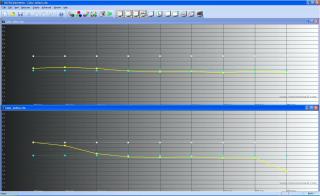
Anfield, I'm using Xrite i1 with ColorHCFR on my projector. While doing greyscale calibration, I found out the Red too high in the original setting. I have to adjust the Red and Blue (RGB Gain/Offset) to get the 6500K target. The RGB post calibration looks OK but the Gamma is about 1.9 instead target 2.2. Is there anything missing here?


|
|
|
Mar 28 2010, 04:16 PM
Return to original view | Post
#3
|
|
Junior Member
397 posts Joined: Mar 2008
|
Thanks for grand sifu help.
Original setting: display mode = cinema degamma = film New setting; display mode = cinema degamma = video Is that always tunes with R/B instead of G (RGB gains/offset) in greyscale calibration? In my case, I cutdown R gain a lots (-22). Not sure it will cause the color composition to off red? I'm not able to do Color calibration due to HD-65 limitation of CMS. |
|
|
Mar 28 2010, 04:42 PM
Return to original view | Post
#4
|
|
Junior Member
397 posts Joined: Mar 2008
|
The lamp is about 200hrs (STD mode). Yes, I'm using i1 Display LT, the affordable version
 Display mode = Cinema/Bright/Photo/TV/User. Degamma = Film/Video/Graphic/PC. I tried Film before but giving unstable D65 across IRE. Will try PC mode as you suggest. BTW, I set ZERO both Brilliant Color & True Vivid setting. Image AI = Off and Color Temp = Medium. This post has been edited by gocitygo: Mar 28 2010, 04:46 PM |
|
|
Mar 28 2010, 05:26 PM
Return to original view | Post
#5
|
|
Junior Member
397 posts Joined: Mar 2008
|
Would give that a try. Thanks.
 Anyone else doing own calibration? It is a good platform to exchange idea  |
|
|
May 2 2010, 09:45 AM
Return to original view | Post
#6
|
|
Junior Member
397 posts Joined: Mar 2008
|
-edit-
This post has been edited by gocitygo: May 2 2010, 09:47 AM |
|
|
|
|
|
May 2 2010, 10:20 AM
Return to original view | Post
#7
|
|
Junior Member
397 posts Joined: Mar 2008
|
Anfield & Gang, my first calibration on 508XG. Any suggesting for further improvement is most welcome.
At first, I was surprise to see the Gamma curve  , too good to be true on the original setting. Until I realized the RGB and Color Temp were quite off. , too good to be true on the original setting. Until I realized the RGB and Color Temp were quite off. The whole calibration process took so long (~3 hrs) for newbie like me. At one hand look for how-to procedures and on other the hand try to familiarize the software. But the whole learning process is fun and rewarding. Better do it at late night so that no one is ka-ka-chau-chau. I really recommend AV enthusiasts to try on this, either DIY or pay professional calibrators to do it. Imaging the significant improvement you can get from the existing hardwares just with a small price to invest versus your HT investment cost. Now, I'm realize for almost 30yrs, I am looking at something off the standard  On the CIE curves, I found the R & G points slightly off from target. Already tried on the CMS setting and still cannot get the (x,y) on the dot. Any suggestion? 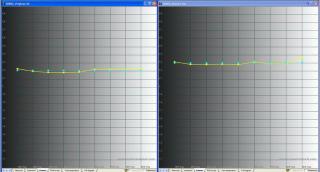
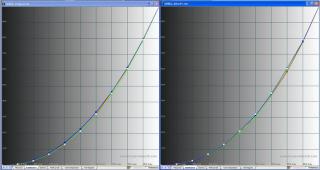


Note: a) Meter: Xrite i1 display LT. b) Software: Color HCFR, Color space standard: HDTV-REC 709 c) Test disc: AVS HD 709 d) Left graph with original settings and right graph with new settings. This post has been edited by gocitygo: May 2 2010, 11:47 AM |
|
|
May 2 2010, 11:39 AM
Return to original view | Post
#8
|
|
Junior Member
397 posts Joined: Mar 2008
|
QUOTE(anfieldude @ May 2 2010, 11:16 AM) gocitygo, Wow, you are keng chau. Yes, the original with Color Space 1 and the new with Color Space 2. I found out the Color Space 1 too much Red and need to cut a lots during Grayscale calibration.Pls post the .chc file so I can take a look a the data. I suppose u calibrated in Colour Space 2 and the 1st graph is with Colour Space 1. For the Pio's I would not touch the CMS more than +/- 2 clicks as it effects greyscale quite badly. I suspect there is some clipping but let me take a look a the chc file bfore I comment.  If don't adjust the CMS too much, how to get the (x,y) for the Primary & Secondary colors? Attached is the chc files. Thanks This post has been edited by gocitygo: May 2 2010, 11:56 AM Attached File(s)  508XG.zip ( 5.25k )
Number of downloads: 58
508XG.zip ( 5.25k )
Number of downloads: 58 |
|
|
May 2 2010, 04:34 PM
Return to original view | Post
#9
|
|
Junior Member
397 posts Joined: Mar 2008
|
Bro Anfield, thanks for the sharing.
|
|
|
Jun 7 2010, 07:54 PM
Return to original view | Post
#10
|
|
Junior Member
397 posts Joined: Mar 2008
|
QUOTE(darenlks @ Jun 7 2010, 01:04 PM) Anfieldude, Welcome to the club Uploaded the printscreens on my calibration result for my ZV. Click spoiler to view. Pls let me know any improvement needed based on the result » Click to show Spoiler - click again to hide... « Edit : Added Color Data images and uploaded .chc files [attachmentid=1614566] Actually I've started my calibration using Moive mode (This mode has the lowest brightness pre-set amongst all other modes available in this tv) but the end result is the picture is quite dark and can't bear with it after few hours watching, so I've done another round of calibration using Standard mode instead and found it much better to suit my room environment  . Great to see more kaki into DIY Cal. . Great to see more kaki into DIY Cal.Be ready to poison by master Anfield.... he he What meter you are using? This post has been edited by gocitygo: Jun 7 2010, 09:42 PM |
| Change to: |  0.0226sec 0.0226sec
 0.36 0.36
 7 queries 7 queries
 GZIP Disabled GZIP Disabled
Time is now: 2nd December 2025 - 02:20 AM |
 Quote
Quote


