Welcome Guest ( Log In | Register )

Bump Topic Topic Closed RSS Feed
10 Pages « < 3 4 5 6 7 > » Bottom

Outline · [ Standard ] · Linear+

 Alienware Mothership v3, the official alien armies thread

views
     
stringfellow
post Mar 1 2010, 08:59 PM

Ultrawide | 4K | VR
********
Senior Member
11,305 posts

Joined: Jan 2003
The Setup

user posted image

The Games

user posted image

The Specs

QUOTE
Alienware M11x
Cosmic Black Base, Genuine Windows® 7 Home Premium 64bit (English)

Processor
Intel® Core™2 Duo Processor SU7300 (1.3GHz/800MHz FSB/3M Cache)*Overclocked to 1.6Ghz

Memory
4GB Dual-channel 1066MHz DDR3 SDRAM (2 x 2G)

Video Card
1GB GDDR3 NVIDIA® GeForce® GT 335M

Hard Drive
500GB 7200RPM P11 Hard Drive


Bioshock 2
Setting: 1366 x 768, All Graphics Options ON, Quality HIGH.

» Click to show Spoiler - click again to hide... «


Framerates fluctuates between 30fps on texture-heavy scenes to a silky smooth 60fps on the other end of the spectrum. rclxms.gif

Modern Warfare 2 NEXT!
stringfellow
post Mar 1 2010, 09:27 PM

Ultrawide | 4K | VR
********
Senior Member
11,305 posts

Joined: Jan 2003
The Specs

QUOTE
Alienware M11x
Cosmic Black Base, Genuine Windows® 7 Home Premium 64bit (English)

Processor
Intel® Core™2 Duo Processor SU7300 (1.3GHz/800MHz FSB/3M Cache)*Overclocked to 1.6Ghz

Memory
4GB Dual-channel 1066MHz DDR3 SDRAM (2 x 2G)

Video Card
1GB GDDR3 NVIDIA® GeForce® GT 335M

Hard Drive
500GB 7200RPM P11 Hard Drive


Call of Duty: Modern Warfare 2

Settings: 1366 x 768, Anti-aliasing & V-sync OFF, Everything else ON, Texture Quality and Aspect Ratio AUTO.

» Click to show Spoiler - click again to hide... «


Framerate varies between mid 20s (25fps on enemy- and particle-heavy scenes) to 52fps. Averages out to 35fps throughout the game. Perfectly playable. rclxms.gif

This post has been edited by stringfellow: Mar 1 2010, 09:31 PM
stringfellow
post Mar 1 2010, 09:53 PM

Ultrawide | 4K | VR
********
Senior Member
11,305 posts

Joined: Jan 2003
The Specs

QUOTE
Alienware M11x
Cosmic Black Base, Genuine Windows® 7 Home Premium 64bit (English)

Processor
Intel® Core™2 Duo Processor SU7300 (1.3GHz/800MHz FSB/3M Cache)*Overclocked to 1.6Ghz

Memory
4GB Dual-channel 1066MHz DDR3 SDRAM (2 x 2G)

Video Card
1GB GDDR3 NVIDIA® GeForce® GT 335M

Hard Drive
500GB 7200RPM P11 Hard Drive


Mass Effect

Setting: 1366 x 768, All Graphics Options (HDR Bloom, Light Environment and Dynamic Shadows) ON.

» Click to show Spoiler - click again to hide... «


Never drops below 30fps, more forgiving on the cutscenes/text/decision scenes, to around 38-39fps on gameplays that requires moving around. PERFECT! rclxms.gif

NEXT will be Street Fighter IV, NFS:Shift and GRID. To be continued!
stringfellow
post Mar 2 2010, 04:59 AM

Ultrawide | 4K | VR
********
Senior Member
11,305 posts

Joined: Jan 2003
The Specs

QUOTE
Alienware M11x
Cosmic Black Base, Genuine Windows® 7 Home Premium 64bit (English)

Processor
Intel® Core™2 Duo Processor SU7300 (1.3GHz/800MHz FSB/3M Cache)*Overclocked to 1.6Ghz

Memory
4GB Dual-channel 1066MHz DDR3 SDRAM (2 x 2G)

Video Card
1GB GDDR3 NVIDIA® GeForce® GT 335M

Hard Drive
500GB 7200RPM P11 Hard Drive


Street Fighter IV

Settings: AA 2X, 1366 x 768, Display Refresh Rate 60fps, V-sync ON, Framerates FIXED, Parallel Rendering ON, Texture Quality Default, the rest of the graphic options HIGH.

» Click to show Spoiler - click again to hide... «


Ran the built-in benchmark app, framerate fluctuates between high 40s, and steady 55s. Probably because of the FIXED framerate setting is on, but I'd rather have that than yo-yoing FPSes. Variable FPS probably increases the graphical quality, but at this screen size, the effect would have been negligible. Another PERFECT game to showcase your M11X! rclxms.gif

NEXT is NFS:Shift!


This post has been edited by stringfellow: Mar 2 2010, 05:47 AM
stringfellow
post Mar 2 2010, 05:48 AM

Ultrawide | 4K | VR
********
Senior Member
11,305 posts

Joined: Jan 2003
The Specs

QUOTE
Alienware M11x
Cosmic Black Base, Genuine Windows® 7 Home Premium 64bit (English)

Processor
Intel® Core™2 Duo Processor SU7300 (1.3GHz/800MHz FSB/3M Cache)*Overclocked to 1.6Ghz

Memory
4GB Dual-channel 1066MHz DDR3 SDRAM (2 x 2G)

Video Card
1GB GDDR3 NVIDIA® GeForce® GT 335M

Hard Drive
500GB 7200RPM P11 Hard Drive


Need For Speed: Shift

Settings: Resolution 29( 1366 x 768, 2X AA, Refresh rate 60Hz, Bilinear Filtering, V-Sync ON, the rest of the graphical settings on HIGH).

» Click to show Spoiler - click again to hide... «


This one's a toughie! I had to do a trial-and-error on which settings it would run acceptably well. Just for kicks I had it running at Resolution 31, which is 1366 x 768, 8x AA, Trilinear Filtering, the rest HIGH), and watched in horror as the game drops down to 15fps! Stutter and lags but still playable, albeit with obvious loss in fluidity. Dropped down the setting to Resolution 29, and the fps climbed back to high 20s/low 30s. The killer would be the behind-the-car view, cockpit view is running at more than acceptable 38fps, while the rest are in between.

Moving on to GRID next!

This post has been edited by stringfellow: Mar 2 2010, 05:48 AM
stringfellow
post Mar 2 2010, 06:06 AM

Ultrawide | 4K | VR
********
Senior Member
11,305 posts

Joined: Jan 2003
The Specs

QUOTE
Alienware M11x
Cosmic Black Base, Genuine Windows® 7 Home Premium 64bit (English)

Processor
Intel® Core™2 Duo Processor SU7300 (1.3GHz/800MHz FSB/3M Cache)*Overclocked to 1.6Ghz

Memory
4GB Dual-channel 1066MHz DDR3 SDRAM (2 x 2G)

Video Card
1GB GDDR3 NVIDIA® GeForce® GT 335M

Hard Drive
500GB 7200RPM P11 Hard Drive


GRID

Settings: 1366 x 768, 2X AA, V-sync OFF, Refresh rate 60Hz, Advanced Settings everything either ON or HIGH.

» Click to show Spoiler - click again to hide... «


Another hard one to get to. Finally got down to this config, with framerates between high 20s and mid 30s. Again, the killer POV is behind-the-car cam, cockpit view is more forgiving. At one time though, when cars were crumpled up in a tight corner, the framerate drops to 17fps! shocking.gif Very rare, so I left it at this config. If you want further smoothness, you can drop the options in the Advanced Settings to default.

NEXT is Crysis: Warhead and Crysis!

This post has been edited by stringfellow: Mar 2 2010, 06:06 AM
stringfellow
post Mar 2 2010, 06:51 AM

Ultrawide | 4K | VR
********
Senior Member
11,305 posts

Joined: Jan 2003
The Specs

QUOTE
Alienware M11x
Cosmic Black Base, Genuine Windows® 7 Home Premium 64bit (English)

Processor
Intel® Core™2 Duo Processor SU7300 (1.3GHz/800MHz FSB/3M Cache)*Overclocked to 1.6Ghz

Memory
4GB Dual-channel 1066MHz DDR3 SDRAM (2 x 2G)

Video Card
1GB GDDR3 NVIDIA® GeForce® GT 335M

Hard Drive
500GB 7200RPM P11 Hard Drive


Crysis: Warhead

Settings: 1366 x 768, V-sync OFF, Graphics Option set to "Mainstream".

» Click to show Spoiler - click again to hide... «


Settings: 1366 x 768, V-sync OFF, Graphics Option set to "Gamer".

» Click to show Spoiler - click again to hide... «


Run on both settings. There are instances where the "Gamer" setting is acceptable, but on fierce and heavy firefights, you can imagine the consequences. Drop to "Mainstream", the framerates are more acceptable, high 20s to low 30s. For kicks, ramped it up to "Enthusiast", and watched a nice "slideshow", with beautiful graphics. laugh.gif

Barely playable at "Gamer", somewhat playable at "Mainstream". Dropping it further to "Minimum" makes it look butt-ugly.

NEXT, the mother of all gaming stress-test, the original Crysis. sweat.gif
stringfellow
post Mar 2 2010, 07:40 AM

Ultrawide | 4K | VR
********
Senior Member
11,305 posts

Joined: Jan 2003
I left it running on 1.6Ghz, ever since I got the thing. Not going to go back to 1.3Ghz.


Added on March 2, 2010, 7:52 am

The Setup

user posted image

The Games

user posted image

The Specs

QUOTE
Alienware M11x
Cosmic Black Base, Genuine Windows® 7 Home Premium 64bit (English)

Processor
Intel® Core™2 Duo Processor SU7300 (1.3GHz/800MHz FSB/3M Cache)*Overclocked to 1.6Ghz

Memory
4GB Dual-channel 1066MHz DDR3 SDRAM (2 x 2G)

Video Card
1GB GDDR3 NVIDIA® GeForce® GT 335M

Hard Drive
500GB 7200RPM P11 Hard Drive


Crysis

Settings: 1366 x 768, V-Sync OFF, Graphics options set to "Medium"

» Click to show Spoiler - click again to hide... «


It had to be done. Running it on HIGH is beautiful no doubt, but slideshow-beautiful. There are times where the framerates runs at a steady 15fps, and running through the jungle feels somewhat fluid, but add on firefights and all, it becomes unbearable. Again, my target fps is mid- to high- 20s and low 30s, the "Medium" settings gives that. As expected, Crysis is killer. sad.gif

I'll add C&C later but based on what I'm getting, I'm very happy with the M11X. High image quality gaming is finally portable. rclxms.gif

This post has been edited by stringfellow: Mar 2 2010, 12:27 PM
stringfellow
post Mar 2 2010, 01:28 PM

Ultrawide | 4K | VR
********
Senior Member
11,305 posts

Joined: Jan 2003
Hooray! After browsing through the M11X Optimization thread at NBR, I've accomplished 3 things:-

1. Enabled multi-touch on the trackpad! Yup, the M11X trackpad is multi-touch capable, with features like pinch-zoom, rotate, 2-finger scrolling and coasting, and 3-finger gesture-based app launch!

2. Downloaded the EVGA Precision app, designed to streamline GPU overclocking, once I decide to dabble on it later. There is another piece of software that I would need to download later, called MemSet, that is designed to tinker with the RAM memory clock setting, but I'll try the Precision app first to overclock the GPU before I go any further with MemSet. An NBR user reported crossing the 7k mark in 3DMark06 by overclocking his GPU using Precision and changing the memory timing with MemSet!

3. Downloaded SmartDefrag and now in the process of DeepOptimizing my M11X to speed up program launches by defragging them to occupy the outer section of the HDD disc platter for faster access. With all the games installed, this will help greatly in further optimizing the speed of launch of the installed apps/games.

I could go one step further by retweaking the Startup items, using CCleaner, but I see only two items that may be required for fast launch/fetch so I'm leaving it as it is at the moment.
stringfellow
post Mar 2 2010, 08:28 PM

Ultrawide | 4K | VR
********
Senior Member
11,305 posts

Joined: Jan 2003
QUOTE(zerokid @ Mar 2 2010, 07:18 PM)
anyone want to buy WWAN card?
http://www.lelong.com.my/Auc/List/2010-03D...bs-3G-MODEM.htm

im thinking of buying this and slot to my m11x =D
*
If this works, I don't mind. I'm scared that the WWAN slot in the Malaysian M11X are dummy slots. Then there's the case of the application to access the hardware. I have Mobile Connect on my Viliv, so if that works then that would be great.

Don't know if this applies to all, or if it's just my Steam account, but I'm getting free Half-Life 2 and its myriad of addons as free downloads. Everybody else too?

This post has been edited by stringfellow: Mar 2 2010, 08:32 PM
stringfellow
post Mar 3 2010, 02:47 AM

Ultrawide | 4K | VR
********
Senior Member
11,305 posts

Joined: Jan 2003
QUOTE(zerokid @ Mar 2 2010, 10:37 PM)
i dont think they just put dummy slot in our m11x...because in uk they have option to add on the WWAN. they dont include us the wwan card because the frequency for the wwan card use in uk cannot be use in our telco provider. the dell 5530 wireless card have driver for windows 7 and for the application to connect to your 3g just create the dial up and use the port for the wireless broadband card  smile.gif
*
If you are pretty confident that the card would work, then I'm in. I'm not the sort that tinker on this, so I'd have to get you to do it for me then. tongue.gif

If you refer to the guys at NBR, you have to make sure that our M11X is the same case theirs in the UK, with the assembly of the 2 WWAN antennaes already present behind the LCD screen. Otherwise, all this is for nothing.


Added on March 3, 2010, 2:54 am@teikwing

Carry on. My other games are old ones, like the 3 C&Cs. I'll wait for March 16th for the C&C 4, but if anyone wants benchmarks based on the games I have (refer my previous bench posts, for the list of games I have), just post here. I'll do what I can.

To the person asking for BFBC2, I'm not into BFBC2 so I'm not going to do that. BFBC2 reminds me of a certain a$%^hole that I try not to remember. Sort of like a bad taste in the mouth.


This post has been edited by stringfellow: Mar 3 2010, 02:54 AM
stringfellow
post Mar 3 2010, 02:41 PM

Ultrawide | 4K | VR
********
Senior Member
11,305 posts

Joined: Jan 2003
Cant afford the luxury of the currently available SSDs in the market, since none of them are sized big enough to cover the current 500GB HDD in my M11X. The 512GB SSDs are nowhere to be found, otherwise I would have gotten one already. Am not going to a size smaller than that, since looking at my current usage, it's already taken 233GB of the 500GB HDD, and the games kept on coming!

Posting from Starbucks BTS. Dropping by LYP yielded no promising results in my quest for finding the elusive 512GB SSD. Sometimes when you have the cash but dont have the place to spend it on also susah......sigh..
stringfellow
post Mar 3 2010, 04:35 PM

Ultrawide | 4K | VR
********
Senior Member
11,305 posts

Joined: Jan 2003
Addendum to the SFIV benchmark, do not leave the setting to Fixed framerate, leave it to "Variable". At certain points in the game, some scenes will tax the card too much it could not cope up with the Fixed 60fps settings and will start to lag. Leaving it to "Variable" will ease it back down to lower framerate, but from what I noticed, it's never below 40fps.


stringfellow
post Mar 3 2010, 08:33 PM

Ultrawide | 4K | VR
********
Senior Member
11,305 posts

Joined: Jan 2003
Just bought Dragon Age Origins, installing tonight. I promise this will be the last game I'll buy .......until C&C4 comes out, that is.

Also saw BFBC2 already on the shelf for sale, too bad that game leaves a bad taste in my mouth from previous experience tied with a certain arsehole I knew. Plus, I'm a "jump in jump out" kinda person, so I don't have time to clan/group up to play this. *shrug*

Was at Starbucks BTS until 7pm, so today's portable gaming experiment is a huge success. Was playing SFIV and COD:MW2 offline and online as well, so portable gaming is definitely possible, without breaking your back carrying it around. tongue.gif


stringfellow
post Mar 4 2010, 12:32 PM

Ultrawide | 4K | VR
********
Senior Member
11,305 posts

Joined: Jan 2003
Checked with OCZ rep, they only have 3.5' 512GB SSD, can't fit into the M11X. There are other brands like A-DATA and Super Talent, but I don't think there are reps of those entities here. sad.gif
stringfellow
post Mar 4 2010, 09:23 PM

Ultrawide | 4K | VR
********
Senior Member
11,305 posts

Joined: Jan 2003
Not gonna repeat myself, my own report on what external optical drive, what gaming mouse, and what PC gaming headphones I've chosen after my own research, has been posted before. Either I'm being ignored or those asking about these are not keen on doing a proper search first.

Just bought Razer Kabuto for myself, to replace the aging Goliathus. Now with such compact looking gaming mat, Razer Orochi look enticing. Sigh, will the accessory spending ever gonna end? cry.gif

In short, these are my preferred accessories:-

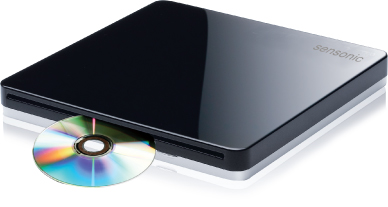
1. External drive: Was looking for an external USB powered Blu-ray drive, since the bundled together PowerDVD 8 is Blu-ray certified, and supported as well. Ended up, none of the retailers in KL ever stock that elusive Asus BD drive model, so I stuck with the Sensonic slot-loading DVD drive. USB powered, and slim because of the slot-loading design.

2. Gaming mat: Razer Goliathus, and now Razer Kabuto. If you choose to stick with a larger gaming mouse like Sidewinder or Mamba, you may wanna stick with the smaller Goliathus mat. There are 2 Goliathus variants. Or if you're thinking of travelling light and compact, Kabuto is excellent as well. The gaming surface of both the smaller Goliathus and Kabuto mat are of the smoother weave compared to the larger Goliathus. After intensive abuse, my old large Goliahus is already ripping away at the sides/seam.

3. Gaming mouse:- Razer Mamba is without peer here when it comes to performance. 5600dpi on wired. If you're willing to drop to a smaller size, get the Razer Orochi at 4000dpi. The best feature of the Mamba is the 1000Hz polling speed, which gives the ultimate in precision even at higher dpi settings. The only downside I see for the Mamba is the bulk of the mouse, but at least it is comfy with your entire palm resting on the mouse. Razer Orochi is smaller, but you'll have the back side of your palm unsupported. Both Orochi and Mamba supports Razer Synapses which allows storing of macro settings and preset configs INSIDE the mouse for bringing the mouse to other PCs without the need of configuration. Both the Orochi and Mamba have light-up scrollwheel which adds to the badd-assness of these mice, and pair it with the Alienware's own AlienFX, they look and match each other perfectly. The Mamba goes one step further, by adding its own trophy cradle to show off the Mamba when docked, and this cradle itself is lighted as well. Total bad-ass! :cool:

4. PC gaming headphones:- There are only 3 options here, in my own opinion. Psyko 5.1 headphones, Logitech G35 and the Sennheiser PC350. Out of the three, only the G35 is available locally, the Psyko is a custom order only from its own manufacturing website, while Sennheiser PC350 is not officially available via local distributors, only via parallel import. I have both the Logitech G35 and the Sennheiser PC350 bought in Adelaide. Between the two, if I really have to choose, and since this revolves around gaming on a gaming laptop, I'd have to go with the G35. Virtual surround sound up to 7.1, and it does work on supported games like COD:MW2. Unsupported games only get stereo remixes which may or may not be to your liking. In terms of audio fidelity, I like the Sennheiser PC350 more, but its potential will not be realized when plugged into the headphone jack alone, it needs to be amp-driven. the volume is tiny on the PC350 compared to the G35. Size-wise, the G35 is bulkier than the PC350.Both these headphones have movable mic arms that slides out of the way when not used, and comparing between the two, the transmission on the PC350 is much more clearer and crisp on the mic compared to the G35. Pricewise, the G35 is cheaperat RM385, compared to close to RM500 after conversion, for the PC350.Take your pick.

Pricetags of the accessories I have for the M11X:

Razer Kabuto = RM69, Razer Goliathus = RM69, Razer Mamba = RM459, Sennheiser PC350 = AUD169.99, Logitech G35 = RM355, Sensonic slot-loading external DVD-writer drive = RM188.

Tomorrow may be Orochi.
user posted image
Sensonic external USB-powered DVD writer

user posted image
Logitech G35

user posted image
Sennheiser PC350

user posted image
Razer Mamba

user posted image
Razer Orochi

user posted image
Razer Kabuto. Do not be fooled, I tried fitting this in as per the picture as a keyboard protector, the M11X does not have the clearance to keep the lid fully closed. The Kabuto however is thinner than the Goliathus.


Also, notice the theme? All black, baby! rclxms.gif

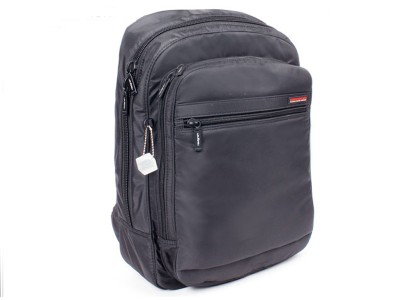
All of these, carried around in the form-fitting Hedgren bag, pictured below:-

user posted image


Looks unassuming, but with enough space to carry all of them. Like I said before, the bag has to be small to take advantage of the size of the M11X, carrying a bag designed for a 15inch laptop defeats this purpose. I also like the fact that is is unassuming, so that nobody knows that I'm carrying an Alienware inside. I'd rather not get mugged, thanks. With all of these inside, it does not overwhelms my back, and I carry it almost like how I did in high school, single side style. Not looking like I'm mountain-hiking up the Himalayas. laugh.gif

This post has been edited by stringfellow: Mar 4 2010, 11:38 PM

stringfellow
post Mar 4 2010, 09:50 PM

Ultrawide | 4K | VR
********
Senior Member
11,305 posts

Joined: Jan 2003
The Orion fits the M15X nicely, that's a good pairing. It'll be like a slim guy wearing an XXXL shirt if I use that with the M11X.

I'm eyeing those Roccats too, but the Razer works awesome on my current config.
stringfellow
post Mar 4 2010, 11:32 PM

Ultrawide | 4K | VR
********
Senior Member
11,305 posts

Joined: Jan 2003
QUOTE(0300078 @ Mar 4 2010, 09:54 PM)
damn bro String all ur stuff look so cool.

I am still deciding between Mamba and Orochi........ cant make up my mind. As for the Mat.... as long as it works well i dun care.
Then about Headphone i will straight go for the Sennheiser 595.... game or wat.... my main purpose will still be music.
As for optical drive...... as for now..... no idea. Maybe wont even bother getting one.
Bag.... still surveying, maybe gonna visit LYP this Sat or Sun.
But i am low on budget currently.... still considering using my money for the Driving Cockpit Obutto but GT5 not out yet..... even bought it now also will be putting aside onli.
*
Looking cool is a bonus, the most important thing is they work as advertised. The Sensonic drive works as advertised with its silent-drive mechanism. Slim enough to be considered as no extra bulk at all into the Hedgren. Between Mamba and Orochi, if lightning fast reflexes isn't one of your main concern, Orochi is plenty enough. I just like the fact that the Mamba cradle lights up as well. Keeps the lighting theme going on between them. I have my own music headphones, they are separate from my gaming and/or headphones for work. I'm big on noise-cancelling 'phones, so Bose QC3 and the Sennheiser PCX350 are my companion. Yes, people balk and scoff at Bose, but the QC3 works as advertised as well, and unplugged, I use it as a standalone noise-cancelling while sleeping onboard the aircraft, free from the engine drones. The PCX350 itself are aviation-certified, used by aircraft engineers for their walk-around in noisy terminal environment.

My point here is, different circumstances necessitates different equipments. Mamba/Orochi for gaming, and MX Air for the Freespace convenience in operating the Mac Mini/Apple TV/HT setup at home. Same goes for the headphones. The 595 is certainly no slouch aurally, but when you pair it as a gaming headphones, the best you'd get would still be a stereo audio. A damn good stereo representation no doubt, but games have moved beyond stereo into the realm of surround sound.
stringfellow
post Mar 4 2010, 11:40 PM

Ultrawide | 4K | VR
********
Senior Member
11,305 posts

Joined: Jan 2003
QUOTE(lawhsee @ Mar 4 2010, 10:50 PM)
Hi String,

Which shop in lowyat you bought the Sensonic slot-loading external DVD-writer drive?
Price is RM129?(Previous you posted is RM188?)
*
Pardon the mistake, I was thinking of another brand. Yes, it is RM188. The post before is now corrected. The RM129 is one of the no-name brand I see which have the drive packaged inside a brown cardboard box with no documentations and just the drive with USB cable.
stringfellow
post Mar 4 2010, 11:51 PM

Ultrawide | 4K | VR
********
Senior Member
11,305 posts

Joined: Jan 2003
QUOTE(giggsyy @ Mar 4 2010, 11:18 PM)
All the best in your exams Screemo..lol

Hmm...cos i was thinking isit better to get a good desktop i7-920, good graphic card, etc or get an alienware with i7-720QM, gtx260 graphics....cos the price would nearly be the same...i do play games, but only occasionally simply because my current lappie cant support todays games anymore..and its only been 3 years..lol. And a desktop with good specs would eventually be outdated in like 4-5 years? which is roughly the same time with an alienware...lol..I do like the idea of mobility gaming...although im thinking isit practical to carry the alienware all over...cos i know that thing is heavier than conventional laptops...i do go around with my lappie but not all the time. but the brand really makes me  drool.gif  laugh.gif but the price makes me  sweat.gif
*
The case in point here is, your own definition of what's portable. Heavyset folks have no qualms in lugging around larger laptops because they can afford to do so, strength-wise. Others may not wanna be burden by the encumbrance and/or weight. I had a 17inch Qosmio maxxed out at one time and I told myself that I can carry this around, because I want a powerful laptop with me wherever I go. Long story short, I ended up with sore shoulders, an increasingly painful back and the challenging situation of rearranging stuff around small tables in my favourite spots like Starbucks without looking like I'm setting up an office there! laugh.gif In the end, the Qosmio now already happy pass ownership to a nice South African friend of mine, who he himself is treating it like a desktop instead of anything portable (ie a laptop).

Which is why I draw the line to maximum of 15 inch for me to lug it around and for the laptop itself to be considered a "portable" unit. Anything more than that size, and the weight that comes with it, would probably have me revisit the same situation I had with the Qosmio before. And now, comparing the M11X and my old M15X, even though the M15X has more power under its hood, I'd rather game on the M11X because it is always with me all the time. A gaming laptop is only useful when it is being used, and for it to be used, it needs to be with you all the time. If a "laptop" is predestined to stay on a particular spot most, if not all the time, getting a desktop is more logical than a laptop.

My routine now, I carry my M11X everywhere I go. Because it is now "portable" enough, in terms of size and weight, to do so.

ADDENDUM: This would probably be the next mouse to get!

» Click to show Spoiler - click again to hide... «

10 Pages « < 3 4 5 6 7 > » Top
Topic ClosedOptions
 

Change to:
| Lo-Fi Version
0.0432sec    0.61    7 queries    GZIP Disabled
Time is now: 12th December 2025 - 06:29 AM