Welcome Guest ( Log In | Register )

Outline · [ Standard ] · Linear+

 Setup BB Bold 9000 as modem for tethering via BT, Worth with unlimited data package

views
     
TSauronthas
post Feb 5 2010, 02:47 AM, updated 15y ago

AudiOphiL3
******
Senior Member
1,346 posts

Joined: Sep 2007
A Word of Warning

While most wireless carriers offer you an “unlimited” data plan for the duration of your service contract, it is quite common for there to be small print that protects the carrier from excessive usage on your part. It is always a good idea to discuss any plans of this nature with your service to ensure that you are within their terms of service. You do not want to get a surprise when you receive your bill the following month. These words to the wise also apply to anyone who is not currently using a plan that allows for unlimited data transfer. If you do not have unlimited data plan, do not even think of using your BlackBerry as a modem.


I have followed step-by-step instruction on BB Bold setup as modem (shown in the spoiler below) and copied the BB Bold modem script, everything working fine and configure except the APN setting.

Update 6 Feb 2010:

Thanks for eb0nY & iv0ry's contribution on PC setup.

I have merged the step-by-step instruction and APN settings for both PC and Mac setting up for BB Bold 9000 as modem for tethering via Bluetooth (Also attached BB Bold modem script, only applicable for Mac users, as for Window PC, it will automatically installed the driver)

For Mac users
» Click to show Spoiler - click again to hide... «


For PC users:
» Click to show Spoiler - click again to hide... «


Thanks for reading

This post has been edited by auronthas: Jul 15 2010, 10:04 AM


Attached File(s)
Attached File  BlackBerry_Bold.zip ( 3.14k ) Number of downloads: 980

eb0nY & iv0ry
post Feb 5 2010, 05:16 AM

New Member
*
Junior Member
44 posts

Joined: Aug 2008


sorry bro..for MAC i can't teach u..PC i can la
TSauronthas
post Feb 5 2010, 06:15 AM

AudiOphiL3
******
Senior Member
1,346 posts

Joined: Sep 2007
QUOTE(eb0nY & iv0ry @ Feb 5 2010, 05:16 AM)
sorry bro..for MAC i can't teach u..PC i can la
*
Hi bro, if PC how? Window Vista
calmshot
post Feb 5 2010, 09:59 AM

My Name Is ...
*******
Senior Member
2,560 posts

Joined: Jan 2003
From: behind you


Download the latest desktop manager from RIM, it comes with tether function. just configure the APN setting to use Maxis-3G, then connect.

http://bit.ly/8jDW7u

This post has been edited by calmshot: Feb 5 2010, 10:02 AM
eb0nY & iv0ry
post Feb 5 2010, 03:32 PM

New Member
*
Junior Member
44 posts

Joined: Aug 2008


QUOTE(calmshot @ Feb 5 2010, 09:59 AM)
Download the latest desktop manager from RIM, it comes with tether function. just configure the APN setting to use Maxis-3G, then connect.

http://bit.ly/8jDW7u
*
TS wanna use BB as modem through BT la, anyone also know how to use USB. Wait ah TS, the instructions at work, few more hours then give you coz its quite complicated.
TSauronthas
post Feb 5 2010, 03:43 PM

AudiOphiL3
******
Senior Member
1,346 posts

Joined: Sep 2007
QUOTE(eb0nY & iv0ry @ Feb 5 2010, 03:32 PM)
TS wanna use BB as modem through BT la, anyone also know how to use USB. Wait ah TS, the instructions at work, few more hours then give you coz its quite complicated.
*
Thanks Calmshot

Thanks eb0nY & iv0ry (cute name), will wait for your step-by-step instruction then.


skydays
post Feb 5 2010, 04:00 PM

New Member
*
Junior Member
32 posts

Joined: Oct 2008


I've the latest version. But what's the apn configuration? It seems like I select maxis 3G then everything is disabled. Unless I make a new profile.
notausername
post Feb 5 2010, 04:46 PM

Getting Started
**
Junior Member
102 posts

Joined: Jan 2010
From: In front of my computer


can i tumpang here?

when BB tether,is it that other function be disabled???
eb0nY & iv0ry
post Feb 5 2010, 11:19 PM

New Member
*
Junior Member
44 posts

Joined: Aug 2008


Here you go, ready for wall of text. I assume you are quite familiar with using the Windows OS.
» Click to show Spoiler - click again to hide... «


@skydays: Everything should be pre-configured. Just try clicking Connect after selecting your profile.

@notausername: Nope, you can even make calls.

EDIT: edited step #7

This post has been edited by eb0nY & iv0ry: Feb 6 2010, 02:32 AM
skydays
post Feb 6 2010, 12:59 AM

New Member
*
Junior Member
32 posts

Joined: Oct 2008


@ Ebony : will i get charge for the data transfer ?? cuz when i clicked connect then the 3G signal do not have the BB logo dy.
eb0nY & iv0ry
post Feb 6 2010, 01:11 AM

New Member
*
Junior Member
44 posts

Joined: Aug 2008


QUOTE(skydays @ Feb 6 2010, 12:59 AM)
@ Ebony : will i get charge for the data transfer ?? cuz when i clicked connect then the 3G signal do not have the BB logo dy.
*
Yes you will be charged for it. It's as though you are using EDGE/3G on your PC, it still goes through your BB.

This post has been edited by eb0nY & iv0ry: Feb 6 2010, 01:13 AM
skydays
post Feb 6 2010, 01:22 AM

New Member
*
Junior Member
32 posts

Joined: Oct 2008


How come maxis staff told me tethering is included in the unlimited bis plan. Sigh

eb0nY & iv0ry
post Feb 6 2010, 01:34 AM

New Member
*
Junior Member
44 posts

Joined: Aug 2008


QUOTE(skydays @ Feb 6 2010, 01:22 AM)
How come maxis staff told me tethering is included in the unlimited bis plan. Sigh
*
Oh, my mistake then. If you have unlimited data plan then of course you won't get charged, I meant that it still counts toward your BB data usage for fixed data plan users.

This post has been edited by eb0nY & iv0ry: Feb 6 2010, 01:35 AM
TSauronthas
post Feb 6 2010, 01:49 AM

AudiOphiL3
******
Senior Member
1,346 posts

Joined: Sep 2007
QUOTE(eb0nY & iv0ry @ Feb 5 2010, 11:19 PM)
Here you go, ready for wall of text. I assume you are quite familiar with using the Windows OS.
» Click to show Spoiler - click again to hide... «


*
Thanks eb0nY & iv0ry for step-by-step instruction on setting up BB Bold modem, I will try it later. Hopefully I can get it right without much difficulty then I can tethering during CNY period via BB Bold smile.gif
eb0nY & iv0ry
post Feb 6 2010, 01:59 AM

New Member
*
Junior Member
44 posts

Joined: Aug 2008


QUOTE(auronthas @ Feb 6 2010, 01:49 AM)
Thanks eb0nY & iv0ry for step-by-step instruction on setting up BB Bold modem, I will try it later.  Hopefully I can get it right without much difficulty then I can tethering during CNY period via BB Bold smile.gif
*
You're welcome. Tell me how it goes, I tried it twice before and so far it worked both times.
skydays
post Feb 6 2010, 02:00 AM

New Member
*
Junior Member
32 posts

Joined: Oct 2008


QUOTE(eb0nY & iv0ry @ Feb 6 2010, 01:34 AM)
Oh, my mistake then. If you have unlimited data plan then of course you won't get charged, I meant that it still counts toward your BB data usage for fixed data plan users.
*
Meaning if do not have the BB logo beside the 3G signal is still under the unlimited plan?
cuz I read some article share by bloggers state tat need to create new connection instead of using the pre-configured apn settings.

eb0nY & iv0ry
post Feb 6 2010, 02:21 AM

New Member
*
Junior Member
44 posts

Joined: Aug 2008


QUOTE(skydays @ Feb 6 2010, 02:00 AM)
Meaning if do not have the BB logo beside the 3G signal is still under the unlimited plan?
cuz I read some article share by bloggers state tat need to create new connection instead of using the pre-configured apn settings.
*
As for the apn stuff, I can't clarify any further. You have to ask Maxis on that. Sounds ridiculous to me though. You can try creating another profile leaving all fields blank then try connecting to see if it gives the same result.
I'm not 100% sure what the BB logo means, my BB logo disappears too when I use IP Modem.

This post has been edited by eb0nY & iv0ry: Feb 6 2010, 02:43 AM
petepix
post Feb 6 2010, 09:54 AM

Casual
***
Junior Member
392 posts

Joined: Oct 2004
From: Puchong


u forgot to key in the APN la, APN = unet


Added on February 6, 2010, 9:57 ambtw u are better off using USB cable, coz can also charge the BB as well

This post has been edited by petepix: Feb 6 2010, 09:57 AM
TSauronthas
post Feb 6 2010, 09:59 AM

AudiOphiL3
******
Senior Member
1,346 posts

Joined: Sep 2007
Great, I have set up it successfully via BT. It's pretty straight forward following instruction. And attached the speedtest result. smile.gif

I did not key APN name, just leave user name and password blank, and type dial number *99#. I have tried connect / disconnet and reconnect. It works like charm. Not sure how USB setup, but I still connect USB cable to charge my BB at the same time using BT for tethering.

user posted image


Added on February 6, 2010, 10:31 am


With the PC BB bold setup brainstorming, I also have setup BB Bold for Mac OS X (iMAC) successfully, just follow the spoiler of the first thread.

However, the APN setting (Maxis) for Mac is different from PC (dunno why, just trial & error), i.e

Telephone number = unet
Account name = maxis
password = 123

Please make sure both your network setup and bluetooth setup having the same APN setting which I did not notice until I double-checked. Speedtest from BB Bold to iMac as follow:

user posted image

Hope it helps.

This post has been edited by auronthas: Feb 6 2010, 10:37 AM
eb0nY & iv0ry
post Feb 6 2010, 06:38 PM

New Member
*
Junior Member
44 posts

Joined: Aug 2008


nice to hear it worked for you TS. btw for step 7, it should be "net" or "unet" instead of "internet.com", i edited it in my post.

one advantage i can think of BT tethering over USB tethering is that you can tether while the device is charging in the cradle, because some users are not a fan of USB as there are some cases of the USB pin breaking.
TSauronthas
post Feb 6 2010, 07:14 PM

AudiOphiL3
******
Senior Member
1,346 posts

Joined: Sep 2007
QUOTE(eb0nY & iv0ry @ Feb 6 2010, 06:38 PM)
nice to hear it worked for you TS. btw for step 7, it should be "net" or "unet" instead of "internet.com", i edited it in my post.

one advantage i can think of BT tethering over USB tethering is that you can tether while the device is charging in the cradle, because some users are not a fan of USB as there are some cases of the USB pin breaking.
*
Actually, I did not do anything on step 7, just click ok, then there will be pop-up window ask for username, password (leave as blank), and type '*99#' on dial, and it's done.

Yeah, i agree on BT tethering over USB too.
sonyclie77
post Feb 10 2010, 01:23 PM

Stressed Personnel
Group Icon
Staff
10,928 posts

Joined: Jan 2003
From: United Kingdom


Thread pinned.

Keep up the good effort!

moreo
post Feb 11 2010, 09:52 PM

New Member
*
Junior Member
14 posts

Joined: Feb 2010
From: KL-PJ-KK


QUOTE(eb0nY & iv0ry @ Feb 6 2010, 02:21 AM)
As for the apn stuff, I can't clarify any further. You have to ask Maxis on that. Sounds ridiculous to me though. You can try creating another profile leaving all fields blank then try connecting to see if it gives the same result.
I'm not 100% sure what the BB logo means, my BB logo disappears too when I use IP Modem.
*
when BB logo disappear, mean you're on standard data connection not BIS..

(i think hmm.gif ) i can confirm that, coz im on DiGi, i was charged rm90+ for 1+ hour of usb internet tethering using ip modem via dm!!! cry.gif

not sure other service provider, since we know that DiGi doesnt support modem tethering at the moment!!

This post has been edited by moreo: Feb 11 2010, 10:57 PM
TSauronthas
post Feb 12 2010, 03:23 PM

AudiOphiL3
******
Senior Member
1,346 posts

Joined: Sep 2007
QUOTE(moreo @ Feb 11 2010, 09:52 PM)
when BB logo disappear, mean you're on standard data connection not BIS..

(i think  hmm.gif ) i can confirm that, coz im on DiGi, i was charged rm90+ for 1+ hour of usb internet tethering using ip modem via dm!!! cry.gif

not sure other service provider, since we know that DiGi doesnt support modem tethering at the moment!!
*
As far as Maxis is concerned, there is no extra charge or fair usage policy if you subscribe with unlimited data package. I have called twice Maxis CS to double confirmed.

As for other service providers, I have no clue, perhaps other forum members can share
calmshot
post Feb 12 2010, 03:47 PM

My Name Is ...
*******
Senior Member
2,560 posts

Joined: Jan 2003
From: behind you


QUOTE(moreo @ Feb 11 2010, 09:52 PM)
when BB logo disappear, mean you're on standard data connection not BIS..

(i think  hmm.gif ) i can confirm that, coz im on DiGi, i was charged rm90+ for 1+ hour of usb internet tethering using ip modem via dm!!! cry.gif

not sure other service provider, since we know that DiGi doesnt support modem tethering at the moment!!
*
yup, DIGI tethering is PAYU (Pay As You Use), eventhou you subscribe with unlimited DIGI BIS plan. But for other telco it is ok to tether as long u subscribe with unlimited plan. I use maxis unlimited BIS plan, and tethering everyday, no extra charge at all.

and for the BB logo, if it dissapear, doesnt mean you're not connected to BIS. if you're not connect to BIS, the icon will change to lowercase character example, 3G will become 3g, EDGE will become edge.

This post has been edited by calmshot: Feb 12 2010, 03:49 PM
midnightsunray
post Feb 19 2010, 11:26 AM

Getting Started
**
Junior Member
87 posts

Joined: Apr 2007
From: PJ


I'm using an unlocked T-Mobile Bold 9000 and I tried tethering with a Macbook OS X with the settings but can't seem to work. For the APN Setting, I key in the APN profile I have on my Bold, which is internet.t-mobile

for the username and password, i just leave it blank?


TSauronthas
post Feb 19 2010, 11:45 AM

AudiOphiL3
******
Senior Member
1,346 posts

Joined: Sep 2007
QUOTE(midnightsunray @ Feb 19 2010, 11:26 AM)
I'm using an unlocked T-Mobile Bold 9000 and I tried tethering with a Macbook OS X with the settings but can't seem to work. For the APN Setting, I key in the APN profile I have on my Bold, which is internet.t-mobile

for the username and password, i just leave it blank?
*
What's your telco? If you are Maxis user, the APN setting for tethering with Mac OS X is as follow: -

Telephone Number :unet
Account Name/username :maxis
Password: 123


Attached thumbnail(s)
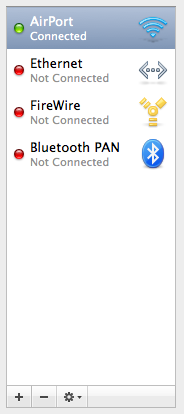
Attached Image
midnightsunray
post Feb 20 2010, 11:46 AM

Getting Started
**
Junior Member
87 posts

Joined: Apr 2007
From: PJ


I'm using Maxis but after I have followed all the instructions I still cannot connect. The error message is Could not negotiate a connection with the remote PPP server. Please verify your settings and try again.
TSauronthas
post Feb 20 2010, 12:45 PM

AudiOphiL3
******
Senior Member
1,346 posts

Joined: Sep 2007
QUOTE(midnightsunray @ Feb 20 2010, 11:46 AM)
I'm using Maxis but after I have followed all the instructions I still cannot connect. The error message is Could not negotiate a connection with the remote PPP server. Please verify your settings and try again.
*
Firstly, have installed BB Bold 9000 modem script? Have you paired/sync your phone with your Mac? Please make sure your BB Bold bluetooth should be set to discoverable (Options>Bluetooth>click BB logo key>Options)

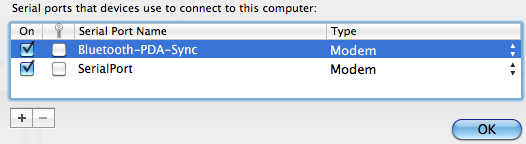
If your BB Bold is paired with your Mac, you should see the following icon on the top right bar.

If the above the above have been configured correctly, you should be able to connect to Maxis broadband network.

Update (1.10 pm)

I just tried my BB Bold / Mac connection, my first attempt also having the same error message. But the second attempt it works, sometimes it may be due to stability of maxis network or bluetooth network. Keep trying.

This post has been edited by auronthas: Feb 20 2010, 01:11 PM


Attached image(s)
Attached Image
tat_lee
post Mar 1 2010, 03:02 PM

Getting Started
**
Junior Member
61 posts

Joined: Dec 2005


QUOTE(calmshot @ Feb 12 2010, 03:47 PM)
and for the BB logo, if it dissapear, doesnt mean you're not connected to BIS. if you're not connect to BIS, the icon will change to lowercase character example, 3G will become 3g, EDGE will become edge.
*
I have this situation.

When I tethered, the BB logo disappear and 'Modem Mode Enable" will appear. And during that time, I think I've been disconnect from BIS. I'll try sending mail to myself from PC, the e-mail won't be push to me. I try to send e-mail from my tethered BB, that e-mail is just hanging, cannot send out. BBM also cannot use. But I still can receive&make call. Also, send/receive sms also OK.

When I stop the tethering connection, BB logo reappear, then all above problem is solve. I will instantly receive e-mail that I send, and outgoing e-mail finally can be send out. And my BBM start to receive msg again.

So, what's wrong with my setting for tethering?

p/s : I'm using Bold 9700 and USB cable for PC connection.


TSauronthas
post Mar 3 2010, 07:13 PM

AudiOphiL3
******
Senior Member
1,346 posts

Joined: Sep 2007
QUOTE(tat_lee @ Mar 1 2010, 03:02 PM)
I have this situation.

When I tethered, the BB logo disappear and 'Modem Mode Enable" will appear. And during that time, I think I've been disconnect from BIS. I'll try sending mail to myself from PC, the e-mail won't be push to me. I try to send e-mail from my tethered BB, that e-mail is just hanging, cannot send out. BBM also cannot use. But I still can receive&make call. Also, send/receive sms also OK.

When I stop the tethering connection, BB logo reappear, then all above problem is solve. I will instantly receive e-mail that I send, and outgoing e-mail finally can be send out. And my BBM start to receive msg again.

So, what's wrong with my setting for tethering?

p/s : I'm using Bold 9700 and USB cable for PC connection.
*
I don't think there is any wrong with your setup, I can't receive BBM and can't push email as well (BB 4 dot logo disappear), there is no BIS connected when I check manage connection. However, when I set to wifi while tethering I manage to push email but not BBM. Not sure if the push email is via my BB's APN (WAP) setting.

The purpose of tethering (use BB as modem) is during emergency when internet access or wifi is available, and it drains your BB battery very quick too if your BB not connected to PSU/USB.

I have checked few forum on the similar problem, most of them unable to push email/ BBM during tethering.

Here's the link.

http://forums.crackberry.com/showthread.php?t=405922
SUSedwardstevens
post Mar 10 2010, 07:27 PM

Casual
***
Junior Member
366 posts

Joined: Nov 2007
From: Sin City
QUOTE(auronthas @ Feb 19 2010, 11:45 AM)
What's your telco? If you are Maxis user, the APN setting for tethering with Mac OS X is as follow: -

Telephone Number :unet
Account Name/username :maxis
Password: 123
*
bro, i thought the password is: wap

?
TSauronthas
post Mar 10 2010, 09:34 PM

AudiOphiL3
******
Senior Member
1,346 posts

Joined: Sep 2007
QUOTE(edwardstevens @ Mar 10 2010, 07:27 PM)
bro, i thought the password is: wap

?
*
Hmm, I am not sure, my setup / password used is 123, no problem so far. Have you tried it? Or probably the password can leave it as blank ( like the tethering setup for PC in first thread)
SUSedwardstevens
post Mar 11 2010, 12:35 AM

Casual
***
Junior Member
366 posts

Joined: Nov 2007
From: Sin City
QUOTE(auronthas @ Mar 10 2010, 09:34 PM)
Hmm, I am not sure, my setup / password used is 123, no problem so far.  Have you tried it?  Or probably the password can leave it as blank ( like the tethering setup for PC in first thread)
*
i use 'wap' as password. but nevermind, as long as it works.

but anyways, i see maxis got multi sim, 1 line service.

1 sim for the bb, another sim for the usb 3g.

easier, no need to do pairing, etc.
darwyn
post Mar 20 2010, 12:43 PM

New Member
*
Junior Member
18 posts

Joined: Feb 2008


Hi all, my laptop is restricted to installa 3rd parry apps, meaning I can't installed the desktop manager for BB. However I want to tether via bold 9700 using that laptop. Anyone can help me?
I am using celcom unlimited plan

Thanks
yewjin
post Mar 27 2010, 11:52 AM

Casual
***
Junior Member
356 posts

Joined: Oct 2007


Can celcom xpax do tethering?
wailers88
post May 1 2010, 04:06 AM

New Member
*
Junior Member
29 posts

Joined: Oct 2006


i got a question, i'm a celcom user but when i set up in my mac, my account name is Maxis.. is that normal? or i'm fcuked since i'm online..
sclim4435
post Jun 2 2010, 07:01 PM

New Member
*
Junior Member
33 posts

Joined: Apr 2006
Is it confirmed that DIGI smart plan cant have free tethering?? I am using Bold 9700 with DIGI smart plan RM68.
gkweng
post Jun 3 2010, 12:01 AM

Getting Started
**
Junior Member
140 posts

Joined: Dec 2007
From: Somewhere I Belong


QUOTE(sclim4435 @ Jun 2 2010, 07:01 PM)
Is it confirmed that DIGI smart plan cant have free tethering?? I am using Bold 9700 with DIGI smart plan RM68.
*
Yeah! Free tethering for DiGi Smart plan.
KannaSai1
post Jun 6 2010, 12:04 PM

Look at all my stars!!
*******
Senior Member
6,933 posts

Joined: Jun 2010
From: Today, 00:00 AM
QUOTE(sclim4435 @ Jun 2 2010, 07:01 PM)
Is it confirmed that DIGI smart plan cant have free tethering?? I am using Bold 9700 with DIGI smart plan RM68.
*
Smart plan RM68 yes.
Smart berry RM58 no.


Added on June 25, 2010, 5:43 pm
QUOTE(yewjin @ Mar 27 2010, 11:52 AM)
Can celcom xpax do tethering?
*
sure. can do

This post has been edited by KannaSai1: Jun 25 2010, 05:43 PM
Astronaut
post Jun 26 2010, 01:20 PM

Getting Started
**
Junior Member
102 posts

Joined: Sep 2005
From: Boleh Land!
HI DUde, i can't get the com number at step 3

3. In the device Properties window, go to the services tab and take note of the COM number beside the Dial-up networking (DUN) field.


And also can't find
Create a new connection using the New Connection Wizard

can you pls advise? pls help cry.gif

This post has been edited by Astronaut: Jun 26 2010, 01:34 PM
TSauronthas
post Jul 1 2010, 09:44 PM

AudiOphiL3
******
Senior Member
1,346 posts

Joined: Sep 2007
QUOTE(Astronaut @ Jun 26 2010, 01:20 PM)
HI DUde, i can't get the com number at step 3

3. In the device Properties window, go to the services tab and take note of the COM number beside the Dial-up networking (DUN) field.


*
What Window OS are you using? If it's Vista, you should be able to see an bluetooth icon (if activate) on the taskbar. Right click and choose 'open bluetooth settings', you should be able to see a pop-up window as photo below, you should able to see com port in one of the tab:

user posted image


QUOTE
And also can't find
Create a new connection using the New Connection Wizard


Goto Control panel, click on 'network and sharing center', on the left column, you should able to see ' set up a connection or network', click it, you should be able to see another pop-up window ' Connect to a network' as the photo below,

user posted image

then choose 'connect to the internet', then follow the rest of steps as described in thread #1, it's straight forward and logic.

Hope it helps.

Auronthas

This post has been edited by auronthas: Jul 1 2010, 09:46 PM
Astronaut
post Jul 3 2010, 03:26 AM

Getting Started
**
Junior Member
102 posts

Joined: Sep 2005
From: Boleh Land!
Thank you, connection successful.


Added on July 3, 2010, 3:34 amfor celcom it was so slow since i hv been monitor for around 1 week and not stable at all, abit regret on sign up


Added on July 6, 2010, 1:59 pmRe phase: i think is easier to read and understand
Consider pairing is complete and done

1. Double-click the Bluetooth icon at taskbar select BB under the Devices then click Properties.

2. In the device Properties window, go to the services tab and take down the COM number beside the Dial-up networking (DUN) field.

3. Create a new connection using the New Connection Wizard.
Click on Start -> Connect To -> Next
-> Set up a connection or network
-> Connect using a dial-up modem
-> Select the Standard modem with the COM which is same as COM number in Blackberry under Bluetooth device list -> properties under service tab!

4. Unselect others field -> Next -> Give a random ISP name -> Next -> leave the phone number field blank -> Next -> leave all user name and password blank -> Finish

5. Enter *99# in the Dial field

6. Go to Control Panel -> Phone and Modem Options -> Modems, select the modem with the COM number obtained in step 2
then go to Properties -> Advanced. In the Extra initialization commands field, input the following string then click OK: +CGDCONT=1,"IP","net" (can either be "net" or "unet")

7. Connect *connection name* windows click Dial, leaving the user and password field blank.


This post has been edited by Astronaut: Jul 6 2010, 01:59 PM
timoed
post Jul 14 2010, 09:23 PM

New Member
*
Junior Member
43 posts

Joined: Jul 2010
im on a mac and i followed ur instructions they dont seem to work.and btw im on digi unless u got the exact apn infos for it.thanks
TSauronthas
post Jul 15 2010, 10:07 AM

AudiOphiL3
******
Senior Member
1,346 posts

Joined: Sep 2007
QUOTE(Astronaut @ Jul 3 2010, 03:26 AM)
» Click to show Spoiler - click again to hide... «
Updated on the first post, I have rephrased it.


This post has been edited by auronthas: Jul 15 2010, 10:16 AM
TSauronthas
post Jul 15 2010, 10:16 AM

AudiOphiL3
******
Senior Member
1,346 posts

Joined: Sep 2007
QUOTE(timoed @ Jul 14 2010, 09:23 PM)
im on a mac and i followed ur instructions they dont seem to work.and btw im on digi unless u got the exact apn infos for it.thanks
*
Please follow the step-by-step instruction, have installed the modem script for Mac? (Pls note the attached modem script is for BB Bold 9000, other BB model may not work, please google for the appropriate script)

As for Digi APN, please google or call your Digi Service Centre to find out.
MX510
post Aug 4 2010, 06:10 PM

Love Me Sin Hate Me Sinner
*******
Senior Member
4,038 posts

Joined: Aug 2005
From: Earth


Celcom RM 98 unlimited can download how much per month? Any Fair Usage Policy?
idq2k3
post Sep 11 2010, 12:38 AM

New Member
*
Junior Member
16 posts

Joined: Aug 2005
WOohoo! I successfully manage to get connected via Digi SmartPlan.
The trick is to change the "net" to "diginet" in Step 7.

Enjoy!
unique~
post Sep 13 2010, 10:29 AM

Getting Started
**
Junior Member
64 posts

Joined: Nov 2007


QUOTE(idq2k3 @ Sep 11 2010, 12:38 AM)
WOohoo! I successfully manage to get connected via Digi SmartPlan.
The trick is to change the "net" to "diginet" in Step 7.

Enjoy!
*
Hi idq2k3,

May I know which plan are you using from DIGI? I'm planning to get a data plan from telco to enable me to use my BB 9000 as modem. Digi does charge extra for tethering with PC rite?

This post has been edited by unique~: Sep 13 2010, 10:30 AM
TSauronthas
post Sep 14 2010, 07:43 AM

AudiOphiL3
******
Senior Member
1,346 posts

Joined: Sep 2007
QUOTE(idq2k3 @ Sep 11 2010, 12:38 AM)
WOohoo! I successfully manage to get connected via Digi SmartPlan.
The trick is to change the "net" to "diginet" in Step 7.

Enjoy!
*
Glad to hear that idq2k3 you did it smile.gif

Different ISPs (Maxis, Celcom, Digi, etc) have different username and password, please check with them or google smile.gif
imjowen
post Sep 20 2010, 10:21 AM

Getting Started
**
Junior Member
200 posts

Joined: Aug 2008


hie guys, how about tethering via usb? any step by step guide in lowyat? thx.
TSauronthas
post Sep 20 2010, 08:41 PM

AudiOphiL3
******
Senior Member
1,346 posts

Joined: Sep 2007
QUOTE(imjowen @ Sep 20 2010, 10:21 AM)
hie guys, how about tethering via usb? any step by step guide in lowyat? thx.
*
Install Blackberry Desktop Manager, then follow the link below, I believe it's straight forward.

http://mobilewirelessnews.com/2006/10/30/h...use-as-a-modem/
imjowen
post Sep 20 2010, 10:28 PM

Getting Started
**
Junior Member
200 posts

Joined: Aug 2008


QUOTE(auronthas @ Sep 20 2010, 08:41 PM)
Install Blackberry Desktop Manager, then follow the link below, I believe it's straight forward.

http://mobilewirelessnews.com/2006/10/30/h...use-as-a-modem/
*
thx bro! icon_rolleyes.gif
dicksonbell
post Sep 21 2010, 12:24 PM

This is life...
********
Senior Member
11,159 posts

Joined: Jul 2010
From: Kuala Lumpur


QUOTE(auronthas @ Sep 20 2010, 08:41 PM)
Install Blackberry Desktop Manager, then follow the link below, I believe it's straight forward.

http://mobilewirelessnews.com/2006/10/30/h...use-as-a-modem/
*
Thanks for sharing.. rclxms.gif
kinfei
post Sep 22 2010, 09:12 PM

ENDLESS RAIN
******
Senior Member
1,109 posts

Joined: Jan 2006


Hey guys I got an issue here..my gf's streamyx has gone down which I believe resulting from lighting strike,so I thought I might lend my gf my bb to tether awhile..so, I copy the desktop manager installer v.6 into my phone and attempted to install it after extract d folder.but however I managed to extraxt it,but unable to install it which comes out an error ..have you all know how to solve this problem??

Sigh spoiled my mood with the error sad.gif
TSauronthas
post Sep 22 2010, 09:55 PM

AudiOphiL3
******
Senior Member
1,346 posts

Joined: Sep 2007
QUOTE(kinfei @ Sep 22 2010, 09:12 PM)
.....Copy the desktop manager installer v.6 into my phone  and attempted to install it after extract d folder.....
*
Did I read it correctly? The BDM (Blackberry Desktop Manager) is supposed to copy into your PC or Mac, then use USB to sync and check and install your OS, apps, contact, calendar, etc.
dicksonbell
post Sep 24 2010, 09:39 AM

This is life...
********
Senior Member
11,159 posts

Joined: Jul 2010
From: Kuala Lumpur


QUOTE(kinfei @ Sep 22 2010, 09:12 PM)
Hey guys I got an issue here..my gf's streamyx has gone down which I believe resulting from lighting strike,so I thought I might lend my gf my bb to tether awhile..so, I copy the desktop manager installer v.6 into my phone  and attempted to install it after extract d folder.but however I managed to extraxt it,but unable to install it which comes out an error ..have you all know how to solve this problem??

Sigh spoiled my mood with the error sad.gif
*
Is there anyway you can download again your BlackBerry Desktop Manager again? I suspect something wrong with the "exe" files you downloaded..
T09
post Sep 25 2010, 12:13 AM

The Kopite
*******
Senior Member
2,194 posts

Joined: Apr 2010
From: Anfield


QUOTE(dicksonbell @ Sep 24 2010, 09:39 AM)
Is there anyway you can download again your BlackBerry Desktop Manager again? I suspect something wrong with the "exe" files you downloaded..
*
http://na.blackberry.com/eng/services/desktop/
TSauronthas
post Sep 25 2010, 07:03 AM

AudiOphiL3
******
Senior Member
1,346 posts

Joined: Sep 2007
Try to get back to the original topic nod.gif
dicksonbell
post Sep 25 2010, 05:35 PM

This is life...
********
Senior Member
11,159 posts

Joined: Jul 2010
From: Kuala Lumpur


QUOTE(auronthas @ Sep 25 2010, 07:03 AM)
Try to get back to the original topic  nod.gif
*
All is about BlackBerry.. Happy Birthday "auronthas"
TSauronthas
post Sep 25 2010, 09:23 PM

AudiOphiL3
******
Senior Member
1,346 posts

Joined: Sep 2007
QUOTE(dicksonbell @ Sep 25 2010, 05:35 PM)
All is about BlackBerry.. Happy Birthday "auronthas"
*
Thanks dicksonbell smile.gif

Of course we are talking about Blackberry here tongue.gif

What I meant was try to get back to the topic related to BB tethering in this thread.

Sorry if I did not make it clear in my previous post.


dicksonbell
post Sep 25 2010, 10:13 PM

This is life...
********
Senior Member
11,159 posts

Joined: Jul 2010
From: Kuala Lumpur


Ya what I mean is all of us are discussing about BlackBerry phones here.. smile.gif
rattan
post Oct 8 2010, 02:58 AM

Droid
Group Icon
Trade Dispute
3,379 posts

Joined: Apr 2006
From: KL


I notice youtube load way way faster with my DiGi tethered via 9650 on full 3g coverage.
dicksonbell
post Oct 8 2010, 10:07 AM

This is life...
********
Senior Member
11,159 posts

Joined: Jul 2010
From: Kuala Lumpur


Bcoz recently DiGi had updated it Service Book to enhance better and Postpaid/Prepaid users no longer need to put in an APN to watch..
enix2000
post Oct 9 2010, 10:21 AM

Enthusiast
*****
Senior Member
747 posts

Joined: Jul 2008
From: Selangor..


bro curve can?
dicksonbell
post Oct 9 2010, 10:22 AM

This is life...
********
Senior Member
11,159 posts

Joined: Jul 2010
From: Kuala Lumpur


Are you using DiGi network? If yes then in option un-tick the APN pull out battery and re-insert again..
enix2000
post Oct 9 2010, 10:23 AM

Enthusiast
*****
Senior Member
747 posts

Joined: Jul 2008
From: Selangor..


yes. you mean for tethering?

must be bluetooth enable pc for tethering for bb? usb cant?
dicksonbell
post Oct 9 2010, 10:29 AM

This is life...
********
Senior Member
11,159 posts

Joined: Jul 2010
From: Kuala Lumpur


Un-tick APN is Service Book update for DiGi user..

Tethering you need to use your phone via cable to connect to Desktop Manager for online.. Bluetooth also can..
TSauronthas
post Oct 9 2010, 11:25 AM

AudiOphiL3
******
Senior Member
1,346 posts

Joined: Sep 2007
QUOTE(dicksonbell @ Oct 9 2010, 10:29 AM)
Un-tick APN is Service Book update for DiGi user..

Tethering you need to use your phone via cable to connect to Desktop Manager for online.. Bluetooth also can..
*
If you are using bluetooth tethering, I would recommend your BB's USB connected to power supply unit instead of connected to notebook USB port, as I have experienced in network unstability (network keep dropping) in my opinion.


dicksonbell
post Oct 9 2010, 11:27 AM

This is life...
********
Senior Member
11,159 posts

Joined: Jul 2010
From: Kuala Lumpur


+2 Always cable are better than Bluetooth..
raikko5
post Oct 10 2010, 02:16 PM

Enthusiast
*****
Senior Member
792 posts

Joined: Oct 2009


how long... it's suitable period for tethering using BB? don't want to damage my BB... heheheehehe
T09
post Oct 10 2010, 02:40 PM

The Kopite
*******
Senior Member
2,194 posts

Joined: Apr 2010
From: Anfield


QUOTE(raikko5 @ Oct 10 2010, 02:16 PM)
how long... it's suitable period for tethering using BB? don't want to damage my BB... heheheehehe
*
i don tink it has a 'suitable period' for tethering, jz use it tether until u feel ur bb cannot tahan anymore lo.
raikko5
post Oct 10 2010, 02:43 PM

Enthusiast
*****
Senior Member
792 posts

Joined: Oct 2009


QUOTE(T09 @ Oct 10 2010, 02:40 PM)
i don tink it has a 'suitable period' for tethering, jz use it tether until u feel ur bb cannot tahan anymore lo.
*
ok.. so it's still good for using around 1 hour and above.. none stop.. great...
will subscribe for digi smart plan... hehhehehe rclxm9.gif
dicksonbell
post Oct 10 2010, 02:45 PM

This is life...
********
Senior Member
11,159 posts

Joined: Jul 2010
From: Kuala Lumpur


1-2 hour are normal..
raikko5
post Oct 10 2010, 03:44 PM

Enthusiast
*****
Senior Member
792 posts

Joined: Oct 2009


QUOTE(dicksonbell @ Oct 10 2010, 02:45 PM)
1-2 hour are normal..
*
ok.. tq for the info....
it's will save my budget....
i can cancel my celcom BB..
dicksonbell
post Oct 10 2010, 03:45 PM

This is life...
********
Senior Member
11,159 posts

Joined: Jul 2010
From: Kuala Lumpur


You are welcome.. DiGi Always a Smarter Choice..

Celcom really giving problem all the time
raikko5
post Oct 10 2010, 04:00 PM

Enthusiast
*****
Senior Member
792 posts

Joined: Oct 2009


QUOTE(dicksonbell @ Oct 10 2010, 03:45 PM)
You are welcome.. DiGi Always a Smarter Choice..

Celcom really giving problem all the time
*
hope not giving me bad coverage.... heheheheh...
dicksonbell
post Oct 10 2010, 06:36 PM

This is life...
********
Senior Member
11,159 posts

Joined: Jul 2010
From: Kuala Lumpur


Yellow Man always follow you.. smile.gif
raikko5
post Oct 10 2010, 07:34 PM

Enthusiast
*****
Senior Member
792 posts

Joined: Oct 2009


QUOTE(dicksonbell @ Oct 10 2010, 06:36 PM)
Yellow Man always follow you.. smile.gif
*
eeeeiii.... sometimes.. really likes their iklan... huhuhuhuhuh..
dicksonbell
post Oct 10 2010, 07:37 PM

This is life...
********
Senior Member
11,159 posts

Joined: Jul 2010
From: Kuala Lumpur


QUOTE(T09 @ Oct 10 2010, 02:40 PM)
i don tink it has a 'suitable period' for tethering, jz use it tether until u feel ur bb cannot tahan anymore lo.
*
Not advisable to use tether too long on phone via USB..
kapultek
post Oct 14 2010, 10:11 AM

Regular
******
Senior Member
1,376 posts

Joined: Oct 2008


why my bold 2 failed to pair with windows7
dicksonbell
post Oct 14 2010, 10:24 AM

This is life...
********
Senior Member
11,159 posts

Joined: Jul 2010
From: Kuala Lumpur


You are setting up your modem?
TSauronthas
post Oct 14 2010, 11:00 AM

AudiOphiL3
******
Senior Member
1,346 posts

Joined: Sep 2007
QUOTE(kapultek @ Oct 14 2010, 10:11 AM)
why my bold 2 failed to pair with windows7
*
Have you set your BB bluetooth enabled, discoverable = yes ?

Go to Option -> Bluetooth , press BB logo button, scroll to options, set Discoverable to yes, then only your PC can detect your BB.

Hope it helps.
dicksonbell
post Oct 14 2010, 11:05 AM

This is life...
********
Senior Member
11,159 posts

Joined: Jul 2010
From: Kuala Lumpur


Just wondering he is using Desktop Manager 5/6 and using Windows 7, 32Bit/64Bit??

BLUETOOTH Driver Fix Windows 7 64-bit and Blackberry DTM

Manually load the extra two PORTS by choosing from a list of drivers.

Find the 2 problem drivers-missing entries in your Bluetooth devices list, right click on the first one, choose UPDATE DRIVER SOFTWARE. Then choose Browse My Computer, then Lets Pick From a List of Device Drivers. Scroll down till you see PORTS, then choose Rim Virtual Serial Port v2 and click Apply.

You'll get a warning message from windows 7, ignore this choose OK or apply and load the driver. It will report the device is set up correctly.

REPEAT this process 1 more time for the 2nd problem child bluetooth device that is missing the driver.

Then pair up your Blackberry with your laptop. Don't forget to REMOVE your laptop or PC from the blackberry list of paired bluetooth devices and then pair it all over again now that you've fixed the drivers on the pc/laptop side of things in Windows 7 by adding those two ports that were missing (assuming you're upgrading to Windows 7 and having problems where you can't sync with Outlook and your Blackberry using BLUETOOTH.

This post has been edited by dicksonbell: Oct 14 2010, 11:06 AM
rattan
post Oct 25 2010, 02:46 AM

Droid
Group Icon
Trade Dispute
3,379 posts

Joined: Apr 2006
From: KL


QUOTE(dicksonbell @ Oct 14 2010, 11:05 AM)
Just wondering he is using Desktop Manager 5/6 and using Windows 7, 32Bit/64Bit??

BLUETOOTH Driver Fix Windows 7 64-bit and Blackberry DTM

Manually load the extra two PORTS by choosing from a list of drivers.

Find the 2 problem drivers-missing entries in your Bluetooth devices list, right click on the first one, choose UPDATE DRIVER SOFTWARE. Then choose Browse My Computer, then Lets Pick From a List of Device Drivers. Scroll down till you see PORTS, then choose Rim Virtual Serial Port v2 and click Apply.

You'll get a warning message from windows 7, ignore this choose OK or apply and load the driver. It will report the device is set up correctly.

REPEAT this process 1 more time for the 2nd problem child bluetooth device that is missing the driver.

Then pair up your Blackberry with your laptop. Don't forget to REMOVE your laptop or PC from the blackberry list of paired bluetooth devices and then pair it all over again now that you've fixed the drivers on the pc/laptop side of things in Windows 7 by adding those two ports that were missing (assuming you're upgrading to Windows 7 and having problems where you can't sync with Outlook and your Blackberry using BLUETOOTH.
*
I notice tethering with BT really sucks the juice out of the battery. Anyone?

dicksonbell
post Oct 25 2010, 06:19 AM

This is life...
********
Senior Member
11,159 posts

Joined: Jul 2010
From: Kuala Lumpur


When tether it will charged the battery at the same time..
ken8boy
post Oct 25 2010, 11:53 AM

Getting Started
**
Junior Member
150 posts

Joined: Aug 2010
ya unless u r tethering by using USD and not via Bluetooth
dicksonbell
post Oct 25 2010, 11:59 AM

This is life...
********
Senior Member
11,159 posts

Joined: Jul 2010
From: Kuala Lumpur


Bluetooth is not recommend for tethering as line not stable..
rattan
post Oct 25 2010, 12:23 PM

Droid
Group Icon
Trade Dispute
3,379 posts

Joined: Apr 2006
From: KL


QUOTE(dicksonbell @ Oct 25 2010, 11:59 AM)
Bluetooth is not recommend for tethering as line not stable..
*
Ya bluetooth connection is slow and unreliable. I prefer using USB to tether.
dicksonbell
post Oct 25 2010, 12:30 PM

This is life...
********
Senior Member
11,159 posts

Joined: Jul 2010
From: Kuala Lumpur


USB with Desktop Manager 6 is always the best choice for tethering..
TSauronthas
post Oct 25 2010, 01:20 PM

AudiOphiL3
******
Senior Member
1,346 posts

Joined: Sep 2007
QUOTE(dicksonbell @ Oct 25 2010, 12:30 PM)
USB with Desktop Manager 6 is always the best choice for tethering..
*
Yeah, I agree with USB with latest BDM over BT, I created this thread as the earlier version of BDM did not support tethering.

If you are using bluetooth tethering, I always charged my BB (using its charger not USB) while tethering, the connection speed quite stable, I always use it when I am back to hometown.

My connection speed download is around 1.2Mbps, upload is around 0.4Mbps.
rattan
post Oct 25 2010, 01:26 PM

Droid
Group Icon
Trade Dispute
3,379 posts

Joined: Apr 2006
From: KL


QUOTE(auronthas @ Oct 25 2010, 01:20 PM)
Yeah, I agree with USB with latest BDM over BT, I created this thread as the earlier version of BDM did not support tethering.

If you are using bluetooth tethering, I always charged my BB (using its charger not USB) while tethering, the connection speed quite stable, I always use it when I am back to hometown.

My connection speed download is around 1.2Mbps, upload is around 0.4Mbps.
*
Agree. I had no issues tethering with BDM 6. Plug n play. I avoid bluetooth tethering as it sucks my BB battery and also notebook battery.
dicksonbell
post Oct 25 2010, 03:39 PM

This is life...
********
Senior Member
11,159 posts

Joined: Jul 2010
From: Kuala Lumpur


QUOTE(auronthas @ Oct 25 2010, 01:20 PM)
Yeah, I agree with USB with latest BDM over BT, I created this thread as the earlier version of BDM did not support tethering.

If you are using bluetooth tethering, I always charged my BB (using its charger not USB) while tethering, the connection speed quite stable, I always use it when I am back to hometown.

My connection speed download is around 1.2Mbps, upload is around 0.4Mbps.
*
That the reason why I choose USB rather than Bluetooth..
rattan
post Oct 25 2010, 03:44 PM

Droid
Group Icon
Trade Dispute
3,379 posts

Joined: Apr 2006
From: KL


QUOTE(dicksonbell @ Oct 25 2010, 03:39 PM)
That the reason why I choose USB rather than Bluetooth..
*
USB is the best stable way to go.
TSauronthas
post Oct 25 2010, 03:58 PM

AudiOphiL3
******
Senior Member
1,346 posts

Joined: Sep 2007
QUOTE(dicksonbell @ Oct 25 2010, 03:39 PM)
That the reason why I choose USB rather than Bluetooth..
*
As I mentioned earlier, the earlier version of BDM (4.x.x) did not support USB tethering, it's lot of hard work need to do your config your PC/Mac setup, that's why I started this thread and asked for pinned.

Now, it's pretty easy with new BDM for PC on USB tethering, I hope BDM for Mac will come up with USB tethering soon.


dicksonbell
post Oct 25 2010, 04:01 PM

This is life...
********
Senior Member
11,159 posts

Joined: Jul 2010
From: Kuala Lumpur


The other day got a forumer ask about Mac tethering, i think I already answer in that topic, need to search for it again..
rattan
post Oct 25 2010, 04:04 PM

Droid
Group Icon
Trade Dispute
3,379 posts

Joined: Apr 2006
From: KL


QUOTE(dicksonbell @ Oct 25 2010, 04:01 PM)
The other day got a forumer ask about Mac tethering, i think I already answer in that topic, need to search for it again..
*
Ya it was answered already.
dicksonbell
post Oct 25 2010, 04:51 PM

This is life...
********
Senior Member
11,159 posts

Joined: Jul 2010
From: Kuala Lumpur


I will search for it.. Give me some time..
rattan
post Oct 25 2010, 05:38 PM

Droid
Group Icon
Trade Dispute
3,379 posts

Joined: Apr 2006
From: KL


QUOTE(dicksonbell @ Oct 25 2010, 04:51 PM)
I will search for it.. Give me some time..
*
Thanks.
dicksonbell
post Oct 25 2010, 06:41 PM

This is life...
********
Senior Member
11,159 posts

Joined: Jul 2010
From: Kuala Lumpur


You are welcome "rattan"
rattan
post Oct 25 2010, 07:24 PM

Droid
Group Icon
Trade Dispute
3,379 posts

Joined: Apr 2006
From: KL


If we can add the Mac guide here then already perfect. No reason not to own and BB.
TSauronthas
post Oct 25 2010, 07:46 PM

AudiOphiL3
******
Senior Member
1,346 posts

Joined: Sep 2007
QUOTE(rattan @ Oct 25 2010, 07:24 PM)
If we can add the Mac guide here then already perfect. No reason not to own and BB.
*
There is a Mac guide for bluetooth tethering from my first post. My latest BDM for Mac does not tethering feature.
rattan
post Oct 25 2010, 07:47 PM

Droid
Group Icon
Trade Dispute
3,379 posts

Joined: Apr 2006
From: KL


QUOTE(auronthas @ Oct 25 2010, 07:46 PM)
There is a Mac guide for bluetooth tethering from my first post. My latest BDM for Mac does not tethering feature.
*
U referring to BDM 6 ?
dicksonbell
post Oct 25 2010, 10:08 PM

This is life...
********
Senior Member
11,159 posts

Joined: Jul 2010
From: Kuala Lumpur


Mac Desktop Manager is different from Windows.. Its a bit complicated compare to what we used daily..
rattan
post Oct 26 2010, 12:56 AM

Droid
Group Icon
Trade Dispute
3,379 posts

Joined: Apr 2006
From: KL


QUOTE(dicksonbell @ Oct 25 2010, 10:08 PM)
Mac Desktop Manager is different from Windows.. Its a bit complicated compare to what we used daily..
*
I dont know why BB is not Mac friendly. Maybe RIM is not in very good terms with Apple.
dicksonbell
post Oct 26 2010, 01:49 AM

This is life...
********
Senior Member
11,159 posts

Joined: Jul 2010
From: Kuala Lumpur


As we all know Apple and RIM are competitors and Mac not only cant support BlackBerry properly it also cant support most Mobile Suite in Market including Symbian and latest Andriod..
rattan
post Oct 26 2010, 01:53 AM

Droid
Group Icon
Trade Dispute
3,379 posts

Joined: Apr 2006
From: KL


QUOTE(dicksonbell @ Oct 26 2010, 01:49 AM)
As we all know Apple and RIM are competitors and Mac not only cant support BlackBerry properly it also cant support most Mobile Suite in Market including Symbian and latest Andriod..
*
Looks like windows is way better then apple then.
dicksonbell
post Oct 26 2010, 02:16 AM

This is life...
********
Senior Member
11,159 posts

Joined: Jul 2010
From: Kuala Lumpur


Thats is for sure on certain issue..
TSauronthas
post Oct 26 2010, 07:41 AM

AudiOphiL3
******
Senior Member
1,346 posts

Joined: Sep 2007
QUOTE(rattan @ Oct 26 2010, 01:53 AM)
Looks like windows is way better then apple then.
*
[Out of Topic]

Not really, I love iPod Touch, as I can easily select my songs/playlists and sync, so as the iPod Touch apps.

However, the other day, I try to sync from my iTunes to Blackberry via BDM 5 (Mac), the playlist was not correctly transferred to my BB.

Furthermore, on BB apps, I can't select/deselect apps. (like iPod touch), once I deselect, it remove my app. entirely from BB. I have hundreds of apps in my iTunes/Mobile Application directory, it's so convenient to choose your app.

I do hope BDM can create a directory to save all the app. javascript file (Jad), then let the users choose their favorite apps.

Can BDM 6 do the same now? As far as I know, even BDM 5 can't do that yet.

I have limited phone memory 128 MB, most of them had been used for BB OS, BBM, BB affiliated software and left merely 19MB (having battery pull), not many apps I can install sad.gif

[Out of Topic]

This post has been edited by auronthas: Oct 26 2010, 07:41 AM
dicksonbell
post Oct 26 2010, 09:13 AM

This is life...
********
Senior Member
11,159 posts

Joined: Jul 2010
From: Kuala Lumpur


BDM5 and BDM6 almost the same, just different in interface..
TSauronthas
post Oct 26 2010, 09:48 AM

AudiOphiL3
******
Senior Member
1,346 posts

Joined: Sep 2007
QUOTE(dicksonbell @ Oct 26 2010, 09:13 AM)
BDM5 and BDM6  almost the same, just different in interface..
*
Can we freely select/deselect downloaded (OTA) app. like iPhone/iPod Touch yet?
dicksonbell
post Oct 26 2010, 11:25 AM

This is life...
********
Senior Member
11,159 posts

Joined: Jul 2010
From: Kuala Lumpur


No there are none ATM..
rattan
post Oct 26 2010, 01:05 PM

Droid
Group Icon
Trade Dispute
3,379 posts

Joined: Apr 2006
From: KL


QUOTE(auronthas @ Oct 26 2010, 09:48 AM)
Can we freely select/deselect downloaded (OTA) app. like iPhone/iPod Touch yet?
*
U can download from App World. For BlackBerry the only reliable source for app is from AppWorld. Yes u can download directly from yr BB via 3G/EDGE or via WiFi.
TSauronthas
post Oct 26 2010, 01:12 PM

AudiOphiL3
******
Senior Member
1,346 posts

Joined: Sep 2007
QUOTE(rattan @ Oct 26 2010, 01:05 PM)
U can download from App World. For BlackBerry the only reliable source for app is from AppWorld. Yes u can download directly from yr BB via 3G/EDGE or via WiFi.
*
Rattan, I knew that, if you are iPhone User, you should understand my question smile.gif
rattan
post Oct 26 2010, 01:18 PM

Droid
Group Icon
Trade Dispute
3,379 posts

Joined: Apr 2006
From: KL


QUOTE(auronthas @ Oct 26 2010, 01:12 PM)
Rattan, I knew that, if you are iPhone User, you should understand my question smile.gif
*
Yes I am an iPhone user myself. There is no way to dload apps like we do for the iphone.
TSauronthas
post Oct 26 2010, 01:32 PM

AudiOphiL3
******
Senior Member
1,346 posts

Joined: Sep 2007
QUOTE(rattan @ Oct 26 2010, 01:18 PM)
Yes I am an iPhone user myself. There is no way to dload apps like we do for the iphone.
*
It's not the download problem, rattan.

Here's my question.

In iPhone or iPod Touch, the downloaded apps are stored in your iTunes directory (iTunes/Mobile Application), you can pick your favorite apps and sync from your PC or MAC.

But not so in your BB, once your deselect the apps, it removes your app., you need to re-download the apps. It's frustrating especially with my limited phone memory. vmad.gif

dicksonbell
post Oct 26 2010, 01:36 PM

This is life...
********
Senior Member
11,159 posts

Joined: Jul 2010
From: Kuala Lumpur


That why I say can't
rattan
post Oct 26 2010, 01:47 PM

Droid
Group Icon
Trade Dispute
3,379 posts

Joined: Apr 2006
From: KL


Ya for BB its different, there is no such facility under BDM yet. Maybe in future they will improve.

This post has been edited by rattan: Oct 26 2010, 01:49 PM
TSauronthas
post Oct 26 2010, 02:18 PM

AudiOphiL3
******
Senior Member
1,346 posts

Joined: Sep 2007
QUOTE(dicksonbell @ Oct 26 2010, 01:36 PM)
That why I say can't
*
I knew you understand my question, that's why I did not quote you.

I was quoting Rattan's reply.

It's so easy and convenience to add/remove (without delete) apps, waiting for the great feature in BB BDM very soon.
dicksonbell
post Oct 26 2010, 02:30 PM

This is life...
********
Senior Member
11,159 posts

Joined: Jul 2010
From: Kuala Lumpur


Yes it will available soon in.. smile.gif
rattan
post Oct 26 2010, 03:51 PM

Droid
Group Icon
Trade Dispute
3,379 posts

Joined: Apr 2006
From: KL


QUOTE(auronthas @ Oct 26 2010, 02:18 PM)
I knew you understand my question, that's why I did not quote you.

I was quoting Rattan's reply.

It's so easy and convenience to add/remove (without delete) apps, waiting for the great feature in BB BDM very soon.
*
Ya, sorry i didnt get what u was referring to earlier. Then after u explain i understood. wink.gif
dicksonbell
post Oct 28 2010, 12:42 PM

This is life...
********
Senior Member
11,159 posts

Joined: Jul 2010
From: Kuala Lumpur


Just wonder why some Torch 9800 user sadi they can't tether via Desktop Manager v6??? Anyone here experience this?
TSauronthas
post Oct 28 2010, 01:20 PM

AudiOphiL3
******
Senior Member
1,346 posts

Joined: Sep 2007
QUOTE(dicksonbell @ Oct 28 2010, 12:42 PM)
Just wonder why some Torch 9800 user sadi they can't tether via Desktop Manager v6??? Anyone here experience this?
*
I downloaded latest BDM (BDM 6) into my PC, it works ok, there's mobile internet on the bottom left, from the tools, there is a pull down menu, select 'mobile internet ...', will lead you to another window, usually your service providers (eg. Maxis, Digi, Celcom network) should appear there, just leave every thing blank, click 'connect', and tethering starts....

Probably ask the Torch 9800 user to uninstall his/her BDM, reinstall from the official blackberry website (need to enter email address for registration)...


dicksonbell
post Oct 28 2010, 01:25 PM

This is life...
********
Senior Member
11,159 posts

Joined: Jul 2010
From: Kuala Lumpur


Yea I think it supposed to be this way, maybe the download the Desktop Manager from other website which causes all this problem... The best is always download Desktop Manager from BlackBerry website...
rattan
post Oct 29 2010, 10:50 PM

Droid
Group Icon
Trade Dispute
3,379 posts

Joined: Apr 2006
From: KL


QUOTE(dicksonbell @ Oct 28 2010, 12:42 PM)
Just wonder why some Torch 9800 user sadi they can't tether via Desktop Manager v6??? Anyone here experience this?
*
Could be due to the latest OS6 on the device or corrupted BDM6
dicksonbell
post Oct 30 2010, 12:09 AM

This is life...
********
Senior Member
11,159 posts

Joined: Jul 2010
From: Kuala Lumpur


Then your 9800 can tether on PC/Laptop via USB...
rattan
post Oct 30 2010, 03:28 AM

Droid
Group Icon
Trade Dispute
3,379 posts

Joined: Apr 2006
From: KL


Can
dicksonbell
post Oct 30 2010, 08:50 AM

This is life...
********
Senior Member
11,159 posts

Joined: Jul 2010
From: Kuala Lumpur


Then iI will inform my forumer about it. Thx
rattan
post Oct 30 2010, 11:34 AM

Droid
Group Icon
Trade Dispute
3,379 posts

Joined: Apr 2006
From: KL


QUOTE(dicksonbell @ Oct 30 2010, 08:50 AM)
Then iI will inform my forumer about it. Thx
*
Ok.
dicksonbell
post Oct 30 2010, 11:36 AM

This is life...
********
Senior Member
11,159 posts

Joined: Jul 2010
From: Kuala Lumpur


smile.gif
rattan
post Oct 31 2010, 02:21 PM

Droid
Group Icon
Trade Dispute
3,379 posts

Joined: Apr 2006
From: KL


I find the tethering speed with DiGi is quite good. Youtube loads quite fast. Very satisfying.
dicksonbell
post Oct 31 2010, 04:19 PM

This is life...
********
Senior Member
11,159 posts

Joined: Jul 2010
From: Kuala Lumpur


This only applied to DiGi Unlimited user not Prepaid user...
rattan
post Oct 31 2010, 04:45 PM

Droid
Group Icon
Trade Dispute
3,379 posts

Joined: Apr 2006
From: KL


QUOTE(dicksonbell @ Oct 31 2010, 04:19 PM)
This only applied to DiGi Unlimited user not Prepaid user...
*
Prepaid user different speed ?
dicksonbell
post Oct 31 2010, 04:56 PM

This is life...
********
Senior Member
11,159 posts

Joined: Jul 2010
From: Kuala Lumpur


Not different speed, Prepaid user will be charged if they over their tether allow limit... That's its good for Unlimited user...
rattan
post Oct 31 2010, 05:08 PM

Droid
Group Icon
Trade Dispute
3,379 posts

Joined: Apr 2006
From: KL


QUOTE(dicksonbell @ Oct 31 2010, 04:56 PM)
Not different speed, Prepaid user will be charged if they over their tether allow limit... That's its good for Unlimited user...
*
Tether limit is calculated on daily cycle rite if im not mistaken.
dicksonbell
post Oct 31 2010, 05:10 PM

This is life...
********
Senior Member
11,159 posts

Joined: Jul 2010
From: Kuala Lumpur


Yes it can for Postpaid user but not for Prepaid user, their available tethering are limited...
rattan
post Nov 1 2010, 04:20 AM

Droid
Group Icon
Trade Dispute
3,379 posts

Joined: Apr 2006
From: KL


QUOTE(dicksonbell @ Oct 31 2010, 05:10 PM)
Yes it can for Postpaid user but not for Prepaid user, their available tethering are limited...
*
what is DiGi prepaid tether limit?
dicksonbell
post Nov 1 2010, 08:55 AM

This is life...
********
Senior Member
11,159 posts

Joined: Jul 2010
From: Kuala Lumpur


DiGi tethering limit is 128kbps
rattan
post Nov 1 2010, 11:47 AM

Droid
Group Icon
Trade Dispute
3,379 posts

Joined: Apr 2006
From: KL


And the volume for prepaid user?
dicksonbell
post Nov 1 2010, 11:52 AM

This is life...
********
Senior Member
11,159 posts

Joined: Jul 2010
From: Kuala Lumpur


100MB...
rattan
post Nov 2 2010, 02:43 AM

Droid
Group Icon
Trade Dispute
3,379 posts

Joined: Apr 2006
From: KL


QUOTE(dicksonbell @ Nov 1 2010, 11:52 AM)
100MB...
*
Aww thats very little. Thanks for sharing bro.
dicksonbell
post Nov 2 2010, 06:20 AM

This is life...
********
Senior Member
11,159 posts

Joined: Jul 2010
From: Kuala Lumpur


You are welcome... smile.gif
Silverwolf
post Nov 18 2010, 05:40 PM

Getting Started
**
Junior Member
67 posts

Joined: Jun 2007
Hi wanna ask when paired and using BB in modem mode (shown on BB screen), we can't recieve incoming call?
ken8boy
post Nov 18 2010, 07:13 PM

Getting Started
**
Junior Member
150 posts

Joined: Aug 2010
i can receive call and sms....
dicksonbell
post Nov 18 2010, 09:26 PM

This is life...
********
Senior Member
11,159 posts

Joined: Jul 2010
From: Kuala Lumpur


QUOTE(Silverwolf @ Nov 18 2010, 05:40 PM)
Hi wanna ask when paired and using BB in modem mode (shown on BB screen), we can't recieve incoming call?
*
Yes you can, your tethering wont interrupt your incoming and outgoing calls...
TSauronthas
post Nov 19 2010, 10:09 PM

AudiOphiL3
******
Senior Member
1,346 posts

Joined: Sep 2007
QUOTE(dicksonbell @ Nov 18 2010, 09:26 PM)
Yes you can, your tethering wont interrupt your incoming and outgoing calls...
*
You won't get your data i.e. BBM, email and sms during tethering however. You will get back your BBM, sms, email after tethering.
dicksonbell
post Nov 20 2010, 12:20 PM

This is life...
********
Senior Member
11,159 posts

Joined: Jul 2010
From: Kuala Lumpur


But mine can? When I'm tethering I can received incoming calls & BBM...
TSauronthas
post Nov 20 2010, 02:57 PM

AudiOphiL3
******
Senior Member
1,346 posts

Joined: Sep 2007
QUOTE(dicksonbell @ Nov 20 2010, 12:20 PM)
But mine can? When I'm tethering I can received incoming calls & BBM...
*
I can receive voice but not data via bluetooth tethering

This post has been edited by auronthas: Nov 20 2010, 02:58 PM
dicksonbell
post Nov 20 2010, 03:15 PM

This is life...
********
Senior Member
11,159 posts

Joined: Jul 2010
From: Kuala Lumpur


IC, okay means cable connection, no problem on receving calls and BBM..
tednet
post Nov 22 2010, 02:04 PM

Waaalllaauuu
*****
Senior Member
952 posts

Joined: Mar 2009


i did the bt tethering and its works but so far never tired to get data or mail during my tethering session.

but its kind the speed is kind a slow is this normal? me on celcom and my pc bt is ver 2.0
dicksonbell
post Nov 22 2010, 02:15 PM

This is life...
********
Senior Member
11,159 posts

Joined: Jul 2010
From: Kuala Lumpur


Fast or slow is depends on BIS package you are using...
tednet
post Nov 22 2010, 06:50 PM

Waaalllaauuu
*****
Senior Member
952 posts

Joined: Mar 2009


ermm... later will check with celcom for my BIS package.
dicksonbell
post Nov 22 2010, 06:51 PM

This is life...
********
Senior Member
11,159 posts

Joined: Jul 2010
From: Kuala Lumpur


Do update us also...
tednet
post Nov 22 2010, 07:06 PM

Waaalllaauuu
*****
Senior Member
952 posts

Joined: Mar 2009


yeah, will do
dicksonbell
post Nov 22 2010, 07:28 PM

This is life...
********
Senior Member
11,159 posts

Joined: Jul 2010
From: Kuala Lumpur


+3 smile.gif
tednet
post Nov 22 2010, 11:33 PM

Waaalllaauuu
*****
Senior Member
952 posts

Joined: Mar 2009


just talked to the celcom careline.. they say my bis+data as follows

speed : 512kbps
fair usage : 5gbps
plan: unlimited

so basicaly if i use more than 5gb it will throttle down to gprs speed. is this plan ok or not? unsure.gif unsure.gif
dicksonbell
post Nov 22 2010, 11:52 PM

This is life...
********
Senior Member
11,159 posts

Joined: Jul 2010
From: Kuala Lumpur


You sure is 512kbps?? This is very good offer...

BTW we are in the wrong topic also... Better discuss in Celcom thread...
tednet
post Nov 23 2010, 12:11 PM

Waaalllaauuu
*****
Senior Member
952 posts

Joined: Mar 2009


huhu sory... hope mod wont give me vacation for this icon_rolleyes.gif icon_rolleyes.gif icon_rolleyes.gif
dicksonbell
post Nov 23 2010, 12:30 PM

This is life...
********
Senior Member
11,159 posts

Joined: Jul 2010
From: Kuala Lumpur


Don't worry it won't... Back to topic then we are safe...
uSry^_^
post Dec 1 2010, 04:09 AM

Getting Started
**
Junior Member
133 posts

Joined: Feb 2010
From: Selangor
1st time trying this.. DG BIS quite fast
dicksonbell
post Dec 1 2010, 08:39 AM

This is life...
********
Senior Member
11,159 posts

Joined: Jul 2010
From: Kuala Lumpur


DiGi are always fast if you are in the right position and area using it...
xtremez
post Dec 23 2010, 06:49 PM

On my way
****
Senior Member
576 posts

Joined: Jan 2009
So would this contribute to the usage of our BIS bundle? Or would this be cost a separate charge?
dicksonbell
post Dec 23 2010, 07:19 PM

This is life...
********
Senior Member
11,159 posts

Joined: Jul 2010
From: Kuala Lumpur


It is bundle... smile.gif
xtremez
post Dec 27 2010, 11:56 PM

On my way
****
Senior Member
576 posts

Joined: Jan 2009
Maybe that's for Digi i wonder maxis whether it's the same or not....
dicksonbell
post Dec 28 2010, 10:46 PM

This is life...
********
Senior Member
11,159 posts

Joined: Jul 2010
From: Kuala Lumpur


By logically it should be...
Biscuit
post Feb 14 2011, 07:24 PM

Getting Started
**
Junior Member
177 posts

Joined: Jun 2005


What could be the differentiation matter in terms of hardware when it comes to Tethering speed?
I am constantly downloading at 120kbps using my laptop but on my Desktop PC, it will never go above 70. It looked as if there's a cap on the PC. I am wondering could it be some hardware limitations on the controllers?
On the Desktop PC, it will not even fluctuate above 70kbps whereas on my Laptop, the readings are obvious that it will definitely go above 70kbps. I have tested it with BB Desktop Manager 5 and 6. Results are the same with PC not going above 70kbps whereas laptop exceeds it. This observing is based on a span of few months and countless of disconnection and reconnecting to secure a better IP/Speed.
dicksonbell
post Feb 15 2011, 03:14 PM

This is life...
********
Senior Member
11,159 posts

Joined: Jul 2010
From: Kuala Lumpur


Nothing much different.. Its just term of speed only... It is normal sometime I got speed like yours just depends on are you are using it...
johnny82
post Feb 22 2011, 09:30 PM

Enthusiast
*****
Senior Member
831 posts

Joined: Jul 2005


hey has anybody wrote on how to pair make a bb modem tethered for apple device? hope somebody can refer me to the latest version ><
dicksonbell
post Feb 22 2011, 09:43 PM

This is life...
********
Senior Member
11,159 posts

Joined: Jul 2010
From: Kuala Lumpur


1. Download the modem scripts for your Blackberry phone and drop the scripts in this folder: Macintosh HD:Library:Modem Scripts.

http://www.fibble.org/archives/2007/10/updated-modem-s.html If you have links to modem scripts for other Blackberries, please post about it in the comments.

2. Pair your phone with your Mac through Bluetooth.

3. Select your phone and click on the gear in the Bluetooth Preferences. Choose "Edit Serial Ports".

4. Add a serial port. Change the Protocol to "Modem" and the Service to "Dialup Networking". Check the box next to "Show in Network Preferences".

5. Go to "Network Preferences" and select the serial port that you just created. It is called "BlackBerry9700-BlackBer-1" or any name.

6. In "Telephone Number", enter the APN of your service provider (Celcom/Maxis/DiGi), the User Name in the Account Name field (diginet for DiGi) and the password (diginet for DiGi). You can Google that information for your service provider.

7. In Advanced, select the Vendor "Research in Motion" and the Model that matches your phone.

8. That's it! Click Connect and it should log on. You really should get additional info from service provider. Not all wireless service provider included tethering and you don't want to end up with a huge bill.
johnny82
post Feb 23 2011, 08:44 AM

Enthusiast
*****
Senior Member
831 posts

Joined: Jul 2005


umm thanks..
but im kinda looking on how to pair it with ipod touch
does the same steps apply? i think im suppose to download some program for the bb rite?
dicksonbell
post Feb 23 2011, 08:54 AM

This is life...
********
Senior Member
11,159 posts

Joined: Jul 2010
From: Kuala Lumpur


Try first, I cant explained much as I dont have apple device to test...
SUSOptiplex330
post Apr 11 2011, 10:25 PM

10k Club
********
Senior Member
12,696 posts

Joined: Aug 2008
QUOTE(auronthas @ Feb 5 2010, 02:47 AM)
A Word of Warning

While most wireless carriers offer you an “unlimited” data plan for the duration of your service contract, it is quite common for there to be small print that protects the carrier from excessive usage on your part. It is always a good idea to discuss any plans of this nature with your service to ensure that you are within their terms of service. You do not want to get a surprise when you receive your bill the following month. These words to the wise also apply to anyone who is not currently using a plan that allows for unlimited data transfer. If you do not have unlimited data plan, do not even think of using your BlackBerry as a modem.


*
Not even for accessing email/web browsing/youtube but no movies?

dicksonbell
post Apr 13 2011, 01:05 PM

This is life...
********
Senior Member
11,159 posts

Joined: Jul 2010
From: Kuala Lumpur


Yes it only applied to Unlimited package user..

Without it dont ever try to access bcoz you might ended being charge as wap...
piscesguy
post Apr 13 2011, 08:02 PM

私の名前はりゅうです
*******
Senior Member
3,965 posts

Joined: Nov 2006
Used my phone as modem via BT...everything works fine BUT when try to watch any youtube video...phone will prompt something about error free buffer message (white background) and reboot itself... doh.gif sweat.gif anyone experience this ? icon_question.gif

btw, I m using OS 5.0 sad.gif
dicksonbell
post Apr 13 2011, 10:14 PM

This is life...
********
Senior Member
11,159 posts

Joined: Jul 2010
From: Kuala Lumpur


Are your BlackBerry upgradable to OS6??

I suspect the restart is due to OS crashing with Apps...

If you cant update it then wipe and reinstall your OS again...
pengejar
post Apr 18 2011, 03:57 PM

New Member
*
Junior Member
32 posts

Joined: Oct 2009


I went to Maxis Center to take unlimited plan. But the salesgirl there told me no more unlimited plan for maxis, its now 6GB only. So I sign up for the RM55 plan. I plan to tethering and cancel my broadband, it will save me a lot but since its up to 6GB only, I just take RM55 plan and keep my broadband. But I want to double confirm with you guys, because I don't trust the salesgirl since last time when I bought iPhone, I deal with her too and she gave me wrong info. So still unlimited or up to 6GB? Thank you.
dicksonbell
post Apr 18 2011, 06:44 PM

This is life...
********
Senior Member
11,159 posts

Joined: Jul 2010
From: Kuala Lumpur


I never heard Unlimited Plan is up to 6GB max I know is 3GB only.

You better check this with other Maxis branch as well.
pengejar
post Apr 19 2011, 03:44 AM

New Member
*
Junior Member
32 posts

Joined: Oct 2009


It is max 6GB, you can check at Maxis website. 3G is for BIS Pro, the one that I'm talking is BIS Advance. At the website they say not yet limit to 6GB, for now unlimited future it will 6GB. But at the Maxis Center, the salesgirl said it already max 6GB only, maybe the website not updated but she told its already 4 months, so for me it's hard to believe if already 4 months Maxis haven't update their website. That's why I want to confirm with you guys.
dicksonbell
post Apr 19 2011, 12:22 PM

This is life...
********
Senior Member
11,159 posts

Joined: Jul 2010
From: Kuala Lumpur


I really suggest you to call CS Maxis HQ to verify it clearly...
WHITE APPLE
post Apr 21 2011, 12:48 PM

Getting Started
**
Junior Member
113 posts

Joined: Apr 2011
Other than bold 9000, other BBR bold model, lets say 9650 or 9780 or 9800 can use as modem for tethering via BT? Is this similar to iphone4 work as wireless router for other laptop or ipad to connect?
TSauronthas
post Apr 21 2011, 09:33 PM

AudiOphiL3
******
Senior Member
1,346 posts

Joined: Sep 2007
QUOTE(WHITE APPLE @ Apr 21 2011, 12:48 PM)
Other than bold 9000, other BBR bold model, lets say 9650 or 9780 or 9800 can use as modem for tethering via BT? Is this similar to iphone4 work as wireless router for other laptop or ipad to connect?
*
I posted this tips for tethering before Blackberry Desktop Manager (BDM) version 6 come out. It's via blue tooth tethering, if you insist to use BT, this is the method, but please have your blackberry power charged as BT will drain your BB's battery fast.

Since the BDM version 6 and above launched,you can tethering via USB between BB and PC, there is mobile internet in the pull down menu, simply select your Telco, then hit the connect, and you are connected and start tethering, it's simpler than BT tethering.

Auronthas
WHITE APPLE
post Apr 22 2011, 11:26 AM

Getting Started
**
Junior Member
113 posts

Joined: Apr 2011
QUOTE(auronthas @ Apr 21 2011, 09:33 PM)
I posted this tips for tethering before Blackberry Desktop Manager (BDM) version 6 come out.  It's via blue tooth tethering, if you insist to use BT, this is the method, but please have your blackberry power charged as BT will drain your BB's battery fast.

Since the BDM version 6 and above launched,you can tethering via USB between BB and PC, there is mobile internet in the pull down menu, simply select your Telco, then hit the connect, and you are connected and start tethering, it's simpler than BT tethering.

Auronthas
*
Can tethering via wireless to let more devices to connect?
dicksonbell
post Apr 22 2011, 06:24 PM

This is life...
********
Senior Member
11,159 posts

Joined: Jul 2010
From: Kuala Lumpur


You can try few people to join the tether but I might worried it will keep disconnected all the time because I experience it before...
William_Yeo
post Apr 29 2011, 01:09 AM

Regular
******
Senior Member
1,524 posts

Joined: Jan 2003
From: Cheras | Puchong | Seremban | KL | PJ


i using digi smart plan 58(old plan) and trying tether using "TetherBerry". I have enable APN in my BB without APN address defined. It works with my Tetherberry !

But i wondering, is this going to incur charges as smart plan 58 does not allow tethering....... really wondering this kind tethering is via BIS or DIGI APN ? i tried to lookup IP when tethering, it is US IP not DIGI malaysia... so i guess the tether is via BIS....
dicksonbell
post Apr 29 2011, 12:34 PM

This is life...
********
Senior Member
11,159 posts

Joined: Jul 2010
From: Kuala Lumpur


Have you double check your bills?

Any additional charges incur after tethering?

As I know tethering do incur additional charges... If you are not on unlimited package..

This post has been edited by dicksonbell: Apr 29 2011, 12:35 PM
Lakeambience
post May 15 2011, 07:25 PM

Getting Started
**
Junior Member
66 posts

Joined: Feb 2009
From: Petaling Jaya


Bro. I can't seem to tether with my bb9000. I'm using a macbook pro with the OS 10.6.7. If you could provide me with step by step instructions then that would be great because the one you provided in the first page is not the same. And i would like to tether with cable connection.

This post has been edited by Lakeambience: May 15 2011, 07:28 PM
TSauronthas
post May 16 2011, 07:40 AM

AudiOphiL3
******
Senior Member
1,346 posts

Joined: Sep 2007
QUOTE(Lakeambience @ May 15 2011, 07:25 PM)
Bro. I can't seem to tether with my bb9000. I'm using a macbook pro with the OS 10.6.7. If you could provide me with step by step instructions then that would be great because the one you provided in the first page is not the same. And i would like to tether with cable connection.
*
it is easier now without following the step-by-step for usb cable connection.

Firstly, install latest Blackberry Desktop Manager, connect your BB to PC via USB cable, wait until both sync, then go to the top menu (under tools) for mobile internet setting, select the Telco (Maxis, Digi, Celcome, etc.), once selected, you are able to tether via BB.

This post has been edited by auronthas: May 16 2011, 07:44 AM


Attached thumbnail(s)
Attached Image
dicksonbell
post May 16 2011, 11:18 AM

This is life...
********
Senior Member
11,159 posts

Joined: Jul 2010
From: Kuala Lumpur


Is this apply to Mac and Windows auronthas???
TSauronthas
post May 16 2011, 12:23 PM

AudiOphiL3
******
Senior Member
1,346 posts

Joined: Sep 2007
QUOTE(dicksonbell @ May 16 2011, 11:18 AM)
Is this apply to Mac and Windows auronthas???
*
Oops... my bad, it applies for Window only not for Mac yet ... but if you have bootcamp for window OS in your Mac, install the latest Blackberry Desktop Manager, it should work flawlessly.
Lakeambience
post May 16 2011, 03:51 PM

Getting Started
**
Junior Member
66 posts

Joined: Feb 2009
From: Petaling Jaya


QUOTE(auronthas @ May 16 2011, 12:23 PM)
Oops... my bad, it applies for Window only not for Mac yet ...  but if you have bootcamp for window OS in your Mac, install the latest Blackberry Desktop Manager, it should work flawlessly.
*
So what should i do to tether to a mac?
TSauronthas
post May 16 2011, 05:21 PM

AudiOphiL3
******
Senior Member
1,346 posts

Joined: Sep 2007
QUOTE(Lakeambience @ May 16 2011, 03:51 PM)
So what should i do to tether to a mac?
*
Currently the Blackberry Desktop Manager (BDM) or Blackberry Deskstop Software (version 2.01 built 14) for Mac does not have tether feature yet unfortunately.

But if you Mac has bootcamp (partition hard disc) for Window OS, then you can install latest BDM and follow my earlier thread, few posts above for setting up the tethering, it's pretty straight forward.

Hope it helps.
dicksonbell
post May 16 2011, 05:51 PM

This is life...
********
Senior Member
11,159 posts

Joined: Jul 2010
From: Kuala Lumpur


QUOTE(auronthas @ May 16 2011, 12:23 PM)
Oops... my bad, it applies for Window only not for Mac yet ...  but if you have bootcamp for window OS in your Mac, install the latest Blackberry Desktop Manager, it should work flawlessly.
*
Thanks for sharing..

Good information... rclxms.gif
TSauronthas
post May 17 2011, 02:52 PM

AudiOphiL3
******
Senior Member
1,346 posts

Joined: Sep 2007
No problem. Sharing is caring biggrin.gif
g3m
post May 19 2011, 08:11 PM

Getting Started
**
Junior Member
53 posts

Joined: Nov 2004
From: Kota Damansara


bro, jus wondering if Android tablet can teether from our BB phone using BT? anyone try b4?

This post has been edited by g3m: May 19 2011, 08:14 PM
dicksonbell
post May 19 2011, 11:23 PM

This is life...
********
Senior Member
11,159 posts

Joined: Jul 2010
From: Kuala Lumpur


I dont think so BlackBerry smartphone have this feature yet on their current OS..

Maybe you could wait for upcoming OS...
hanif444
post Jul 17 2011, 01:03 PM

Regular
******
Senior Member
1,523 posts

Joined: Dec 2007
From: Puchong...

QUOTE(dicksonbell @ May 19 2011, 11:23 PM)
I dont think so BlackBerry smartphone have this feature yet on their current OS..

Maybe you could wait for upcoming OS...
*
I just signed up with IDigi138 with 3GB unlimited package for 24months on June 2011. I feel Iphone4 are suck and not suitable for me, i plan to get it off and buy BB torch9800 or Bold3

The problem is can i use Bb torch9800 to tethering with my PC at office or laptop at home easily with USB cable? Will i get charges extra from Digi? I already subscribe for iDigi and i cant change to smartplan, what can i do?

I really want to get Bb torch9800 if no extra charges by digi and can tethering with my pc...

pls help me..
dicksonbell
post Jul 18 2011, 11:19 AM

This is life...
********
Senior Member
11,159 posts

Joined: Jul 2010
From: Kuala Lumpur


I dont think so iDiGi is suitable for BlackBerry, it is made for iPhone only.

You better call your Telco cancelled it and active BIS for you..

Do it before you being charged extra...
hanif444
post Jul 18 2011, 05:04 PM

Regular
******
Senior Member
1,523 posts

Joined: Dec 2007
From: Puchong...

QUOTE(dicksonbell @ Jul 18 2011, 11:19 AM)
I dont think so iDiGi is suitable for BlackBerry, it is made for iPhone only.

You better call your Telco cancelled it and active BIS for you..

Do it before you being charged extra...
*
Called Digi, need to active BIS for Rm10 monthly...can tethering with BB. Looking for BB torch9800 now rclxms.gif
dicksonbell
post Jul 18 2011, 09:28 PM

This is life...
********
Senior Member
11,159 posts

Joined: Jul 2010
From: Kuala Lumpur


Yes iPlan are different from BIS..

Enjoy the World of BlackBerry...
zeliustitan
post Jul 20 2011, 10:32 AM

Casual
***
Junior Member
466 posts

Joined: Jul 2008
When i used my BB as modem, i realize i wont be getting any push notifications like FB notifications, bbm msgs, emails on my BB. Any possibilities to make the BB receive those push notifications while acting as a modem?
dicksonbell
post Jul 20 2011, 11:51 AM

This is life...
********
Senior Member
11,159 posts

Joined: Jul 2010
From: Kuala Lumpur


Which OS version you are using now?

On which BlackBerry model???
mengsuan
post Jul 20 2011, 12:00 PM

9W2NNS
Group Icon
Staff
10,459 posts

Joined: Sep 2005
From: Puchong

QUOTE(zeliustitan @ Jul 20 2011, 10:32 AM)
When i used my BB as modem, i realize i wont be getting any push notifications like FB notifications, bbm msgs, emails on my BB. Any possibilities to make the BB receive those push notifications while acting as a modem?
*
You need to disable IP Modem Solo Mode in engineering menu.
dicksonbell
post Jul 20 2011, 12:44 PM

This is life...
********
Senior Member
11,159 posts

Joined: Jul 2010
From: Kuala Lumpur


user posted image

Well, what to say? The best feature I've seen in blackberry phones is hidden! Let's unhide it!
On 8900 and 9000 (for example) press ALT+CAP+H.

You will get to the "Help Me!" screen.
That screen is not really what you think
it is. It's a crippled engineering screen.
How to uncripple it?

Enter on the above form the data you see on your 'crippled' screen. For App Version you must include the space and parethesis. For Uptime, just enter the number. After filling all the form, you'll get your key. To enter it just press the keys. (You won't see anything) Use ALT for numbers and normal keys for the characters. To enter C8, for example, you will have to type: c then ALT+x As soon as you have entered all 8 characters you will see the above screen every time you will press ALT+CAP+H

Good luck on trying... nod.gif
zeliustitan
post Jul 20 2011, 07:24 PM

Casual
***
Junior Member
466 posts

Joined: Jul 2008
running on OS 6 in my 9780

i guess the link was removed.

i found this link "http://www.dubai-mobiles.net/keygenBB.htm"

what does the key duration mean?

This post has been edited by zeliustitan: Jul 20 2011, 07:36 PM
mengsuan
post Jul 20 2011, 08:34 PM

9W2NNS
Group Icon
Staff
10,459 posts

Joined: Sep 2005
From: Puchong

Key duration means how long you want Engineering Screen to be allowed. Maximum is 30 days and I do it 30 days so that I don't have to do it often. Any changes you made in Engineering Screen is automatically reverted to default after a battery pull.
zeliustitan
post Jul 20 2011, 09:07 PM

Casual
***
Junior Member
466 posts

Joined: Jul 2008
i see.. so the link i put, is it correct?
dicksonbell
post Jul 22 2011, 01:03 PM

This is life...
********
Senior Member
11,159 posts

Joined: Jul 2010
From: Kuala Lumpur


Key duration: 30 days


syqwerty
post Jul 28 2011, 11:00 AM

New Member
*
Newbie
0 posts

Joined: Jul 2011
what is the apn for digi smart plan please?


Added on July 28, 2011, 11:00 amwhat is the apn for digi smart plan please?

This post has been edited by syqwerty: Jul 28 2011, 11:00 AM
dicksonbell
post Jul 28 2011, 01:01 PM

This is life...
********
Senior Member
11,159 posts

Joined: Jul 2010
From: Kuala Lumpur


Advanced Options - Browser:
- Default browser configuration: internet browser
- Default MDS browser configuration: Internet browser
- Default WAP browser configuration: DIGI WAP

Advanced Options - Browser Push:
- Enable push: tick
- Enable MDS push: untick (not sure what it does so i just untick)
- Enable WAP push: tick (this is for MMS)
- Allow WAP Push applications: untick (this i believe will force apps to run with WAP)

Advanced Options - GPS:
- GPS data source: Device GPS
- GPS services: Location ON
- Location data: enabled
- Location aiding: enabled

Advanced Options: TCP/IP
- APN Settings Enabled: tick
- APN: BlackBerry.net (notice the capital letters)
- APN Authentication Enabled: untick

*Both Username and Password for APN Authentication are left blank*

This post has been edited by dicksonbell: Jul 28 2011, 01:03 PM
sepet
post Aug 3 2011, 10:25 AM

Getting Started
**
Junior Member
148 posts

Joined: May 2005

just wan to ask can i use my curve 3G as modem? im using digi prepaid..

im plan to make my BB as modem so i dont have to buy any broadband and can save cost, what u think guys??? isnt possible?
dicksonbell
post Aug 3 2011, 02:18 PM

This is life...
********
Senior Member
11,159 posts

Joined: Jul 2010
From: Kuala Lumpur


Yes you can, just choose the suitable package for you..

Your BlackBerry act as tethering modem...
kelvinyam
post Aug 16 2011, 10:59 AM

May beauty be everywhere around me
******
Senior Member
1,766 posts

Joined: Jan 2003
From: Klang Valley


Maybe this has been asked before... I'm on 500MB Maxis BIS package. If I browse the net using Blackberry Internet Connection, will I be charged extra?
dicksonbell
post Aug 16 2011, 06:14 PM

This is life...
********
Senior Member
11,159 posts

Joined: Jul 2010
From: Kuala Lumpur


Just don't over use the 500MB and you wont be charged...
no-tech-know-logy
post Aug 19 2011, 11:30 AM

New Member
*
Junior Member
30 posts

Joined: Jun 2010
I will be getting a BB 9780 with unlimited data from Maxis from my company. Can I use this as a modem to tether to ipad 2?
dicksonbell
post Aug 19 2011, 11:41 AM

This is life...
********
Senior Member
11,159 posts

Joined: Jul 2010
From: Kuala Lumpur


Yes you can. Just configure your BB accordingly to Maxis setting...
radi0head
post Sep 6 2011, 03:06 AM

A Shocker
*******
Senior Member
2,759 posts

Joined: Jan 2009
i'm getting a lappie soon... wanna use my bb9700 as a modem and i've never done tehtering before... so, i just need to follow the steps on the first page? still valid wan rite as it's meant more for bb8900 and bb9000 wor...

fyi, i'm on bb9700 os5 wif digi lite plan...

wink.gif

dicksonbell
post Sep 6 2011, 07:57 AM

This is life...
********
Senior Member
11,159 posts

Joined: Jul 2010
From: Kuala Lumpur


Yes just follow the set up instruction and you can tether via your BB to your laptop.

Good luck in trying...
no-tech-know-logy
post Sep 7 2011, 10:40 AM

New Member
*
Junior Member
30 posts

Joined: Jun 2010
Can Bold 9900, Torch 9810 and Torch 9800 be used to tether to my ipad 2? Company giving me a choice of BB phones to choose but I need one that can be used for my personal wifi ipad 2..
dicksonbell
post Sep 8 2011, 08:29 PM

This is life...
********
Senior Member
11,159 posts

Joined: Jul 2010
From: Kuala Lumpur


No it cant at the moment.

Hopefully in future there will be apps develope to enable both this device to connect to each other...
ace77
post Sep 12 2011, 11:37 PM

Regular
******
Senior Member
1,123 posts

Joined: Oct 2010
QUOTE(dicksonbell @ Sep 8 2011, 08:29 PM)
No it cant at the moment.

Hopefully in future there will be apps develope to enable both this device to connect to each other...
*
Could anyone to assist to setup bluetooth connection to my PC for internet surfing. My PC reported bluetooth device not found. Thx

my unit is bold 9900 OS 7
dicksonbell
post Sep 13 2011, 02:30 AM

This is life...
********
Senior Member
11,159 posts

Joined: Jul 2010
From: Kuala Lumpur


Install the latest PC suite (drivers included) after that you will be able to connect via bluetooth...


ace77
post Sep 16 2011, 11:35 PM

Regular
******
Senior Member
1,123 posts

Joined: Oct 2010
QUOTE(dicksonbell @ Sep 13 2011, 02:30 AM)
Install the latest PC suite (drivers included) after that you will be able to connect via bluetooth...
*
Thanks.

Install via the BB Desktop manager ?? I tried and the device version is 7.0.0.261 and reported no further latest version available.
dicksonbell
post Sep 19 2011, 12:31 PM

This is life...
********
Senior Member
11,159 posts

Joined: Jul 2010
From: Kuala Lumpur


You are having the latest OS and desktop with you. I presume all your prob and issue are solved. Right?
Secret Hunter
post Sep 25 2011, 08:04 PM

Getting Started
**
Junior Member
271 posts

Joined: Nov 2005


i cant tether my bold 9900 via usb or bluetooth.. im using digi n windows 7.. how how??
dicksonbell
post Sep 26 2011, 11:27 AM

This is life...
********
Senior Member
11,159 posts

Joined: Jul 2010
From: Kuala Lumpur


Download the latest desktop manager and make sure all the relevant drivers are installed as well.

Reboot both phone and pc after installation.

Best of luck on trying...
unyilpesing
post Sep 27 2011, 05:42 PM

New Member
*
Junior Member
4 posts

Joined: Sep 2011
info you offer is very useful for me because I want to find alternatives to the modem that coincidence is the Blackberry...

thanks..
dicksonbell
post Sep 28 2011, 04:46 PM

This is life...
********
Senior Member
11,159 posts

Joined: Jul 2010
From: Kuala Lumpur


Good luck in trying...
cwkean87
post Oct 30 2011, 01:52 PM

New Member
*
Junior Member
19 posts

Joined: May 2011


thx for sharing..
ayil
post Dec 9 2011, 04:20 PM

Price Police Sux My Dix
*******
Senior Member
2,377 posts

Joined: Jul 2007
From: Biggest IT Warehouse in Malaysia


guys, already download the latest DM 7? new features.
kae7
post Dec 9 2011, 05:32 PM

10k VIP Club
********
All Stars
10,950 posts

Joined: Jan 2009
From: Hatton Cross


QUOTE(ayil @ Dec 9 2011, 04:20 PM)
guys, already download the latest DM 7? new features.
*
it still beta though, not so recommended.. some more have compatibility issue and have bugs

i just use v6 is ok wink.gif
sandcool
post Dec 31 2011, 11:49 PM

COMFORT
*******
Senior Member
2,292 posts

Joined: Jan 2006
i am using bold 9700... how can i set my phone as wifi hotspot. Coz my house dun have broadband, plan to online by using my phone data...
kae7
post Jan 1 2012, 05:14 PM

10k VIP Club
********
All Stars
10,950 posts

Joined: Jan 2009
From: Hatton Cross


QUOTE(sandcool @ Dec 31 2011, 11:49 PM)
i am using bold 9700... how can i set my phone as wifi hotspot. Coz my house dun have broadband, plan to online by using my phone data...
*
you want to connect with several pc or just one pc ..?

if one pc , better you just tethering by using USB cable to your PC ,

but if want to make it wifi -hotspot , i donno sweat.gif
alienfighter
post Jan 30 2012, 04:00 PM

On my way
****
Senior Member
503 posts

Joined: Feb 2006
From: 3' 11" N 101' 42 E


after study this thread and did some GOOGLEing, finally i managed to tethered my MBP with bold 9700 (Digi SmartPlan)!...

ok, this is step-by-step procedures:-

1.just follow the earlier instructions on pairing the mac and bb.
2.once paired, click "Advance" button in Bluetooth setting and make sure both services are present.
user posted image
(if there is no SerialPort, simply click the "+" button)
3.Open Network Preferences by navigating to System Preferences -> Network.
user posted imageuser posted image
4.In Network Preferences, Select Bluetooth DUN and click "Add Configuration".
5.Name the configuration Blackberry.

Telephone Number: *99#
Account Name: guest
Password: guest

6.Click "Apply" then click "Advance" button.
7.In the Modem tab, select and enter the following:

Vendor: Research in Motion
Model: Blackberry IP Modem (GSM)
APN: diginet
CID: 1

8.Click "OK" and then click "Connect"

p/s: enjoy your tethering!
fik92
post Jan 30 2012, 04:27 PM

Regular
******
Senior Member
1,900 posts

Joined: Oct 2011
From: Kuala Lumpur


thx for the info thumbup.gif will try tonight smile.gif
jo`
post Mar 12 2012, 07:22 PM

Getting Started
**
Junior Member
179 posts

Joined: Nov 2004
wan to ask if i can use bb to be a wifi hotspot. so my ipod can connect. since i hav unlimited data plan
kae7
post Mar 12 2012, 08:15 PM

10k VIP Club
********
All Stars
10,950 posts

Joined: Jan 2009
From: Hatton Cross


QUOTE(jo` @ Mar 12 2012, 07:22 PM)
wan to ask if i can use bb to be a wifi hotspot. so my ipod can connect. since i hav unlimited data plan
*
what BB that u use ?

have u read this whole thread?? sweat.gif doh.gif
ace77
post Apr 27 2012, 12:21 AM

Regular
******
Senior Member
1,123 posts

Joined: Oct 2010
QUOTE(kae7 @ Mar 12 2012, 08:15 PM)
what BB that u use ?

have u read this whole thread??  sweat.gif  doh.gif
*
Hi guys, anybody use:

(1) BB 9900 to surf using Samsung Galaxy 10.1"

(2) How to set BB9900 as wifi hot-spot?
kae7
post Apr 27 2012, 02:43 PM

10k VIP Club
********
All Stars
10,950 posts

Joined: Jan 2009
From: Hatton Cross


QUOTE(ace77 @ Apr 27 2012, 12:21 AM)
Hi guys, anybody use:

(1) BB 9900 to surf using Samsung Galaxy 10.1"

(2) How to set BB9900 as wifi hot-spot?
*
its better if you ask in --> http://forum.lowyat.net/topic/2219084/

as I know, the new OS 7.1 has added wifi hotspot function..
Acer09
post May 17 2012, 02:14 PM

New Member
*
Junior Member
14 posts

Joined: Jan 2009
From: Kuching Sarawak


My Blackberry can't connect to the BIS. I already active the data plan i noticed that i only have 3G with no Blackberry icon and also i try to register the host routing table. It said that registration message sent. But i havent received any confirmation emai. Izit BBpin is unlocked? Anyone know what is and how to resolve the problem? Thanks
aeryhz
post Aug 8 2012, 11:33 AM

New Member
*
Junior Member
7 posts

Joined: Sep 2009


QUOTE(dicksonbell @ Aug 19 2011, 12:41 PM)
Yes you can. Just configure your BB accordingly to Maxis setting...
*
how...?

i have unlimited data package on my bb.. can i make it as wifi hotspot for my ipad.?
kae7
post Aug 15 2012, 01:40 PM

10k VIP Club
********
All Stars
10,950 posts

Joined: Jan 2009
From: Hatton Cross


QUOTE(aeryhz @ Aug 8 2012, 11:33 AM)
how...?

i have unlimited data package on my bb.. can i make it as wifi hotspot for my ipad.?
*
http://forum.lowyat.net/topic/2469811
mukhrizMrz
post Oct 23 2012, 11:05 AM

Getting Started
**
Junior Member
203 posts

Joined: Jul 2010
From: Shah Alam


QUOTE(sandcool @ Dec 31 2011, 11:49 PM)
i am using bold 9700... how can i set my phone as wifi hotspot. Coz my house dun have broadband, plan to online by using my phone data...
*
ehh, what's the different between WiFi Hotspot and Teethering?
Is it still the same?


Change to:
| Lo-Fi Version
0.0955sec    1.01    6 queries    GZIP Disabled
Time is now: 19th December 2025 - 12:07 AM