

anyone played with ECS boards before? ada oooommmmph like gaygay/ahsus/m$i/biotek?
AMD® Socket AM2&AM3 Overclocking V21, ~.~ Thuban & SPI 32M Season.
AMD® Socket AM2&AM3 Overclocking V21, ~.~ Thuban & SPI 32M Season.
|
|
 Jan 28 2010, 09:41 PM Jan 28 2010, 09:41 PM
|
 
Senior Member
1,064 posts Joined: Jul 2008 From: Star Stuff  
|
anyone played with ECS boards before? ada oooommmmph like gaygay/ahsus/m$i/biotek?
|
|
|
|
|
|
Jan 28 2010, 10:34 PM
|

Senior Member
3,795 posts Joined: Nov 2008 From: Varies....
|
QUOTE(cloudwan @ Jan 27 2010, 09:46 PM) If that happen i think kunta will eat maggie only to get it hoi2...talk when im not around    any idea about the unlocking batch of 555BE? if i can sell my 0922 550 be @ 350..sure will buy one..mebbe this CNY...go to lyp and buy one... thuban? no no no no no...meggi mee for whole semester..  Added on January 28, 2010, 10:36 pm QUOTE(dafreak @ Jan 28 2010, 09:41 PM) anyone played with ECS boards before? ada oooommmmph like gaygay/ahsus/m$i/biotek? like abg otromen said earlier, the circuit not developed well for OC..means not so oooooommmphhhh...This post has been edited by kuntawakaw: Jan 28 2010, 10:36 PM |
|
|
Jan 28 2010, 10:48 PM
|
|
Senior Member
1,064 posts Joined: Jul 2008 From: Star Stuff
|
QUOTE(kuntawakaw @ Jan 28 2010, 10:34 PM) hoi2...talk when im not around wont unlocking method be the same? any idea about the unlocking batch of 555BE? if i can sell my 0922 550 be @ 350..sure will buy one..mebbe this CNY...go to lyp and buy one... thuban? no no no no no...meggi mee for whole semester.. Added on January 28, 2010, 10:36 pm like abg otromen said earlier, the circuit not developed well for OC..means not so oooooommmphhhh...  ooo, yakah? because bro bryanyeo want to bring in ECS i think  so considering.. so considering.. |
|
|
Jan 28 2010, 11:00 PM
|

Senior Member
2,458 posts Joined: Apr 2008 From: M A N C A V E 
|
QUOTE(dafreak @ Jan 28 2010, 11:48 PM) wont unlocking method be the same? Depends dude, BTW bryan bring a good decent and money saving mobo for starter~ consider ok for me! ooo, yakah? because bro bryanyeo want to bring in ECS i think so considering.. Do play with lower end mobo,and after gain some knowledge and skills then jump into Mainstream or Hardcore mobo! |
|
|
Jan 28 2010, 11:00 PM
|
|
Senior Member
3,795 posts Joined: Nov 2008 From: Varies....
|
^ method shud be the same..but rate of unlocking with different batch will be differ...
try asking around... very2 few ppl using ecs..and have few -ve feedback from AMD and intel users... y dont u give a try |
|
|
Jan 29 2010, 12:20 AM
|

Senior Member
4,242 posts Joined: Aug 2006 From: Soviet Putrajaya
|
sorry i am new to overclocking arena. just bought:
1- a phenom II x4 965 (said it was 3.4ghz, but properties showed 1.61ghz) what happen? 2- gigabyte MA790FXT-UD5P 3- Corsair value ram 1333 2gbx2 4- corsair hx850w PSU 5- CM v8 replacing stock AMD HSF 6- Pair of xfx radeon HD5770 7- 2 wd green carviar 1tb HDDs put inside HAF i was wondering why i got 1.61ghz instead of 3.4ghz mentioned in the pricelist, receipt. i wanted to oc but dunno where to start please help me  |
|
|
|
|
|
Jan 29 2010, 12:23 AM
|
|
Senior Member
3,795 posts Joined: Nov 2008 From: Varies....
|
^ use wat window? go to bios and disable the Cool and Quiet.
if lazy,just make the power management to max performance (in windows) oc, read 1st page for guides... |
|
|
Jan 29 2010, 12:23 AM
|

Senior Member
9,436 posts Joined: Oct 2006 From: Oz  
|
QUOTE(shah_ho_nam2 @ Jan 29 2010, 12:20 AM) sorry i am new to overclocking arena. just bought: 1. Read guide at the FP. It helps alot.1- a phenom II x4 965 (said it was 3.4ghz, but properties showed 1.61ghz) what happen? 2- gigabyte MA790FXT-UD5P 3- Corsair value ram 1333 2gbx2 4- corsair hx850w PSU 5- CM v8 replacing stock AMD HSF 6- Pair of xfx radeon HD5770 7- 2 wd green carviar 1tb HDDs put inside HAF i was wondering why i got 1.61ghz instead of 3.4ghz mentioned in the pricelist, receipt. i wanted to oc but dunno where to start please help me 2. You get 1.61ghz because you probably on the Cool&Quiet. |
|
|
Jan 29 2010, 12:25 AM
|
|
Senior Member
4,242 posts Joined: Aug 2006 From: Soviet Putrajaya
|
QUOTE(kuntawakaw @ Jan 29 2010, 01:23 AM) ^ use wat window? go to bios and disable the Cool and Quiet. owh i see. if lazy,just make the power management to max performance (in windows) oc, read 1st page for guides... sorry i am new to this oc as i told u. let me try that 1st thanks QUOTE(XiuKeong @ Jan 29 2010, 01:23 AM) 1. Read guide at the FP. It helps alot. any tips on getting it higher? thanks2. You get 1.61ghz because you probably on the Cool&Quiet. |
|
|
Jan 29 2010, 12:31 AM
|
|
Senior Member
9,436 posts Joined: Oct 2006 From: Oz
|
965 is BE. So you just increase the multiplier. After that stress it to check whether it's stable or not.
|
|
|
Jan 29 2010, 12:32 AM
|
|
Senior Member
3,795 posts Joined: Nov 2008 From: Varies....
|
@shah_ho_nam2
getting it higher? u started OC? try OC ur proc using the multi 1st...try to get the highest with the stock volt (set manually instead leave it auto) |
|
|
Jan 29 2010, 12:34 AM
|

Senior Member
2,142 posts Joined: Jan 2008 From: who wants to know? 
|
google and read first about the step of overclocking and the methods used dont just straight away change multiplier without even looking at the other things such as vcore and not to forget ram timing and vdimm...
|
|
|
Jan 29 2010, 12:40 AM
|
|
Senior Member
4,242 posts Joined: Aug 2006 From: Soviet Putrajaya
|
QUOTE(XiuKeong @ Jan 29 2010, 01:31 AM) 965 is BE. So you just increase the multiplier. After that stress it to check whether it's stable or not. i don't know where to start from the bios itself too many option to be changedQUOTE(kuntawakaw @ Jan 29 2010, 01:32 AM) @shah_ho_nam2 just now i set to 212x15 > stable.. but when i change the HT and x16. pc can't be turned on anymore. i plug out the 24pin. then plug it back. SAFE.. then i thought of getting some help here. sorry ya for disturbing your timegetting it higher? u started OC? try OC ur proc using the multi 1st...try to get the highest with the stock volt (set manually instead leave it auto) |
|
|
|
|
|
Jan 29 2010, 12:41 AM
|
|
Senior Member
1,064 posts Joined: Jul 2008 From: Star Stuff
|
just disable Cool'n'quiet in the bios and you will get the rated clock speed
For OCing you could use amd overdrive within windows as a start, play around with the multiplier etc |
|
|
Jan 29 2010, 12:42 AM
|
|
Senior Member
9,436 posts Joined: Oct 2006 From: Oz
|
QUOTE(shah_ho_nam2 @ Jan 29 2010, 12:40 AM) i don't know where to start from the bios itself too many option to be changed Thats why we recommend you to read some guide before start overclocking just now i set to 212x15 > stable.. but when i change the HT and x16. pc can't be turned on anymore. i plug out the 24pin. then plug it back. SAFE.. then i thought of getting some help here. sorry ya for disturbing your time  |
|
|
Jan 29 2010, 12:44 AM
|
|
Senior Member
4,242 posts Joined: Aug 2006 From: Soviet Putrajaya
|
QUOTE(dafreak @ Jan 29 2010, 01:41 AM) just disable Cool'n'quiet in the bios and you will get the rated clock speed disable cnq already. but the speed still the same. anyway i should try out overdrive as you said. let me dl it 1stFor OCing you could use amd overdrive within windows as a start, play around with the multiplier etc owh ya i am ni win7 64bit. will post the cpuz later QUOTE(XiuKeong @ Jan 29 2010, 01:42 AM) Thats why we recommend you to read some guide before start overclocking am sorry. am reading it. btw what u want me to do with super pi?what to calculate and how much u want me to calculate?am downloading amd overdrive 31 This post has been edited by shah_ho_nam2: Jan 29 2010, 12:54 AM |
|
|
Jan 29 2010, 12:49 AM
|
|
Senior Member
4,242 posts Joined: Aug 2006 From: Soviet Putrajaya
|
here you go, my specs
  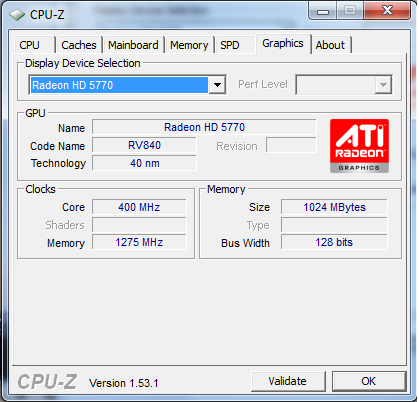 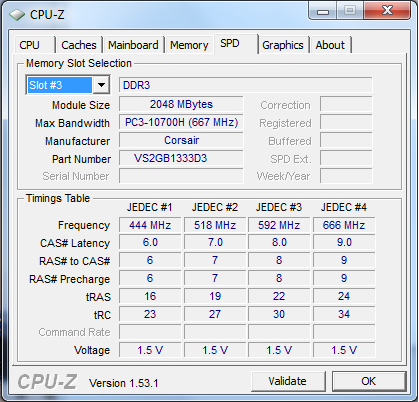 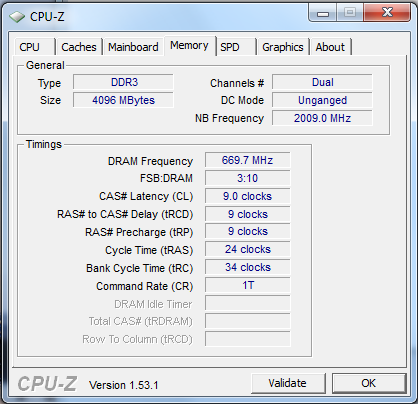 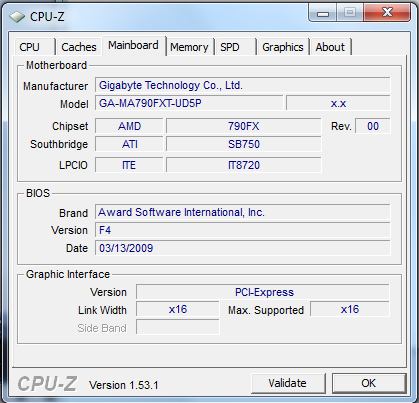 please help |
|
|
Jan 29 2010, 12:54 AM
|
|
Senior Member
3,795 posts Joined: Nov 2008 From: Varies....
|
u sure u did disable the cool and quiet..max performance of "power option" pls....
|
|
|
Jan 29 2010, 12:58 AM
|
 
VIP
4,032 posts Joined: Jan 2003 From: MSR Headquaters
|
QUOTE(shah_ho_nam2 @ Jan 29 2010, 12:44 AM) disable cnq already. but the speed still the same. anyway i should try out overdrive as you said. let me dl it 1st Firstly go into bios find a phrase called "Cool & Quiet" ...dun put On or Auto, just set at "Off"owh ya i am ni win7 64bit. will post the cpuz later am sorry. am reading it. btw what u want me to do with super pi?what to calculate and how much u want me to calculate? am downloading amd overdrive 31 Secondly find a three letter combo called C1E, disable it also... Now go inside windows 7 and go into Power Option... Power option is located in the Control Panel... Look for High Performance or Always On settings...select it and press ok... Look at CPU-z, does it change ur CPU speed?  Added on January 29, 2010, 12:59 am QUOTE(shah_ho_nam2 @ Jan 29 2010, 12:44 AM) disable cnq already. but the speed still the same. anyway i should try out overdrive as you said. let me dl it 1st Firstly go into bios find a phrase called "Cool & Quiet" ...dun put On or Auto, just set at "Off"owh ya i am ni win7 64bit. will post the cpuz later am sorry. am reading it. btw what u want me to do with super pi?what to calculate and how much u want me to calculate? am downloading amd overdrive 31 Secondly find a three letter combo called C1E, disable it also... Now go inside windows 7 and go into Power Option... Power option is located in the Control Panel... Look for High Performance or Always On settings...select it and press ok... Look at CPU-z, does it change ur CPU speed? This post has been edited by antonio: Jan 29 2010, 12:59 AM |
|
|
Jan 29 2010, 01:01 AM
|
|
Senior Member
4,242 posts Joined: Aug 2006 From: Soviet Putrajaya
|
QUOTE(antonio @ Jan 29 2010, 01:58 AM) Firstly go into bios find a phrase called "Cool & Quiet" ...dun put On or Auto, just set at "Off" give me 5 minutesSecondly find a three letter combo called C1E, disable it also... Now go inside windows 7 and go into Power Option... Power option is located in the Control Panel... Look for High Performance or Always On settings...select it and press ok... Look at CPU-z, does it change ur CPU speed? Added on January 29, 2010, 12:59 am Firstly go into bios find a phrase called "Cool & Quiet" ...dun put On or Auto, just set at "Off" Secondly find a three letter combo called C1E, disable it also... Now go inside windows 7 and go into Power Option... Power option is located in the Control Panel... Look for High Performance or Always On settings...select it and press ok... Look at CPU-z, does it change ur CPU speed? [ This post has been edited by shah_ho_nam2: Jan 29 2010, 01:24 AM |
|
Topic ClosedOptions
|
| Change to: |  0.0185sec 0.0185sec
 0.34 0.34
 6 queries 6 queries
 GZIP Disabled GZIP Disabled
Time is now: 3rd December 2025 - 03:19 PM |
 Quote
Quote