u will not get a optimum result with that...u will get a a non-stress clock which is might not stable..+ excess amount of vcore added..and for sure that is not the max clock for the vcore added...
OC urself..
about the clock @ 1.6ghz..how about set the multiplier manually? set at x17 at ur bios...
nice rig there mate.

» Click to show Spoiler - click again to hide... «
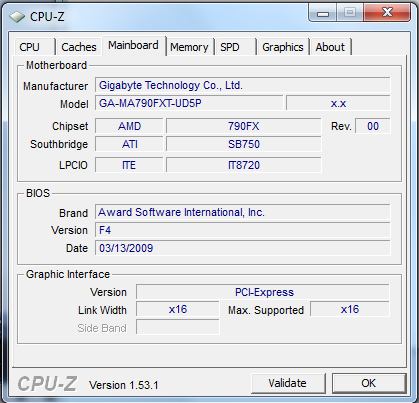
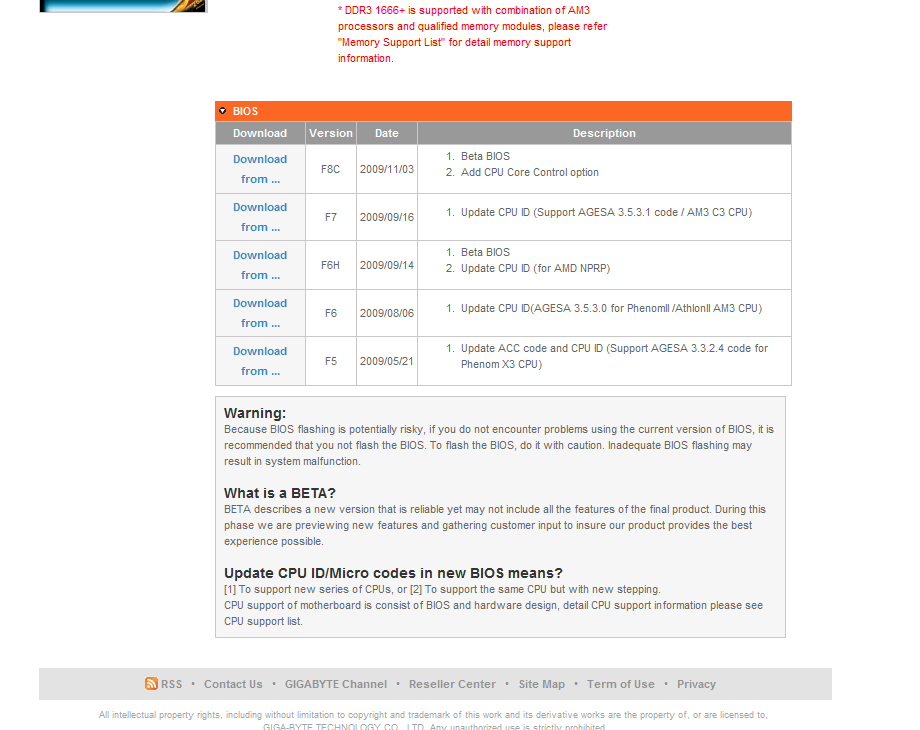
ya bios is kinda old, f7 was great for my x2 before, but they say f3l is solid for real quad core. do give it a try...

i always like to encourage htt oc eventhou there's not much performance gained thru it. and i know u have a BE chip there, some mite say why bothered while u have unlocked cpu multi. u can just simply crank up d cpu, htt (if needed) or even d cpu-nb multi & whack 'em w/ volts to make 'em stable, as simple as that. but by doin so (playin w/ htt), users tend to know how to make d best outta their components (clock speed, ram & cpu-nb). i'm not askin u to try insane htt oc like 3xx or higher, but i reckon a 250 htt oc or slightly higher/lower won't hurt seriously.

cputweakin:1. disable those power saving feature as mentioned by sir antonio (c1e, c&q).
2. set ram divider @ 1333/1066 (from what i remember fxt doesn't like 1600 that much)
3. set cpu clock 200~300MHz (play w/ cpu multi only) higher than stock w/o touchin any voltage.
4. prime it (blend test), if stable, go higher (again higher multi). if not, increase vcore. keep repeatin until temp & volt is outta comfort zone (load temp > 55, vcore > 1.4/1.45v for me for 24/7 setup)
5. 965BE should be able to do 3.7/8GHz for 24/7 (that if u need that much of processin power)
ram tweakin:1. set htt multi & cpu-nb @ 8x, cpu multi @ 13/14, vnb & vhtt @ 1.3v
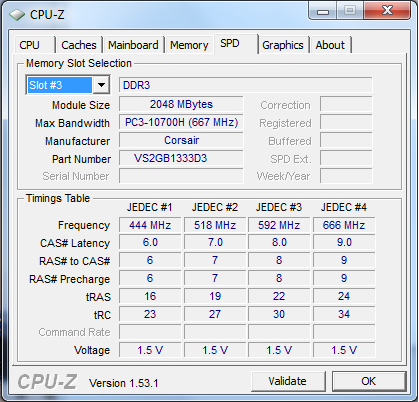
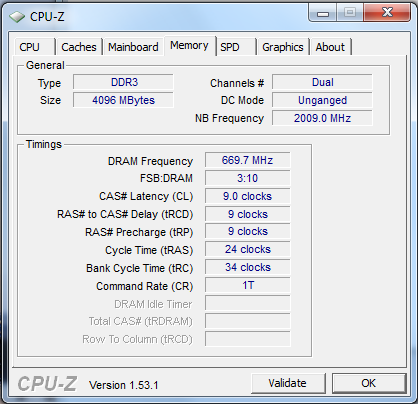
2. set major timing @ 8-8-8-x-x (refer to timing table of ya ram in cpu-z), it is d loosest i'd go. cas 6/7 is preferred but not a realistic target for value unless ya ram is d9/elpida inside.
3. use memtest (dos based, press esc, 1 > 3 > 8
*credits to sir antonio for enlightenin me) to test d ram by setting higher htt, if ur on 1333 ram divider, u can try to play w/ htt 220~250, should be doable but depends on what chippies are used on ya corsair value. voltage wise i'd wouldn't advise to go above 1.9v for long hour of stress.
4. if memtest ok, go into windows & test w/ prime (blend). add vdimm bit by bit, by usin aod can save u some time to reboots.
5. timing wise i couldn't help much as i'm not so gud in ram tweakin. u can use cpu-tweaker to adjust main/sub timings but i'd say leave to main timing alone coz most of d time they dun like to be adjusted "on d fly" especially when u try to tighten 'em.
cpu-nb (a.k.a) imc tweakin:1. once u know d mileage of ya ram, try to find d max cpu-nb (a.k.a imc) freq by just using d same setting from ram tweakin. increase imc multi by
2x/3x higher. prime (again, blend test) it, if stable, increase again, if not, add juices. unlike cpu tweakin, imc mileage discovery could be abit tricky. beside addin vimc, addin vcore mite help sometimes.
2. c3 should be able to do 2.8~3.0GHz (or more) for 24/7, voltage wise not so sure but i think should be safe ~1.4v (+/- 0.5v)
rojak tweakin (cpu clock + ram & imc freq):1. now u know d max clock ya chip can take, max freq d ram (so do timing) & d imc can handle, try to find d sweet spot for all 3. as simple as that (sounds simple but not to me).
2. try to have more patience.
that's what i can think off now, otais pls correct me if i missed out anything/misleadin somewhere. i'm old & not havin enuf sleep, that's why i'm blur most of d time... especially in office...

woah this is nice dude. i will try it later
bro, we have same proc and mobo, but urs must b CE rite?
1st thing u must do is update the bios, last time i oso have same prob and after update it,
can get 3.4Ghz 4sure!
OC?i dunno
Added on January 29, 2010, 10:21 amno matter what setting u do in AOD, u still get 1.6ghz if bios no updated!



 Jan 29 2010, 12:20 AM


 Quote
Quote







 0.0447sec
 0.73
0.73
 7 queries
 GZIP Disabled