Welcome Guest ( Log In | Register )

Outline · [ Standard ] · Linear+

 Guide to BLOCK PPS without flash the firmware, Just want to share what i've discovered

views
     
TSswgiant
post Dec 16 2009, 04:00 AM, updated 16y ago

Extravagance RUINS Your Life !!!
******
Senior Member
1,414 posts

Joined: Jan 2003
From: 47300


First, you need to have the router's login password.

Just block the following ports for both of TCP & UDP.

64430
17788
1900 *
8400
3478 *
8800 *
7201 *

* you can choose not block this ports. As PPStream more depends on port 17788, 8400 & 64430

user posted image
My router is Dlink Di-524, with an original firmware

user posted image
PPS is buffering...

user posted image
Block the PPS Servers' ports

user posted image
Now try to watch another movie, makes it reconnects to the server

user posted image
Now, PPS failed on connecting to its server!


Tested on 2 pcs, which installed of the latest of PPS and they failed to stream the movie now... whistling.gif
NOTE: If it works, your skunk housemate may opted an alternative... So, please share with me what you have found... nod.gif

This post has been edited by swgiant: Dec 16 2009, 04:33 AM
bingozero
post Dec 16 2009, 04:41 AM

♥♥♥♥♥♥♥♥♥♥♥♥♥♥♥♥♥♥♥♥♥
*******
Senior Member
4,522 posts

Joined: Jan 2009
QUOTE(swgiant @ Dec 16 2009, 04:00 AM)
Just block the following ports for both of TCP & UDP.

64430
17788
1900 *
8400
3478 *
8800 *
7201 *

* you can choose not block this ports. As PPStream more depends on port 17788, 8400 & 64430

*
And also for UDP 7202, but TCP port is dynamic
TSswgiant
post Dec 16 2009, 05:00 AM

Extravagance RUINS Your Life !!!
******
Senior Member
1,414 posts

Joined: Jan 2003
From: 47300


Only 64430 falls on dynamic range. UDP is usually for streaming media purpose, so in this case i believed that TCP is prior than UDP.
Therefore we need to block the initial connections from it's server, to make them cant connect with each other.
leyley
post Dec 16 2009, 09:45 PM

Look at all my stars!!
*******
Senior Member
2,096 posts

Joined: May 2008
Does it really matter if the TCP port is dynamic ?
TSswgiant
post Dec 16 2009, 11:30 PM

Extravagance RUINS Your Life !!!
******
Senior Member
1,414 posts

Joined: Jan 2003
From: 47300


PPStream will connect to its server before itself connecting to p2p. So the ports of reaching to the server must be blocked and those ports are consistency, so no problem for here.
deogracias
post Jan 26 2010, 02:59 PM

Getting Started
**
Junior Member
74 posts

Joined: Oct 2008
From: miao......


if i block this port, will it be affecting the other streaming program?
Raki
post Jan 26 2010, 03:03 PM

Casual
***
Junior Member
311 posts

Joined: Jan 2009


QUOTE(deogracias @ Jan 26 2010, 02:59 PM)
if i block this port, will it be affecting the other streaming program?
*
example what other streaming program?
ieR
post Jan 27 2010, 08:03 PM

~Cursed Member~
Group Icon
Elite
3,928 posts

Joined: Jan 2003
From: Incheon, Korea.. currently in Miri, Soviet Sarawak
mainly block 7201 and 7202 UDP can already

at least i am not evil, i dont block it whole time, i block it when i need the internet... usually to be fair, 8pm to 12am... the rest of the time, she can watch all she wans

This post has been edited by ieR: Jan 27 2010, 08:04 PM
developer
post Jan 28 2010, 01:59 PM

Getting Started
**
Junior Member
285 posts

Joined: Jan 2006


well pps can choose to use port 80.
muslimz85
post Jan 31 2010, 02:13 AM

Getting Started
**
Junior Member
55 posts

Joined: Sep 2009


rclxms.gif
sai86
post Feb 28 2010, 02:48 PM

StilL LearninG
*******
Senior Member
4,934 posts

Joined: Sep 2008
From: Setapak


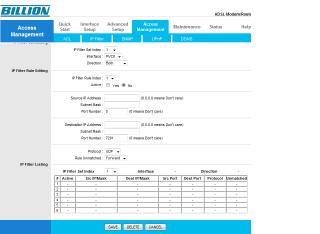
hi guys, juz wanted to know how to block d udp port using my modem(given by tmnut). Plz check d attachment whether its correct o not?? Im not good in this kinda thing. Tq for d tips ts and all d help here biggrin.gif

Attached Image

This post has been edited by sai86: Feb 28 2010, 02:51 PM
vccy118
post Mar 10 2010, 11:27 AM

Casual
***
Junior Member
374 posts

Joined: Mar 2005
From: Sarawak


Erm, block inbound or outbound? Coz my modem is DSL 2640T, has the same function but has inbound and outbound options.

EDIT: I just blocked 7201 to 64430 port outbound, both TCP and UDP and now PPS doesn't work anymore! Woohoo!

This post has been edited by vccy118: Mar 10 2010, 11:55 AM
razorboy
post Mar 22 2010, 07:39 AM

#winning
*******
Senior Member
2,634 posts

Joined: Dec 2008


cool info and guide, thanks a lot man
Casper85
post Mar 28 2010, 07:35 PM

Getting Started
**
Junior Member
81 posts

Joined: Aug 2007


will it block Qvod also?


vccy118

can u screen shot to let me c how u set?
RangerRed
post Mar 28 2010, 08:29 PM

Look at all my stars!!
Group Icon
Moderator
2,083 posts

Joined: Jan 2003
From: Penang

Just block the site addy.... doing this blocking port nonsense will cause ur roommate to screw around with the modem n such. Block the site... n when he ask why cannot access u tell him must be tm prob cause u cant access too... either that or assign QOS to PPS.


Attached thumbnail(s)
Attached Image
scph50004
post Mar 28 2010, 09:02 PM

Für die lulz
****
Senior Member
692 posts

Joined: Dec 2004
From: Soviet Sarawak


if i block the port range from 7401 to 64430, will it affect normal surfing? only p2p programs such as ppstream and QVOD blocked?
Sky.Live
post Mar 30 2010, 10:03 PM

Proctected Species
*******
Senior Member
4,390 posts

Joined: Oct 2004
From: Cheras, Malaysia


how does it works?

QoS on specifically PPS? I am not complaining since it's my sister watching, but tht damn program is uploading unlimitedly..
CrazyShadows
post Apr 16 2010, 02:02 AM

New Member
*
Newbie
1 posts

Joined: Dec 2006


now the latest pps port is 8200~19999
just block on UDP and TCP 8200~19999

most of the router have firewall setting there
i'm using SMC Router Modem so i set it like below
user posted image

also thx for swgiant guided


This post has been edited by CrazyShadows: Apr 16 2010, 02:04 AM
Patrick0527
post Apr 27 2010, 04:05 PM

New Member
*
Newbie
0 posts

Joined: Apr 2010
how to use my router to block PPS?

user posted image

which one i should choose?
Silpheed
post Apr 28 2010, 11:16 AM

Casual
***
Junior Member
419 posts

Joined: Jul 2006


QUOTE(Patrick0527 @ Apr 27 2010, 04:05 PM)
how to use my router to block PPS?

which one i should choose?
*
Access Control is the section you should look into.
shymx
post May 4 2010, 06:50 PM

Casual
***
Junior Member
379 posts

Joined: Aug 2007
Destination Port and Source Port the same ?
wyh104
post Jun 10 2010, 05:51 PM

New Member
*
Junior Member
8 posts

Joined: Dec 2007
QUOTE(Silpheed @ Apr 28 2010, 11:16 AM)
Access Control is the section you should look into.
*
after access control, what should i rule it?

anyway, if i Configure Parental Control to deny www.ppstream.com, is that working?
ywkwy
post Jun 18 2010, 06:21 PM

Enthusiast
*****
Senior Member
868 posts

Joined: Dec 2005
if u got dd-wrt router is the best, i make the mac priority qos to limit the download limit 3000kbps and upload limit 256kbps and priority of http port 80 to the highest and it does not affect my net surfing while my mom stream pps smoohtly.. also my bro's fps online game juz increase ping from 80 to 100ms which is no obvious delay when my mom stream pps.. dd-wrt rocks XD
wyh104
post Jun 18 2010, 07:34 PM

New Member
*
Junior Member
8 posts

Joined: Dec 2007
what is the latest port for pps?
OSW
post Jun 30 2010, 04:48 PM

New Member
*
Junior Member
27 posts

Joined: May 2009
Hi I'm using innacomm W3100.. and i don't know should i key in the ports number on the source port or destination port.. please help..
Casper85
post Jul 2 2010, 05:56 PM

Getting Started
**
Junior Member
81 posts

Joined: Aug 2007


im using DSL-2640T, who can screen shot for me and teach me how to set ?????
imation1314
post Sep 7 2010, 10:45 PM

Getting Started
**
Junior Member
159 posts

Joined: Sep 2010
hi, my modem(with wireless and 4 port) is D-Link DSL-2640B come with TM-NET ,i dun know how to configure it can any 1 teach me how to block pps stream..?

Currently my house only me 1 person me uisng lan others are using WAN, can teach me how set QOS to let my pc have most high priority than other.?
Serge32789
post Sep 8 2010, 04:30 AM

New Member
*
Junior Member
29 posts

Joined: Sep 2010
WOW! thx for the shared! wink.gif
wkh_united
post Sep 25 2010, 02:13 AM

Getting Started
**
Junior Member
243 posts

Joined: Dec 2008
anyone can help me block PPS using my P1 wimax modem? thank you..
MazeLoL
post Nov 15 2010, 08:45 PM

Enthusiast
*****
Senior Member
847 posts

Joined: Mar 2010


Taikor...
i using a belkin wireless rounter which connect to a Dlink modern
the problem is when my sis start loading those Stupid PPS movie..
my internet totally sucks..because all speed gone.
anyone can help me ???
btw the connection type which i found at my rounter setting was the PPPoE service, anyone can give a help ??

If last time my older belkin *with 1 wifi stick* got the block port function, but now seem like GONE?? izzit possible that the service type changed??
CalvinYeohYL
post Dec 7 2010, 11:08 PM

New Member
*
Junior Member
26 posts

Joined: Sep 2006
boss? how to do if im using Aztech DSL605-EW
cant find any TCP or UDP setting.. sorry to say that i know nothing bout networking, but i hope u guy can help me out..

some screenshot for my login.router

» Click to show Spoiler - click again to hide... «


where should i start? or i should try out P2Pover, seem is a software that can cap bandwidth speed??

thank you notworthy.gif notworthy.gif
cshong
post Dec 7 2010, 11:15 PM

Look at all my stars!!
*******
Senior Member
3,927 posts

Joined: Oct 2007
If PPS implement the option to change port number, then your ways won't work anymore.

Edit: Eh no. PPS already has this function.

This post has been edited by cshong: Dec 7 2010, 11:17 PM
alexang
post Dec 8 2010, 08:04 AM

Getting Started
Group Icon
Trade Dispute
238 posts

Joined: Jun 2005
I'm using Buffalo WBMR-G125 anyone how to blocks it? I really cant stand with my housemate! Mac user here. Thanks!

Cheers.
quineMc
post Feb 11 2011, 11:26 PM

Casual
***
Junior Member
308 posts

Joined: Mar 2010


can i use this tips if im using the modem which given by streamyx??
saints5354
post Mar 19 2011, 07:09 PM

New Member
*
Newbie
1 posts

Joined: Mar 2011


swgiant

Thanks a million, it works.

Iwwstriker
post Mar 30 2011, 01:35 AM

New Member
*
Newbie
2 posts

Joined: Dec 2009
Excuse me, I have recently bought a TP-Link W8960N modem router. It has the QoS feature, but how do i limit the bandwidth that my housemate is using? Because he's using pps for 24 hours, and i wish to just slow him down, no need to block everything. Please help. I can't find any solutions.
mjsim1990
post May 1 2011, 03:29 PM

New Member
*
Junior Member
5 posts

Joined: Jan 2009


Thank you so much you have saved my life
mindbard
post Jun 5 2011, 01:24 PM

New Member
*
Junior Member
18 posts

Joined: Dec 2009


I need help seriously, the guide you posted were for the older version of DSL-2640B but now I'm having the one with firmware version GE_1.07 and it involves Inbound IP and Outbound IP. I don't know how to input the settings, help please!!!!!!!!!
ju146
post Jun 7 2011, 10:35 PM

Regular
******
Senior Member
1,594 posts

Joined: Nov 2008
QUOTE(imation1314 @ Sep 7 2010, 10:45 PM)
hi, my modem(with wireless and 4 port) is D-Link DSL-2640B come with TM-NET  ,i dun know how to configure it can any 1 teach me how to block pps stream..?

Currently my house only me 1 person me uisng lan others are using WAN, can teach me how set QOS  to let my pc have most high priority than other.?
*
bump this thread, can some 1 share how to block those p2p program using modem above?
wyh
post Jun 9 2011, 07:15 PM

Regular
******
Senior Member
1,447 posts

Joined: Jan 2008
DSL-2640B help me too.. i guess no one knows how to do it

This post has been edited by wyh: Jun 11 2011, 12:48 PM
ck_boon
post May 10 2012, 12:23 PM

Regular
******
Senior Member
1,894 posts

Joined: Nov 2009


QUOTE(Iwwstriker @ Mar 30 2011, 02:35 AM)
Excuse me, I have recently bought a TP-Link W8960N modem router. It has the QoS feature, but how do i limit the bandwidth that my housemate is using? Because he's using pps for 24 hours, and i wish to just slow him down, no need to block everything. Please help. I can't find any solutions.
*
bump this thread 2, how to Qos one user to watch at certain limit speed but not totally block it down?
WilliamG
post May 11 2012, 09:29 PM

Getting Started
**
Junior Member
142 posts

Joined: Oct 2005


Is the first post still usefull?
jackyyong
post May 17 2012, 10:06 PM

Casual
***
Junior Member
431 posts

Joined: Aug 2007
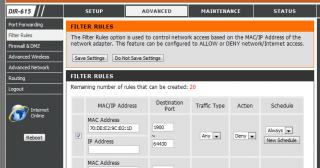
For those using Unifi with stock DIR-615 router, it is very easy to block off PPS using the router. Just go to "Advanced" - "Filter Rules". Then get the MAC address of the client whom u wanna block. Block port from 1900 to 64430. Save Setting and Reboot router. They can now surf normally, but PPS will be blocked!

Here's a screenshot:
Attached Image

The best thing is during low-peak hour when you allow PPS you can always uncheck the tick box, and re-check whenever you need the bandwidth again, and act like nothing happened ...... whistling.gif

Worked for me ...... thumbup.gif
BaDKiDz
post Jun 2 2012, 05:43 PM

Getting Started
**
Junior Member
262 posts

Joined: Sep 2010
From: PG

QUOTE(jackyyong @ May 17 2012, 10:06 PM)
For those using Unifi with stock DIR-615 router, it is very easy to block off PPS using the router. Just go to "Advanced" - "Filter Rules". Then get the MAC address of the client whom u wanna block. Block port from 1900 to 64430. Save Setting and Reboot router. They can now surf normally, but PPS will be blocked!

Here's a screenshot:
Attached Image

The best thing is during low-peak hour when you allow PPS you can always uncheck the tick box, and re-check whenever you need the bandwidth again, and act like nothing happened ......  whistling.gif

Worked for me ......  thumbup.gif
*
block the port 1900-64430 what is restricted?
can they download from hosting website? or only pps?
johnlth93
post Jun 4 2012, 01:09 PM

Debian
******
Senior Member
1,200 posts

Joined: Feb 2010
From: Kuala Lumpur


ppl can change port de ma sleep.gif
so no point to block like this
i would suggest block port range if you really wan to block


Added on June 4, 2012, 1:15 pmi would advice to block port 1024~65535
and exceptionally allow port that u need to access to like 8443 or etc if you need those for other http services or like mysql on 3306 etc

This post has been edited by johnlth93: Jun 4 2012, 01:15 PM
jackdon
post Jun 6 2012, 04:07 PM

Enthusiast
*****
Senior Member
719 posts

Joined: Dec 2006
QUOTE(johnlth93 @ Jun 4 2012, 01:09 PM)
ppl can change port de ma sleep.gif
so no point to block like this
i would suggest block port range if you really wan to block


Added on June 4, 2012, 1:15 pmi would advice to block port 1024~65535
and exceptionally allow port that u need to access to like 8443 or etc if you need those for other http services or like mysql on 3306 etc
*
Hi,

I would suggest that you look at OpenDNS.
Get a Free Home OpenDNS account and configure your network.
Block DNS port on the router for those IP. Enable DNS relay on the Router to 208.67.222.222 and 208.67.220.220.
A lot of School and Organization are using DNS to filter.

Hope this works.

johnlth93
post Jun 6 2012, 11:57 PM

Debian
******
Senior Member
1,200 posts

Joined: Feb 2010
From: Kuala Lumpur


QUOTE(jackdon @ Jun 6 2012, 04:07 PM)
Hi,

I would suggest that you look at OpenDNS.
Get a Free Home OpenDNS account and configure your network.
Block DNS port on the router for those IP. Enable DNS relay on the Router to 208.67.222.222  and 208.67.220.220.
A lot of School and Organization are using DNS to filter.

Hope this works.
*
errr sir, you suggesting to me because?
liez
post Oct 9 2012, 11:53 PM

Regular
******
Senior Member
1,346 posts

Joined: Jun 2007
block inbound or outbound?
general_odin
post Jun 13 2013, 05:44 PM

no work, no money
*****
Senior Member
904 posts

Joined: Nov 2006
From: Selangor & Malacca, Malaysia


anyone got port range for Qvod player?
chuahcs79
post Jun 14 2013, 12:33 AM

Look at all my stars!!
Group Icon
Elite
6,931 posts

Joined: Apr 2011
From: Bolehland for sure ^_^


QUOTE(general_odin @ Jun 13 2013, 05:44 PM)
anyone got port range for Qvod player?
*
QVOD very flexible as it have UDP/HTTP in their setting in port range though,.

if u want fully block it,. try to block from 1024~65535,..

that's what i set in my router to block it notworthy.gif
notausername
post Jun 25 2013, 11:41 PM

Getting Started
**
Junior Member
102 posts

Joined: Jan 2010
From: In front of my computer


I'm using unifi, how to block pps? i used the port 7201 and 7202,but cannot save the settings,dunno why.

pps only 7201 and 7202 only?(i'm quite a dummy,so explain with more details id can rclxms.gif )

what to key in in the MAC/IP adress??

need help! thanks.


Attached thumbnail(s)
Attached Image
notausername
post Jun 26 2013, 12:32 AM

Getting Started
**
Junior Member
102 posts

Joined: Jan 2010
From: In front of my computer


QUOTE(CrazyShadows @ Apr 16 2010, 02:02 AM)
now the latest pps port is 8200~19999
just block on UDP and TCP 8200~19999

most of the router have firewall setting there
i'm using SMC Router Modem so i set it  like below
user posted image

also thx for swgiant guided
*
if we block such a wide range,will it block other access also?? other access as in web surfing.

This post has been edited by notausername: Jun 26 2013, 12:57 AM
notausername
post Jun 26 2013, 01:00 AM

Getting Started
**
Junior Member
102 posts

Joined: Jan 2010
From: In front of my computer


QUOTE(RangerRed @ Mar 28 2010, 08:29 PM)
Just block the site addy.... doing this blocking port nonsense will cause ur roommate to screw around with the modem n such. Block the site... n when he ask why cannot access u tell him must be tm prob cause u cant access too... either that or assign QOS to PPS.
*
my router only support qos speed reduction but wont block specific site, hot to do that?


Change to:
| Lo-Fi Version
0.0404sec    0.68    6 queries    GZIP Disabled
Time is now: 1st December 2025 - 05:50 PM