Welcome Guest ( Log In | Register )

Bump Topic Topic Closed RSS Feed

Outline · [ Standard ] · Linear+

 Astro B.yond, HD Content Available

views
     
LCP
post Dec 24 2009, 08:59 PM

Getting Started
**
Junior Member
61 posts

Joined: Sep 2008
On the DD5.1, I think Astro need to relook at their overall audio quality, of course they also need to get the DD5.1 right... Right now the SD channels are so much softer compared to the HD channels when in DD5.1, quite annoying when switching channels...

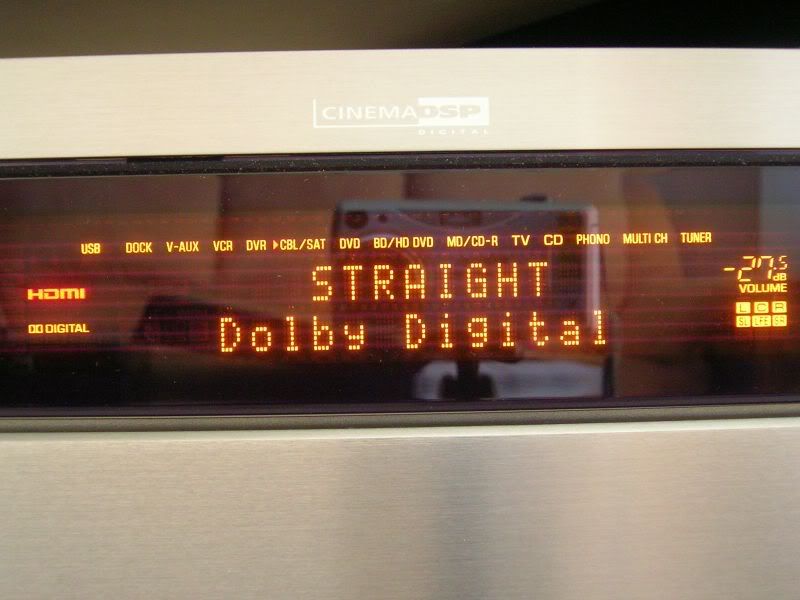
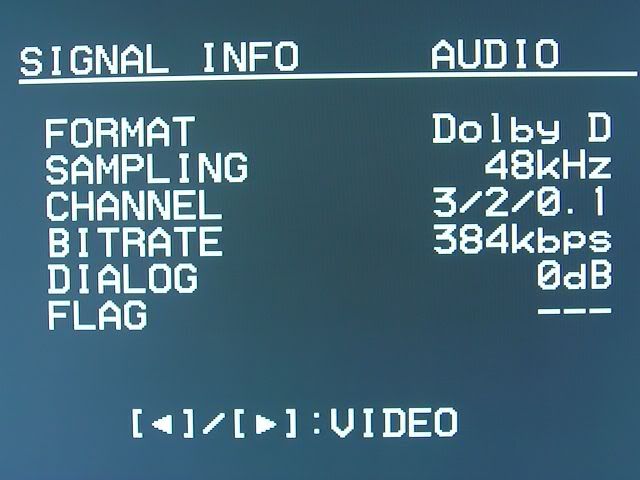
Here's the audio as detected by my Yamaha, DD5.1 is only at 384kbps, I only have Nat Geo HD, History HD and Supersports HD to compare, not sure about HBO HD...

Shot of my Yamaha RX-V1900 display, can even see reflections of my camera on a tripod, lousy cameraman...
user posted image

Screen shot from the Yamaha signal status for the audio of HD channel:
user posted image

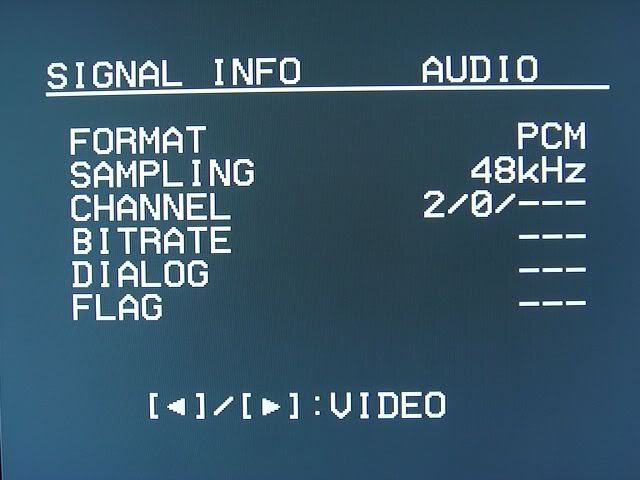
When on SD channel, the MPEG Audio Layer 2 stream is decoded to 2-channel PCM at standard 48kHz sampling rate...
user posted image

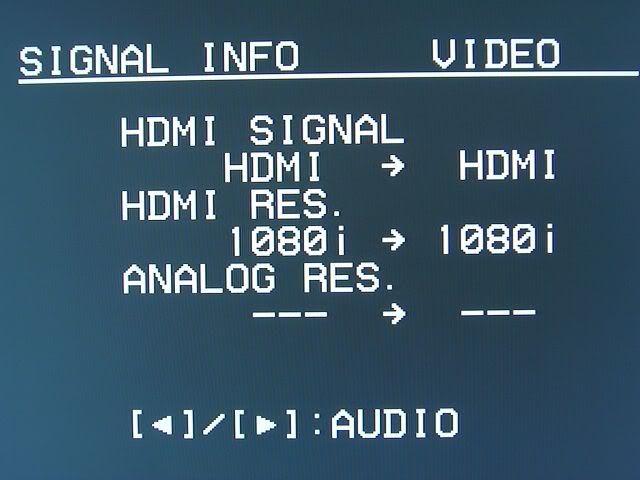
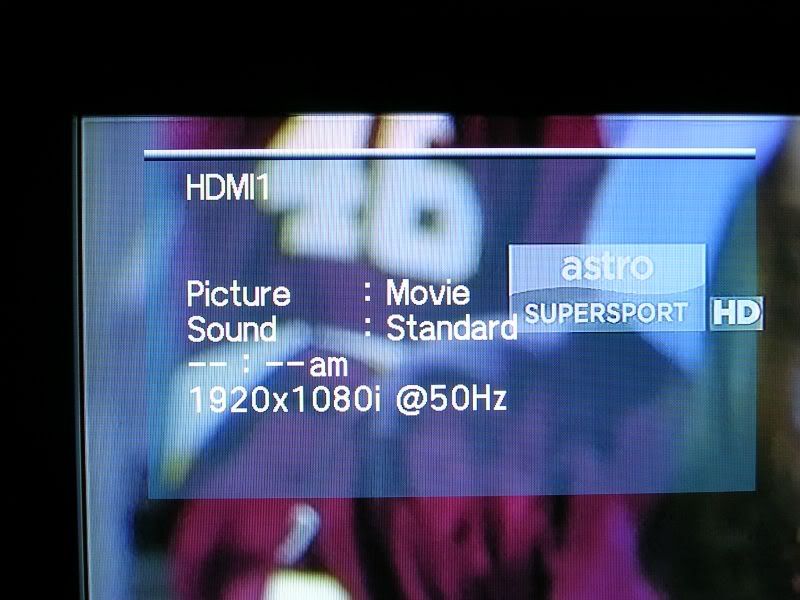
And some video info... HDMI video signal are passed through untouched by my Yamaha...
user posted image

Info screen from my TV showing 1080i 50Hz...
user posted image
LCP
post Dec 24 2009, 09:02 PM

Getting Started
**
Junior Member
61 posts

Joined: Sep 2008
QUOTE(AjkR06 @ Dec 24 2009, 08:45 PM)
I got 222 and sometimes 225 on the signal bar....
*
So do you have continuous toot toot sound when displaying the satellite signal screen?

My cable to the dish could be 18 metres long, embedded in the wall, not changed during installation.
LCP
post Dec 24 2009, 09:07 PM

Getting Started
**
Junior Member
61 posts

Joined: Sep 2008
QUOTE(AjkR06 @ Dec 24 2009, 09:04 PM)
How much is the price for ur Yamaha system?
*
Bought almost a year ago, at RM4200 I think, just the AV Receiver amplifier only. Used back my existing super rojak speakers...
LCP
post Dec 24 2009, 09:20 PM

Getting Started
**
Junior Member
61 posts

Joined: Sep 2008
QUOTE(AjkR06 @ Dec 24 2009, 09:04 PM)
yes.. I can hear the continuous low pitch "toot... toot..toot.." ( actually it sounds much like beep..beep..beep...) sound when displaying signal screen....
*
Okay, a friend's Byond set signal level is at 168 only (around 60% at the graph), no toot toot sound, but quality is still 100%...

And mine's borderline case, 201 no sound, 206 has sound... I wonder whether Astro is trying to tell their installers to get the signal optimised properly, but looks like none of the installers care... Anyone knows what is the official standard defined by Astro for the signal level to be classified as "optimised"?
LCP
post Dec 24 2009, 09:30 PM

Getting Started
**
Junior Member
61 posts

Joined: Sep 2008
QUOTE(sg999 @ Dec 24 2009, 09:19 PM)
SD should be 720*576
astro compressed it to 640*480 for local chanel (those channel have astro logo)
for imported chanel 544*576 only
some chanel 8tv ntv7 even worse
more blur than SVCD!!!!
*
I believe the signal is still 720x576 at 25fps interlaced (standard PAL MPEG2), but the bitrate has been restricted so much that the details are all smoothed out, and very bad macroblocking effect during fast changing scenes. Yes, local free-to-air stations are the worst affected. Many people are surprised that these local stations actually are so much sharper when received directly off the air via the regular analogue UHF transmission, provided their antenna system is good and within range of the broadcast.
LCP
post Dec 24 2009, 09:33 PM

Getting Started
**
Junior Member
61 posts

Joined: Sep 2008
QUOTE(accitzone @ Dec 24 2009, 09:26 PM)
i think y all r worrying waaaaaaaaaay too much, as long as the signal quality is 100%, me thinks it's ok, not like the signal stregth gonna affect ur PQ or AQ.
*
The only way to test it out is during heavy rain and thick clouds between the dish and the satellites... will see, currently no worries...
LCP
post Dec 26 2009, 01:20 AM

Getting Started
**
Junior Member
61 posts

Joined: Sep 2008
QUOTE(JOR23N @ Dec 25 2009, 02:05 PM)
Using existing cable or new cable?
*
Using existing cable (18 metres max length) for my 201 signal strength... A friend here in Penang had to change cable and got only 168 with new cable, and I believe it did not exceed 20 metres also (so there are no joints on the cable).

Anyway, I noticed that my signal is 206-209 at night, must be because of less solar electromagnetic background noise.

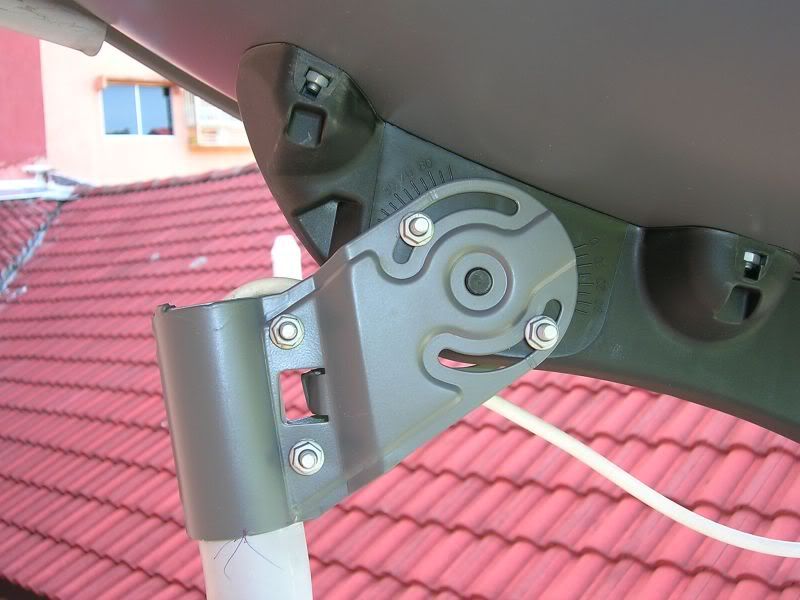
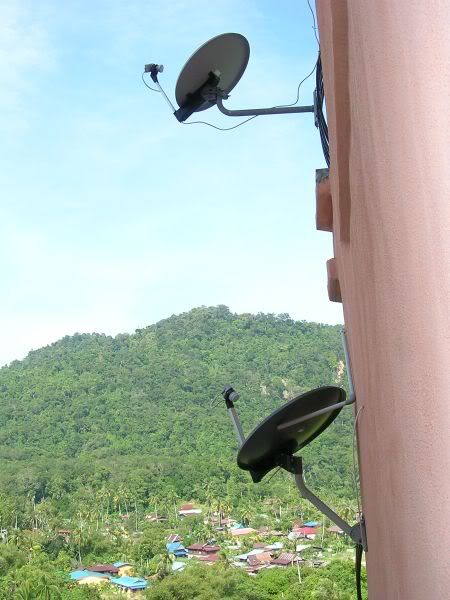
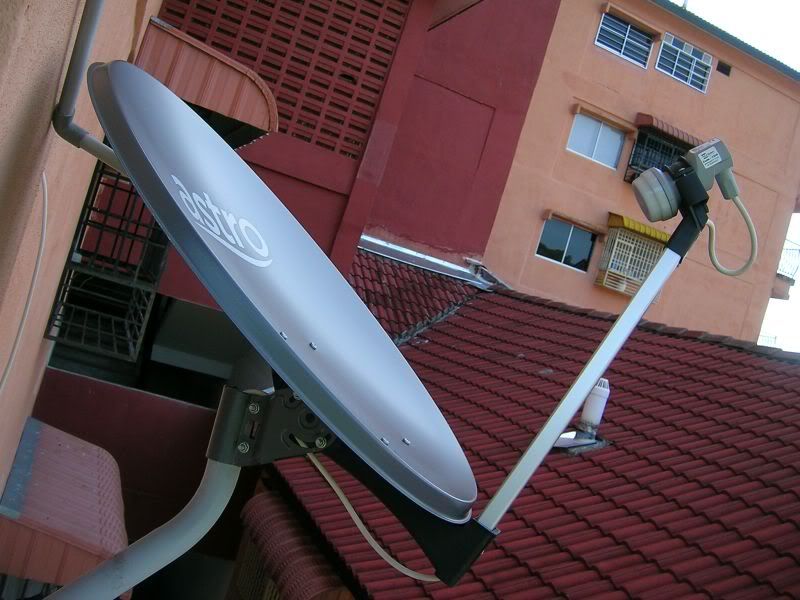
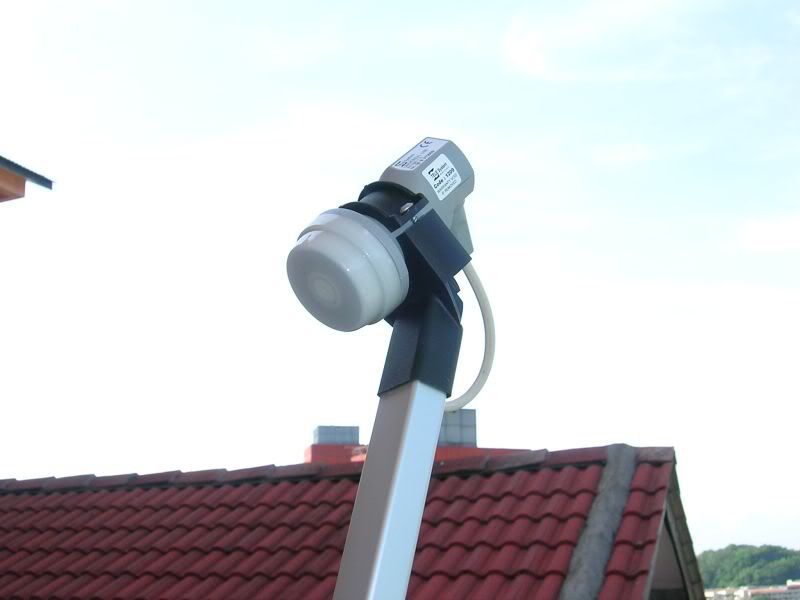
I have some doubts on the alignment of my dish, but on closer inspection, I think the installer made some markings on the holder pole so that he can turn the dish back to the aligned position after screwing back my cable... Here are some photos of my dish, and also a comparison with my upstairs neighbour's dish, the angle is different...

user posted image

Comparison with my upstairs neighbour's dish...

user posted image

My dish as viewed from the balcony (the only way to reach the dish), I need to do something about the collapsed aircon drain pipe that is touching the back of the dish...

user posted image

And here's the LNB where the arm can't reach unless the dish is rotated first...

user posted image
LCP
post Dec 26 2009, 01:35 AM

Getting Started
**
Junior Member
61 posts

Joined: Sep 2008
QUOTE(allenultra @ Dec 25 2009, 05:18 PM)
How to reach this in my astro B.yond?
I tried almost all buttons, none of them can access to this menu.
Another thing will be on the button (from the shape of it, it seem I can choose to display output in normal resolution or fully stretch), when I press on it, nothing changed.
I wonder if it just me or all people experience the same thing.
*
Let me try, I am not at home right now, recalling from memory...

Press Home button
Select Settings
Select Installation Settings
Key in PIN number (0000)
Select Satellite (or something like that)
Need to press OK a few times to get to the signal screen

As for standard definition signal output whether in pillar box (two vertical bars at the side) or stretched to fill the screen, the button on the remote is not working yet (Astro said next year only it will work), but now you can go change from pillar box to stretch on this screen, somewhere in the Installation Settings menu also...

user posted image

Personally, I prefer pillar box rather than seeing distorted human bodies... tongue.gif
LCP
post Dec 26 2009, 01:47 AM

Getting Started
**
Junior Member
61 posts

Joined: Sep 2008
QUOTE(prasys @ Dec 25 2009, 06:01 PM)
For the sake of testing analogue , I tested with analogue output + Dolby Pro Logic II. To my surprise , it did sound better then 5.1 with echos. I think i am going to settle with DLP II for now.
*
How about with the DD5.1 channels downgraded to stereo PCM, should sound as good too I guess with Dolby PLII?

I noticed that the SD channels now sounded better than the old decoder, simply because there is no analogue conversion and the audio is kept in digital form all the way to the amp... then it could also mean that my old Nokia SD set must have been using some cheap op-amp chip for the RCA audio output... just my RM0.02 tongue.gif

This post has been edited by LCP: Dec 26 2009, 01:50 AM
LCP
post Dec 26 2009, 12:07 PM

Getting Started
**
Junior Member
61 posts

Joined: Sep 2008
QUOTE(AjkR06 @ Dec 26 2009, 07:33 AM)
wow! your neighbour dish was so old-school...  biggrin.gif
From the dish stand and LNB itself looks very old-school...
I think, it was the first batch ODU unit from astro since their first launch in 1996...
the price of astro set for that time was about RM1.5k ++  notworthy.gif

If I, I will keep it....  laugh.gif
*
I just noticed that my neighbour's LNB is angled very differently with respect to the dish, maybe that's why the angle of the dish is different too.

Not sure how old is his dish, the apartment is more than 6 years old already, many brought their dish over from their previous place, me too.
LCP
post Dec 26 2009, 12:13 PM

Getting Started
**
Junior Member
61 posts

Joined: Sep 2008
Is it me or the decoder's handling of the remote control infra red signal is done badly... Sometimes you pressed once and the set thinks that you pressed twice, quite annoying, can happen on any buttons, numeric, up/down channel, etc. I think the debouncing circuitry is not done correctly... hopefully can be corrected by a firmware update.
LCP
post Dec 26 2009, 01:43 PM

Getting Started
**
Junior Member
61 posts

Joined: Sep 2008
QUOTE(rayfoo @ Dec 26 2009, 12:28 PM)
have problem with my tv tuner, got sound no picture, using hdmi , what standard we using here? PAL B ? PAL D? H? I ? M? so many choices
*
Actually what has the tuner on the TV got to with its HDMI inputs, the tuner is a separate item altogether... Anyway, we're on PAL B/G, B for VHF band, G for UHF band, both B and G go together.

For HDMI, there's no PAL B/D/G/H/I/M, just PAL if 576i, and maybe 576p. Note that some TVs (like my Samsung LA40A650) cannot accept PAL 576i and NTSC 480i over HDMI, it will only do 576p and 480p onwards.
LCP
post Dec 26 2009, 01:46 PM

Getting Started
**
Junior Member
61 posts

Joined: Sep 2008
QUOTE(rayfoo @ Dec 26 2009, 01:19 PM)
oh ok , apparently no video when using 1080i, when using 720p, i have picture
*
Hmmm, I thought even the non-full HD TVs can all accept 1080i since it's the HD broadcast standard. The TV will then downscale from 1920x1080 to 1366x768, or even 1024x768 in some plasmas with non-square pixels..
LCP
post Dec 26 2009, 01:50 PM

Getting Started
**
Junior Member
61 posts

Joined: Sep 2008
QUOTE(rayfoo @ Dec 26 2009, 01:46 PM)
Sorry, i'm not using TV set...i'm playing on my PC using  PC TV Tuner smile.gif ..managed to get the pictures using 720P, no display when using 1080i, can record HD channel, but the video jerking..still playing around, but should not be possible with HDCP , just wondering why cannot display 1080i, limitation or my tv tuner card or monitor ? which both also suppose can support this resolution
*
What TV tuner card are you using that has HDMI input...
LCP
post Dec 26 2009, 04:47 PM

Getting Started
**
Junior Member
61 posts

Joined: Sep 2008
Whoa, I just received a call from someone claiming to be from a research firm engaged by Astro inviting me to a tea session at 6pm at Cititel (at Penang Road, Penang) to get our feedback on Byond. Food and drinks provided. Apparently there is some sort of voucher provided also, RM120 it seems. Too bad I have things to do and had to decline...
LCP
post Dec 26 2009, 04:58 PM

Getting Started
**
Junior Member
61 posts

Joined: Sep 2008
QUOTE(LCP @ Dec 26 2009, 04:47 PM)
Whoa, I just received a call from someone claiming to be from a research firm engaged by Astro inviting me to a tea session at 6pm at Cititel (at Penang Road, Penang) to get our feedback on Byond. Food and drinks provided. Apparently there is some sort of voucher provided also, RM120 it seems. Too bad I have things to do and had to decline...
*
Actually, come to think of it, I have no idea what's going on, many people would have just gotten their sets and requesting for feedback so fast... sounds like there's some hidden agenda there.
LCP
post Dec 27 2009, 11:18 PM

Getting Started
**
Junior Member
61 posts

Joined: Sep 2008
I think there's a bug in the set, not sure whether it's hardware or software...

When powering up the set from a full AC shutdown (from mains 240V off to on), after the clock display appears, if I press the power button immediately on the remote, the decoder will turn on, as expected to. Only problem is I am getting random black horizontal bars streaking across my screen (at random positions), sometimes the whole picture just went off.

My solution is to press the power button (on remote) to turn it off, and usually I wait maybe at least 10-20 seconds before turning it back on. No more video problems...

Anyone has the same problems? Not sure why but it will only happen on a power up from a full shutdown, could it be that the Linux OS hasn't really finished booting up yet when the display was already showing the clock, therefore the HDMI output is not stable because the processor is busy doing other things (boot and load other stuff)? Or just a plain hardware problem in my case?
LCP
post Dec 27 2009, 11:36 PM

Getting Started
**
Junior Member
61 posts

Joined: Sep 2008
By the way, for those of you with AV Receivers that have programmable remotes, have any of you gotten your AV Receivers' remote to work with this customised Pace/Byond decoder? If yes, through which way: simply selecting the code page, or through learning feature of the remote? What about those with universal remotes (Harmony, etc), any luck of getting the remote to work from the preset code, or need to do manual learning?

My Yamaha AV Receiver (model released in Aug 2008) has a programmable/learning remote, but none of the four codes listed for Pace satellite decoders worked, there is also a Pace cable decoder remote code listed also, didn't work either. So, Astro must have really requested for a customised remote or the remote is so new that no one has the codes.

Spent nearly half an hour today making my amp's remote learn each button on the Byond remote... Took a long time because can't quite decide which button to assign to which for more ergonomic and easy pressing... phew...

Previously on the Nokia SD set, my amp's remote can control the decoder by just selecting one of the predefined codes for Nokia's satellite decoders, no need to learn anything.
LCP
post Dec 28 2009, 11:37 PM

Getting Started
**
Junior Member
61 posts

Joined: Sep 2008
QUOTE(eastherd @ Dec 28 2009, 10:45 PM)
btw, astro is not charging us anything anything for the HD content until April, so i think we are the guinea pig...
i believe before this,they were more concerned about the HD quality picture more than the sound quality..
now that the pic quality is acceptable, they might focus on the audio quality.

i also believe that by the time they start charging on April, most of the problem would be rectified.
*
I think they should also speed up the implementation of the features supported by this decoder. As we already know that this box runs on some sort of Linux, programming it should at their (Astro's) fingertips. Note that there is a button called Apps on the remote, I wonder what sort of applications will be provided in the future... My wish list:

1) Video files playback via USB on all commonly supported formats at up to full HD resolution
2) Audio files playback, not limited to mp3/wma only but to lossless formats like wav/flac/etc
3) Photo viewer
4) Some basic file management (copy, move, delete, rename, etc) for the USB drive
5) Internet surfing via network port
6) Digital net radio streaming via internet
7) more stuff...

LCP
post Dec 31 2009, 12:56 PM

Getting Started
**
Junior Member
61 posts

Joined: Sep 2008
Astro B.yond headcount...

1.apexg2
2.kelvin (Penang)
3.torreto (Subang Jaya/Kelantan)
4. rayfoo
5.l_berd (Penang)
6.RAMChYLD (Klang)
7 Cyberian (Sepang)
8. azri (U5, Shah Alam)
9. teikwing (Taiping, Perak)
10. AjKR06 (Bgn Serai, Perak)
11. horray (Petaling Jaya, Selangor)
12. LCP (Penang)

3 Pages < 1 2 3 >Top
Topic ClosedOptions
 

Change to:
| Lo-Fi Version
0.0439sec    0.85    7 queries    GZIP Disabled
Time is now: 4th December 2025 - 10:25 PM