Welcome Guest ( Log In | Register )

Bump Topic Topic Closed RSS Feed
7 Pages « < 3 4 5 6 7 >Bottom

Outline · [ Standard ] · Linear+

 Sony Ericsson XPERIA™ X10, SE 1st Andriod Phone!!!

views
     
tot31
post Nov 1 2010, 11:33 PM

I DON'T GIVE A DAMN
*******
Senior Member
2,451 posts

Joined: Jan 2003
From: GOD's Land


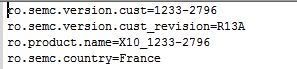
here's my default.prop before edited

user posted image

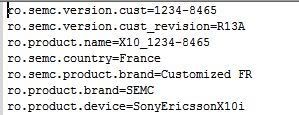
and here's is default.prop after edited

user posted image


Added on November 1, 2010, 11:37 pmmore info...

1. Free market apps works..I can download and install applications from free Market.

2. Wifi works like a charm, can browse and FB.

3. GPS also works fine only Papago just wouldn't run...

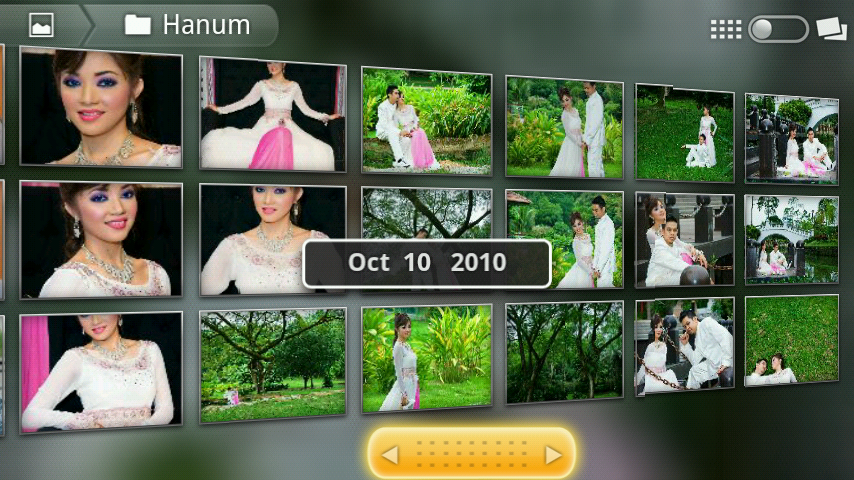
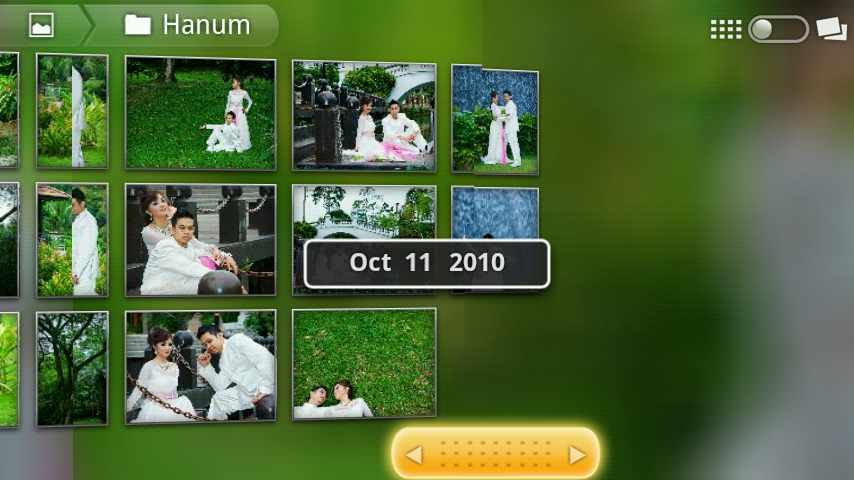
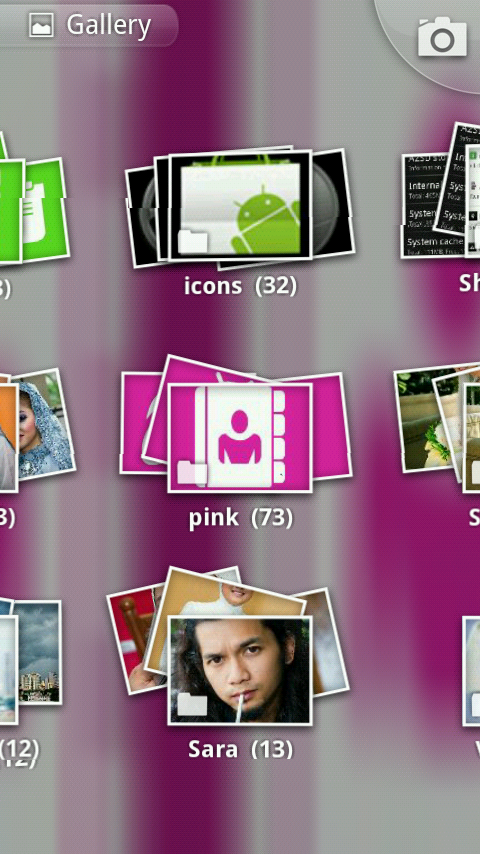
4. The built in 3D gallery is awesome just like Cooliris for PC..yeah cooliris developed this 3D gallery for android.

Some screenshots of 3D Gallery

user posted image

user posted image

user posted image

This post has been edited by tot31: Nov 1 2010, 11:55 PM
tot31
post Nov 1 2010, 11:53 PM

I DON'T GIVE A DAMN
*******
Senior Member
2,451 posts

Joined: Jan 2003
From: GOD's Land


QUOTE(Spetre @ Nov 1 2010, 11:45 PM)
how to in debugging mode ??? i hav tick/untick the usb debugging mode already ... just dunno how to open n type the code ...
*
Go to Settings --> Applications --> Development --> USB Debugging (tick this box)

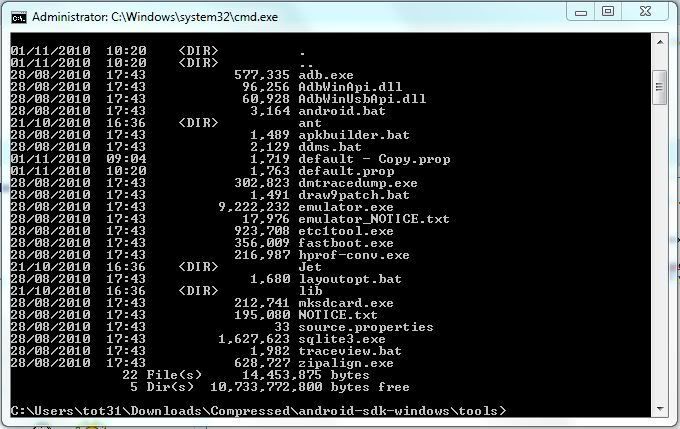
You also need adb shell which you can get by downloading the android sdk (google it). Once you have downloaded it, extract it and go to the android sdk folder go to "tools" folder but you must use the dos box or windows command shell....sound geeky right? if you never use a dos box before then this method is not for you...

here's my dos box prompt

user posted image
tot31
post Nov 2 2010, 12:02 AM

I DON'T GIVE A DAMN
*******
Senior Member
2,451 posts

Joined: Jan 2003
From: GOD's Land


QUOTE(Spetre @ Nov 1 2010, 11:56 PM)
huh ... then i better flash it to 2.1 ...
*
the XFlash method also needs to be done using the dos box and you must install Java Runtime i.e the jre and the jdk on your pc...if all these methods are really confusing for you, rclxub.gif then better wait for the official regional update.... biggrin.gif
tot31
post Nov 2 2010, 12:12 AM

I DON'T GIVE A DAMN
*******
Senior Member
2,451 posts

Joined: Jan 2003
From: GOD's Land


QUOTE(Spetre @ Nov 2 2010, 12:04 AM)
nvm , i giv it a try ... if the phone was brick , send to hp shop to unbrick it ... lol
*
The very best of luck to you bro... biggrin.gif


Added on November 2, 2010, 12:17 am
QUOTE(sunnyboy @ Nov 2 2010, 12:11 AM)
where is the 3d gallery located?

cant find it punya?
*
it's hidden, you have to korek2 .... laugh.gif laugh.gif

okay if you're using dxTop just long press on an empty space then select Shortcut then select Activities, scroll down until you find Gallery,tap it and choose the first Gallery (com.cooliris.media.gallery)

This post has been edited by tot31: Nov 2 2010, 12:17 AM
tot31
post Nov 2 2010, 12:01 PM

I DON'T GIVE A DAMN
*******
Senior Member
2,451 posts

Joined: Jan 2003
From: GOD's Land


No guts, No glory........if feels like sissy then sit diam2...kekekekekek.. laugh.gif laugh.gif


Added on November 2, 2010, 12:04 pm
QUOTE(teamloks @ Nov 2 2010, 12:00 PM)
btw anyone use handcent sms? i think got bug with notification led >.>
*
yup no led notification..................I'm enjoying every bits of 2.1..........................................wow...................

This post has been edited by tot31: Nov 2 2010, 12:04 PM
tot31
post Nov 2 2010, 09:26 PM

I DON'T GIVE A DAMN
*******
Senior Member
2,451 posts

Joined: Jan 2003
From: GOD's Land


new version app2sd for 2.1 is out..yay... rclxm9.gif
tot31
post Nov 2 2010, 11:49 PM

I DON'T GIVE A DAMN
*******
Senior Member
2,451 posts

Joined: Jan 2003
From: GOD's Land


QUOTE(bjmin @ Nov 2 2010, 10:08 PM)
Arh... !!! headache to update it to 2.1 .. tension on work.. come back n c update also need so many step.. gorsh!! singapore set.. pls fast fast give me update.. i dun1 headache.. but my hand itchy for 2.1 ..


Added on November 2, 2010, 10:11 pmthen need a bigger SD card d..
ngek ngek..

Added on November 2, 2010, 10:26 pmOH yes...!! Midland is so good, can just download the SEUS then can update to 2.1.. thank god.. guys.. im joining ur all at 2.1 .. wait me~ Muakz...
*
No need bigger card for app2sd, 1.4GB partition is recommended and more than enough....wow now my 2.1 x10 really fast....
tot31
post Nov 3 2010, 01:01 PM

I DON'T GIVE A DAMN
*******
Senior Member
2,451 posts

Joined: Jan 2003
From: GOD's Land


QUOTE(Spetre @ Nov 3 2010, 10:47 AM)
Same as me , any1can help us ?
*
keep on tick/untick the USB debugging thing..


Added on November 3, 2010, 1:03 pm
QUOTE(rayzrblade @ Nov 3 2010, 12:57 PM)
hey guys..

bad luck

dont know why after 2.1 my x10 bcome laggier than 1.6

the live wallpaper jerks

scrolling menu stuck a while n move..

whyyyyyyyyy
*
The first time reboot after upgrading is like that, just wait for an hour and you'll see the performance...

This post has been edited by tot31: Nov 3 2010, 01:03 PM
tot31
post Nov 3 2010, 02:26 PM

I DON'T GIVE A DAMN
*******
Senior Member
2,451 posts

Joined: Jan 2003
From: GOD's Land


wow...suddenly this thread becomes more merrier... rclxms.gif rclxms.gif thumbup.gif thumbup.gif
tot31
post Nov 3 2010, 05:13 PM

I DON'T GIVE A DAMN
*******
Senior Member
2,451 posts

Joined: Jan 2003
From: GOD's Land


Go here for the 3D gallery to be appeared in your apps drawer --> http://forum.xda-developers.com/showthread.php?t=826311


This post has been edited by tot31: Nov 3 2010, 05:20 PM
tot31
post Nov 3 2010, 05:54 PM

I DON'T GIVE A DAMN
*******
Senior Member
2,451 posts

Joined: Jan 2003
From: GOD's Land


QUOTE(Spetre @ Nov 3 2010, 05:32 PM)
now x10 hav custom rom yet ???
*
no, because the bootloader hasn't been crack yet...
tot31
post Nov 3 2010, 09:59 PM

I DON'T GIVE A DAMN
*******
Senior Member
2,451 posts

Joined: Jan 2003
From: GOD's Land


QUOTE(maruteamatklang @ Nov 3 2010, 06:36 PM)
Do we still need to root the phone in order for the apps to be install in the SD or after upgrade to 2.1, we will have the opt to install it in SD ?
*
your phone needs to be rooted in order to use app2sd and all apps will be installed into sd card.

Here are my experiences on using app2sd :-

1. Better to install it when your phone is freshly updated or formatted. If you install it after you have installed 3rd party applications and after the reboot, all the applications can't be seen although they were successfully transferred into your sd card and you'll have to reinstall them back again.

2. It's good to have a better Class micro sd card instead of the original 8GB card because the one that comes with the phone is only Class 2. I'm using Class 10 card and my phone is really responsive and no lag at all.

3. Once app2sd is installed, never ever take out your micro sd card from the phone because it will screw up everything and you'll have to reupdate/reinstall the phone firmware and reinstall everything from scratch.

4. To make sure that all your applications are installed into your card, just install Linux Reader software into your pc and you can see all your applications are inside the app folder.

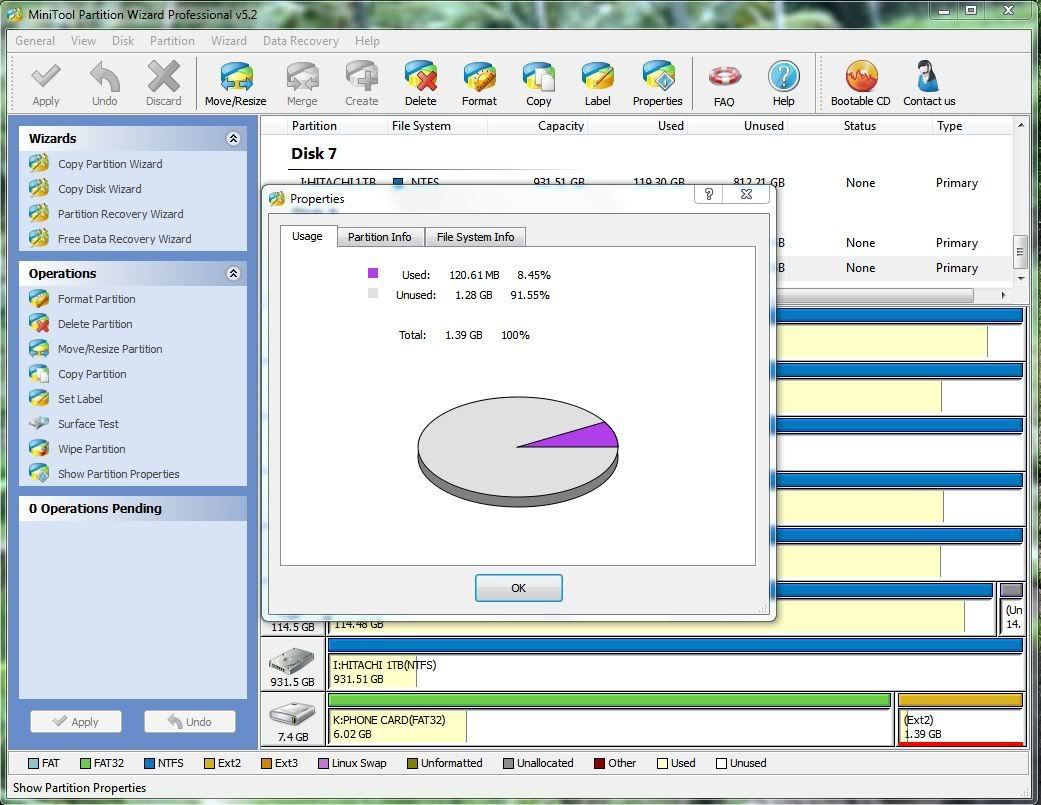
Another way is, in the Minitool Partition Wizard, just right click the ext2 partition and select properties. It will show you that the partition is being used...this is mine..

user posted image

For instance, my internal memory was 402MB after I fresh install 2.1 firmware and now it has 357MB left although I've installed 120MB worth of applications.
tot31
post Nov 4 2010, 11:42 PM

I DON'T GIVE A DAMN
*******
Senior Member
2,451 posts

Joined: Jan 2003
From: GOD's Land


QUOTE(ckshieh @ Nov 4 2010, 11:24 PM)
That particular checkbox isn't checked, which mean I don't depend on the contact in the FB or Twitter for my contact. Anyhow, guess what? yesterday I decided to remove all the contact which I have sync from sony ericsson portal, just to test again on the backup and restore function in the phone. What I did is delete all the phone contact, then restore only the contact via the backup and restore function, TATA, all the contacts now restored and display correctly.

I guess la, maybe I need to setup the FB account, then only restore will work?? If really this is the case, then die la, people without FB account, then contact all gone for sure.
*
I'm using contact2sim to synchronize contacts between my phone and my sim card. I never rely on gmail or fb or other sync method. So whenever I formatted my phone I'll copy back all my contacts from my sim to my phone, it's very easy and convenient.
tot31
post Nov 5 2010, 05:55 PM

I DON'T GIVE A DAMN
*******
Senior Member
2,451 posts

Joined: Jan 2003
From: GOD's Land


How To : App2sd on Xperia X10i

Pre Installation.
I'm assuming that you have just fresh install 2.1 firmware and root your phone before you start the procedure. This is how I did with my phone.
1. Reinstall 2.1 firmware by using Sony Ericsson Update Service.
2. Root the phone by using SuperOneClick ( http://d01.megashares.com/dl/1xcuTic/Super...4-ShortFuse.zip ). More info on SuperOneClick, go here -> http://forum.xda-developers.com/showthread.php?t=803682
Note : Please disable any anti virus especially Kaspersky as it will give false virus alarm and will delete one of the file.
3. Install busybox ( http://d01.megashares.com/dl/pe5Hj9N/steri...ybox.1.17.1.apk ).

Step 1 : Preparing your micro SD Card.
Please refer to this link ( http://forum.xda-developers.com/wiki/index...rd_partitioning ) on how to prepare your micro sd card. For better performance I would advise that you use a Class 10 card instead of the original card that comes with the phone because the card is only Class 2 card. For more infomation on speed class rating of sd card please go here -> http://en.wikipedia.org/wiki/Secure_Digital

An excerpt taken from wikipedia :-
The following are the ratings of some currently available cards:
* Class 0 - These cards do not specify performance, which includes all legacy cards prior to class specifications.
* Class 2 - Minimum of 2 MB/s performance. Lowest speed for SDHC cards.
* Class 4 - Minimum of 4 MB/s performance.
* Class 6 - Minimum of 6 MB/s performance.
* Class 10 - Minimum of 10 MB/s performance.

Note : The recommended maximum size of ext2 partition is 1.4GB. I've tried 3GB before and ended up with unstable system and eventually crash the phone. So if you're really greedy since you've bought a 16GB or 32GB card to partition the ext2 more than the recommended size and if your phone is unstable, you've been warn.

Step 2 : Download the related files.
1. App2sd : http://d01.megashares.com/dl/lKxNsky/app2sd2.1.zip
2. adb shell : http://d01.megashares.com/dl/s9Iyqte/adb.zip

Step 3 : Enabling USB Debugging mode on you phone.
Go to Settings -> Applications -> Development -> USB Debugging (check this option).

Step 4 : Installing App2sd.
Create a folder name adb in your pc and extract all the files from adb.zip into this folder.

Connect your phone to your pc and mount the sd card. Extract all the file from app2sd2.1.zip to the root of your sd card. Make sure to unmount the sd card before continue the next step.

In your pc open up a dox terminal box by typing cmd in the Search programs and files box.

Type

cd /adb

then type

adb shell

then type

sh /sdcard/app2sd.sh

you'll be presented by this screen...
+________________________________+
********************************
*Welcome To wolfilein's App2sd *
*installing script *
********************************
+--------------------------------+

~this version should be go on any device ~

+___________________+
********************
* Menu *
* *
*[0] install app2sd*
*[1] remove app2sd *
*[2] exit *
********************
+--------------------+
[0]


now just press the enter key & wait.

Important : Make sure to set your phone screen timeout to the max because Superuser will ask for your permission to allow this script to run. If your screen goes blank, you can't see this prompt and the installation will fail.

after a while you'll get this..

busybox is /system/bin/busybox
rm failed for /etc/mount_sd.sh, No such file or directory
+________________________________+
********************************
finished going reboot now
********************************
+--------------------------------+


Don't worry, actually it does not fail. I also got the same message and I also thought it failed but when install all the apps and check using Minitool Partition Wizard and Linux Reader for windows, all my applications are installed into my card (see my previous post with screenshot).

The Explanation
If you look through the app2sd.sh script, command rm /etc/mount_sd.sh means remove/delete the mount_sd.sh file from /etc folder, since that file does not exist in the fresh install phone, it gives this error message but continue with other commands..

rm /etc/mount_sd.sh
mv /system/bin/sh /system/bin/sh_bak
cat /sdcard/sh.sh > /system/bin/sh
chmod 777 /system/bin/sh
busybox cp /sdcard/mount_sd.sh /etc/mount_sd.sh
echo "
+________________________________+
********************************
finished going reboot now
********************************
+--------------------------------+
"
sleep 1
reboot


Finally after a reboot, your phone is ready with app2sd. From now on when you install any applications it will save into your sd card.

Disclaimer : Do this at your own risk. I will not responsible if any injuries or damage occur to you or your phone laugh.gif laugh.gif

This post has been edited by tot31: Nov 5 2010, 06:29 PM

tot31
post Nov 7 2010, 10:26 PM

I DON'T GIVE A DAMN
*******
Senior Member
2,451 posts

Joined: Jan 2003
From: GOD's Land


QUOTE(FallenOut @ Nov 7 2010, 03:40 AM)
if u r in the market for some shopping
if u need a nicer lock screen
widgetlocker is the nicest there is
n quite cheap too

after i went over to 2.1
tat was the first thing i brought
*
Yup agree with you on that... thumbup.gif

Another 2.2 feature that can run on 2.1, ie JIT enable...now my phone runs much better....

This post has been edited by tot31: Nov 7 2010, 10:28 PM
tot31
post Nov 8 2010, 08:52 AM

I DON'T GIVE A DAMN
*******
Senior Member
2,451 posts

Joined: Jan 2003
From: GOD's Land


QUOTE(FallenOut @ Nov 8 2010, 01:32 AM)
u r so hardworkin lolz
im too lazy
nvr install app2sd n also jit
bt read someone sayin jit not so stable yet

live wallpaper really makes the phone laggy abit n battery drainin
bt i like the live wallpaper n i can live wit some minor lag n i got 2 batts for the drainin part
*
so far my phone is stable with jit... thumbup.gif
tot31
post Nov 9 2010, 05:45 PM

I DON'T GIVE A DAMN
*******
Senior Member
2,451 posts

Joined: Jan 2003
From: GOD's Land


Papago X5 is working back again.... rclxm9.gif rclxm9.gif
tot31
post Nov 9 2010, 06:34 PM

I DON'T GIVE A DAMN
*******
Senior Member
2,451 posts

Joined: Jan 2003
From: GOD's Land


QUOTE(bjmin @ Nov 9 2010, 06:22 PM)
gain complain from my fren said i always send 2 mms to them when im just sending them 1. using Handcent downloaded on market. any solution?
*
I'm using chompsms...so far no problem. Even I can get the led notification.

tot31
post Nov 10 2010, 07:04 AM

I DON'T GIVE A DAMN
*******
Senior Member
2,451 posts

Joined: Jan 2003
From: GOD's Land


QUOTE(bjmin @ Nov 10 2010, 12:34 AM)
may i know how to JIT it?
*
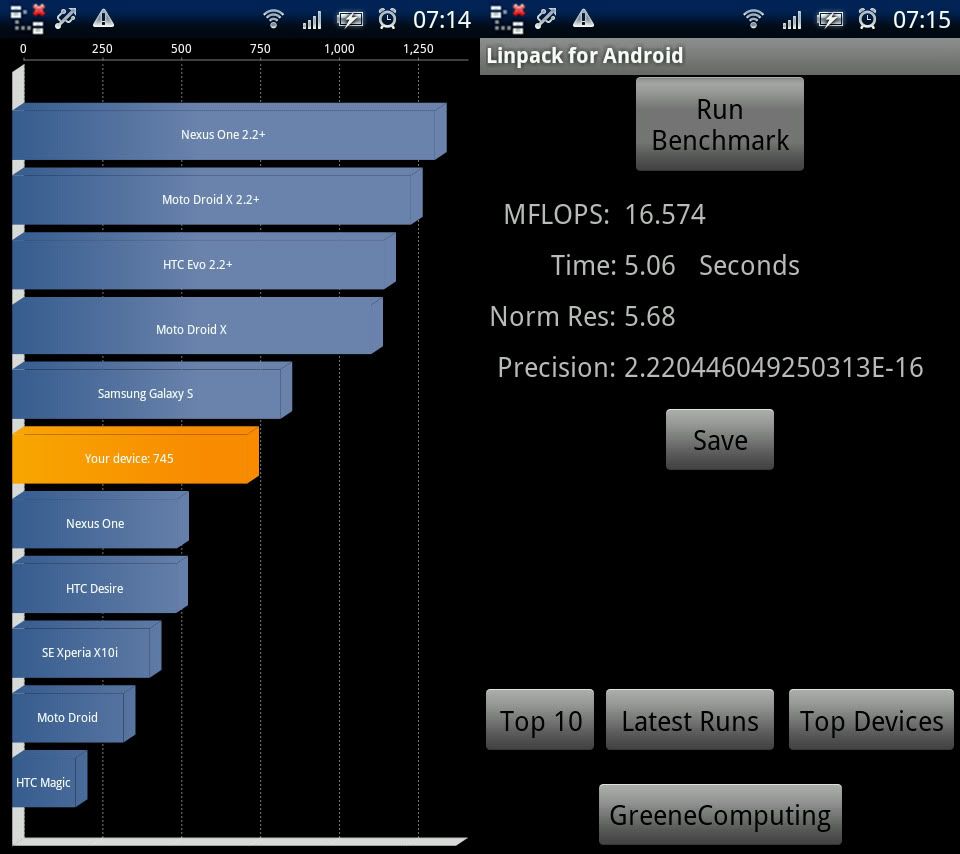
The easiest way and you will not loose your root -> JIT Toggle

my benchmark

user posted image

This post has been edited by tot31: Nov 10 2010, 07:21 AM
tot31
post Nov 10 2010, 09:20 AM

I DON'T GIVE A DAMN
*******
Senior Member
2,451 posts

Joined: Jan 2003
From: GOD's Land


QUOTE(Benjamin @ Nov 10 2010, 07:49 AM)
Nice one bro tot31. Any lags or obvious improvements? Can the 2.1 support tethering?  laugh.gif
*
So far no lags at all. Everything are much better. Angry birds runs even faster, sometimes too fast.


7 Pages « < 3 4 5 6 7 >Top
Topic ClosedOptions
 

Change to:
| Lo-Fi Version
0.0488sec    0.49    7 queries    GZIP Disabled
Time is now: 6th December 2025 - 06:05 PM