

Yeap did that.."one click" rooting via flashrec and RA-HERO...img.
Shahz's Android guides with Ultimate package dload, Get the most out of your HTC Hero!
Shahz's Android guides with Ultimate package dload, Get the most out of your HTC Hero!
|
|
 Nov 6 2009, 03:44 PM Nov 6 2009, 03:44 PM
|
 
Senior Member
882 posts Joined: Mar 2005  
|
Yeap did that.."one click" rooting via flashrec and RA-HERO...img.
|
|
|
|
|
|
Nov 6 2009, 03:46 PM
|

Senior Member
1,566 posts Joined: Jun 2007 From: Subang Jaya
|
Great..Anything, just post here yeah
 Have fun~ Have fun~ |
|
|
Nov 6 2009, 05:31 PM
|
|
Senior Member
882 posts Joined: Mar 2005
|
Maybe i'll try tonight one last time. (By the way your 1st step involving the command prompt works, but it just cant find the RA.img) That's why i use the "once click" method from overlockr. So basically what i'll do:
1. Restore hero to original state. SEA firmware 2. Install flashrec 3. Flash Hero.img 4. Boot, invoke through "home & power" button 5. Perform nand backup 6.Wipe 7.Update generic (update.zip) 8. update radio 9.update MCR 2.9 10.update enhance 11.update boot sound 12. reboot Anything i miss? |
|
|
Nov 6 2009, 08:41 PM
|
|
Senior Member
1,566 posts Joined: Jun 2007 From: Subang Jaya
|
Yeah..You're all set to go..! Good Luck bro..!
 |
|
|
Nov 7 2009, 01:36 AM
|

Junior Member
82 posts Joined: Jun 2008
|
OMG, I can't believe I missed this guide before indulging myself into deep confusion. Thumbs up for the great job,bro!
|
|
|
Nov 7 2009, 01:46 AM
|
|
Senior Member
882 posts Joined: Mar 2005
|
I did once more, this time restoration via Sprite backup just after running update & radio. Only thereafter I run mcr update
|
|
|
|
|
|
Nov 7 2009, 01:49 AM
|
|
Senior Member
1,566 posts Joined: Jun 2007 From: Subang Jaya
|
QUOTE(voodoo8808 @ Nov 7 2009, 01:36 AM) OMG, I can't believe I missed this guide before indulging myself into deep confusion. Thumbs up for the great job,bro! Haha..Problem is, this post is not sticky..Thats why you must have missed it..   QUOTE(cylon @ Nov 7 2009, 01:46 AM) I did once more, this time restoration via Sprite backup just after running update & radio. Only thereafter I run mcr update YAY!  Its okay..Actually, the sequence is of flashing is not important because each of them have different ROMs and are independent of each other (radio, system, etc.)..Only thing you have to install in the last is the "bootsounds" if you want to use it that is |
|
|
Nov 7 2009, 03:58 PM
|

Senior Member
1,138 posts Joined: Sep 2005
|
There is another Dev in XDA, i saw some people say his rom is faster, haven't tried it yet though, but what is interesting is that he says his can alow installation of 1.6 and 2.0 app.
|
|
|
Nov 7 2009, 04:30 PM
|

Junior Member
218 posts Joined: Apr 2006 From: ~ Infrared World ~ 
|
C:\Users\Value Customer>adb shell reboot bootloader
C:\Users\Value Customer>fastboot boot recovery-RA-HERO-v1.2.3.img cannot load 'recovery-RA-HERO-v1.2.3.img' what errors for this? |
|
|
Nov 7 2009, 06:07 PM
|
|
Senior Member
1,566 posts Joined: Jun 2007 From: Subang Jaya
|
QUOTE(naTTan @ Nov 7 2009, 03:58 PM) There is another Dev in XDA, i saw some people say his rom is faster, haven't tried it yet though, but what is interesting is that he says his can alow installation of 1.6 and 2.0 app. Depends on which ROM you are talking about. There are plenty of ROMs available out there. Problem is, some devs overclock their roms to achieve speed. This is not the right method. Overclocking the processor will not only shorten the lifespan of the processor, but also reduce battery life and can burn your processor over continuous usages. I have tried several ROMs already. Thing about this MoDaCo ROM with teknologist kernel is, all the main needed applications are installed. All the unused ones are removed. Do post the link you are referring to so we can analyse it too QUOTE(shahnakal @ Nov 7 2009, 04:30 PM) C:\Users\Value Customer>adb shell reboot bootloader you need to go to your Android SDK package's tool installation folder.C:\Users\Value Customer>fastboot boot recovery-RA-HERO-v1.2.3.img cannot load 'recovery-RA-HERO-v1.2.3.img' what errors for this? eg: C:\<android_SDK_folder>\tools |
|
|
Nov 7 2009, 06:17 PM
|
|
Senior Member
882 posts Joined: Mar 2005
|
He faces the same problem as I had. The command, syntax & directory are correct. It just can't find the img. I forego that step and use overlockr one click method.
|
|
|
Nov 7 2009, 06:22 PM
|
|
Junior Member
218 posts Joined: Apr 2006 From: ~ Infrared World ~
|
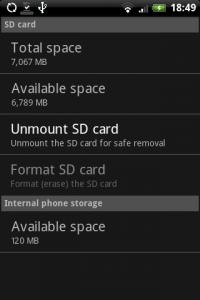
QUOTE(cylon @ Nov 7 2009, 06:17 PM) He faces the same problem as I had. The command, syntax & directory are correct. It just can't find the img. I forego that step and use overlockr one click method. so are u successful make partition on your SD? i've try lots of time but still cant..
This post has been edited by shahnakal: Nov 7 2009, 06:57 PM |
|
|
Nov 7 2009, 06:38 PM
|
|
Senior Member
1,566 posts Joined: Jun 2007 From: Subang Jaya
|
That is strange..did you put the recovery-RA-HERO-v1.2.3.img on the root of your SD card?
Otherwise, flashrec.apk is the way to go..Verify if you have located the img in the root of SD first.. |
|
|
|
|
|
Nov 8 2009, 02:52 AM
|

Senior Member
1,513 posts Joined: Nov 2004 From: Kuching - Klang 
|
shah im mac user
can u clarify how to install the sdk on my mac? do u need to install eclipse first? |
|
|
Nov 8 2009, 04:00 AM
|
|
Senior Member
1,566 posts Joined: Jun 2007 From: Subang Jaya
|
Aloha prazole...
Actually, I'm also a mac user (Great choice on both your laptop and phone!  ) )Its easy actually... On your mac, find your .bash_profile and in the PATH variable, add the SDK location to your $SDK_ROOT/tools folder. That will settle it Oh, and all the commands for ADB on mac are the same, except that you need to insert a ./ before each command. Try it out. Good Luck.. Added on November 8, 2009, 4:01 amForgot to add, you don't need eclipse unless you want to develop an application for android This post has been edited by shahz: Nov 8 2009, 04:01 AM |
|
|
Nov 8 2009, 08:53 PM
|

Senior Member
6,659 posts Joined: Jan 2003 From: Palace of sexology 
|
anyone here try Power Manager Full 1.6.2
is it good ? |
|
|
Nov 8 2009, 11:42 PM
|
|
Senior Member
1,566 posts Joined: Jun 2007 From: Subang Jaya
|
Not yet..Why not you give it a shot and share with us?
|
|
|
Nov 8 2009, 11:46 PM
|
|
Senior Member
6,659 posts Joined: Jan 2003 From: Palace of sexology
|
QUOTE(shahz @ Nov 8 2009, 11:42 PM) Not yet..Why not you give it a shot and share with us? Power Manager Full 1.6.2• Summary: Extended your battery life and manage the power usage of your phone. Adds NEW settings to the phone (e.g. screen timeout during a call, etc.) and allows you to quickly change other phone settings depending on conditions. Description This application adds NEW power settings to the phone (e.g. how long the screen is on during a call, if device stays on while the keyboard is open, etc.) and allows you to quickly view and change other phone settings depending on different conditions (e.g. turn off synchronization when the battery level drops below 30%, lower the brightness of the screen when on battery power, change the screen timeout if on A/C power, etc.) It comes with a set of predefined profiles and automatically starts working after installation. Unless you want to change any of these definitions or use advanced features nothing else has to be done after the program is installed. How to use You can change individual settings (e.g. WiFi) by clicking the buttons on the panel at the top of the screen or you can change several settings at once by using a profile. Profiles define what settings should be modified and can also contain triggers that indicate if they should be applied automatically (e.g. when on A/C power, when on battery power, when the battery drops below a certain level). NOTE: THE MONITOR MUST BE ENABLED IN THE STATUS PANEL FOR PROFILES TO BE APPLIED AUTOMATICALLY. This application comes with predefined profiles for the most common conditions. These profiles can be changed or deleted by either long pressing on the profile name or by selecting the profile with the track ball and clicking on the menu key. You can also create additional profiles and shortcuts on the desktop to a specific profile. Power Manager also gathers statistics as the device changes power states. These statistics and can be written to a CSV file on the SDCARD (in the power_manger sub-directory) and can then be loaded into a spreadsheet application (e.g. Excel) to perform analysis (e.g. determine if your battery does not last as long it used to, or if an application is affecting your battery life). NOTE: THE APPLICATION WORKS DIFFERENTLY DEPENDING ON THE VERSION OF ANDROID YOU ARE RUNNING.  |
|
|
Nov 8 2009, 11:52 PM
|
|
Senior Member
1,566 posts Joined: Jun 2007 From: Subang Jaya
|
Looks pretty good actually, But I think we can basically achieve this manually..There are plenty of widgets which do parts of this, and you can add it to one page of the home screen
Personally, I wouldn't buy it though..I don't see the necessity.. I downloaded Adobe Photoshop Android yesterday..Pretty cool I would say..Of course PicSayPro is a lot powerful, but since photoshop is free, what it does is really cool |
|
|
Nov 9 2009, 06:30 PM
|

Junior Member
203 posts Joined: May 2006
|
http://theunlockr.com/ have good tutorial with video. check that site if u want to hack around ur android.
btw, i'm using oldskool g1. no intention to upgrade yet since i love my physical keyboard |
| Change to: |  0.0245sec 0.0245sec
 0.48 0.48
 6 queries 6 queries
 GZIP Disabled GZIP Disabled
Time is now: 5th December 2025 - 10:37 AM |
 Quote
Quote