0586297 is disaster code.... same bro.... we both suffer... and yes.. NCC far far away from my place...
i still stuck in V1.2...
so "happy"
NOKIA N97 V3!, Firmware v21 is available for updates!
NOKIA N97 V3!, Firmware v21 is available for updates!
|
|
 Feb 2 2010, 08:49 PM Feb 2 2010, 08:49 PM
|
 
Senior Member
1,148 posts Joined: Jan 2009 
|
0586297 is disaster code.... same bro.... we both suffer... and yes.. NCC far far away from my place...
i still stuck in V1.2... so "happy" |
|
|
|
|
|
Feb 2 2010, 09:05 PM
|

Junior Member
310 posts Joined: May 2005 
|
QUOTE(tplus1 @ Feb 2 2010, 08:49 PM) 0586297 is disaster code.... same bro.... we both suffer... and yes.. NCC far far away from my place... your previous post i read and i tot why you so happy with the v12 ><i still stuck in V1.2... so "happy"   everyone here now upgrade to v21, but i wanna stick with v20 for a while. they dont have much diff anyway...dont wanna go through all the trouble. oh ya.... can anyone explain to me what is hard reset and how to do it ? |
|
|
Feb 2 2010, 09:23 PM
|

Senior Member
1,661 posts Joined: Oct 2008
|
Read this..
QUOTE(Xploit Machine @ Jan 22 2010, 05:21 PM) Soft & Hard Reset Nokia - Explanation » Click to show Spoiler - click again to hide... « QUOTE(Leo the Lion @ Oct 28 2009, 05:27 PM) How to reset your Nokia N97 » Click to show Spoiler - click again to hide... « |
|
|
Feb 2 2010, 09:37 PM
|

Senior Member
8,407 posts Joined: Jun 2005
|
QUOTE(PyOsE @ Feb 2 2010, 08:22 PM) found it!! thanks Bro... http://www.pizero.net/archives/1427 Added on February 2, 2010, 8:28 pm if u really want the new firmware...do it...but not so much improvement..only minor update  Added on February 2, 2010, 8:31 pm what? u mean during using NSU?  Added on February 2, 2010, 8:34 pm why so happy bro? coz u still at v11? @tplus1.. what is the point of making complaining here again n again? If you don't feel like going to NCC, just learn the few step to change the product code to whatever code you like, then get the NSU to upgrade to the new firmware u are looking for.. end of story rather than complaining yeah? more productivity way yeah? |
|
|
Feb 2 2010, 09:40 PM
|

Junior Member
196 posts Joined: Mar 2009
|
i mean when update through cable to pc... it available new update for my fon, but i click update...it say fail...and ask me to connect usb direct to the pc....bla bla bla...
|
|
|
Feb 2 2010, 09:49 PM
|
|
Senior Member
8,407 posts Joined: Jun 2005
|
QUOTE(gunslinger @ Feb 2 2010, 09:40 PM) i mean when update through cable to pc... it available new update for my fon, but i click update...it say fail...and ask me to connect usb direct to the pc....bla bla bla... can you freely copy and delete file in ur Phone using ur PC? |
|
|
|
|
|
Feb 2 2010, 09:53 PM
|
|
Junior Member
196 posts Joined: Mar 2009
|
how a?
Attached thumbnail(s) 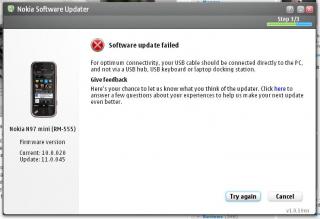
|
|
|
Feb 2 2010, 09:56 PM
|
|
Senior Member
8,407 posts Joined: Jun 2005
|
QUOTE(gunslinger @ Feb 2 2010, 09:53 PM) how a? r u using the Ori USB cable? try another PC I suggest.... |
|
|
Feb 2 2010, 11:28 PM
|

Senior Member
839 posts Joined: Aug 2009
|
QUOTE(PyOsE @ Feb 2 2010, 04:35 PM) here u go... Hi PyOsE, can you share the wigzet at the bottom of your screen?» Click to show Spoiler - click again to hide... « btw..its not a big deal...i always use other Theme instead of default nokia  So cool.... I like...  QUOTE(gunslinger @ Feb 2 2010, 09:53 PM) how a? I think this error message said "are you using a USB Hub to connect your phone to the PC?"...I would try use the original USB cable, in case you are using the normal cable from other computer shop. I would also try connect the phone and PC directly without a USB Hub, if you're not using any USB Hub, try change to other USB port, probably the one at the back of the CPU casing.  |
|
|
Feb 2 2010, 11:56 PM
|
|
Senior Member
8,407 posts Joined: Jun 2005
|
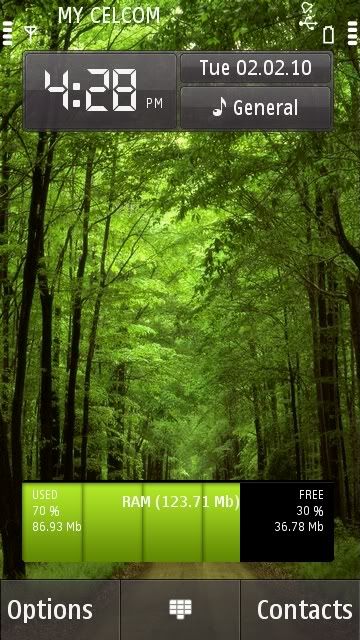
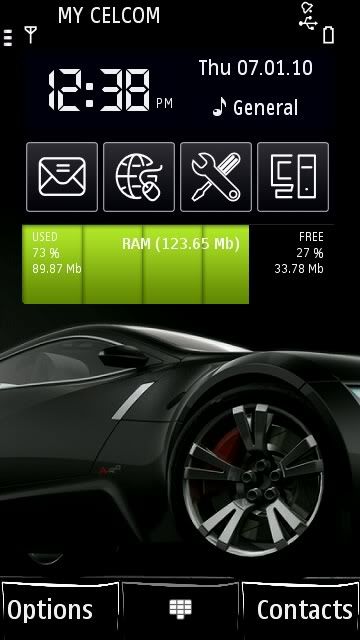
very hard to find animated theme...
 Added on February 3, 2010, 12:00 amhttp://www.nokia4free.com/animated-themes/index.php This post has been edited by BuFung: Feb 3 2010, 12:00 AM |
|
|
Feb 3 2010, 12:04 AM
|
|
Junior Member
196 posts Joined: Mar 2009
|
QUOTE(G K Lai @ Feb 2 2010, 11:28 PM) Hi PyOsE, can you share the wigzet at the bottom of your screen? it's orignal usb cable in the box...and i hv try to connect all at the back usb hub... same error comes outSo cool.... I like... I think this error message said "are you using a USB Hub to connect your phone to the PC?"... I would try use the original USB cable, in case you are using the normal cable from other computer shop. I would also try connect the phone and PC directly without a USB Hub, if you're not using any USB Hub, try change to other USB port, probably the one at the back of the CPU casing. |
|
|
Feb 3 2010, 12:24 AM
|

Senior Member
1,475 posts Joined: Dec 2006 From: Paradise 
|
QUOTE(gunslinger @ Feb 2 2010, 09:53 PM) how a? i got the same problem too, i have 2 phones, 1 updated successfully but another failed with the usb update error.hopefully someone have solution, cos i already googled hard without any good result. btw hope all bros dont mind that im from n97mini thread =.=" |
|
|
Feb 3 2010, 12:49 AM
|
|
Junior Member
62 posts Joined: Nov 2009
|
i just updated my phone to v21 but havent hard reset yet
having 2nd thought on hard reset did backup, later if i restore back, are all the application installed b4 hard reset will be restored as well? i have installed alot of 3rd applications wei, scared of losing it all This post has been edited by omarule87: Feb 3 2010, 12:52 AM |
|
|
|
|
|
Feb 3 2010, 01:09 AM
|
|
Senior Member
839 posts Joined: Aug 2009
|
QUOTE(BuFung @ Feb 2 2010, 11:56 PM) very hard to find animated theme... Hi BuFung, the site is great..... errr....... but how to download? Added on February 3, 2010, 12:00 amhttp://www.nokia4free.com/animated-themes/index.php QUOTE(gunslinger @ Feb 3 2010, 12:04 AM) it's orignal usb cable in the box...and i hv try to connect all at the back usb hub... same error comes out This is so weird.....  If it still failed and nothing more you can do, why not hard-reset and then try update again?  people change product code just for update to the latest firmware (include me...  )... )...so if you do a hard-reset to get the latest firmware, this isn't any strange... QUOTE(dvinez @ Feb 3 2010, 12:24 AM) btw hope all bros dont mind that im from n97mini thread =.=" Who is going to mind which thread are you from?  All are welcome....!  QUOTE(omarule87 @ Feb 3 2010, 12:49 AM) i just updated my phone to v21 but havent hard reset yet If you also choose to backup "user files" from phone memory and mass memory, having 2nd thought on hard reset did backup, later if i restore back, are all the application installed b4 hard reset will be restored as well? i have installed alot of 3rd applications wei, scared of losing it all I believe you will get it back after restore... But remember do not restore your "Settings" from v20 to this new firmware. I had issue (stuck at Nokia logo screen when power on) when restore my v12 "Settings" over v20 firmware, tried many times (hard reset a lot of time due to unable to boot up) only found out the culprit. Nokia people also mentioned "backup exclude Settings..." you can see it a few page back... |
|
|
Feb 3 2010, 01:33 AM
|
|
Junior Member
62 posts Joined: Nov 2009
|
QUOTE(G K Lai @ Feb 3 2010, 01:09 AM) If you also choose to backup "user files" from phone memory and mass memory, I believe you will get it back after restore... But remember do not restore your "Settings" from v20 to this new firmware. I had issue (stuck at Nokia logo screen when power on) when restore my v12 "Settings" over v20 firmware, tried many times (hard reset a lot of time due to unable to boot up) only found out the culprit. Nokia people also mentioned "backup exclude Settings..." you can see it a few page back... |
|
|
Feb 3 2010, 01:46 AM
|
|
Senior Member
1,661 posts Joined: Oct 2008
|
Lai, check this out
» Click to show Spoiler - click again to hide... « g.nite all  Added on February 3, 2010, 1:50 am QUOTE(omarule87 @ Feb 3 2010, 01:33 AM) where to find this setting? during backup, u can choose to backup your old settings or not...just untick the "settings" box This post has been edited by PyOsE: Feb 3 2010, 01:50 AM |
|
|
Feb 3 2010, 03:36 AM
|
|
Senior Member
839 posts Joined: Aug 2009
|
QUOTE(PyOsE @ Feb 3 2010, 01:46 AM) Lai, check this out Many thanks, PyOsE...! |
|
|
Feb 3 2010, 08:20 AM
|
Senior Member
1,949 posts Joined: Nov 2006 From: village land 
|
yesterday use my phone connect interne more than 2 hour.
suddenly feel tat my phone is going hang, so i try to restart. after restart my phone cannot be ON anymore. just stay in NOKIA screen  i think the phone software is corrupted. need to send bk to nokia service centre  |
|
|
Feb 3 2010, 08:32 AM
|
|
Senior Member
1,006 posts Joined: Jul 2007
|
take out battery then pput back again
|
|
|
Feb 3 2010, 08:49 AM
|
|
Senior Member
1,475 posts Joined: Dec 2006 From: Paradise
|
QUOTE(MOMOchacha @ Feb 3 2010, 08:20 AM) yesterday use my phone connect interne more than 2 hour. that is the famous wsod suddenly feel tat my phone is going hang, so i try to restart. after restart my phone cannot be ON anymore. just stay in NOKIA screen i think the phone software is corrupted. need to send bk to nokia service centre must update firmware asap to fix..( too bad mine cant )Follow these steps from nokia discussion, it works: » Click to show Spoiler - click again to hide... « if really cannot then do a hard reset, it will on back. |
|
Topic ClosedOptions
|
| Change to: |  0.0297sec 0.0297sec
 0.68 0.68
 6 queries 6 queries
 GZIP Disabled GZIP Disabled
Time is now: 4th December 2025 - 05:44 PM |
 Quote
Quote