Welcome Guest ( Log In | Register )

116 Pages « < 18 19 20 21 22 > » Bottom

Outline · [ Standard ] · Linear+

 Cable Management Thread V2, Share your cabling tricks here

views
     
NewKY
post Jun 15 2010, 12:38 PM

New Member
*
Junior Member
9 posts

Joined: Nov 2009
From: Selayang Jaya
QUOTE(V3nz @ Jun 14 2010, 06:05 PM)
oh my!i juz love to see lancool-k62 in action!! rclxm9.gif  wub.gif

same case user here cheers.gif

nice job done,i must say,very2 neat!! rclxms.gif

and i see you got your hdd tray out,nice idea on that! thumbup.gif

may i ask how?i tried to get it out but can't,haha!stupid me i guess doh.gif

ask you one thing,where do you get the same blue fan at the top there?i mean front panel tongue.gif

wat brand isit? hmm.gif
*
The HDD tray have five screw (1 on the top(inside the bottom of CD tray) and 4 at the bottom chassis) but mine only got 2 at the bottom.. It's depend smile.gif

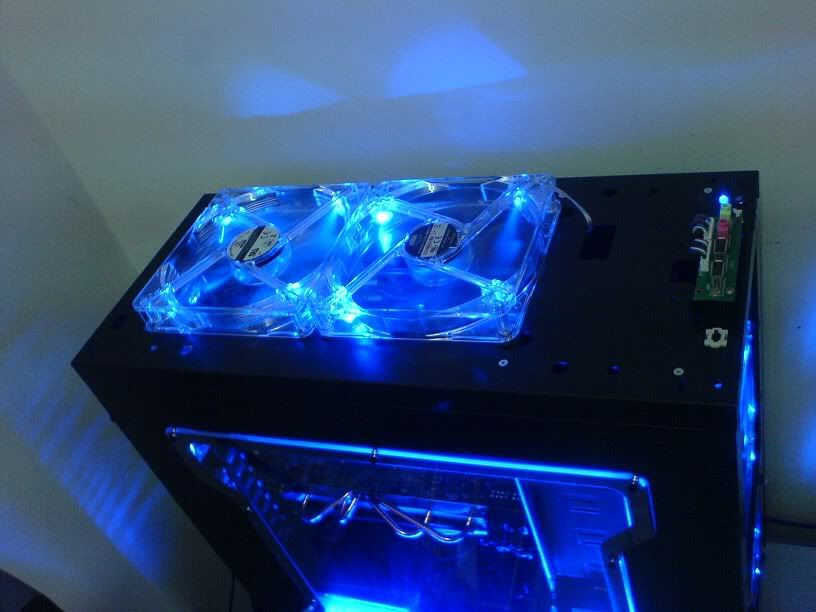
The blue fan on the top (front panel) which I borrow from the top chassis fan that's come with the chassis itself. Then I replace the top chassis fan with cooler master 14 cm blue LED silent fan. P/S the cooler master blue LED is a bit difference color with Lancool.

Hope the infor can help you brows.gif


Added on June 15, 2010, 12:47 pm
QUOTE(apexc @ Jun 14 2010, 11:44 PM)
HI Everyone....

Just need to ask one simple question.

Just newbie here , but I am not into casing mod....but I need to know where to get nylon cable sleeve?

I have survey almost the whole LowYat but end up frustrating....
I need it to do something else... Hope all sifus here will give me a good guide....
Thank you in advanced....
*
Bro, did you means this?
http://forum.lowyat.net/index.php?showtopic=327972

This post has been edited by NewKY: Jun 15 2010, 12:47 PM
apexc
post Jun 15 2010, 03:46 PM

New Member
*
Newbie
3 posts

Joined: Oct 2008


Thank bro NewKY...
V3nz
post Jun 15 2010, 05:11 PM

Chuck to teh rescue !!
*******
Senior Member
2,367 posts

Joined: Oct 2008
From: Penang / Selangor


QUOTE(NewKY @ Jun 15 2010, 12:38 PM)
The HDD tray have five screw (1 on the top(inside the bottom of CD tray) and 4 at the bottom chassis) but mine only got 2 at the bottom.. It's depend  smile.gif

The blue fan on the top (front panel) which I borrow from the top chassis fan that's come with the chassis itself.  Then I replace the top chassis fan with cooler master 14 cm blue LED silent fan. P/S the cooler master blue LED is a bit difference color with Lancool.

Hope the infor can help you  brows.gif


Added on June 15, 2010, 12:47 pm

Bro, did you means this?
http://forum.lowyat.net/index.php?showtopic=327972
*
Nice idea!!But then not nice to look at the top chasis liao hmm.gif

and how you get the top chasis's fan out?it seems abit hard sweat.gif

Thank you very much anyway notworthy.gif notworthy.gif
NewKY
post Jun 17 2010, 10:43 AM

New Member
*
Junior Member
9 posts

Joined: Nov 2009
From: Selayang Jaya
QUOTE(V3nz @ Jun 15 2010, 05:11 PM)
Nice idea!!But then not nice to look at the top chasis liao hmm.gif

and how you get the top chasis's fan out?it seems abit hard sweat.gif

Thank you very much anyway notworthy.gif  notworthy.gif
*
Here how's mine top chassis look like
user posted image

"How to get the top chassis's fan out"
http://www.youtube.com/watch?v=N4XCT9yibwQ

V3nz
post Jun 17 2010, 03:12 PM

Chuck to teh rescue !!
*******
Senior Member
2,367 posts

Joined: Oct 2008
From: Penang / Selangor


QUOTE(NewKY @ Jun 17 2010, 10:43 AM)
Here how's mine top chassis look like
» Click to show Spoiler - click again to hide... «


"How to get the top chassis's fan out"
http://www.youtube.com/watch?v=N4XCT9yibwQ
*
Wow!Nice brows.gif
akagidemon
post Jun 20 2010, 12:34 PM

Casual
***
Junior Member
453 posts

Joined: Nov 2007
From: Between Reality and Fantasy


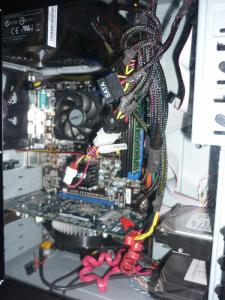
here is my effort. still very new in cable management but i tried my best to do it. additional advice is welcome.

CM elite 335

business end

user posted image

behind the scene

user posted image

really tight with a v10 in a mid tower. silly me messing up the measurement before buying the v10.

Darksorrow3010
post Jun 20 2010, 01:46 PM

Getting Started
**
Junior Member
147 posts

Joined: Oct 2009


@NewKY, where u put ur HDD? at the 5.25" drive bay?
SUSXiia0Ban
post Jun 20 2010, 02:04 PM

Look at all my stars!!
*******
Senior Member
3,657 posts

Joined: Aug 2009
QUOTE(Darksorrow3010 @ Jun 20 2010, 01:46 PM)
@NewKY, where u put ur HDD? at the 5.25" drive bay?
*

» Click to show Spoiler - click again to hide... «

Yeah he put at the 5.25" drive bay
Darksorrow3010
post Jun 20 2010, 02:07 PM

Getting Started
**
Junior Member
147 posts

Joined: Oct 2009


how did he fit the HDD in there? need some kind of adaptor or something?
SUSXiia0Ban
post Jun 20 2010, 03:44 PM

Look at all my stars!!
*******
Senior Member
3,657 posts

Joined: Aug 2009
QUOTE(Darksorrow3010 @ Jun 20 2010, 02:07 PM)
how did he fit the HDD in there? need some kind of adaptor or something?
*
Just put the hdd on there will do...since the hdd is only 3.5" while the drive bay is 5.25"...
No idea how he secure the hdd from falling down..maybe let him answer himself
akagidemon
post Jun 20 2010, 03:57 PM

Casual
***
Junior Member
453 posts

Joined: Nov 2007
From: Between Reality and Fantasy


i think silverstone got an adaptor for fitting a hdd into the 5.25".
captvizcenzo
post Jun 20 2010, 04:00 PM

Regular
******
Senior Member
1,484 posts

Joined: Feb 2009
From: Kuching - Samarahan, Sarawak


QUOTE(Darksorrow3010 @ Jun 20 2010, 02:07 PM)
how did he fit the HDD in there? need some kind of adaptor or something?
*
QUOTE(Xiia0Ban @ Jun 20 2010, 03:44 PM)
Just put the hdd on there will do...since the hdd is only 3.5" while the drive bay is 5.25"...
No idea how he secure the hdd from falling down..maybe let him answer himself
*
There are quite a number of 5.25 to 3.5 bay converter... One of the example is here smile.gif
Darksorrow3010
post Jun 20 2010, 10:32 PM

Getting Started
**
Junior Member
147 posts

Joined: Oct 2009


oh... tq tq
NewKY
post Jun 21 2010, 09:50 AM

New Member
*
Junior Member
9 posts

Joined: Nov 2009
From: Selayang Jaya
QUOTE(captvizcenzo @ Jun 20 2010, 04:00 PM)
There are quite a number of 5.25 to 3.5 bay converter... One of the example is here  smile.gif
*
Yeap, you can use the converter for more secure and stable rclxms.gif
But for mine's, I just screw up one side of the hard drive into the 5.25" tray tongue.gif
rekaito90
post Jul 4 2010, 02:16 PM

Getting Started
**
Junior Member
181 posts

Joined: Nov 2007
From: Malacca / Kuala Lumpur


This thread silent leady.try to bump a lil bit.

hows my cable management? sob3.need to buy new PSU .HAHA.
and someone please give me idea which casing is the best for RM200 below budget?

btw my DVD drive i didnt use often.so i pull out the power / sata .lol.

user posted image
SUSXiia0Ban
post Jul 4 2010, 02:21 PM

Look at all my stars!!
*******
Senior Member
3,657 posts

Joined: Aug 2009
QUOTE(rekaito90 @ Jul 4 2010, 02:16 PM)
This thread silent leady.try to bump a lil bit.

hows my cable management? sob3.need to buy new PSU .HAHA.
and someone please give me idea which casing is the best for RM200 below budget?

btw my DVD drive i didnt use often.so i pull out the power / sata .lol.

» Click to show Spoiler - click again to hide... «

*
Try hide ur sata cable into hdd rack?
reiben05
post Jul 4 2010, 02:37 PM

American Muscle
******
Senior Member
1,800 posts

Joined: Dec 2008
From: unknown


QUOTE(rekaito90 @ Jul 4 2010, 02:16 PM)
This thread silent leady.try to bump a lil bit.

hows my cable management? sob3.need to buy new PSU .HAHA.
and someone please give me idea which casing is the best for RM200 below budget?

btw my DVD drive i didnt use often.so i pull out the power / sata .lol.

user posted image
*
cable management looks good, needs some MDPC-X sleeving brows.gif.. ur PSU also looks fine haha, is that custom spraying on the psu cover ah?? drool.gif ..

QUOTE(Xiia0Ban @ Jul 4 2010, 02:21 PM)
Try hide ur sata cable into hdd rack?
*
or just get a shorter one as well sweat.gif??
sohakyee
post Jul 4 2010, 03:52 PM

Casual
***
Junior Member
358 posts

Joined: May 2010
From: Batu Caves, Selangor


Usual cabling ~
Attached Image
SUSXiia0Ban
post Jul 4 2010, 03:58 PM

Look at all my stars!!
*******
Senior Member
3,657 posts

Joined: Aug 2009
QUOTE(reiben05 @ Jul 4 2010, 02:37 PM)
cable management looks good, needs some MDPC-X sleeving brows.gif.. ur PSU also looks fine haha, is that custom spraying on the psu cover ah?? drool.gif ..
or just get a shorter one as well sweat.gif??
*
Good idea, i didnt thought about it just now..


This post has been edited by Xiia0Ban: Jul 4 2010, 04:00 PM
rekaito90
post Jul 4 2010, 04:11 PM

Getting Started
**
Junior Member
181 posts

Joined: Nov 2007
From: Malacca / Kuala Lumpur


QUOTE(reiben05 @ Jul 4 2010, 02:37 PM)
cable management looks good, needs some MDPC-X sleeving brows.gif.. ur PSU also looks fine haha, is that custom spraying on the psu cover ah?? drool.gif ..
or just get a shorter one as well sweat.gif??
*
haha ya.i spray my CAPALANG PSU.huhu. and body.hehe.ok i try to hide sata cable. thanks for all feedback:)

i jst plan to buy new psu later.with sleeving.hehe.


Added on July 4, 2010, 4:12 pm
QUOTE(sohakyee @ Jul 4 2010, 03:52 PM)
Usual cabling ~
Attached Image
*
what is ur psu?

This post has been edited by rekaito90: Jul 4 2010, 04:12 PM

116 Pages « < 18 19 20 21 22 > » Top
 

Change to:
| Lo-Fi Version
0.0314sec    0.64    6 queries    GZIP Disabled
Time is now: 21st December 2025 - 09:29 PM