Outline ·
[ Standard ] ·
Linear+
Cable Management Thread V2, Share your cabling tricks here
|
9minds
|
 Feb 25 2010, 12:02 PM Feb 25 2010, 12:02 PM
|
Getting Started


|
QUOTE(faizal87 @ Feb 24 2010, 02:53 PM) may i know what casing do u use?cm690? yup sure is 690
Added on February 25, 2010, 12:10 pmQUOTE(pitywoman @ Feb 23 2010, 07:31 AM) but the casing unlike ur casing, d behind there kinda hard to put on so many fatty cable. sure wil bump and hard to close it. u juz hav hav to push it harder.. before i also use scout with superb 550 a bit hard to close but if u really give it a try 4 sure it will close nicely and try to route your cables on the cover shape (scout side panel has some kind of shape) coz it will give u a bit space This post has been edited by 9minds: Feb 25 2010, 12:10 PM |
|
|
|
|
|
ytchoong
|
Feb 25 2010, 07:13 PM
|
New Member
|
QUOTE(faizal87 @ Feb 24 2010, 02:53 PM) may i know what casing do u use?cm690? CM690 !! |
|
|
|
|
|
yuktsi14
|
Feb 25 2010, 10:06 PM
|
|
|
|
|
|
|
|
|
danny_sp15
|
Feb 27 2010, 02:22 AM
|
|
|
QUOTE(esart @ Feb 27 2010, 12:12 AM) » Click to show Spoiler - click again to hide... « can sum1 help me with this cable management?? hmm... maybe u can put the hdd in the opposite direction... so that the SATA and the power cables for the hdd arent visible from the front.. like in yuktsi14's rig for example...  |
|
|
|
|
|
esart
|
Feb 27 2010, 06:59 AM
|
Getting Started
|
QUOTE(danny_sp15 @ Feb 27 2010, 02:22 AM) hmm... maybe u can put the hdd in the opposite direction... so that the SATA and the power cables for the hdd arent visible from the front.. like in yuktsi14's rig for example... nice idea  but cannot be done  the hdd rack cant be in opposite direction.... thanks 4 d idea |
|
|
|
|
|
danny_sp15
|
Feb 27 2010, 10:31 AM
|
|
|
eh, no no... the hdd rack stays that way, but the hdd's sata port and power port will be facing inside. just take out the hdd, turn it the other way around, clip it back to the blue plastic hdd holder, and just slide it in. i'm sure it can be done as i have similar chassis before. |
|
|
|
|
|
LOOOOOOL
|
Feb 27 2010, 11:54 AM
|
|
|
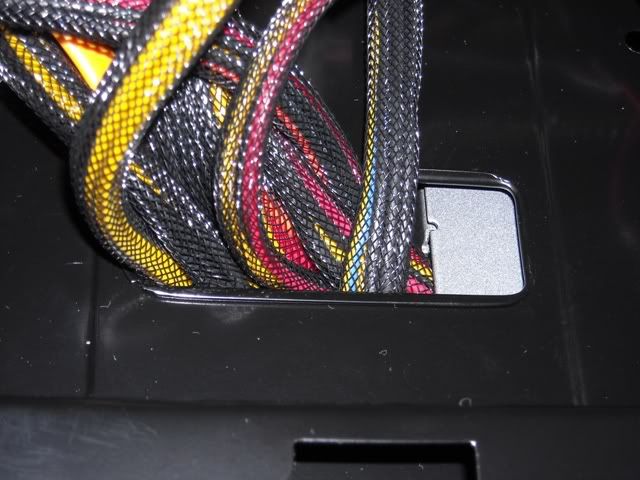
how come everyone can fit their 24pin cable into CM690 bottom hole @.@ the 1 beside power supply. if i put my 24pin cable into it, others cable will not able to go in -.-" so i decide to leave my 24pin cable outside  |
|
|
|
|
|
nidzamputra
|
Feb 27 2010, 11:56 AM
|
|
|
@LOOOOOOL
bro..you need some force to your 24pin psu cable...
|
|
|
|
|
|
LOOOOOOL
|
Feb 27 2010, 12:19 PM
|
|
|
hmm..its abit short to go through behind i think. any idea how much is the price for the cable extension??
|
|
|
|
|
|
danny_sp15
|
Feb 27 2010, 12:35 PM
|
|
|
QUOTE(LOOOOOOL @ Feb 27 2010, 11:54 AM) how come everyone can fit their 24pin cable into CM690 bottom hole @.@ the 1 beside power supply. if i put my 24pin cable into it, others cable will not able to go in -.-" so i decide to leave my 24pin cable outside maybe ur psu is a bit longer than the standard size, thus blocking the hole beneath the mobo tray. what kind of psu are u using?  anyway, the holes arent that big to begin with, but u should be able to squeeze the cables through...  This post has been edited by danny_sp15: Feb 27 2010, 12:40 PM This post has been edited by danny_sp15: Feb 27 2010, 12:40 PM |
|
|
|
|
|
LOOOOOOL
|
Feb 27 2010, 12:41 PM
|
|
|
vantec ion 2+ u r right..the hole is actually enuf to fit everything, but my psu block almost half or it already  |
|
|
|
|
|
danny_sp15
|
Feb 28 2010, 02:00 AM
|
|
|
eh... very weird... did u assemble the components urself or the shop did it for u? did u press both of the blue clips besides the hdd when u tried to pull it out? make sure u disconnect the sata cables and the power cables first... This post has been edited by danny_sp15: Feb 28 2010, 02:06 AM |
|
|
|
|
|
esart
|
Feb 28 2010, 05:52 AM
|
Getting Started
|
 2 bottom hdd facing backwork...its stuck there...cant be push more inside  notice dat 2 blue clips arent clip nicely.....afraid it will tercabot during transportation as i travel with this pc always(student) |
|
|
|
|
|
danny_sp15
|
Feb 28 2010, 08:56 AM
|
|
|
hmm... very weird... i'll confirm back with u later, cos rite now the old chassis is at my hometown...  sorry for troubling u bro..  This post has been edited by danny_sp15: Feb 28 2010, 08:58 AM This post has been edited by danny_sp15: Feb 28 2010, 08:58 AM |
|
|
|
|
|
danny_sp15
|
Feb 28 2010, 12:18 PM
|
|
|
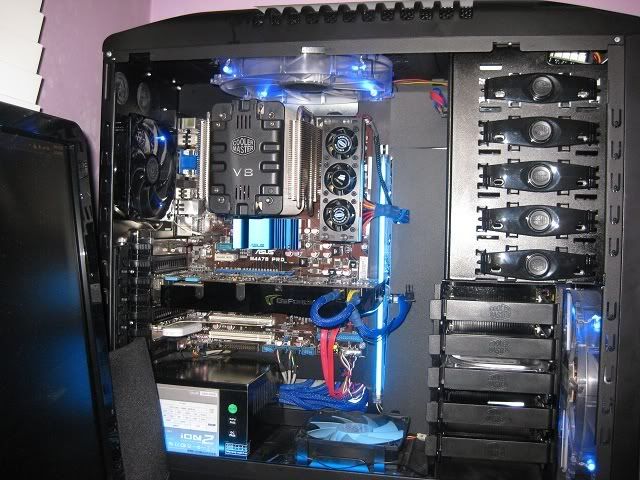
the 2nd rig's cable management is much better, even though the psu is non-modular, and the chassis is just a normal chassis..  by the way, ur mom needs the ram cooler?  |
|
|
|
|
|
nidzamputra
|
Feb 28 2010, 12:25 PM
|
|
|
overclock maybe  |
|
|
|
|



 Quote
Quote






 0.0294sec
 1.04
1.04
 6 queries
 GZIP Disabled