Welcome Guest ( Log In | Register )

5 Pages « < 2 3 4 5 >Bottom

Outline · [ Standard ] · Linear+

 ASUS k40AB/k50AB v2, Good budget laptop w/HD4570

views
     
Krovaxq
post Nov 16 2009, 04:50 PM

Single Ghost
*****
Senior Member
731 posts

Joined: Jan 2007


My Driver is dated 25/06/2009

Driver : 8.631.0.0

with Catalyst 9.10 and i used the Mobility Modder (downloaded under Radeon 4500)

@8tvt : I just tried 600/500 .. failed too. 'SetClock failed. Please check device configuration'.
Krovaxq
post Nov 16 2009, 05:21 PM

Single Ghost
*****
Senior Member
731 posts

Joined: Jan 2007


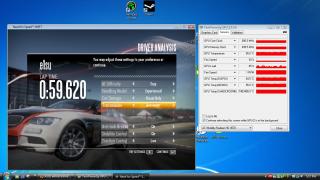
Okay, I disabled Powerplay already, this is what i got...

Core and Memory as followed, is this consider okay?

coz i was playing NFS Shift on 800x600 with everything low... still jerking though, coz the guy above said hes playing at med-high setting able to get about 25fps..which i cant, so cooking the GPU can improve that much huh?

now i turned off powerplay also cant OC via amd gpu T.T

Attached Image
Krovaxq
post Nov 17 2009, 06:31 PM

Single Ghost
*****
Senior Member
731 posts

Joined: Jan 2007


guys, how do i disable the touchpad?

i find it annoying that its so sensitive when im typing, didnt touch also got kena2 the effect...if theres a toggle on/off pad, would be nice..

ill try lookin up at asus.com see ^^
Krovaxq
post Nov 17 2009, 06:38 PM

Single Ghost
*****
Senior Member
731 posts

Joined: Jan 2007


ok will look up ^^

but bios means during startup only can do, right?

prefer it toggleable...

Found the driver in Asus.com adi...

wont edit this post, in case if anyone need help on this one hehe


Elantech Touchpad driver
Version V7.0.5.6

From www.asus.com/download

Krovaxq
post Nov 17 2009, 09:14 PM

Single Ghost
*****
Senior Member
731 posts

Joined: Jan 2007


QUOTE(xKAIZERUx @ Nov 17 2009, 06:54 PM)
there is an option...

user posted image
*
yeah, before i downloaded the driver, i had no options like that...but funny enough, although i disabled it, my touchpad is still normal lol... even disabled from device manager, feel like to frap it and show but not gonna waste time for that haha...

ill jz disable from bios ~.~
Krovaxq
post Nov 17 2009, 10:45 PM

Single Ghost
*****
Senior Member
731 posts

Joined: Jan 2007


QUOTE(GothFebrio @ Nov 17 2009, 09:37 PM)
the mouse that asus give very nice, easy to click, love it. logitech with asus logo on it worth 40 ringgit. xD
*
idk but i hate the asus mouse so much, coz i have huge palm haha...

Krovaxq
post Nov 18 2009, 01:35 AM

Single Ghost
*****
Senior Member
731 posts

Joined: Jan 2007


QUOTE(saw2001 @ Nov 17 2009, 11:52 PM)
can i know what backpack u all using?
*
targus. the 1 asus gave like too small for me coz after put AC adapter and some cds, mouse... become too sempit.

so i use another targus, actually the 1 from HP pavillion 1 haha... but more space ^^
Krovaxq
post Nov 19 2009, 01:18 PM

Single Ghost
*****
Senior Member
731 posts

Joined: Jan 2007


QUOTE(Batusai @ Nov 18 2009, 11:46 PM)
i thought u did.. lolzzz..

i think it should support very well.. as its platform is da same with COD4 right..
*
i am playing COD4:MW at a healthy 30-40fps(on LAN/multiplayer)... (20-35fps on single player due to huge worldmaps and models and doodads) Captured by FRAPS.

i heard people said although there arent muchhhh comparison in term of visual graphics in between of COD4:MW and COD:MW2, MW2 requires higher spec requirements to play... i hope its not true =(

but without OC-ing, I COULD never run NFS:Shift..sucks really bad with the FPS (as claimed as one of k40ab user here, he can run Shift at med-high setting and still have 25fps average, although i never OC anything yet, not coz im scared, coz i cant hahaha)

am waiting to get a hand-on COD4:MW2 when I get the chance wink.gif
Krovaxq
post Nov 19 2009, 04:51 PM

Single Ghost
*****
Senior Member
731 posts

Joined: Jan 2007


@Nagenaz : i put LOW on everything, like everything everything lol...

some that i might not know well would be the Vsync(for screen tearing right? but off is better?) antistrophic blabla... AA trilinear bilinear thingy.. i have no idea about.

1 more thing, CCC will affect this setting or not? i mean like if we change the settings from NFS, but our CCC already have their setting, which would affect ?

p/s: now that u mentioned it, i wanna go run NFS now...wana double check the stuffs i shud put on LOW.


Added on November 19, 2009, 5:09 pmtested : 640x480, small windowed screen, everything is turned the lowest/OFF

AA : bilinear
Vsync : Off

Fraps shows average 15-20FPS...lol

This post has been edited by Krovaxq: Nov 19 2009, 05:09 PM
Krovaxq
post Nov 20 2009, 11:56 AM

Single Ghost
*****
Senior Member
731 posts

Joined: Jan 2007


QUOTE(NaGeNaZ @ Nov 20 2009, 01:11 AM)
Going to try it soon, some said that the built in engine of COD MW2 is more efficient than COD4 thus creating better graphics for less gpu fire power.

And for the NFS Shift guys, please do some tweaking as the game cant select the optimum graphics automatically for different hardware spec.
I'm still finding the right settings for balanced fps & graphics.
*
awesome, ive been getting 40fps on cod:mw1, this is a good news for me to try mw2 hehe...
n batusai, pls find more solutions on shift, i cant wait to be able to play this game, as a racing game fan, 15-20fps is totally unplayable.
Krovaxq
post Dec 2 2009, 12:24 PM

Single Ghost
*****
Senior Member
731 posts

Joined: Jan 2007


come to report as always smile.gif

No overclock, no mods, me.. a stock-man biggrin.gif

COD4: MW1 - very much playable - 1280x768(high setting) FRAPS: 40-100fps

COD4: MW2 - Awesome - 1280x768(med-high setting) FRAPS: 30-50fps

Dragon Age - Surprisingly amazing- 1280x768(High setting) FRAPS: 20-50fps

i was really surprised that DragonAge is so nice @.@ graphic is so cool, n fps was much an issue, 20-30 averagely.


Krovaxq
post Dec 2 2009, 01:05 PM

Single Ghost
*****
Senior Member
731 posts

Joined: Jan 2007


QUOTE(hsienhsien @ Dec 2 2009, 12:47 PM)
so far anyone facing any problem with asus kseries? shud buy k40ab or k50 ab?
*
no prob with me so far... even the drivers, coz im using vista ultimate, the people who had trouble before coz theyre using Windows 7 kua... the rest all okay ^^

ofc cant compare this laptop with other gaming laptop la, i mean cmon.... look at the price, but still can play latest games consider ok liao, its a laptop for god sake biggrin.gif

1st time AMD user here, so far so good.. no overheat issue as many ppl kena poisoned by this and hated AMD haha...
Krovaxq
post Mar 12 2010, 11:52 AM

Single Ghost
*****
Senior Member
731 posts

Joined: Jan 2007


Hi, I'm back with some personal gaming review ^^

DiRT 2 - Awesome (1280x768 Med-High) - FRAPS : 30-50 FPS (seriously this is a nice game lol)

Battlefield 2: Bad Company - Ouch (1280x768 Low) - FRAPS : 17-25 FPS[during busy time with explosions, FPS might drop as low as to 5, yes, FIVE] (very very unhealthy for our machine, totally different from COD4 MW2)

Heroes of Newerth - Awesome (1280x768 High) - FRAPS : 30-60 FPS

*again, reminder for new users in this thread, this is on a virgin K40AB, unmodded unclocked smile.gif


-----

That aside, my LCD is starting to give me problems already, can anyone rectify this? it blinks at random time, greyish color..sometimes it appears as grey/white color blank on the screen where my only solution is to close the LCD lid and open it back up, then it goes back to normal. At times it occurs multiple times like disco light...

and i wanna give the 10.3 a try, thanks for the dude who posted the dl link..hopefully it fixes something smile.gif

ok thank you!
Krovaxq
post Mar 12 2010, 06:59 PM

Single Ghost
*****
Senior Member
731 posts

Joined: Jan 2007


QUOTE(Wilson0011 @ Mar 12 2010, 06:05 PM)
is this laptop be heat up easily?
*
been using for 4 months now, never heating issues occured, in fact, the laptop is so cold to me -.-...all the heats go out through the backside vent...unlike my previous laptop, u can feel hot at the mousepad area, palm rest area, sometimes on the keyboard, but my k40ab, never hot even a lil bit...jz like the sticker pasted on the palm rest (25% cooler than body temperature) lol, i tot it was a hoax, but its true actually =x
Krovaxq
post Mar 13 2010, 12:29 PM

Single Ghost
*****
Senior Member
731 posts

Joined: Jan 2007


QUOTE(kuroda1226 @ Mar 13 2010, 08:13 AM)
Battlefield 2: Bad Company is so nice...
*
yea very nice, like watching a movie lol...many cutscenes, but it doesnt run as nice on my K40AB... FPS drop is really disappointing sad.gif
Krovaxq
post Mar 13 2010, 02:10 PM

Single Ghost
*****
Senior Member
731 posts

Joined: Jan 2007


QUOTE(User_Xp @ Mar 13 2010, 01:53 PM)
go to device manager and go to display adapter,then update the driver in 10.3 folder..  thumbup.gif
*
hi,

just to make sure, i jz installed 10.3 yesterday, and everything was fine... so i have a screenie and pls tell me if im on the right track after the upgrade..

thanks heap.

Attached Image
Krovaxq
post Jun 9 2010, 12:24 PM

Single Ghost
*****
Senior Member
731 posts

Joined: Jan 2007


long time didnt drop by...

been using my k40ab for almost a year already.. standing strong hehe...am satisfied with the GPU also, as im a casual gamer.. so far never really frustrate me.

although all the happiness, i have this something that bothers me...the LCD.

the LCD tends to blink2 with the showing of some colorful lines at random position of my LCD (Vertically) u know..like screen rosak2..it happens almost everytime i move the LCD lid downwards/upwards(like when starting the laptop or moving for angles) and at random times too, it just does that although the LCD isnt moved by anyone..

any solution for this? or shud i jz send it to royal club?

tq
Krovaxq
post Jun 9 2010, 01:20 PM

Single Ghost
*****
Senior Member
731 posts

Joined: Jan 2007


u mean the middle part that connects the LCD and the board?

i usually will flip the edge of the screen to open it... didnt know the method can cause this sad.gif

if like that, the only way to fix this is to send back to SC?

thanks 8tvt

EDIT: oh i get what u meant adi...ya..i always pull the LCD panel from only 1 side sad.gif


This post has been edited by Krovaxq: Jun 9 2010, 01:26 PM
Krovaxq
post Jul 15 2010, 12:49 PM

Single Ghost
*****
Senior Member
731 posts

Joined: Jan 2007


QUOTE(bushidiot @ Jun 18 2010, 08:48 AM)
sometime my k40ab LCD 'kelip-kelip' and make some line.
why r?
anyone know?
*
arr...u also kena @_@..

i also kena, need to send to service da...

anyway, is it normal to just go to imbi asus centre and say i want to have my laptop fan cleaned? as well as fixing my LCD issue? im still under warranty...

about warranty hor..i wan ask, since the day i bought my k40ab, i never filled any forms nor register my unit online or whatever...

coz i think the salesman i bought this unit from lowyat plaza that time say, no nid register anything, when got problem jz bring to centre as they will verify my laptop's serial number for reference ...is that correct?


Krovaxq
post Aug 30 2010, 12:18 PM

Single Ghost
*****
Senior Member
731 posts

Joined: Jan 2007


QUOTE(astria @ Aug 30 2010, 11:38 AM)
dirt 2 on HD4570???

of course it would lag...
*
been playing dirt 2 , mass effect 2, cod, starcraft 2 on my HD4570... medium setting, smooth sahaja smile.gif

this laptop is bang for bucks thumbup.gif

5 Pages « < 2 3 4 5 >Top
 

Change to:
| Lo-Fi Version
0.0289sec    0.76    7 queries    GZIP Disabled
Time is now: 5th December 2025 - 06:26 AM