Welcome Guest ( Log In | Register )

Outline · [ Standard ] · Linear+

 Faulty Denon 1909?, Denon problem

views
     
TSalexalex
post Oct 22 2009, 05:56 PM

Getting Started
**
Junior Member
73 posts

Joined: Jan 2008


Bro,

Thanks.

Yes, there is Direct Mode in this Denon.

It sounded average and not much better than my good old RM1k 2.1 system.


Do you have experiences in Equalizer?

Should use or just leave it at it is?


QUOTE(tracktion3 @ Oct 22 2009, 04:36 PM)
Audio CD?

When you play Audio CD, use the direct mode.Not sure if Denon 1909 got pure direct or not. Usually at this mode, your sub will not be utilized. I dont think we need sub when play audio CD. Just stereo will do providing your stereo speaker could play full range.  Some AVR can use sub as well in the direct mode. But my Yammy 465 cant. And I read from some expert review.... we dont need it. There if now LFE in Audio CD. Other sifu here may be able to help. LFE usually for movies only.

I dont think there going to be any diffrent if you use the L/R channel or dedicated sub input at your sub.
*
tracktion3
post Oct 22 2009, 09:06 PM

On my way
****
Senior Member
532 posts

Joined: Oct 2009


QUOTE(alexalex @ Oct 22 2009, 05:56 PM)
Bro,

Thanks.

Yes, there is Direct Mode in this Denon.

It sounded average and not much better than my good old RM1k 2.1 system.
Do you have experiences in Equalizer?

Should use or just leave it at it is?
*
my 2 cents of input.....

Equalizer, the name it self tell us that we need to equalized something. In this case, "To Equalized" the sound so when it arrive on our ear, they arrive equally. When I was young, always like to boost the base and treble and it look like a bath tub. How naive I was. But what actually I'm doing is to get the frequency flat from all band. Good speaker, player, amp and cable will not change the flatness of the graph even when we increase the volume. But very difficult because another factory is hard to control is the room. Lots of reflections which can cause cancellation etc.

When you run Audessey, it will auto tune ( +EQ) each of the speaker and to get the best result base on the room environment. This is hard to do and for those sifu who got the ear of a bat can perhaps tune manually, providing your EQ come with great octave spread.

There are enthusiast that will get everything into perfection including room, cable and of course the hardware and software. This is expensive. So our AVR is consider "far away" from enthusiast who use tube, valve, turn table etc.

So, if you ask me, let your AVR do the tuning. The only area that you should play is the Xover. I suggest around 90hz but it depends on your setting. My apartment is pretty small around 18'x20' living room. So, base on some study, this will create a hump at 90 hz. So, I cross at 80hz for my sub and 100hz at my AVR. It looks like a gap right? Well no, the gap will tone down the 90hz hump and create a balance. I study my Wharfedale 9.1. As matter a fact, it has a bump around 90hz. A trick that the UK folks do to give a somehow good bass. But it depends on design. Many enthusiast don't like that. Speakers should produce flat freq respond as flat as possible. I own a pair of ESI 05 nearfield active Speaker. They produce a pretty flat freq respond. Sound On Sound magazine rated these active speaker a high mark.

So you see, in order to play with EQ, so many factor need to consider. The best is, you need a tool to do that. There is a tread here where sifu and enthusiast measure there freq respond and they own a tool to do that. Amazing result some of them discovered.

There you go... my humble opinion.... smile.gif

TSalexalex
post Oct 23 2009, 01:42 PM

Getting Started
**
Junior Member
73 posts

Joined: Jan 2008


Dear Tracktion3,

Thanks for sharing your thoughts eventhough I do not quite understand the Xover, 80, 90 and the hump at 90Hz.


QUOTE(tracktion3 @ Oct 22 2009, 09:06 PM)
my 2 cents of input.....

Equalizer, the name it self tell us that we need to equalized something. In this case, "To Equalized" the sound so when it arrive on our ear, they arrive equally.  When I was young, always like to boost the base and treble and it look like a bath tub. How naive I was. But what actually I'm doing is to get the frequency flat from all band. Good speaker, player,  amp and cable will not change the flatness of the graph even when we increase the volume. But very difficult because another factory is hard to control is the room. Lots of reflections which can cause cancellation etc.

When you run Audessey, it will auto tune ( +EQ) each of the speaker and to get the best result base on the room environment. This is hard to do and for those sifu who got the ear of a bat can perhaps tune manually, providing your EQ come with great octave spread.

There are enthusiast that will get everything into perfection including room, cable and of course the hardware and software. This is expensive. So our AVR is consider "far away" from enthusiast who use tube, valve, turn table etc.

So, if you ask me, let your AVR do the tuning. The only area that you should play is the Xover. I suggest around 90hz but it depends on your setting. My apartment is pretty small around 18'x20' living room. So, base on some study, this will create a hump at 90 hz. So, I cross at 80hz for my sub and 100hz at my AVR. It looks like a gap right? Well no, the gap will tone down the 90hz hump and create a balance. I study my Wharfedale 9.1. As matter a fact, it has a bump around 90hz. A trick that the UK folks do to give a somehow good bass. But it depends on design. Many enthusiast don't like that. Speakers should produce flat freq respond as flat as possible. I own a pair of ESI 05 nearfield active Speaker. They produce a pretty flat freq respond. Sound On Sound magazine rated these active speaker a high mark.

So you see, in order to play with EQ, so many factor need to consider. The best is, you need a tool to do that. There is a tread here where sifu and enthusiast measure there freq respond and they own a tool to do that. Amazing result some of them discovered.

There you go... my humble opinion.... smile.gif
*
tracktion3
post Oct 23 2009, 02:36 PM

On my way
****
Senior Member
532 posts

Joined: Oct 2009


QUOTE(alexalex @ Oct 23 2009, 01:42 PM)
Dear Tracktion3,

Thanks for sharing your thoughts eventhough I do not quite understand the Xover, 80, 90 and the hump at 90Hz.
*
Hmmm first you need to know what is Crossover. Well with the name, is like crossing over to somehwere... tongue.gif

Well, is there is a speaker ( one speaker) that can play all the frequencies flat at any volume, that will be hack of a speaker.... but unfortunately no, there is no such speaker. Even the Horn type got some weaknesses...

So in order to get the frequency to be played nicely in a speaker, a diffrent type of size, material, technology etc etc been created. Even the Xover has diffrent design whether it is 24octv or 12octv. Google around and you get the technical answers.

To make things simple, so you see a set of speaker consist of a tweeter, a mid and than a sub. All these 3 are dedicated to play some certain freq. So, in order for them to recieved only a dedicated freq as mentioned, a cross over is required to pass the right freq to the right speaker. Even inside the bookshelf speakers got a cross over inside to make sude the freq devided to the tweet and mid.

Your sub woofer as per the pic attached has "low pass" which is actually a Xover. Which allow the lower freq you set to pass and anything higher than that will be block. There is a few more setting like Q etc etc, but that is to details to explain here. Google to get them.

As I mention, my room somehow cause some increase ( hump) at the 90hz freq. So it look like a camel back you know. tongue.gif In order to tame this hump and make it flat, I have to xover at 80 for my sub and 100hz at my AVR. So graphically this is what it represent:

user posted image

Is not exacly the same, but just to make you get the point. More of this related to room acoustic and again... if you dont have a dedicated room... just leave this alone. Or.. if you want to be an enthusiast, start reading more.. ha ha ha, is good for yah and may help you to sleep if you have trouble sleeping.

Here is a good site to start
http://www.linkwitzlab.com/rooms.htm


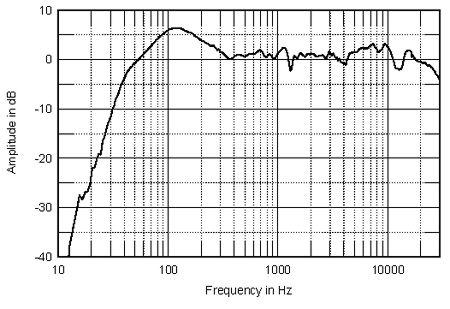
this is my Wharefdale Diamond 9.1 Freq respond chart...

user posted image

Notice the hump at about 100hz about 5db? couple with my room effect, my bass sound really boomy which I dislike. So, cross them at 80hz sub and 100hz avr could solve this problem. But I just use my ear. Dont have the equipment to measure them. tongue.gif


This post has been edited by tracktion3: Oct 23 2009, 03:00 PM
TSalexalex
post Oct 23 2009, 04:16 PM

Getting Started
**
Junior Member
73 posts

Joined: Jan 2008


Bro,

Wow, thanks, guess I have a lot of catching up to do!.


Added on December 7, 2009, 6:42 pmDear Traction3, (or other sifus)


I seldom use my Denon AVR.

Yesterday, I discovered something wrong with my AVR and that my AVR will emits loud noise once a while until I have to power OFF and ON again.

=> Eg. now playing CD audio/MP3, fine for about 10 min (after ON), then suddenly my rear surround speaker (5.1) suddenly emit loud noise.
=> I will have to power OFF and then ON the AVR with the CD playing (no stop DVD player), then it is fine. (no lmore oud noise)
=> but it will appear again, after about another 30min (maybe randomly)

The sound from the speaker, sounded like someone blowing loudly into a MIC . I'm sure it came from the rear surround and not Front Speakers.


What could it be?

My speaker cabling?
My HMDI cabling?


Pls let me know if you encounter such problem(s) before and what possibility it might be?

My AVR warranty from WKH will expire in few months time.


Thanks.


This post has been edited by alexalex: Dec 7 2009, 06:42 PM

3 Pages < 1 2 3Top
 

Change to:
| Lo-Fi Version
0.0185sec    0.48    6 queries    GZIP Disabled
Time is now: 20th December 2025 - 05:17 AM