Welcome Guest ( Log In | Register )

Bump Topic Topic Closed RSS Feed
126 Pages « < 98 99 100 101 102 > » Bottom

Outline · [ Standard ] · Linear+

 Recommended iTunes AppStore Applications, News/Short Reviews/Discussion

views
     
fuiyo
post Nov 22 2010, 12:02 AM

Never Settle
******
Senior Member
1,193 posts

Joined: Sep 2007


QUOTE(zeeyen @ Nov 21 2010, 04:39 PM)
Looks like AirAsia finally got it's iPhone App up.

http://itunes.apple.com/us/app/airasia/id381082755?mt=8
*
Thanks man! It just got released today. Trying it now...
siawgu
post Nov 22 2010, 12:35 PM

Enthusiast
*****
Senior Member
996 posts

Joined: Jan 2003
From: Kuching, Sarawak


QUOTE(fuiyo @ Nov 22 2010, 12:02 AM)
Thanks man! It just got released today. Trying it now...
*
trying now. but crashed when searching for flight.
cute_boboi
post Nov 22 2010, 01:58 PM

° 忍 °
*******
Senior Member
6,462 posts

Joined: Nov 2004
From: [Latitude-N3°9'25"] [Longitude-E101°42'45"]


Any recommendation for Chinese calendar that shows 1st/15th of the month, etc. ? hmm.gif

Best if it can integrate with existing iPhone Calendar.

Thanks

wan1912
post Nov 22 2010, 04:28 PM

Getting Started
**
Junior Member
200 posts

Joined: Jun 2007
From: Kota Kinabalu, Sabah


QUOTE(inoone @ Nov 20 2010, 09:32 AM)
saw this on appshopper and currently free for a limited time, have not try yet (still downloading), Penny Save is the programme that helps you manage your expenses, budget etc etc....

http://itunes.apple.com/us/app/penny-saved/id354538546?mt=8

user posted image

user posted image

user posted image
*
i do like HomeBudget better ~ =) but the full version is a bit pricey ($4.99)

QuickFire
post Nov 22 2010, 09:09 PM

The more you sin the more you win
*******
Senior Member
2,867 posts

Joined: Jan 2003


lol I bought the full version of HomeBudget, because I really wanted to keep track of my daily expenses. I tried the lite versions of HomeBudget and iXpenseIt, and while the latter has more features, ultimately it looked butt ugly and I went for HomeBudget. A couple of things I find glaringly missing in HomeBudget:

- You can't view charts and reports itemized by subcategories.
- You can only view current day/week/month expenses in Quick Summary, no way to view previous days/weeks/months.

I've emailed support, and the reply said charts with subcategories will be implemented in the future. Good to hear that.

If you want a free expense app, get ExpenseTracker. You're limited to the preset categories from apart from that it's good.
lilster
post Nov 22 2010, 09:15 PM

On my way
****
Senior Member
636 posts

Joined: Mar 2009
agree with u. but i still think homebudget is still currently the best around.
inoone
post Nov 22 2010, 09:50 PM

Casual
***
Junior Member
348 posts

Joined: Nov 2010
QUOTE(cute_boboi @ Nov 22 2010, 01:58 PM)
Any recommendation for Chinese calendar that shows 1st/15th of the month, etc. ?  hmm.gif

Best if it can integrate with existing iPhone Calendar.

Thanks
*
i using IdeoCal now, u can giv it a try biggrin.gif FREE, but cant integrate with yr calendar....

http://itunes.apple.com/us/app/id400271506?mt=8


wan1912
post Nov 22 2010, 11:51 PM

Getting Started
**
Junior Member
200 posts

Joined: Jun 2007
From: Kota Kinabalu, Sabah


QUOTE(lilster @ Nov 22 2010, 09:15 PM)
agree with u. but i still think homebudget is still currently the best around.
*
bought myself the full version brows.gif

the add own category really make ease for this apps, but havent yet try the sync one though.

im suprise to realize my own expenses just for this month, this apps really makes me be careful on my spending, now i make a must do everyday to key in my daily expenses nod.gif

Thumbs up for HomeBudget icon_rolleyes.gif
nickygin
post Nov 22 2010, 11:52 PM

Getting Started
**
Junior Member
240 posts

Joined: May 2009
QUOTE(QuickFire @ Nov 22 2010, 09:09 PM)
lol I bought the full version of HomeBudget, because I really wanted to keep track of my daily expenses. I tried the lite versions of HomeBudget and iXpenseIt, and while the latter has more features, ultimately it looked butt ugly and I went for HomeBudget. A couple of things I find glaringly missing in HomeBudget:

- You can't view charts and reports itemized by subcategories.
- You can only view current day/week/month expenses in Quick Summary, no way to view previous days/weeks/months.

I've emailed support, and the reply said charts with subcategories will be implemented in the future. Good to hear that.

If you want a free expense app, get ExpenseTracker. You're limited to the preset categories from apart from that it's good.
*
I am actually using 'Money' which is free and can sync with your Mac (have to pay for Mac version). Besides having to monitor the expenses, it can also generate reports to help you identify what you want to see/ know. Just sharing... smile.gif
sawmania
post Nov 23 2010, 11:48 AM

Casual
***
Junior Member
435 posts

Joined: Nov 2008
From: Seri Kembangan


got a question
when i m using pulse news mini, i notice that when updating the latest news, there is no wifi/3g loading signal( * )
will we get charged by telco for updating the news?
terrytay2009
post Nov 23 2010, 01:06 PM

Getting Started
**
Junior Member
149 posts

Joined: Jan 2009


There is a loading signal in the app itself. Pay attention to the source when refreshing. Of cos need data, if not how the news comes in?
cute_boboi
post Nov 23 2010, 02:58 PM

° 忍 °
*******
Senior Member
6,462 posts

Joined: Nov 2004
From: [Latitude-N3°9'25"] [Longitude-E101°42'45"]


QUOTE(inoone @ Nov 22 2010, 09:50 PM)
i using IdeoCal now, u can giv it a try  biggrin.gif  FREE, but cant integrate with yr calendar....

http://itunes.apple.com/us/app/id400271506?mt=8
*
Thanks for the recommendation. I've installed and trying it.

Currently also trying out this one:
?????(??)Chinese calendar by Blue Crane

iv'N
post Nov 23 2010, 04:18 PM

On my way
****
Senior Member
657 posts

Joined: Jan 2003
QUOTE(QuickFire @ Nov 22 2010, 09:09 PM)
lol I bought the full version of HomeBudget, because I really wanted to keep track of my daily expenses. I tried the lite versions of HomeBudget and iXpenseIt, and while the latter has more features, ultimately it looked butt ugly and I went for HomeBudget. A couple of things I find glaringly missing in HomeBudget:

- You can't view charts and reports itemized by subcategories.
- You can only view current day/week/month expenses in Quick Summary, no way to view previous days/weeks/months.

I've emailed support, and the reply said charts with subcategories will be implemented in the future. Good to hear that.

If you want a free expense app, get ExpenseTracker. You're limited to the preset categories from apart from that it's good.
*
Homebudget has also transfer feature within accounts.. which is a huge plus compared to iXpenseIt
whatsayyou
post Nov 23 2010, 06:48 PM

On my way
****
Senior Member
525 posts

Joined: Mar 2010
an alternative to dropbox: Sugarsync

Works exactly like Dropbox but is much much better.

You can choose the folder you want to sync, you don't have to drag your stuff to the dropbox directory to sync.

Need to share a file, no problem, one click to get a public link for the shared file. You can get e-mail notication when the shared file is accessed.

Upload and sync via e-mail. Publish your pictures to facebook.

You start with 5GB and you can get another 1GB easily. You get extra 500mb when you use my referral link to sign up.

https://www.sugarsync.com/referral?rf=gyw56p9rr9rs

You can get another 250mb when you install the application on your PC and carry out the getting started steps and if you install the mobile application, you get another 250mb when you complete the mobile getting started steps.


Added on November 23, 2010, 6:50 pm
QUOTE(iv'N @ Nov 23 2010, 04:18 PM)
Homebudget has also transfer feature within accounts.. which is a huge plus compared to iXpenseIt
*
how does homebudget compare against MyAccounts?

With MyAccounts, i cant view expenses by week or month. Also the credit card account doesnt become negative. It shows as positive and makes my total net worth wrong...

This post has been edited by whatsayyou: Nov 23 2010, 06:50 PM

QuickFire
post Nov 23 2010, 07:45 PM

The more you sin the more you win
*******
Senior Member
2,867 posts

Joined: Jan 2003


Any app to password protect certain photos on the iPhone? brows.gif

The ones I tried compress the photos and make them look like shit when zoomed in.
wan1912
post Nov 23 2010, 11:56 PM

Getting Started
**
Junior Member
200 posts

Joined: Jun 2007
From: Kota Kinabalu, Sabah


Oplayer ~ can play avi files ~ just now a mac studio workshop make demo brows.gif
kylee700
post Nov 24 2010, 10:30 AM

Getting Started
**
Junior Member
239 posts

Joined: Oct 2006


hey..is anyone using the find my iphone app?just wanna ask rite...do i need to have the app running in the background for it to be located?
wan1912
post Nov 24 2010, 11:46 AM

Getting Started
**
Junior Member
200 posts

Joined: Jun 2007
From: Kota Kinabalu, Sabah


QUOTE(kylee700 @ Nov 24 2010, 10:30 AM)
hey..is anyone using the find my iphone app?just wanna ask rite...do i need to have the app running in the background for it to be located?
*
you just need to turn on the settings, thats all ~ =)

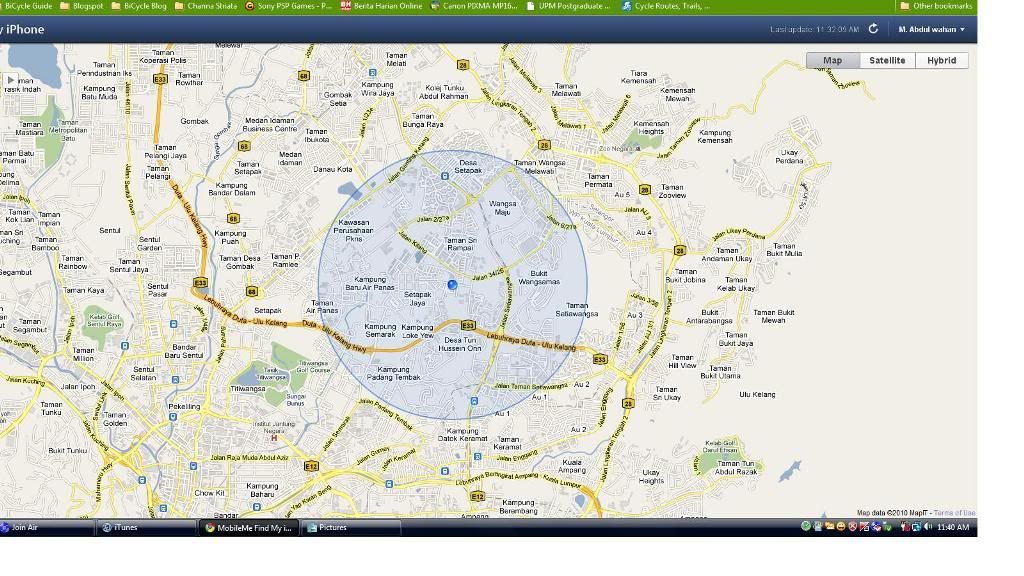
further details, find iphone

it locates my iphone outside of the building, duhh... According to the MacStudio guy, the accuracy of the location is determined by the signal of your phone, if got 3g will be having a smaller blue radius
» Click to show Spoiler - click again to hide... «
nickygin
post Nov 24 2010, 11:48 AM

Getting Started
**
Junior Member
240 posts

Joined: May 2009
QUOTE(kylee700 @ Nov 24 2010, 10:30 AM)
hey..is anyone using the find my iphone app?just wanna ask rite...do i need to have the app running in the background for it to be located?
*
You need to set your phone settings to allow your phone to be found.

The 'find my iphone' app is the search engine which let's anyone to look for their lost iPhone

kylee700
post Nov 24 2010, 04:55 PM

Getting Started
**
Junior Member
239 posts

Joined: Oct 2006


QUOTE(wan1912 @ Nov 24 2010, 11:46 AM)
you just need to turn on the settings, thats all ~ =)

further details, find iphone

it locates my iphone outside of the building, duhh... According to the MacStudio guy, the accuracy of the location is determined by the signal of your phone, if got 3g will be having a smaller blue radius
» Click to show Spoiler - click again to hide... «
QUOTE(nickygin @ Nov 24 2010, 11:48 AM)
You need to set your phone settings to allow your phone to be found.

The 'find my iphone' app is the search engine which let's anyone to look for their lost iPhone
*
all rite.thanx smile.gif

126 Pages « < 98 99 100 101 102 > » Top
Topic ClosedOptions
 

Change to:
| Lo-Fi Version
0.0218sec    0.60    6 queries    GZIP Disabled
Time is now: 5th December 2025 - 10:35 PM