

I will be gettign my 50S10 tomorrow. Got it for Rm5600 with 2 free HDMI cable and a set of kitchen ware
Panasonic VIERA TH-P50S10K
Panasonic VIERA TH-P50S10K
|
|
 Oct 20 2009, 09:55 PM Oct 20 2009, 09:55 PM
Return to original view | Post
#41
|
 
Senior Member
2,298 posts Joined: Jan 2003 From: Miri, Sarawak  
|
I will be gettign my 50S10 tomorrow. Got it for Rm5600 with 2 free HDMI cable and a set of kitchen ware
|
|
|
|
|
|
Oct 22 2009, 10:39 AM
Return to original view | Post
#42
|
|
Senior Member
2,298 posts Joined: Jan 2003 From: Miri, Sarawak
|
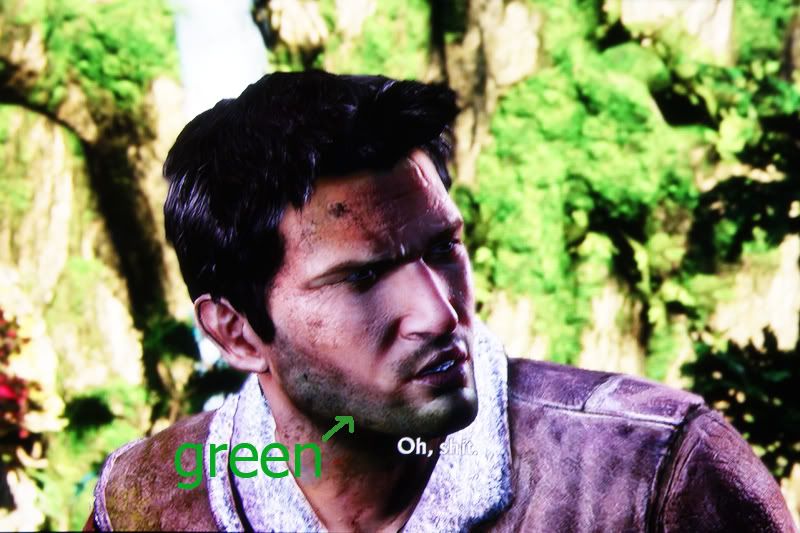
I got my 50S10 yesterday. So far the picture quality is very good, but there is one very disturbing thing with this panasonic plasma tv. I heard many people and reviewers mention about the color inaccuracy with strange green tint and i thought they were very minimum. But man, I was quite shock to see the green color problem actually very bad. It is so visible and looks very bad.
I was playing Uncharted 2 last night and those green color appear very clearly on Nathan's face....(how do you call that eg. when someone shave his beard and then there is this like darker tone skin on the face)...that part appears green on the 50S10!!! Is that bad!!! When I play Ice age 3, the shadow part of the mammoth and Sid(their hair color is brown) but it appear green. I will try to post some screen shot later. Is there a way to reduce this green effect or eliminate it? Need help. |
|
|
Oct 22 2009, 11:15 AM
Return to original view | Post
#43
|
|
Senior Member
2,298 posts Joined: Jan 2003 From: Miri, Sarawak
|
QUOTE(anfieldude @ Oct 22 2009, 11:11 AM) As kayroll says, nothign u can do unless u go into the service menu and make some changes. It has a strong green push and is a known problem with the S10. However, it can be calibrated out. Can i do the calibration now or do i need to wait till its fully run-in?  Thanks Added on October 22, 2009, 11:24 amThe other problem I notice is the black level. I try to do a basic calibration with some TV calibration photos i got from the internet. The calibration done with this calibration screen would appear good on movies when their is a lot of bright object on the screen. What I mean is that the black looks fantastic if the movie scene is a bright scene. But when the movies enter a very dark scene, the the black becomes grey and it appears like the tv is set too bright. But if I calibrate the black to be balck on dark scene, then the picture would look dull on bright scene and its looks too dark. This post has been edited by lightning69: Oct 22 2009, 11:24 AM |
|
|
Oct 22 2009, 08:31 PM
Return to original view | Post
#44
|
|
Senior Member
2,298 posts Joined: Jan 2003 From: Miri, Sarawak
|
QUOTE(anfieldude @ Oct 22 2009, 12:33 PM) Again, something that needs to be done in service menu, there is a setting called sub-brightness that can be adjusted to bring the set out of black faster or slower. Can you let me know how u adjusted the brightness? Was it using a windowed pattern or full black pattern? What test patterns did u use? Also what r u viewing it with, HTPC, media player? Actually i calibrate my 50S10 with these:Calibration shd be done after 200hrs so that the phospors have settled. 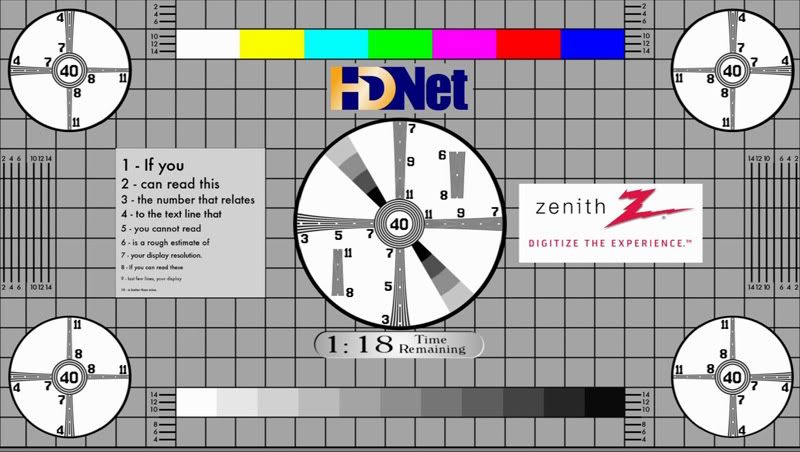 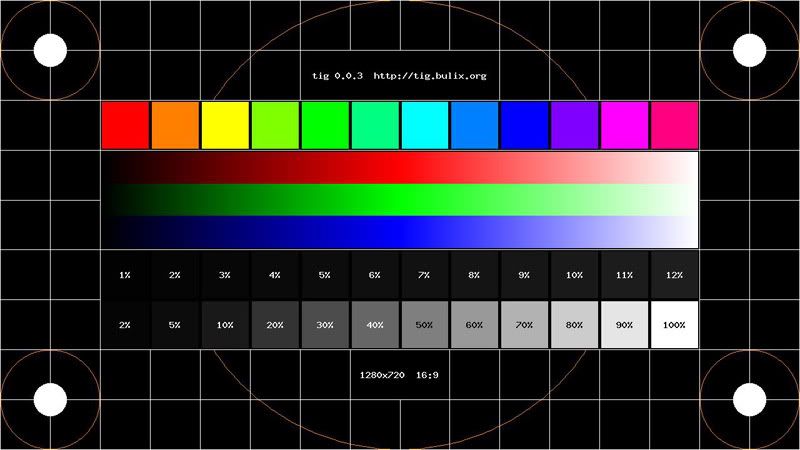 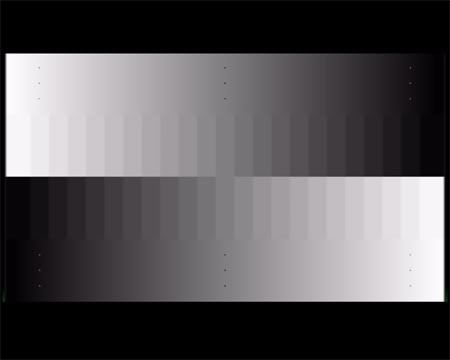 I'm using WDTV. Can you help out with a simple guide to calibrate the 50S10? This post has been edited by lightning69: Oct 22 2009, 08:42 PM |
|
|
Oct 23 2009, 07:30 AM
Return to original view | Post
#45
|
|
Senior Member
2,298 posts Joined: Jan 2003 From: Miri, Sarawak
|
QUOTE(Riddhy @ Oct 23 2009, 05:43 AM) post pics or vids of your set up i want to see how 1080p mkvs and 720p mkv in your 50s10k Will try to get some picture today.Added on October 23, 2009, 7:35 am QUOTE(anfieldude @ Oct 22 2009, 08:44 PM) I've been meaning to start a thread on LYN on using basic test patterns for simple calibration of contrast, brightness, sharpness but have not had the time. I have asked permission from the owner of the test patterns if I can link them, so for now, pls PM me so I can send u the link and some basic instructions to at least get ur brightness, contrast settings correct. What i did with these calibration pictures is set the contrast to 100 and then play around with brightness to achieve the a good black level. Pana tv are very limited in calibration without entering service menu.BTW, these settings are no use to do anything. This post has been edited by lightning69: Oct 23 2009, 07:35 AM |
|
|
Oct 23 2009, 10:06 AM
Return to original view | Post
#46
|
|
Senior Member
2,298 posts Joined: Jan 2003 From: Miri, Sarawak
|
QUOTE(anfieldude @ Oct 23 2009, 08:39 AM) Lightning, Ok...didn't know that. I thought the higher the better. Contrast at 100 is too high for a plasma, pls reduce it since it is still new. I believe the last time I calibrated a S10 it was around 80+ only.  Will try again tonight. Will try again tonight. |
|
|
|
|
|
Oct 26 2009, 11:40 PM
Return to original view | Post
#47
|
|
Senior Member
2,298 posts Joined: Jan 2003 From: Miri, Sarawak
|
Here is a screen shot of the weird green color on 50S10. It is very obvious.
 |
|
|
Oct 27 2009, 07:21 AM
Return to original view | Post
#48
|
|
Senior Member
2,298 posts Joined: Jan 2003 From: Miri, Sarawak
|
QUOTE(SIWIS @ Oct 27 2009, 12:22 AM) that is very obvious... maybe after break in should be ok already My recommendation to people who are looking to buy plasma tv....check out the Samsung plasma as the have better picture and colors according to members new. I didn't know Pana actually screw up the new plasma so bad. Don't get me wrong, they still look great, but there are better one. |
|
|
Oct 27 2009, 08:40 PM
Return to original view | Post
#49
|
|
Senior Member
2,298 posts Joined: Jan 2003 From: Miri, Sarawak
|
QUOTE(anfieldude @ Oct 27 2009, 06:24 PM) lightning69, I understand. I read about this green problem but i thought they appear only on green object making the green not looking natural. Somehow it appear on almost all the grey colors making grey look "greenish". Sometimes they are not obvious but other times they are everywhere. This is expected from the S10. As I mentioned earlier, this will not reduce or go away with break in. This needs to be calibrated out. Unfortunately, it requires someone to navigate in the service menu and shd not be attempted without knowledge, care and preferably with a meter. I seriously need pro calibration for this one. So for people who wants accurate colors out of the box, stay away from panasonic plasma. |
|
|
Oct 28 2009, 04:43 PM
Return to original view | Post
#50
|
|
Senior Member
2,298 posts Joined: Jan 2003 From: Miri, Sarawak
|
What is the procedure to go in to the service menu for 50S10? What are the things that to watch out for? THing not to change etc? Any precaution?
|
|
|
Oct 29 2009, 11:33 AM
Return to original view | Post
#51
|
|
Senior Member
2,298 posts Joined: Jan 2003 From: Miri, Sarawak
|
QUOTE(pierreye @ Jul 16 2009, 01:43 AM)
I had manage to nail the 2.2 gamma in Panny service menu. The trick is to use All-Drv and All-Cut to adjust the gamma curve. As you mention, low end is around 2.0-2.1. So you need to adjust All-Cut a little bit down to reduce the luminance. As for 90% grey around 1.3, that's mean your All-Drv is too high (Too high luminance for upper greyscale). Redo the greyscale again after you adjust the All-Cut and All Drv. Look at your gamma curve and look at the color that is either above or below the targeted gamma curve. For eg, for 30% grey, if red is above the gamma curve 2.2, then reduce red cut etc... I think you will get the idea. Below is the final adjustment I got (took me 2 hours to get this almost perfect curve and good greyscale). Note: ATI pixel is set at YPbPr 4:4:4 which will enable me to see BTB and WTW. Updated. Must be too tired yesterday and just found out adjusting All-Cut will also reduce the brightness control so black crush do occur. After adjusting the brightness control again using the pluge test pattern, gamma shoot back to around 1.9 to 2.0 again. Looks like this is final result I can get but nothing too serious as your problem where 90% gray at 1.3. I think you set the contrast too high which is why you get this result. I found the above posting on adjusting the grey scale calibration. Do I need any additional hardware to do the above calibration? This post has been edited by lightning69: Oct 29 2009, 11:33 AM |
|
|
Oct 29 2009, 11:50 AM
Return to original view | Post
#52
|
|
Senior Member
2,298 posts Joined: Jan 2003 From: Miri, Sarawak
|
QUOTE(anfieldude @ Oct 29 2009, 11:37 AM) Yes to know what the effect of making these adjustments do, you would need spectrophotomer or a colorimeter. And a software to go with that. I don't have any spectrophotomer so can try with naked eyes to calibrate to please the eyes only? You mentioned that the above is for brightness and contrast, what about the greyscale?BTW, you cannot get a ruler flat gamma curve on any panasonics. They either crush blacks to get a 2.2 gamma or u are stuck with correct black levels but gamma of 1.9-2.0. This in turn will wash out the whites.... Also All DRV, All Cut don't do anything except raising the brightness and contrast. One thing that needs to be also changed is the Sub-Brigthness, this can improve the gamma in the low light levels. |
|
|
Oct 29 2009, 12:04 PM
Return to original view | Post
#53
|
|
Senior Member
2,298 posts Joined: Jan 2003 From: Miri, Sarawak
|
QUOTE(anfieldude @ Oct 29 2009, 11:58 AM) You can try anything its ur set. U just need to be careful in the service menu as pressing the wrong button and saving can brick ur set. Ok....Tq. Aanyway "pressing the wrong button and saving can brick ur set"...what are they wrong buttons and how to save after calibrating. I might try by writing down the original values so that I can always go back to it.For greyscale the adjustments need to be RCut,GCut, BCut, RDrv, GDrv amd BDrv. I calibrated a S10 before. I cannot remember if I had to change both Green Cuts and Drv to remove the green tint. Also I believe I had to do more that that to get a proper greyscale. The problem is if u change it too much, u risk ending up with a blue or red tint. Also changing this can change the brightness as well on the low scale. The good thing is that post calibration the set looked pretty good with no green tinting anymore. lightning, I cannot think of a safe way of telling you what to do, especially since I do not have S10 in front of me. As such, I am wary of giving the wrong info. As I told you, when I get the chance to calibrate the next S10 and the owner allows me to share the service menu offsets I will post if I feel the risk is low. I will not be responsible for anyone messing around in the service menu and bricking ur set. I hope i can hire you to do it for me but you too far away. This post has been edited by lightning69: Oct 29 2009, 12:05 PM |
|
|
|
|
|
Nov 4 2009, 09:52 AM
Return to original view | Post
#54
|
|
Senior Member
2,298 posts Joined: Jan 2003 From: Miri, Sarawak
|
QUOTE(daryl.k @ Nov 3 2009, 07:07 PM) saw both S10 & B650 at HN Pyramid. they didnt placed them side-by-side tho..i had to run back & forth to compare them... I think you cannot go wrong with both. The 50S10 i have have pretty good anti-reflective coating and the is some slight reflection in my living room lighting but nothing to the extend that I was worried about before I bought it. I have seen some Pioneer plasma which have even more reflective screen.actually feel that B650 had the upper hand..color a lot more vibrant..but both had demo disc on (different disc) so very difficult to compare. in terms of reflections, to me (dun fire me) i feel even Kuro 9G also gives reflections. but the area is brightly lid...so inevitably, reflections will be very visible...i just dun find reflection to be a major problem..esp since i'll be watching in rather dimmed or dark environment.. both can get same price from forumer here..exact same price that is without any freebies...so its back to the 1 basic question, Panny or Sammy. on 1 hand, S10 is considered an entry level Plasma on panny's range. reliable brand, japanese but in terms of final PQ output, losses out to B650. on another, B650, is considered a mid-level Plasma (above series 5), good PQ, but reliability is still a question, known IR problem, korean.  The good thing about the 50S10 is how well it manage IR. I have not seen any IR since I bought the tv 2 weeks ago. I have seen LG plasma that was just very bad IR. Just leave a stactic screen on for like 30 secs is enough to have IR on the screen. These same goes to Samsung plasma i guess. This post has been edited by lightning69: Nov 4 2009, 11:06 AM |
|
|
Nov 5 2009, 12:22 PM
Return to original view | Post
#55
|
|
Senior Member
2,298 posts Joined: Jan 2003 From: Miri, Sarawak
|
Just realise the 50S10 don't support Deep Colour (10/12-bit), but only support x.v. Colour. Anyone can explain the difference?
The 50S10 also don't support 24p Smooth Film, but can support "24p Playback"....what is the difference? Digital Cinema Colour - No Shades of Gradation 5,120 equivalent steps of gradation Deep Colour (10/12-bit) - No x.v. Colour - Yes |
|
|
Nov 26 2009, 01:07 PM
Return to original view | Post
#56
|
|
Senior Member
2,298 posts Joined: Jan 2003 From: Miri, Sarawak
|
QUOTE(edwinhlc @ Nov 25 2009, 08:19 PM) In Kuching, quoted 2 days ago, RM5250 Where in Kuching you got the quote. Phone number can share? |
|
|
Jan 22 2010, 08:31 PM
Return to original view | Post
#57
|
|
Senior Member
2,298 posts Joined: Jan 2003 From: Miri, Sarawak
|
50S10K only Rm3999...that is very good price.
|
|
|
Apr 1 2010, 08:30 PM
Return to original view | Post
#58
|
|
Senior Member
2,298 posts Joined: Jan 2003 From: Miri, Sarawak
|
QUOTE(bananalow @ Apr 1 2010, 08:07 PM) lol~~ how about p50s10k? p42s10k RM3999 is quite cheap though~~~ That is expensive considering that my friend bought that tv for Rm3200 like a year ago |
| Change to: |  0.0370sec 0.0370sec
 1.16 1.16
 7 queries 7 queries
 GZIP Disabled GZIP Disabled
Time is now: 21st December 2025 - 04:48 PM |
 Quote
Quote