Welcome Guest ( Log In | Register )

Bump Topic Topic Closed RSS Feed
11 Pages < 1 2 3 4 5 > » Bottom

Outline · [ Standard ] · Linear+

Photography The Sony Alpha Thread V25!, The Orange Legion

views
     
achew
post May 5 2009, 12:37 AM

Photolithography Engineer
*******
Senior Member
3,807 posts

Joined: Jan 2003
From: Masking


QUOTE(-i7- @ May 5 2009, 12:23 AM)
So the price is justify for that... or or it should around rm 200?  hmm.gif flex.gif

neway my aim is sal18250mm easy to go travel... tongue.gif  blush.gif  drool.gif
*
personally...i think the only *cheaper* add-on lens that worth the $ is raynox macro lens...

but to be frank i nv really use alot of 'em b4...so it wouldnt b fair for me to bad mouth about those add-on stuff....


my point of view is always...if u want to shoot macro..get a true macro lens..if u wan to shoot wide angle..get a wide angle lens.....the converter might satisfy u for awhile..but eventually u'll move to the 'true' lens for the quality...so y waste the $ at the first place? biggrin.gif


p/s:to me..800buck is too exp.. =)


Added on May 5, 2009, 12:38 am
QUOTE(kysham @ May 5 2009, 12:34 AM)
OK, photo SPAM 3 pictures lah:

Shot these girls at the local Tanjung Aru beach last Sunday. Gorgeous sunset and of course one of my favourite shooting style, sunset portraiture! rclxm9.gif

» Click to show Spoiler - click again to hide... «

C&C welcomed! biggrin.gif
*
its the usual "kysham" style....and as usual..its nice smile.gif

This post has been edited by achew: May 5 2009, 12:38 AM
achew
post May 5 2009, 12:48 AM

Photolithography Engineer
*******
Senior Member
3,807 posts

Joined: Jan 2003
From: Masking


QUOTE(-i7- @ May 5 2009, 12:42 AM)
advice noted.. since a200 is my first dslr i will try to lenjan the kit lens to da max and up my knowledge.
later on find more lens.. now trying to get bokeh with kit 1810 huhuhuhuhuh ... (boleh kew?)
*
1870 u mean tongue.gif

well..not say cannot..just that its a lil bit hard and the bokeh of cos cant b compared with the prime lenses....(and thats the reason y i got my 50mm less than a week after i bought my a300..lol)

try zoom to the max..get nearer to ur subject....and use the smallest F number possible...

This post has been edited by achew: May 5 2009, 12:48 AM
achew
post May 5 2009, 02:27 AM

Photolithography Engineer
*******
Senior Member
3,807 posts

Joined: Jan 2003
From: Masking


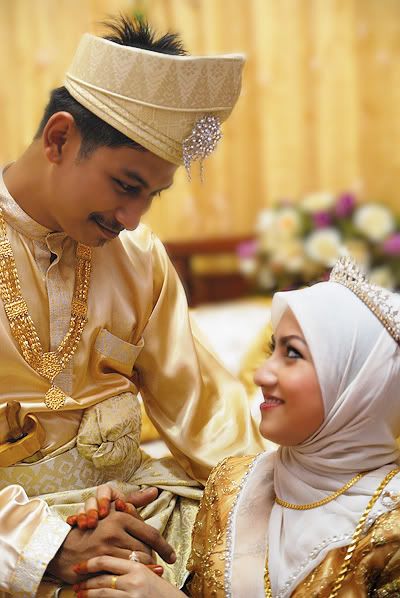
ok..heres another quick edit from me..things i did...fake bokeh(might b a lil bit too aggressive..but lazy to change =p )..sharpen some details....smoothen the face...make the skin tone btwn both of them more balanced...


user posted imageuser posted image


p/s: the more i see..the more i don like the fake bokeh..lol...but well...just for fun..so lazy to reduce it =p

This post has been edited by achew: May 5 2009, 02:28 AM
achew
post May 5 2009, 02:45 AM

Photolithography Engineer
*******
Senior Member
3,807 posts

Joined: Jan 2003
From: Masking


QUOTE(alpha_company @ May 5 2009, 02:37 AM)
waah achew.. the skin tone of the groom u edit how? step by step plzz.. fake bokeh how?
*
errr...actually there is no "correct" way of using photoshop la...as long as u understand the functions..u no need to follow the steps...if not..follow blindly wont bring u far..

ok..anyway..since guy n the gal skin tone is not on the same level..all i did was change the exposure + gamma + brightness to make the gal skin tone until i feel comfortable...and den another layer of exp + gamma for the guy..and den mask it using the gradient tool....

bokeh wise...its just "blur"..nothing great..lol


edit: oh ya..i desaturate ur photo a lil bit too...

This post has been edited by achew: May 5 2009, 02:47 AM
achew
post May 5 2009, 03:47 AM

Photolithography Engineer
*******
Senior Member
3,807 posts

Joined: Jan 2003
From: Masking


QUOTE(Seng_Kiat @ May 5 2009, 03:40 AM)
how to do that fake bokeh in photoshop? wink.gif.
*
i had a alien skin plugin for bokeh in my CS4...i can stimulate bokeh effects and even set the shape of the blades which create slightly diff bokeh results...

but usually...just do a "lens blur"..the result is more or less the same....but of cos..u can only "blur" the object..u cant really create the real bokeh like wad our lens produces...
achew
post May 5 2009, 12:44 PM

Photolithography Engineer
*******
Senior Member
3,807 posts

Joined: Jan 2003
From: Masking


u need to create a "mask" layer bside the layer u wanna mask...

try to google for some tutorial...masking is very simple concept..but i think its darn useful in photoshop...
achew
post May 5 2009, 01:33 PM

Photolithography Engineer
*******
Senior Member
3,807 posts

Joined: Jan 2003
From: Masking


QUOTE(alpha_company @ May 5 2009, 01:26 PM)
found a lot about mask layer but donno which is useful to me .. pening already..
*
did a quick google...and found this youtube vid..quickly browse thru..i think this shd b ok...

http://www.youtube.com/watch?v=R2fwM0eZlQs


Added on May 5, 2009, 1:36 pm
QUOTE(chiggy @ May 5 2009, 01:32 PM)
therefore on my a350, you would encourage me to use centre AF to get a better focus then?
Mine is always on Focus Priority
*
i always set mine on release...slight OOF stil can b tuned during post processing...better than totally miss the chance of shooting the moment...isnt it?

This post has been edited by achew: May 5 2009, 01:36 PM
achew
post May 5 2009, 02:07 PM

Photolithography Engineer
*******
Senior Member
3,807 posts

Joined: Jan 2003
From: Masking


QUOTE(Seng_Kiat @ May 5 2009, 02:02 PM)
here you go bro:

FOR WOMEN:
» Click to show Spoiler - click again to hide... «


FOR MEN:
» Click to show Spoiler - click again to hide... «


a lot more at MY FLICKR
*
luckily...not my cup of tea.. whistling.gif

i might nose bleed if u post some new sony slr n lenses... tongue.gif
achew
post May 5 2009, 05:25 PM

Photolithography Engineer
*******
Senior Member
3,807 posts

Joined: Jan 2003
From: Masking


QUOTE(alpha_company @ May 5 2009, 04:10 PM)
the vid shows the basics of what how u edit using masks in the wed pic that i took? thanks. biggrin.gif
*
hmm..to me..masking = masking..there is no basic or advance(or probably i hvn reach the advance stage yet =p )...its actually just a simple concept.. =)
achew
post May 5 2009, 06:00 PM

Photolithography Engineer
*******
Senior Member
3,807 posts

Joined: Jan 2003
From: Masking


QUOTE(alpha_company @ May 5 2009, 05:56 PM)
1. you change the exposure + gamma + brightness to make the gal skin tone until okay
2. and den another layer of exp + gamma for the guy
3. mask it using the gradient tool... (this you do by masking then using what kind/colour of gradient?)
*
correct for 1 & 2...

3...from wad i know...masking only have 2 color..black n white.....black = show previous layer...white = shows current layer...so wad color i use for gradient tool?black n white tongue.gif
achew
post May 5 2009, 07:50 PM

Photolithography Engineer
*******
Senior Member
3,807 posts

Joined: Jan 2003
From: Masking


QUOTE(alpha_company @ May 5 2009, 07:17 PM)
hehe.. sorry.. i thought in masking, the gradient tool can choose colour will show the colour in the pic..
*
try to create 2 layers with diff things inside...and put mask on the top layer..play around with it..i believe its not hard to understand =)
achew
post May 5 2009, 07:58 PM

Photolithography Engineer
*******
Senior Member
3,807 posts

Joined: Jan 2003
From: Masking


QUOTE(Wonka @ May 5 2009, 07:54 PM)
Picture spams.

#1
» Click to show Spoiler - click again to hide... «


#2
» Click to show Spoiler - click again to hide... «

*
i think #2 would b better if u increase the DoF ??looks abit too shallow...
achew
post May 5 2009, 08:17 PM

Photolithography Engineer
*******
Senior Member
3,807 posts

Joined: Jan 2003
From: Masking


QUOTE(Wonka @ May 5 2009, 07:59 PM)
How to increase using Raynox? I don't know how la. Hahaha..
*
hmm?? increase aperture??
achew
post May 5 2009, 08:34 PM

Photolithography Engineer
*******
Senior Member
3,807 posts

Joined: Jan 2003
From: Masking


nothing wrong to increase more..sometimes i shoot F25 or even higher...shd see the picture instead of judging with the numbers..right?? =D
achew
post May 5 2009, 09:47 PM

Photolithography Engineer
*******
Senior Member
3,807 posts

Joined: Jan 2003
From: Masking


nice soft shadow there =D
achew
post May 6 2009, 01:00 AM

Photolithography Engineer
*******
Senior Member
3,807 posts

Joined: Jan 2003
From: Masking


QUOTE(Seng_Kiat @ May 6 2009, 12:41 AM)
i got wide angle+macro converter. I wanna let it goes at RM300 only. tongue.gif. I was getting it for about RM600 and not really use it. sad.gif.
*
how come u sounds like u r the one jumping..lol
achew
post May 6 2009, 01:15 AM

Photolithography Engineer
*******
Senior Member
3,807 posts

Joined: Jan 2003
From: Masking


QUOTE(Seng_Kiat @ May 6 2009, 01:07 AM)
lol. It's just a lens converter, not lens nor body .. tongue.gif..
*
ok..since u nv use it..i'll adopt it for free... tongue.gif
achew
post May 6 2009, 01:47 AM

Photolithography Engineer
*******
Senior Member
3,807 posts

Joined: Jan 2003
From: Masking


QUOTE(Seng_Kiat @ May 6 2009, 01:42 AM)
haha ..

i was cheated by tarita at lyp la and they sold me RM3.4k for A300 single lens + sigggy 7030 + this wide angle/macro converter + 4gb + sony bag + those freebies like tripod and uv filter.

initially, they were offering me RM400 for 2 Hoya UV HMC filters + screen protector which is non-sense. At that time, I knew nothing about DSLR and lucky I did not take it but I was going for wide angle + macro converter instead.
*
i bought a unknown brand filter for 70bucks..and a normal handphone-like screen protector for 30buck too =.=
achew
post May 6 2009, 02:32 AM

Photolithography Engineer
*******
Senior Member
3,807 posts

Joined: Jan 2003
From: Masking


QUOTE(alpha_company @ May 6 2009, 02:22 AM)
achew.. the groom's face i cant never get it right la.. what u do exactly to match the color?
*
by 'cant get it right' i guess its not the masking prob right???

to b frank..all my pp r done according to my 'feeling' at the moment..giv me another chance i might not giv u the same tone...so i cant really giv u a 'standard procedures' to follow....

but like wad i said...i always play with ->contrast , vibrancy , gamma , exposure , brightness to achieve the skin tone.....sometimes i use color filter too..but not very often on human portrait..mostly flowers shots...
achew
post May 6 2009, 02:41 AM

Photolithography Engineer
*******
Senior Member
3,807 posts

Joined: Jan 2003
From: Masking


QUOTE(TrutH_SeeKeR @ May 6 2009, 02:38 AM)
hi all..
im so happy today...!! finally i bought the Sony 50mm 1:4 lens from Mr Chin Studio Zaloon. very happy indeed. now i will sell off some of my lenses.

rclxm9.gif
*
have fun with the great lens... biggrin.gif

11 Pages < 1 2 3 4 5 > » Top
Topic ClosedOptions
 

Change to:
| Lo-Fi Version
0.0450sec    0.57    7 queries    GZIP Disabled
Time is now: 11th December 2025 - 01:27 AM