Welcome Guest ( Log In | Register )

Outline · [ Standard ] · Linear+

 How to make your Celcom Broadband USB modem faster, follow the steps and check...

views
     
TSDavidtcf
post Mar 29 2009, 06:18 PM, updated 17y ago

To the moon!!
*******
Senior Member
3,520 posts

Joined: Jan 2003


i've made an important discovery after my 3rd day of using the celcom usb modem...

user posted image


1. as you can see from the above pic, make sure the 2nd option is unchecked (every PC/laptop has a different type of internal modem name).

detailed steps for Window XP users:
(go to start > network connections > right click Vodafone Mobile Connect > Properties > you will see the same scenario as above under Generals tab... )

(if not, go to start > control panel > network connections, same steps as above...)

For Vista users:

control panel > under Network and Internet, view network status and tasks > view status > properties > uncheck the 2nd option in the box

p.s. : it is always the 2nd option for that modem... the name always differs from each computer as every computer might be using a different internal modem... HUAWEI Mobile Connect will always be referring to the Celcom USB Modem, thus ONLY that option should be checked.

For those who enquire if their number is *99#, the latest one should be this as I am using it and just signed up less than a month:
*99***2#


2. disconnect your USB modem using the Vodafone Modem Connect Lite


3. reconnect back (as the settings will only take effect after doing so)


If not, you will suffer the below slow speed:

It will cause your PC to consume more memory as well, thus slowing it down...

user posted image


Once you've done the steps I've mentioned, look how huge is the difference:

user posted image


Hope it works for you too.... biggrin.gif

This post has been edited by Davidtcf: Apr 9 2009, 05:17 PM
mrafif
post Mar 29 2009, 06:38 PM

New Member
*
Junior Member
36 posts

Joined: Oct 2007
From: Bathroom


nice found~ biggrin.gif
TSDavidtcf
post Mar 29 2009, 06:43 PM

To the moon!!
*******
Senior Member
3,520 posts

Joined: Jan 2003


QUOTE(mrafif @ Mar 29 2009, 06:38 PM)
nice found~ biggrin.gif
*
yea i was wondering my the connection was so slow when I'm using the 98 package...

after tweaking here and there it caught me that ticking that option could be the cause....

experimented and it worked...
nod.gif

haha was funny of me adjusting the modem here and there thinking it's location might be affecting it... but it seems not. The modem placed anywhere is giving me good speed now... laugh.gif

JinXXX
post Mar 30 2009, 01:03 PM

Look at all my stars!!
*******
Senior Member
2,516 posts

Joined: Feb 2007
From: Uarla Umpur


how is the download speed.. constant ?

cause i downloaded a large file and i monitor the bandwidth with netmeter..

there is a lot of fluctuations
ira179
post Mar 30 2009, 04:10 PM

Getting Started
**
Junior Member
50 posts

Joined: Dec 2004
From: Kajang, Selangor


before :
user posted image

after :
user posted image

**it works rclxms.gif tongue.gif
tonynk9
post Mar 31 2009, 12:52 AM

Getting Started
**
Junior Member
114 posts

Joined: Feb 2008
From: cyberjaya, serdang, mines, seri kembangan


hey...thanks for sharing... no wonder my connection is extremely slow...
mfa333
post Mar 31 2009, 08:17 PM

Huhah!
*******
Senior Member
2,588 posts

Joined: Jan 2003
From: KL-Skudai

thats all?

too bad my pc doesn't have internal modem and celcom speed still sucks.. sad.gif
fabianz03
post Mar 31 2009, 08:31 PM

Look at all my stars!!
*******
Senior Member
4,649 posts

Joined: Aug 2008
From: Tāmaki Makaurau
Nice tip.
Thanks for sharing! flex.gif
speedfamgirl
post Apr 1 2009, 04:05 PM

Not afraid of #138
******
Senior Member
1,900 posts

Joined: Apr 2007
From: Mental Asylum
is this only works when the limit of 6GB has not been capped?

coz by default from the 1st day i only select the 1st modem. of course my speed is fast before that...
digilife
post Apr 2 2009, 02:39 AM

The MNP guy, its me yeah.
*******
Senior Member
8,025 posts

Joined: Feb 2005
From: Planet Boleland


hey, i tot the dial number should be *99# and why is yours different?????
eugene90
post Apr 5 2009, 07:47 AM

Getting Started
**
Junior Member
251 posts

Joined: Jan 2009
is the bunfdle plan of streamyx+cel broadband (rm108 monthly)still exist ?
TSDavidtcf
post Apr 8 2009, 01:26 AM

To the moon!!
*******
Senior Member
3,520 posts

Joined: Jan 2003


QUOTE(JinXXX @ Mar 30 2009, 01:03 PM)
how is the download speed.. constant ?

cause i downloaded a large file and i monitor the bandwidth with netmeter..

there is a lot of fluctuations
*
hmm i noticed that too.. time to use torrent? celcom doesnt block torrent u know... try bitcomet biggrin.gif


QUOTE(ira179 @ Mar 30 2009, 04:10 PM)
before :
user posted image

after :
user posted image

**it works rclxms.gif  tongue.gif
*
good for u, u must be curious like me to go touch the 2nd option biggrin.gif


QUOTE(tonynk9 @ Mar 31 2009, 12:52 AM)
hey...thanks for sharing... no wonder my connection is extremely slow...
*
ur welcome... laugh.gif (maybe u can post ur speedtest before and after to proof it)

QUOTE(mfa333 @ Mar 31 2009, 08:17 PM)
thats all?

too bad my pc doesn't have internal modem and celcom speed still sucks.. sad.gif
*
err, i think u better try moving to a location nearer to the window maybe? or not too closed up... it is still wireless modem, placed beside the window at my 3rd floor is like flying speed thumbup.gif

QUOTE(fabianz03 @ Mar 31 2009, 08:31 PM)
Nice tip.
Thanks for sharing!  flex.gif
*
ur welcome

QUOTE(speedfamgirl @ Apr 1 2009, 04:05 PM)
is this only works when the limit of 6GB has not been capped?

coz by default from the 1st day i only select the 1st modem. of course my speed is fast before that...
*
hmm... u download a lot? D98 has a 5GB cap. u can check the cap in the "view usage" in ur vodafone mobile connect...

QUOTE(digilife @ Apr 2 2009, 02:39 AM)
hey, i tot the dial number should be *99# and why is yours different?????
*
maybe u shud try change to mine and see how wink.gif (as i just got the modem recently)

QUOTE(eugene90 @ Apr 5 2009, 07:47 AM)
is the bunfdle plan of streamyx+cel broadband (rm108 monthly)still exist ?
*
i have no idea bro... sweat.gif
MVP123
post Apr 8 2009, 10:33 PM

New Member
*
Junior Member
11 posts

Joined: Feb 2009
hello..is it the celcome broadband can use 5gb limited only?if over wil make the line down ah?can tell me how to do?can make it fast download...or change vpn ??ip address??
TSDavidtcf
post Apr 9 2009, 01:54 AM

To the moon!!
*******
Senior Member
3,520 posts

Joined: Jan 2003


QUOTE(MVP123 @ Apr 8 2009, 10:33 PM)
hello..is it the celcome broadband can use 5gb limited only?if over wil make the line down ah?can tell me how to do?can make it fast download...or change vpn ??ip address??
*
this is to control usage... i dont think its all a bad idea. malaysia broadband services havent developed till like the west yet

after 5gb using celcom i heard will be slower... so monitor ur usage make sure dont exceed.

u can view it at the vodafone mobile connect > view usage
jimlim007
post Apr 9 2009, 07:41 AM

Enoch
*******
Senior Member
4,073 posts

Joined: Aug 2006


QUOTE(Davidtcf @ Apr 9 2009, 01:54 AM)
this is to control usage... i dont think its all a bad idea. malaysia broadband services havent developed till like the west yet

after 5gb using celcom i heard will be slower... so monitor ur usage make sure dont exceed.

u can view it at the vodafone mobile connect > view usage
*
5gb not enough. sien then cant jump ship to celcom sweat.gif
TSDavidtcf
post Apr 9 2009, 05:15 PM

To the moon!!
*******
Senior Member
3,520 posts

Joined: Jan 2003


updated the doc to include vista users as well as the latest dialing number...
ashkann
post Apr 10 2009, 11:49 PM

Getting Started
**
Junior Member
93 posts

Joined: Apr 2009
this step work with those using hp as a modem? hmm.gif
TSDavidtcf
post Apr 11 2009, 06:10 PM

To the moon!!
*******
Senior Member
3,520 posts

Joined: Jan 2003


QUOTE(ashkann @ Apr 10 2009, 11:49 PM)
this step work with those using hp as a modem? hmm.gif
*
as long as it is celcom i supposed. As both uses a sim card to dial to 3G
fabianz03
post Apr 11 2009, 06:11 PM

Look at all my stars!!
*******
Senior Member
4,649 posts

Joined: Aug 2008
From: Tāmaki Makaurau
Wonder if MOD can pin this. hmm.gif
MX510
post Apr 11 2009, 06:53 PM

Love Me Sin Hate Me Sinner
*******
Senior Member
4,038 posts

Joined: Aug 2005
From: Earth


Will try this tricks i'm a d98
umarnet
post Apr 12 2009, 09:55 PM

Getting Started
**
Junior Member
61 posts

Joined: Oct 2008
user posted image

my celcom d98, everyday average speed sad.gif
TSDavidtcf
post Apr 12 2009, 10:02 PM

To the moon!!
*******
Senior Member
3,520 posts

Joined: Jan 2003


QUOTE(fabianz03 @ Apr 11 2009, 06:11 PM)
Wonder if MOD can pin this. hmm.gif
*
i suppose it will be good rather than relying on my sig to make ppl realize... biggrin.gif


Added on April 12, 2009, 10:03 pm
QUOTE(umarnet @ Apr 12 2009, 09:55 PM)
user posted image

my celcom d98, everyday average speed  sad.gif
*
celcom might be doing some upgrading work... i notice a fall in speed recently too, and i feel it's quite a big difference.

or could be the weather in kl... recent rains? hmm? hmm.gif

This post has been edited by Davidtcf: Apr 12 2009, 10:05 PM
-storm-
post Apr 13 2009, 01:25 AM

Hmmm........
*******
Senior Member
2,105 posts

Joined: Apr 2006
From: Somewhere in KL


Mine is already unchecked by default but speed is still that sucky.
WaCKy-Angel
post Apr 13 2009, 01:28 AM

PeACe~~
*********
All Stars
21,962 posts

Joined: Dec 2004
From: KL


Huh......
Uncheck the dial-up modem and your connection becomes faster?

I say that is complete bullshit.

princezs
post Apr 13 2009, 01:41 AM

Getting Started
**
Junior Member
262 posts

Joined: Sep 2008
From: Raju's heart


wow
this is nice
i try at my advinne modem also works thumbup.gif

skyneterror
post Apr 13 2009, 09:19 AM

New Member
*
Junior Member
13 posts

Joined: Aug 2008
From: kg.baru..kl


user posted image

thanks ya
cruxidex
post Apr 13 2009, 08:03 PM

Enthusiast
*****
Senior Member
898 posts

Joined: Aug 2006
From: Kajang, Selangor


yeyy~ figured out another trick for my celcom BB. b4 this since i used in sg ramal here i alwiz have EDGE eventhou my coverage states my house is under HSDPA,

using the VODAFONE MOBILE CONNECT LITE software now i know how i can force to use the 3G network.. now i got HSDPA coverage n full 384kbps (coz im in D68)

in ur vodafone software go to menu VIEW>AVAILABLE MOBILE CONNECTION,

ur modem will now do a network search.. when u see CELCOM MALAYSIA 3G click CONNECT... now~ no more slow internet for me yeyyy~~~

user posted image
TSDavidtcf
post Apr 13 2009, 10:35 PM

To the moon!!
*******
Senior Member
3,520 posts

Joined: Jan 2003


QUOTE(WaCKy-Angel @ Apr 13 2009, 01:28 AM)
Huh......
Uncheck the dial-up modem and your connection becomes faster?

I say that is complete bullshit.
*
you should read the feedback i got first...

before i posted this i tried and tested myself.


Added on April 13, 2009, 10:39 pm
QUOTE(princezs @ Apr 13 2009, 01:41 AM)
wow
this is nice
i try at my advinne modem also works thumbup.gif
*
glad to hear that... enjoy ur speed smile.gif

QUOTE(skyneterror @ Apr 13 2009, 09:19 AM)
user posted image

thanks ya
*
ur welcome... it improved i see...


QUOTE(cruxidex @ Apr 13 2009, 08:03 PM)
yeyy~ figured out another trick for my celcom BB. b4 this since i used in sg ramal here i alwiz have EDGE eventhou my coverage states my house is under HSDPA,

using the VODAFONE MOBILE CONNECT LITE software now i know how i can force to use the 3G network.. now i got HSDPA coverage n full 384kbps (coz im in D68)

in ur vodafone software go to menu VIEW>AVAILABLE MOBILE CONNECTION,

ur modem will now do a network search.. when u see CELCOM MALAYSIA 3G click CONNECT... now~ no more slow internet for me yeyyy~~~

user posted image
*
actually, the easiest way for it to get better signal is to go near the window, as bricks and glass windows etc obstructing it can actually reduce it's signal strength...

and whether to get 3G, HSDPA, or Edge is based on whether that area is covered with the coverage, and even if it does let's say with HSDPA, how strong is that signal? the usual stronger coverage is at places which is more commercialized, packed with more people, and a place where celcom can't afford to show low signal to its users...

that is why they give a 7 days trial period laugh.gif

p.s. i work with maxis before as customer care so i know all these... tongue.gif

This post has been edited by Davidtcf: Apr 13 2009, 10:39 PM
wear
post Apr 14 2009, 11:20 AM

New Member
*
Junior Member
34 posts

Joined: Dec 2008


before:

user posted image


after:

user posted image


hurm....
I'm using D68 n in hdspa area indeed.

This post has been edited by wear: Apr 14 2009, 11:44 AM
Gula Kapas
post Apr 14 2009, 11:53 AM

New Member
*
Newbie
0 posts

Joined: Apr 2009
The changing setting part does not work for me mad.gif cry.gif

The phone number won't change from *99***16# to *99***2#, no matter how i try to change it vmad.gif

Other than that stubborn number, the HUAWEI modem is the only one checked. The other (built-in) modem has always been unchecked.

This is the connection at its not best at all best rclxub.gif (Before)
user posted image
Sorry, no After, coz i couldn't change any settings sad.gif

Am using the RM68/month package rclxm9.gif

This post has been edited by Gula Kapas: Apr 14 2009, 12:08 PM
TSDavidtcf
post Apr 14 2009, 10:04 PM

To the moon!!
*******
Senior Member
3,520 posts

Joined: Jan 2003


QUOTE(Gula Kapas @ Apr 14 2009, 11:53 AM)
The changing setting part does not work for me  mad.gif  cry.gif

The phone number won't change from *99***16# to *99***2#, no matter how i try to change it  vmad.gif

Other than that stubborn number, the HUAWEI modem is the only one checked. The other (built-in) modem has always been unchecked.

This is the connection at its not best at all best  rclxub.gif  (Before)
user posted image
Sorry, no After, coz i couldn't change any settings  sad.gif

Am using the RM68/month package  rclxm9.gif
*
oh... then i better record that down...

it makes sense if D68 package comes with a different dialing number hmm.gif
wear
post Apr 15 2009, 08:39 PM

New Member
*
Junior Member
34 posts

Joined: Dec 2008


today i did successfully change the 'phone number' from *99***1# to *99***2# and this is what I got:

before:
user posted image

after:
user posted image

p/s:if u can't change the 'phone number' to *99***2# (where it keeps reverting back to *99***1#) just setup a new dial-up connection, choose your modem, key in *99***2# into "dial up phone number" box, and connect.. I believe your speed will change..

This post has been edited by wear: Apr 15 2009, 08:40 PM
smwah
post Apr 15 2009, 11:23 PM

Glad to be Here
Group Icon
Elite
1,701 posts

Joined: Jan 2003
From: Setia Alam


how about maxis account? any idea to improve the speed.
TSDavidtcf
post Apr 16 2009, 01:04 AM

To the moon!!
*******
Senior Member
3,520 posts

Joined: Jan 2003


QUOTE(wear @ Apr 15 2009, 08:39 PM)
today i did successfully change the 'phone number' from *99***1# to *99***2# and this is what I got:

before:
user posted image

after:
user posted image

p/s:if u can't change the 'phone number' to *99***2# (where it keeps reverting back to *99***1#) just setup a new dial-up connection, choose your modem, key in *99***2# into "dial up phone number" box, and connect.. I believe your speed will change..
*
good for u then... thumbup.gif


Added on April 16, 2009, 1:06 am
QUOTE(smwah @ Apr 15 2009, 11:23 PM)
how about maxis account? any idea to improve the speed.
*
no idea... u can try call up their helpdesk? i know from exp that maxis support is knowledgeable and helpful...

we are posting this coz in truth celcom helpdesk really suck, so we do our own troubleshooting haha!

tongue.gif biggrin.gif


This post has been edited by Davidtcf: Apr 16 2009, 01:06 AM
speedfamgirl
post Apr 17 2009, 11:01 AM

Not afraid of #138
******
Senior Member
1,900 posts

Joined: Apr 2007
From: Mental Asylum
it's not working at all after being capped.

-> am d98 user
TSDavidtcf
post Apr 19 2009, 04:56 PM

To the moon!!
*******
Senior Member
3,520 posts

Joined: Jan 2003


QUOTE(speedfamgirl @ Apr 17 2009, 11:01 AM)
it's not working at all after being capped.

-> am d98 user
*
yes being capped no matter how u do it wont work...

need to wait till end of the month for it to uncapped. Maybe u can try call celcom helpdesk see they can assist to uncapped it? (give all sorts of reasons)
blacktubi
post Apr 19 2009, 09:55 PM

-
Group Icon
Elite
8,409 posts

Joined: Jul 2008

works in maxis brodband?

TSDavidtcf
post Apr 21 2009, 12:15 AM

To the moon!!
*******
Senior Member
3,520 posts

Joined: Jan 2003


QUOTE(blacktubi @ Apr 19 2009, 09:55 PM)
works in maxis brodband?
*
no...
amiruldaniel
post Jun 10 2009, 11:42 AM

New Member
*
Newbie
3 posts

Joined: Jun 2009
hai saya junior disini.so blh tlng saya x?saya ada baca tntang article nie.saya pakai celcom broadband d68.acsess number die *99#.klw tukar ke nombor nie *99***2#,harga bulanan yang perlu saya bayar meningkat tak? rclxub.gif sweat.gif
DarthMaus
post Jun 14 2009, 12:02 AM

Now u see me... now u don't... really...
******
Senior Member
1,238 posts

Joined: Feb 2009
From: JB


Hi,

Somehow, i cannot see the initial screenshot...therefore don't know exactly what to do. Please repost the screenie. Thanks a million.
internetinsider
post Jun 14 2009, 12:42 AM

Getting Started
**
Junior Member
109 posts

Joined: May 2009
wow. This is a good idea. Will try it with mine. Bump! Bump! Bump! Let others see this!
lj0000
post Jun 14 2009, 01:02 AM

Look at all my stars!!
*******
Senior Member
2,200 posts

Joined: Jan 2003
also at the same time, do adjust in the 'options' tab, set the redial to 999,
time between redial = 1 and enable 'redial if line is dropped'

this way, you should not feel any disconnection badly.
internetinsider
post Jun 14 2009, 01:26 AM

Getting Started
**
Junior Member
109 posts

Joined: May 2009
Hmm..average speedtest increased slightly from 0.42Mbps to 0.54Mbps. Thanks for the idea anyway. Keep up the good work!
joongieforeva
post Jun 16 2009, 10:50 PM

Getting Started
**
Junior Member
91 posts

Joined: Apr 2009
i follow your instruction but the weird thing is my computer do not have internal modem
only got the celcom huawei


i just subscribed celcom broadband
my sim card is the postpaid sim card
i was wondering how to check my celcom number/account number?
celcom number suppose to start with 019

This post has been edited by joongieforeva: Jun 16 2009, 10:53 PM
bear300
post Jun 19 2009, 12:25 PM

Getting Started
**
Junior Member
79 posts

Joined: Oct 2005
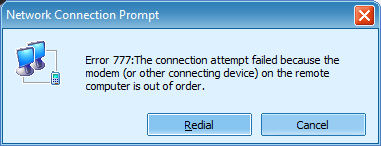
this error message occur when i try to change the dial number from *99# to *99***2#
"The connection attempt failed because the modem (or other connecting device) on the remote computer is out of order)"

help~
my speed is super slow now.. speed tested and the download speed is 0.02mbps.. :S

help needed...

This post has been edited by bear300: Jun 19 2009, 12:32 PM
acad615
post Jun 22 2009, 12:38 AM

Getting Started
**
Junior Member
224 posts

Joined: Apr 2006


QUOTE(bear300 @ Jun 19 2009, 12:25 PM)
this error message occur when i try to change the dial number from *99# to *99***2#
"The connection attempt failed because the modem (or other connecting device) on the remote computer is out of order)"

help~
my speed is super slow now.. speed tested and the download speed is 0.02mbps..  :S

help needed...
*
same here on d98 but speed lower than d68, in usj 9 area >.<
Polaris
post Jun 26 2009, 11:32 AM

Trust Fund Baby
*******
Senior Member
2,850 posts

Joined: Aug 2006
From: Stellar Nursery
I upgraded to the RM98 speed a few days ago and did what the TS recommended, disconnect then reconnect..

But a few tests still yield SLOW mad.gif speeds!!

user posted image

vmad.gif vmad.gif
TSDavidtcf
post Jun 26 2009, 05:31 PM

To the moon!!
*******
Senior Member
3,520 posts

Joined: Jan 2003


QUOTE(Polaris @ Jun 26 2009, 11:32 AM)
I upgraded to the RM98 speed a few days ago and did what the TS recommended, disconnect then reconnect..

But a few tests still yield SLOW  mad.gif  speeds!!

user posted image

vmad.gif  vmad.gif
*
is the problem still persisting? how about the speed before?
Polaris
post Jun 28 2009, 11:19 PM

Trust Fund Baby
*******
Senior Member
2,850 posts

Joined: Aug 2006
From: Stellar Nursery
QUOTE(Davidtcf @ Jun 26 2009, 05:31 PM)
is the problem still persisting? how about the speed before?
*
Previously I was on the RM68 pack for about a month, the speedtest results were usually around 50% of the advertised speed..

Now, this is the speedtest results at this very moment..


user posted image
roommate
post Jun 29 2009, 01:39 PM

Casual
***
Junior Member
383 posts

Joined: Jul 2005
From: anywhere u want =)


QUOTE(Davidtcf @ Apr 11 2009, 06:10 PM)
as long as it is celcom i supposed. As both uses a sim card to dial to 3G
*
nope. FOr those who using HP to connect (like me), it doesn't appear the 2nd option of connection as claim bt TS. So it should be no prob for those who using their HP to connect to Celcom Broadband Internet. smile.gif
TSDavidtcf
post Jun 29 2009, 08:20 PM

To the moon!!
*******
Senior Member
3,520 posts

Joined: Jan 2003


QUOTE(Polaris @ Jun 28 2009, 11:19 PM)
Previously I was on the RM68 pack for about a month, the speedtest results were usually around 50% of the advertised speed..

Now, this is the speedtest results at this very moment..
user posted image
*
why is your location in the speedtest selected as spore?

can try change to malaysia KL server and post again?


Added on June 29, 2009, 8:22 pmmy speedtest with spore selected:

user posted image

lower than the malaysia's test


Added on June 29, 2009, 8:23 pmanyway i'm using package 98.. i guess it does make a difference

This post has been edited by Davidtcf: Jun 29 2009, 08:23 PM
amirudin920927
post Jun 30 2009, 11:17 AM

///-| Kapten | Amirudin |-\\\
******
Senior Member
1,431 posts

Joined: Feb 2009
From: Seremban - Putrajaya


thanks for sharing bro~!
zmonay
post Jul 25 2009, 02:33 AM

New Member
*
Newbie
0 posts

Joined: Oct 2006


Hye... can somebody guide me... icon_question.gif

im using ASUS laptop which have no internal modem by factory default..

which mean that i have no '2nd option' to be checked in the box...

And im using vista home premium... celcom BB basic 384kbps...RM68/month...

yeah... the speed sucks... cry.gif

ive tried the tweaking steps as per instructed here but no luck for me... cry.gif

how can i configure this step since only huawei 3g modem appeared in the list?...

does this mean that i cannot use this method since i only have 1 modem? icon_question.gif icon_question.gif icon_question.gif icon_rolleyes.gif
mp3sucker
post Aug 3 2009, 11:54 AM

New Member
*
Junior Member
21 posts

Joined: Aug 2008
From: Subang Jaya SS15


hmm.. anyone can clear this up I heard some people says this wireless broadband provider block some applications...

Is the celcom or maxis will block certain application like limewire or torrent or some other file sharing application? if it does is there anyway to bypass this?
TSDavidtcf
post Aug 13 2009, 12:13 AM

To the moon!!
*******
Senior Member
3,520 posts

Joined: Jan 2003


QUOTE(zmonay @ Jul 25 2009, 02:33 AM)
Hye... can somebody guide me...  icon_question.gif

im using ASUS laptop which have no internal modem by factory default..

which mean that i have no '2nd option' to be checked in the box...

And im using vista home premium... celcom BB basic 384kbps...RM68/month...

yeah... the speed sucks...   cry.gif

ive tried the tweaking steps as per instructed here but no luck for me...  cry.gif

how can i configure this step since only huawei 3g modem appeared in the list?...

does this mean that i cannot use this method since i only have 1 modem? icon_question.gif  icon_question.gif  icon_question.gif  icon_rolleyes.gif
*
hmm, i think ur last resort would be using OpenDNS..

im using it so far for a few days already, improving my speed when browsing FB, international sites... will slightly drop for local sites tho but still ok

https://www.opendns.com/

follow the steps... it's quite simple.. basically it's just routing the way the network flows into another IP...

when u go to speedtest.net the suggested server will change to Singapore... so i guess it's a shortcut to make the link faster.

another method is to use google chrome... i'm using it and it definately helps to boost speed.

http://www.google.com/chrome

hope this helps further...

I'm using D98 so speed is still not that big of an issue smile.gif


Added on August 13, 2009, 12:15 am
QUOTE(mp3sucker @ Aug 3 2009, 11:54 AM)
hmm.. anyone can clear this up I heard some people says this wireless broadband provider block some applications...

Is the celcom or maxis will block certain application like limewire or torrent or some other file sharing application? if it does is there anyway to bypass this?
*
i'm using bitcomet, getting download speed of up to 50-60kbps or above during off peak hours smile.gif

http://www.bitcomet.com/

one more thing, maxis do block all torrent and file sharing apps, sorry to say that... time to switch over to celcom? wink.gif

This post has been edited by Davidtcf: Aug 13 2009, 12:16 AM
n0v4m4r1n3
post Aug 25 2009, 07:43 PM

Safety and Health Practitioner
******
Senior Member
1,072 posts

Joined: Jan 2008
From: MY


Hello there, I can't seem to get this works with Huawei E1550..

Maybe not compatible? Sorry if asking such a stupid question, new to this stuff btw.. blush.gif


This post has been edited by n0v4m4r1n3: Aug 25 2009, 07:51 PM
TSDavidtcf
post Aug 27 2009, 09:23 PM

To the moon!!
*******
Senior Member
3,520 posts

Joined: Jan 2003


QUOTE(n0v4m4r1n3 @ Aug 25 2009, 07:43 PM)
Hello there, I can't seem to get this works with Huawei E1550..

Maybe not compatible? Sorry if asking such a stupid question, new to this stuff btw.. blush.gif
*
wont be able to help you then... im using vodafone K3565
Solidusnake
post Sep 18 2009, 12:32 AM

Getting Started
**
Junior Member
57 posts

Joined: Sep 2009


Wow Its Works Bro

Before

user posted image

After
user posted image
Celcom d98

Damn That Huge Different

This post has been edited by Solidusnake: Sep 18 2009, 12:35 AM
TSDavidtcf
post Sep 18 2009, 10:07 AM

To the moon!!
*******
Senior Member
3,520 posts

Joined: Jan 2003


QUOTE(Solidusnake @ Sep 18 2009, 12:32 AM)
Wow Its Works Bro

Before

user posted image

After
user posted image
Celcom d98

Damn That Huge Different
*
congrats.. biggrin.gif
aaron_15ryderz
post Sep 19 2009, 10:27 AM

Getting Started
**
Junior Member
276 posts

Joined: Sep 2008
From: Kuching, Sarawak


i cannot change the *99# number...
it cannot connect at all...


Added on September 19, 2009, 10:28 amanyway, i'm using huawei e160 usb stick modem


Added on September 19, 2009, 10:29 ambefore :
user posted image

This post has been edited by aaron_15ryderz: Sep 19 2009, 10:29 AM
HeiShou
post Sep 20 2009, 01:32 AM

Getting Started
**
Junior Member
141 posts

Joined: Sep 2009
Ahh, it was already uncheck. O_O

Btw, Celcom broadbrand is slow >_<
goodfella
post Sep 26 2009, 07:47 PM

New Member
*
Junior Member
44 posts

Joined: Mar 2009
Try using cfos. You are going to see alot of improvement for your internet speed. Post your review after using it.

Try Toonel too:

Toonel

This post has been edited by goodfella: Sep 26 2009, 08:26 PM
rizashahril
post Sep 28 2009, 02:41 PM

Getting Started
**
Junior Member
65 posts

Joined: Nov 2008


there is one more method

go to MCMC website and lodge an online complaint, attached your speedtest print screen on the online form. also don't forget to put in your real info.

MCMC already state in the paper last time that all ISP provider must provide a best effort of 70% of the speed provided.

2-3 days later celcom will call you for sure. Don't be shy to lodge another complaint if celcom still give shitty answers like they are going to upgrade in the future. demand a rebate if their service is unsatisfactory.

don't stay quiet cause they will only 'pijak kepala' on all the user.

This post has been edited by rizashahril: Sep 28 2009, 02:42 PM
uberific
post Oct 11 2009, 03:24 PM

On my way
****
Senior Member
618 posts

Joined: Mar 2007
From: Selangor


can this be done as im Using Vodafone Modem with ZTE Join Air....
TSDavidtcf
post Oct 12 2009, 07:34 AM

To the moon!!
*******
Senior Member
3,520 posts

Joined: Jan 2003


QUOTE(uberific @ Oct 11 2009, 03:24 PM)
can this be done as im Using Vodafone Modem with ZTE Join Air....
*
can... this is at windows settings

another method when u cant connect is using windows dialer...

right click at the vodafone mobile connect at "network connections" > disconnect

then press "connect" back... it will direct dial the celcom without going through a medium (any software vodafone etc)

sometimes it works sometimes not, have to keep try... and sometimes faster sometimes not tongue.gif
faizalmzain
post Oct 12 2009, 11:36 AM

Regular
******
Senior Member
1,416 posts

Joined: Apr 2005
From: Kuala Lumpur


QUOTE(umarnet @ Apr 12 2009, 09:55 PM)
user posted image

my celcom d98, everyday average speed  sad.gif
*
mine is about the same speed as well for d68...by next month if the speed is the same as d68 then i will downgrade to d68.


Added on October 12, 2009, 11:39 am
QUOTE(wear @ Apr 14 2009, 11:20 AM)
before:

user posted image
after:

user posted image
hurm....
I'm using D68 n in hdspa area indeed.
*
poor you.. i think u only get GPRS speed.. digi edge speed should be much better ohmy.gif

This post has been edited by faizalmzain: Oct 12 2009, 11:39 AM
nooblike221
post Oct 20 2009, 04:28 PM

New Member
*
Newbie
0 posts

Joined: Oct 2009
o no... i cant find "vodafone mobile connect" in "network connections"

i using K3565-z on DELL Latitude D630...HELP

Attached Image
chokey84
post Oct 21 2009, 09:16 AM

Getting Started
**
Junior Member
86 posts

Joined: Jul 2006
From: KL


QUOTE(goodfella @ Sep 26 2009, 07:47 PM)
Try using cfos. You are going to see alot of improvement for your internet speed. Post your review after using it.

Try Toonel too:

Toonel
*
how to used this toonel.net?? thanks smile.gif
TSDavidtcf
post Oct 27 2009, 01:33 PM

To the moon!!
*******
Senior Member
3,520 posts

Joined: Jan 2003


QUOTE(nooblike221 @ Oct 20 2009, 04:28 PM)
o no... i cant find "vodafone mobile connect" in "network connections"

i using K3565-z on DELL Latitude D630...HELP

Attached Image
*
not sure about that...

have u tried opendns and using google chrome?

changing apnet to celcom.net.my?
Scandal
post Oct 27 2009, 02:07 PM

๑۩۞۩๑ 努力 ๑۩۞۩๑
*****
Senior Member
902 posts

Joined: Jun 2005
From: Negeri Sembilan Current Location: Johor


i only have 1 option for cheacked.....
Little White Baby
post May 12 2010, 10:30 PM

New Member
*
Junior Member
9 posts

Joined: May 2010
can i use this solution when im using the latest celcom broadband modem?

but then i only have one option to checked. cry.gif

someone save me please. the speed is killing me. very very slow nowadays T.T
jitzlim
post Jul 15 2010, 04:24 PM

New Member
*
Junior Member
32 posts

Joined: Nov 2009
From: Subang Jaya


how do you do it for windows 7?
Sapitt
post Nov 17 2010, 09:55 PM

New Member
*
Junior Member
7 posts

Joined: Jun 2010


Any change to make this on Windows 7? I'm using Windows 7 Home Premium on Asus Notebook UL30VT.
Help me please . Lately Celcom suckin' slow cry.gif

user posted image

This post has been edited by Sapitt: Nov 17 2010, 09:59 PM
GMS FearLess
post Nov 19 2010, 01:03 AM

Getting Started
**
Junior Member
178 posts

Joined: May 2009
From: in thes lulz


QUOTE(Sapitt @ Nov 17 2010, 09:55 PM)
Any change to make this on Windows 7? I'm using Windows 7 Home Premium on Asus Notebook UL30VT.
Help me please . Lately Celcom suckin' slow  cry.gif

user posted image
*
yeah...me too..... cry.gif
Sapitt
post Nov 19 2010, 01:06 AM

New Member
*
Junior Member
7 posts

Joined: Jun 2010


Anyone? rclxub.gif
Chyan
post Nov 19 2010, 07:31 PM

Look at all my stars!!
*******
Senior Member
4,222 posts

Joined: Apr 2007

Just go to Network and Sharing center. Click on Celcom 3G and go to properties. It's all there.

Everything is practically the same with Vista and marginally the same with WinXP. It's Windows afterall. smile.gif


By the way guys, do inform if you've already got capped when over the data usage limit and share your speed results. smile.gif
SUSSharzRezza
post Dec 10 2010, 03:59 AM

Getting Started
**
Junior Member
106 posts

Joined: Feb 2009


im using win7, so what shud i do?
any1 can help me
yus1987
post Apr 4 2011, 06:29 AM

New Member
*
Junior Member
8 posts

Joined: Apr 2011


My celcom broadband D-98 everyday speed :-


tongue.gifAttached Image

This post has been edited by yus1987: Apr 4 2011, 06:31 AM
Ghostblind
post Aug 29 2011, 01:25 AM

4°₭ ⍧∟⌊⌋ß
****
Senior Member
546 posts

Joined: Nov 2007
From: ҝίЯ⍺βџζụ


mine celcom 3g broadband

before

user posted image

after cry.gif

user posted image

This post has been edited by Ghostblind: Aug 29 2011, 01:28 AM
cshong
post Aug 29 2011, 08:47 AM

Look at all my stars!!
*******
Senior Member
3,927 posts

Joined: Oct 2007
QUOTE(Davidtcf @ Mar 29 2009, 06:18 PM)
For those who enquire if their number is *99#, the latest one should be this as I am using it and just signed up less than a month:
*99***2#
*
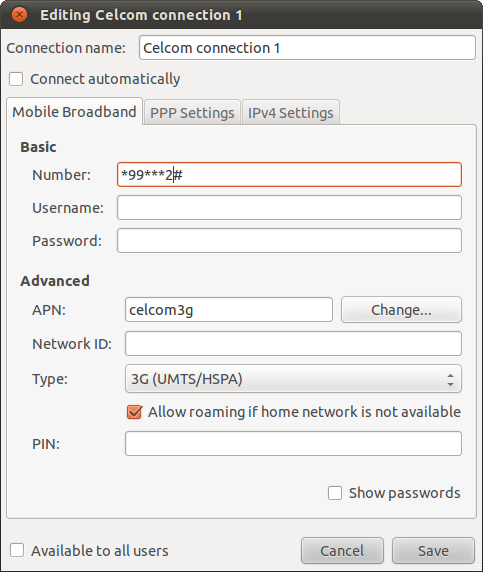
That number does not work for me. My modem is Huawei E173U USB modem and my laptop has no other modem. I am using Celcom Broadband Manager. OS is Windows 7 Home Premium 64 bit.

user posted image

user posted image

user posted image

This post has been edited by cshong: Aug 29 2011, 09:07 AM
cshong
post Aug 29 2011, 09:10 AM

Look at all my stars!!
*******
Senior Member
3,927 posts

Joined: Oct 2007
The number "*99***2#" also not work under Linux OS (Ubuntu 11.04). It disconnected immediately after I connect.

user posted image

The following screenshot is too wide in size, so I only post the thumbnail here.

user posted image
skeleton123
post Sep 24 2011, 01:04 PM

Getting Started
**
Junior Member
206 posts

Joined: Aug 2010


QUOTE(cshong @ Aug 29 2011, 08:47 AM)
That number does not work for me. My modem is Huawei E173U USB modem and my laptop has no other modem. I am using Celcom Broadband Manager. OS is Windows 7 Home Premium 64 bit.

user posted image

user posted image

user posted image
*
I got the same problem. icon_question.gif
fat16
post Sep 25 2011, 01:58 PM

Look at all my stars!!
*******
Senior Member
4,582 posts

Joined: Jan 2003
From: West johor


CODE
--> WvDial: Internet dialer version 1.60
--> Cannot get information for serial port.
--> Initializing modem.
--> Sending: ATZ
ATZ
OK
--> Sending: ATZ
ATZ
OK
--> Sending: ATQ0 V1 E1 S0=0 &C1 &D2 +FCLASS=0
ATQ0 V1 E1 S0=0 &C1 &D2 +FCLASS=0
OK
--> Modem initialized.
--> Sending: ATDT*99***2#
--> Waiting for carrier.
ATDT*99***2#
ERROR
--> Invalid dial command.
--> Disconnecting at Sun Sep 25 13:54:02 2011

jaya28inside
post Feb 24 2013, 01:22 AM

Getting Started
**
Junior Member
222 posts

Joined: Jan 2008
rclxms.gif

but it works for my huawei... flex.gif


Change to:
| Lo-Fi Version
0.0439sec    0.68    6 queries    GZIP Disabled
Time is now: 8th December 2025 - 09:00 PM