

Ahh, it was already uncheck. O_O
Btw, Celcom broadbrand is slow >_<
How to make your Celcom Broadband USB modem faster, follow the steps and check...
How to make your Celcom Broadband USB modem faster, follow the steps and check...
|
|
 Sep 20 2009, 01:32 AM Sep 20 2009, 01:32 AM
|
 
Junior Member
141 posts Joined: Sep 2009 
|
Ahh, it was already uncheck. O_O
Btw, Celcom broadbrand is slow >_< |
|
|
|
|
|
Sep 26 2009, 07:47 PM
|

Junior Member
44 posts Joined: Mar 2009
|
Try using cfos. You are going to see alot of improvement for your internet speed. Post your review after using it.
Try Toonel too: Toonel This post has been edited by goodfella: Sep 26 2009, 08:26 PM |
|
|
Sep 28 2009, 02:41 PM
|

Junior Member
65 posts Joined: Nov 2008 
|
there is one more method
go to MCMC website and lodge an online complaint, attached your speedtest print screen on the online form. also don't forget to put in your real info. MCMC already state in the paper last time that all ISP provider must provide a best effort of 70% of the speed provided. 2-3 days later celcom will call you for sure. Don't be shy to lodge another complaint if celcom still give shitty answers like they are going to upgrade in the future. demand a rebate if their service is unsatisfactory. don't stay quiet cause they will only 'pijak kepala' on all the user. This post has been edited by rizashahril: Sep 28 2009, 02:42 PM |
|
|
Oct 11 2009, 03:24 PM
|

Senior Member
618 posts Joined: Mar 2007 From: Selangor
|
can this be done as im Using Vodafone Modem with ZTE Join Air....
|
|
|
Oct 12 2009, 07:34 AM
|

Senior Member
3,520 posts Joined: Jan 2003
|
QUOTE(uberific @ Oct 11 2009, 03:24 PM) can this be done as im Using Vodafone Modem with ZTE Join Air.... can... this is at windows settings another method when u cant connect is using windows dialer... right click at the vodafone mobile connect at "network connections" > disconnect then press "connect" back... it will direct dial the celcom without going through a medium (any software vodafone etc) sometimes it works sometimes not, have to keep try... and sometimes faster sometimes not  |
|
|
Oct 12 2009, 11:36 AM
|
|
Senior Member
1,416 posts Joined: Apr 2005 From: Kuala Lumpur
|
QUOTE(umarnet @ Apr 12 2009, 09:55 PM)  my celcom d98, everyday average speed  Added on October 12, 2009, 11:39 am QUOTE(wear @ Apr 14 2009, 11:20 AM) before: poor you.. i think u only get GPRS speed.. digi edge speed should be much better  after:  hurm.... I'm using D68 n in hdspa area indeed.  This post has been edited by faizalmzain: Oct 12 2009, 11:39 AM |
|
|
|
|
|
Oct 20 2009, 04:28 PM
|
|
Newbie
0 posts Joined: Oct 2009
|
o no... i cant find "vodafone mobile connect" in "network connections"
i using K3565-z on DELL Latitude D630...HELP 
|
|
|
Oct 21 2009, 09:16 AM
|

Junior Member
86 posts Joined: Jul 2006 From: KL
|
QUOTE(goodfella @ Sep 26 2009, 07:47 PM) Try using cfos. You are going to see alot of improvement for your internet speed. Post your review after using it. how to used this toonel.net?? thanks Try Toonel too: Toonel  |
|
|
Oct 27 2009, 01:33 PM
|
|
Senior Member
3,520 posts Joined: Jan 2003
|
QUOTE(nooblike221 @ Oct 20 2009, 04:28 PM) o no... i cant find "vodafone mobile connect" in "network connections" not sure about that...i using K3565-z on DELL Latitude D630...HELP
have u tried opendns and using google chrome? changing apnet to celcom.net.my? |
|
|
Oct 27 2009, 02:07 PM
|

Senior Member
902 posts Joined: Jun 2005 From: Negeri Sembilan Current Location: Johor
|
i only have 1 option for cheacked.....
|
|
|
 May 12 2010, 10:30 PM May 12 2010, 10:30 PM
|

Junior Member
9 posts Joined: May 2010
|
can i use this solution when im using the latest celcom broadband modem?
but then i only have one option to checked.  someone save me please. the speed is killing me. very very slow nowadays T.T |
|
|
Jul 15 2010, 04:24 PM
|

Junior Member
32 posts Joined: Nov 2009 From: Subang Jaya
|
how do you do it for windows 7?
|
|
|
Nov 17 2010, 09:55 PM
|

Junior Member
7 posts Joined: Jun 2010
|
Any change to make this on Windows 7? I'm using Windows 7 Home Premium on Asus Notebook UL30VT.
Help me please . Lately Celcom suckin' slow  This post has been edited by Sapitt: Nov 17 2010, 09:59 PM |
|
|
|
|
|
Nov 19 2010, 01:03 AM
|

Junior Member
178 posts Joined: May 2009 From: in thes lulz 
|
QUOTE(Sapitt @ Nov 17 2010, 09:55 PM) Any change to make this on Windows 7? I'm using Windows 7 Home Premium on Asus Notebook UL30VT. yeah...me too..... Help me please . Lately Celcom suckin' slow |
|
|
Nov 19 2010, 01:06 AM
|
|
Junior Member
7 posts Joined: Jun 2010
|
Anyone?
 |
|
|
Nov 19 2010, 07:31 PM
|

Senior Member
4,223 posts Joined: Apr 2007 
|
Just go to Network and Sharing center. Click on Celcom 3G and go to properties. It's all there.
Everything is practically the same with Vista and marginally the same with WinXP. It's Windows afterall. By the way guys, do inform if you've already got capped when over the data usage limit and share your speed results. |
|
|
Dec 10 2010, 03:59 AM
|

Junior Member
106 posts Joined: Feb 2009
|
im using win7, so what shud i do?
any1 can help me |
|
|
Apr 4 2011, 06:29 AM
|

Junior Member
8 posts Joined: Apr 2011
|
My celcom broadband D-98 everyday speed :-
 This post has been edited by yus1987: Apr 4 2011, 06:31 AM |
|
|
Aug 29 2011, 01:25 AM
|

Senior Member
546 posts Joined: Nov 2007 From: ҝίЯ⍺βџζụ  
|
mine celcom 3g broadband
before  after  This post has been edited by Ghostblind: Aug 29 2011, 01:28 AM |
|
|
Aug 29 2011, 08:47 AM
|

Senior Member
3,927 posts Joined: Oct 2007
|
QUOTE(Davidtcf @ Mar 29 2009, 06:18 PM) For those who enquire if their number is *99#, the latest one should be this as I am using it and just signed up less than a month: That number does not work for me. My modem is Huawei E173U USB modem and my laptop has no other modem. I am using Celcom Broadband Manager. OS is Windows 7 Home Premium 64 bit.*99***2#   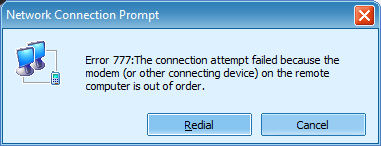 This post has been edited by cshong: Aug 29 2011, 09:07 AM |
| Change to: |  0.0314sec 0.0314sec
 0.64 0.64
 6 queries 6 queries
 GZIP Disabled GZIP Disabled
Time is now: 13th December 2025 - 01:05 PM |
 Quote
Quote