Outline ·
[ Standard ] ·
Linear+
Wireless Broadband ★★DiGi 3G Broadband Thread★★, Broadband done right
|
pennyzai
|
 May 23 2009, 11:49 PM May 23 2009, 11:49 PM
|
New Member


|
Hi guys, I just wanted to know does Digi broadband allowed you to share multiple computer at home??
I heard the modem router which i'm using for my streamyx cannot be used anymore. I was been told that I need another special router which has USB in it so that you can plug in the DIGI USB into your router and that router which has USB cost around RM 800+. Is that true??
Can someone clarify this? I mean can someone who are using DIGI broadband now able to share with multiple computers using the normal router??
Appreciate if someone could help because i always wanted to change my streamyx bad line which is shared by 2 computers at home now. Cheers
|
|
|
|
|
|
pennyzai
|
May 24 2009, 03:19 PM
|
New Member
|
QUOTE(kayx @ May 24 2009, 09:20 AM) most wireless broadband provider offer usb modem. Streamyx modems and router uses RJ45 port. So there's a interface incompatibility. Your option to share is to get a wireless router that has 3g modem built in which is expensive and hard to find. So far i only heard of models from huawei, ericsson, and tmobile. Another option is to get a 3g router only which has a Usb port for you to plug in your usb modem Thank you so much for the info. I Will bear that in mind and looking forward to get a new 3G router if I have decided to get DIGI 3G Broadband. Cheers |
|
|
|
|
|
pennyzai
|
May 25 2009, 12:08 PM
|
New Member
|
QUOTE(llmcso @ May 24 2009, 04:45 PM) Yupe ks98 got it right. U can got for Dlink or a brand called Aztech which is slightly cheaper, RM380. But Dlink is more recommended by seller, as Dlink specialized in modem router but Aztech is a Singapore brand. I'm using Dlink router bought from Low Yat a month ago for around RM460. Mind telling me which Dlink 3G router series ( for 3G Broadband) that you are using now?? I wanted to look for one before i register for Digi broadband. or maybe other people out there willing to share which are the model u r using currently without any problems so far using 3G broadband?? Thanks
Added on May 25, 2009, 12:11 pmQUOTE(kayx @ May 25 2009, 12:08 AM) bear in mind most of the 3g router spec support up to 3.6mpbs only. for those who are particular about getting more than 3.6mbps a.k.a the 7.2mbps package do take note. Hi Kayx, are you saying that there's a latest 3G router out there that support 7.2mbps? Mind sharing ur thoughts? I went to Digi centre and ask and they told me they got a 3G router which supports up to 7.2mbps and it cost around rm 800+.  Can anyone clarify this? This post has been edited by pennyzai: May 25 2009, 12:11 PM |
|
|
|
|
|
pennyzai
|
May 28 2009, 12:18 PM
|
New Member
|
QUOTE(allrightall @ May 27 2009, 04:55 PM) ok, tq, cos i din ask the promoter when i signed up. so far used 3.37 GB 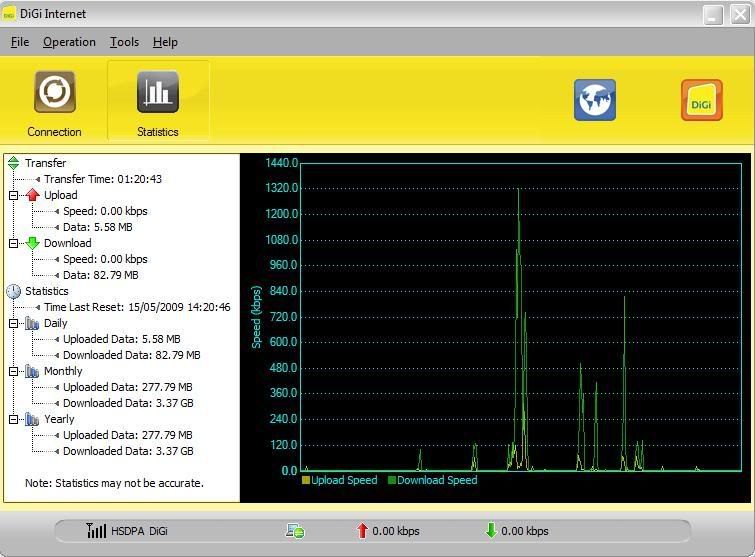 After how long you have used up to 3.37GB ? If for gaming purposes like 20 hours per day ( for vending) is 10 GB sufficient? Anyone can advice on this ?? Thanks |
|
|
|
|
|
pennyzai
|
Jun 12 2009, 01:59 PM
|
New Member
|
QUOTE(NicolasLau @ Jun 12 2009, 12:33 PM) anyb 1 wanty my pre- lauch package limited download 50gb permonth \heheh where r u from? possible to get it from you? When does your contract ends? when it ends does the quota 50gb still continues?? |
|
|
|
|
|
pennyzai
|
Jun 12 2009, 03:23 PM
|
New Member
|
ya i know it's pre-launched. Existing customer who owned this pre- launched plan able to continue the same quota 50gb after 12 months?
"RM 128 for 1st 6 month and RM 158 for last 6 months."
So does RM 158 still the same after 12 months?
|
|
|
|
|
|
pennyzai
|
Aug 10 2009, 11:10 PM
|
New Member
|
QUOTE(9M-MAS @ Aug 10 2009, 10:49 PM) Anyone experiencing slowdown tonight? Surfing seems fast enough but file downloads (HTTP)....hiyoh! Less than 10KB/sec...tried different servers...all the same.. Hell yes.... i duno why.....when i watch youtube...it loaded very fast until some point the connection is 0 !! It's not moving at all..... By the way, I've just got digi bb yday from PC fair, and found out the latency ( PING) is so high, can't even play online game..that's pathetic.. Besides that..The connection wasn't stable at all... Anyone experience the same too?? I'm so fed up now....thinking of canceling the contract npw. |
|
|
|
|
|
pennyzai
|
Aug 11 2009, 09:57 AM
|
New Member
|
QUOTE(davidmak @ Aug 11 2009, 07:51 AM) Streaming on Youtube is a bit tricky. Initially it can stream very fast and for a moment it will go down to 0kbps and it stays there. After awhile, it'll eventually move again until speed nears 1Mbps. For a few moments, it'll go back to 0kbps. Yesterday, things were just average. Youtube takes time to stream. But overall surfing remains OK. Uploading on Facebook is a total no no. Yes that's exactly my point. When I try to load a video from youtube, the loading was fast at some point it wasn't moving at all and then I open the digi software to check the stability of the connection. Believe it or not the download is 0 kpbs and the video totally not moving at all. I feel like Digi is throttling the connection. Anyone confirm this? Sadly to say, the connection was so bad & I really don't know why it happened. P/s: I'm from Kota Kinabalu btw. |
|
|
|
|
|
pennyzai
|
Oct 7 2009, 02:55 PM
|
New Member
|
QUOTE(MoNzAi @ Oct 6 2009, 03:18 PM) set ur network connection to WCDMA only and try see I have been getting EDGE very often recently. What happen to the DIGI connection nowadays? It's been pretty bad. Would you mind share how did u set your network to WCDMA or HSDPA only? I did not use any router btw. It's a direct connection from Digi BB modem ( USB) and i can't find the network connection which can bet set to WCDMA from the software installed inside my laptop. Thank you. |
|
|
|
|
|
pennyzai
|
Oct 7 2009, 03:35 PM
|
New Member
|
QUOTE(karheng @ Oct 7 2009, 03:05 PM) for me no problem. Do not connect first. Launch the Digi bb software. go to Tools > Options > Network > Network type : select WCDMA only then apply. wait few seconds, then connect and see. That helps! Thanks so much. |
|
|
|
|



 Quote
Quote

 0.0718sec
 0.65
0.65
 7 queries
 GZIP Disabled