QUOTE(talrasha @ May 7 2009, 11:39 AM)
Thanks,
Yeah, i agree with that, but unfortunately, i am not in an air-conditioned room. Tee hee! So, i ve got to do best with what i have.

My room can
get darn pretty hot especially from noon - 3pm+. Right now, the best solution is to have that cheap lappy cooler as my modem aka gadgets cooler.

Anyway, the best way to cool down your lappy in a non-air conditioned room is by having a floor or table fan blowing near you. And i find it pretty effective too since the cooling area is quite extensive, covering my lappy, my modem and my power adapter, but since i have that extra cheap cooler, might as well i use it
Modem stays just warm on my usual 1-2 hours of gaming and cool on normal web surfing.
just in terms of modem, when the time i bought i was too excited with the laptop and new modem, and forgot to register in huawei website, if any DiGi Broadband subscriber come with modem, gentle reminder: remember to log in hua wei to register in 4days (wrote on the card). cause after 2months i used the modem and i suspect modem problem and want to get the warranty card and check out, but what i found in the box only one piece small paper to remind to register,

they dont have the physical warranty card. But lucky to say that, i found out that time they had some network issue, not the problem of modem, if not i really want to cry if they not accept for late register. anyway i found out that time, i quickly online to register the modem to prevent if anything happen.
But too bad for me cannot do the same cooler thing to my modem, coz my modem need to stay in certain height to capture the signal, so it cannot lay down like your picture, but i plan to buy mini usb stand fan for it,heeee.



 May 6 2009, 11:03 AM


 just saw the post of digi broadband recently and will provide my speed test and my location at shah alam (check in the coverage is totally out of cover), i m under pre-launch package, subscribe that time was priority for the laptop, but accidentally found out my house was cover by very tiny little piece (all time 1 bar with up to 3 bar when used in midnight).
  I just feel extremely lucky to get that speed. but the case happen like me if someday without connection i really cannot blame anyone.
  wish digi could get stronger cover to my place.
  i am super fan to online game, streaming and p2p, now if u ask me get to Edge, i am sure will yelling at anyone around me, too bad, i am addicted to high speed, spare me.


 Quote
Quote


 .... now i m letting go P2P at after 6pm (the speed is really killing until midnight, only half of the normal speed).... haaa.... i will on my pc before sleep and let it download till morning when i wake up.... i tried b4, after 3am is the speed is tremendously fast...... for all the telcos is saving bandwidth these days, very missed the pre launch time whereby not everybody knows about DiGi Broadband.....
 i want my speed back!!!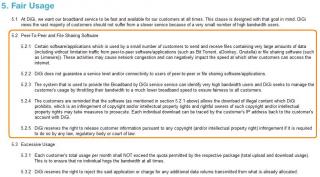
 compare with the previous post the place near by my house is not capture at all, the nearest coverage area is 3km away, but really strange that i still get the signal...
  now i know the answer, they really had a plan near by my housing area and the hope that it will come nearer and nearer to my house to get better signal, yaaaaaaaaaaayyyyyyyyyy!!!!


 0.0229sec
 0.86
0.86
 7 queries
 GZIP Disabled