Outline ·
[ Standard ] ·
Linear+
Nokia Nokia 5800 XpressMusic a.k.a "TUBE" V8 ♥♪, Nokia Tube the Iphone Killer
|
keagan
|
 Feb 10 2009, 11:10 AM Feb 10 2009, 11:10 AM
|

|
QUOTE(bltzkri3g @ Feb 10 2009, 10:57 AM) Is there a way to check if my set is an APAC set? Mine is zitron set bought from a Nokia store.. So am sure its an ori set.. but on FOTA, it shows no updates found!! i had that problem ...at first was updating using the pc...den i actually disconnected the phone halfway while its updating coz nothing was updated...updates all downloaded and all it stays stuck at 15% when installing....den i ran the FOTA..it came back with the no updates..so i reconnected it to the pc and this time the updates that was downloaded earlier started to install...i suggest u to use the PC suite method  This post has been edited by keagan: Feb 10 2009, 11:11 AM This post has been edited by keagan: Feb 10 2009, 11:11 AM |
|
|
|
|
|
keagan
|
Feb 10 2009, 11:12 AM
|
|
|
QUOTE(-i-c-h-i-g-o- @ Feb 10 2009, 11:11 AM) do our tube have "Flight Mode" function? it's offline mode for ours |
|
|
|
|
|
keagan
|
Feb 10 2009, 11:14 AM
|
|
|
QUOTE(-i-c-h-i-g-o- @ Feb 10 2009, 11:12 AM) i plug in my charger n use my home WiFi to update... its easier for me since i read so many have difficulties updating by PC... i rather use the pc suite method coz it's a major firmware update...also i still feel much at ease using the pc suite method instead...god knows what may go wrong using FOTA as it's a relatively new method |
|
|
|
|
|
keagan
|
Feb 10 2009, 11:19 AM
|
|
|
QUOTE(-i-c-h-i-g-o- @ Feb 10 2009, 11:17 AM) aiseh u scare me... so far its ok la... hopefully nothing happen...  hahah ur very lucky...even the flagship n series hardly uses FOTA...that's why i sked!!~~  |
|
|
|
|
|
keagan
|
Feb 10 2009, 11:32 AM
|
|
|
QUOTE(-i-c-h-i-g-o- @ Feb 10 2009, 11:30 AM) what version is ur FW? mayb its already updated? or no connection? i checked adi..when i tried FOTA method..my firmware still ver 11..lol |
|
|
|
|
|
keagan
|
Feb 10 2009, 11:49 AM
|
|
|
QUOTE(zackloy @ Feb 10 2009, 11:34 AM) Then looks like you have no choice but try the cable method lor. ya in the end use back cable...they really should do something about their software in vista...very very the unstable  |
|
|
|
|
|
keagan
|
Feb 10 2009, 11:50 AM
|
|
|
QUOTE(leongtat @ Feb 10 2009, 11:46 AM) 3. Lost packet...distortion...you know wireless la... For important update such as firmware dun play play....the safest way still is cable even you don't like that could minimal the impact... i couldn't agree more =p |
|
|
|
|
|
keagan
|
Feb 10 2009, 11:51 AM
|
|
|
QUOTE(kalel181 @ Feb 10 2009, 11:49 AM) my FW is ver.10.. the connection is ok. and i never updated it before. you seriously gotta update big time dude...the first ver is so so so unstable....u will notice a drastic improvement once u have hopped to v20 |
|
|
|
|
|
keagan
|
Feb 10 2009, 11:58 AM
|
|
|
QUOTE(kalel181 @ Feb 10 2009, 11:53 AM) its sucks big time man... i want to update it... but cannot... is it common problems for AP set? i believe mine is from HK. possibly, u gotta try to do a search up on the HK firmware which should be on par ..or the biggest risk ...to flash and change the product code... |
|
|
|
|
|
keagan
|
Feb 10 2009, 11:59 AM
|
|
|
QUOTE(gaigene @ Feb 10 2009, 11:57 AM) I just had a problem. When I click on the search bar in the home screen, the was an error message "System Error". Anyone has this problem......  Mine is already v20 firmware. do refer to thread v7, the last few pages, there's a code for it...u need to do a reset on the settings...for me i just hit the *7370# and the error was gone..but that's gonna wipe out everything on the phone u installed... |
|
|
|
|
|
keagan
|
Feb 10 2009, 12:02 PM
|
|
|
QUOTE(chris2k @ Feb 10 2009, 12:00 PM) No need to do that. As I said just uninstall any 1 software which you installed. yeah, unless u had nothing installed and still that problems occur..i have it actually..nothing installed on the phone..yet the error came on after i did the update |
|
|
|
|
|
keagan
|
Feb 11 2009, 11:18 PM
|
|
|
yeah it happened to me once too ..using n73 me..the firmware was gone in just a matter of days...dunno why...
|
|
|
|
|
|
keagan
|
Feb 13 2009, 12:45 AM
|
|
|
i'm a blue tube owner..on v20..no probs so far...
|
|
|
|
|
|
keagan
|
Feb 14 2009, 11:25 AM
|
|
|
no wonder TS so good fire...lol..but she/he did not say anything when others address the recipient as a HE..hahaha
|
|
|
|
|
|
keagan
|
Feb 14 2009, 11:32 AM
|
|
|
haha..maybe she doesn't practice feminism..so he/she = she..lol...better dun stray away from the main topic...anywayz!~~~ anyone tested mobitubia on their phone yet???
|
|
|
|
|
|
keagan
|
Feb 14 2009, 11:37 AM
|
|
|
QUOTE(ShaLong @ Feb 14 2009, 11:36 AM) 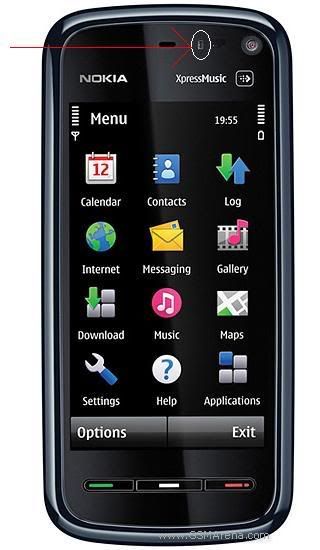 paiseh paiseh ...  wat is dat ah?? da one in circle.. proximity and light sensor means when the phone is near ur face during a call, the screen will turn off to conserve energy/prevent accidental presses as well as during incoming call, if ur phone is in the pocket there will be nothing displayed..until u take the phone out of ur pocket This post has been edited by keagan: Feb 14 2009, 11:38 AM |
|
|
|
|
|
keagan
|
Feb 14 2009, 11:47 AM
|
|
|
QUOTE(ShaLong @ Feb 14 2009, 11:43 AM) i tot tiz is d other one beside the circle one er..interchangeably la..the proximity sensor should be the one circled |
|
|
|
|
|
keagan
|
Feb 14 2009, 11:52 AM
|
|
|
by the way i just tested..incoming calls, even when i put something on top of the sensor..the screen doesn't turn off when the phone's ringing..v20 update.. -.-
|
|
|
|
|
|
keagan
|
Feb 14 2009, 12:00 PM
|
|
|
in the first version, it turns off when there's things close despite incoming call..v10 that is..
|
|
|
|
|
|
keagan
|
Feb 14 2009, 12:06 PM
|
|
|
QUOTE(ShaLong @ Feb 14 2009, 12:04 PM) v11 oso same =.= i juz take off my screen saver n changed the new one =.= ya, the update in v20 is during incoming calls, the screen lights up instead of being blank...and only will turn off when ur in the midst of a call, ya i saw the earlier screen procs, they cut a hole on the top there..ahahah prototype SP... |
|
|
|
|



 Quote
Quote
 0.0442sec
 0.40
0.40
 7 queries
 GZIP Disabled