Outline ·
[ Standard ] ·
Linear+
HTC Touch Pro LYN's Official Thread V2, Touch Pro new ROM 5.07 Asia see Post 1
|
paparock
|
  Feb 6 2009, 05:06 PM Feb 6 2009, 05:06 PM
|
New Member


|
Hi all...  i'm having problem with my TP...sudddenly no words show up when i type via the keyboard... d words are moving but nothing show up on screen (as if d font is in white color) hmm..at 1st i thought its a sliding lag, but after awhile oso no word came up... i oso perform soft reset few time, but stil didnt work.. to all sifu's..plz...really need help here..  thanks in advance... p/s: juz bought my TP 2 months ago, butt me in 2 d owner's list please  |
|
|
|
|
|
paparock
|
Feb 7 2009, 08:35 AM
|
New Member
|
QUOTE(booooster @ Feb 6 2009, 07:36 PM) I think u may need a hard reset not a soft reset  lol when did u buy yr Touch Pro exactly? just wondering as well how much? I will post it too so can remind u of when warranty is up ok will try later...thanks... bought on 14 dec for rm2800 at pda expect lyp..received free 4gb mcard + pouch... btw,how 2 get d extended warranty?for how much? |
|
|
|
|
|
paparock
|
Feb 12 2009, 01:16 PM
|
New Member
|
Hi all... is that possible to share internet connection from office or home network by connecting through pc via usb cable? i'd read somewhere that 'internet sharing' feature in TP is just only to use our TP as a modem, but not to share internet connection from other devices.. any guides?  |
|
|
|
|
|
paparock
|
Feb 12 2009, 03:41 PM
|
New Member
|
QUOTE(prescott83 @ Feb 12 2009, 02:13 PM) 1. if ur office/home got internet connection u connect ur TP using usb u can surf the web in ur TP 2. if when u connect TP to ur PC via usb cable and choose internet sharing then ur PC will get the internet connection already tried both,but stil cannot.. |
|
|
|
|
|
paparock
|
Feb 13 2009, 09:25 AM
|
New Member
|
QUOTE(prescott83 @ Feb 12 2009, 04:54 PM) 1. when u connect to usb cable to ur TP make sure before that u installed activesync then also make sure choose activesnyc in TP when choose the which type of connection u want to connect to. then on pc click on microsoft activesync go file-connection setting then set this computer is connected to the internet. then for sure u can surf web on TP 2. make sure ur service provider internet setting is already set, the TP will auto detect and auto set up ur internet setting. then follow the step i told before then on TP u will see h or 3g or e or g on the line bar. already tried many times but stil cannot... mayb mine got some connection problems issue.. thanks btw...  |
|
|
|
|
|
paparock
|
Feb 16 2009, 09:33 AM
|
New Member
|
hi all.... i hav 1 quick question...is dat possible to arrange all the apps installed in program menu according to it categories? i.e. creating new folder n drag the apps icon into it... mine is quite messy w all the games n other apps mixed up.. which software can do that? now still kinda noob w pda phone n stil in learning stage... any tips?
Added on February 16, 2009, 9:41 amn i more thing... i found 1 apps that can change program menu into several pages instead of scrolling down (similar to iphone), but forget to bookmark dat page... any1 know d software name n where 2 get it? thanks.. This post has been edited by paparock: Feb 16 2009, 09:41 AM |
|
|
|
|
|
paparock
|
Feb 23 2009, 11:56 PM
|
New Member
|
any1 had any problem w their gps b4? mine using Mapking but lately my TP cannot fix any gps. had never experienced this since before it work perfectly is it got something to do with my gpsgate setting? btw, wat is this gpsgate for?why on some device (htc HD) they didnt install gpsgate, but for mine they did? any help? hmm, really need my gps back b4 next week...  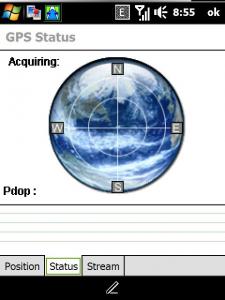

|
|
|
|
|



 Quote
Quote

 0.0363sec
 0.22
0.22
 7 queries
 GZIP Disabled