Welcome Guest ( Log In | Register )

Bump Topic Topic Closed RSS Feed

Outline · [ Standard ] · Linear+

Nokia ♪♥ Nokia XpressMusic 5800 "TUBE" V5 ♪, WE'VE MORE THAN 200 TUBIANS NOW!!!!

views
     
hvaly
post Jan 16 2009, 09:36 PM

Casual
***
Junior Member
433 posts

Joined: Nov 2004


QUOTE(vyzc @ Jan 16 2009, 09:33 PM)
Just a note to those still looking for a proper screen protector; the Nokia kiosk in Giant Kelana Jaya sells properly-cut 5800 screen protectors. Got mine for RM5. You might want to check stock availability beforehand though.
*
i think that sp is not good enough. i got mine from giant too. scratch it after 2 hours i using sweat.gif doh.gif
i wanna look for a decent sp that can last longer and less screen interference .. even RM 50 also nvm
hvaly
post Jan 18 2009, 03:56 PM

Casual
***
Junior Member
433 posts

Joined: Nov 2004


for those still using pheonix to update the firmware, i think it is not necessary coz it is abit risky

better use NSU as this is the official one.
I duno why u guys lazy or never read other news ?
The official release for v11 firmware is ready since 15th january

http://www.symbian-freak.com/news/009/01/f...y_available.htm

update pls guys

QUOTE(Apis_LuaLua @ Jan 18 2009, 03:39 PM)
doh.gif  doh.gif  doh.gif
*
dont simply spam uselesss emoticon .. u just wasting forum resources sweat.gif post something useful


This post has been edited by hvaly: Jan 18 2009, 03:57 PM
hvaly
post Jan 18 2009, 04:08 PM

Casual
***
Junior Member
433 posts

Joined: Nov 2004


QUOTE(MyRedEviL @ Jan 18 2009, 04:04 PM)
u r really smart.. others are shite??  doh.gif
*
stop flamming , did i say others are shite ? doh.gif
did i say i am smart ?

i just wish that the phone discussion thread is more meaningful instead of all rubbish spam sweat.gif
hvaly
post Jan 19 2009, 10:28 AM

Casual
***
Junior Member
433 posts

Joined: Nov 2004


hehe, finally able to run garmin at my 5800, take so long to install all properly as this is my first gps XD

can go to petrol station n kfc fast fast d, good for cny holiday as i will travelling around smile.gif
hvaly
post Jan 19 2009, 11:47 AM

Casual
***
Junior Member
433 posts

Joined: Nov 2004


why when i using garmin gps, there will be a prompt for charges for data access and ask whether i wanna activate it or not zzz

i keep on replying "No" but it will come out again after about 5 min, how to totally disable it ?

and anyone know where got sell cheap+nice CAR hp holder for my tube ? so that i can drive better icon_question.gif

This post has been edited by hvaly: Jan 19 2009, 11:48 AM
hvaly
post Jan 19 2009, 11:58 AM

Casual
***
Junior Member
433 posts

Joined: Nov 2004


QUOTE(freeman1314 @ Jan 19 2009, 11:52 AM)
Whats written ?
*
Connection to network positioning server required. Costs may be incurred depending on network provider. Continue anyway ? Yes / No sweat.gif

but i think i know how to disable it d. under server setting, choose disable sweat.gif

This post has been edited by hvaly: Jan 19 2009, 11:59 AM
hvaly
post Jan 19 2009, 12:10 PM

Casual
***
Junior Member
433 posts

Joined: Nov 2004


QUOTE(bltzkri3g @ Jan 19 2009, 11:57 AM)
New blue tube user here..

m facing a weird prob here.. while browsing net on WLAN, am not able to find the shortcut to enable on screen keyboard..

can anybody help me out??
*
just double click at whatever text box field and the input screen will appear, is this what u want ?

hvaly
post Jan 19 2009, 12:19 PM

Casual
***
Junior Member
433 posts

Joined: Nov 2004


3 new application released today at Dr.junkka (which supply the famous Y-Browser) website. It is freeware

Profile Scheduler version 055 (English & Unsigned) thumbup.gif

Profile Scheduler is a free Profile scheduler application that allows automated profile changing with timer schduling

Theme Scheduler version 055 (English & Unsigned) thumbup.gif

Theme Scheduler is a free theme scheduler application that allows automated theme schduling with timer, or automated theme changing according to active profile.

Fake Messages version 055 (English & Unsigned) doh.gif

Fake Messages is a free fake message sending application that allows timed "sending" of fake SMS messages. SMS messages are handled inside the device, so no network connection is needed, thus sending fake SMS messages are completely free of charge..

You can use it to trick ur fren as a sms reminder or fake promotion that u received from sms wub.gif
user posted image

icon_rolleyes.gif
For those like to try new application, can go to here
Click Me

This post has been edited by hvaly: Jan 19 2009, 12:22 PM
hvaly
post Jan 19 2009, 01:03 PM

Casual
***
Junior Member
433 posts

Joined: Nov 2004


QUOTE(loumou @ Jan 19 2009, 12:57 PM)
hi everyone,how can i get a google maps apps? icon_question.gif
*
just some googling then u can find doh.gif
sweat.gif why dont u handworking abit ?

Here is the link for spoon feeding wub.gif
Google maps official website
Maps for S60 << Not tested whistling.gif

This post has been edited by hvaly: Jan 19 2009, 01:05 PM
hvaly
post Jan 19 2009, 01:49 PM

Casual
***
Junior Member
433 posts

Joined: Nov 2004


since i love this phone so much, i think i will spend my time to write many tricks n tips for using this phone. I felt that many new users still duno how to maximize the usage of our lovely tube.

Pls pm me if got any nice tips. I will compile all together and make our tube a better one. .. if not the best XD


hvaly
post Jan 19 2009, 03:30 PM

Casual
***
Junior Member
433 posts

Joined: Nov 2004


Just share some tips n tricks for 5800 with you all. Got any mistake pls let me know. All compiled by me from various sources. wub.gif
General
1. Use Dialer and press # for about 2 seconds will switch the profile between Silent and General; press and hold 0 will open the web browser; press and hold 1 will open the voice mailbox
2. There is a shortcut key for Music, Gallery, Share, Video, Web shortcut at the top right corner just below the front camera
3. Press and hold the Green caller button when standby mode will activate the voice command. You could call the name from the contact or application name.
4. Organize your sms by grouping them like outlook by Messaging -> Option -> Setting -> Text message -> Other -> Show messages in groups -> Yes
5. Notification light will blink if there is unread sms/missed call. It could be turned off at Settings -> Notification light -> Off
6. If the touch input is not accurate, you could calibrate your screen at Touch Input-> Touch Screen Calibration -> ( Tap around the 4 dots at the corner)
7. Turning control functions:
a. Rotate your screen horizontal or vertical
b. Silence your phone for incoming call by rotate your phone with screen facing down.
c. Snooze the alarm by rotating phone screen facing down
8. Theme effect will give 3D and transition effect if on but will slow down your tube considerably. Settings -> Personal -> Themes -> General -> Themes effects -> On/Off
9. Shortcut to exit application : Press and hold the middle white button then press and hold the program that you wish to quit, an open/exit option will pop out (useful for those haven’t install handy taskman yet)
10. When using handwriting input, slide from left to right is Spacebar, right to left is Backspace
11. Organize your menu by Menu -> option -> organize. You could drag and drop the location of the application you wish to relocate.

Battery saving
1. Always turn off wireless scanning, Bluetooth when not in use
2. For those not using 3G, choose your network mode to “GSM” instead of “Dual mode” which will consume more battery. Settings -> Connectivity -> Network mode -> GSM
3. Less Display Light
a. Setting -> Phone -> Display -> light sensor (move the slider to the left)
b. Setting -> Phone -> Display -> Light Time-Out (lesser time to save battery but annoying if too short while you are playing games)
4. Always terminate the application properly that is not using by using Option ->Exit. It might be running background and consuming battery which you don’t know.

Memory Saving
1. Restart your phone if the memory less than 30MB, you could either soft reset (User a dialer and dial 5 * * then call quickly) or hard reset by pressing the power button
2. Use Handy Taskman to close all application regularly or kill application that is not in use.

Camera & Picture
1. Some noise could be reduced if set the ISO sensitivity to low instead of auto.
2. When viewing pictures, you could use your stylus to view for previous (slide left) or next (slide right) picture like iphone feature.

Video
For converting video that is high quality to play at 5800, should use the mp4 format as below (All is 16:9 widescreen):
a) Xvid @ 678kbps resolution 480×272
b) Xvid @794kpbs resolution 640×352
c) H.264 @ 512kbps resolution 400×224
d) H.264 @ 550kbps resolution 400×224 (Recommended)

Music
1. If you can’t find your songs after transferring from your pc to memory card, go to music player -> Option -> Refresh library

Application
1. Always install your phone theme on the memory cards. This is because if some theme does not work (Christmas tree) then you need to flash your phone.
2. Uninstall your application in proper way. Use Menu -> Setting -> Application mgr. -> Installed apps -> Choose application then option n uninstall

Known Bugs
1. While u are using music player on your phone and there is incoming calls, the phone will use the default nokia ring tone as the memory card is used by the music player.
2. The inclination sensor is over-sensitive. The screen will changed to horizontal mode even slight rotate.
3. Regarding the screen blank and locked when calling, this is because the proximity sensor if blocked it will make the screen black when calling. The block is including some glossy transparent film, so please cut out the film around the sensor located between the middle earpiece and front camera

This post has been edited by hvaly: Jan 19 2009, 03:38 PM

hvaly
post Jan 19 2009, 03:43 PM

Casual
***
Junior Member
433 posts

Joined: Nov 2004


QUOTE(deejay73 @ Jan 19 2009, 03:21 PM)
Hi Guys,

Those who have been enjoying Garmin Mobile XT on your tube, here's a place where u can change your blue triangle (in navigation mode) to something more fun. e.g. a sport car, fighter jet, or even a cake!!! Follow this link (official from Garmin):

http://www8.garmin.com/vehicles/bundles/allvehicles.html

You can even load custom voice to be your guide; if u fancy scary voice to navigate u in the middle of the nite, then do try Dr Nightmare's voice pack.. Spooky!

Rgds,
DV


Added on January 19, 2009, 3:23 pm

Read my post, after nego, RM20 oni..  rclxms.gif

BTW, i just asked the shop, how much it cost to setup garmin on my Tube. He said RM60.. Wahlau...ripoff. Like that i also wanna do biz, who want to setup garmin on their tube i charge RM30..hahaha. Anyone want??
*
wakka thx for the link ~ i wanna change my pointer to helicopter and and spooky voice sweat.gif wub.gif
hvaly
post Jan 19 2009, 04:51 PM

Casual
***
Junior Member
433 posts

Joined: Nov 2004


QUOTE(vyzc @ Jan 19 2009, 04:37 PM)
Tried installing GMXT and VirtualKey earlier. VirtualKey installation went without problems, but I can't seem to run GMXT. No response after clicking the icon. Any ideas, guys?
*
make sure the virtual key is running at background.

and which icon do u mean ? your gps ready d ?
hvaly
post Jan 19 2009, 04:54 PM

Casual
***
Junior Member
433 posts

Joined: Nov 2004


QUOTE(loumou @ Jan 19 2009, 04:52 PM)
hi guys,sorry for noob.if i connect my msn thru wifi(my house/office/public) and not wap/3G....do i need to pay? sweat.gif
*
sure no need.
btw, you can check your data packet connection through Log -> packet data

if there is no send/received data increment, then you are save icon_rolleyes.gif
hvaly
post Jan 20 2009, 09:40 AM

Casual
***
Junior Member
433 posts

Joined: Nov 2004


QUOTE(jass80 @ Jan 20 2009, 09:32 AM)
try to rename the voice file to "american_english_.vpm" in your pc.
Garmin 200 user here biggrin.gif
*
wow never think of that. thx for the solution since i also cant see the drnightmare voice brows.gif
hvaly
post Jan 20 2009, 11:01 AM

Casual
***
Junior Member
433 posts

Joined: Nov 2004


QUOTE(jass80 @ Jan 20 2009, 10:43 AM)
No prob..being using the Garmin Nuvi 200 GPS Navigator..so I know a little bit tips & trick lor.. blush.gif


Added on January 20, 2009, 10:47 am
wait lor....this evening maa  biggrin.gif
*
i tested to rename it to english_american_.vpm but cant work doh.gif
anyone else able to make the dr.nightmare work at 5800 ? notworthy.gif
hvaly
post Jan 20 2009, 11:53 AM

Casual
***
Junior Member
433 posts

Joined: Nov 2004


QUOTE(kennyboy @ Jan 20 2009, 10:14 AM)
It will always appear under the american english in the menus....it won't have a new choice. choose american english and the new voice will be used.
*
ya i understand that ... but i choose the american english voice and it come out no voice at all
hvaly
post Jan 20 2009, 06:03 PM

Casual
***
Junior Member
433 posts

Joined: Nov 2004


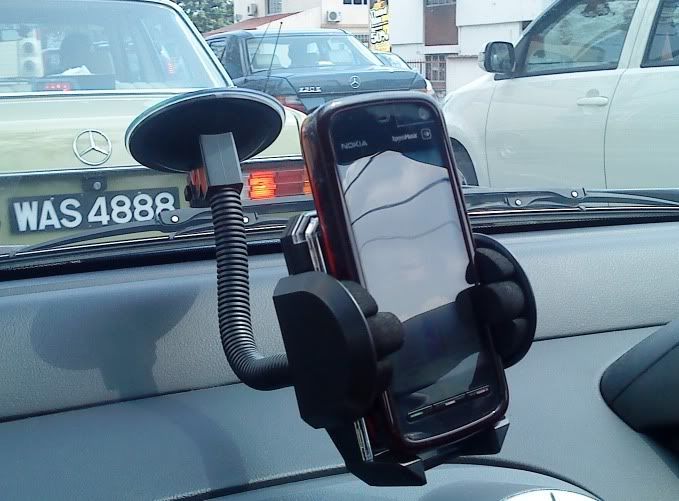
For those interested to get a car holder, can get at RM 10 only at any pasar malam store/ mobile shop.
I think the car holder will be more demanding after the GPS is fully functional wub.gif

user posted image


and for skool screnn protector, can get as low as RM 3.5 - RM 10, dont get cheated by those high price at lowyat (RM20++) sweat.gif

This post has been edited by hvaly: Jan 20 2009, 06:04 PM
hvaly
post Jan 20 2009, 06:07 PM

Casual
***
Junior Member
433 posts

Joined: Nov 2004


QUOTE(gaigene @ Jan 20 2009, 06:06 PM)
ooo.... bro.... dun say like that la.... i bought mine at RM20 wor......  cry.gif
*
aiyo =.= RM 10 not much different la for u la, one time less starbucks ok d wink.gif

just to remind other new buyer for 5800 wub.gif
hvaly
post Jan 20 2009, 11:32 PM

Casual
***
Junior Member
433 posts

Joined: Nov 2004


yea, need pro ridzyroo sifu help me here too, cry.gif

how can i fix the light leakage problem on top right of the tube ? icon_question.gif wub.gif

This post has been edited by hvaly: Jan 20 2009, 11:33 PM

2 Pages  1 2 >Top
Topic ClosedOptions
 

Change to:
| Lo-Fi Version
1.6113sec    0.53    7 queries    GZIP Disabled
Time is now: 6th December 2025 - 12:50 PM