Welcome Guest ( Log In | Register )

Outline · [ Standard ] · Linear+

 Self extracting archive

views
     
TScavern
post Jan 5 2009, 08:46 PM, updated 17y ago

Getting Started
**
Junior Member
224 posts

Joined: Jul 2008
From: Kota Kinabalu, Sabah


hello everyone...i need help about Self extracting archive...i was wondering how to create Self extracting archive to smaller size?

i mean like etc. a counter strike's file that has about 700 mb which had been create to Self extracting archive n store it to 200 mb space..

is it about winzip and winrar? could some1 teach me how to create Self extracting archive? i've try to figure it out but i could'nt... cry.gif
redkord
post Jan 5 2009, 09:15 PM

Casual
***
Junior Member
399 posts

Joined: Jun 2007
u want to compress it part by part or want it shrunk from 700 to 200mb?
TScavern
post Jan 5 2009, 09:42 PM

Getting Started
**
Junior Member
224 posts

Joined: Jul 2008
From: Kota Kinabalu, Sabah


QUOTE(redkord @ Jan 5 2009, 09:15 PM)
u want to compress it part by part or want it shrunk from 700 to 200mb?
*
both...could u teach me pls? but i rather Self extracting archive from 700mb to 200mb...
any software that i need?
newuserex
post Jan 5 2009, 09:56 PM

キャッハハ…キャハハッキャッ……キャハハ…
****
Senior Member
546 posts

Joined: Nov 2007
From: Tawau,Sabah,MY Status: AFK


Ya, there is a one. but long time no use, so i need to search my hard disk for it.
Why dont u try google 'file shredder'? U can get one faster before I find it on my HDD.

edit


no no not file shredder. I use this program to cut files & merge it back( file from rapidshare). U may also use winrar but better ask someone else because im not used with winrar.
Thx

This post has been edited by newuserex: Jan 5 2009, 10:02 PM
sotplug
post Jan 5 2009, 10:22 PM

The old noobie...
*****
Senior Member
920 posts

Joined: Dec 2005
From: Seri Kembangan, Selangor


7-Zip is free and has good compression, archive splitting and supports zip/rar/etc etc...
TScavern
post Jan 5 2009, 10:39 PM

Getting Started
**
Junior Member
224 posts

Joined: Jul 2008
From: Kota Kinabalu, Sabah


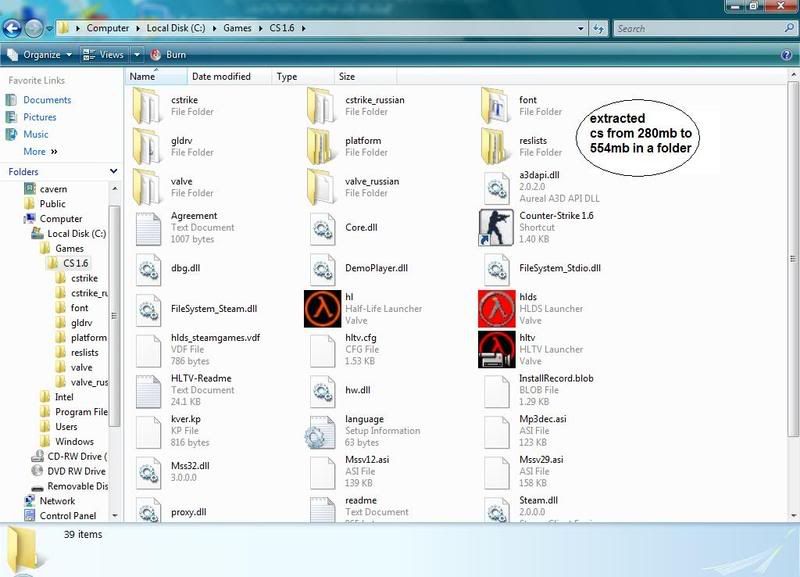
ok i've got d pic to show u guys...
user posted image
this is 280 Self extracting archive..

user posted image
and these are after extracted to 554mb..

could somone pls teach me how to create it?

This post has been edited by cavern: Jan 5 2009, 10:40 PM
sotplug
post Jan 5 2009, 10:48 PM

The old noobie...
*****
Senior Member
920 posts

Joined: Dec 2005
From: Seri Kembangan, Selangor


Download 7-Zip and try it for yourself. Programs like WinZip, WinRAR, 7-Zip, etc all have easy to use wizards to help you with compression/decompression, creating exe, password protect archives etc...

Looking at your screenshot, it was compressed using WinRAR.
TScavern
post Jan 6 2009, 11:25 AM

Getting Started
**
Junior Member
224 posts

Joined: Jul 2008
From: Kota Kinabalu, Sabah


QUOTE(sotplug @ Jan 5 2009, 10:48 PM)
Download 7-Zip and try it for yourself. Programs like WinZip, WinRAR, 7-Zip, etc all have easy to use wizards to help you with compression/decompression, creating exe, password protect archives etc...

Looking at your screenshot, it was compressed using WinRAR.
*
ok..i've already download Paquet Builder 2.9..it's include with zip compression. cabinet compression, 7-zip compression...and it's easy way to create Self extracting archive but my problem now is i still can't find d solution how to reduce the size...etc. i've a folder that contain 50mb and after Self extracting archive it's still stand with d same 50mb...
and my question is how to reduce it to smaller size? cry.gif pls help me..

This post has been edited by cavern: Jan 6 2009, 11:28 AM
ys_2k
post Jan 6 2009, 08:47 PM

Casual
***
Junior Member
369 posts

Joined: Jan 2003
From: Shah Alam


compression doesnt mean it can really compress everything...

it depends on what type of file type you are going to compress..

in example, if you compress an BMP picture, you might able to get a compression 70% of its original size..

to compress an JPG, after compressed, the file size is still around the same as original...bcoz JPG itself is an compressed filetype...
TScavern
post Jan 7 2009, 03:02 AM

Getting Started
**
Junior Member
224 posts

Joined: Jul 2008
From: Kota Kinabalu, Sabah


QUOTE(ys_2k @ Jan 6 2009, 08:47 PM)
compression doesnt mean it can really compress everything...

it depends on what type of file type you are going to compress..

in example, if you compress an BMP picture, you might able to get a compression 70% of its original size..

to compress an JPG, after compressed, the file size is still around the same as original...bcoz JPG itself is an compressed filetype...
*
did u mean files like song(mp3) and picture are still in same size after Self extracting archive?
how did they create Self extracting archive base in the pic above? 280mb to 554mb...?
could u explain to me pls....
neato4u
post Jan 7 2009, 07:36 AM

Cha La, Head Cha La!
******
Senior Member
1,664 posts

Joined: Jan 2003
From: Ipoh

QUOTE(cavern @ Jan 5 2009, 08:46 PM)
hello everyone...i need help about Self extracting archive...i was wondering how to create Self extracting archive to smaller size?

i mean like etc. a counter strike's file that has about 700 mb which had been create to Self extracting archive n store it to 200 mb space..

is it about winzip and winrar? could some1 teach me how to create Self extracting archive? i've try to figure it out but i could'nt... cry.gif
*
Lol.. first you want to know how to do self extracting archive, guess the others had that answered for you already.

Then you want to know how to make it smaller - well, I might try changing the compression level in WinRAR / WinZIP if i were you - play around with it and see what comes best.

That screenshot which you show, what happen when you run the self extracting archive? Does a DOS box pops out and display anything? (sorry i know my sort of knowledge with this are old-school type!) - if it does, then usually it will display what sort of application that it was packed with. If it's a windows based box and shows nothing bout the app, then i don't know. Sorry!

There are a lot of compression utilities out there, all with different pros and cons, you might want to check it out yourself and give it a little test first to meet your desired result. (hohoho that aint helpin much was it) doh.gif whistling.gif
ys_2k
post Jan 7 2009, 04:44 PM

Casual
***
Junior Member
369 posts

Joined: Jan 2003
From: Shah Alam


QUOTE(cavern @ Jan 7 2009, 03:02 AM)
did u mean files like song(mp3) and picture are still in same size after Self extracting archive?
how did they create Self extracting archive base in the pic above? 280mb to 554mb...?
could u explain to me pls....
*
that's why i said it depends on the file type...

file such as mp3, jpg.....it is considered as compressed file format....
regardless you using zip or rar, the output size will still almost the same.

the different between zip or rar is just different algorithm which might have minor different in term of
speed of compress or uncompress, ratio of compression...


if you wanna know the different,
you can try to do this experiment.

Experiment 1 for picture type
1) zip a folder which consists of 10MB of bmp file
2) zip a folder which consists of 10MB of jpg file

Experiment 2 for audio type
1) zip a folder which consists of 10MB of mp3 file
2) zip a folder which consists of 10MB of wav file

then compare the size of these two experiments

last experiment you can try is do winrar on that 554mb folder which you extracted from that self extracting archieve...


to know how much you can actually compress...it still back to the question, "File type"

This post has been edited by ys_2k: Jan 7 2009, 04:47 PM

dylanchan1688
post Jan 7 2009, 04:59 PM

PuLu™
**
Senior Member
125 posts

Joined: May 2008
From: Petaling Jaya


try winrar
TScavern
post Jan 7 2009, 06:42 PM

Getting Started
**
Junior Member
224 posts

Joined: Jul 2008
From: Kota Kinabalu, Sabah


QUOTE(ys_2k @ Jan 7 2009, 04:44 PM)
that's why i said it depends on the file type...

file such as mp3, jpg.....it is considered as compressed file format....
regardless you using zip or rar, the output size will still almost the same.

the different between zip or rar is just different algorithm which might have minor different in term of
speed of compress or uncompress, ratio of compression...
if you wanna know the different,
you can try to do this experiment.

Experiment 1 for picture type
1) zip a folder which consists of 10MB of bmp file
2) zip a folder which consists of 10MB of jpg file

Experiment 2 for audio type
1) zip a folder which consists of 10MB of mp3 file
2) zip a folder which consists of 10MB of wav file

then compare the size of these two experiments

last experiment you can try is do winrar on that 554mb folder which you extracted from that self extracting archieve...
to know how much you can actually compress...it still back to the question, "File type"
*
oh i see...i got it..i thought every file can be reduced to d smaller size...but i was wrong....it's all about file type...
i'd tried for the experiment 1 and 2...the result was in same size..nothing change..

and i havent try d 554mb because i know you are right...thx for the explanation im very appreciated it..
n also thx for neato4u biggrin.gif

This post has been edited by cavern: Jan 7 2009, 09:29 PM
cybpsych
post Jan 7 2009, 07:52 PM

---------------------
*********
All Stars
65,365 posts

Joined: Jan 2003
winrar is the best in terms of compression and SFX creation ...
convivencia
post Jan 9 2009, 08:54 PM

idiot
*******
Senior Member
2,675 posts

Joined: Dec 2008
QUOTE(cavern @ Jan 5 2009, 08:46 PM)
hello everyone...i need help about Self extracting archive...i was wondering how to create Self extracting archive to smaller size?

i mean like etc. a counter strike's file that has about 700 mb which had been create to Self extracting archive n store it to 200 mb space..

is it about winzip and winrar? could some1 teach me how to create Self extracting archive? i've try to figure it out but i could'nt... cry.gif
*
Not every kind of 700MB data can be losslessly compressed to 200MB.
karhoe
post Jan 9 2009, 11:45 PM

Look at all my stars!!
*******
Senior Member
6,238 posts

Joined: Sep 2005
From: Kuala Lumpur


How much you can compress depends on what you are trying to compress in the first place biggrin.gif
sanjayws
post Jan 10 2009, 01:20 PM

J@Y
***
Junior Member
359 posts

Joined: Jun 2008
From: Selangor


QUOTE(karhoe @ Jan 9 2009, 11:45 PM)
How much you can compress depends on what you are trying to compress in the first place biggrin.gif
*
Spot on...no secret way of compressing an already compressed source for instance. Files that are encrypted also cannot be compressed.

Most files like jpg, mp3, divx movies or alike, new MS Office document formats, as mentioned already come compressed, this is called destructive compression where you cannot reverse. Zips for instance, is non destructive but it completely depends on the file types to achieve a ok/good/great compression ratio.

Matter of fact, if you try to compress an already compressed content you could actually increase the file size due to the compression wrapper overheads.

Nonethless, if you need to more space you have a couple more options:1

1. Get more disk
2. Remove more crap!

Lol..

enjoy the weekend.

This post has been edited by sanjayws: Jan 10 2009, 01:25 PM
virusspreader
post Jan 10 2009, 10:58 PM

On my way
****
Senior Member
552 posts

Joined: Dec 2007
From: Cheras
7-zip is de best followed by winrar...icon_rolleyes.gif
cybpsych
post Jan 11 2009, 12:55 PM

---------------------
*********
All Stars
65,365 posts

Joined: Jan 2003
of course 7-zip is the best, but it's not user friendly for beginner ...

most don't even now how to fully utilize 7-zip's capability wink.gif

2 Pages  1 2 >Top
 

Change to:
| Lo-Fi Version
0.0243sec    0.66    6 queries    GZIP Disabled
Time is now: 21st December 2025 - 05:29 PM