

Still using 1.8.3.
Yesterday afternoon my torrent blasted 140kbps.
Freaked me out a bit.
Thanks for a few Russian & Ukraine seeders

This post has been edited by Raikkonen: Sep 2 2009, 04:31 PM
New uTorrent 1.9/2.0 client bypasses throttling, uTorrent 2.0 RC2 is out!
|
|
 Sep 1 2009, 05:38 AM Sep 1 2009, 05:38 AM
|
 
Senior Member
8,635 posts Joined: Jun 2006 From: Jeonju/Jeollabuk-do   
|
Hi.
Still using 1.8.3. Yesterday afternoon my torrent blasted 140kbps. Freaked me out a bit. Thanks for a few Russian & Ukraine seeders This post has been edited by Raikkonen: Sep 2 2009, 04:31 PM |
|
|
|
|
|
Sep 2 2009, 01:01 AM
|

Senior Member
1,473 posts Joined: Oct 2006 From: Jupiter
|
QUOTE(Chyan @ Aug 30 2009, 11:44 PM) Hmm. I just swtiched to Windows 7. I'm using windows 7 RTMIt seems the speed is decreasing to max of 12kb/s which before using XP was 70kb/s. Any tips? I've used 10 in bt.disposition just now. Currently trying 15. See how it goes.   utorrent speed is fast like usual, same on xp/vista. around 100-150kb/s well depend on tracker, and utorrent version i'm using 1.8.4 and 2.0beta (beta faster)Edit: Windows XP SP2-SP3, Vista SP1 or older need tcpip patch for improving BT downloads, Vista SP2 and Windows 7 don't need tcpip patch, no more tcpip limitation. Port forwarding and tcpip patch (if needed) always useful for improving ur BT speed. This post has been edited by squall0833: Sep 2 2009, 01:05 AM |
|
|
Sep 4 2009, 12:34 PM
|
 
Elite
195 posts Joined: Sep 2006
|
QUOTE(gsan @ Aug 31 2009, 01:14 PM) i failed the network test although i did portforward it in the router...why? Did you fail the UPnP test or the connection test from their website to your client? Port forwarding test checks if your UT client can be reached from remote peers (on the UT port that you specify to use), so.. if you have set the manual port forwarding correctly you would pass this test. The UPnP test on the other hand is failable.. doesn't mean much really. |
|
|
Sep 4 2009, 12:51 PM
|

Senior Member
4,470 posts Joined: Jan 2003
|
Hei, when i use the new utorrent it says i have been denied access from the torrent tracker.
It's weird because at first, traffic will flow, then only 4 second after it will say this message and not let me download. But when i download using a demonoid tracker it will let me and not give me such a message. Anybody know whats going on here? Yes i have port forwarded the port i am using for utorrent  |
|
|
Sep 6 2009, 11:45 AM
|

Senior Member
2,657 posts Joined: Feb 2008 From: Highbury House, 75 Drayton Park, London
|
im using Utorrent 2 latest build 16394. Im getting really low speed around 10kb only. Is my account throttled?
|
|
|
Sep 6 2009, 02:45 PM
|

Senior Member
1,185 posts Joined: Feb 2008 From: Not Found 
|
QUOTE(Chyan @ Aug 30 2009, 11:44 PM) Hmm. I just swtiched to Windows 7. Stick it to 10.It seems the speed is decreasing to max of 12kb/s which before using XP was 70kb/s. Any tips? I've used 10 in bt.disposition just now. Currently trying 15. See how it goes. Have you done anything to your network config?  |
|
|
|
|
|
Sep 6 2009, 02:48 PM
|

Senior Member
4,649 posts Joined: Aug 2008 From: Tāmaki Makaurau
|
I'm using Win7 RTM7600 and no problem with 2.0b at all.
Still the godlike speed. |
|
|
Sep 7 2009, 11:17 AM
|

Junior Member
6 posts Joined: Jul 2009
|
hmm anyone haveing problems with utor 2.0 crashing on some torrents?
|
|
|
Sep 7 2009, 11:05 PM
|
|
Senior Member
2,657 posts Joined: Feb 2008 From: Highbury House, 75 Drayton Park, London
|
My surfing speed is been really slow and lagging until have to reload few times before the page can load. i reduce ut download speed from unlimited to 50 and then to 30. surfing still lagging.... anything wrong with my settings? or what do i need to do?
|
|
|
Sep 12 2009, 01:33 AM
|

Senior Member
614 posts Joined: Jan 2003
|
already bought 2 x 1TB hard disk (and 90% full).....if this kind of speed continue.....i think i need 10 TB....
|
|
|
Sep 14 2009, 11:52 PM
|

Senior Member
1,479 posts Joined: Nov 2008
|
can anyone teachme how to do port forward? I know the website for it, but after trying 10 times oso failed...especially the part where I have to set a static IP....
TQ |
|
|
Sep 14 2009, 11:57 PM
|
 
VIP
16,825 posts Joined: Jan 2003 From: Siberia
|
no need to set static IP
just put a port in your modem/router page. |
|
|
Sep 15 2009, 12:40 AM
|
|
Senior Member
1,479 posts Joined: Nov 2008
|
QUOTE(fariz @ Sep 14 2009, 11:57 PM) no need to set static IP How do I do that? Im using Aztech DSL605EUjust put a port in your modem/router page. PLease guide me TQ |
|
|
|
|
|
Sep 15 2009, 05:50 AM
|
|
VIP
16,825 posts Joined: Jan 2003 From: Siberia
|
This is my setup for DSL605EW
login into DSL605EU config page left menu, select Application > Port forwarding Category: select User Click "New" button Use this setup. Rule Name: torrent Protocol: TCP, UDP Port Start: 51000 Port End: 51000 Port Map: 51000 Click apply Click User again, select torrent, click "Add" to add it to Applied Rules Add port 51000 in µTorrent configurition. Click Save Setting (left menu) Use port 49152 through 65535 since it is private/not use. This post has been edited by fariz: Sep 15 2009, 05:51 AM |
|
|
Sep 15 2009, 05:56 PM
|
|
Senior Member
1,479 posts Joined: Nov 2008
|
QUOTE(fariz @ Sep 15 2009, 05:50 AM) This is my setup for DSL605EW What do you mean by "Add port 51000 in µTorrent configurition." ? Use 51000 as the port for utorrent?login into DSL605EU config page left menu, select Application > Port forwarding Category: select User Click "New" button Use this setup. Rule Name: torrent Protocol: TCP, UDP Port Start: 51000 Port End: 51000 Port Map: 51000 Click apply Click User again, select torrent, click "Add" to add it to Applied Rules Add port 51000 in µTorrent configurition. Click Save Setting (left menu) Use port 49152 through 65535 since it is private/not use. TQ |
|
|
Sep 16 2009, 09:04 PM
|

Junior Member
5 posts Joined: Nov 2008
|
Well, i using fine with the pass 2weeks, but now my torrent have a problem T_T
no download speed and upload speed although there are some seeders...... anyone who know solutions please tell me...i would really appreciate here is the SS 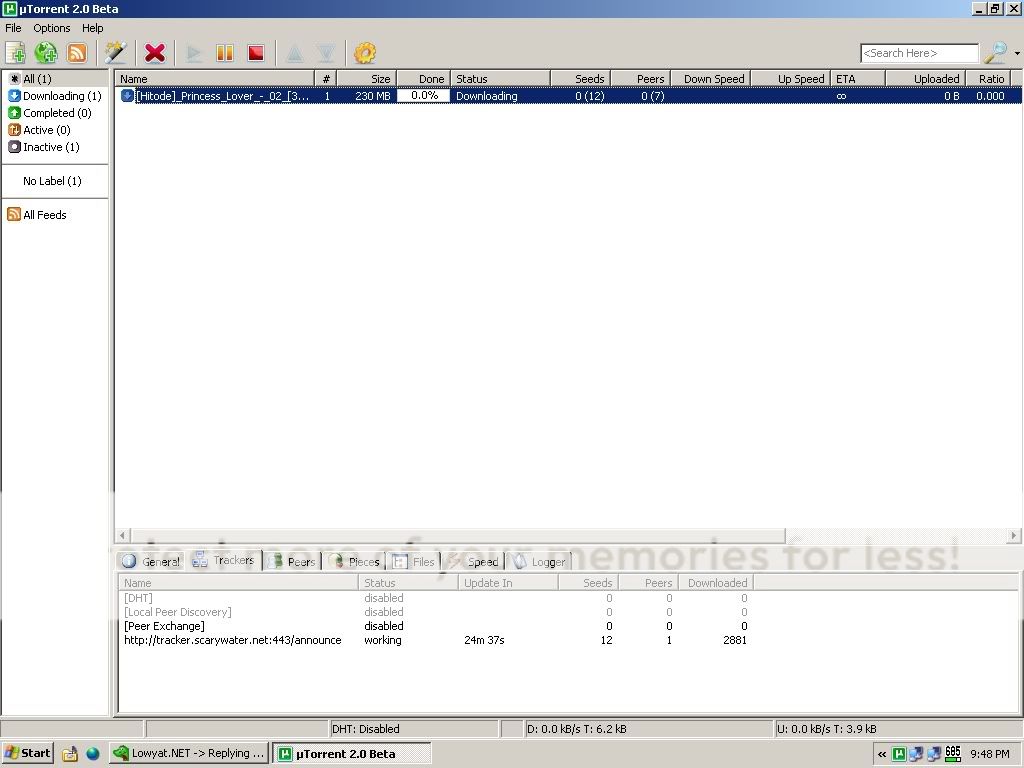 This post has been edited by glenn6h: Sep 16 2009, 09:21 PM |
|
|
Sep 17 2009, 08:44 AM
|

Junior Member
16 posts Joined: Sep 2009
|
Your port is not open.
Added on September 17, 2009, 8:46 am This post has been edited by automan5891: Sep 17 2009, 08:46 AM |
|
|
Sep 27 2009, 10:46 PM
|

Senior Member
565 posts Joined: Jan 2003 From: Melaka
|
I have started using the 2.0 bete why i can't surf the net like normal always can't found sever + dns error
|
|
|
Sep 27 2009, 11:00 PM
|
|
Junior Member
104 posts Joined: Oct 2007
|
hi guys,
i'm using UT1.84 on Vista SP2. Already optimized using Vista tweak from Speedguide. Port forwarding setup correctly on my router and traffic is coming in fine. Tweaked some settings inside UT like net.maxhalfopen etc as suggested by some online guides. But my downloads are still slow. Mostly around 20kB or less on my 1MB streamyx line. is there something i'm missing? pls help. what are some good and sucky streamyx ip ranges? |
|
|
Sep 27 2009, 11:16 PM
|

All Stars
12,413 posts Joined: Jan 2008 From: KL - Cardiff - Subang - Sydney 
|
so is 2.0 stable and good?im still using 1.9,happy with it
|
|
Topic ClosedOptions
|
| Change to: |  0.0240sec 0.0240sec
 0.68 0.68
 6 queries 6 queries
 GZIP Disabled GZIP Disabled
Time is now: 11th December 2025 - 08:00 AM |
 Quote
Quote