Welcome Guest ( Log In | Register )

Bump Topic Topic Closed RSS Feed

Outline · [ Standard ] · Linear+

 New uTorrent 1.9/2.0 client bypasses throttling, uTorrent 2.0 RC2 is out!

views
     
TSrizvanrp
post Dec 6 2008, 09:35 PM, updated 16y ago

Getting Started
Group Icon
Elite
195 posts

Joined: Sep 2006


Hey,

Just wondering if anyone else here has tried the new uTorrent 1.9.1 alpha with UTP (UDP transfer) support? I've been getting killer (150KB/s per foreign bittorrent/utorrent 1.8.1+ peer) speeds occasionally using UTP ONLY mode (bt.transp_disposition 10). The speed is unstable but can hit around 200KB/s on my 4mbit line without VPN/tunnel yawn.gif!

http://forum.utorrent.com/viewtopic.php?id=49813

Set bt.transp_disposition to 10 in advanced settings to make your client use only UDP connections.. you'll see [utp] tag next to every connection in your peer list.

Other people seem to be having good results with it too :

http://www.dslreports.com/forum/r21497962-...vade-throttling

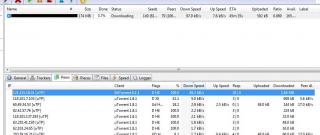
As proof, I've attached an SS of a torrent I added a minute or so ago.. this is a Korean peer at 50KB/s. Yesterday I had a few american (US flag) peers at 100-150KB/s. I've also noticed that I'm getting these high speeds mainly from BitTorrent 6.1.1 clients + uTP.


---

UPDATE 1st Jan 2010 :

UT 2.0 RC2 is out smile.gif (well it's been out for a bit)

http://forum.utorrent.com/viewtopic.php?id=65482&p=1

----

FAQ

Q : Why should bt.trans_disposition be set to 10 instead of the default 15?

A : Look here - http://forum.lowyat.net/index.php?showtopi...post&p=28065338

Q : What kind of speed increase am I looking at with this method?

A : I'm on a 4mbps line myself. I can download at 400+KB/s max. With this method + a good public tracker, I can easily download torrents at 430KB/s stable as opposed to 1KB/s without enabling UTP-only mode.

This post has been edited by rizvanrp: Jan 1 2010, 11:55 AM


Attached thumbnail(s)
Attached Image
TSrizvanrp
post Dec 6 2008, 10:08 PM

Getting Started
Group Icon
Elite
195 posts

Joined: Sep 2006


It's weird, I've noticed these insane 100KB/s+ peer speeds from Bittorrent 6.x clients with uTP. I guess utorrent 1.8.1 didn't properly implement this function. Oh well, it's a step up from my constant peer disconnection + miserable 3kb/s speeds lol

Update : Now the highest speed peer on my previous torrent is at 35KB/s.. german peer on uTorrent 1.8.1 :S

Update 2 : Speed at 200KB+ now, screenshot included biggrin.gif I'm behind NAT without port forwarding mind you..!

This post has been edited by rizvanrp: Dec 6 2008, 10:15 PM


Attached thumbnail(s)
Attached Image
TSrizvanrp
post Dec 6 2008, 11:03 PM

Getting Started
Group Icon
Elite
195 posts

Joined: Sep 2006


Well maybe they weren't testing uTP-only mode. I cant even connect to peers with non-uTP connections and when I do, the total speed goes up to like.. 3KB/s max. Not even xunlei works in my area (near KDU) ;(
TSrizvanrp
post Dec 7 2008, 12:05 AM

Getting Started
Group Icon
Elite
195 posts

Joined: Sep 2006


UDP should be harder to block unless they plan to packet inspect every UDP connection which includes voip and some latency sensitive games.. The speed should get better as they roll out more clients to support this. So far only utorrent 1.8.1> and the latest bittorrent client support it. ;(
TSrizvanrp
post Dec 7 2008, 01:00 AM

Getting Started
Group Icon
Elite
195 posts

Joined: Sep 2006


QUOTE(nwk @ Dec 7 2008, 12:15 AM)
thanks to your stupidity in posting your results here about utorrent 1.9.1, tmnut spies will report back to their monkey boss and will soon throttle this new version of utorrent as well. maybe next time you will learn to keep your mouth shut.
*
Thanks nwk, I'll be sure to remember not to help out people in the future for my own benefit. In fact, that should be LYN's motto -- go **** yourself because I won't benefit from it. I should go on every thread in the help section of the forum and tell people to stfu, especially the xunlei and bitcomet mod unthrottle ones.

uTP is being developed as a standard protocol, even if I had posted about it or not -- TMnet would have upgraded their solution to block it anyway once the people they outsourced the network filtering to get wind of the new protocol, which they probably ALREADY HAVE seeing as uTorrent and BitTorrent are working together on it.

Do you honestly think I didn't consider keeping this for myself? I've been playing around with this for more than just a few days and people on dsl reports and utorrent.com have already been talking about it since version 1.8.1 was in the making.

I don't even need to unthrottle my home line, I already have access to multiple high bandwidth datacenter servers (as you can clearly see from my signature) and I was doing this to help the people who can't afford such luxuries out.. but what would you know about helping your fellow Malaysians? Absolutely nothing -- so maybe you should learn to keep your selfish, ignorant mouth shut before you come here and flame me for your bullshit reasons. You only like to know how to take things but not give anything back in return.

Besides, there are tons of other foreign P2P protocols which I know TMnet is aware of but have not blocked up to this day. This is just the next step in torrenting, much like header encryption and tracker connection obfuscation was.

---

Oh, and if the TMnet monkeys are reading this post :

Block this new protocol if you wish but remember that it is your lack of infrastructure and foresight (really, never heard of the 80-20 rule of thumb?) that has us using VPNs and other torrenting services.


This post has been edited by rizvanrp: Dec 7 2008, 01:22 AM
TSrizvanrp
post Dec 7 2008, 12:03 PM

Getting Started
Group Icon
Elite
195 posts

Joined: Sep 2006


Lol, there was a discussion regarding the whole game software cracking and piracy scene in the gamers section earlier last week. I put up my thoughts there esp regarding ps3 and game DRM cracking by groups like razor1911 but I fell sick and was bed ridden for a week.

QUOTE
so I actually kind of agree with nwk to not spread this too much. that said, I still am very thankful towards the sharing of this info with others rizvan.

I agree its just that this info has already been spread across the net and I'm just informing lowyat about it. Might as well use it before it gets blocked. The only I got pissed is because of the way he replied, I don't 'demand respect on the Internet' but if you're going to talk to me like a d*** my response will be equally as d***-ish.

My point here is this anti-throttling technology was developed for a reason. That reason being to help people like us TMnet subscribers which are promised 'unlimited' packages yet are stabbed in the eyes constantly by TMnet and their snake-like policies. It's not a 'hidden' feature, it's been there since alpha and just not a lot of people know about it.. but it's already on digg.com and the torrentfreak blog. So it's already getting out there, yet there are some people who want to know about it and not let others have that advantage too.

I mean, that's like finding out the cure for cancer is eating 3 apples and an orange a day then telling everyone else who knows about it not to share it. Why? 'We need to capitalize on this shit guys! Patent it or something! We have to like, get a profit out of this shit!'. It's f**king ridiculous in this case because it's just torrents and changing 1 setting (which has already been pointed out on the utorrent forum).

People always want to hide shit regarding anti-throttling but this is basic knowledge. TMnet filters don't filter UDP packets, so what?

Xunlei got blocked even with abt 3 people per page posting 'NOOO KEEP IT IN LOWYAT YOU BLOODY FOOL!', I won't be surprised if this gets blocked too.

This post has been edited by rizvanrp: Dec 7 2008, 12:20 PM
TSrizvanrp
post Dec 8 2008, 01:52 AM

Getting Started
Group Icon
Elite
195 posts

Joined: Sep 2006


QUOTE(aMer @ Dec 7 2008, 10:01 PM)
how are they gonna throttle udp, this protocol doesnt have flag like tcp. tmnut really at lose this time.
*
That's what I've been wondering too. Like I said, I hope they don't inspect ALL UDP packets in order to achieve their means or even CS servers like the one in your siggy and my old avex ones are gonna suffer ):

QUOTE(tifosi @ Dec 7 2008, 10:45 PM)
Been using it since yesterday. I see no difference or maybe just a little in speed increment and i did all my port forwarding untweaked and tweaked settings. ANd those i am downloading has seeds over 10k.
*
Ah man I'm sorry to hear that. Which area are you in? Over here the difference is highly noticeable. On non-uTP connections, not even 1-3KB/s speeds.. instant disconnection. My client cant even connect to more than 5-10 peers at once because all the connections are dropped. With uTP this isn't the case however, speed is unstable (most probably due to the nature of UDP) but its there.

This post has been edited by rizvanrp: Dec 8 2008, 01:54 AM
TSrizvanrp
post Jan 15 2009, 03:26 AM

Getting Started
Group Icon
Elite
195 posts

Joined: Sep 2006


Woah haven't checked this thread in a while since I started it.. looks like it grew while I was away D:

Anyway, you guys shouldn't be at each others throats because 'precious bandwidth' is being utilized for P2P purposes. Bittorrent is a legitimate protocol and if using the full package capacity that's being promoted by TMnet is too much for their infrastructure to handle.. they should set aside packages for downloaders so that way everyone gets a fair share of bandwidth. If anything, you should be blaming TMnet for promoting unlimited b/w packages rather than being sensible and letting us pay for what we use.

The tech savvy people in our IT community will always find a way around roadblocks set up by TMnet be it VPNs or offshore servers for P2P.. and the same amount of bandwidth will be consumed in the end. And yeah.. this thread is for UTP + uTorrent discussion but BitComet mod comparisons are welcome smile.gif I myself didn't like it because of its 500+ TCP connection plowing technique to achieve a higher speed. Waste of resources + full of memory leaks.

This post has been edited by rizvanrp: Jan 15 2009, 03:28 AM
TSrizvanrp
post Jul 20 2009, 04:35 PM

Getting Started
Group Icon
Elite
195 posts

Joined: Sep 2006


Dec 6 2008, 09:35 PM

That's when I posted this thread smile.gif Lol

---

Tcpip.sys patching doesn't affect UDP connections if I'm not mistaken. Also, it works fine for private trackers.. I use a custom UT 1.9 build which sends UT 1.8.2 headers to the private tracker I'm using cause they have a client whitelisting system which has not been updated to support 1.9.

This way I can use UTP connections. On my private music tracker I get about 400KB/s down instantly after starting up a torrent.. all of which are UTP connections XD

Its been working for more than 7 months now, sucks for all those people who flamed me initially for posting this method saying it would be blocked.

If anybody wants me to post updated client configuration instructions on the first post, please PM me directly and I'll add it in when I have the time.
TSrizvanrp
post Aug 10 2009, 05:48 PM

Getting Started
Group Icon
Elite
195 posts

Joined: Sep 2006


UPDATE 10 August 2009 :

uTorrent 2.0 beta is out! Give it a spin smile.gif :

http://forum.utorrent.com/viewtopic.php?pid=421542

Some changelog highlights :

QUOTE
# uTP has been improved significantly over the previous alpha, with many bugs fixed and performance improvements. It's no longer hidden in Advanced settings.

- Fix: fixed uTP selective ack bug (would cause connections to stall and time out)
- Fix: fixed uTP fast re-send bug (would sometimes re-send packets that shouldn't be re-sent)
- Fix: uTP recovers faster after timeout
- Feature: uTP supports window sizes smaller than the packet size
- Change: reduced uTP overhead slightly by ramping up packet sizes at lower rates
- Feature: uTP can be enabled or disabled using "Enable bandwidth management" checkbox in Preferences
- Fix: uTP issue on low-latency high-throughput networks

- Feature: UDP tracker support
UTP improvements and UDP TRACKER SUPPORT ! I have yet to test it out myself though tongue.gif
TSrizvanrp
post Aug 10 2009, 11:02 PM

Getting Started
Group Icon
Elite
195 posts

Joined: Sep 2006


It's the same, you need to alter the bt.trans_disposition to 10 if you want UTP only connections.
TSrizvanrp
post Aug 18 2009, 11:46 AM

Getting Started
Group Icon
Elite
195 posts

Joined: Sep 2006


QUOTE(mhaneline @ Aug 17 2009, 04:50 AM)
I think it is not such a great idea to BT 24/7 when there are internet issues affecting everyone.

The mentality is I want what I paid for. If everyone got what they paid for, nobody would have internet because there isn't enough bandwidth. All of the routers and switches would be overloading, and everyone would have 100% packet loss.

Just my opinion.
*
Fish seem to like to eat TMnet's cables sad.gif Computers worms also like to slow down their network all the time sad.gif Haihz, TMnet has it so bad..

/s

This post has been edited by rizvanrp: Aug 18 2009, 11:47 AM
TSrizvanrp
post Aug 20 2009, 05:25 AM

Getting Started
Group Icon
Elite
195 posts

Joined: Sep 2006


QUOTE(wenhui100 @ Aug 20 2009, 02:22 AM)
Well ... i have changed the settings ... still the same .... 9kb to 10 ... fluctuating like mad ... i have also port forwarded both TCP and UDP .... i still think its a load of crap ... 100kb is over stating ...


Added on August 20, 2009, 2:25 am

this setting just made my connection worst ...
*
Attached is a screenshot of my UT client on UTP-only mode on a private tracker without any VPN/tunneling service smile.gif And yes, its at 430KB/s stable non stop.

What setting the trans_disposition to 10 does is make the client use UTP (unthrottled, UDP based connections) only. This is however, only compatible with utorrent >1.8.1 and bittorrent >6.x peers. In other words, lets say the torrent you're downloading has 100 peers and only 20 of them have utorrent/bittorrent.. if bt.trans_disposition is set to 10 you will only be able to connect to 20 of these clients. Your download speed will be subject to whatever they have set their upload to and the quality of their connection to your PC.

If you really want to see if UTP is helping you bypass your throttle cap, get a well seeded torrent on a private tracker, set the trans_disp to 10 and test it out there. Check your speed per peer. As you can see in the attachment, all my peers have a [UTP] tag on it which means its a [UTP] connection and I'm downloading at >30KB/s for most of them.

The reason why I don't recommend setting trans_disp to 15 (the default setting) is because TCP based torrent connections will be throttled no matter what. In a situation where your torrent has 100 peers, where only 2 of which are running clients compatible with UTP you may see faster speeds with this setting back at the default of 15. Why? You may be able to pull an unthrottled 5-10KB/s from each of these peers via UTP but the remainder 98 peers you could potentially connect to would give you an extra 0.5-1KB/s each.

This method works best with private trackers where clients are using the latest UT client simply because of UTP protocol support any everyone wanting to seed data.. for public torrents it can go either way. In a public tracker, who gives a **** about seeding? There's no penalty for capping your upload or not seeding at all.. so testing public tracker torrents to see if this works/doesn't work is not a good idea. It also depends on your own line.. who knows how TMnet implements their filter right?

Regarding application stability, this is a BETA build of the UT client. I can run mine fine for days but that depends on your own PC (hardware, operating system, software which may interrupt the application such as antivirus software.. etc.).

So good luck with this and hopefully it works for you. I posted this information when I tested it out myself to help others.. so if it works/doesn't work for you please don't complain about it to me because its your own ISPs fault. smile.gif I've had to put up with all the insults when I first posted this thread anyway, this method works for me and many other people out there so if anyone tells me how this method is bull****.. I really could not be arsed about it.

Please don't call me a liar or say that I exaggerated figures because I can provide the proof + numbers any day wink.gif

This post has been edited by rizvanrp: Aug 20 2009, 05:48 AM


Attached thumbnail(s)

Attached Image
TSrizvanrp
post Aug 28 2009, 12:11 AM

Getting Started
Group Icon
Elite
195 posts

Joined: Sep 2006


UT 2.0 fixes the UTP speed stability issue for me, I get 520-550KB/s flat out now :S
TSrizvanrp
post Aug 31 2009, 10:46 AM

Getting Started
Group Icon
Elite
195 posts

Joined: Sep 2006


QUOTE(jason988 @ Aug 29 2009, 02:19 AM)
what is the warning means ? what should i do ?
*
The message means it failed to automatically setup the port forwarding for you via UPnP, so you can do it yourself manually if you want (in your router config/firewall).
TSrizvanrp
post Sep 4 2009, 12:34 PM

Getting Started
Group Icon
Elite
195 posts

Joined: Sep 2006


QUOTE(gsan @ Aug 31 2009, 01:14 PM)
i failed the network test although i did portforward it in the router...why?
*
Did you fail the UPnP test or the connection test from their website to your client? Port forwarding test checks if your UT client can be reached from remote peers (on the UT port that you specify to use), so.. if you have set the manual port forwarding correctly you would pass this test. The UPnP test on the other hand is failable.. doesn't mean much really.
TSrizvanrp
post Nov 2 2009, 11:20 AM

Getting Started
Group Icon
Elite
195 posts

Joined: Sep 2006


QUOTE(automan5891 @ Nov 1 2009, 07:06 PM)
http://torrentfreak.com/utorrent-2-0-to-el...ottling-091031/

uTorrent 2.0 To Elimininate The Need For ISP Throttling
Written by Ernesto on October 31, 2009

BitTorrent Inc. is about to launch a completely improved implementation of the BitTorrent protocol that will benefit both users and ISPs. uTorrent 2.0, which is currently being tested by thousands of people, will eliminate the need for ISPs to throttle or stop BitTorrent traffic, and will optimize the download experience for its users.
*
Finally featured on TorrentFreak after we've been using it for months biggrin.gif
TSrizvanrp
post Nov 16 2009, 01:04 AM

Getting Started
Group Icon
Elite
195 posts

Joined: Sep 2006


QUOTE(TechnoDude94 @ Nov 15 2009, 06:35 PM)
My household got selected for "Fibre Optic BETA Testing" (FTTH) and this is our speed. Btw, I'm using uTorrent BETA on Mac (0.9.2):

Look at the bottom-right, "1.7 MB/S" (Download rate, with down-arrow sign).
Size: 844 MB, ETA: 4 Min 32 Secs @ 48% Completed.

*
Tech,

Nice speed and all but please remove the tracker + hash value from the screenshot too. Anyone who Googles it knows exactly what A*hem* product you're downloading.

Also, grats on getting beta! smile.gif Wish they would finish up the bloody wiring in TTDI so I can get my hands on it sad.gif

This post has been edited by rizvanrp: Nov 16 2009, 01:07 AM
TSrizvanrp
post Jan 1 2010, 11:48 AM

Getting Started
Group Icon
Elite
195 posts

Joined: Sep 2006


QUOTE(RangerRed @ Dec 19 2009, 08:55 AM)
U really wanna know why? Cuz of the new net traffic sense they put in utorrent. If tm adds the end code in ur packets n the uploader's packets it looks like the net is congested. Utorrent then throttles itself. So when ur p2p packets reach a certain quota for peak hrs or whatever restriction tm injects code, utorrent takes that as net congestion n throttles itself = u getting slow bt. TM laughs all the way.
*
I doubt TMnet is performing packet injection and exploiting the protocol itself as the bandwidth management feature of UTP can most probably be bypassed on your side with a simple byte modification using ollydbg. The only way you can be sure if this unthrottles your line is to pick up a properly seeded torrent from a private tracker and test the speed with that.

On public trackers, it takes a while (5-10mins+) for the speed to build up a 5k+ seeded torrent however on private trackers it takes about 3 seconds to hit 400KB/s on my 4mbps line.

QUOTE(bossnass15 @ Dec 30 2009, 06:33 PM)
my utorrent can't get past 200kb/s  cry.gif ...help..~on 4mb connection..I'm suscribing to bolehbit vpn..will it mean that mean utorrent have to be configured differently from you guys?
*
Don't use a VPN. It will just add more overhead to the UDP connections and decrease your download rate while you're using this new protocol.

This post has been edited by rizvanrp: Jan 1 2010, 11:51 AM
TSrizvanrp
post Mar 24 2010, 03:52 AM

Getting Started
Group Icon
Elite
195 posts

Joined: Sep 2006


QUOTE(Gh-x @ Mar 20 2010, 01:11 AM)
if i am not mistaken Lvl Lords used to be a patch to open connection in Windows Xp. Since by default the open connection is limited to 10 only.
*
Lvllord's patch is to open the max TCP half open connections for windows.. patches the tcpip.sys file. It should not affect UDP connections at all and there's no real need to use it for this new client if you're on UDP mode only.

If you set bt.trans_disposition to 15, that's the default setting which uses TCP and UDP. I recommend bt.trans_disposition 10 at the start of this thread because thats UDP (UTP only) mode... and while TCP is throttled, UDP isn't. There's no real reason to enable TCP connections because they will be throttled no matter what you do. The only reason to enable TCP is if there are very few peers on that torrent you are downloading using uTorrent client with UTP support (so you have more sources to download from).

UTP speed will be unstable no matter what and it will be affected by the quality of seeders and leechers on that torrent you're downloading. I recommend you try to download that particular torrent (with 194 seeds) alone without activating the second one, then select it and hit the 'Peers' tab and sort by download speed. This way you will be able to see if UDP/TCP is throttled because UDP connections will have a [UTP] tag at the end of the peer address. Throttled connections will be in the 0.1-1.0KB/s range and might cut off randomly.

This post has been edited by rizvanrp: Mar 24 2010, 03:53 AM

2 Pages  1 2 >Top
Topic ClosedOptions
 

Change to:
| Lo-Fi Version
0.0215sec    0.51    7 queries    GZIP Disabled
Time is now: 4th December 2025 - 02:59 AM