Outline ·
[ Standard ] ·
Linear+
Poll: What do you think of 2.2 firmware, Worth upgrading?
|
acesdsi
|
 Dec 9 2008, 12:55 PM Dec 9 2008, 12:55 PM
|
Getting Started


|
Hi all, I don't know where to ask my Q's, but here seems appropriate. iPhone: 3G 8GB Origin: Aussie Unlocked: officially unlocked Jailbroken: no f/w: 2.1 Operator: maxis Tried to upgrade f/w to 2.2; but end result "The iPhone "iPhone" could not be restored. An unknown error occurred (1013)." like below; 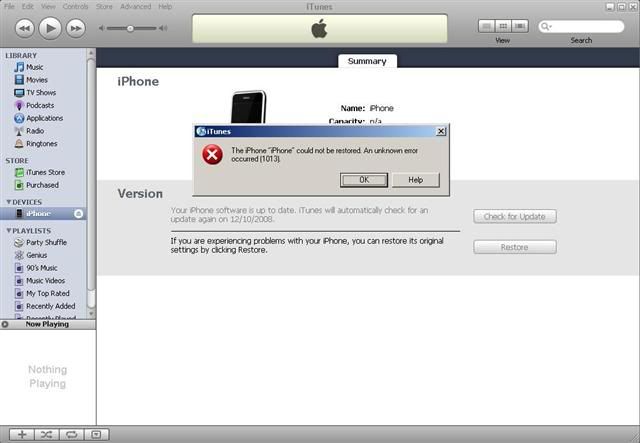 I've tried 1. restore button in iTunes(with USB and iTunes icon on iPhone); An unknown error occurred (1013) 2. DFU mode(black screen on iPhone); An unknown error occurred (1013) 3. uninstall/install iTunes. Normal restore/DFU; An unknown error occurred (1013) Please help. Thanks! |
|
|
|
|
|
nokia2003
|
Dec 9 2008, 01:18 PM
|
|
|
@ acesdsi
try on a mac instead?
|
|
|
|
|
|
gengstapo
|
Dec 9 2008, 01:57 PM
|
|
|
QUOTE(acesdsi @ Dec 9 2008, 12:55 PM) Hi all, I don't know where to ask my Q's, but here seems appropriate. iPhone: 3G 8GB Origin: Aussie Unlocked: officially unlocked Jailbroken: no f/w: 2.1 Operator: maxis Tried to upgrade f/w to 2.2; but end result "The iPhone "iPhone" could not be restored. An unknown error occurred (1013)." like below; [img] I've tried 1. restore button in iTunes(with USB and iTunes icon on iPhone); An unknown error occurred (1013) 2. DFU mode(black screen on iPhone); An unknown error occurred (1013) 3. uninstall/install iTunes. Normal restore/DFU; An unknown error occurred (1013) Please help. Thanks! hmm what itunes version was that? try uninstall itunes & reinstall before proceed to next restore |
|
|
|
|
|
TripleH
|
Dec 9 2008, 02:03 PM
|
|
|
QUOTE(acesdsi @ Dec 9 2008, 12:55 PM) Hi all, I don't know where to ask my Q's, but here seems appropriate. iPhone: 3G 8GB Origin: Aussie Unlocked: officially unlocked Jailbroken: no f/w: 2.1 Operator: maxis Tried to upgrade f/w to 2.2; but end result "The iPhone "iPhone" could not be restored. An unknown error occurred (1013)." like below; I've tried 1. restore button in iTunes(with USB and iTunes icon on iPhone); An unknown error occurred (1013) 2. DFU mode(black screen on iPhone); An unknown error occurred (1013) 3. uninstall/install iTunes. Normal restore/DFU; An unknown error occurred (1013) Please help. Thanks! Have you tried pwange and quickpwn guide on pin thread? |
|
|
|
|
|
acesdsi
|
Dec 9 2008, 04:07 PM
|
Getting Started
|
nokia2003, I dont have mac  gengstapo, iTunes version 8.0.2.20. Yes, I've tried uninstall itunes & reinstall, the step #3. TripleH, Not yet. Which one is the link. Blur already. Thanks! |
|
|
|
|
|
frozzbyte
|
Dec 9 2008, 07:21 PM
|
|
|
@acesdsi
How did you restore? Pressing the restore button and wait itunes to download the file or you already have the firmware file? If you use the 2nd method i.e using already downloaded firmware file, can you write down the file name as firmware file for 1st gen and 2nd gen are different.
|
|
|
|
|
|
acesdsi
|
Dec 9 2008, 07:45 PM
|
Getting Started
|
QUOTE(frozzbyte @ Dec 9 2008, 07:21 PM) @acesdsi How did you restore? Pressing the restore button and wait itunes to download the file or you already have the firmware file? If you use the 2nd method i.e using already downloaded firmware file, can you write down the file name as firmware file for 1st gen and 2nd gen are different. Hi, I restore by pressing restore button and wait itunes to download the file. BTW, I'm in the midst of formating my laptop with Win XP Pro SP2, install audio, video, wireless and iTunes. Thanks! |
|
|
|
|
|
frozzbyte
|
Dec 9 2008, 08:08 PM
|
|
|
Try downloading the standalone firmware file and restore with shift+restore and select the downloaded file. Download the file here. |
|
|
|
|
|
acesdsi
|
Dec 9 2008, 09:31 PM
|
Getting Started
|
Hi, Can you all check weather my iPhone1,2_2.2_5G77_Restore.ipsw is not corrupted or not by using md5sum.exe you can find iPhone1,2_2.2_5G77_Restore.ipsw in; "C:\Documents and Settings\ Administrator\Application Data\Apple Computer\iTunes\iPhone Software Updates" *change Administrator to your current user. C:\Documents and Settings\Administrator\Application Data\Apple Computer\iTunes\iPhone Software Updates>md5sum.exe iPhone1,2_2.2_5G77_Restore.ipsw fd33b6f92a6b5bc3dd0fa40b39a40c0c *iPhone1,2_2.2_5G77_Restore.ipswThanks! |
|
|
|
|
|
afcmh
|
Jan 7 2009, 11:47 PM
|
Getting Started
|
back to the topic, yes it really really really worth  |
|
|
|
|
|
xbalapc
|
Jan 9 2009, 10:50 AM
|
New Member
|
QUOTE(walabies @ Nov 29 2008, 09:15 AM) Fixed caller ID? Time to upgrade. Coolerthings, I got many things to ask u about the Iphone la, I still very new. yaa u can ask.... no problem bala.supramaniam@finisar.com
Added on January 9, 2009, 10:52 amQUOTE(rjmm2 @ Nov 29 2008, 10:29 AM) Anyone with locked version upgraded 2.2? Any problem after upgrading? its goooooood bala.supramaniam@finisar.com This post has been edited by xbalapc: Jan 9 2009, 10:52 AM |
|
|
|
|
|
gengstapo
|
Jan 10 2009, 08:50 PM
|
|
|
2.2 best ever i think, i can see the wifi signal much stronger than before
|
|
|
|
|
|
atomica
|
Jan 11 2009, 11:19 PM
|
|
|
it's the first thing i did once i got the iphone. it is 200MB++ so it took 4 hours to download
|
|
|
|
|
|
SixtyNine
|
Jan 11 2009, 11:46 PM
|
New Member
|
Have the 2.2 version become stable dy?
coz i heard 2.2ver not so smooth...zz
is it true?
|
|
|
|
|
|
TripleH
|
Jan 12 2009, 12:24 PM
|
|
|
QUOTE(SixtyNine @ Jan 11 2009, 11:46 PM) Have the 2.2 version become stable dy? coz i heard 2.2ver not so smooth...zz is it true? Not true. It's stable. You should try lor. Then only you know. |
|
|
|
|



 Quote
Quote



 0.0459sec
 0.90
0.90
 6 queries
 GZIP Disabled