Outline ·
[ Standard ] ·
Linear+
Poll: What do you think of 2.2 firmware, Worth upgrading?
|
acesdsi
|
 Dec 9 2008, 12:55 PM Dec 9 2008, 12:55 PM
|
Getting Started


|
Hi all, I don't know where to ask my Q's, but here seems appropriate. iPhone: 3G 8GB Origin: Aussie Unlocked: officially unlocked Jailbroken: no f/w: 2.1 Operator: maxis Tried to upgrade f/w to 2.2; but end result "The iPhone "iPhone" could not be restored. An unknown error occurred (1013)." like below; 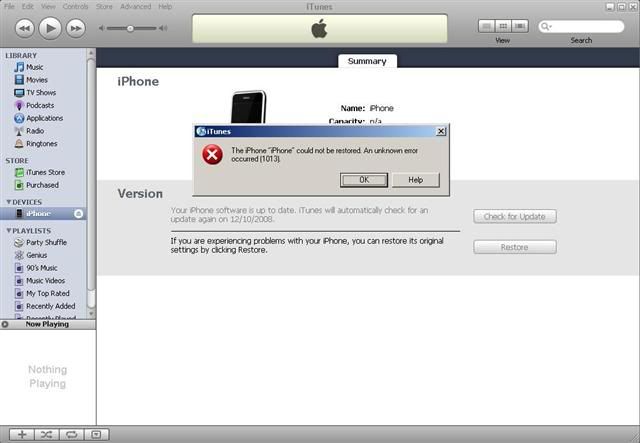 I've tried 1. restore button in iTunes(with USB and iTunes icon on iPhone); An unknown error occurred (1013) 2. DFU mode(black screen on iPhone); An unknown error occurred (1013) 3. uninstall/install iTunes. Normal restore/DFU; An unknown error occurred (1013) Please help. Thanks! |
|
|
|
|
|
acesdsi
|
Dec 9 2008, 04:07 PM
|
Getting Started
|
nokia2003, I dont have mac  gengstapo, iTunes version 8.0.2.20. Yes, I've tried uninstall itunes & reinstall, the step #3. TripleH, Not yet. Which one is the link. Blur already. Thanks! |
|
|
|
|
|
acesdsi
|
Dec 9 2008, 07:45 PM
|
Getting Started
|
QUOTE(frozzbyte @ Dec 9 2008, 07:21 PM) @acesdsi How did you restore? Pressing the restore button and wait itunes to download the file or you already have the firmware file? If you use the 2nd method i.e using already downloaded firmware file, can you write down the file name as firmware file for 1st gen and 2nd gen are different. Hi, I restore by pressing restore button and wait itunes to download the file. BTW, I'm in the midst of formating my laptop with Win XP Pro SP2, install audio, video, wireless and iTunes. Thanks! |
|
|
|
|
|
acesdsi
|
Dec 9 2008, 09:31 PM
|
Getting Started
|
Hi, Can you all check weather my iPhone1,2_2.2_5G77_Restore.ipsw is not corrupted or not by using md5sum.exe you can find iPhone1,2_2.2_5G77_Restore.ipsw in; "C:\Documents and Settings\ Administrator\Application Data\Apple Computer\iTunes\iPhone Software Updates" *change Administrator to your current user. C:\Documents and Settings\Administrator\Application Data\Apple Computer\iTunes\iPhone Software Updates>md5sum.exe iPhone1,2_2.2_5G77_Restore.ipsw fd33b6f92a6b5bc3dd0fa40b39a40c0c *iPhone1,2_2.2_5G77_Restore.ipswThanks! |
|
|
|
|



 Quote
Quote

 0.0462sec
 0.81
0.81
 7 queries
 GZIP Disabled