Outline ·
[ Standard ] ·
Linear+
Pwnagetool/Quickpwn & "yellowsn0w" 3G Unlock, »2G/3G Fw 2.2.1 Unlocking&Jailbreaking«
|
teikwing
|
 Jan 10 2009, 02:36 AM Jan 10 2009, 02:36 AM
|

|
QUOTE(davidgary73 @ Jan 7 2009, 10:22 AM) My band is Altered Frequency and the album name is "Transit". Cheers You may have to give it a try. If you have doubts, refer to this thread http://forum.lowyat.net/topic/888017Seems like the thread is closed but the solutions are in it. You should be able to unlock your lock iPhone. If you need assistances, contact HanxzCheers QUOTE(klsmurf @ Jan 10 2009, 12:53 AM) Sadly, I have no joy after unlocking my 3G iPhone (US)  Installed 0.9.6 via Cydia. Tried the reboot, reset network settings, toggle airplane mode..... and I still get a Maxis line. Any suggestions from those who got theirs to work? @davidgary73 : dave, you're from Altered Frequency?! it's my favourite Malaysian band! been listening since the Exalt album.  @klsmurf : don't seem to understand what you're saying. you've unlocked & got a Maxis line, should be happy right? |
|
|
|
|
|
teikwing
|
Feb 7 2009, 05:22 PM
|
|
|
anyone tried the latest yellowsn0w 0.9.8? i'm on 0.9.6 and it's working fine for me actually (just sometimes signal is lost and i gotta toggle the Airplane mode On/Off or reboot the phone to make it work again, happened to me twice in the last 1 month) just wonder should i update to 0.9.8. it says that 0.9.8 resolves WiFi and slowness issues. http://news.softpedia.com/news/Yellowsn0w-0-9-8-Unlock-Tool-Out-for-iPhone-2-2-1-103942.shtml |
|
|
|
|
|
teikwing
|
Feb 23 2009, 07:09 PM
|
|
|
QUOTE(Whatever111 @ Feb 23 2009, 07:00 PM) hi..i'm a new iphone owner. i just got my set from singapore. i wuld like to ask whether it' safe to upgrade my firmware using itunes? and if i restore my iphone will it become relocked? do post your general questions iPhone Club Version 8 next time. firstly, verify your iPhone's origin. To confirm the set is from Singapore: 1. Check the Part No. at the back of the iPhone box. 2. Check the Model No. in iPhone. (Settings->General->About) The Part/Model No. is either MB489ZA/A, MB496ZA/A or MB500ZA/A. More details can get online at http://support.apple.com/kb/HT1937 |
|
|
|
|
|
teikwing
|
Feb 25 2009, 10:08 PM
|
|
|
QUOTE(gengstapo @ Feb 25 2009, 05:17 PM) eh guys, just wondering wheter today maxis got problem or not coz i found my i2g fw 2.2.1 sometimes lost carrier signal. yesterday got no prob, but early in the morning i manage to install openssh. after that my phone seems to be nuts. how the maxis today?? no problems for me today. using yellowsn0w 0.9.7 with Maxis. |
|
|
|
|
|
teikwing
|
Mar 18 2009, 03:40 PM
|
|
|
QUOTE(gyver @ Mar 18 2009, 03:35 PM) Bad luck my friend... you just got yourself a very expensive Ipod Touch. EDIT - Maybe you can get one of those hardware unlock i.e. Rebel SIM. Do some window shopping first. he is on iPhone 2G, which can be unlocked even on 2.2.1. TS, for tutorial on how to unlock it, refer to HERE. please close up this thread or the mod will do so. you can post your questions or problems HERE. This post has been edited by teikwing: Mar 18 2009, 03:45 PM |
|
|
|
|
|
teikwing
|
Mar 18 2009, 04:03 PM
|
|
|
QUOTE(whkl8808 @ Mar 18 2009, 03:51 PM) Dear teikwing, i've download those teach in the tutorial... but nw the main concern is when i plug in my Iphone into my laptop,n my itunes keep saying that the sim card is not supported by the Iphone... N my Iphone screen now is showing" the plug & the itunes logo"...n i only can make emergency call...that all i can do with my Iphone now... Thx for your help again... your phone is still locked. try going through the whole jailbreaking process using Quickpwn again. remember to check the 'Unlock phone' option. |
|
|
|
|
|
teikwing
|
Mar 23 2009, 03:48 PM
|
|
|
QUOTE(maru @ Mar 23 2009, 03:44 PM) how its the jailbreak take? i waited around 10min nothing happen....just an apple appear in the screen the whole process won't take more than 30 mins including restore. the whole process should look something like this: Jailbreaking Process |
|
|
|
|
|
teikwing
|
Mar 23 2009, 03:53 PM
|
|
|
QUOTE(maru @ Mar 23 2009, 03:50 PM) yeah...i know but it stuck for 10min i thought it hang edi zzz OMG i keep press home n power button will it interrupt the progress ? when did it got stuck? after this? 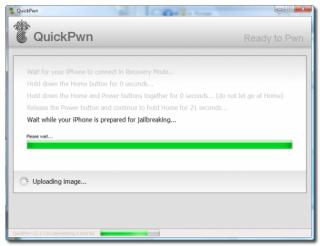
once it's at "Wait while your iPhone is prepared for jailbreaking', you can let go of any buttons. |
|
|
|
|
|
teikwing
|
Mar 23 2009, 03:57 PM
|
|
|
@maru: read the bolded part: » Click to show Spoiler - click again to hide... « QUOTE(nokia2003 @ Mar 22 2009, 07:15 PM) nahhh, take a chill pill. it does take some talent & luck to actually brick an iPhone. does your the white apple logo (located at the middle) goes off and on after a few minutes? if it does, it means that your iPhone is in a "loop".
there is nothing much that you can do, apart from restoring it again.
to overcome this obstacle, simply follow this sequence.good luck! |
|
|
|
|
|
teikwing
|
Mar 23 2009, 06:52 PM
|
|
|
QUOTE(maru @ Mar 23 2009, 04:05 PM) zzzz mean i need to JB again?
Added on March 23, 2009, 4:06 pmi tried the procedure, nothing happen....the white apple still remain at the main screen QUOTE(jimnuz @ Mar 23 2009, 06:32 PM) Oic, but will they be able to check whether our set jailbreaked before? or..i don't think they can  @maru: go through the whole restore process again, try it from iTunes. @jimmuz: there's no way for them to detect it. a restore simply deletes everything. |
|
|
|
|
|
teikwing
|
Mar 25 2009, 09:31 PM
|
|
|
QUOTE(Renee @ Mar 25 2009, 09:23 PM) Sorry for asking noob question. Why some Iphone when turn ON. The logo is same like Pineapple instead of Apple logo. Hehe 'cause the boot logo has been changed/edited after jailbreaking. |
|
|
|
|
|
teikwing
|
Mar 25 2009, 10:00 PM
|
|
|
QUOTE(Renee @ Mar 25 2009, 09:42 PM) I have a question here. I have a locked unit Iphone with firmware 2.2.1 and baseband 2.30 Before jailbeak, unable to use it right , only stuck at the connect to itune page. So after jailbreak, able to go to Menu page. So i got a rebel turbosim. The problem is the iphone showing "NO SIM" Whether i use with rebel turbosim or just insert the simcard into it. The phone only showing "NO SIM" So any sifu here able to answer what is the problem ? Is the phone problem or anything ? might the some issues with the jailbreaking. here's how. do a test to check it. restore the phone using iTunes (do not jailbreak) and insert the Rebel Sim to activate the phone & see whether is the carrier option available. |
|
|
|
|
|
teikwing
|
Mar 25 2009, 10:26 PM
|
|
|
QUOTE(slyeo @ Mar 25 2009, 10:11 PM) i also have the same problem... and i tried to restore it, no jailbreak, and put my sim card and rebel sim inside, shown got signal.. then i jailbreak to activate it.. after that can receive and send MSG.. however, when i make call, then will appear "call failed" and no more signal.. *currently using iPhone 3G 16GB with FW2.2.1 and baseband 02.30.03 and rebel sim. looking for advise for this situation... any sifu can help me ?  there might be some issues with Unlock Sim. tried disabling the 3G & make calls on 2G? |
|
|
|
|
|
teikwing
|
Mar 25 2009, 10:31 PM
|
|
|
QUOTE(animorphs @ Mar 25 2009, 10:30 PM) My phone hung after jailbreak completed. It says jailbreak completed rebooting phone now. Firmware 2.2.1 with QuickPwn 2.2.5-2 Now iTunes and QuickPwn can't even detect my phone. Keep on looping at the apple/ pineapple flash screen. Any idea how to solve this? Thanks in advance. » Click to show Spoiler - click again to hide... « QUOTE(nokia2003 @ Mar 22 2009, 07:15 PM) nahhh, take a chill pill. it does take some talent & luck to actually brick an iPhone. does your the white apple logo (located at the middle) goes off and on after a few minutes? if it does, it means that your iPhone is in a "loop".
there is nothing much that you can do, apart from restoring it again.
to overcome this obstacle, simply follow this sequence.good luck! |
|
|
|
|
|
teikwing
|
Mar 25 2009, 10:50 PM
|
|
|
QUOTE(animorphs @ Mar 25 2009, 10:37 PM) Ya it's in infinite loop. iTunes say there's a passcode locking it. I can't get my iPhone keyboard up to enter my passcode. Am I doomed? Really worried now. First time doing this and got such bad luck Thanks in advance. hope this helps. try a hard reset on the phone, hold the top on and off switch and the home button on the front for 15 sec or so, it will go to black showing the Apple logo, then don't do anything for a bit and it will restart/reset the phone. it should reset the code as well, i think. This post has been edited by teikwing: Mar 25 2009, 10:57 PM |
|
|
|
|
|
teikwing
|
Mar 27 2009, 05:47 PM
|
|
|
QUOTE(Renee @ Mar 25 2009, 10:57 PM) Already tried to restore back and put the rebel turbosim. Also cannot. The Iphone appear the Message "No SIM card installed, Insert a valid sim with no PIN lock to activate Iphone". So is my turbosim problem or the phone problem ? Even i insert the simcard alone without the turbosim, the phone also appear that message. Iphone newbie here. please help Thanks if it's a locked set, inserting the sim card lone without Rebel/Turbo sim will definitely won't work. my suggestion is getting yourself other Rebel sim to test it out. the Rebel sim might be the culprit. |
|
|
|
|
|
teikwing
|
Mar 30 2009, 01:47 PM
|
|
|
QUOTE(clawhammer @ Mar 30 2009, 12:53 PM) If the jailbreak goes wrong, we can re-upload the current firmware from Apple or is there a way to recover it? yeah. just restore it then re-jailbreak again or you can leave it without jailbreak too. restore will restore your phone to the original condition just like new. in another words, it's something like formatting for iPhone. |
|
|
|
|
|
teikwing
|
Apr 22 2009, 10:46 AM
|
|
|
QUOTE(ivylsm @ Apr 22 2009, 02:51 AM) how about my baseband is 04.22.01??i up to 3.0beta then my baseband up to 04.22.01, anyone can unlock the sim? upgrading to a beta firmware with that baseband is never recommended. Dev Team themselves stated that they will not have support for these (unlocking etc.) till the actual 3.0 is out. so for now you gotta just live with it. |
|
|
|
|
|
teikwing
|
Apr 23 2009, 09:14 AM
|
|
|
QUOTE(Rinyuu @ Apr 23 2009, 04:47 AM) To All Sifu, My iphone is unlocked set running on 2.2 firmware with baseband 2.28. Now the problem is...i got itchy hand wants to upgrade to firmware 2.2.1. The reasons want to upgrade cos many tempting apps only works with that firmware. Question is....is it a bad idea for me to upgrade the 2.2.1 firmware? i had jb my friend's iphone bought from maxis running on 2.2.1 firmware with 2.30 basebahd, Seems like no problem in future. if you can be sure that your iPhone is an officially unlocked set, then there's no harm upgrading to 2.2.1. although i don't see any significant changes that will tempt me to upgrade to that. i thought most games/apps can run on 2.1/2.2 & above? there's are specific apps which only work on 2.2.1? |
|
|
|
|
|
teikwing
|
Jun 7 2009, 04:01 PM
|
|
|
QUOTE(VeilSidex @ Jun 7 2009, 03:43 PM) Hey guys now my iphone 3G is on Firmware 2.2, and is not a official unlock unit, if i want to update to 2.2.1 the only way is using pwanage right? cause from the information quick pwan or itunes will not reserved the baseband and yellow snow only support for 02.28 base band, izit correct? if you need a firmware 2.2.1 with a preserved 2.28.00 baseband, you will need PwnageTool to create that custom ipsw. then update via iTunes using that custom ipsw. (restore your iPhone with your custom firmware bundle by holding the “Alt/Option” button and clicking “restore”) Quickpwn is unable to create a custom ipsw. a direct update via iTunes will give u a 2.2.1 with 2.30.03 baseband which disables yellowsn0w. however, do take note that there has been issues with Windows users facing errors while trying to restore their iPhones with that custom ipsw. therefore, it's safer to restore via iTunes on Mac OS X.This post has been edited by teikwing: Jun 7 2009, 04:04 PM |
|
|
|
|



 Quote
Quote
 0.0498sec
 0.41
0.41
 7 queries
 GZIP Disabled